lock CHEVROLET SPARK 2017 4.G Owners Manual
[x] Cancel search | Manufacturer: CHEVROLET, Model Year: 2017, Model line: SPARK, Model: CHEVROLET SPARK 2017 4.GPages: 331, PDF Size: 5.56 MB
Page 4 of 331
Chevrolet Spark Owner Manual (GMNA-Localizing-U.S./Canada-9956101) -
2017 - crc - 4/25/16
Introduction 3
{Danger
Danger indicates a hazard with a
high level of risk which will result
in serious injury or death.
{Warning
Warning indicates a hazard that
could result in injury or death.
Caution
Caution indicates a hazard that
could result in property or vehicle
damage.
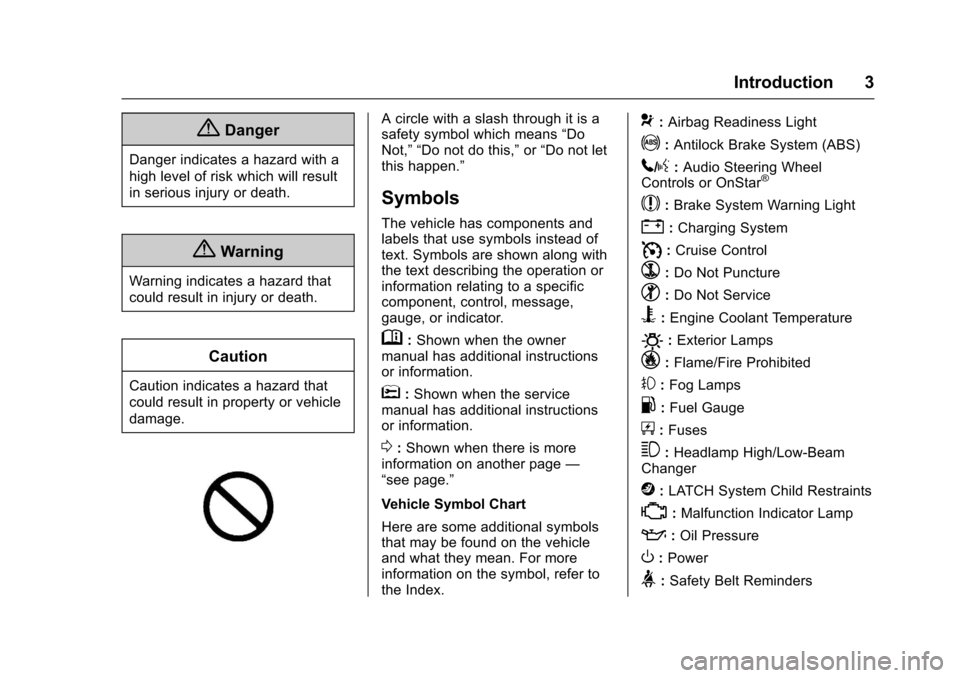
A circle with a slash through it is a
safety symbol which means“Do
Not,” “Do not do this,” or“Do not let
this happen.”
Symbols
The vehicle has components and
labels that use symbols instead of
text. Symbols are shown along with
the text describing the operation or
information relating to a specific
component, control, message,
gauge, or indicator.
M: Shown when the owner
manual has additional instructions
or information.
*: Shown when the service
manual has additional instructions
or information.
0: Shown when there is more
information on another page —
“see page.”
Vehicle Symbol Chart
Here are some additional symbols
that may be found on the vehicle
and what they mean. For more
information on the symbol, refer to
the Index.
9: Airbag Readiness Light
!:Antilock Brake System (ABS)
5/g: Audio Steering Wheel
Controls or OnStar®
$: Brake System Warning Light
":Charging System
I: Cruise Control
`:Do Not Puncture
^:Do Not Service
B:Engine Coolant Temperature
O:Exterior Lamps
_: Flame/Fire Prohibited
#:Fog Lamps
.:Fuel Gauge
+: Fuses
3:Headlamp High/Low-Beam
Changer
j: LATCH System Child Restraints
*:Malfunction Indicator Lamp
::Oil Pressure
O:Power
>:Safety Belt Reminders
Page 6 of 331
Chevrolet Spark Owner Manual (GMNA-Localizing-U.S./Canada-9956101) -
2017 - crc - 4/25/16
In Brief 5
In Brief
Instrument Panel
Instrument Panel . . . . . . . . . . . . . . . . 6
Initial Drive Information
Initial Drive Information . . . . . . . . . . 8
Remote Keyless Entry (RKE)System . . . . . . . . . . . . . . . . . . . . . . . . 8
Door Locks . . . . . . . . . . . . . . . . . . . . . 9
Liftgate . . . . . . . . . . . . . . . . . . . . . . . . . . 9
Windows . . . . . . . . . . . . . . . . . . . . . . . 10
Seat Adjustment . . . . . . . . . . . . . . . 10
Second Row Seats . . . . . . . . . . . . 11
Head Restraint Adjustment . . . . 11
Safety Belts . . . . . . . . . . . . . . . . . . . . 11
Passenger Sensing System . . . 12
Mirror Adjustment . . . . . . . . . . . . . . 12
Steering Wheel Adjustment . . . . 13
Interior Lighting . . . . . . . . . . . . . . . . 13
Exterior Lighting . . . . . . . . . . . . . . . 14
Windshield Wiper/Washer . . . . . . 14
Climate Controls . . . . . . . . . . . . . . . 15
Vehicle Features
Radio(s) . . . . . . . . . . . . . . . . . . . . . . . 16
Satellite Radio . . . . . . . . . . . . . . . . . 16
Portable Audio Devices . . . . . . . . 16
Bluetooth
®. . . . . . . . . . . . . . . . . . . . . 16
Steering Wheel Controls . . . . . . . 17 Cruise Control . . . . . . . . . . . . . . . . . 17
Driver Information
Center (DIC) . . . . . . . . . . . . . . . . . 18
Forward Collision Alert (FCA) System . . . . . . . . . . . . . . . . . . . . . . . 18
Lane Departure Warning (LDW) . . . . . . . . . . . . . . . 18
Rear Vision Camera (RVC) . . . . 18
Parking Assist . . . . . . . . . . . . . . . . . 18
Power Outlets . . . . . . . . . . . . . . . . . 19
Sunroof . . . . . . . . . . . . . . . . . . . . . . . . 19
Performance and Maintenance
Traction Control/Electronic Stability Control . . . . . . . . . . . . . . 19
Tire Pressure Monitor . . . . . . . . . . 20
Fuel . . . . . . . . . . . . . . . . . . . . . . . . . . . 20
E85 or FlexFuel . . . . . . . . . . . . . . . . 20
Engine Oil Life System . . . . . . . . 20
Driving for Better Fuel Economy . . . . . . . . . . . . . . . . . . . . . 21
Roadside Assistance Program . . . . . . . . . . . . . . . . . . . . . . 22
Page 8 of 331

Chevrolet Spark Owner Manual (GMNA-Localizing-U.S./Canada-9956101) -
2017 - crc - 4/25/16
In Brief 7
1.Air Vents 0162.
2. Exterior Lamp Controls 0129.
Instrument Panel Illumination
Control 0133.
3. Turn and Lane-Change
Signals 0132.
Driver Information Center (DIC)
Controls. See Driver
Information Center (DIC) 0112.
4. Instrument Cluster 098.
Driver Information Center (DIC)
Display. See Driver Information
Center (DIC) 0112.
5. Windshield Wiper/Washer 094.
Rear Window Wiper/
Washer 095.
6. Hazard Warning
Flashers 0131.
7. Light Sensor. See Automatic
Headlamp System 0130.
8. Infotainment 0135.
9. Power Outlets 096.
10. Climate Control
Systems 0160. 11.
Heated Front Seats 050
(If Equipped).
12. Shift Lever. See Automatic
Transmission 0185
(If Equipped) or Manual
Transmission 0187
(If Equipped).
13. Parking Brake 0189.
14. Auxiliary Devices 0149
(If Equipped).
15. Ignition Positions (Key Access)
0176 orIgnition Positions
(Keyless Access) 0177.
16. Steering Wheel Controls 093
(If Equipped).
17. Horn 094.
18. Steering Wheel
Adjustment 093.
19. Cruise Control 0193
(If Equipped).
Forward Collision Alert (FCA)
System 0198 (If Equipped).
20. Traction Control/Electronic
Stability Control 0191.
Lane Departure Warning
(LDW) 0200 (If Equipped). 21.
Instrument Panel Fuse
Block 0238.
22. Hood Release. See Hood 0210.
23. Data Link Connector (DLC) (Out of View). See Malfunction
Indicator Lamp (Check Engine
Light) 0103.
Page 9 of 331
Chevrolet Spark Owner Manual (GMNA-Localizing-U.S./Canada-9956101) -
2017 - crc - 4/25/16
8 In Brief
Initial Drive
Information
This section provides a brief
overview about some of the
important features that may or may
not be on your specific vehicle.
For more detailed information, refer
to each of the features which can be
found later in this owner manual.
Remote Keyless Entry
(RKE) System
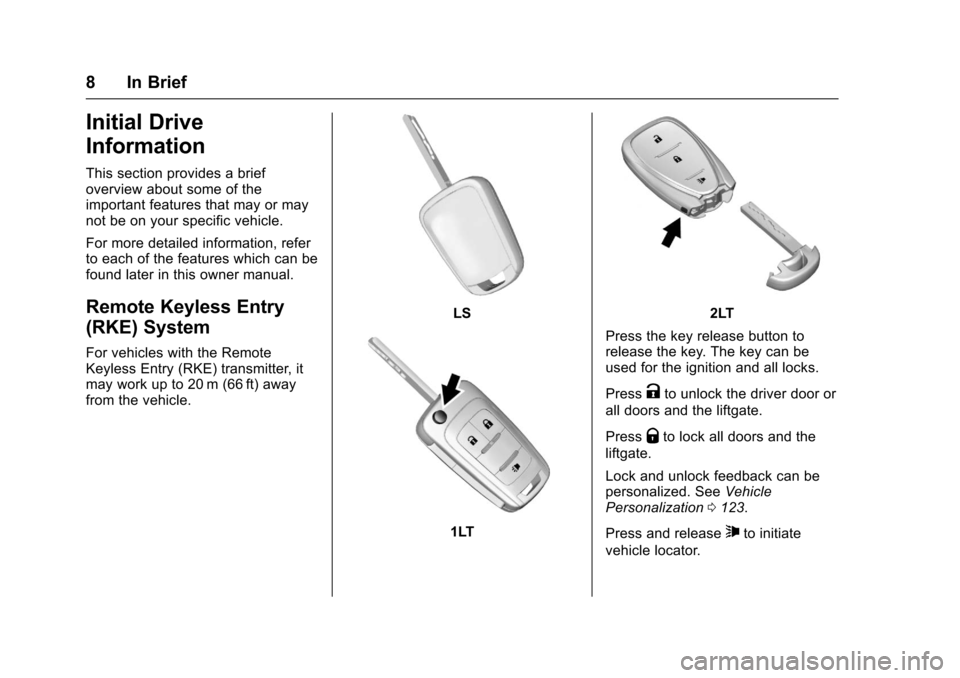
For vehicles with the Remote
Keyless Entry (RKE) transmitter, it
may work up to 20 m (66 ft) away
from the vehicle.
LS
1LT
2LT
Press the key release button to
release the key. The key can be
used for the ignition and all locks.
Press
Kto unlock the driver door or
all doors and the liftgate.
Press
Qto lock all doors and the
liftgate.
Lock and unlock feedback can be
personalized. See Vehicle
Personalization 0123.
Press and release
7to initiate
vehicle locator.
Page 10 of 331
Chevrolet Spark Owner Manual (GMNA-Localizing-U.S./Canada-9956101) -
2017 - crc - 4/25/16
In Brief 9
Press and hold7for at least
three seconds to sound the panic
alarm.
Press
7again to cancel the panic
alarm.
See Keys 023 and Remote Keyless
Entry (RKE) System Operation
(Keyless Access) 028 orRemote
Keyless Entry (RKE) System
Operation (Key Access) 026.
Door Locks
To lock or unlock the doors from
outside the vehicle:
.
Use the key in the driver door to
lock and unlock the door.
. Press
QorKon the Remote
Keyless Entry (RKE) transmitter.
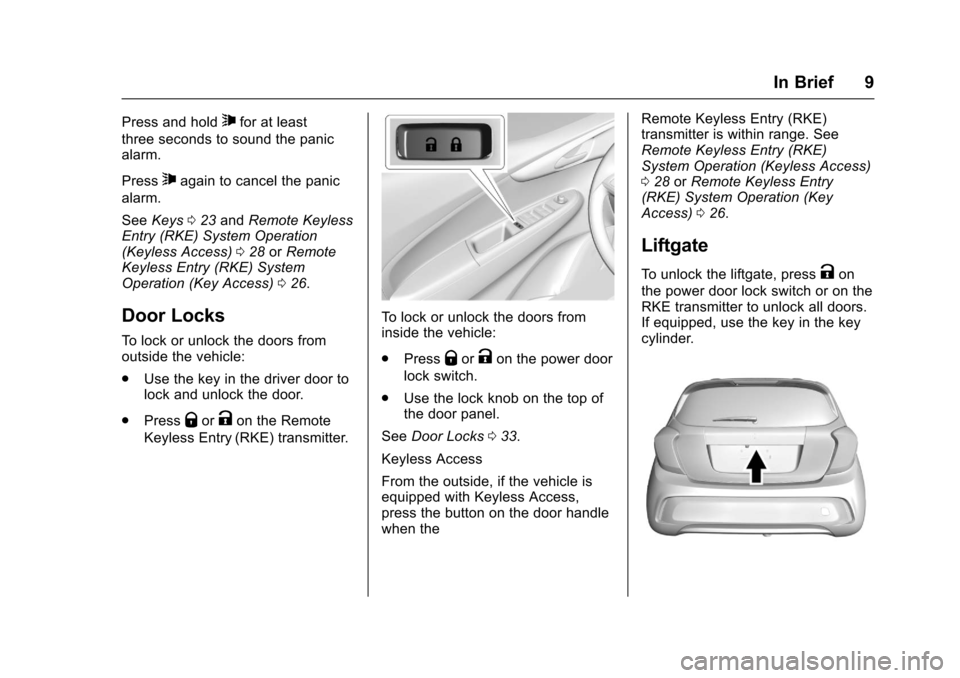
To lock or unlock the doors from
inside the vehicle:
. Press
QorKon the power door
lock switch.
. Use the lock knob on the top of
the door panel.
See Door Locks 033.
Keyless Access
From the outside, if the vehicle is
equipped with Keyless Access,
press the button on the door handle
when the Remote Keyless Entry (RKE)
transmitter is within range. See
Remote Keyless Entry (RKE)
System Operation (Keyless Access)
0
28 orRemote Keyless Entry
(RKE) System Operation (Key
Access) 026.
Liftgate
To unlock the liftgate, pressKon
the power door lock switch or on the
RKE transmitter to unlock all doors.
If equipped, use the key in the key
cylinder.
Page 11 of 331
Chevrolet Spark Owner Manual (GMNA-Localizing-U.S./Canada-9956101) -
2017 - crc - 4/25/16
10 In Brief
Press the touch pad and lift to open
or, if equipped, pull the handle and
lift up.
To lock the liftgate, press
Qon the
power door lock switch or on the
RKE transmitter.
See Liftgate 036.
Windows
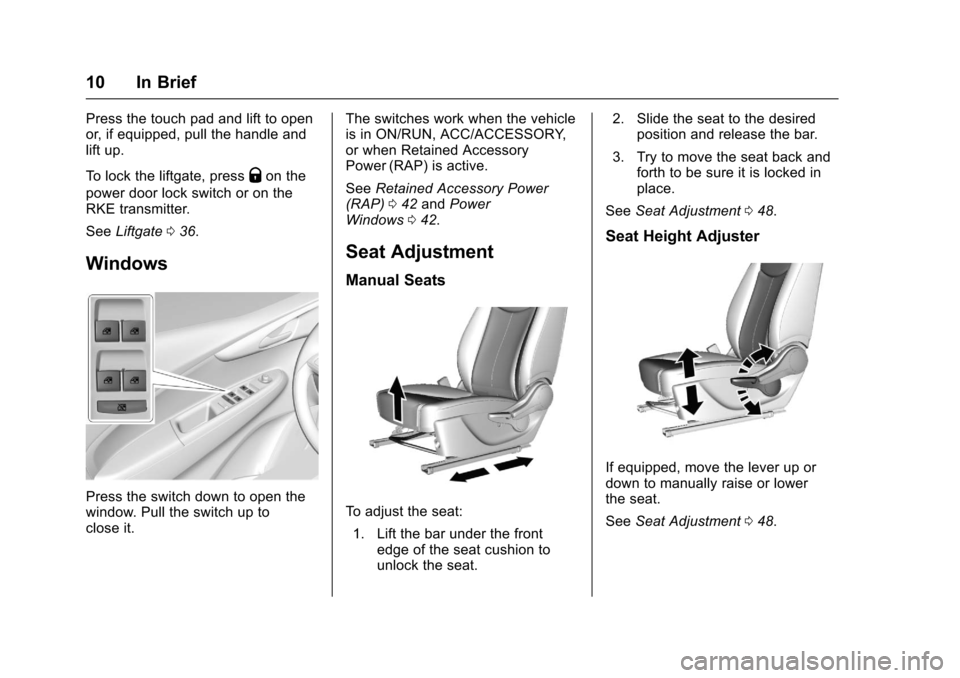
Press the switch down to open the
window. Pull the switch up to
close it. The switches work when the vehicle
is in ON/RUN, ACC/ACCESSORY,
or when Retained Accessory
Power (RAP) is active.
See
Retained Accessory Power
(RAP) 042 and Power
Windows 042.
Seat Adjustment
Manual Seats
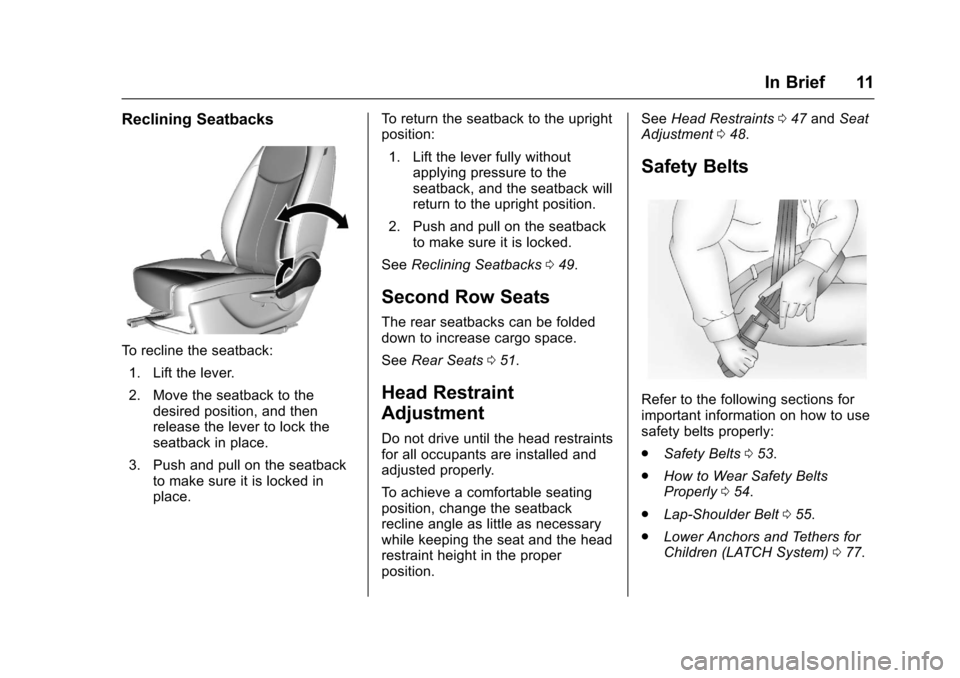
To adjust the seat:
1. Lift the bar under the front edge of the seat cushion to
unlock the seat. 2. Slide the seat to the desired
position and release the bar.
3. Try to move the seat back and forth to be sure it is locked in
place.
See Seat Adjustment 048.
Seat Height Adjuster
If equipped, move the lever up or
down to manually raise or lower
the seat.
See Seat Adjustment 048.
Page 12 of 331
Chevrolet Spark Owner Manual (GMNA-Localizing-U.S./Canada-9956101) -
2017 - crc - 4/25/16
In Brief 11
Reclining Seatbacks
To recline the seatback:1. Lift the lever.
2. Move the seatback to the desired position, and then
release the lever to lock the
seatback in place.
3. Push and pull on the seatback to make sure it is locked in
place. To return the seatback to the upright
position:
1. Lift the lever fully without applying pressure to the
seatback, and the seatback will
return to the upright position.
2. Push and pull on the seatback to make sure it is locked.
See Reclining Seatbacks 049.
Second Row Seats
The rear seatbacks can be folded
down to increase cargo space.
See Rear Seats 051.
Head Restraint
Adjustment
Do not drive until the head restraints
for all occupants are installed and
adjusted properly.
To achieve a comfortable seating
position, change the seatback
recline angle as little as necessary
while keeping the seat and the head
restraint height in the proper
position. See
Head Restraints 047 and Seat
Adjustment 048.
Safety Belts
Refer to the following sections for
important information on how to use
safety belts properly:
.
Safety Belts 053.
. How to Wear Safety Belts
Properly 054.
. Lap-Shoulder Belt 055.
. Lower Anchors and Tethers for
Children (LATCH System) 077.
Page 14 of 331
Chevrolet Spark Owner Manual (GMNA-Localizing-U.S./Canada-9956101) -
2017 - crc - 4/25/16
In Brief 13
Folding Mirrors
The outside mirrors can be folded
inward to prevent damage when
going through an automatic car
wash. To fold, pull the mirror toward
the vehicle. Push the mirror outward
to return it to the original position.
SeeFolding Mirrors 041.
Steering Wheel
Adjustment
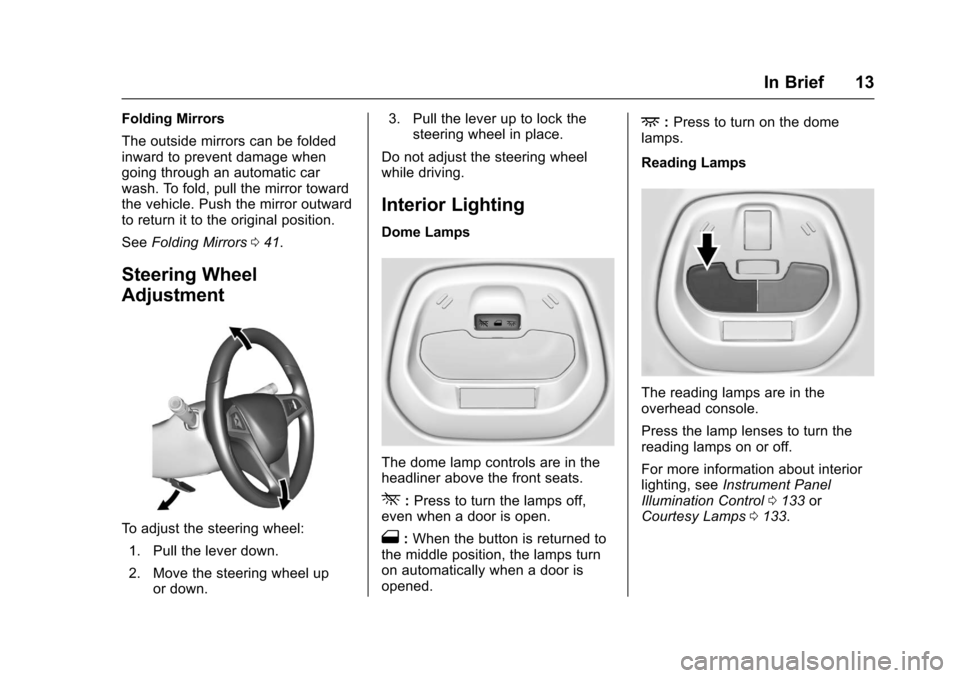
To adjust the steering wheel:
1. Pull the lever down.
2. Move the steering wheel up or down. 3. Pull the lever up to lock the
steering wheel in place.
Do not adjust the steering wheel
while driving.
Interior Lighting
Dome Lamps
The dome lamp controls are in the
headliner above the front seats.
*: Press to turn the lamps off,
even when a door is open.
1: When the button is returned to
the middle position, the lamps turn
on automatically when a door is
opened.
+: Press to turn on the dome
lamps.
Reading Lamps
The reading lamps are in the
overhead console.
Press the lamp lenses to turn the
reading lamps on or off.
For more information about interior
lighting, see Instrument Panel
Illumination Control 0133 or
Courtesy Lamps 0133.
Page 22 of 331
Chevrolet Spark Owner Manual (GMNA-Localizing-U.S./Canada-9956101) -
2017 - crc - 4/25/16
In Brief 21
The oil life system should be reset
to 100% only following an oil
change.
Base Level Cluster1. Press the MENU button to show Remaining Oil Life on the
display. This display shows an
estimate of the oil’s remaining
useful life. If 99% is displayed,
that means that 99% of the
current oil life remains.
2. To reset the engine oil life system, press the SET/CLR
button while the oil life display
is active. After a few seconds,
the oil life will be reset to
100%. Be careful not to reset
the oil life display accidentally
at any time other than after the
oil is changed. It cannot be
reset accurately.
If the
:% CHANGE message in
the DIC comes back on when the
vehicle is started, the engine oil life
system has not reset. Repeat the
procedure. Uplevel Cluster
1. Turn the ignition to ON/RUN with the engine off.
2. Press the DIC MENU button on the turn signal lever to enter
the Vehicle Information Menu.
Use the thumbwheel to scroll
through the menu items until
you reach REMAINING
OIL LIFE.
3. Press the SET/CLR button to reset the oil life at 100%.
4. Turn the ignition to LOCK/OFF.
The oil life system can also be reset
as follows: 1. Turn the ignition to ON/RUN with the engine off.
2. Fully press and release the accelerator pedal three times
within five seconds.
See Engine Oil Life System 0215.
Driving for Better Fuel
Economy
Driving habits can affect fuel
mileage. Here are some driving tips
to get the best fuel economy
possible.
.
Avoid fast starts and accelerate
smoothly.
. Brake gradually and avoid
abrupt stops.
. Avoid idling the engine for long
periods of time.
. When road and weather
conditions are appropriate, use
cruise control.
. Always follow posted speed
limits or drive more slowly when
conditions require.
. Keep vehicle tires properly
inflated.
. Combine several trips into a
single trip.
. Replace the vehicle's tires with
the same TPC Spec number
molded into the tire's sidewall
near the size.
Page 24 of 331
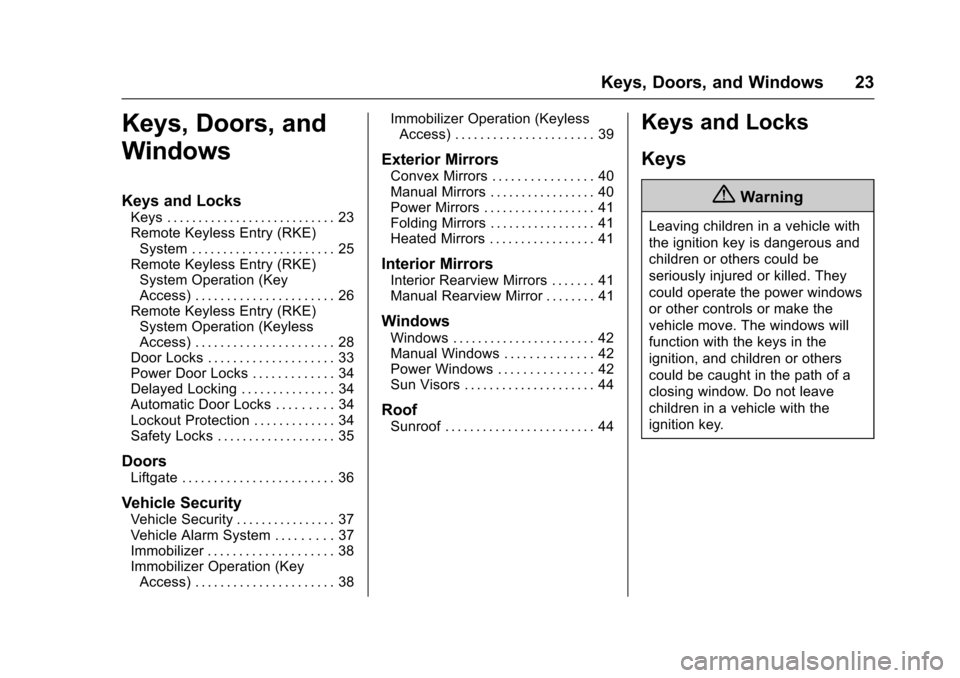
Chevrolet Spark Owner Manual (GMNA-Localizing-U.S./Canada-9956101) -
2017 - crc - 4/25/16
Keys, Doors, and Windows 23
Keys, Doors, and
Windows
Keys and Locks
Keys . . . . . . . . . . . . . . . . . . . . . . . . . . . 23
Remote Keyless Entry (RKE)System . . . . . . . . . . . . . . . . . . . . . . . 25
Remote Keyless Entry (RKE) System Operation (Key
Access) . . . . . . . . . . . . . . . . . . . . . . 26
Remote Keyless Entry (RKE) System Operation (Keyless
Access) . . . . . . . . . . . . . . . . . . . . . . 28
Door Locks . . . . . . . . . . . . . . . . . . . . 33
Power Door Locks . . . . . . . . . . . . . 34
Delayed Locking . . . . . . . . . . . . . . . 34
Automatic Door Locks . . . . . . . . . 34
Lockout Protection . . . . . . . . . . . . . 34
Safety Locks . . . . . . . . . . . . . . . . . . . 35
Doors
Liftgate . . . . . . . . . . . . . . . . . . . . . . . . 36
Vehicle Security
Vehicle Security . . . . . . . . . . . . . . . . 37
Vehicle Alarm System . . . . . . . . . 37
Immobilizer . . . . . . . . . . . . . . . . . . . . 38
Immobilizer Operation (Key Access) . . . . . . . . . . . . . . . . . . . . . . 38 Immobilizer Operation (Keyless
Access) . . . . . . . . . . . . . . . . . . . . . . 39
Exterior Mirrors
Convex Mirrors . . . . . . . . . . . . . . . . 40
Manual Mirrors . . . . . . . . . . . . . . . . . 40
Power Mirrors . . . . . . . . . . . . . . . . . . 41
Folding Mirrors . . . . . . . . . . . . . . . . . 41
Heated Mirrors . . . . . . . . . . . . . . . . . 41
Interior Mirrors
Interior Rearview Mirrors . . . . . . . 41
Manual Rearview Mirror . . . . . . . . 41
Windows
Windows . . . . . . . . . . . . . . . . . . . . . . . 42
Manual Windows . . . . . . . . . . . . . . 42
Power Windows . . . . . . . . . . . . . . . 42
Sun Visors . . . . . . . . . . . . . . . . . . . . . 44
Roof
Sunroof . . . . . . . . . . . . . . . . . . . . . . . . 44
Keys and Locks
Keys
{Warning
Leaving children in a vehicle with
the ignition key is dangerous and
children or others could be
seriously injured or killed. They
could operate the power windows
or other controls or make the
vehicle move. The windows will
function with the keys in the
ignition, and children or others
could be caught in the path of a
closing window. Do not leave
children in a vehicle with the
ignition key.