change time CHEVROLET SPARK 2019 User Guide
[x] Cancel search | Manufacturer: CHEVROLET, Model Year: 2019, Model line: SPARK, Model: CHEVROLET SPARK 2019Pages: 343, PDF Size: 5.08 MB
Page 128 of 343

Chevrolet Spark Owner Manual (GMNA-Localizing-U.S./Canada-12146335) -
2019 - CRC - 4/26/18
Lighting 127
.The high-beam headlamps
are on.
. The low-beam headlamps
are on.
. The flash-to-pass feature
is used.
For vehicles first sold in Canada,
the DRL can only be turned off
when the vehicle is parked.
The regular headlamp system
should be used when needed.
Automatic Headlamp
System
When it is dark enough outside and
the exterior lamp control is in the
automatic position, the headlamps
come on automatically. See Exterior
Lamp Controls 0125.
The vehicle has a light sensor on
top of the instrument panel. Make
sure it is not covered, or the
headlamps will be on when they are
not needed.
The system may also turn on the
headlamps when driving through a
parking garage or tunnel.
If the vehicle is started in a dark
garage, the automatic headlamp
system comes on immediately. If it
is light outside when the vehicle
leaves the garage, there is a slight
delay before the automatic
headlamp system changes to the
Daytime Running Lamp (DRL).
During that delay, the instrument cluster may not be as bright as
usual. Make sure the instrument
panel brightness control is in the full
bright position. See
Instrument
Panel Illumination Control 0129.
When it is bright enough outside,
the headlamps will turn off or may
change to DRL.
The automatic headlamp system
turns off when the exterior lamp
control or the ignition is off.Lights On with Wipers
If the windshield wipers are
activated in daylight with the vehicle
on, and the exterior lamp control is
in AUTO, the headlamps, parking
lamps, and other exterior lamps
come on. The transition time for the
lamps coming on varies based on
wiper speed. When the wipers are
not operating, these lamps turn off.
Move the exterior lamp control to
P
or;to disable this feature.
Page 129 of 343
Chevrolet Spark Owner Manual (GMNA-Localizing-U.S./Canada-12146335) -
2019 - CRC - 4/26/18
128 Lighting
Hazard Warning Flashers
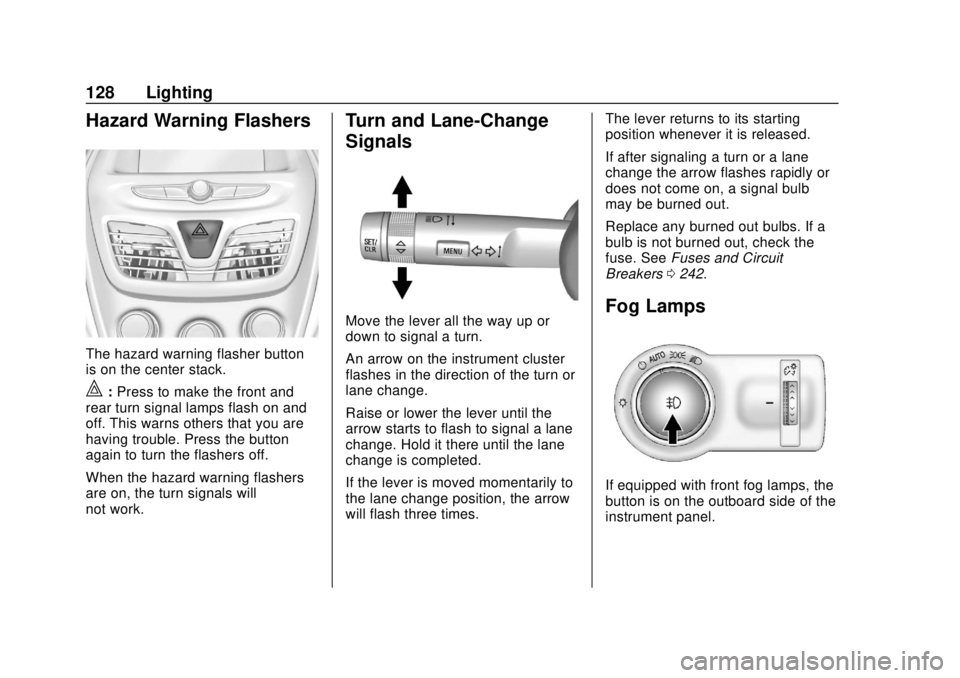
The hazard warning flasher button
is on the center stack.
|:Press to make the front and
rear turn signal lamps flash on and
off. This warns others that you are
having trouble. Press the button
again to turn the flashers off.
When the hazard warning flashers
are on, the turn signals will
not work.
Turn and Lane-Change
Signals
Move the lever all the way up or
down to signal a turn.
An arrow on the instrument cluster
flashes in the direction of the turn or
lane change.
Raise or lower the lever until the
arrow starts to flash to signal a lane
change. Hold it there until the lane
change is completed.
If the lever is moved momentarily to
the lane change position, the arrow
will flash three times. The lever returns to its starting
position whenever it is released.
If after signaling a turn or a lane
change the arrow flashes rapidly or
does not come on, a signal bulb
may be burned out.
Replace any burned out bulbs. If a
bulb is not burned out, check the
fuse. See
Fuses and Circuit
Breakers 0242.Fog Lamps
If equipped with front fog lamps, the
button is on the outboard side of the
instrument panel.
Page 131 of 343

Chevrolet Spark Owner Manual (GMNA-Localizing-U.S./Canada-12146335) -
2019 - CRC - 4/26/18
130 Lighting
+:Press to turn on the dome
lamps.
Reading Lamps
The reading lamps are in the
overhead console.
Press the lamp lenses to turn the
reading lamps on or off.
Lighting Features
Entry Lighting
Some exterior lamps and most of
the interior lights turn on briefly at
night, or in areas of limited lighting
when
Kis pressed on the Remote
Keyless Entry (RKE) transmitter.
See Remote Keyless Entry (RKE)
System Operation (Key Access)
0 27 orRemote Keyless Entry
(RKE) System Operation (Keyless
Access) 029. When the driver door
is opened, all control lights, Driver
Information Center (DIC) lights, and
door pocket lights turn on. After
about 30 seconds the exterior lamps
turn off, then the remaining interior
lights dim to off. Entry lighting can
be disabled manually by turning the
ignition on or to ACC/ACCESSORY,
or by pressing
Qon the RKE
transmitter.
This feature can be changed. See
“Vehicle Locator Lights” under
Vehicle Personalization 0121.
Exit Lighting
Some exterior lamps and interior
lights come on at night, or in areas
with limited lighting, when the driver
door is opened after the ignition is
turned off. The dome lamp comes
on after the ignition is turned off.
The exterior lamps and dome lamp
remain on for a set amount of time,
then automatically turn off.
The exterior lamps turn off
immediately by turning the exterior
lamp control off.
This feature can be changed. See
Vehicle Personalization 0121.
Battery Power Protection
The battery saver feature is
designed to protect the vehicle's
battery.
If some interior lamps and/or
headlamps are left on and the
ignition is turned off, the battery
rundown protection system
automatically turns the lamp off after
some time.
Page 148 of 343
Chevrolet Spark Owner Manual (GMNA-Localizing-U.S./Canada-12146335) -
2019 - CRC - 4/27/18
Infotainment System 147
the center stack. The adjusted
volume level remains in memory for
later calls. The volume cannot be
lowered beyond a certain level.
Bluetooth (Pairing and
Using a Phone)
Pairing
A Bluetooth-enabled cell phone
must be paired to the Bluetooth
system and then connected to the
vehicle before it can be used. See
the cell phone manufacturer's user
guide for Bluetooth functions before
pairing the cell phone.
Pairing Information
.If no mobile device has been
connected, the Phone main
page on the infotainment display
will show the Connect Phone
option. Touch this option to
connect. Another way to connect
is to touch the Phones tab at the
top right of the display and then
touch Add Phone. .
A Bluetooth phone with music
capability can be paired to the
vehicle as a phone and a music
player at the same time.
. Up to 10 devices can be paired
to the Bluetooth system.
. The pairing process is disabled
when the vehicle is moving.
. Pairing only needs to be
completed once, unless the
pairing information on the cell
phone changes or the cell phone
is deleted from the system.
. If multiple paired cell phones are
within range of the system, the
system connects to the paired
cell phone that is set to First to
Connect. If there is no phone set
to First to Connect, it will link to
the device which was used last.
To link to a different paired
phone, see “Linking to a
Different Phone” later in this
section. Pairing a Phone
1. Make sure Bluetooth has been enabled on the cell phone
before pairing is started.
2. Touch the Phone icon on the Home Page or the phone
shortcut on the applications
tray at the bottom of the
display.
3. Touch Phone at the top of the infotainment display. There is
also an Add option in the
middle of the Phone screen.
Touching this Add Phone
option will shortcut to the
Phone List menu.
4. Touch Add Phone.
5. Select the vehicle name shown on the infotainment display
from your phone’ s Bluetooth
Settings list.
6. Follow the instructions on the cell phone to confirm the
six-digit code shown on the
infotainment display and touch
Pair. The code on the cell
Page 153 of 343
Chevrolet Spark Owner Manual (GMNA-Localizing-U.S./Canada-12146335) -
2019 - CRC - 4/27/18
152 Infotainment System
To use Android Auto and/or Apple
CarPlay:1. Download the Android Auto app to your smartphone from
the Google Play store. There is
no app required for Apple
CarPlay.
2. Connect your Android smartphone or Apple iPhone
by using the compatible phone
USB cable and plugging into a
USB data port. For best
performance, use the device’ s
factory-provided USB cable.
Aftermarket or third-party
cables may not work.
3. When the phone is first connected to activate Apple
CarPlay or Android Auto, the
message “Device Projection
Privacy Consent” will appear.
. Touch Continue to launch
Apple CarPlay or
Android Auto.
. Touch Disable to remove
Apple CarPlay and Android
Auto capability from the vehicle Settings menu.
Other functions may
still work.
The Android Auto and Apple
CarPlay icons on the Home Page
will illuminate depending on the
smartphone. Android Auto and/or
Apple CarPlay may automatically
launch upon USB connection. If not,
touch the Android Auto or Apple
CarPlay icon on the Home Page to
launch.
Press
{on the center stack to
return to the Home Page.
For further information on how to set
up Android Auto and Apple CarPlay
in the vehicle, see my.chevrolet.com
or see Customer Assistance Offices
0 307.
Android Auto is provided by
Google and is subject to Google’ s
terms and privacy policy. Apple
CarPlay is provided by Apple and is
subject to Apple’ s terms and privacy
policy. Data plan rates apply.
For Android Auto support see
https://support.google.com/
androidauto. For Apple CarPlay support see www.apple.com/ios/
carplay/. Apple or Google may
change or suspend availability at
any time. Android Auto, Android,
Google, Google Play, and other
marks are trademarks of Google
Inc.; Apple CarPlay is a trademark
of Apple Inc.
Press
{on the center stack to exit
Android Auto or Apple CarPlay. To
enter back into Android Auto or
Apple CarPlay, press and hold {on
the center stack.
Apple CarPlay and Android Auto
can be disabled from the
Infotainment system. To do this,
touch Home, Settings, and then
touch the Apps tab along the top of
the display. Use the On/Off toggled
to turn off Apple CarPlay or
Android Auto.
Page 158 of 343
Chevrolet Spark Owner Manual (GMNA-Localizing-U.S./Canada-12146335) -
2019 - CRC - 4/27/18
Infotainment System 157
.Re-sync Device Contacts:
This allows the device contacts
to re-sync if you are having
difficulty accessing all of the
contacts on your cell phone.
. Delete All Vehicle Contacts:
Touch to delete all vehicle stored
contacts.
. OnStar Phone TTY Mode: This
enables OnStar cell phone
TTY mode.
Touch Disable or Enable.
Vehicle
This menu allows adjustment of
different vehicle features. See
Vehicle Personalization 0121.
Trademarks and
License Agreements
FCC Information
See Radio Frequency Statement
0 315.
Bluetooth
The Bluetooth word mark and logos
are owned by the Bluetooth
®SIG,
Inc. and any use of such marks by
General Motors is under license.
Other trademarks and trade names
are those of their respective owners.
"Made for iPod," and "Made for
iPhone," mean that an electronic
accessory has been designed to
connect specifically to iPod or
iPhone, respectively, and has been
certified by the developer to meet
Apple performance standards. Apple is not responsible for the
operation of this device or its
compliance with safety and
regulatory standards. Please note
that the use of this accessory with
iPod or iPhone may affect wireless
performance. iPhone, iPod, iPod
classic, iPod nano, iPod shuffle, and
iPod touch are trademarks of Apple
Inc., registered in the U.S. and other
countries.
Fees and Taxes: Subscription fee,
taxes, one time activation fee, and
other fees may apply. Subscription
fee is consumer only. All fees and
programming subject to change.
Subscriptions subject to Customer
Agreement available at
www.siriusxm.com or
www.siriusxm.ca. SiriusXM service
only available in the 48 contiguous
United States and Canada.
Page 161 of 343

Chevrolet Spark Owner Manual (GMNA-Localizing-U.S./Canada-12146335) -
2019 - CRC - 4/26/18
160 Climate Controls
fan control to 0 turns the fan off. The
fan must be turned on to run the air
conditioning compressor.
Air Delivery Mode Control :Turn
clockwise or counterclockwise to
change the current airflow mode.
Select from the following air delivery
modes:
Y: Air is directed to the instrument
panel outlets.
\: Air is divided between the
instrument panel and floor outlets.
[: Air is directed to the floor
outlets.
W: This mode clears the windows
of fog or moisture. Air is directed to
the floor, windshield, and side
window outlets.
1: This mode clears the
windshield of fog or frost more
quickly. Air is directed to the
windshield and side window outlets.
Do not drive the vehicle until all
windows are clear. In defrost or defog mode, excessive
air conditioning use can cause the
windows to fog. If this happens,
change the air delivery mode to
Y
and reduce the fan speed.
A/C :
If equipped with air
conditioning, follow these steps to
use the system. Turn
Ato the
desired speed. The air conditioning
does not operate when the fan
control knob is in the off position.
Press A/C to turn the air
conditioning on and off. When A/C
is pressed, an indicator light comes
on to show that the air conditioning
is on.
For quick cool down on hot days:
1. Open the windows to let hot air escape.
2. Press
M.
3. Press A/C.
4. Select the coolest temperature.
5. Select the highest
Aspeed. Using these settings together for
long periods of time may cause the
air inside the vehicle to become too
dry. To prevent this from happening,
after the air in the vehicle has
cooled, turn the recirculation
mode off.
M:
This mode recirculates and
helps to quickly cool the air inside
the vehicle. It can be used to reduce
the entry of outside air and odors.
Press
Mto turn the recirculation
mode on. An indicator light comes
on to show that the recirculation is
on. Press
Magain to return to
outside air mode.
Using the recirculation mode for
extended periods may cause the
windows to fog. If this happens,
select the defrost mode.
If the air delivery mode is set to
W
or1, A/C operation and outside air
mode will be fixed to defog or
defrost as quickly as possible
regardless of indicator status.
Page 191 of 343
Chevrolet Spark Owner Manual (GMNA-Localizing-U.S./Canada-12146335) -
2019 - CRC - 4/30/18
190 Driving and Operating
Shift Speeds
{Warning
If you skip a gear when
downshifting, you could lose
control of the vehicle. You could
injure yourself or others. Do not
shift down more than one gear at
a time when downshifting.
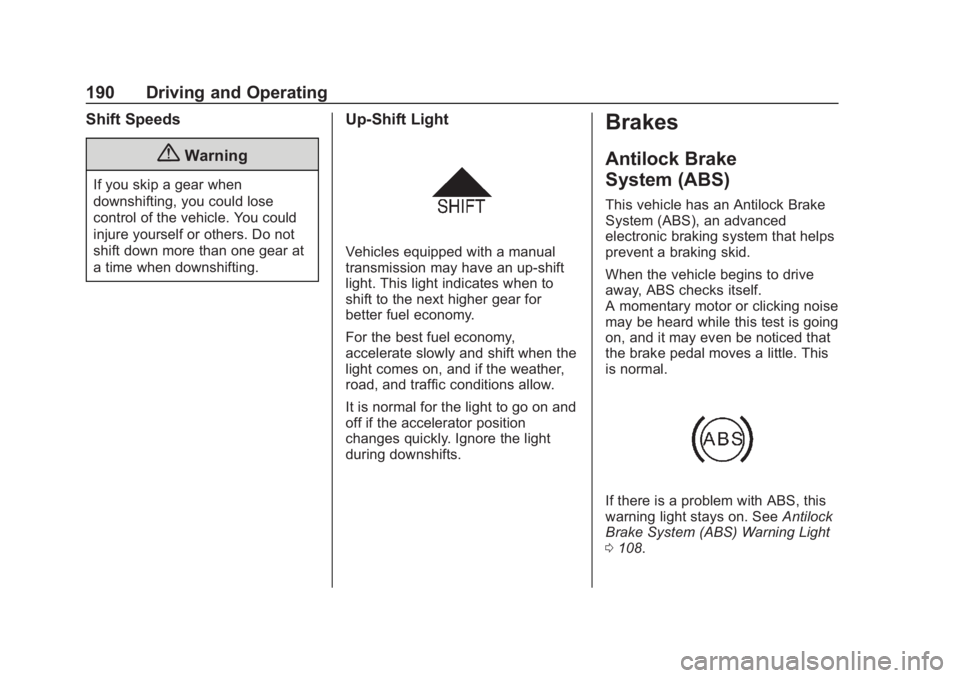
Up-Shift Light
Vehicles equipped with a manual
transmission may have an up-shift
light. This light indicates when to
shift to the next higher gear for
better fuel economy.
For the best fuel economy,
accelerate slowly and shift when the
light comes on, and if the weather,
road, and traffic conditions allow.
It is normal for the light to go on and
off if the accelerator position
changes quickly. Ignore the light
during downshifts.
Brakes
Antilock Brake
System (ABS)
This vehicle has an Antilock Brake
System (ABS), an advanced
electronic braking system that helps
prevent a braking skid.
When the vehicle begins to drive
away, ABS checks itself.
A momentary motor or clicking noise
may be heard while this test is going
on, and it may even be noticed that
the brake pedal moves a little. This
is normal.
If there is a problem with ABS, this
warning light stays on. SeeAntilock
Brake System (ABS) Warning Light
0 108.
Page 192 of 343
Chevrolet Spark Owner Manual (GMNA-Localizing-U.S./Canada-12146335) -
2019 - CRC - 4/30/18
Driving and Operating 191
If driving safely on a wet road and it
becomes necessary to slam on the
brakes and continue braking to
avoid a sudden obstacle, a
computer senses the wheels are
slowing down. If one of the wheels
is about to stop rolling, the computer
will separately work the brakes at
each wheel.
ABS can change the brake pressure
to each wheel, as required, faster
than any driver could. This can help
you steer around the obstacle while
braking hard.
As the brakes are applied, the
computer keeps receiving updates
on wheel speed and controls
braking pressure accordingly.Remember: ABS does not change
the time needed to get a foot up to
the brake pedal or always decrease
stopping distance. If you get too
close to the vehicle in front of you,
there will not be enough time to
apply the brakes if that vehicle
suddenly slows or stops. Always
leave enough room up ahead to
stop, even with ABS.
Using ABS
Do not pump the brakes. Just hold
the brake pedal down firmly and let
ABS work. You may hear the ABS
pump or motor operating and feel
the brake pedal pulsate. This is
normal.
Braking in Emergencies
ABS allows you to steer and brake
at the same time. In many
emergencies, steering can help
more than even the very best
braking.
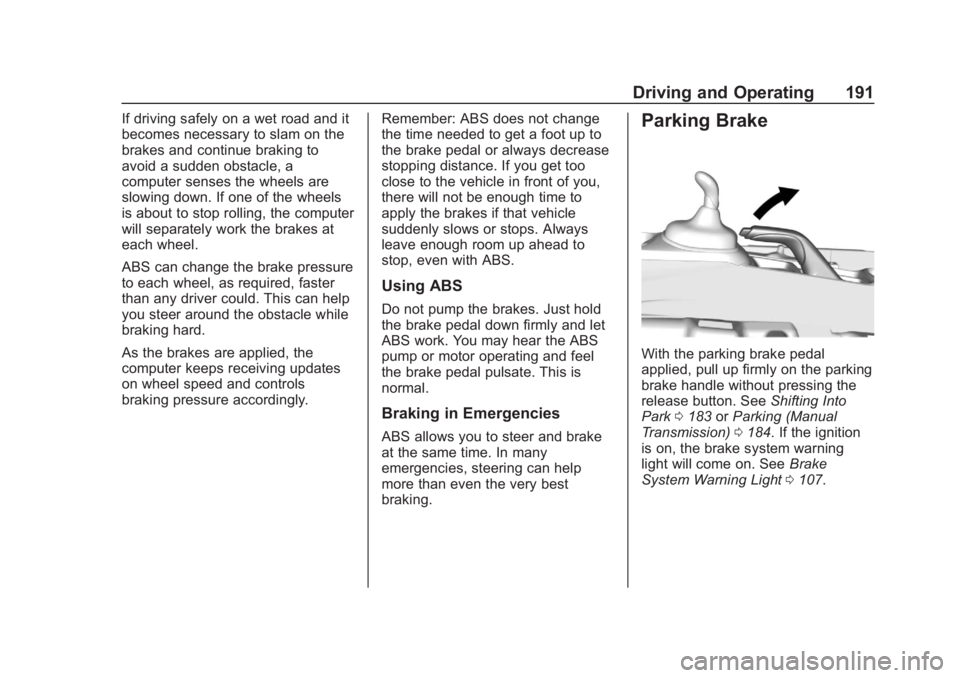
Parking Brake
With the parking brake pedal
applied, pull up firmly on the parking
brake handle without pressing the
release button. See
Shifting Into
Park 0183 orParking (Manual
Transmission) 0184. If the ignition
is on, the brake system warning
light will come on. See Brake
System Warning Light 0107.
Page 199 of 343
Chevrolet Spark Owner Manual (GMNA-Localizing-U.S./Canada-12146335) -
2019 - CRC - 4/30/18
198 Driving and Operating
Warning (Continued)
Under many conditions, these
systems will not:. Detect children,
pedestrians, bicyclists,
or animals.
. Detect vehicles or objects
outside the area monitored
by the system.
. Work at all driving speeds.
. Warn you or provide you
with enough time to avoid a
crash.
. Work under poor visibility or
bad weather conditions.
. Work if the detection sensor
is not cleaned or is covered
by ice, snow, mud, or dirt.
. Work if the detection sensor
is covered up, such as with
a sticker, magnet, or metal
plate.
(Continued)
Warning (Continued)
.Work if the area surrounding
the detection sensor is
damaged or not properly
repaired.
Complete attention is always
required while driving, and you
should be ready to take action
and apply the brakes and/or steer
the vehicle to avoid crashes.
Audible Alert
Some driver assistance features
alert the driver of obstacles by
beeping. To change the volume of
the warning chime, see “Comfort
and Convenience” underVehicle
Personalization 0121.
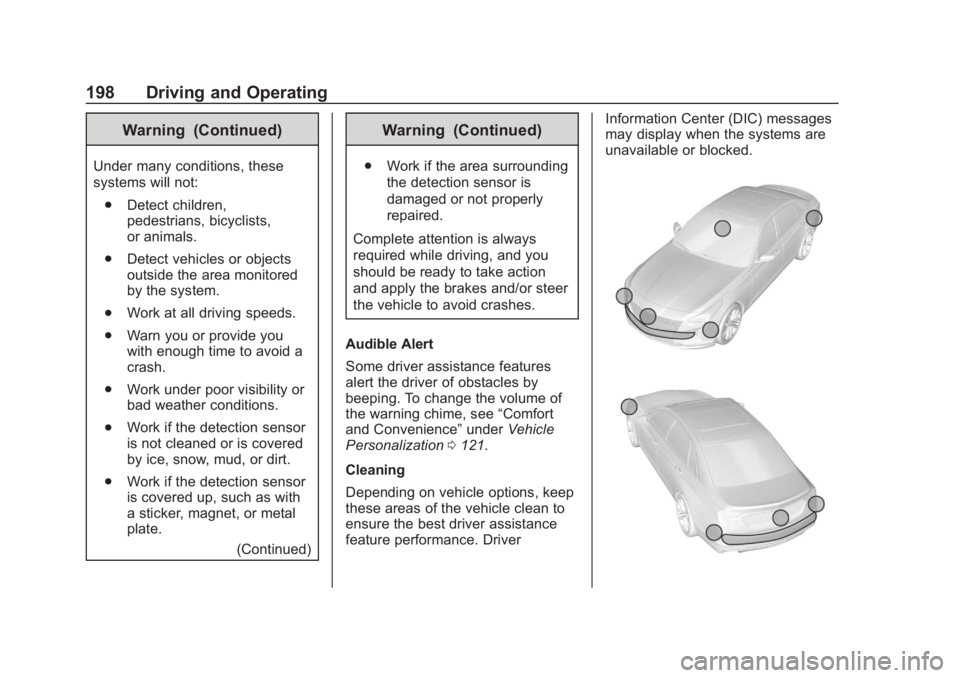
Cleaning
Depending on vehicle options, keep
these areas of the vehicle clean to
ensure the best driver assistance
feature performance. Driver Information Center (DIC) messages
may display when the systems are
unavailable or blocked.