parking brake CHEVROLET SPARK 2019 Owner's Guide
[x] Cancel search | Manufacturer: CHEVROLET, Model Year: 2019, Model line: SPARK, Model: CHEVROLET SPARK 2019Pages: 343, PDF Size: 5.08 MB
Page 234 of 343

Chevrolet Spark Owner Manual (GMNA-Localizing-U.S./Canada-12146335) -
2019 - CRC - 4/26/18
Vehicle Care 233
Automatic Transmission
Shift Lock Control
Function Check
{Warning
When you are doing this
inspection, the vehicle could
move suddenly. If the vehicle
moves, you or others could be
injured.
1. Before starting this check, be sure there is enough room
around the vehicle. It should be
parked on a level surface.
2. Apply the parking brake. Be ready to apply the regular
brake immediately if the vehicle
begins to move.
3. With the engine off, turn the ignition on, but do not start the
engine. Without applying the
regular brake, try to move the
shift lever out of P (Park) with normal effort. If the shift lever
moves out of P (Park), contact
your dealer for service.
Ignition Transmission
Lock Check
If equipped with Key Access, while
parked, and with the parking brake
set, try to turn the ignition off in
each shift lever position.
.
For automatic transmission
vehicles, the ignition should turn
off only when the shift lever is in
P (Park).
. For manual transmission
vehicles, the ignition should turn
off only when the shift lever is in
Neutral.
On all Key Access vehicles, the
ignition key should come out only
when the ignition is off.
Contact your dealer if service is
required.
Park Brake and P (Park)
Mechanism Check
{Warning
When you are doing this check,
the vehicle could begin to move.
You or others could be injured
and property could be damaged.
Make sure there is room in front
of the vehicle in case it begins to
roll. Be ready to apply the regular
brake at once should the vehicle
begin to move.
Park on a fairly steep hill, with the
vehicle facing downhill. Keeping
your foot on the regular brake, set
the parking brake.
. To check the parking brake's
holding ability: With the engine
running and the transmission in
N (Neutral), slowly remove foot
pressure from the regular brake
pedal. Do this until the vehicle is
held by the parking brake only.
Page 235 of 343

Chevrolet Spark Owner Manual (GMNA-Localizing-U.S./Canada-12146335) -
2019 - CRC - 4/26/18
234 Vehicle Care
.To check the P (Park)
mechanism's holding ability:
With the engine running, shift to
P (Park). Then release the
parking brake followed by the
regular brake.
Contact your dealer if service is
required.
Wiper Blade Replacement
Windshield Wiper Blades
Windshield wiper blades should be
inspected for wear and cracking.
Replacement blades come in
different types and are removed in
different ways. For proper type and
length, see Maintenance
Replacement Parts 0300.
Caution
Allowing the wiper arm to touch
the windshield when no wiper
blade is installed could damage
the windshield. Any damage that
occurs would not be covered by
(Continued)
Caution (Continued)
the vehicle warranty. Do not allow
the wiper arm to touch the
windshield.
To replace the windshield wiper
blade: 1. Pull the windshield wiper assembly away from the
windshield.
2. Press the release lever in themiddle of the wiper blade
where the wiper blade
attaches. 3. Remove the wiper blade.
4. Reverse Steps 1–3 for wiper
blade replacement.
Rear Wiper Blade
1. Lift the wiper arm away fromthe rear windshield.
2. Push the wiper blade away from the wiper arm.
3. Once the blade pin disengages from the wiper arm, remove the
wiper blade by sliding the blade
off the arm.
4. Reverse Steps 1–3 to install a new wiper blade.
Page 259 of 343

Chevrolet Spark Owner Manual (GMNA-Localizing-U.S./Canada-12146335) -
2019 - CRC - 4/26/18
258 Vehicle Care
installed and the sensor
matching process is performed
successfully. See your dealer for
service.
. Replacement tires or wheels do
not match the original equipment
tires or wheels. Tires and wheels
other than those recommended
could prevent the TPMS from
functioning properly. See Buying
New Tires 0261.
. Operating electronic devices or
being near facilities using radio
wave frequencies similar to the
TPMS could cause the TPMS
sensors to malfunction.
If the TPMS is not functioning
properly, it cannot detect or signal a
low tire pressure condition. See
your dealer for service if the TPMS
malfunction light and DIC message,
if equipped, come on and stay on.
TPMS Sensor Matching
Process
Each TPMS sensor has a unique
identification code. The identification
code needs to be matched to a new
tire/wheel position after rotating the vehicle’s tires or replacing one or
more of the TPMS sensors. Also,
the TPMS sensor matching process
should be performed after replacing
a spare tire with a road tire
containing the TPMS sensor. The
malfunction light and the DIC
message, if equipped, should go off
at the next ignition cycle. The
sensors are matched to the tire/
wheel positions, using a TPMS
relearn tool, in the following order:
driver side front tire, passenger side
front tire, passenger side rear tire,
and driver side rear. See your
dealer for service or to purchase a
relearn tool. A TPMS relearn tool
can also be purchased.
See Tire Pressure Monitor
Sensor Activation Tool at
www.gmtoolsandequipment.com or
call 1-800-GM TOOLS
(1-800-468-6657).
There are two minutes to match the
first tire/wheel position, and
five minutes overall to match all four
tire/wheel positions. If it takes
longer, the matching process stops
and must be restarted.
The TPMS sensor matching
process is:
1. Set the parking brake.
2. Turn the ignition on without starting the vehicle or place the
vehicle in Service Mode.
See Ignition Positions (Keyless
Access) 0175 orIgnition
Positions (Key Access) 0177.
3. Use MENU to select the Vehicle Information Menu
(Menu 2) in the Driver
Information Center (DIC).
4. Use the thumbwheel (or up and down arrows) to scroll to the
Tire Pressure Learn Menu Item
(Base DIC) or the Tire
Pressure Menu Item screen
(Uplevel DIC).
5. Press and hold SET/CLR to begin the sensor matching
process.
A message requesting
acceptance of the process may
display.
6. If requested, press SET/CLR again to confirm the selection.
Page 262 of 343
Chevrolet Spark Owner Manual (GMNA-Localizing-U.S./Canada-12146335) -
2019 - CRC - 4/26/18
Vehicle Care 261
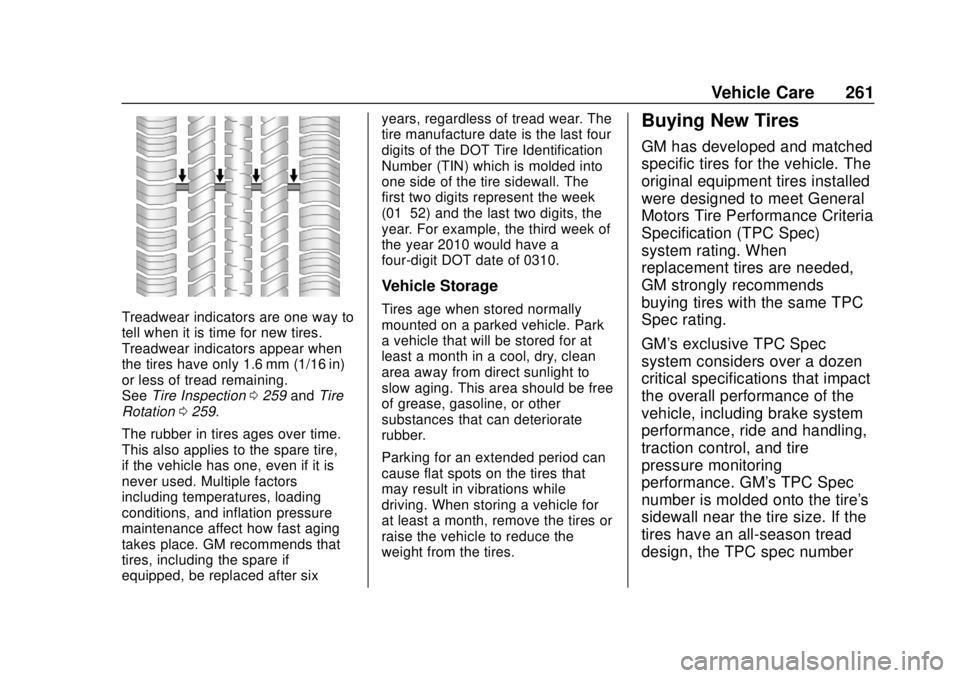
Treadwear indicators are one way to
tell when it is time for new tires.
Treadwear indicators appear when
the tires have only 1.6 mm (1/16 in)
or less of tread remaining.
SeeTire Inspection 0259 andTire
Rotation 0259.
The rubber in tires ages over time.
This also applies to the spare tire,
if the vehicle has one, even if it is
never used. Multiple factors
including temperatures, loading
conditions, and inflation pressure
maintenance affect how fast aging
takes place. GM recommends that
tires, including the spare if
equipped, be replaced after six years, regardless of tread wear. The
tire manufacture date is the last four
digits of the DOT Tire Identification
Number (TIN) which is molded into
one side of the tire sidewall. The
first two digits represent the week
(01–52) and the last two digits, the
year. For example, the third week of
the year 2010 would have a
four-digit DOT date of 0310.
Vehicle Storage
Tires age when stored normally
mounted on a parked vehicle. Park
a vehicle that will be stored for at
least a month in a cool, dry, clean
area away from direct sunlight to
slow aging. This area should be free
of grease, gasoline, or other
substances that can deteriorate
rubber.
Parking for an extended period can
cause flat spots on the tires that
may result in vibrations while
driving. When storing a vehicle for
at least a month, remove the tires or
raise the vehicle to reduce the
weight from the tires.
Buying New Tires
GM has developed and matched
specific tires for the vehicle. The
original equipment tires installed
were designed to meet General
Motors Tire Performance Criteria
Specification (TPC Spec)
system rating. When
replacement tires are needed,
GM strongly recommends
buying tires with the same TPC
Spec rating.
GM's exclusive TPC Spec
system considers over a dozen
critical specifications that impact
the overall performance of the
vehicle, including brake system
performance, ride and handling,
traction control, and tire
pressure monitoring
performance. GM's TPC Spec
number is molded onto the tire's
sidewall near the tire size. If the
tires have an all-season tread
design, the TPC spec number
Page 268 of 343

Chevrolet Spark Owner Manual (GMNA-Localizing-U.S./Canada-12146335) -
2019 - CRC - 4/26/18
Vehicle Care 267
Warning (Continued)
tire service center repair or
replace the flat tire as soon as
possible.
{Warning
Lifting a vehicle and getting under
it to do maintenance or repairs is
dangerous without the
appropriate safety equipment and
training. If a jack is provided with
the vehicle, it is designed only for
changing a flat tire. If it is used for
anything else, you or others could
be badly injured or killed if the
vehicle slips off the jack. If a jack
is provided with the vehicle, only
use it for changing a flat tire.
If a tire goes flat, avoid further tire
and wheel damage by driving slowly
to a level place, well off the road,
if possible. Turn on the hazard
warning flashers. See Hazard
Warning Flashers 0128.
{Warning
Changing a tire can be
dangerous. The vehicle can slip
off the jack and roll over or fall
causing injury or death. Find a
level place to change the tire. To
help prevent the vehicle from
moving:
1. Set the parking brake firmly.
2. Put an automatictransmission in P (Park) or a
manual transmission in
1 (First) or R (Reverse).
3. Turn off the engine and do not restart while the vehicle
is raised.
4. Do not allow passengers to remain in the vehicle.
5. Place wheel blocks, if equipped, on both sides of
the tire at the opposite
corner of the tire being
changed. When the vehicle has a flat tire (2),
use the following example as a
guide to assist in the placement of
the wheel blocks (1), if equipped.
1. Wheel Block (If Equipped)
2. Flat Tire
The following information explains
how to repair or change a tire.
Tire Changing
Removing the Spare Tire and
Tools
The spare tire and tools are located
in the storage compartment in the
rear of the vehicle.
Page 275 of 343

Chevrolet Spark Owner Manual (GMNA-Localizing-U.S./Canada-12146335) -
2019 - CRC - 4/26/18
274 Vehicle Care
Caution
Ignoring these steps could result
in costly damage to the vehicle
that would not be covered by the
vehicle warranty. Trying to start
the vehicle by pushing or pulling it
will not work, and it could damage
the vehicle.
1. Discharged BatteryNegative Grounding Point
2. Discharged Battery Positive Post
3. Good Battery Positive Post 4. Good Battery Negative Post
The jump start positive post is in the
engine compartment on the driver
side of the vehicle. See
Engine
Compartment Overview 0217.
The jump start negative grounding
point is in front of the engine cover
or an engine mounting bolt.
The jump start positive post and
negative post are on the battery of
the vehicle providing the jump start.
The positive jump start connection
for the discharged battery is under a
trim cover. Open the cover to
expose the post.
These locations are used instead of
a direct connection to the battery. 1. Check the other vehicle. It must have a 12-volt battery
with a negative ground system.
Caution
If the other vehicle does not have
a 12-volt system with a negative
ground, both vehicles can be
(Continued)
Caution (Continued)
damaged. Only use a vehicle that
has a 12-volt system with a
negative ground for jump starting.
2. Position the two vehicles so that they are not touching.
3. Set the parking brake firmly and put the shift lever in
P (Park) with an automatic
transmission, or Neutral with a
manual transmission. See
Shifting Into Park 0183 with an
automatic transmission,
or Parking (Manual
Transmission) 0184 with a
manual transmission.
Caution
If any accessories are left on or
plugged in during the jump
starting procedure, they could be
damaged. The repairs would not
be covered by the vehicle
(Continued)
Page 279 of 343
Chevrolet Spark Owner Manual (GMNA-Localizing-U.S./Canada-12146335) -
2019 - CRC - 4/26/18
278 Vehicle Care
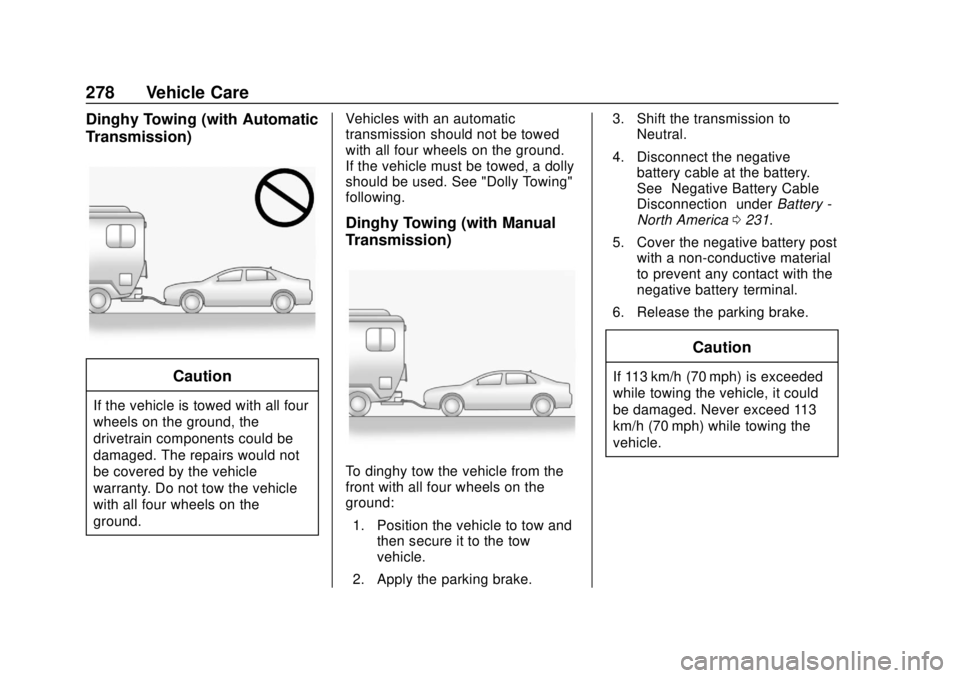
Dinghy Towing (with Automatic
Transmission)
Caution
If the vehicle is towed with all four
wheels on the ground, the
drivetrain components could be
damaged. The repairs would not
be covered by the vehicle
warranty. Do not tow the vehicle
with all four wheels on the
ground.Vehicles with an automatic
transmission should not be towed
with all four wheels on the ground.
If the vehicle must be towed, a dolly
should be used. See "Dolly Towing"
following.
Dinghy Towing (with Manual
Transmission)
To dinghy tow the vehicle from the
front with all four wheels on the
ground:
1. Position the vehicle to tow and then secure it to the tow
vehicle.
2. Apply the parking brake. 3. Shift the transmission to
Neutral.
4. Disconnect the negative battery cable at the battery.
See “Negative Battery Cable
Disconnection” underBattery -
North America 0231.
5. Cover the negative battery post with a non-conductive material
to prevent any contact with the
negative battery terminal.
6. Release the parking brake.
Caution
If 113 km/h (70 mph) is exceeded
while towing the vehicle, it could
be damaged. Never exceed 113
km/h (70 mph) while towing the
vehicle.
Page 280 of 343
Chevrolet Spark Owner Manual (GMNA-Localizing-U.S./Canada-12146335) -
2019 - CRC - 4/26/18
Vehicle Care 279
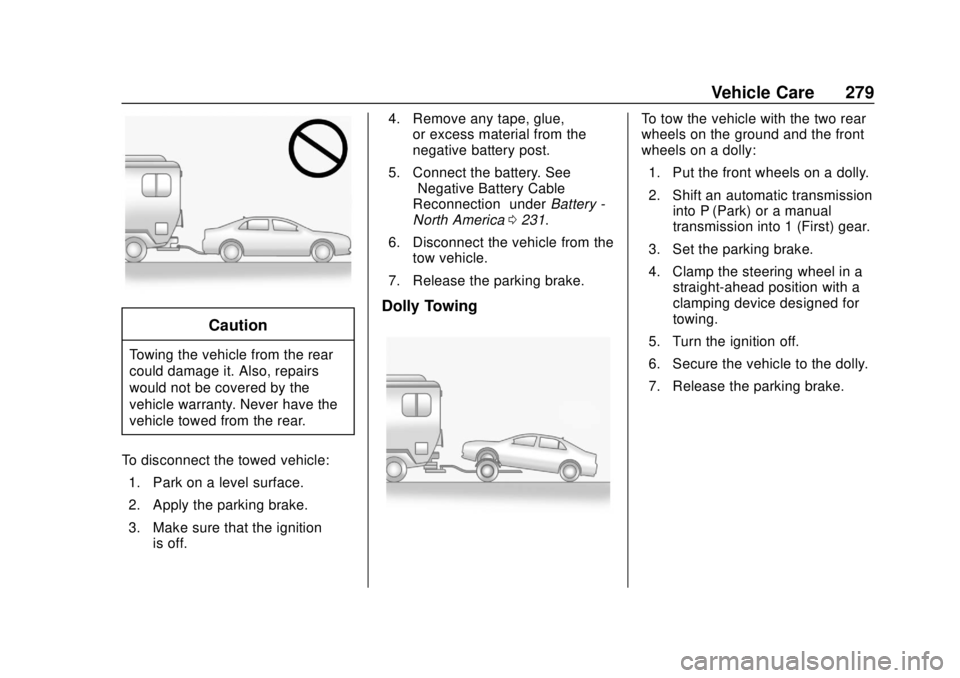
Caution
Towing the vehicle from the rear
could damage it. Also, repairs
would not be covered by the
vehicle warranty. Never have the
vehicle towed from the rear.
To disconnect the towed vehicle: 1. Park on a level surface.
2. Apply the parking brake.
3. Make sure that the ignition is off. 4. Remove any tape, glue,
or excess material from the
negative battery post.
5. Connect the battery. See “Negative Battery Cable
Reconnection” underBattery -
North America 0231.
6. Disconnect the vehicle from the tow vehicle.
7. Release the parking brake.
Dolly Towing
To tow the vehicle with the two rear
wheels on the ground and the front
wheels on a dolly: 1. Put the front wheels on a dolly.
2. Shift an automatic transmission into P (Park) or a manual
transmission into 1 (First) gear.
3. Set the parking brake.
4. Clamp the steering wheel in a straight-ahead position with a
clamping device designed for
towing.
5. Turn the ignition off.
6. Secure the vehicle to the dolly.
7. Release the parking brake.
Page 293 of 343

Chevrolet Spark Owner Manual (GMNA-Localizing-U.S./Canada-12146335) -
2019 - CRC - 4/26/18
292 Service and Maintenance
.Inspect brake system. See
Exterior Care 0280.
. Visually inspect steering,
suspension, and chassis
components for damage,
including cracks or tears in the
rubber boots, loose or missing
parts, or signs of wear at least
once a year. See Exterior Care
0 280.
. Inspect power steering for
proper attachment, connections,
binding, leaks, cracks,
chafing, etc.
. Visually inspect halfshafts and
drive shafts for excessive wear,
lubricant leaks, and/or damage
including: tube dents or cracks,
constant velocity joint or
universal joint looseness,
cracked or missing boots, loose
or missing boot clamps, center
bearing excessive looseness,
loose or missing fasteners, and
axle seal leaks. .
Check restraint system
components. See Safety System
Check 059.
. Visually inspect fuel system for
damage or leaks.
. Visually inspect exhaust system
and nearby heat shields for
loose or damaged parts.
. Lubricate body components. See
Exterior Care 0280.
. Check starter switch. See Starter
Switch Check 0232.
. Check automatic transmission
shift lock control function. See
Automatic Transmission Shift
Lock Control Function Check
0233. .
Check ignition transmission lock.
See Ignition Transmission Lock
Check 0233.
. Check parking brake and
automatic transmission park
mechanism. See Park Brake and
P (Park) Mechanism Check
0 233.
. Check accelerator pedal for
damage, high effort, or binding.
Replace if needed.
. Visually inspect gas strut for
signs of wear, cracks, or other
damage. Check the hold open
ability of the strut. If the hold
open is low, service the gas
strut. See Gas Strut(s) 0235.
Page 333 of 343

Chevrolet Spark Owner Manual (GMNA-Localizing-U.S./Canada-12146335) -
2019 - CRC - 4/26/18
332 Index
Assistance Program,Roadside . . . . . . . . . . . . . . . . . . . . . . 309
Audio Bluetooth . . . . . . . . . . . . . . . . . . . . . 143
Automatic Door Locks . . . . . . . . . . . . . . . . . . . . . 35
Forward Braking . . . . . . . . . . . . . . 204
Headlamp System . . . . . . . . . . . . 127
Transmission . . . . . . . . . . . . . . . . . 186
Transmission Fluid . . . . . . . . . . . 221
Automatic Transmission
Shift Lock Control FunctionCheck . . . . . . . . . . . . . . . . . . . . . . . 233
Auxiliary Jack . . . . . . . . . . . . . . . . . . . 143
Avoiding Untrusted Media Devices . . . . . . . . . . . . . . . . . . . . . . . 140
B
Battery
Exterior Lighting BatterySaver . . . . . . . . . . . . . . . . . . . . . . . 131
Power Protection . . . . . . . . . . . . . 130
Battery - North America . . . . 231, 273
Blade Replacement, Wiper . . . . . 234
Bluetooth Overview . . . . . . . . . . . . . . . . 146, 147 Bluetooth Audio . . . . . . . . . . . . . . . . 143
Brake
System Warning Light . . . . . . . . 107
Brakes . . . . . . . . . . . . . . . . . . . . . . . . . . 229 Antilock . . . . . . . . . . . . . . . . . . . . . . . 190
Assist . . . . . . . . . . . . . . . . . . . . . . . . . 192
Fluid . . . . . . . . . . . . . . . . . . . . . . . . . . 229
Parking . . . . . . . . . . . . . . . . . . . . . . . 191
Braking . . . . . . . . . . . . . . . . . . . . . . . . . 166 Automatic Forward . . . . . . . . . . . 204
Break-In, New Vehicle . . . . . . . . . . 175
Bulb Replacement
Halogen Bulbs . . . . . . . . . . . . . . . . 236
Headlamp Aiming . . . . . . . . . . . . . 236
Headlamps . . . . . . . . . . . . . . . . . . . 236
Headlamps, Front TurnSignal, Sidemarker, and
Parking Lamps . . . . . . . . . . . . . . 237
High Intensity Discharge (HID) Lighting . . . . . . . . . . . . . . . 237
License Plate Lamps . . . . . . . . . 240
Taillamps, Turn Signal,
Stoplamps, and Back-up
Lamps . . . . . . . . . . . . . . . . . . . . . . 240
Buying New Tires . . . . . . . . . . . . . . . 261
C
Calibration . . . . . . . . . . . . . . . . . . . . . . . 98
California
Perchlorate MaterialsRequirements . . . . . . . . . . . . . . . 214
California Proposition
65 Warning . . . . . . . . . .213, 231, 273, Back Cover
Camera
Rear Vision (RVC) . . . . . . . . . . . . 199
Canadian Vehicle Owners . . . . . . . . 2
Capacities and Specifications . . . . . . . . . . . . . . . . . 303
Carbon Monoxide Engine Exhaust . . . . . . . . . . . . . . . 185
Liftgate . . . . . . . . . . . . . . . . . . . . . . . . . 37
Winter Driving . . . . . . . . . . . . . . . . 169
Cargo
Cover . . . . . . . . . . . . . . . . . . . . . . . . . . . 92
Tie-Downs . . . . . . . . . . . . . . . . . . . . . . 93
Caution, Danger, and Warning . . . . 2
Chains, Tire . . . . . . . . . . . . . . . . . . . . 266
Charging System Light . . . . . . . . . 105
Check Engine Light (MalfunctionIndicator) . . . . . . . . . . . . . . . . . . . . 105
Ignition Transmission Lock . . . 233