instrument cluster CHEVROLET SPARK 2021 User Guide
[x] Cancel search | Manufacturer: CHEVROLET, Model Year: 2021, Model line: SPARK, Model: CHEVROLET SPARK 2021Pages: 270, PDF Size: 8.19 MB
Page 87 of 270
Chevrolet Spark Owner Manual (GMNA-Localizing-U.S./Canada-14622955) -
2021 - CRC - 8/17/20
86 Instruments and Controls
Average Fuel Economy
This display shows the approximate average
liters per 100 kilometers (L/100 km) or miles
per gallon (mpg). This number is calculated
based on the number of L/100 km (mpg)
recorded since the last time this menu item
was reset. This number reflects only the
approximate average fuel economy that the
vehicle has right now, and will change as
driving conditions change. The fuel economy
can be reset by pressing SET/CLR while the
Average Fuel Economy display is showing.
Average Vehicle Speed
This display shows the average speed of the
vehicle in kilometers per hour (km/h) or
miles per hour (mph). This average is
calculated based on the various vehicle
speeds recorded since the last reset of this
value. The average speed can be reset by
pressing SET/CLR while the Average Vehicle
Speed display is showing.
Timer
Available on some vehicles, this display can
be used as a timer. To start the timer, press
SET/CLR while Timer is displayed. The
display will show the amount of time that
has passed since the timer was last reset,
not including time the ignition is off. Timewill continue to be counted as long as the
ignition is on, even if another display is
being shown on the DIC. The timer will
record up to 99 hours, 59 minutes, and
59 seconds (99:59:59) after which the
display will return to zero. To stop the
timer, press SET/CLR briefly while Timer is
displayed. To reset the timer to zero, press
and hold SET/CLR.
Vehicle Information Menu Items
(Uplevel DIC)
Press MENU on the turn signal lever until
Vehicle Information menu is displayed. Use
w/xto scroll through the following
possible menu items:
.Display Units
.Tire Pressure
.Remaining Oil Life
Display Units
Move
w/xto switch between metric or
US when the Unit display is active. Press
SET/CLR to confirm the setting. This will
change the displays on the cluster and DIC
to either metric or English (US)
measurements. Tire Pressure
The display will show a vehicle with the
approximate pressures of all four tires. Tire
pressure is displayed in either
kilopascal (kPa) or pounds per square
inch (psi). See
Tire Pressure Monitor System
0 196 and
Tire Pressure Monitor Operation 0197.
Remaining Oil Life
This menu is not available while the vehicle
is moving. This display shows an estimate of
the oil's remaining useful life. If REMAINING
OIL LIFE 99 % is displayed, that means 99%
of the current oil life remains.
When the remaining oil life is low, the
CHANGE ENGINE OIL SOON message will
appear on the display. The oil should
changed as soon as possible. See Engine Oil
0 166. In addition to the engine oil life
system monitoring the oil life, additional
maintenance is recommended. See
Maintenance Schedule 0226.
Remember, the Oil Life display must be
reset after each oil change. It will not reset
itself. Also, be careful not to reset the Oil
Life display accidentally at any time other
than when the oil has just been changed.
It cannot be reset accurately until the next
Page 88 of 270
Chevrolet Spark Owner Manual (GMNA-Localizing-U.S./Canada-14622955) -
2021 - CRC - 8/17/20
Instruments and Controls 87
oil change. To reset the engine oil life
system, press SET/CLR while the Oil Life
display is active. SeeEngine Oil Life System
0 168.
Vehicle Messages
Vehicle Messages (Base Level
Cluster)
DIC messages display when the status of the
vehicle has changed and action may be
needed to correct the condition. Multiple
messages appear one after another. All
messages should be taken seriously.
On the base level cluster, vehicle messages
appear as code numbers. Some of these
codes may appear along with the service
vehicle soon light and the owner’s manual
symbol in the DIC display.
2 : No Remote Detected, Press Clutch To
Restart
4 : A/C Off Due to High Engine Temp
5 : Steering Column Is Locked
7 : Turn Steering Wheel, Turn Key Off,
Then On
9 : Turn Steering Wheel, Start Vehicle Again 10 :
Brakes Overheated
15 : Check High Mounted Brake Lamp
16 : Check Brake Lamps
17 : Headlamp Leveling Malfunction —
Contact Service
18 : Left Low Beam Failure
20 : Right Low Beam Failure
21 : Check Left Position Lamp
22 : Check Right Position Lamp
23 : Reversing Lamp Failure
24 : License Plate Lamp Failure
25 : Left Front Turn Indicator Failure
26 : Left Rear Turn Indicator Failure
27 : Right Front Turn Indicator Failure
28 : Right Rear Turn Indicator Failure
35 : Replace Battery In Remote Key
49 : Lane Departure Warning Unavailable
52 : Change Timing Belt –See Owner’s
Manual
53 : Tighten Gas Cap
59 : Open, Then Close Driver Window
65 : Theft Attempted 66 :
Service Theft Alarm
67 : Service Steering Column Lock
68 : Service Power Steering, Drive with Care
77 : Service Front Camera
79 : Engine Oil Low –Add Oil
81 : Service Transmission
84 : Engine Power Is Reduced
88 : Use Transmitter Pocket to Start
89 : Service Vehicle Soon
91 : No Remote Detected
92 : No Remote Detected, Press Brake To
Restart
93 : Press Button Again To Turn Engine Off
94 : Shift to Park
95 : Service Airbag
174 : Low Battery
258 : Park Assist Off
Engine Oil Messages
:% CHANGE
This message displays when the engine oil
needs to be changed. When changing the
engine oil, be sure to reset the Oil Life
Page 89 of 270
Chevrolet Spark Owner Manual (GMNA-Localizing-U.S./Canada-14622955) -
2021 - CRC - 8/17/20
88 Instruments and Controls
System. SeeEngine Oil Life System 0168,
Engine Oil 0166, and Maintenance Schedule
0 226.
Vehicle Messages (Uplevel
Cluster)
Messages displayed on the DIC indicate the
status of the vehicle or some action that
may be needed to correct a condition.
Multiple messages may appear one after
another.
The messages that do not require
immediate action can be acknowledged and
cleared by pressing SET/CLR. The messages
that require immediate action cannot be
cleared until that action is performed.
All messages should be taken seriously;
clearing the message does not correct the
problem.
If a SERVICE message appears, see your
dealer.
Follow the instructions given in the
messages. The system displays messages
regarding the following topics:
.Service Messages
.Fluid Levels
.Vehicle Security
.Brakes
.Steering
.Ride Control Systems
.Driver Assistance Systems
.Cruise Control
.Lighting and Bulb Replacement
.Wiper/Washer Systems
.Doors and Windows
.Seat Belts
.Airbag Systems
.Engine and Transmission
.Tire Pressure
.Battery
Engine Power Messages
ENGINE POWER IS REDUCED
This message displays when the vehicle's
propulsion power is reduced. A reduction in
propulsion power can affect the vehicle's
ability to accelerate. If this message is on,
but there is no observed reduction in
performance, proceed to your destination.
Under certain conditions the performance
may be reduced the next time the vehicle is
driven. The vehicle may be driven while this
message is on, but maximum acceleration
and speed may be reduced. Anytime this message stays on, or displays repeatedly,
the vehicle should be taken to your dealer
for service as soon as possible.
Under certain operating conditions,
propulsion will be disabled. Try restarting
after the ignition has been off for
30 seconds.
Vehicle Speed Messages
SPEED LIMITED TO XXX KM/H (MPH)
This message shows that the vehicle speed
has been limited to the speed displayed. The
limited speed is a protection for various
propulsion and vehicle systems, such as
lubrication, thermal, brakes, suspension,
Teen Driver if equipped, or tires.
Vehicle Personalization
The following are all possible vehicle
personalization features. Depending on the
vehicle, some may not be available.
For System and Apps features and functions,
see
Settings 0113.
To access the vehicle personalization menu: 1. Touch the Settings icon on the Home Page of the infotainment display.
Page 94 of 270
Chevrolet Spark Owner Manual (GMNA-Localizing-U.S./Canada-14622955) -
2021 - CRC - 8/17/20
Lighting 93
The3light comes on in the instrument
cluster while the high beams are on and the
ignition is on.
To return to low beams, push the lever
again or pull the lever toward you and
release.
Flash-to-Pass
This feature is used to signal to the vehicle
ahead that you want to pass.
Pull the turn signal lever toward you until
the high-beam headlamps come on, then
release the lever to turn them off.
Daytime Running Lamps (DRL)
DRL can make it easier for others to see the
front of your vehicle during the day. Fully
functional DRL are required on all vehicles
first sold in Canada.
The DRL system makes the headlamps come
on when the following conditions are met:
.The ignition is on.
.The exterior lamp control is in the AUTO.
.The vehicle is not parked.
.The light sensor determines it is daytime. When the DRL system is on, the taillamps,
sidemarker lamps, parking lamps, and
instrument panel lights do not come on
unless the exterior lamp control is turned to
the parking lamp or headlamp position.
The DRL system turns off when one of the
following conditions is met:
.The ignition is off.
.The vehicle is parked.
.The high-beam headlamps are on.
.The low-beam headlamps are on.
.The light sensor determines it is
nighttime.
For vehicles first sold in Canada, the DRL can
only be turned off when the vehicle is
parked.
The regular headlamp system should be
used when needed.
Automatic Headlamp System
When it is dark enough outside and the
exterior lamp control is in the automatic
position, the headlamps come on
automatically. See Exterior Lamp Controls
0 92.
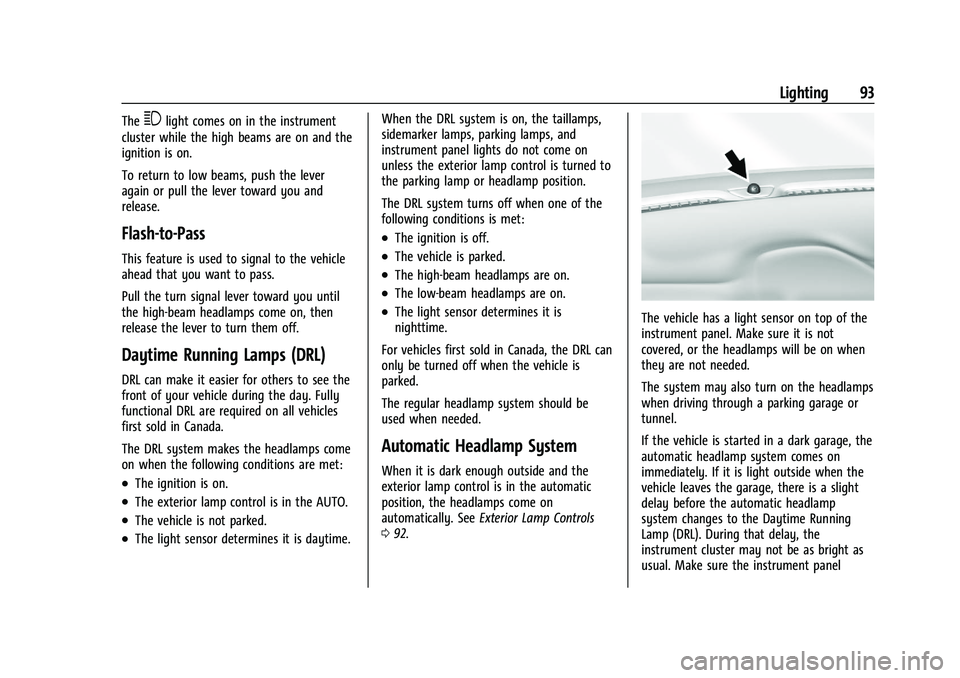
The vehicle has a light sensor on top of the
instrument panel. Make sure it is not
covered, or the headlamps will be on when
they are not needed.
The system may also turn on the headlamps
when driving through a parking garage or
tunnel.
If the vehicle is started in a dark garage, the
automatic headlamp system comes on
immediately. If it is light outside when the
vehicle leaves the garage, there is a slight
delay before the automatic headlamp
system changes to the Daytime Running
Lamp (DRL). During that delay, the
instrument cluster may not be as bright as
usual. Make sure the instrument panel
Page 95 of 270
Chevrolet Spark Owner Manual (GMNA-Localizing-U.S./Canada-14622955) -
2021 - CRC - 8/17/20
94 Lighting
brightness control is in the full bright
position. SeeInstrument Panel Illumination
Control 095.
When it is bright enough outside, the
headlamps will turn off or may change
to DRL.
The automatic headlamp system turns off
when the exterior lamp control or the
ignition is off.
Lights On with Wipers
If the windshield wipers are activated in
daylight with the vehicle on, and the
exterior lamp control is in AUTO, the
headlamps, parking lamps, and other
exterior lamps come on. The transition time
for the lamps coming on varies based on
wiper speed. When the wipers are not
operating, these lamps turn off. Move the
exterior lamp control to
Por;to
disable this feature.
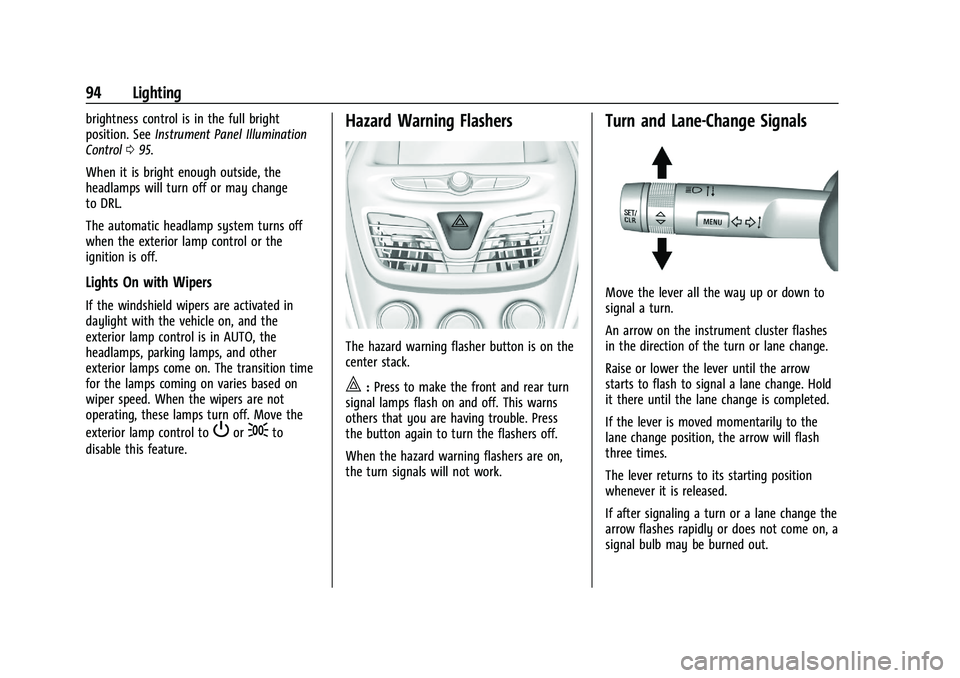
Hazard Warning Flashers
The hazard warning flasher button is on the
center stack.
|: Press to make the front and rear turn
signal lamps flash on and off. This warns
others that you are having trouble. Press
the button again to turn the flashers off.
When the hazard warning flashers are on,
the turn signals will not work.
Turn and Lane-Change Signals
Move the lever all the way up or down to
signal a turn.
An arrow on the instrument cluster flashes
in the direction of the turn or lane change.
Raise or lower the lever until the arrow
starts to flash to signal a lane change. Hold
it there until the lane change is completed.
If the lever is moved momentarily to the
lane change position, the arrow will flash
three times.
The lever returns to its starting position
whenever it is released.
If after signaling a turn or a lane change the
arrow flashes rapidly or does not come on, a
signal bulb may be burned out.
Page 96 of 270
Chevrolet Spark Owner Manual (GMNA-Localizing-U.S./Canada-14622955) -
2021 - CRC - 8/17/20
Lighting 95
Replace any burned out bulbs. If a bulb is
not burned out, check the fuse. SeeFuses
and Circuit Breakers 0185.
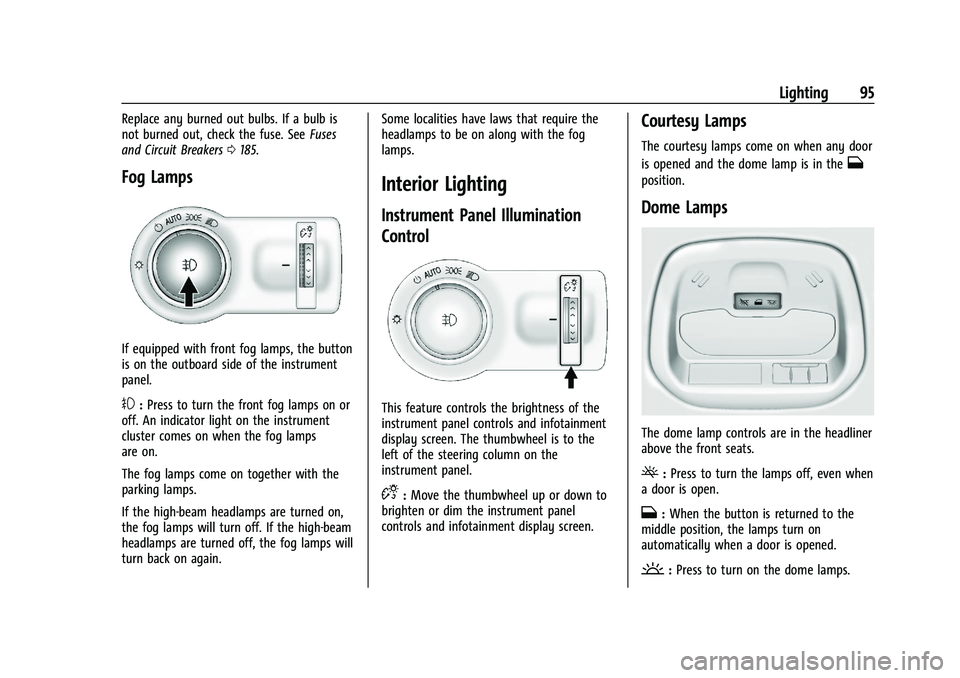
Fog Lamps
If equipped with front fog lamps, the button
is on the outboard side of the instrument
panel.
#:Press to turn the front fog lamps on or
off. An indicator light on the instrument
cluster comes on when the fog lamps
are on.
The fog lamps come on together with the
parking lamps.
If the high-beam headlamps are turned on,
the fog lamps will turn off. If the high-beam
headlamps are turned off, the fog lamps will
turn back on again. Some localities have laws that require the
headlamps to be on along with the fog
lamps.
Interior Lighting
Instrument Panel Illumination
Control
This feature controls the brightness of the
instrument panel controls and infotainment
display screen. The thumbwheel is to the
left of the steering column on the
instrument panel.
D:
Move the thumbwheel up or down to
brighten or dim the instrument panel
controls and infotainment display screen.
Courtesy Lamps
The courtesy lamps come on when any door
is opened and the dome lamp is in the
H
position.
Dome Lamps
The dome lamp controls are in the headliner
above the front seats.
(: Press to turn the lamps off, even when
a door is open.
H: When the button is returned to the
middle position, the lamps turn on
automatically when a door is opened.
': Press to turn on the dome lamps.
Page 98 of 270
Chevrolet Spark Owner Manual (GMNA-Localizing-U.S./Canada-14622955) -
2021 - CRC - 8/17/20
Infotainment System 97
Infotainment System
Introduction
Introduction . . . . . . . . . . . . . . . . . . . . . . . . . . . . 97
Overview . . . . . . . . . . . . . . . . . . . . . . . . . . . . . . . 98
Using the System . . . . . . . . . . . . . . . . . . . . . . 99
Radio
AM-FM Radio . . . . . . . . . . . . . . . . . . . . . . . . . . 101
Satellite Radio . . . . . . . . . . . . . . . . . . . . . . . . . 103
Radio Reception . . . . . . . . . . . . . . . . . . . . . . . 103
Multi-Band Antenna . . . . . . . . . . . . . . . . . . . 103
Audio Players
Avoiding Untrusted Media Devices . . . . 103
USB Port . . . . . . . . . . . . . . . . . . . . . . . . . . . . . . 103
Auxiliary Jack . . . . . . . . . . . . . . . . . . . . . . . . . . 106
Bluetooth Audio . . . . . . . . . . . . . . . . . . . . . . . 106
OnStar System
OnStar System . . . . . . . . . . . . . . . . . . . . . . . . 107
Phone
Bluetooth (Overview) . . . . . . . . . . . . . . . . . . 108
Bluetooth (Pairing and Using aPhone) . . . . . . . . . . . . . . . . . . . . . . . . . . . . . . 109
Apple CarPlay and Android Auto . . . . . . . 112
Settings
Settings . . . . . . . . . . . . . . . . . . . . . . . . . . . . . . . . 113
Trademarks and License Agreements
Trademarks and License Agreements . . . 117Introduction
Read the following pages to become familiar
with the features.
{Warning
Taking your eyes off the road for too
long or too often while using any
infotainment feature can cause a crash.
You or others could be injured or killed.
Do not give extended attention to
infotainment tasks while driving. Limit
your glances at the vehicle displays and
focus your attention on driving. Use voice
commands whenever possible.
The infotainment system has built-in
features intended to help avoid distraction
by disabling some functions when driving.
These functions may gray out when they
are unavailable. Many infotainment features
are also available through the instrument
cluster and steering wheel controls.
Before driving:
.Become familiar with the operation,
center stack controls, and infotainment
display controls.
Page 113 of 270
Chevrolet Spark Owner Manual (GMNA-Localizing-U.S./Canada-14622955) -
2021 - CRC - 8/17/20
112 Infotainment System
Accepting a Call
There are three ways to accept a call:
.Pressb/gon the steering wheel
controls.
.Touch Answer on the infotainment
display.
.Select Answer on the instrument cluster
using the select control.
Declining a Call
There are three ways to decline a call:
.Press$/ion the steering wheel
controls.
.Touch Ignore on the infotainment display.
.Select Ignore on the instrument cluster
using the select control.
Call Waiting
Call waiting must be supported on the
Bluetooth phone and enabled by the
wireless service carrier to work.
Accepting a Call
There are three ways to accept a
call-waiting call:
.Pressb/gon the steering wheel
controls.
.Touch Switch on the infotainment display.
.Select Switch on the instrument cluster
using the select control.
Declining a Call
There are three ways to decline a
call-waiting call:
.Press$/ion the steering wheel
controls.
.Touch Ignore on the infotainment display.
.Select Ignore on the instrument cluster
using the select control.
Switching Between Calls (Call Waiting
Calls Only)
To switch between calls, press the Phone
icon on the Home Page to display Call View.
While in Call View, touch the call
information of the call on hold to change
calls.
Three-Way Calling
Three-way calling must be supported on the
Bluetooth phone and enabled by the
wireless service carrier to work.
To start a three-way call while in a
current call: 1. In the Call View, touch Add Call to add another call. 2. Initiate the second call by selecting from
Recents, Contacts, or Keypad.
3. When the second call is active, touch the merge icon to conference the three-way
call together.
Ending a Call
.Press$/ion the steering wheel
controls.
.Touch#on the infotainment display,
next to a call to end only that call.
.Select End on the instrument cluster using
the select control.
Dual Tone Multi-Frequency (DTMF) Tones
The in-vehicle Bluetooth system can send
numbers during a call. This is used when
calling a menu-driven phone system. Use the
Keypad to enter the number.
Apple CarPlay and Android Auto
If equipped, Android Auto and/or Apple
CarPlay capability may be available through
a compatible smartphone. If available, the
Android Auto and Apple CarPlay icons will
appear on the Home Page of the
infotainment display.
Page 117 of 270
Chevrolet Spark Owner Manual (GMNA-Localizing-U.S./Canada-14622955) -
2021 - CRC - 8/17/20
116 Infotainment System
.Erase Settings and Personal Data: Erases
app data settings, user profiles, and
personal data including mobile
device data.
Touch Cancel or Erase.
Apps
The menu may contain the following:
Android Auto
This feature allows you to interact directly
with your phone on the infotainment
display. SeeApple CarPlay and Android Auto
0 112.
Touch Off or On.
Apple CarPlay
This feature allows you to interact directly
with your phone on the infotainment
display. See Apple CarPlay and Android Auto
0 112.
Touch Off or On. Audio
Depending on the current audio source,
different options will be available.
Touch and the following may display:
.Tone Settings: Touch to adjust Equalizer,
Fade/Balance, or Sound Mode. See
“Infotainment System Sound Menu”
in
AM-FM Radio 0101.
.Auto Volume: This feature adjusts the
volume based on the vehicle speed.
Touch Off, Low, Medium-Low, Medium,
Medium-High, or High.
.Manage Favorites: Touch to display a list
of Audio or Mobile Devices favorites.
Favorites can be moved, renamed,
or deleted.
To move, touch and hold the favorite, and
then drag up or down to rearrange the
position.
.Set Number of Audio Favorites: Touch to
select how many favorites pages can be
viewed from the audio application. The
Auto setting will automatically adjust this
number based on the number of favorites
saved. Touch Auto, 5, 10, 15, 20, 25, 30,
35, or 40.
.RDS: This allows RDS to be turned off
or on.
Touch Off or On.
.Explicit Content Filter: This allows Explicit
Content Filter to be turned off or on.
Touch Off or On.
.Manage Phones: Select to connect to a
different phone source, disconnect a
phone, or delete a phone.
.Reset Music Index: This allows the music
index to be reset if you are having
difficulty accessing all of the media
content on your device.
Touch YES or NO.
Phone
Touch and the following may display:
.My Number: Displays the cell phone
number of the Bluetooth connected
device.
.Active Call View: Shows active call display
when answering a call.
Touch Off or On.
.Privacy: Only shows call alerts in the
instrument cluster.
Touch Off or On.
.Sort Contacts: Touch to sort by first or
last name.
Page 137 of 270
Chevrolet Spark Owner Manual (GMNA-Localizing-U.S./Canada-14622955) -
2021 - CRC - 8/17/20
136 Driving and Operating
If the key is left in ACC/ACCESSORY with the
engine off, the battery could drain and the
vehicle may not start.
A warning chime will sound when the driver
door is opened and the key is in the
ignition.
2 (ON/RUN) :This position can be used to
operate the electrical accessories and to
display some instrument cluster warning
and indicator lights. This position can also
be used for service and diagnostics, and to
verify the proper operation of the
malfunction indicator lamp as may be
required for emission inspection purposes.
The switch stays in this position when the
engine is running. The transmission is also
unlocked in this position on automatic
transmission vehicles.
If the key is left in ON/RUN with the engine
off, the battery could drain and the vehicle
may not start.
3 (START) : This is the position that starts
the engine. When the engine starts, release
the key. The ignition returns to ON/RUN for
driving.Ignition Positions (Keyless Access)
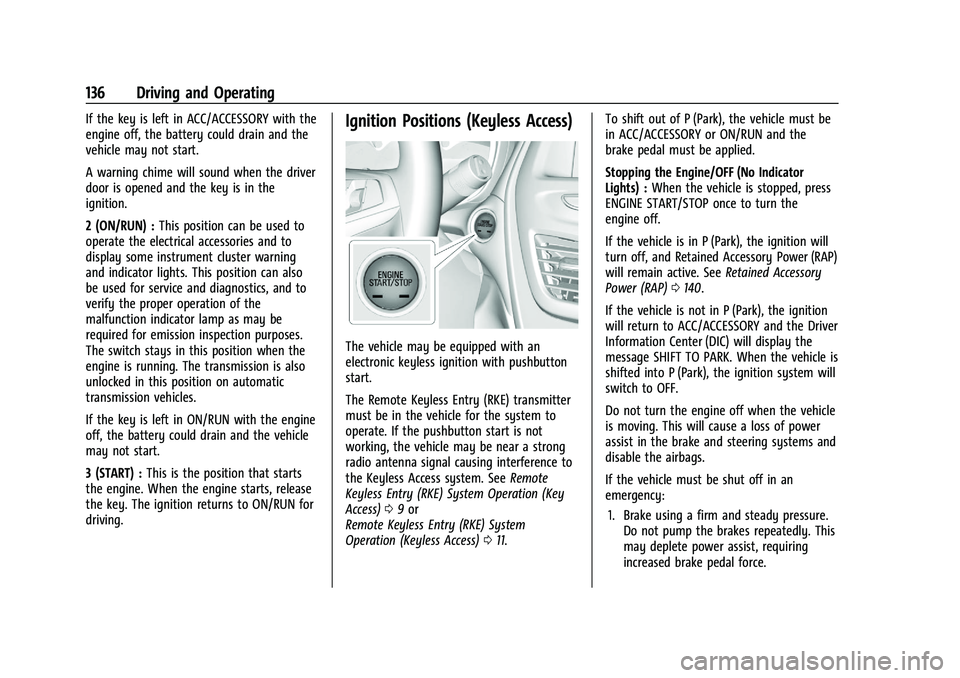
The vehicle may be equipped with an
electronic keyless ignition with pushbutton
start.
The Remote Keyless Entry (RKE) transmitter
must be in the vehicle for the system to
operate. If the pushbutton start is not
working, the vehicle may be near a strong
radio antenna signal causing interference to
the Keyless Access system. See Remote
Keyless Entry (RKE) System Operation (Key
Access) 09or
Remote Keyless Entry (RKE) System
Operation (Keyless Access) 011. To shift out of P (Park), the vehicle must be
in ACC/ACCESSORY or ON/RUN and the
brake pedal must be applied.
Stopping the Engine/OFF (No Indicator
Lights) :
When the vehicle is stopped, press
ENGINE START/STOP once to turn the
engine off.
If the vehicle is in P (Park), the ignition will
turn off, and Retained Accessory Power (RAP)
will remain active. See Retained Accessory
Power (RAP) 0140.
If the vehicle is not in P (Park), the ignition
will return to ACC/ACCESSORY and the Driver
Information Center (DIC) will display the
message SHIFT TO PARK. When the vehicle is
shifted into P (Park), the ignition system will
switch to OFF.
Do not turn the engine off when the vehicle
is moving. This will cause a loss of power
assist in the brake and steering systems and
disable the airbags.
If the vehicle must be shut off in an
emergency: 1. Brake using a firm and steady pressure. Do not pump the brakes repeatedly. This
may deplete power assist, requiring
increased brake pedal force.