parking brake CHEVROLET SPARK 2021 Owner's Manual
[x] Cancel search | Manufacturer: CHEVROLET, Model Year: 2021, Model line: SPARK, Model: CHEVROLET SPARK 2021Pages: 270, PDF Size: 8.19 MB
Page 6 of 270
Chevrolet Spark Owner Manual (GMNA-Localizing-U.S./Canada-14622955) -
2021 - CRC - 8/17/20
Introduction 5
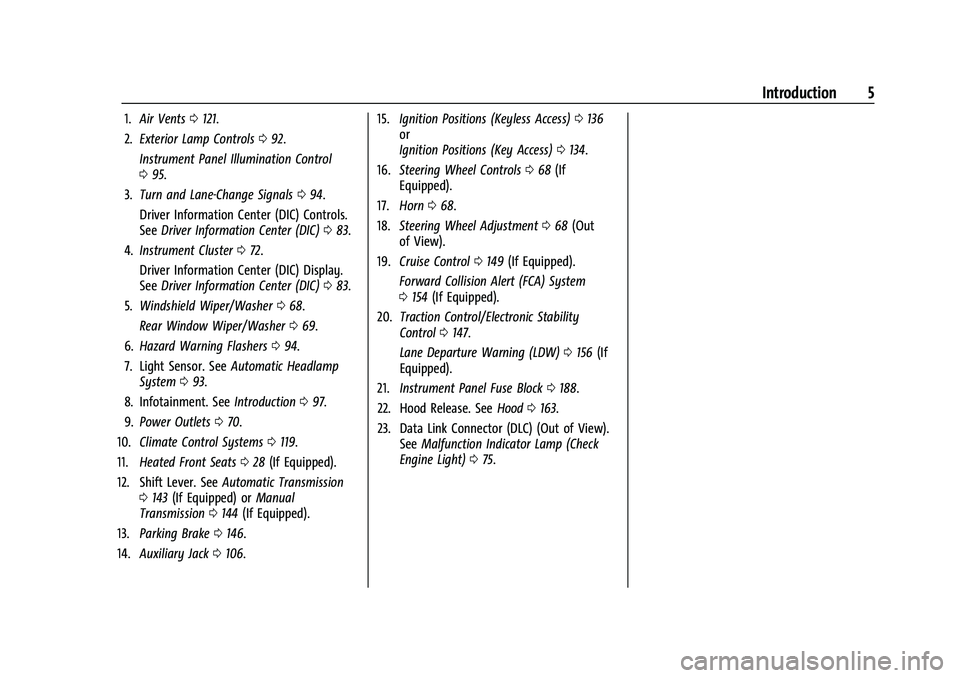
1.Air Vents 0121.
2. Exterior Lamp Controls 092.
Instrument Panel Illumination Control
0 95.
3. Turn and Lane-Change Signals 094.
Driver Information Center (DIC) Controls.
See Driver Information Center (DIC) 083.
4. Instrument Cluster 072.
Driver Information Center (DIC) Display.
See Driver Information Center (DIC) 083.
5. Windshield Wiper/Washer 068.
Rear Window Wiper/Washer 069.
6. Hazard Warning Flashers 094.
7. Light Sensor. See Automatic Headlamp
System 093.
8. Infotainment. See Introduction097.
9. Power Outlets 070.
10. Climate Control Systems 0119.
11. Heated Front Seats 028 (If Equipped).
12. Shift Lever. See Automatic Transmission
0 143 (If Equipped) or Manual
Transmission 0144 (If Equipped).
13. Parking Brake 0146.
14. Auxiliary Jack 0106. 15.
Ignition Positions (Keyless Access) 0136
or
Ignition Positions (Key Access) 0134.
16. Steering Wheel Controls 068 (If
Equipped).
17. Horn 068.
18. Steering Wheel Adjustment 068 (Out
of View).
19. Cruise Control 0149 (If Equipped).
Forward Collision Alert (FCA) System
0 154 (If Equipped).
20. Traction Control/Electronic Stability
Control 0147.
Lane Departure Warning (LDW) 0156 (If
Equipped).
21. Instrument Panel Fuse Block 0188.
22. Hood Release. See Hood0163.
23. Data Link Connector (DLC) (Out of View). SeeMalfunction Indicator Lamp (Check
Engine Light) 075.
Page 68 of 270
Chevrolet Spark Owner Manual (GMNA-Localizing-U.S./Canada-14622955) -
2021 - CRC - 8/17/20
Instruments and Controls 67
Instruments and Controls
Controls
Steering Wheel Adjustment . . . . . . . . . . . . 68
Steering Wheel Controls . . . . . . . . . . . . . . . 68
Horn . . . . . . . . . . . . . . . . . . . . . . . . . . . . . . . . . . . 68
Windshield Wiper/Washer . . . . . . . . . . . . . 68
Rear Window Wiper/Washer . . . . . . . . . . . 69
Compass . . . . . . . . . . . . . . . . . . . . . . . . . . . . . . . 70
Clock . . . . . . . . . . . . . . . . . . . . . . . . . . . . . . . . . . . 70
Power Outlets . . . . . . . . . . . . . . . . . . . . . . . . . . 70
Warning Lights, Gauges, and Indicators
Warning Lights, Gauges, andIndicators . . . . . . . . . . . . . . . . . . . . . . . . . . . . . 71
Instrument Cluster . . . . . . . . . . . . . . . . . . . . . . 72
Speedometer . . . . . . . . . . . . . . . . . . . . . . . . . . . 72
Odometer . . . . . . . . . . . . . . . . . . . . . . . . . . . . . . 72
Trip Odometer . . . . . . . . . . . . . . . . . . . . . . . . . . 72
Tachometer . . . . . . . . . . . . . . . . . . . . . . . . . . . . . 72
Fuel Gauge . . . . . . . . . . . . . . . . . . . . . . . . . . . . . 73
Seat Belt Reminders . . . . . . . . . . . . . . . . . . . . 73
Airbag Readiness Light . . . . . . . . . . . . . . . . . 74
Passenger Airbag Status Indicator . . . . . . 74
Charging System Light . . . . . . . . . . . . . . . . . . 75
Malfunction Indicator Lamp (Check Engine Light) . . . . . . . . . . . . . . . . . . . . . . . . . . 75
Service Vehicle Soon Light . . . . . . . . . . . . . . 77
Owner Manual Indicator . . . . . . . . . . . . . . . . 77
Brake System Warning Light . . . . . . . . . . . . 77 Antilock Brake System (ABS) Warning
Light . . . . . . . . . . . . . . . . . . . . . . . . . . . . . . . . . . 78
Operate Pedal Light . . . . . . . . . . . . . . . . . . . . 78
Up-Shift Light . . . . . . . . . . . . . . . . . . . . . . . . . . . 78
Power Steering Warning Light . . . . . . . . . . 78
Lane Departure Warning (LDW) Light . . . 78
Vehicle Ahead Indicator . . . . . . . . . . . . . . . . 79
Ultrasonic Parking Sensor Light . . . . . . . . . 79
Traction Off Light . . . . . . . . . . . . . . . . . . . . . . 79
StabiliTrak OFF Light . . . . . . . . . . . . . . . . . . . . 79
Traction Control System (TCS)/StabiliTrak Light . . . . . . . . . . . . . . . . . . . . . . . . . . . . . . . . . 80
Engine Coolant Temperature Warning Light . . . . . . . . . . . . . . . . . . . . . . . . . . . . . . . . . 80
Tire Pressure Light . . . . . . . . . . . . . . . . . . . . . 80
Engine Oil Pressure Light . . . . . . . . . . . . . . . 81
Low Fuel Warning Light . . . . . . . . . . . . . . . . 81
Immobilizer Light . . . . . . . . . . . . . . . . . . . . . . . 81
Reduced Engine Power Light . . . . . . . . . . . . 82
High-Beam On Light . . . . . . . . . . . . . . . . . . . . 82
Front Fog Lamp Light . . . . . . . . . . . . . . . . . . . 82
Lamps On Reminder . . . . . . . . . . . . . . . . . . . . 82
Cruise Control Light . . . . . . . . . . . . . . . . . . . . 82
Hood Ajar Light . . . . . . . . . . . . . . . . . . . . . . . . 83
Door Ajar Light . . . . . . . . . . . . . . . . . . . . . . . . . 83
Information Displays
Driver Information Center (DIC) . . . . . . . . . 83
Vehicle Messages
Vehicle Messages (Base Level Cluster) . . . . . . . . . . . . . . . . . . . . . . . . . . . . . . . 87
Vehicle Messages (Uplevel Cluster) . . . . . 88
Engine Power Messages . . . . . . . . . . . . . . . . 88
Vehicle Speed Messages . . . . . . . . . . . . . . . . 88
Vehicle Personalization
Vehicle Personalization . . . . . . . . . . . . . . . . . 88
Page 78 of 270
Chevrolet Spark Owner Manual (GMNA-Localizing-U.S./Canada-14622955) -
2021 - CRC - 8/17/20
Instruments and Controls 77
.Critical emission control systems have not
been completely diagnosed. If this
happens, the vehicle would not be ready
for inspection and might require
several days of routine driving before the
system is ready for inspection. This can
happen if the 12-volt battery has recently
been replaced or run down, or if the
vehicle has been recently serviced.
See your dealer if the vehicle will not pass
or cannot be made ready for the test.
Service Vehicle Soon Light
For vehicles with this light, it comes on if a
condition exists that may require the vehicle
to be taken in for service.
If the light comes on, take the vehicle to
your dealer for service as soon as possible.
Owner Manual Indicator
This symbol is shown when you need to see
the owner’s manual for additional
instructions or information.
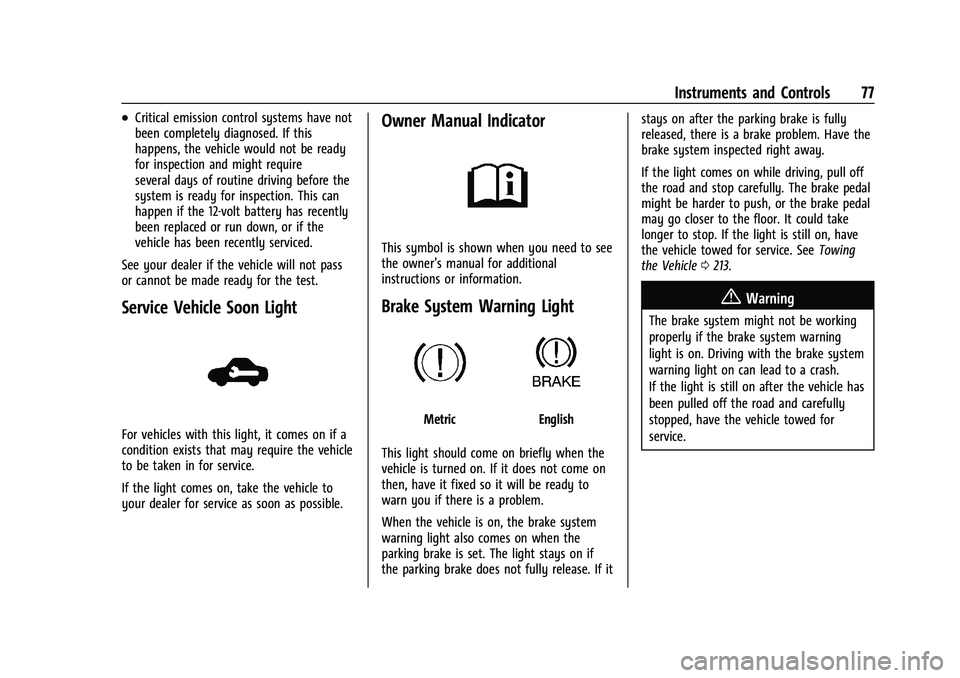
Brake System Warning Light
MetricEnglish
This light should come on briefly when the
vehicle is turned on. If it does not come on
then, have it fixed so it will be ready to
warn you if there is a problem.
When the vehicle is on, the brake system
warning light also comes on when the
parking brake is set. The light stays on if
the parking brake does not fully release. If it stays on after the parking brake is fully
released, there is a brake problem. Have the
brake system inspected right away.
If the light comes on while driving, pull off
the road and stop carefully. The brake pedal
might be harder to push, or the brake pedal
may go closer to the floor. It could take
longer to stop. If the light is still on, have
the vehicle towed for service. See
Towing
the Vehicle 0213.
{Warning
The brake system might not be working
properly if the brake system warning
light is on. Driving with the brake system
warning light on can lead to a crash.
If the light is still on after the vehicle has
been pulled off the road and carefully
stopped, have the vehicle towed for
service.
Page 90 of 270

Chevrolet Spark Owner Manual (GMNA-Localizing-U.S./Canada-14622955) -
2021 - CRC - 8/17/20
Instruments and Controls 89
2. Touch Vehicle to display a list ofavailable options.
3. Touch to select the desired feature setting.
4. Touch
9orRto turn a feature off or on.
5. Touch
zto go to the top level of the
Settings menu.
The menu may contain the following:
Vehicle
The menu may contain the following:
Rear Seat Reminder
This allows for a chime and a message when
the rear door has been opened before or
during operation of the vehicle.
Touch Off or On.
Collision / Detection Systems
Touch and the following may display:
.Park Assist
.Forward Collision System
Park Assist
This feature can assist in backing up and
parking the vehicle. See Park Assist0153.
Touch Off or On. Forward Collision System
This setting controls the vehicle response
when detecting a vehicle ahead of you. The
Off setting disables all FCA and AEB
functions. With the Alert and Brake setting,
both FCA and AEB are available. The Alert
setting disables AEB. See
Automatic
Emergency Braking (AEB) 0155.
Touch Off, Alert, or Alert and Brake.
Comfort and Convenience
Touch and the following may display:
.Chime Volume
.Auto Wipe in Reverse Gear
Chime Volume
This allows the selection of the chime
volume level.
Touch the controls on the infotainment
display to adjust the volume.
Auto Wipe in Reverse Gear
When on and the front wiper is on, the rear
wiper will automatically activate when the
vehicle is shifted to R (Reverse).
Touch Off or On.
Lighting
Touch and the following may display:
.Vehicle Locator Lights
.Exit Lighting
Vehicle Locator Lights
This feature will flash the exterior lamps and
allows some exterior lamps and most
interior lamps to turn on briefly when
Kon
the Remote Keyless Entry (RKE) transmitter
is pressed to locate the vehicle.
Touch Off or On.
Exit Lighting
This allows the selection of how long the
exterior lamps stay on when leaving the
vehicle when it is dark outside.
Touch Off, 30 Seconds, 60 Seconds,
or 120 Seconds.
Power Door Locks
Touch and the following may display:
.Open Door Anti Lock Out
.Auto Door Unlock
.Delayed Door Lock
Page 125 of 270
Chevrolet Spark Owner Manual (GMNA-Localizing-U.S./Canada-14622955) -
2021 - CRC - 8/17/20
124 Driving and Operating
Driving and Operating
Driving Information
Driving for Better Fuel Economy . . . . . . . 125
Distracted Driving . . . . . . . . . . . . . . . . . . . . . . 125
Defensive Driving . . . . . . . . . . . . . . . . . . . . . . 125
Impaired Driving . . . . . . . . . . . . . . . . . . . . . . . 126
Control of a Vehicle . . . . . . . . . . . . . . . . . . . 126
Braking . . . . . . . . . . . . . . . . . . . . . . . . . . . . . . . . 126
Steering . . . . . . . . . . . . . . . . . . . . . . . . . . . . . . . 126
Off-Road Recovery . . . . . . . . . . . . . . . . . . . . . 127
Loss of Control . . . . . . . . . . . . . . . . . . . . . . . . . 127
Driving on Wet Roads . . . . . . . . . . . . . . . . . 128
Hill and Mountain Roads . . . . . . . . . . . . . . 129
Winter Driving . . . . . . . . . . . . . . . . . . . . . . . . . 129
If the Vehicle Is Stuck . . . . . . . . . . . . . . . . . 130
Vehicle Load Limits . . . . . . . . . . . . . . . . . . . . . 131
Starting and Operating
New Vehicle Break-In . . . . . . . . . . . . . . . . . . 134
Ignition Positions (Key Access) . . . . . . . . . 134
Ignition Positions (Keyless Access) . . . . . 136
Starting the Engine . . . . . . . . . . . . . . . . . . . . 137
Engine Heater . . . . . . . . . . . . . . . . . . . . . . . . . 139
Retained Accessory Power (RAP) . . . . . . . 140
Shifting Into Park . . . . . . . . . . . . . . . . . . . . . 140
Shifting out of Park . . . . . . . . . . . . . . . . . . . . 141
Parking (Manual Transmission) . . . . . . . . . 141
Parking over Things That Burn . . . . . . . . . 142
Extended Parking . . . . . . . . . . . . . . . . . . . . . . 142
Engine Exhaust
Engine Exhaust . . . . . . . . . . . . . . . . . . . . . . . . 142
Running the Vehicle While Parked . . . . . 142
Automatic Transmission
Automatic Transmission . . . . . . . . . . . . . . . 143
Manual Transmission
Manual Transmission . . . . . . . . . . . . . . . . . . 144
Brakes
Antilock Brake System (ABS) . . . . . . . . . . 146
Parking Brake . . . . . . . . . . . . . . . . . . . . . . . . . 146
Brake Assist . . . . . . . . . . . . . . . . . . . . . . . . . . . 147
Hill Start Assist (HSA) . . . . . . . . . . . . . . . . . . 147
Ride Control Systems
Traction Control/Electronic StabilityControl . . . . . . . . . . . . . . . . . . . . . . . . . . . . . . 147
Cruise Control
Cruise Control . . . . . . . . . . . . . . . . . . . . . . . . . 149
Driver Assistance Systems
Driver Assistance Systems . . . . . . . . . . . . . . 151
Rear Vision Camera (RVC) . . . . . . . . . . . . . . 152
Park Assist . . . . . . . . . . . . . . . . . . . . . . . . . . . . . 153
Forward Collision Alert (FCA)System . . . . . . . . . . . . . . . . . . . . . . . . . . . . . . 154
Automatic Emergency Braking (AEB) . . . 155
Lane Departure Warning (LDW) . . . . . . . . 156
Fuel
Top Tier Fuel . . . . . . . . . . . . . . . . . . . . . . . . . . . 157
Recommended Fuel . . . . . . . . . . . . . . . . . . . . 157
Prohibited Fuels . . . . . . . . . . . . . . . . . . . . . . . . 157
Fuels in Foreign Countries . . . . . . . . . . . . . 158
Fuel Additives . . . . . . . . . . . . . . . . . . . . . . . . . 158
Filling the Tank . . . . . . . . . . . . . . . . . . . . . . . . 158
Filling a Portable Fuel Container . . . . . . . 160
Trailer Towing
General Towing Information . . . . . . . . . . . 160
Conversions and Add-Ons
Add-On Electrical Equipment . . . . . . . . . . 160
Page 127 of 270

Chevrolet Spark Owner Manual (GMNA-Localizing-U.S./Canada-14622955) -
2021 - CRC - 8/17/20
126 Driving and Operating
.Assume that other road users
(pedestrians, bicyclists, and other drivers)
are going to be careless and make
mistakes. Anticipate what they may do
and be ready.
.Allow enough following distance between
you and the driver in front of you.
.Focus on the task of driving.
Impaired Driving
Death and injury associated with impaired
driving is a global tragedy.
{Warning
Drinking alcohol or taking drugs and then
driving is very dangerous. Your reflexes,
perceptions, attentiveness, and judgment
can be affected by even a small amount
of alcohol or drugs. You can have a
serious—or even fatal —collision if you
drive after drinking or taking drugs.
Do not drive while under the influence of
alcohol or drugs, or ride with a driver
who has been drinking or is impaired by
drugs. Find alternate transportation
home; or if you are with a group,
designate a driver who will remain sober.
Control of a Vehicle
Braking, steering, and accelerating are
important factors in helping to control a
vehicle while driving.
Braking
Braking action involves perception time and
reaction time. Deciding to push the brake
pedal is perception time. Actually doing it is
reaction time.
Average driver reaction time is about
three-quarters of a second. In that time, a
vehicle moving at 100 km/h (60 mph) travels
20 m (66 ft), which could be a lot of
distance in an emergency.
Helpful braking tips to keep in mind include:
.Keep enough distance between you and
the vehicle in front of you.
.Avoid needless heavy braking.
.Keep pace with traffic.
If the engine ever stops while the vehicle is
being driven, brake normally but do not
pump the brakes. Doing so could make the
pedal harder to push down. If the engine
stops, there will be some power brake assist
but it will be used when the brake is applied. Once the power assist is used up, it
can take longer to stop and the brake pedal
will be harder to push.
Steering
Caution
To avoid damage to the steering system,
do not drive over curbs, parking barriers,
or similar objects at speeds greater than
3 km/h (1 mph). Use care when driving
over other objects such as lane dividers
and speed bumps. Damage caused by
misuse of the vehicle is not covered by
the vehicle warranty.
Page 135 of 270

Chevrolet Spark Owner Manual (GMNA-Localizing-U.S./Canada-14622955) -
2021 - CRC - 8/17/20
134 Driving and Operating
Starting and Operating
New Vehicle Break-In
Caution
The vehicle does not need an elaborate
break-in. But it will perform better in the
long run if you follow these guidelines:
.Do not drive at any one constant
speed, fast or slow, for the first
805 km (500 mi). Do not make
full-throttle starts. Avoid downshifting
to brake or slow the vehicle.
.Avoid making hard stops for the first
322 km (200 mi) or so. During this
time the new brake linings are not yet
broken in. Hard stops with new linings
can mean premature wear and earlier
replacement. Follow this breaking-in
guideline every time you get new
brake linings.
Following break-in, engine speed and load
can be gradually increased.
Ignition Positions (Key Access)
0. Stopping the Engine/LOCK/OFF
1. ACC/ACCESSORY
2. ON/RUN
3. START
The ignition switch has four positions.
To shift out of P (Park) with an automatic
transmission, the ignition must be in ON/
RUN and the brake pedal must be applied. 0 (Stopping the Engine/LOCK/OFF) :
This
position turns off the vehicle. It also locks
the ignition, the transmission on an
automatic transmission vehicle, and the
steering column, if equipped with a locking
steering column.
To turn off the vehicle:
1. Make sure that the vehicle is stopped.
2. Shift to P (Park) with an automatic transmission, or Neutral with a manual
transmission.
3. Continue to hold the brake pedal, then set the parking brake. See Parking Brake
0 146.
Page 136 of 270

Chevrolet Spark Owner Manual (GMNA-Localizing-U.S./Canada-14622955) -
2021 - CRC - 8/17/20
Driving and Operating 135
4. Push the key all the way in toward thesteering column (1), then turn the key to
LOCK/OFF (2).
5. Remove the key.
6. Release the brake pedal.
See your dealer if the key can be removed
in any other position.
Retained Accessory Power (RAP) will remain
active. See Retained Accessory Power (RAP)
0 140.
A warning chime will sound when the driver
door is opened and the key is in the
ignition.
If equipped with a locking steering column,
the steering can bind with the front wheels
turned off center, which may prevent key
rotation out of LOCK/OFF. If this happens,
move the steering wheel from right to left
while turning the key to ACC/ACCESSORY.
If this does not work, then the vehicle needs
service.{Warning
Turning off the vehicle while moving may
cause loss of power assist in the brake
and steering systems and disable the
airbags. While driving, turn off the
vehicle only in an emergency.
In an emergency, if the vehicle cannot be
pulled over and must be turned off while
driving: 1. Push the key all the way in toward the steering column, then turn the key to
ACC/ACCESSORY.
2. Brake using firm and steady pressure. Do not pump the brakes repeatedly. This
may deplete power assist, requiring
increased brake pedal force.
3. Shift the vehicle to N (Neutral). This can be done while the vehicle is moving.
Continue braking and steer the vehicle to
a safe location.
4. Come to a complete stop.
5. Shift to P (Park) with an automatic transmission, or Neutral with a manual
transmission. 6. Continue to hold the brake pedal, then
set the parking brake. See Parking Brake
0 146.
7. Push the key all the way in toward the steering column, then turn the ignition
to LOCK/OFF.
8. Remove the key.
9. Release the brake pedal.
Caution
Use the correct key, make sure it is all
the way in —or pushed all the way in
toward the steering column when turning
off the vehicle —and turn it only with
your hand.
1 (ACC/ACCESSORY) : This position allows
features such as the infotainment system to
operate while the vehicle is off. It also
unlocks the steering column, if equipped
with a locking steering column. Use this
position if the vehicle must be pushed or
towed. See Retained Accessory Power (RAP)
0 140.
From ON/RUN, push the key all the way in
toward the steering column, then turn the
key to ACC/ACCESSORY.
Page 138 of 270

Chevrolet Spark Owner Manual (GMNA-Localizing-U.S./Canada-14622955) -
2021 - CRC - 8/17/20
Driving and Operating 137
2. Shift the vehicle to N (Neutral). This canbe done while the vehicle is moving.
After shifting to N (Neutral), firmly apply
the brakes and steer the vehicle to a
safe location.
3. Come to a complete stop. Shift to P (Park) with an automatic transmission,
or Neutral with a manual transmission.
Turn the ignition to OFF.
4. Set the parking brake. See Parking Brake
0 146.
{Warning
Turning off the vehicle while moving may
cause loss of power assist in the brake
and steering systems and disable the
airbags. While driving, only shut the
vehicle off in an emergency.
If the vehicle cannot be pulled over, and
must be shut off while driving, press and
hold ENGINE START/STOP for longer than
two seconds, or press twice in five seconds.
ACC/ACCESSORY (Amber Indicator Light) :
This mode allows you to use some electrical
accessories when the engine is off. With the ignition off, pressing the button
one time without the brake pedal applied
will place the ignition system in ACC/
ACCESSORY.
The ignition will switch from ACC/
ACCESSORY to OFF after five minutes to
prevent battery rundown.
ON/RUN/START (Green Indicator Light) :
This
mode is for driving and starting. With the
ignition off, and the brake pedal applied,
pressing the button once will place the
ignition system in ON/RUN/START. Once
engine cranking begins, release the button.
Engine cranking will continue until the
engine starts. See Starting the Engine 0137.
The ignition will then remain in ON/RUN.
Service Mode
This power mode is available for service and
diagnostics, and to verify the proper
operation of the malfunction indicator lamp
as may be required for emission inspection
purposes. With the vehicle off, and the
brake pedal not applied, pressing and
holding the button for more than
five seconds will place the vehicle in Service
Mode. The instruments and audio systems
will operate as they do in ON/RUN, but the vehicle will not be able to be driven. The
engine will not start in Service Mode. Press
the button again to turn the vehicle off.
Starting the Engine
Place the transmission in the proper gear.
Caution
If you add electrical parts or accessories,
you could change the way the engine
operates. Any resulting damage would
not be covered by the vehicle warranty.
See
Add-On Electrical Equipment 0160.
Automatic Transmission
Move the shift lever to P (Park) or
N (Neutral). To restart the vehicle when it is
already moving, use N (Neutral) only.
Caution
Do not try to shift to P (Park) if the
vehicle is moving. If you do, you could
damage the transmission. Shift to P (Park)
only when the vehicle is stopped.
Page 139 of 270

Chevrolet Spark Owner Manual (GMNA-Localizing-U.S./Canada-14622955) -
2021 - CRC - 8/17/20
138 Driving and Operating
Manual Transmission
The shift lever should be in Neutral and the
parking brake engaged. Hold the clutch
pedal down to the floor, press the brake
pedal and start the engine.
Key Access1. With your foot off the accelerator pedal, turn the ignition key to START. When
the engine starts, let go of the key. The
idle speed will go down as the engine
warms. Do not race the engine
immediately after starting it. Allow the
oil to warm up and lubricate all moving
parts.
Caution
Cranking the engine for long periods of
time, by trying to start the engine
immediately after cranking has ended,
can overheat and damage the cranking
motor, and drain the battery. Wait at
least 15 seconds between each try, to let
the cranking motor cool down.
2. If the engine does not start after five to 10 seconds, especially in very cold
weather (below −18 °C or 0 °F), it could
be flooded with too much gasoline. Push
the accelerator pedal all the way to the floor and hold it there as you hold the
key in START for a maximum of
15 seconds. Wait at least 15 seconds
between each try, to allow the cranking
motor to cool. When the engine starts,
let go of the key and accelerator. If the
vehicle starts briefly but then stops
again, repeat the procedure. This clears
the extra gasoline from the engine. Do
not race the engine immediately after
starting it. Operate the engine and
transmission gently until the oil warms
up and lubricates all moving parts.
Keyless Access 1. With the Keyless Access system, the RKE transmitter must be in the vehicle. For
vehicles with an automatic transmission,
press the brake pedal, then press ENGINE
START/STOP on the instrument panel.
For vehicles with a manual transmission,
press the clutch pedal and the brake
pedal first, then press ENGINE
START/STOP.
The idle speed will go down as the
engine gets warm. Do not race the
engine immediately after starting it.
If the RKE transmitter is not in the
vehicle, if there is interference, or if the
RKE battery is low, a Driver Information Center (DIC) message will display. See
Driver Information Center (DIC)
083 and
Remote Keyless Entry (RKE) System
Operation (Key Access) 09or
Remote Keyless Entry (RKE) System
Operation (Keyless Access) 011.
Caution
Cranking the engine for long periods of
time, by trying to start the engine
immediately after cranking has ended,
can overheat and damage the cranking
motor, and drain the battery. Wait at
least 15 seconds between each try, to let
the cranking motor cool down.
2. If the engine does not start after five to 10 seconds, especially in very cold
weather (below −18 °C or 0 °F), it could
be flooded with too much gasoline. Try
pushing the accelerator pedal all the way
to the floor and holding it there as you
press ENGINE START/STOP, for up to a
maximum of 15 seconds. Wait at least
15 seconds between each try, to allow
the cranking motor to cool down. When
the engine starts, let go of the button
and the accelerator. If the vehicle starts
briefly but then stops again, do the
same thing. This clears the extra gasoline