brake light CHEVROLET SPARK 2022 User Guide
[x] Cancel search | Manufacturer: CHEVROLET, Model Year: 2022, Model line: SPARK, Model: CHEVROLET SPARK 2022Pages: 270, PDF Size: 8.57 MB
Page 137 of 270

Chevrolet Spark Owner Manual (GMNA-Localizing-U.S./Canada-14622955) -
2021 - CRC - 8/17/20
136 Driving and Operating
If the key is left in ACC/ACCESSORY with the
engine off, the battery could drain and the
vehicle may not start.
A warning chime will sound when the driver
door is opened and the key is in the
ignition.
2 (ON/RUN) :This position can be used to
operate the electrical accessories and to
display some instrument cluster warning
and indicator lights. This position can also
be used for service and diagnostics, and to
verify the proper operation of the
malfunction indicator lamp as may be
required for emission inspection purposes.
The switch stays in this position when the
engine is running. The transmission is also
unlocked in this position on automatic
transmission vehicles.
If the key is left in ON/RUN with the engine
off, the battery could drain and the vehicle
may not start.
3 (START) : This is the position that starts
the engine. When the engine starts, release
the key. The ignition returns to ON/RUN for
driving.Ignition Positions (Keyless Access)
The vehicle may be equipped with an
electronic keyless ignition with pushbutton
start.
The Remote Keyless Entry (RKE) transmitter
must be in the vehicle for the system to
operate. If the pushbutton start is not
working, the vehicle may be near a strong
radio antenna signal causing interference to
the Keyless Access system. See Remote
Keyless Entry (RKE) System Operation (Key
Access) 09or
Remote Keyless Entry (RKE) System
Operation (Keyless Access) 011. To shift out of P (Park), the vehicle must be
in ACC/ACCESSORY or ON/RUN and the
brake pedal must be applied.
Stopping the Engine/OFF (No Indicator
Lights) :
When the vehicle is stopped, press
ENGINE START/STOP once to turn the
engine off.
If the vehicle is in P (Park), the ignition will
turn off, and Retained Accessory Power (RAP)
will remain active. See Retained Accessory
Power (RAP) 0140.
If the vehicle is not in P (Park), the ignition
will return to ACC/ACCESSORY and the Driver
Information Center (DIC) will display the
message SHIFT TO PARK. When the vehicle is
shifted into P (Park), the ignition system will
switch to OFF.
Do not turn the engine off when the vehicle
is moving. This will cause a loss of power
assist in the brake and steering systems and
disable the airbags.
If the vehicle must be shut off in an
emergency: 1. Brake using a firm and steady pressure. Do not pump the brakes repeatedly. This
may deplete power assist, requiring
increased brake pedal force.
Page 138 of 270

Chevrolet Spark Owner Manual (GMNA-Localizing-U.S./Canada-14622955) -
2021 - CRC - 8/17/20
Driving and Operating 137
2. Shift the vehicle to N (Neutral). This canbe done while the vehicle is moving.
After shifting to N (Neutral), firmly apply
the brakes and steer the vehicle to a
safe location.
3. Come to a complete stop. Shift to P (Park) with an automatic transmission,
or Neutral with a manual transmission.
Turn the ignition to OFF.
4. Set the parking brake. See Parking Brake
0 146.
{Warning
Turning off the vehicle while moving may
cause loss of power assist in the brake
and steering systems and disable the
airbags. While driving, only shut the
vehicle off in an emergency.
If the vehicle cannot be pulled over, and
must be shut off while driving, press and
hold ENGINE START/STOP for longer than
two seconds, or press twice in five seconds.
ACC/ACCESSORY (Amber Indicator Light) :
This mode allows you to use some electrical
accessories when the engine is off. With the ignition off, pressing the button
one time without the brake pedal applied
will place the ignition system in ACC/
ACCESSORY.
The ignition will switch from ACC/
ACCESSORY to OFF after five minutes to
prevent battery rundown.
ON/RUN/START (Green Indicator Light) :
This
mode is for driving and starting. With the
ignition off, and the brake pedal applied,
pressing the button once will place the
ignition system in ON/RUN/START. Once
engine cranking begins, release the button.
Engine cranking will continue until the
engine starts. See Starting the Engine 0137.
The ignition will then remain in ON/RUN.
Service Mode
This power mode is available for service and
diagnostics, and to verify the proper
operation of the malfunction indicator lamp
as may be required for emission inspection
purposes. With the vehicle off, and the
brake pedal not applied, pressing and
holding the button for more than
five seconds will place the vehicle in Service
Mode. The instruments and audio systems
will operate as they do in ON/RUN, but the vehicle will not be able to be driven. The
engine will not start in Service Mode. Press
the button again to turn the vehicle off.
Starting the Engine
Place the transmission in the proper gear.
Caution
If you add electrical parts or accessories,
you could change the way the engine
operates. Any resulting damage would
not be covered by the vehicle warranty.
See
Add-On Electrical Equipment 0160.
Automatic Transmission
Move the shift lever to P (Park) or
N (Neutral). To restart the vehicle when it is
already moving, use N (Neutral) only.
Caution
Do not try to shift to P (Park) if the
vehicle is moving. If you do, you could
damage the transmission. Shift to P (Park)
only when the vehicle is stopped.
Page 146 of 270

Chevrolet Spark Owner Manual (GMNA-Localizing-U.S./Canada-14622955) -
2021 - CRC - 8/17/20
Driving and Operating 145
Caution (Continued)
a stop. Also, fully release the accelerator
pedal during gear changes. This will allow
the clutch to cool and should prevent
further clutch slip while the clutch pedal
is fully released. If this message displays
repeatedly, see your dealer. Repeated
clutch slip could cause permanent
damage.
1 : Press the clutch pedal and shift into
1 (First). Then, slowly let up on the clutch
pedal as you press the accelerator pedal.
If you have come to a complete stop and it
is hard to shift into 1 (First), put the shift
lever in Neutral and let up on the clutch.
Press the clutch pedal back down. Then shift
into 1 (First).
2 : Press the clutch pedal as you let up on
the accelerator pedal and shift into
2 (Second). Then, slowly let up on the clutch
pedal as you press the accelerator pedal.
3, 4, and 5 : Shift into 3 (Third), 4 (Fourth),
and 5 (Fifth) the same way as for 2 (Second).
Slowly let up on the clutch pedal as you
press the accelerator pedal. To stop, let up on the accelerator pedal and
press the brake pedal. Just before the
vehicle stops, press the clutch pedal and the
brake pedal, and shift to Neutral.
Neutral :
Use this position when you start
or idle the engine.
R : To back up, press down the clutch pedal
and shift into R (Reverse). Let up on the
clutch pedal slowly while pressing the
accelerator pedal.
Caution
Shifting to R (Reverse) while the vehicle is
moving forward could damage the
transmission. The repairs would not be
covered by the vehicle warranty. Shift to
R (Reverse) only after the vehicle is
stopped.
Caution
Do not rest your hand on the shift lever
while driving. The pressure could cause
premature wear in the transmission. The
repairs would not be covered by the
vehicle warranty.
Shift Speeds
{Warning
If you skip a gear when downshifting,
you could lose control of the vehicle. You
could injure yourself or others. Do not
shift down more than one gear at a time
when downshifting.
Up-Shift Light
Vehicles equipped with a manual
transmission may have an up-shift light. This
light indicates when to shift to the next
higher gear for better fuel economy.
For the best fuel economy, accelerate slowly
and shift when the light comes on, and if
the weather, road, and traffic conditions
allow.
It is normal for the light to go on and off if
the accelerator position changes quickly.
Ignore the light during downshifts.
Page 147 of 270

Chevrolet Spark Owner Manual (GMNA-Localizing-U.S./Canada-14622955) -
2021 - CRC - 8/17/20
146 Driving and Operating
Brakes
Antilock Brake System (ABS)
The Antilock Brake System (ABS) helps
prevent a braking skid and maintain steering
while braking hard.
ABS performs a system check when the
vehicle is first driven. A momentary motor
or clicking noise may be heard while this
test is going on, and the brake pedal may
move slightly. This is normal.
If there is a problem with ABS, this warning
light stays on. SeeAntilock Brake System
(ABS) Warning Light 078.
ABS does not change the time needed to
get a foot on the brake pedal and does not
always decrease stopping distance. If you
get too close to the vehicle ahead, there will
not be enough time to apply the brakes if
that vehicle suddenly slows or stops. Always
leave enough room ahead to stop, even
with ABS.
Using ABS
Do not pump the brakes. Just hold the brake
pedal down firmly. Hearing or feeling ABS
operate is normal.
Braking in Emergencies
ABS allows steering and braking at the same
time. In many emergencies, steering can
help even more than braking.
Parking Brake
To set the parking brake: 1. Hold the regular brake pedal down.
2. Pull up firmly on the parking brake handle without pressing the release
button. 3. The brake system warning light will
come on, if the ignition is on. See Brake
System Warning Light 077.
To release the parking brake: 1. Hold the regular brake pedal down.
2. Pull the parking brake handle up until the release button can be pressed easily.
3. Hold the release button while lowering the brake handle all the way down.
4. The brake system warning light will turn off, if the ignition is on.
Caution
Driving with the parking brake on can
overheat the brake system and cause
premature wear or damage to brake
system parts. Make sure that the parking
brake is fully released and the brake
warning light is off before driving.
Driving with the parking brake applied will
cause a warning chime to sound and a
Driver Information Center (DIC) message
may display. Release the parking brake or
stop the vehicle.
Page 149 of 270
Chevrolet Spark Owner Manual (GMNA-Localizing-U.S./Canada-14622955) -
2021 - CRC - 8/17/20
148 Driving and Operating
The indicator light for both systems is in the
instrument cluster. This light will:
.Flash when TCS is limiting wheel spin.
.Flash when StabiliTrak/ESC is activated.
.Turn on and stay on when either system
is not working.
If either system fails to turn on or to
activate, a message displays in the Driver
Information Center (DIC), and
dcomes on
and stays on to indicate that the system is
inactive and is not assisting the driver in
maintaining control. The vehicle is safe to
drive, but driving should be adjusted
accordingly.
If
dcomes on and stays on:
1. Stop the vehicle.
2. Turn the engine off and wait 15 seconds.
3. Start the engine. Drive the vehicle. If
dcomes on and stays
on, the vehicle may need more time to
diagnose the problem. If the condition
persists, see your dealer.
Turning the Systems Off and On
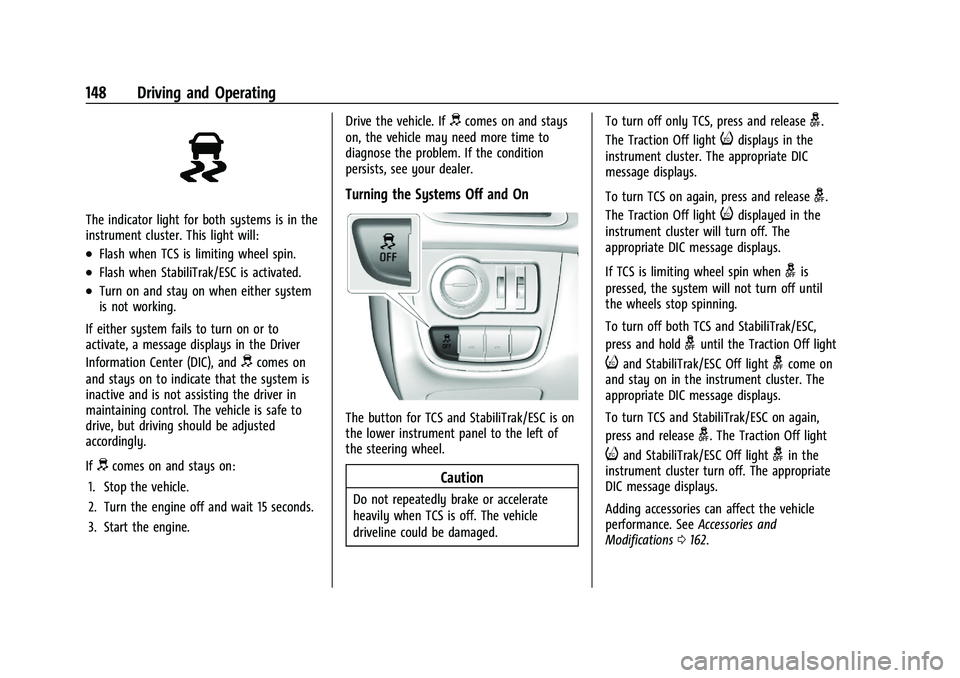
The button for TCS and StabiliTrak/ESC is on
the lower instrument panel to the left of
the steering wheel.
Caution
Do not repeatedly brake or accelerate
heavily when TCS is off. The vehicle
driveline could be damaged. To turn off only TCS, press and release
g.
The Traction Off light
idisplays in the
instrument cluster. The appropriate DIC
message displays.
To turn TCS on again, press and release
g.
The Traction Off light
idisplayed in the
instrument cluster will turn off. The
appropriate DIC message displays.
If TCS is limiting wheel spin when
gis
pressed, the system will not turn off until
the wheels stop spinning.
To turn off both TCS and StabiliTrak/ESC,
press and hold
guntil the Traction Off light
iand StabiliTrak/ESC Off lightgcome on
and stay on in the instrument cluster. The
appropriate DIC message displays.
To turn TCS and StabiliTrak/ESC on again,
press and release
g. The Traction Off light
iand StabiliTrak/ESC Off lightgin the
instrument cluster turn off. The appropriate
DIC message displays.
Adding accessories can affect the vehicle
performance. See Accessories and
Modifications 0162.
Page 151 of 270
Chevrolet Spark Owner Manual (GMNA-Localizing-U.S./Canada-14622955) -
2021 - CRC - 8/17/20
150 Driving and Operating
Resuming a Set Speed
If the cruise control is set at a desired speed
and then the brakes or clutch for manual
transmissions are applied or
*is pressed,
the cruise control is disengaged without
erasing the set speed from memory.
Once the vehicle reaches about 40 km/h
(25 mph) or more, move the thumbwheel up
toward RES/+ briefly. The vehicle returns to
the previous set speed.
Increasing Speed While Using Cruise Control
If the cruise control system is already
activated:
.Move the thumbwheel up toward RES/+
and hold it until the desired speed is
reached, then release it.
.To increase the vehicle speed in small
increments, move the thumbwheel up
toward RES/+ briefly and then release it.
For each press, the vehicle goes about
1 km/h (1 mph) faster.
The speedometer reading can be displayed
in either English or metric units. See Driver
Information Center (DIC) 083. The
increment value used depends on the units
displayed. Reducing Speed While Using Cruise Control
If the cruise control system is already
activated:
.Move the thumbwheel toward SET/−
and
hold until the desired lower speed is
reached, then release it.
.To decrease the vehicle speed in smaller
increments, move the thumbwheel
toward SET/− briefly. For each press, the
vehicle goes about 1 km/h (1 mph) slower.
The speedometer reading can be displayed
in either English or metric units. See Driver
Information Center (DIC) 083. The
increment value used depends on the units
displayed.
Passing Another Vehicle While Using Cruise
Control
Use the accelerator pedal to increase the
vehicle speed. When you take your foot off
the pedal, the vehicle slows down to the
previous set cruise control speed. While
pressing the accelerator pedal or shortly
following the release to override cruise
control, briefly moving the thumbwheel
toward SET/- will result in cruise control set
to the current vehicle speed. Using Cruise Control on Hills
How well cruise control works on hills
depends on the vehicle speed, load, and the
steepness of the hills. When going up steep
hills, you might have to step on the
accelerator pedal to maintain the vehicle
speed. When going downhill, you might
have to brake or shift to a lower gear to
keep your speed down. If the brake pedal is
applied, cruise control will disengage.
Ending Cruise Control
There are four ways to end cruise control:
.To disengage cruise control, step lightly
on the brake pedal or clutch for manual
transmission.
.Press*on the steering wheel.
.Shift the transmission to N (Neutral).
.To turn off cruise control, pressJon
the steering wheel.
Erasing Speed Memory
The cruise control set speed is erased from
memory if the
Jbutton is pressed or if
the ignition is turned off.
Page 155 of 270

Chevrolet Spark Owner Manual (GMNA-Localizing-U.S./Canada-14622955) -
2021 - CRC - 8/17/20
154 Driving and Operating
.Other conditions, such as vibrations from
a jackhammer or the compression of air
brakes on a very large truck, are affecting
system performance.
If the above conditions do not exist, take
the vehicle to your dealer to repair the
system.
Forward Collision Alert (FCA)
System
If equipped, the FCA system may help to
avoid or reduce the harm caused by
front-end crashes. When approaching a
vehicle ahead too quickly, FCA provides a
red flashing alert on the windshield and
rapidly beeps. FCA also lights an amber
visual alert if following another vehicle
much too closely.
FCA detects vehicles within a distance of
approximately 60 m (197 ft) and operates at
speeds above 8 km/h (5 mph).
{Warning
FCA is a warning system and does not
apply the brakes. When approaching a
slower-moving or stopped vehicle ahead
too rapidly, or when following a vehicle (Continued)
Warning (Continued)
too closely, FCA may not provide a
warning with enough time to help avoid
a crash. It also may not provide any
warning at all. FCA does not warn of
pedestrians, animals, signs, guardrails,
bridges, construction barrels, or other
objects. Be ready to take action and
apply the brakes. SeeDefensive Driving
0 125.
FCA can be disabled through vehicle
personalization. See Vehicle Personalization
0 88.
Detecting the Vehicle Ahead
FCA warnings will not occur unless the FCA
system detects a vehicle ahead. When a
vehicle is detected, the vehicle ahead
indicator will display green. Vehicles may
not be detected on curves, highway exit
ramps, or hills, due to poor visibility; or if a vehicle ahead is partially blocked by
pedestrians or other objects. FCA will not
detect another vehicle ahead until it is
completely in the driving lane.
{Warning
FCA does not provide a warning to help
avoid a crash, unless it detects a vehicle.
FCA may not detect a vehicle ahead if
the FCA sensor is blocked by dirt, snow,
or ice, or if the windshield is damaged.
It may also not detect a vehicle on
winding or hilly roads, or in conditions
that can limit visibility such as fog, rain,
or snow, or if the headlamps or
windshield are not cleaned or in proper
condition. Keep the windshield,
headlamps, and FCA sensors clean and in
good repair.
Collision Alert
Page 157 of 270

Chevrolet Spark Owner Manual (GMNA-Localizing-U.S./Canada-14622955) -
2021 - CRC - 8/17/20
156 Driving and Operating
Warning (Continued)
vehicle. AEB will not brake outside of its
operating speed range and only responds
to detected vehicles.
AEB may not:
.Detect a vehicle ahead on winding or
hilly roads.
.Detect all vehicles, especially vehicles
with a trailer, tractors, muddy
vehicles, etc.
.Detect a vehicle when weather limits
visibility, such as in fog, rain, or snow.
.Detect a vehicle ahead if it is partially
blocked by pedestrians or other
objects.
Complete attention is always required
while driving, and you should be ready to
take action and apply the brakes and/or
steer the vehicle to avoid crashes.
AEB may slow the vehicle to a stop to try to
avoid a potential crash.
A system unavailable message may
display if:
.The front of the vehicle or windshield is
not clean.
.Heavy rain or snow is interfering with
object detection.
.There is a problem with the StabiliTrak/
Electronic Stability Control (ESC) system.
The AEB system does not need service.
{Warning
AEB may automatically brake the vehicle
suddenly in situations where it is
unexpected and undesired. It could
respond to a turning vehicle ahead,
guardrails, signs, and other non-moving
objects. To override AEB, firmly press the
accelerator pedal, if it is safe to do so.
AEB can be disabled through vehicle
personalization. See “Collision/Detection
Systems” underVehicle Personalization 088.
Lane Departure Warning (LDW)
If equipped, LDW may help avoid crashes
due to unintentional lane departures. LDW
uses a camera sensor to detect the lane
markings at speeds of 56 km/h (35 mph) or
greater. It may provide an alert if the
vehicle is crossing a lane without using a
turn signal in that direction. LDW light will
not alert if the turn signal is active in the direction of lane departure, or if LDW
detects that you are accelerating, braking or
actively steering.
{Warning
The LDW system does not steer the
vehicle. The LDW system may not:
.Provide enough time to avoid a crash.
.Detect lane markings under poor
weather or visibility conditions. This
can occur if the windshield or
headlamps are blocked by dirt, snow,
or ice; if they are not in proper
condition; or if the sun shines directly
into the camera.
.Detect road edges.
.Detect lanes on winding or hilly roads.
If LDW only detects lane markings on one
side of the road, it will only warn you
when departing the lane on the side
where it has detected a lane marking.
Always keep your attention on the road
and maintain proper vehicle position
within the lane, or vehicle damage,
injury, or death could occur. Always keep (Continued)
Page 162 of 270
Chevrolet Spark Owner Manual (GMNA-Localizing-U.S./Canada-14622955) -
2021 - CRC - 8/17/20
Vehicle Care 161
Vehicle Care
General Information
General Information . . . . . . . . . . . . . . . . . . . 162
California Proposition 65 Warning . . . . . 162
California Perchlorate MaterialsRequirements . . . . . . . . . . . . . . . . . . . . . . . . 162
Accessories and Modifications . . . . . . . . . 162
Vehicle Checks
Doing Your Own Service Work . . . . . . . . . 163
Hood . . . . . . . . . . . . . . . . . . . . . . . . . . . . . . . . . . 163
Engine Compartment Overview . . . . . . . . 165
Engine Oil . . . . . . . . . . . . . . . . . . . . . . . . . . . . . 166
Engine Oil Life System . . . . . . . . . . . . . . . . 168
Automatic Transmission Fluid . . . . . . . . . 169
Manual Transmission Fluid . . . . . . . . . . . . 169
Hydraulic Clutch . . . . . . . . . . . . . . . . . . . . . . . 169
Engine Air Cleaner/Filter . . . . . . . . . . . . . . 169
Cooling System . . . . . . . . . . . . . . . . . . . . . . . . 170
Engine Overheating . . . . . . . . . . . . . . . . . . . . 173
Washer Fluid . . . . . . . . . . . . . . . . . . . . . . . . . . 174
Brakes . . . . . . . . . . . . . . . . . . . . . . . . . . . . . . . . . 175
Brake Fluid . . . . . . . . . . . . . . . . . . . . . . . . . . . . . 175
Battery - North America . . . . . . . . . . . . . . . 176
Starter Switch Check . . . . . . . . . . . . . . . . . . . 178
Automatic Transmission Shift Lock Control Function Check . . . . . . . . . . . . . . 178
Ignition Transmission Lock Check . . . . . . 178 Park Brake and P (Park) Mechanism
Check . . . . . . . . . . . . . . . . . . . . . . . . . . . . . . . . 179
Wiper Blade Replacement . . . . . . . . . . . . . 179
Windshield Replacement . . . . . . . . . . . . . . 180
Gas Strut(s) . . . . . . . . . . . . . . . . . . . . . . . . . . . 180
Headlamp Aiming
Front Headlamp Aiming . . . . . . . . . . . . . . . . 181
Bulb Replacement
Bulb Replacement . . . . . . . . . . . . . . . . . . . . . . 181
Halogen Bulbs . . . . . . . . . . . . . . . . . . . . . . . . . 181
High Intensity Discharge (HID) Lighting . . . . . . . . . . . . . . . . . . . . . . . . . . . . . . 181
LED Lighting . . . . . . . . . . . . . . . . . . . . . . . . . . . 182
Headlamps, Front Turn Signal, Sidemarker, and Parking Lamps . . . . . . 182
Taillamps, Turn Signal, Stoplamps, and Back-Up Lamps . . . . . . . . . . . . . . . . . . . . . . 184
License Plate Lamp . . . . . . . . . . . . . . . . . . . . 184
Electrical System
Electrical System Overload . . . . . . . . . . . . . 185
Fuses and Circuit Breakers . . . . . . . . . . . . . 185
Engine Compartment Fuse Block . . . . . . 186
Instrument Panel Fuse Block . . . . . . . . . . . 188
Wheels and Tires
Tires . . . . . . . . . . . . . . . . . . . . . . . . . . . . . . . . . . 190
All-Season Tires . . . . . . . . . . . . . . . . . . . . . . . 190
Winter Tires . . . . . . . . . . . . . . . . . . . . . . . . . . . 191
Tire Sidewall Labeling . . . . . . . . . . . . . . . . . . 191 Tire Designations . . . . . . . . . . . . . . . . . . . . . . 193
Tire Terminology and Definitions . . . . . . 193
Tire Pressure . . . . . . . . . . . . . . . . . . . . . . . . . . 195
Tire Pressure Monitor System . . . . . . . . . 196
Tire Pressure Monitor Operation . . . . . . . 197
Tire Inspection . . . . . . . . . . . . . . . . . . . . . . . . 199
Tire Rotation . . . . . . . . . . . . . . . . . . . . . . . . . . 200
When It Is Time for New Tires . . . . . . . . 201
Buying New Tires . . . . . . . . . . . . . . . . . . . . . 202
Different Size Tires and Wheels . . . . . . . 203
Wheel Covers . . . . . . . . . . . . . . . . . . . . . . . . . 203
Uniform Tire Quality Grading . . . . . . . . . 203
Wheel Alignment and Tire Balance . . . . 204
Wheel Replacement . . . . . . . . . . . . . . . . . . . 204
Tire Chains . . . . . . . . . . . . . . . . . . . . . . . . . . . . 205
If a Tire Goes Flat . . . . . . . . . . . . . . . . . . . . . 205
Tire Changing . . . . . . . . . . . . . . . . . . . . . . . . . 207
Compact Spare Tire . . . . . . . . . . . . . . . . . . . . 210
Jump Starting
Jump Starting - North America . . . . . . . . . 211
Towing the Vehicle
Towing the Vehicle . . . . . . . . . . . . . . . . . . . . 213
Recreational Vehicle Towing . . . . . . . . . . . 214
Appearance Care
Exterior Care . . . . . . . . . . . . . . . . . . . . . . . . . . . 217
Interior Care . . . . . . . . . . . . . . . . . . . . . . . . . . . 220
Floor Mats . . . . . . . . . . . . . . . . . . . . . . . . . . . . . 223
Page 176 of 270

Chevrolet Spark Owner Manual (GMNA-Localizing-U.S./Canada-14622955) -
2021 - CRC - 8/17/20
Vehicle Care 175
Caution (Continued)
.Do not mix water with ready-to-use
washer fluid. Water can cause the
solution to freeze and damage the
washer fluid tank and other parts of
the washer system.
.When using concentrated washer fluid,
follow the manufacturer instructions
for adding water.
.Fill the washer fluid tank only
three-quarters full when it is very cold.
This allows for fluid expansion if
freezing occurs, which could damage
the tank if it is completely full.
Brakes
Disc brake pads have built-in wear indicators
that make a high-pitched warning sound
when the brake pads are worn and new
pads are needed. The sound can come and
go or can be heard all the time when the
vehicle is moving, except when applying the
brake pedal firmly.
{Warning
The brake wear warning sound means
that soon the brakes will not work well.
That could lead to a crash. When the
brake wear warning sound is heard, have
the vehicle serviced.
Caution
Continuing to drive with worn-out brake
pads could result in costly brake repair.
Some driving conditions or climates can
cause a brake squeal when the brakes are
first applied or lightly applied. This does not
mean something is wrong with the brakes.
Properly torqued wheel nuts are necessary
to help prevent brake pulsation. When tires
are rotated, inspect brake pads for wear and
evenly tighten wheel nuts in the proper
sequence to torque specifications. See
Capacities and Specifications 0238.
Brake pads should be replaced as
complete sets.
Brake Pedal Travel
See your dealer if the brake pedal does not
return to normal height, or if there is a
rapid increase in pedal travel. This could be
a sign that brake service may be required.
Replacing Brake System Parts
Always replace brake system parts with
new, approved replacement parts. If this is
not done, the brakes may not work
properly. The braking performance expected
can change in many other ways if the
wrong replacement brake parts are installed
or if parts are improperly installed.
Brake Fluid
The brake/clutch master cylinder reservoir is
filled with GM approved DOT 4 brake fluid
as indicated on the reservoir cap. See Engine
Compartment Overview 0165 for the
location of the reservoir.