ESP CHEVROLET SS 2014 User Guide
[x] Cancel search | Manufacturer: CHEVROLET, Model Year: 2014, Model line: SS, Model: CHEVROLET SS 2014Pages: 422, PDF Size: 6.18 MB
Page 214 of 422
Black plate (78,1)Chevrolet SS Sedan Owner Manual (GMNA-Localizing-U.S.-6014851) - 2014 -
1st Edition - 8/22/13
7-78 Infotainment System
Pairing a Phone
1. Press
b/g. The system
responds “Please say a
command,” followed by a tone.
2. Say “Pair.”The system responds
with “Please search for
Bluetooth devices on your
phone, select your vehicle,
confirm and enter the PIN
provided on the screen.”
3. Start the search for Bluetooth devices on the phone. Then
select the device and follow the
instructions on the phone by
either entering the four-digit PIN
or confirming the six-digit
passcode. The PIN is used in
Step 4.
4. Locate and select the device named after the vehicle make
and model in the list on the cell
phone. Follow the instructions
on the cell phone to enter the
PIN provided in Step 3 or to
confirm the six-digit code
matches. The system responds
“successfully paired.” 5. Repeat Steps 1−4 to pair
additional phones.
Listing All Paired and Connected
Phones
The system can list all cell phones
paired to it. If a paired cell phone is
also connected to the vehicle, the
system responds with “is connected”
after that phone name.
1. Press
b/g. The system
responds “Please say a
command,” followed by a tone.
2. Say “Device List.”
Deleting a Paired Phone
If the phone name to delete is
unknown, see “Listing All Paired
and Connected Phones.”
1. Press
b/g. The system
responds “Please say a
command,” followed by a tone.
2. Say “Delete Device.” 3. The system responds with:
“To
delete a device, please touch its
name on the screen.” Select the
device to delete on the display
and it will be removed.
To cancel this command, press
$/ion the steering wheel
control or press the
/BACK button
on the radio faceplate.
Connecting to a Different Phone
or Device
To connect to a different cell phone,
the system looks for the next
available cell phone. Depending on
the cell phone to be connected, this
command may need to be repeated.
1. Press
b/g. The system
responds “Please say a
command,” followed by a tone.
2. Say “Change Phone.”
.To select a device, press
the name on the display.
.If another cell phone is not
found, the original phone
remains connected.
ProCarManuals.com
Page 218 of 422
Black plate (82,1)Chevrolet SS Sedan Owner Manual (GMNA-Localizing-U.S.-6014851) - 2014 -
1st Edition - 8/22/13
7-82 Infotainment System
Using the“Dial”or“Call”
Command
To call a number:
1. Press
b/g. The system
responds “Please say a
command,” followed by a tone.
2. Say “Dial”or“Call.”
3. Say the entire number without pausing, followed by “Dial.”
Once connected, the person called
will be heard through the audio
speakers.
To call using a name tag:
1. Press
b/g. The system
responds “Please say a
command,” followed by a tone.
2. Say “Dial”or“Call” and then say
the name tag. For example “Call
John at Work.”
Once connected, the person called
will be heard through the audio
speakers. Using the
“Digit Dial” Command
This allows a phone number to be
dialed by entering the digits one at
a time.
1. Press
b/g. The system
responds “Please say a
command,” followed by a tone.
2. Say “Digit Dial.”
3. Say each digit, one at a time, to dial. After each digit is entered,
the system repeats back the
digit it heard followed by a tone.
After the last digit has been
entered, say “Dial.”
If an unwanted number is repeated
back, say “Clear”to clear the last
number.
Once connected, the person called
will be heard through the audio
speakers.
Using the “Redial”Command
1. Press
b/g. The system
responds “Please say a
command,” followed by a tone. 2. After the tone, say
“Redial.”The
system dials the last number
called from the connected cell
phone.
Once connected, the person called
will be heard through the audio
speakers.
Clearing the System
Unless information is deleted out of
the vehicle Bluetooth system, it will
be retained. This includes phone
pairing information. For directions
on how to delete this information,
see “Deleting a Paired Phone/
Device.”
Text Messaging
For vehicles equipped with
Bluetooth capability, the system,
if equipped with text messaging, can
display text messages, play back a
message over the audio system,
and send a predefined message.
Not all phones support all functions
and work with Bluetooth. The radio
only supports the receipt of SMS
ProCarManuals.com
Page 222 of 422
Black plate (86,1)Chevrolet SS Sedan Owner Manual (GMNA-Localizing-U.S.-6014851) - 2014 -
1st Edition - 8/22/13
7-86 Infotainment System
It is prohibited to copy, decompile,
disassemble, reverse engineer,
hack, manipulate, or otherwise
make available any technology or
software incorporated in receivers
compatible with the SiriusXM
®
Satellite Radio System or that
support the SiriusXM website, the
Online Service or any of its content.
Furthermore, the AMBER voice
compression software included in
this product is protected by
intellectual property rights including
patent rights, copyrights, and trade
secrets of Digital Voice
Systems, Inc.
General Requirements:
.A License Agreement from
SiriusXM®is required for any
product that incorporates
SiriusXM Technology and/or for
use of any of the SiriusXM
marks to be manufactured,
distributed, or marketed in the
SiriusXM Service Area.
Gracenote
Gracenote®, Gracenote logo and
logotype, and the "Powered by
Gracenote" logo are either a
registered trademark or a trademark
of Gracenote, Inc. in the United
States and/or other countries.
Bluetooth
The Bluetooth®word mark and
logos are owned by the Bluetooth®
SIG, Inc. and any use of such marks
by General Motors is under license.
Other trademarks and trade names
are those of their respective owners.
Pandora (If Equipped)
Pandora is a registered trademark
of Pandora Media, Inc., used under
license.
Manufactured under license from
Dolby Laboratories. Dolby and the
double-D symbol are trademarks of
Dolby Laboratories.
Map End User License
Agreement (Optional
Equipment Applies Where
Equipped)
END USER TERMS
The data (“Data”) is provided for
your personal, internal use only and
not for resale. It is protected by
copyright, and is subject to the
following terms and conditions
which are agreed to by you, on the
one hand, and Panasonic
Automotive Systems Company of
America (“PANASONIC”) and its
licensors (including their licensors
and suppliers) on the other hand.
© 2013 NAVTEQ. All rights
reserved.
The Data includes certain
information and related content
provided under license to NT from
third parties and is subject to the
ProCarManuals.com
Page 223 of 422
Black plate (87,1)Chevrolet SS Sedan Owner Manual (GMNA-Localizing-U.S.-6014851) - 2014 -
1st Edition - 8/22/13
Infotainment System 7-87
applicable supplier terms and
copyright notices set forth
at the following URL:
http://corporate.navteq.com/
supplier_terms.html.
In addition, the Lonely Planet Travel
Guide content is subject to the
following supplier notices (if
equipped):
© 2013 Lonely Planet Publications
Pty Ltd. All rights reserved.
PANASONIC and its content
providers have tried to make this
information as accurate as possible,
but it is provided“as is”and
PANASONIC and its content
providers accept no responsibility
for any loss, injury or inconvenience
resulting from this information. You
should verify critical information (like
visas, health and safety) before you
travel.
TERMS AND CONDITIONS
Personal Use Only. You agree to
use this Data together with the
General Motors MyLink or IntelliLink Connected Navigation Radio
Platform for the solely personal,
non-commercial purposes for which
you were licensed, and not for
service bureau, time-sharing or
other similar purposes. Accordingly,
but subject to the restrictions set
forth in the following paragraphs,
you agree not to otherwise
reproduce, copy, modify, decompile,
disassemble, create any derivative
works of, or reverse engineer any
portion of this Data, and may not
transfer or distribute it in any form,
for any purpose, except to the
extent permitted by mandatory laws.
Restrictions
Except where you have been
specifically licensed to do so by
PANASONIC, and without limiting
the preceding paragraph, you may
not (a) use this Data with any
products, systems, or applications
installed or otherwise connected to
or in communication with vehicles,
capable of vehicle navigation,
positioning, dispatch, real time route
guidance, fleet management orsimilar applications; or (b) with or in
communication with any positioning
devices or any mobile or
wireless-connected electronic or
computer devices, including without
limitation cellular phones, palmtop
and handheld computers, pagers,
and personal digital assistants
or PDAs
Warning
The Data may contain inaccurate or
incomplete information due to the
passage of time, changing
circumstances, sources used and
the nature of collecting
comprehensive geographic data,
any of which may lead to incorrect
results.
No Warranty
This Data is provided to you
“as is,”
and you agree to use it at your own
risk. PANASONIC and its licensors
(and their licensors and suppliers)
make no guarantees,
representations or warranties of any
kind, express or implied, arising by
law or otherwise, including but not
ProCarManuals.com
Page 224 of 422
Black plate (88,1)Chevrolet SS Sedan Owner Manual (GMNA-Localizing-U.S.-6014851) - 2014 -
1st Edition - 8/22/13
7-88 Infotainment System
limited to, content, quality, accuracy,
completeness, effectiveness,
reliability, fitness for a particular
purpose, usefulness, use or results
to be obtained from this Data,
or that the Data or server will be
uninterrupted or error-free.
Disclaimer of Warranty
PANASONIC AND ITS LICENSORS
(INCLUDING THEIR LICENSORS
AND SUPPLIERS) DISCLAIM ANY
WARRANTIES, EXPRESS OR
IMPLIED, OF QUALITY,
PERFORMANCE,
MERCHANTABILITY, FITNESS
FOR A PARTICULAR PURPOSE
OR NON-INFRINGEMENT. Some
States, Territories and Countries do
not allow certain warranty
exclusions, so to that extent the
above exclusion may not apply
to you.
Disclaimer of Liability
PANASONIC AND ITS LICENSORS
(INCLUDING THEIR LICENSORS
AND SUPPLIERS) SHALL NOT BE
LIABLE TO YOU: IN RESPECT OFANY CLAIM, DEMAND OR
ACTION, IRRESPECTIVE OF THE
NATURE OF THE CAUSE OF THE
CLAIM, DEMAND OR ACTION
ALLEGING ANY LOSS, INJURY
OR DAMAGES, DIRECT OR
INDIRECT, WHICH MAY RESULT
FROM THE USE OR POSSESSION
OF THE INFORMATION; OR FOR
ANY LOSS OF PROFIT, REVENUE,
CONTRACTS OR SAVINGS, OR
ANY OTHER DIRECT, INDIRECT,
INCIDENTAL, SPECIAL OR
CONSEQUENTIAL DAMAGES
ARISING OUT OF YOUR USE OF
OR INABILITY TO USE THIS
INFORMATION, ANY DEFECT IN
THE INFORMATION, OR THE
BREACH OF THESE TERMS OR
CONDITIONS, WHETHER IN AN
ACTION IN CONTRACT OR TORT
OR BASED ON A WARRANTY,
EVEN IF PANASONIC OR ITS
LICENSORS HAVE BEEN
ADVISED OF THE POSSIBILITY
OF SUCH DAMAGES. Some
States, Territories and Countries do
not allow certain liability exclusions
or damages limitations, so to that
extent the above may not apply
to you.
Export Control
PANASONIC shall not export from
anywhere any part of the Data or
any direct product thereof except in
compliance with, and with all
licenses and approvals required
under, applicable export laws, rules
and regulations, including but not
limited to the laws, rules and
regulations administered by the
Office of Foreign Assets Control of
the U.S. Department of Commerce
and the Bureau of Industry and
Security of the U.S. Department of
Commerce. To the extent that any
such export laws, rules or
regulations prohibit NT from
complying with any of its obligations
hereunder to deliver or distribute
Data, such failure shall be excused
and shall not constitute a breach of
this Agreement.
ProCarManuals.com
Page 225 of 422
Black plate (89,1)Chevrolet SS Sedan Owner Manual (GMNA-Localizing-U.S.-6014851) - 2014 -
1st Edition - 8/22/13
Infotainment System 7-89
Entire Agreement
These terms and conditions
constitute the entire agreement
between PANASONIC (and its
licensors, including their licensors
and suppliers) and you pertaining to
the subject matter hereof, and
supersedes in their entirety any and
all written or oral agreements
previously existing between us with
respect to such subject matter.
Governing Law
The above terms and conditions
shall be governed by the laws of the
State of Illinois (with respect to use
of Data for the Americas and/or the
Asia Pacific territories), and the laws
of The Netherlands (with respect to
Data for the Middle East, Africa,
Russia and Europe territories),
without giving effect to (i) its conflict
of laws provisions, or (ii) the United
Nations Convention for Contracts for
the International Sale of Goods,
which is explicitly excluded. You
agree to submit to the jurisdiction of
the State of Illinois for any and alldisputes, claims and actions arising
from or in connection with the Data
provided to you hereunder.
Government End Users
If the Data is being acquired by or
on behalf of the United States
government or any other entity
seeking or applying rights similar to
those customarily claimed by the
United States government, this Data
is a
“commercial item” as that term
is defined at 48 C.F.R. (“FAR”)
2.101, is licensed in accordance
with these End-User Terms, and
each copy of Data delivered or
otherwise furnished shall be marked
and embedded as appropriate with
the following “Notice of Use,” and
shall be treated in accordance with
such Notice:NOTICE OF USE
CONTRACTOR (MANUFACTURER/
SUPPLIER)
NAME:
NAVTEQ North America, LLC, c/o
Nokia
CONTRACTOR (MANUFACTURER/
SUPPLIER)
ADDRESS:
425 West Randolph Street,
Chicago, IL 60606.
This Data is a commercial item as
defined in FAR 2.101 and is subject
to these End-User Terms under
which this Data was provided.
© 2013 NAVTEQ. All rights
reserved.
If the Contracting Officer, federal
government agency, or any federal
official refuses to use the legend
provided herein, the Contracting
Officer, federal government agency,
or any federal official must notify
NAVTEQ prior to seeking additional
or alternative rights in the Data.
ProCarManuals.com
Page 237 of 422
Black plate (5,1)Chevrolet SS Sedan Owner Manual (GMNA-Localizing-U.S.-6014851) - 2014 -
1st Edition - 8/22/13
Driving and Operating 9-5
The vehicle's right wheels can drop
off the edge of a road onto the
shoulder while driving. Follow
these tips:
1. Ease off the accelerator andthen, if there is nothing in the
way, steer the vehicle so that it
straddles the edge of the
pavement.
2. Turn the steering wheel about one-eighth of a turn, until the
right front tire contacts the
pavement edge.
3. Turn the steering wheel to go straight down the roadway.
Loss of Control
Skidding
There are three types of skids that
correspond to the vehicle's three
control systems:
.Braking Skid —wheels are not
rolling.
.Steering or Cornering
Skid —too much speed or
steering in a curve causes tires
to slip and lose cornering force.
.Acceleration Skid —too much
throttle causes the driving
wheels to spin.
Defensive drivers avoid most skids
by taking reasonable care suited to
existing conditions, and by not
overdriving those conditions. But
skids are always possible.
If the vehicle starts to slide, follow
these suggestions:
.Ease your foot off the
accelerator pedal and steer the
way you want the vehicle to go.
The vehicle may straighten out.
Be ready for a second skid if it
occurs.
.Slow down and adjust your
driving according to weather
conditions. Stopping distance
can be longer and vehicle
control can be affected when
traction is reduced by water,
snow, ice, gravel, or other material on the road. Learn to
recognize warning clues
—such
as enough water, ice, or packed
snow on the road to make a
mirrored surface —and slow
down when you have any doubt.
.Try to avoid sudden steering,
acceleration, or braking,
including reducing vehicle speed
by shifting to a lower gear. Any
sudden changes could cause
the tires to slide.
Remember: Antilock brakes help
avoid only the braking skid.
Track Events and
Competitive Driving
Track events or competitive driving
may affect the vehicle warranty. See
the warranty manual before using
the vehicle for track testing or other
competitive driving.
ProCarManuals.com
Page 241 of 422
Black plate (9,1)Chevrolet SS Sedan Owner Manual (GMNA-Localizing-U.S.-6014851) - 2014 -
1st Edition - 8/22/13
Driving and Operating 9-9
Blizzard Conditions
Being stuck in snow can be a
serious situation. Stay with the
vehicle unless there is help nearby.
If possible, use Roadside
Assistance. SeeRoadside
Assistance Program on page 13-5.
To get help and keep everyone in
the vehicle safe:
.Turn on the hazard warning
flashers.
.Tie a red cloth to an outside
mirror.
{Warning
Snow can trap engine exhaust
under the vehicle. This may
cause exhaust gases to get
inside. Engine exhaust contains
carbon monoxide (CO) which
cannot be seen or smelled. It can
cause unconsciousness and even
death.
(Continued)
Warning (Continued)
If the vehicle is stuck in the snow:
.Clear away snow from around
the base of your vehicle,
especially any that is blocking
the exhaust pipe.
.Check again from time to
time to be sure snow does
not collect there.
.Open a window about 5 cm
(2 in) on the side of the
vehicle that is away from the
wind to bring in fresh air.
.Fully open the air outlets on
or under the instrument
panel.
.Adjust the climate control
system to a setting that
circulates the air inside the(Continued)
Warning (Continued)
vehicle and set the fan speed to
the highest setting. See “Climate
Control Systems”.
For more information about
carbon monoxide, see Engine
Exhaust on page 9-21.
To save fuel, run the engine for only
short periods as needed to warm
the vehicle and then shut the engine
off and close the window most of
the way to save heat. Repeat this
until help arrives but only when you
feel really uncomfortable from the
cold. Moving about to keep warm
also helps.
If it takes some time for help to
arrive, now and then when you run
the engine, push the accelerator
pedal slightly so the engine runs
faster than the idle speed. This
keeps the battery charged to restart
ProCarManuals.com
Page 250 of 422
Black plate (18,1)Chevrolet SS Sedan Owner Manual (GMNA-Localizing-U.S.-6014851) - 2014 -
1st Edition - 8/22/13
9-18 Driving and Operating
pressed for many seconds,
cranking will be stopped after
15 seconds to prevent cranking
motor damage. To prevent gear
damage, this system also
prevents cranking if the engine
is already running. Engine
cranking can be stopped by
pressing the ENGINE START/
STOP button a second time.
{Caution
Cranking the engine for long
periods of time, by pressing the
ENGINE START/STOP button
immediately after cranking has
ended, can overheat and damage
the cranking motor, and drain the
battery. Wait at least 15 seconds
between each try, to let the
cranking motor cool down.
2. If the engine does not start after five to 10 seconds, especially in
very cold weather (below −18°C
or 0°F), it could be flooded with
too much gasoline. Try pushing the accelerator pedal all the way
to the floor and holding it there
as you press the ENGINE
START/STOP button, for up to a
maximum of 15 seconds. Wait at
least 15 seconds between each
try, to allow the cranking motor
to cool down. When the engine
starts, let go of the button and
the accelerator. If the vehicle
starts briefly but then stops
again, do the same thing. This
clears the extra gasoline from
the engine. Do not race the
engine immediately after starting
it. Operate the engine and
transmission gently until the oil
warms up and lubricates all
moving parts.
Retained Accessory
Power (RAP)
The power windows will operate
when the ignition is in the ON/RUN
or ACC/ACCESSORY positions.
Once the ignition is turned off, RAP
allows the power windows to
continue to operate for up to
10 minutes. If a door is opened
during this time, they will be
deactivated.
The audio system will be
deactivated only if the driver door is
opened.
Shifting Into Park
1. Hold the brake pedal down and
set the parking brake.
See Electric Parking Brake on
page 9-27.
2. Hold the button on the shift lever and push the lever toward the
front of the vehicle into P (Park).
3. Turn the ignition off.
ProCarManuals.com
Page 256 of 422
Black plate (24,1)Chevrolet SS Sedan Owner Manual (GMNA-Localizing-U.S.-6014851) - 2014 -
1st Edition - 8/22/13
9-24 Driving and Operating
{Caution
If the vehicle accelerates slowly,
or does not shift gears, the
transmission could be damaged.
Have the vehicle serviced
right away.
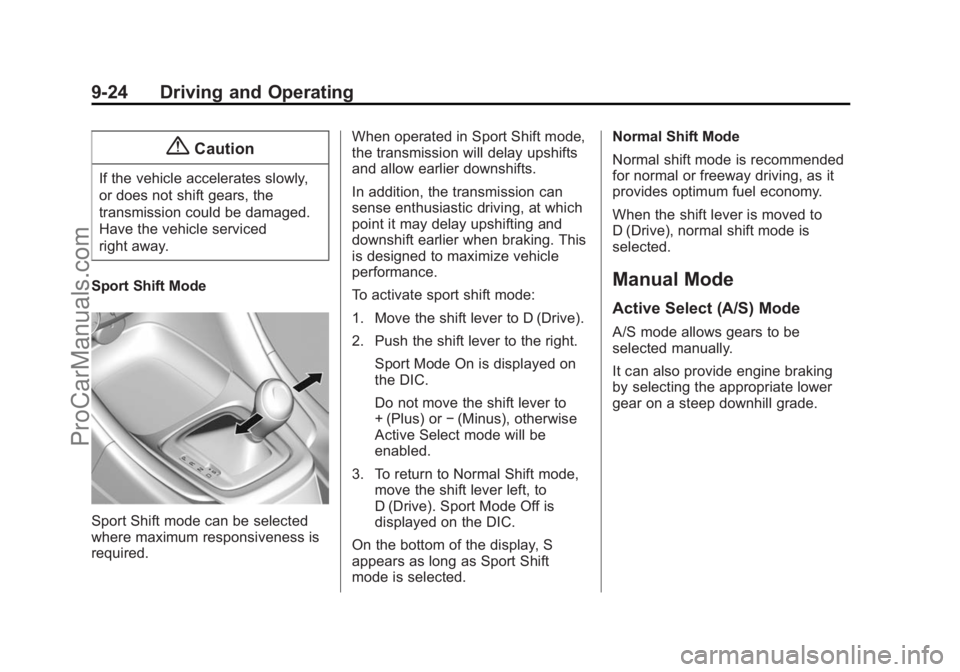
Sport Shift Mode
Sport Shift mode can be selected
where maximum responsiveness is
required. When operated in Sport Shift mode,
the transmission will delay upshifts
and allow earlier downshifts.
In addition, the transmission can
sense enthusiastic driving, at which
point it may delay upshifting and
downshift earlier when braking. This
is designed to maximize vehicle
performance.
To activate sport shift mode:
1. Move the shift lever to D (Drive).
2. Push the shift lever to the right.
Sport Mode On is displayed on
the DIC.
Do not move the shift lever to
+ (Plus) or −(Minus), otherwise
Active Select mode will be
enabled.
3. To return to Normal Shift mode, move the shift lever left, to
D (Drive). Sport Mode Off is
displayed on the DIC.
On the bottom of the display, S
appears as long as Sport Shift
mode is selected. Normal Shift Mode
Normal shift mode is recommended
for normal or freeway driving, as it
provides optimum fuel economy.
When the shift lever is moved to
D (Drive), normal shift mode is
selected.
Manual Mode
Active Select (A/S) Mode
A/S mode allows gears to be
selected manually.
It can also provide engine braking
by selecting the appropriate lower
gear on a steep downhill grade.
ProCarManuals.com