instrument cluster CHEVROLET SS 2014 User Guide
[x] Cancel search | Manufacturer: CHEVROLET, Model Year: 2014, Model line: SS, Model: CHEVROLET SS 2014Pages: 422, PDF Size: 6.18 MB
Page 115 of 422
Black plate (23,1)Chevrolet SS Sedan Owner Manual (GMNA-Localizing-U.S.-6014851) - 2014 -
1st Edition - 8/22/13
Instruments and Controls 5-23
on page 5-11. If there is a problem
with the battery charging system,
the DIC will display a message.
Speed Warning
This display is used to set the
vehicle speed at which the speed
warning chime sounds and the alert
is displayed. The speed can be set
by pressing SET/CLR while the
speed warning display is showing.
Tire Pressure Monitoring
This display will show a vehicle with
the approximate pressures of all
four tires. Tire pressure is displayed
in either kilopascal (kPa) or pounds
per square inch (psi). SeeTire
Pressure Monitor Operation on
page 10-43.
Remaining Oil Life
This display shows an estimate of
the oil's remaining useful life. If 99%
is displayed, that means 99% of the
current oil life remains.
When the remaining oil life is low,
the CHANGE ENGINE OIL SOON
message will appear on the display. See
Engine Oil Messages on
page 5-28. The oil should be
changed as soon as possible. See
Engine Oil on page 10-6. In addition
to the engine oil life system
monitoring the oil life, additional
maintenance is recommended in the
Maintenance Schedule. See
Maintenance Schedule on
page 11-2.
Remember, the Remaining Oil Life
display must be reset after each oil
change. It will not reset itself. Also,
be careful not to reset the Oil Life
display accidentally at any time
other than when the oil has just
been changed. It cannot be reset
accurately until the next oil change.
To reset the engine oil life system,
press SET/CLR while the Oil Life
display is active. See Engine Oil
Life System on page 10-8.
Units
Move
\to switch between metric
or US when the Units display is
active. Press SET/CLR to confirm
the setting. This will change the displays on the cluster and DIC to
either metric or English (US)
measurements.
Head-Up Display (HUD)
{Warning
If the HUD image is too bright or
too high in your field of view, it
may take you more time to see
things you need to see when it is
dark outside. Be sure to keep the
HUD image dim and placed low in
your field of view.
With HUD, some information
concerning the operation of the
vehicle is projected onto the
windshield. The image is projected
through the HUD lens on top of the
instrument panel. The information
appears as an image focused out
toward the front of the vehicle.
ProCarManuals.com
Page 120 of 422
Black plate (28,1)Chevrolet SS Sedan Owner Manual (GMNA-Localizing-U.S.-6014851) - 2014 -
1st Edition - 8/22/13
5-28 Instruments and Controls
ENGINE OVERHEATED—
STOP ENGINE
This message displays and a
continuous chime sounds if the
engine cooling system reaches
unsafe temperatures for operation.
Stop and turn off the vehicle as
soon as it is safe to do so to avoid
severe damage. This message
clears when the engine has cooled
to a safe operating temperature.
Engine Oil Messages
CHANGE ENGINE OIL SOON
This message displays when
service is required for the vehicle.
See your dealer. See Engine Oil on
page 10-6 andMaintenance
Schedule on page 11-2.
Acknowledging the CHANGE
ENGINE OIL SOON message will
not reset the system. See
“Remaining Oil Life” underDriver
Information Center (DIC) on
page 5-21 andEngine Oil Life
System on page 10-8.
ENGINE OIL LOW —ADD OIL
On some vehicles, this message
displays when the engine oil level
may be too low. Check the oil level
before filling to the recommended
level. If the oil is not low and this
message remains on, take the
vehicle to your dealer for service.
See Engine Oil on page 10-6.
OIL PRESSURE LOW STOP
ENGINE
This message displays when the
vehicle's engine oil pressure is low.
The oil pressure light also appears
on the instrument cluster. See
Engine Oil Pressure Light on
page 5-18.
Stop the vehicle immediately, as
engine damage can result from
driving a vehicle with low oil
pressure. Have the vehicle serviced
by your dealer as soon as possible
when this message is displayed.
Engine Power Messages
ENGINE POWER IS REDUCED
This message displays when the
vehicle's engine power is reduced.
Reduced engine power can affect
the vehicle's ability to accelerate.
If this message is on, but there is no
reduction in performance, proceed
to your destination. The
performance may be reduced the
next time the vehicle is driven. The
vehicle may be driven at a reduced
speed while this message is on, but
maximum acceleration and speed
may be reduced. Anytime this
message stays on, the vehicle
should be taken to your dealer for
service as soon as possible.
Fuel System Messages
FUEL LEVEL LOW
This message displays when the
vehicle is low on fuel. Refuel as
soon as possible
ProCarManuals.com
Page 131 of 422
Black plate (1,1)Chevrolet SS Sedan Owner Manual (GMNA-Localizing-U.S.-6014851) - 2014 -
1st Edition - 8/22/13
Lighting 6-1
Lighting
Exterior Lighting
Exterior Lamp Controls . . . . . . . . 6-1
Headlamp High/Low-BeamChanger . . . . . . . . . . . . . . . . . . . . . 6-1
Flash-to-Pass . . . . . . . . . . . . . . . . . 6-1
Daytime Running Lamps (DRL) . . . . . . . . . . . . . . . . 6-2
Automatic Headlamp System . . . . . . . . . . . . . . . . . . . . . . 6-2
Hazard Warning Flashers . . . . . 6-3
Turn and Lane-Change Signals . . . . . . . . . . . . . . . . . . . . . . 6-3
Fog Lamps . . . . . . . . . . . . . . . . . . . . 6-3
Interior Lighting
Instrument Panel Illumination Control . . . . . . . . . . . . . . . . . . . . . . 6-4
Dome Lamps . . . . . . . . . . . . . . . . . 6-4
Reading Lamps . . . . . . . . . . . . . . . 6-4
Lighting Features
Entry Lighting . . . . . . . . . . . . . . . . . 6-5
Exit Lighting . . . . . . . . . . . . . . . . . . . 6-5
Battery Power Protection . . . . . . 6-5
Exterior Lighting
Exterior Lamp Controls
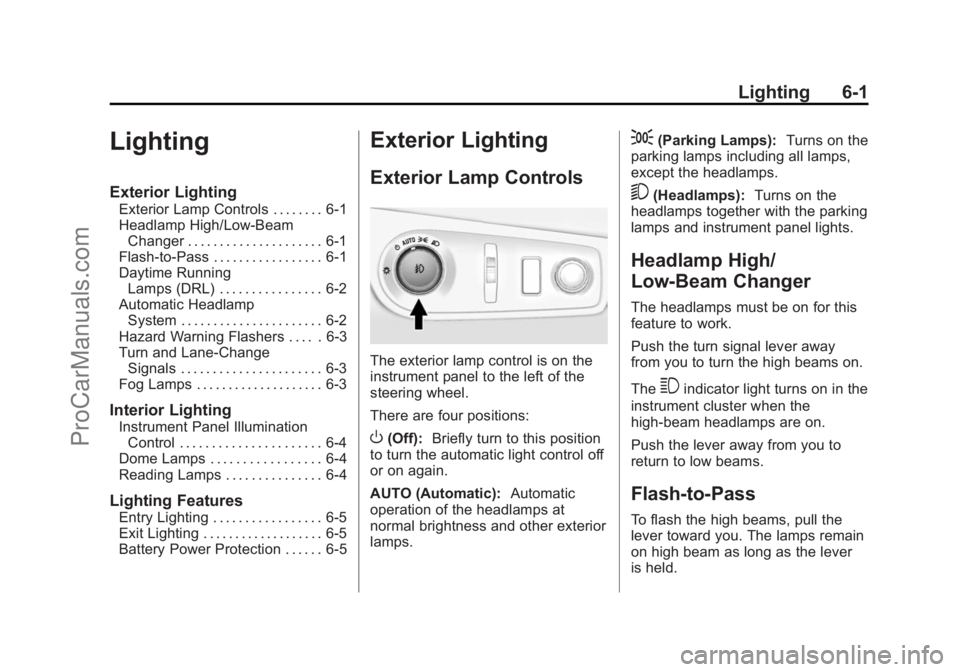
The exterior lamp control is on the
instrument panel to the left of the
steering wheel.
There are four positions:
O(Off): Briefly turn to this position
to turn the automatic light control off
or on again.
AUTO (Automatic): Automatic
operation of the headlamps at
normal brightness and other exterior
lamps.
;(Parking Lamps): Turns on the
parking lamps including all lamps,
except the headlamps.
5(Headlamps): Turns on the
headlamps together with the parking
lamps and instrument panel lights.
Headlamp High/
Low-Beam Changer
The headlamps must be on for this
feature to work.
Push the turn signal lever away
from you to turn the high beams on.
The
3indicator light turns on in the
instrument cluster when the
high-beam headlamps are on.
Push the lever away from you to
return to low beams.
Flash-to-Pass
To flash the high beams, pull the
lever toward you. The lamps remain
on high beam as long as the lever
is held.
ProCarManuals.com
Page 133 of 422
Black plate (3,1)Chevrolet SS Sedan Owner Manual (GMNA-Localizing-U.S.-6014851) - 2014 -
1st Edition - 8/22/13
Lighting 6-3
Hazard Warning Flashers
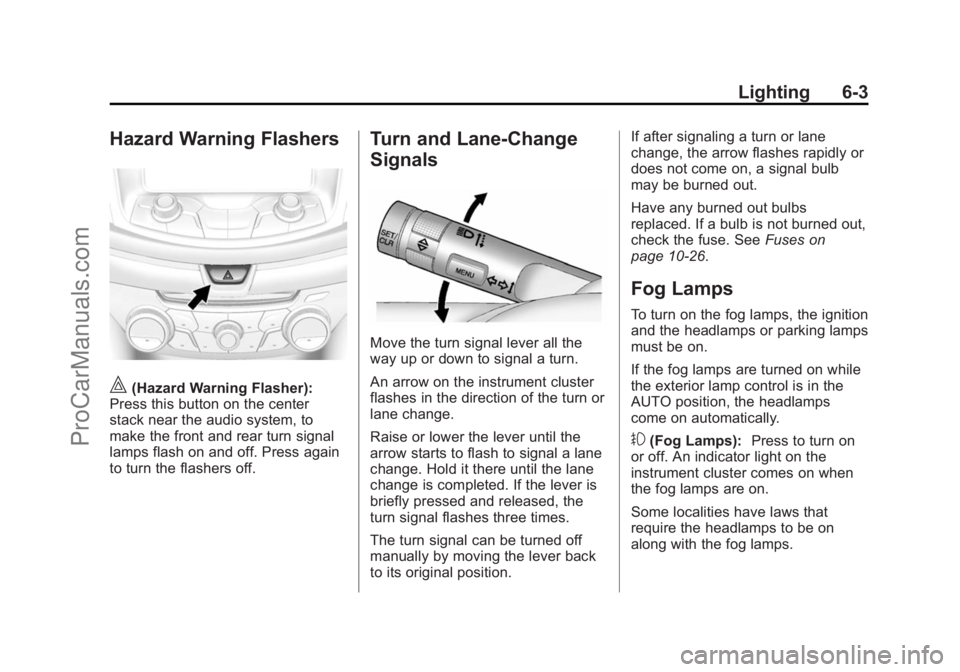
|(Hazard Warning Flasher):
Press this button on the center
stack near the audio system, to
make the front and rear turn signal
lamps flash on and off. Press again
to turn the flashers off.
Turn and Lane-Change
Signals
Move the turn signal lever all the
way up or down to signal a turn.
An arrow on the instrument cluster
flashes in the direction of the turn or
lane change.
Raise or lower the lever until the
arrow starts to flash to signal a lane
change. Hold it there until the lane
change is completed. If the lever is
briefly pressed and released, the
turn signal flashes three times.
The turn signal can be turned off
manually by moving the lever back
to its original position. If after signaling a turn or lane
change, the arrow flashes rapidly or
does not come on, a signal bulb
may be burned out.
Have any burned out bulbs
replaced. If a bulb is not burned out,
check the fuse. See
Fuses on
page 10-26.
Fog Lamps
To turn on the fog lamps, the ignition
and the headlamps or parking lamps
must be on.
If the fog lamps are turned on while
the exterior lamp control is in the
AUTO position, the headlamps
come on automatically.
#(Fog Lamps): Press to turn on
or off. An indicator light on the
instrument cluster comes on when
the fog lamps are on.
Some localities have laws that
require the headlamps to be on
along with the fog lamps.
ProCarManuals.com
Page 262 of 422
Black plate (30,1)Chevrolet SS Sedan Owner Manual (GMNA-Localizing-U.S.-6014851) - 2014 -
1st Edition - 8/22/13
9-30 Driving and Operating
Ride Control Systems
Traction Control/
Electronic Stability
Control
System Operation
The vehicle has a Traction Control
System (TCS) and StabiliTrak®, an
electronic stability control system.
These systems help limit wheel slip
and assist the driver in maintaining
control, especially on slippery road
conditions.
TCS activates if it senses that any
of the drive wheels are spinning or
beginning to lose traction. When this
happens, TCS applies the brakes to
the spinning wheels and reduces
engine power to limit wheel spin.
StabiliTrak activates when the
vehicle senses a difference between
the intended path and the direction
the vehicle is actually traveling.
StabiliTrak selectively applies
braking pressure to any one of the vehicle wheel brakes to assist the
driver in keeping the vehicle on the
intended path.
If cruise control is being used and
traction control or StabiliTrak begins
to limit wheel spin, cruise control will
disengage. Cruise control may be
turned back on when road
conditions allow.
Both systems come on
automatically when the vehicle is
started and begins to move. The
systems may be heard or felt while
they are operating or while
performing diagnostic checks. This
is normal and does not mean there
is a problem with the vehicle.
It is recommended to leave both
systems on for normal driving
conditions, but it may be necessary
to turn TCS off if the vehicle gets
stuck in sand, mud, ice, or snow.
See
If the Vehicle Is Stuck on
page 9-10 and“Turning the
Systems Off and On” later in this
section.
The indicator light for both systems
is in the instrument cluster. This
light will:
.Flash when TCS is limiting
wheel spin.
.Flash when StabiliTrak is
activated.
.Turn on and stay on when either
system is not working.
If either system fails to turn on or to
activate, a message displays in the
Driver Information Center (DIC), and
dcomes on and stays on to
indicate that the system is inactive
and is not assisting the driver in
maintaining control. The vehicle is
safe to drive, but driving should be
adjusted accordingly.
ProCarManuals.com
Page 263 of 422
Black plate (31,1)Chevrolet SS Sedan Owner Manual (GMNA-Localizing-U.S.-6014851) - 2014 -
1st Edition - 8/22/13
Driving and Operating 9-31
Ifdcomes on and stays on:
1. Stop the vehicle.
2. Turn the engine off and wait 15 seconds.
3. Start the engine.
Drive the vehicle. If
dcomes on
and stays on, the vehicle may need
more time to diagnose the problem.
If the condition persists, see your
dealer.
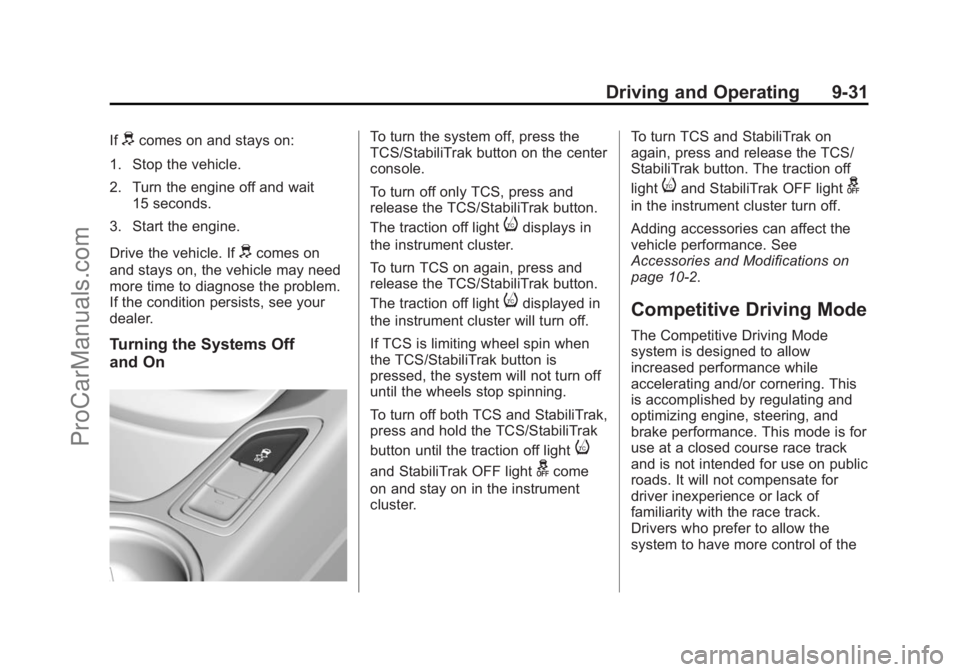
Turning the Systems Off
and On
To turn the system off, press the
TCS/StabiliTrak button on the center
console.
To turn off only TCS, press and
release the TCS/StabiliTrak button.
The traction off light
idisplays in
the instrument cluster.
To turn TCS on again, press and
release the TCS/StabiliTrak button.
The traction off light
idisplayed in
the instrument cluster will turn off.
If TCS is limiting wheel spin when
the TCS/StabiliTrak button is
pressed, the system will not turn off
until the wheels stop spinning.
To turn off both TCS and StabiliTrak,
press and hold the TCS/StabiliTrak
button until the traction off light
i
and StabiliTrak OFF lightgcome
on and stay on in the instrument
cluster. To turn TCS and StabiliTrak on
again, press and release the TCS/
StabiliTrak button. The traction off
light
iand StabiliTrak OFF lightg
in the instrument cluster turn off.
Adding accessories can affect the
vehicle performance. See
Accessories and Modifications on
page 10-2.
Competitive Driving Mode
The Competitive Driving Mode
system is designed to allow
increased performance while
accelerating and/or cornering. This
is accomplished by regulating and
optimizing engine, steering, and
brake performance. This mode is for
use at a closed course race track
and is not intended for use on public
roads. It will not compensate for
driver inexperience or lack of
familiarity with the race track.
Drivers who prefer to allow the
system to have more control of the
ProCarManuals.com
Page 265 of 422
Black plate (33,1)Chevrolet SS Sedan Owner Manual (GMNA-Localizing-U.S.-6014851) - 2014 -
1st Edition - 8/22/13
Driving and Operating 9-33
{Warning
Cruise control can be dangerous
where you cannot drive safely at
a steady speed. Do not use the
cruise control on winding roads or
in heavy traffic.
Cruise control can be dangerous
on slippery roads. On such roads,
fast changes in tire traction can
cause excessive wheel slip, and
you could lose control. Do not use
cruise control on slippery roads.
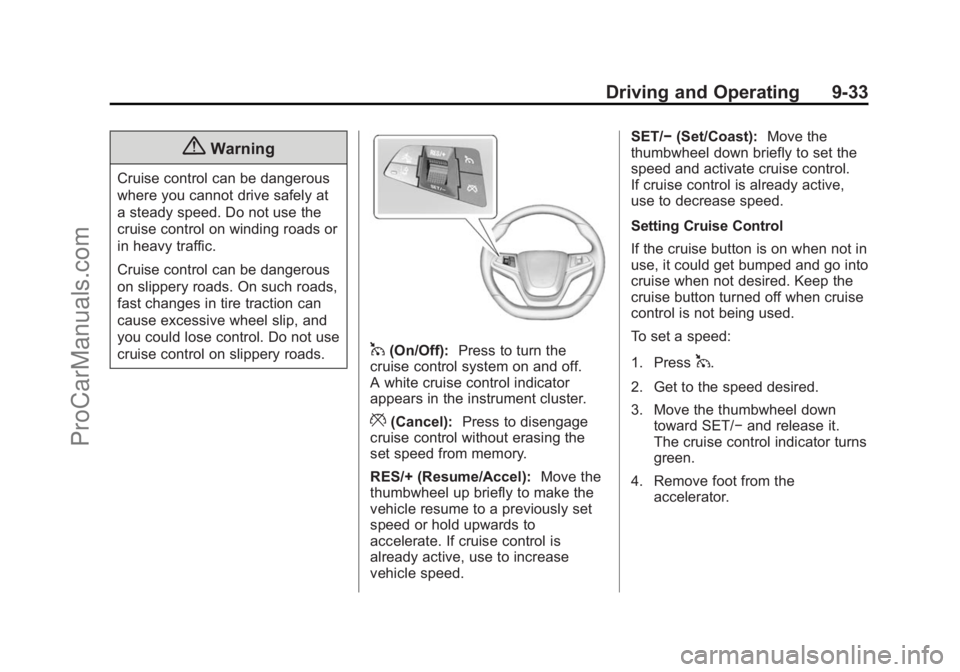
1(On/Off):Press to turn the
cruise control system on and off.
A white cruise control indicator
appears in the instrument cluster.
*(Cancel): Press to disengage
cruise control without erasing the
set speed from memory.
RES/+ (Resume/Accel): Move the
thumbwheel up briefly to make the
vehicle resume to a previously set
speed or hold upwards to
accelerate. If cruise control is
already active, use to increase
vehicle speed. SET/−
(Set/Coast): Move the
thumbwheel down briefly to set the
speed and activate cruise control.
If cruise control is already active,
use to decrease speed.
Setting Cruise Control
If the cruise button is on when not in
use, it could get bumped and go into
cruise when not desired. Keep the
cruise button turned off when cruise
control is not being used.
To set a speed:
1. Press
1.
2. Get to the speed desired.
3. Move the thumbwheel down toward SET/− and release it.
The cruise control indicator turns
green.
4. Remove foot from the accelerator.
ProCarManuals.com
Page 277 of 422
Black plate (45,1)Chevrolet SS Sedan Owner Manual (GMNA-Localizing-U.S.-6014851) - 2014 -
1st Edition - 8/22/13
Driving and Operating 9-45
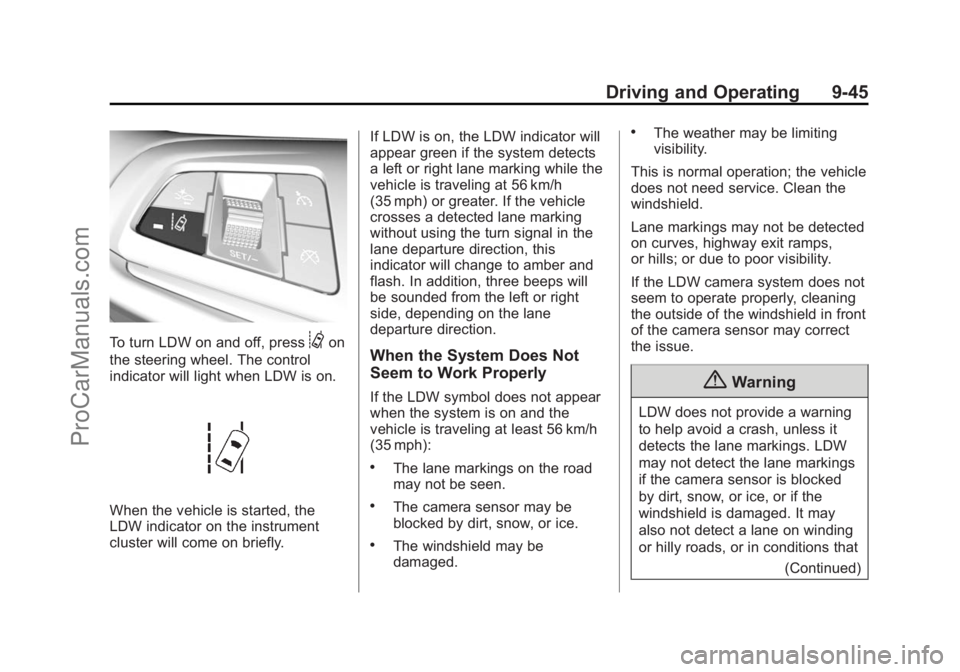
To turn LDW on and off, press@on
the steering wheel. The control
indicator will light when LDW is on.
When the vehicle is started, the
LDW indicator on the instrument
cluster will come on briefly. If LDW is on, the LDW indicator will
appear green if the system detects
a left or right lane marking while the
vehicle is traveling at 56 km/h
(35 mph) or greater. If the vehicle
crosses a detected lane marking
without using the turn signal in the
lane departure direction, this
indicator will change to amber and
flash. In addition, three beeps will
be sounded from the left or right
side, depending on the lane
departure direction.
When the System Does Not
Seem to Work Properly
If the LDW symbol does not appear
when the system is on and the
vehicle is traveling at least 56 km/h
(35 mph):
.The lane markings on the road
may not be seen.
.The camera sensor may be
blocked by dirt, snow, or ice.
.The windshield may be
damaged.
.The weather may be limiting
visibility.
This is normal operation; the vehicle
does not need service. Clean the
windshield.
Lane markings may not be detected
on curves, highway exit ramps,
or hills; or due to poor visibility.
If the LDW camera system does not
seem to operate properly, cleaning
the outside of the windshield in front
of the camera sensor may correct
the issue.
{Warning
LDW does not provide a warning
to help avoid a crash, unless it
detects the lane markings. LDW
may not detect the lane markings
if the camera sensor is blocked
by dirt, snow, or ice, or if the
windshield is damaged. It may
also not detect a lane on winding
or hilly roads, or in conditions that (Continued)
ProCarManuals.com
Page 310 of 422
Black plate (28,1)Chevrolet SS Sedan Owner Manual (GMNA-Localizing-U.S.-6014851) - 2014 -
1st Edition - 8/22/13
10-28 Vehicle Care
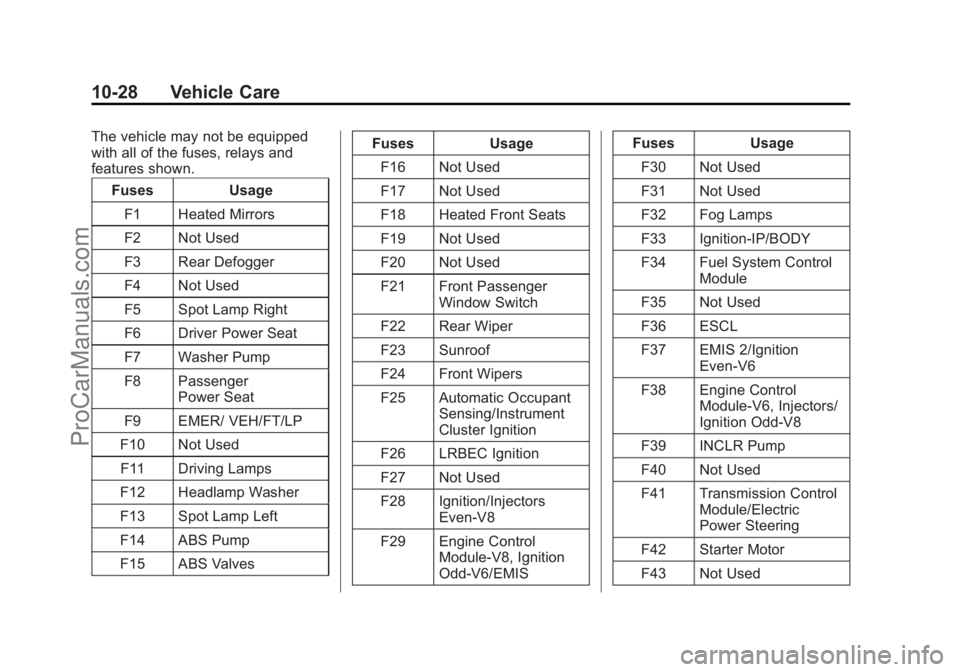
The vehicle may not be equipped
with all of the fuses, relays and
features shown.Fuses Usage
F1 Heated Mirrors
F2 Not Used
F3 Rear Defogger
F4 Not Used
F5 Spot Lamp Right
F6 Driver Power Seat
F7 Washer Pump
F8 Passenger Power Seat
F9 EMER/ VEH/FT/LP
F10 Not Used F11 Driving Lamps
F12 Headlamp Washer
F13 Spot Lamp Left
F14 ABS Pump
F15 ABS Valves Fuses Usage
F16 Not Used
F17 Not Used
F18 Heated Front Seats
F19 Not Used
F20 Not Used
F21 Front Passenger Window Switch
F22 Rear Wiper
F23 Sunroof
F24 Front Wipers
F25 Automatic Occupant Sensing/Instrument
Cluster Ignition
F26 LRBEC Ignition
F27 Not Used
F28 Ignition/Injectors Even-V8
F29 Engine Control Module-V8, Ignition
Odd-V6/EMIS Fuses Usage
F30 Not Used
F31 Not Used
F32 Fog Lamps
F33 Ignition-IP/BODY
F34 Fuel System Control Module
F35 Not Used
F36 ESCL
F37 EMIS 2/Ignition Even-V6
F38 Engine Control Module-V6, Injectors/
Ignition Odd-V8
F39 INCLR Pump
F40 Not Used
F41 Transmission Control Module/Electric
Power Steering
F42 Starter Motor
F43 Not Used
ProCarManuals.com
Page 313 of 422
Black plate (31,1)Chevrolet SS Sedan Owner Manual (GMNA-Localizing-U.S.-6014851) - 2014 -
1st Edition - 8/22/13
Vehicle Care 10-31
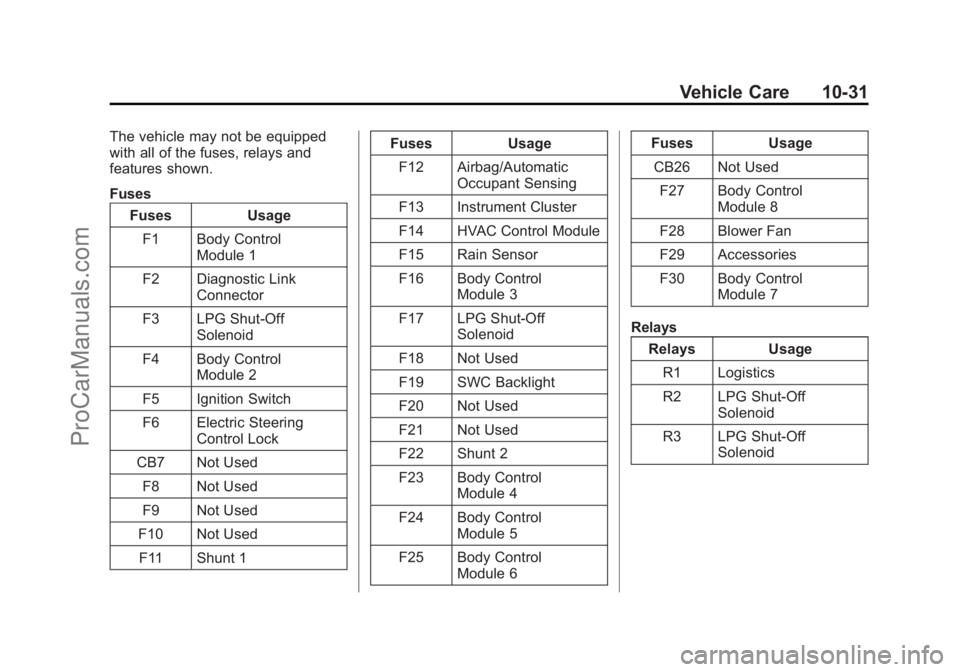
The vehicle may not be equipped
with all of the fuses, relays and
features shown.
FusesFuses Usage
F1 Body Control Module 1
F2 Diagnostic Link Connector
F3 LPG Shut-Off Solenoid
F4 Body Control Module 2
F5 Ignition Switch
F6 Electric Steering Control Lock
CB7 Not Used F8 Not Used
F9 Not Used
F10 Not Used F11 Shunt 1 Fuses
Usage
F12 Airbag/Automatic Occupant Sensing
F13 Instrument Cluster
F14 HVAC Control Module
F15 Rain Sensor
F16 Body Control Module 3
F17 LPG Shut-Off Solenoid
F18 Not Used
F19 SWC Backlight
F20 Not Used
F21 Not Used
F22 Shunt 2
F23 Body Control Module 4
F24 Body Control Module 5
F25 Body Control Module 6 Fuses
Usage
CB26 Not Used F27 Body Control Module 8
F28 Blower Fan
F29 Accessories
F30 Body Control Module 7
Relays Relays Usage
R1 Logistics
R2 LPG Shut-Off Solenoid
R3 LPG Shut-Off Solenoid
ProCarManuals.com