USB CHEVROLET SS 2014 Owner's Manual
[x] Cancel search | Manufacturer: CHEVROLET, Model Year: 2014, Model line: SS, Model: CHEVROLET SS 2014Pages: 422, PDF Size: 6.18 MB
Page 178 of 422

Black plate (42,1)Chevrolet SS Sedan Owner Manual (GMNA-Localizing-U.S.-6014851) - 2014 -
1st Edition - 8/22/13
7-42 Infotainment System
playback. This may happen
depending on how the device
communicates over Bluetooth.
Some phones support sending
Bluetooth music information to
display on the radio. When the radio
receives this information, it will
check to see if any album art is
available and display it.
When playing music on the radio
from a Bluetooth device, make sure
the Bluetooth device is unlocked
and the intended music application
is showing on the home screen.
For iPhone/iPod touch and iPad
devices, Bluetooth Audio will not
work if the device is connected
through the USB and Bluetooth at
the same time.Navigation
Using the Navigation
System
Use the NAV button on the
faceplate or Navigation on the
Home Page to access the
navigation map.
Press the NAV button again to
change between alternative views of
the normal split and full map views.
The Menu screen button at the
bottom right side of the display
accesses the Navigation Menu.
The touch-sensitive buttons
available are:
ProCarManuals.com
Page 198 of 422
Black plate (62,1)Chevrolet SS Sedan Owner Manual (GMNA-Localizing-U.S.-6014851) - 2014 -
1st Edition - 8/22/13
7-62 Infotainment System
settings where background noise is
typically louder than the sound
system volume.
Gracenote Options:Press to
enable/disable Normalization used
to improve voice recognition and
media groupings. See USB on
page 7-34, Auxiliary Devices on
page 7-40, and Bluetooth Audio on
page 7-41.
XM Channel Graphics: Press to
enable/disable the XM Audio page
background on the XM Channel
display.
Max Startup Volume: Press to set
the maximum volume level for
startup that will be used even if a
higher volume had been set when
the radio was turned off.
Number of Favorite Pages: Press
to select the number of FAV pages
to be displayed.
XM Categories: Press to
customize which available XM
Categories are used and displayed. Software Version Information:
Press to display information about
the system and update software if
available.
Phone Settings
See
Bluetooth on page 7-75 in the
“Phone” section for more
information on phone settings.
Navigation Settings
Press the Config button on the
Home Page to enter the setup
menu. Turn the TUNE/MENU knob
or touch-tap the scroll bar until the
Navigation Settings option displays.
Select this feature to make changes
to Voice Prompt, Traffic Settings,
Route Options, and Home Address.
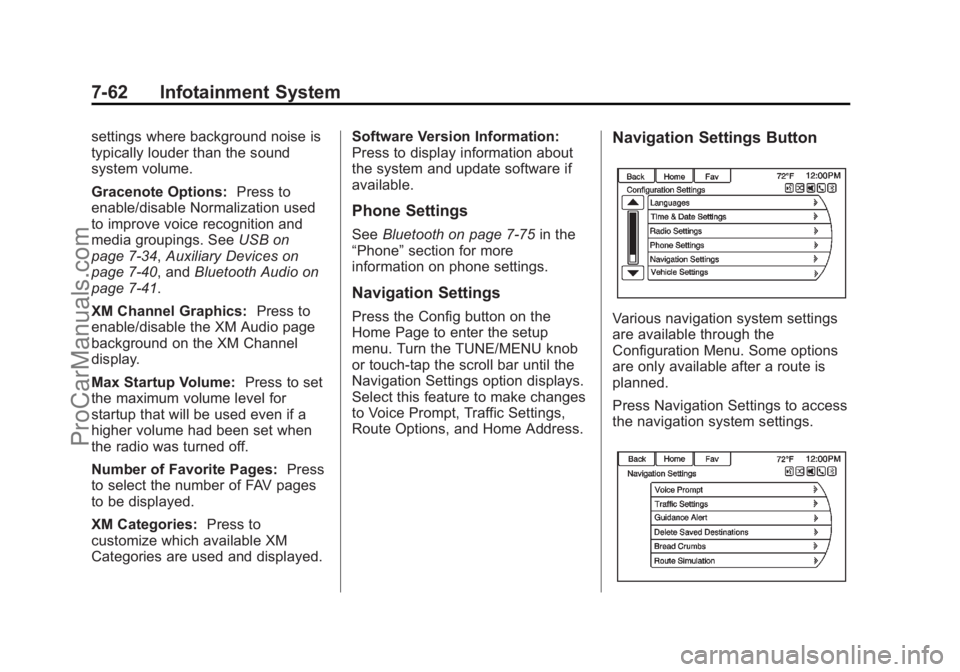
Navigation Settings Button
Various navigation system settings
are available through the
Configuration Menu. Some options
are only available after a route is
planned.
Press Navigation Settings to access
the navigation system settings.
ProCarManuals.com
Page 206 of 422
Black plate (70,1)Chevrolet SS Sedan Owner Manual (GMNA-Localizing-U.S.-6014851) - 2014 -
1st Edition - 8/22/13
7-70 Infotainment System
.If the system provides
destination in another country on
several attempts, say the
“Change Country”command and
say the country of interest. The
country default is the United
States. To enter a destination in
Canada or Mexico, the country
will first have to be changed in
the system.
Voice Recognition Help
To enter the help playback session,
clearly speak one of the help
commands.
Help: The system plays back more
specific help commands such as
Radio Settings for the user to
choose from.
Radio: Use this command to learn
about how to select a band (AM,
FM, or XM), and how to change
radio stations by speaking
frequency numbers.
Phone: Use this command to learn
about how to dial, pair a device,
or delete a device. My Media:
Use this command to
learn how to play specific tracks,
artists, albums, devices connected
to the USB port, or to change
sources.
Settings: Use this command to
learn about how to turn Verbose on
or off, or set the language.
Voice Recognition Commands
The following list shows the voice
commands available for the
infotainment system with a brief
description of each. The commands
are listed with the optional words in
parentheses. To use the voice
commands, see the previous
instructions.
Radio Commands
Tune AM, Tune FM, Tune XM,
Tune Pandora, Tune Stitcher:
Instructs the system to go to the
specific band and the last channel. Tune AM (frequency), Tune FM
(frequency), Tune XM (channel
number), or Tune XM (channel
name):
Instructs the system to go
to the specific station.
Thumbs Up: Instructs the system
to give the current song or station a
thumbs up in Pandora or Stitcher.
Thumbs Down: Instructs the
system to give the current song or
station a thumbs down in Pandora
or Stitcher.
Phone Commands
Dial or Call (phone number or
contact): Instructs the system to
start a phone call. For example, say
“Dial 1 248 123 4567.” To call a
phone book contact, say “Dial”or
“Call,” say the name and location,
and then say “Dial.”For example,
say “Call John at Home” or“Call
John at Work.” If a number is not
recognized, the first number in the
list will be called.
Pair or Connect: Instructs the
system to begin pairing a device.
ProCarManuals.com
Page 207 of 422
Black plate (71,1)Chevrolet SS Sedan Owner Manual (GMNA-Localizing-U.S.-6014851) - 2014 -
1st Edition - 8/22/13
Infotainment System 7-71
Digit Dial:Instructs the system to
dial a phone number one digit at a
time. After saying the digits,
say “Dial.”
Redial or Redial Last Number:
Instructs the system to dial the last
phone number called.
Select Device or Change Phone:
Instructs the system to switch to a
different paired device. The device
must be selected from the screen or
using the TUNE/MENU knob.
Delete Device: Instructs the
system to delete a paired device.
Read Text Messages or Read SMS
Messages: Instructs the system to
begin reading text messages from
paired device.
Not all devices support text
messages. Applicable where
equipped.
My Media Commands
AUX, USB, or Bluetooth Audio:
Instructs the system to change the
source. The following commands only apply
to USB, iPod, and iPhone sources.
They are supported after the device
has been indexed.
Play Artist (artist name):
Instructs
the system to play songs by a
specific artist. For example, say
“Play Artist
Play Album (album title): Instructs
the system to play a specific album.
Play Song (song title): Instructs
the system to play a specific song.
Play Genre (genre name):
Instructs the system to play songs
of a particular genre.
Search Artist (artist name):
Instructs the system to show a list of
all songs by a specific artist. For
example, say "Search Artist
Search Composer (composer
name): Instructs the system to
show a list of all songs by a specific
composer. For example, say
"Search Composer
Instructs the system to show a list of
all songs by a specific album. For
example, say "Search Album
Search Genre (genre name):
Instructs the system to show a list of
all songs for a specific genre. For
example, say "Search Genre
Search Folder (folder name):
Instructs the system to show a list of
all songs in a specific folder. For
example, say "Search folder
Search Playlist (playlist name):
Instructs the system to show a list of
all songs in a specific playlist. For
example, say "Search playlist
Search Audio Book (audio book
name):
Instructs the system to
show a list of all tracks in a specific
audio book. For example, say
"Search audio book
⁐⁃⁍⁵
Page 413 of 422
Black plate (3,1)Chevrolet SS Sedan Owner Manual (GMNA-Localizing-U.S.-6014851) - 2014 -
1st Edition - 8/22/13
INDEX i-3
ControlTraction and Electronic
Stability . . . . . . . . . . . . . . . . . . . . . 9-30
Control of a Vehicle . . . . . . . . . . . . . 9-3
Convenience Net . . . . . . . . . . . . . . . 4-3
Convex Mirrors . . . . . . . . . . . . . . . . 2-16
Coolant Engine . . . . . . . . . . . . . . . . . . . . . . 10-12
Engine Temperature Gauge . . . 5-9
Cooling System . . . . . . . . . . . . . . . 10-11 Engine Messages . . . . . . . . . . . . 5-27
Courtesy Transportation Program . . . . . . . . . . . . . . . . . . . . . . 13-7
Cruise Control . . . . . . . . . . . . . . . . . 9-32 Light . . . . . . . . . . . . . . . . . . . . . . . . . . 5-20
Messages . . . . . . . . . . . . . . . . . . . . 5-27
Cupholders . . . . . . . . . . . . . . . . . . . . . 4-1
Customer Assistance . . . . . . . . . . 13-4 Offices . . . . . . . . . . . . . . . . . . . . . . . . 13-3
Text Telephone (TTY)Users . . . . . . . . . . . . . . . . . . . . . . . 13-4
Customer Information Service PublicationsOrdering Information . . . . . . .13-11
Customer Satisfaction
Procedure . . . . . . . . . . . . . . . . . . . . 13-1D
Damage Repair, Collision . . . . . . 13-9
Danger, Warnings, andCautions . . . . . . . . . . . . . . . . . . . . . . . . iii
Data Recorders, Event . . . . . . . 13-14
Database Coverage Explanations . . . . . . . . . . . . . . . . . 7-68
Daytime Running Lamps (DRL) . . . . . . . . . . . . . . . . . . 6-2
Defensive Driving . . . . . . . . . . . . . . . 9-3
Delayed Locking . . . . . . . . . . . . . . . 2-11
Destination Download, OnStar
®. . . . . . . . . . . . . . . . . . . . . . 7-59
Destination, Navigation . . . . . . . . 7-48
Devices Auxiliary . . . . . . . . . . . . . . . . . . . . . . 7-40
USB . . . . . . . . . . . . . . . . . . . . . . . . . . 7-34
Diagnostics OnStar
®. . . . . . . . . . . . . . . . . . . . . . 14-5
Distracted Driving . . . . . . . . . . . . . . . 9-2
Dome Lamps . . . . . . . . . . . . . . . . . . . 6-4
Door
Ajar Light . . . . . . . . . . . . . . . . . . . . . 5-20
Ajar Messages . . . . . . . . . . . . . . . 5-27
Delayed Locking . . . . . . . . . . . . . . 2-11 Door (cont'd)
Locks . . . . . . . . . . . . . . . . . . . . . . . . . 2-10
Power Locks . . . . . . . . . . . . . . . . . . 2-11
Rear Seat Pass-Through . . . . . . 3-7
Drive Belt Routing, Engine . . . . . 12-3
Driver Assistance Systems . . . . 9-35
Driver Information Center (DIC) . . . . . . . . . . . . . . . . . 5-21
Driving
Assistance Systems . . . . . . . . . . 9-40
Competitive . . . . . . . . . . . . . . . . . . . 9-31
Defensive . . . . . . . . . . . . . . . . . . . . . . 9-3
Drunk . . . . . . . . . . . . . . . . . . . . . . . . . . 9-3
For Better Fuel Economy . . . . . 1-18
Highway Hypnosis . . . . . . . . . . . . . 9-7
Hill and Mountain Roads . . . . . . . 9-7
If the Vehicle is Stuck . . . . . . . . . 9-10
Loss of Control . . . . . . . . . . . . . . . . 9-5
Off-Road Recovery . . . . . . . . . . . . 9-4
Vehicle Load Limits . . . . . . . . . . . 9-10
Wet Roads . . . . . . . . . . . . . . . . . . . . 9-6
Winter . . . . . . . . . . . . . . . . . . . . . . . . . 9-8
Dual Automatic Climate
Control System . . . . . . . . . . . . . . . . 8-1
ProCarManuals.com
Page 422 of 422
Black plate (12,1)Chevrolet SS Sedan Owner Manual (GMNA-Localizing-U.S.-6014851) - 2014 -
1st Edition - 8/22/13
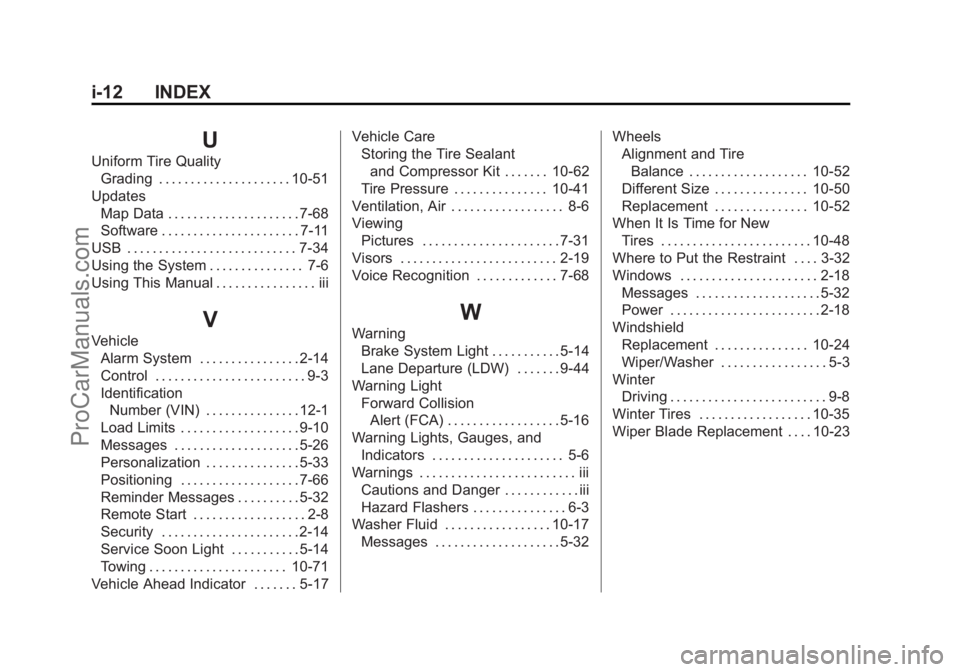
i-12 INDEX
U
Uniform Tire QualityGrading . . . . . . . . . . . . . . . . . . . . . 10-51
Updates Map Data . . . . . . . . . . . . . . . . . . . . . 7-68
Software . . . . . . . . . . . . . . . . . . . . . . 7-11
USB . . . . . . . . . . . . . . . . . . . . . . . . . . . 7-34
Using the System . . . . . . . . . . . . . . . 7-6
Using This Manual . . . . . . . . . . . . . . . . iii
V
Vehicle Alarm System . . . . . . . . . . . . . . . . 2-14
Control . . . . . . . . . . . . . . . . . . . . . . . . 9-3
Identification
Number (VIN) . . . . . . . . . . . . . . . 12-1
Load Limits . . . . . . . . . . . . . . . . . . . 9-10
Messages . . . . . . . . . . . . . . . . . . . . 5-26
Personalization . . . . . . . . . . . . . . . 5-33
Positioning . . . . . . . . . . . . . . . . . . . 7-66
Reminder Messages . . . . . . . . . . 5-32
Remote Start . . . . . . . . . . . . . . . . . . 2-8
Security . . . . . . . . . . . . . . . . . . . . . . 2-14
Service Soon Light . . . . . . . . . . . 5-14
Towing . . . . . . . . . . . . . . . . . . . . . . 10-71
Vehicle Ahead Indicator . . . . . . . 5-17 Vehicle Care
Storing the Tire Sealant
and Compressor Kit . . . . . . . 10-62
Tire Pressure . . . . . . . . . . . . . . . 10-41
Ventilation, Air . . . . . . . . . . . . . . . . . . 8-6
Viewing Pictures . . . . . . . . . . . . . . . . . . . . . . 7-31
Visors . . . . . . . . . . . . . . . . . . . . . . . . . 2-19
Voice Recognition . . . . . . . . . . . . . 7-68
W
Warning Brake System Light . . . . . . . . . . . 5-14
Lane Departure (LDW) . . . . . . . 9-44
Warning Light Forward CollisionAlert (FCA) . . . . . . . . . . . . . . . . . . 5-16
Warning Lights, Gauges, and
Indicators . . . . . . . . . . . . . . . . . . . . . 5-6
Warnings . . . . . . . . . . . . . . . . . . . . . . . . . iii Cautions and Danger . . . . . . . . . . . . iii
Hazard Flashers . . . . . . . . . . . . . . . 6-3
Washer Fluid . . . . . . . . . . . . . . . . . 10-17
Messages . . . . . . . . . . . . . . . . . . . . 5-32 Wheels
Alignment and Tire
Balance . . . . . . . . . . . . . . . . . . . 10-52
Different Size . . . . . . . . . . . . . . . 10-50
Replacement . . . . . . . . . . . . . . . 10-52
When It Is Time for New Tires . . . . . . . . . . . . . . . . . . . . . . . . 10-48
Where to Put the Restraint . . . . 3-32
Windows . . . . . . . . . . . . . . . . . . . . . . 2-18 Messages . . . . . . . . . . . . . . . . . . . . 5-32
Power . . . . . . . . . . . . . . . . . . . . . . . . 2-18
Windshield Replacement . . . . . . . . . . . . . . . 10-24
Wiper/Washer . . . . . . . . . . . . . . . . . 5-3
Winter Driving . . . . . . . . . . . . . . . . . . . . . . . . . 9-8
Winter Tires . . . . . . . . . . . . . . . . . . 10-35
Wiper Blade Replacement . . . . 10-23
ProCarManuals.com