battery CHEVROLET SS 2015 Owner's Manual
[x] Cancel search | Manufacturer: CHEVROLET, Model Year: 2015, Model line: SS, Model: CHEVROLET SS 2015Pages: 435, PDF Size: 6.27 MB
Page 167 of 435
Black plate (26,1)Chevrolet SS Sedan Owner Manual (GMNA-Localizing-U.S.-7707491) - 2015 -
crc - 9/11/14
7-26 Infotainment System
Loss of Audio
Loss of Pandora audio can happen
in different ways:
.Weak or lost data connection.
.Device needs to be charged.
.Application needs to be
relaunched.
.Connection between phone and
radio lost.
.If any iPhone, iPod touch,
or iPad is connected to
Bluetooth and the dock
connector, go to the Airplay icon
on the device and select dock
connector or disconnect and
reconnect the dock connector on
the device.
.The volume is too low. Turn up
the volume on the device.
.The battery saver and task
manager applications on the
phone can cause Pandora to
function incorrectly. Removethose apps from the phone or
remove Pandora and Bluetooth
from the task lists.
If the connection is lost between the
application and device, a message
“Please unlock your phone or restart
the phone app and try again” will
display. Press OK to retry.
If pressing OK does not clear the
issue on the phone, see “Please
Unlock Your Phone or Restart
Phone App and Try Again” under
"Common Pandora Messages"
following.
Common Pandora Messages
Please See Device: When not
logged in or when authentication
failed, see the device. Press OK to
continue.
Paused or Audio Paused:
Playback is paused on the radio or
the device. Press
Jor play on the
device. No Stations Found:
Logged in but
no stations have been created.
Press OK to continue.
Please Unlock Your Phone or
Restart Phone App and Try
Again: Communication failure
between the radio and the phone
application, or the device is locked.
Devices that allow multitasking may
require an extra step to quit the
Pandora application. Close Pandora
on the device and launch again.
Unlock the phone and check that
Home Page is displayed on the
phone/device.
See the cell phone manufacturer's
user guide.
See www.pandora.com/help for
more information. If the service will
not work, see your dealer for
assistance.
ProCarManuals.com
Page 170 of 435
Black plate (29,1)Chevrolet SS Sedan Owner Manual (GMNA-Localizing-U.S.-7707491) - 2015 -
crc - 9/11/14
Infotainment System 7-29
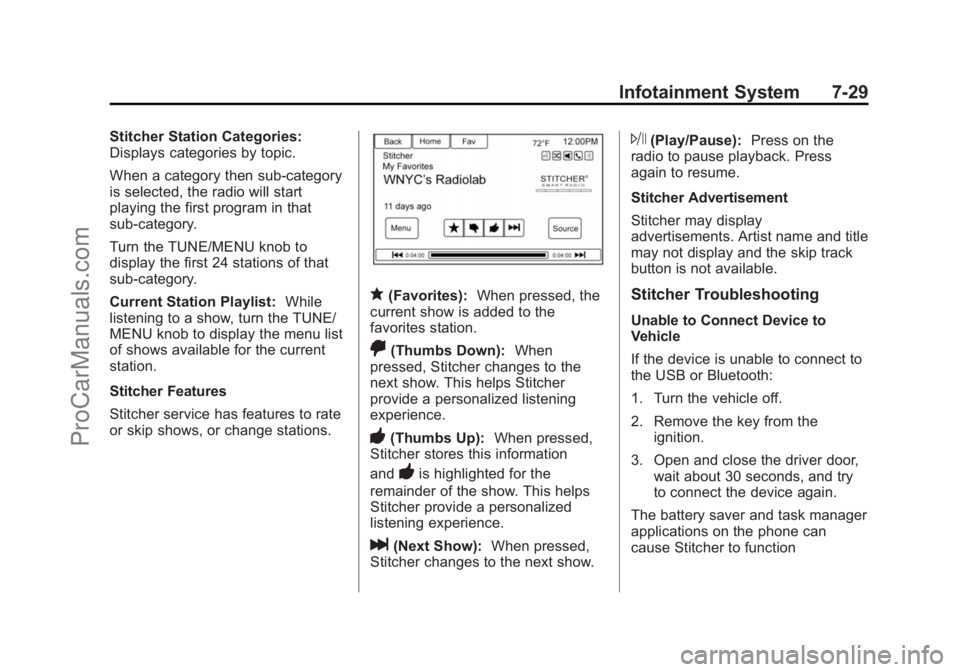
Stitcher Station Categories:
Displays categories by topic.
When a category then sub-category
is selected, the radio will start
playing the first program in that
sub-category.
Turn the TUNE/MENU knob to
display the first 24 stations of that
sub-category.
Current Station Playlist:While
listening to a show, turn the TUNE/
MENU knob to display the menu list
of shows available for the current
station.
Stitcher Features
Stitcher service has features to rate
or skip shows, or change stations.
q(Favorites): When pressed, the
current show is added to the
favorites station.
,(Thumbs Down): When
pressed, Stitcher changes to the
next show. This helps Stitcher
provide a personalized listening
experience.
-(Thumbs Up): When pressed,
Stitcher stores this information
and
-is highlighted for the
remainder of the show. This helps
Stitcher provide a personalized
listening experience.
l(Next Show): When pressed,
Stitcher changes to the next show.
J(Play/Pause): Press on the
radio to pause playback. Press
again to resume.
Stitcher Advertisement
Stitcher may display
advertisements. Artist name and title
may not display and the skip track
button is not available.
Stitcher Troubleshooting
Unable to Connect Device to
Vehicle
If the device is unable to connect to
the USB or Bluetooth:
1. Turn the vehicle off.
2. Remove the key from the ignition.
3. Open and close the driver door, wait about 30 seconds, and try
to connect the device again.
The battery saver and task manager
applications on the phone can
cause Stitcher to function
ProCarManuals.com
Page 179 of 435
Black plate (38,1)Chevrolet SS Sedan Owner Manual (GMNA-Localizing-U.S.-7707491) - 2015 -
crc - 9/11/14
7-38 Infotainment System
Playing from an iPod®
This feature supports the following
iPod models:
.iPod classic®(6th generation)
.iPod nano®(3G, 4G, 5G,
and 6G)
.iPod touch®(1G, 2G, 3G,
and 4G)
There may be problems with the
operation and function in the
following situations:
.When connecting an iPod on
which a more recent version of
the firmware is installed than is
supported by the infotainment
system.
.When connecting an iPod on
which firmware from other
providers is installed.
To connect an iPod:
1. Connect one end of the standard iPod USB cable to the iPod's
dock connector. 2. Connect the other end to the
USB port in the center console.
iPod music information displays on
the radio’s display and begins
playing through the vehicle’s audio
system.
The iPod battery recharges
automatically while the vehicle is on.
The iPod shuts off and stops
charging when the vehicle is
shut off.
If the iPod is an unsupported model,
it can still be listened to in the
vehicle by connecting to the
auxiliary input jack using a standard
3.5 mm (1/8 in) stereo cable.
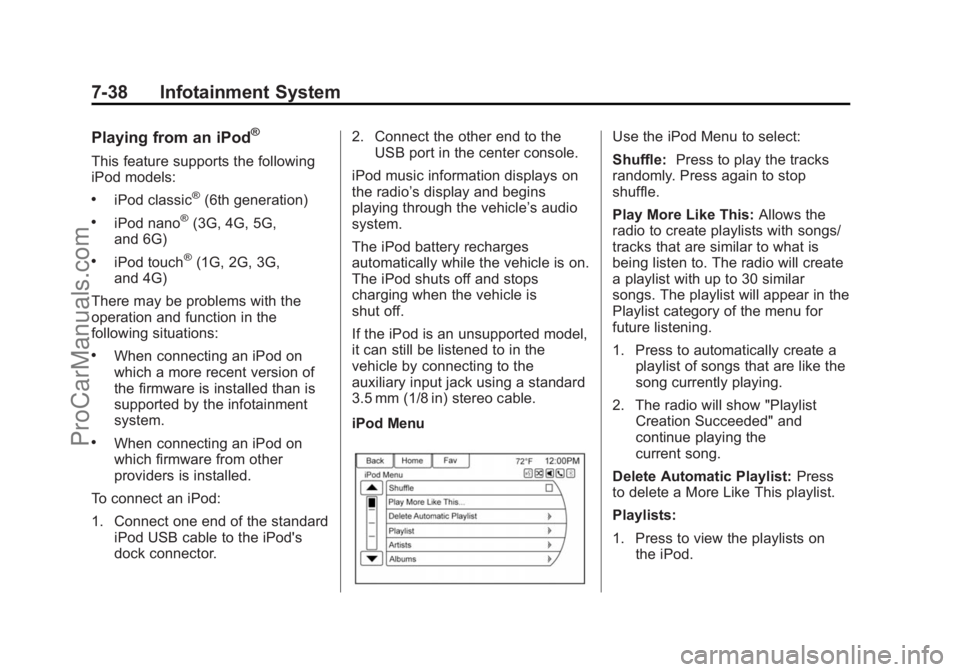
iPod Menu
Use the iPod Menu to select:
Shuffle: Press to play the tracks
randomly. Press again to stop
shuffle.
Play More Like This: Allows the
radio to create playlists with songs/
tracks that are similar to what is
being listen to. The radio will create
a playlist with up to 30 similar
songs. The playlist will appear in the
Playlist category of the menu for
future listening.
1. Press to automatically create a
playlist of songs that are like the
song currently playing.
2. The radio will show "Playlist Creation Succeeded" and
continue playing the
current song.
Delete Automatic Playlist: Press
to delete a More Like This playlist.
Playlists:
1. Press to view the playlists on the iPod.
ProCarManuals.com
Page 207 of 435
Black plate (66,1)Chevrolet SS Sedan Owner Manual (GMNA-Localizing-U.S.-7707491) - 2015 -
crc - 9/11/14
7-66 Infotainment System
.The vehicle is traveling on
winding roads or long straight
roads.
.The vehicle is approaching a tall
building or a large vehicle.
.The surface streets run parallel
to a freeway.
.The vehicle has been transferred
by a vehicle carrier or a ferry.
.The current position calibration
is set incorrectly.
.The vehicle is traveling at high
speed.
.The vehicle changes directions
more than once, or the vehicle is
turning on a turn table in a
parking lot.
.The vehicle is entering and/or
exiting a parking lot, garage, or a
lot with a roof.
.The GPS signal is not received.
.A roof carrier is installed on the
vehicle.
.Tire chains have been installed.
.The tires are replaced or worn.
.The tire pressure for the tires is
incorrect.
.This is the first navigation use
after the map data is updated.
.The 12-volt battery is
disconnected for several days.
.The vehicle is driving in heavy
traffic where driving is at low
speeds, and the vehicle is
stopped and started repeatedly.
Problems with Route
Guidance
Inappropriate route guidance can
occur under one or more of the
following conditions:
.The turn was not made on the
road indicated.
.Route guidance might not be
available when using automatic
rerouting for the next right or
left turn.
.The route might not be changed
when using automatic rerouting.
.There is no route guidance when
turning at an intersection.
.Plural names of places might be
announced occasionally.
.It could take a long time to
operate automatic rerouting
during high-speed driving.
.Automatic rerouting might
display a route returning to the
set waypoint if heading for a
destination without passing
through a set waypoint.
.The route prohibits the entry of a
vehicle due to a regulation by
time or season or any other
regulation which may be given.
.Some routes might not be
searched.
.The route to the destination
might not be shown if there are
new roads, if roads have
recently changed, or if certain
roads are not listed in the map
data. SeeMaps on page 7-46.
ProCarManuals.com
Page 248 of 435
Black plate (11,1)Chevrolet SS Sedan Owner Manual (GMNA-Localizing-U.S.-7707491) - 2015 -
crc - 9/11/14
Driving and Operating 9-11
If it takes some time for help to
arrive, now and then when you run
the engine, push the accelerator
pedal slightly so the engine runs
faster than the idle speed. This
keeps the battery charged to restart
the vehicle and to signal for help
with the headlamps. Do this as little
as possible to save fuel.
If the Vehicle Is Stuck
Slowly and cautiously spin the
wheels to free the vehicle when
stuck in sand, mud, ice, or snow.
If stuck too severely for the traction
system to free the vehicle, turn the
traction system off and use the
rocking method. SeeTraction
Control/Electronic Stability Control
on page 9-32.
{Warning
If the vehicle's tires spin at high
speed, they can explode, and you
or others could be injured. The
(Continued)
Warning (Continued)
vehicle can overheat, causing an
engine compartment fire or other
damage. Spin the wheels as little
as possible and avoid going
above 56 km/h (35 mph).
Rocking the Vehicle to Get
it Out
Turn the steering wheel left and
right to clear the area around the
front wheels. Turn off any traction
system. Shift back and forth
between R (Reverse) and a low
forward gear, spinning the wheels
as little as possible. To prevent
transmission wear, wait until the
wheels stop spinning before shifting
gears. Release the accelerator
pedal while shifting, and press
lightly on the accelerator pedal
when the transmission is in gear.
Slowly spinning the wheels in the
forward and reverse directions
causes a rocking motion that could
free the vehicle. If that does not get the vehicle out after a few tries, it
might need to be towed out. If the
vehicle does need to be towed out,
see
Towing the Vehicle on
page 10-73.
Vehicle Load Limits
It is very important to know how
much weight the vehicle can
carry. This weight is called the
vehicle capacity weight and
includes the weight of all
occupants, cargo, and all
nonfactory-installed options.
Two labels on the vehicle show
how much weight it may
properly carry, the Tire and
Loading Information label and
the Certification label.
ProCarManuals.com
Page 255 of 435
Black plate (18,1)Chevrolet SS Sedan Owner Manual (GMNA-Localizing-U.S.-7707491) - 2015 -
crc - 9/11/14
9-18 Driving and Operating
The ignition will switch from ACC/
ACCESSORY to OFF after
five minutes to prevent battery
rundown.
ON/RUN/START (Green Indicator
Light):This mode is for driving and
starting. With the ignition off, and
the brake pedal applied for
automatic transmission vehicles,
and the clutch pedal applied for
manual transmission vehicles,
pressing the button once will place
the ignition system in ON/RUN/
START. Once engine cranking
begins, release the button. Engine
cranking will continue until the
engine starts. See Starting the
Engine on page 9-18. The ignition
will then remain in ON/RUN.
Service Only Mode
This power mode is available for
service and diagnostics, and to
verify the proper operation of the
malfunction indicator lamp as may
be required for emission inspection
purposes. With the vehicle off, and
the brake pedal not applied, pressing and holding the button for
more than five seconds will place
the vehicle in Service Only Mode.
The instruments and audio systems
will operate as they do in ON/RUN,
but the vehicle will not be able to be
driven. The engine will not start in
Service Only Mode. Press the
button again to turn the vehicle off.
Starting the Engine
Place the transmission in the
proper gear.
{Caution
If you add electrical parts or
accessories, you could change
the way the engine operates. Any
resulting damage would not be
covered by the vehicle warranty.
See
Add-On Electrical Equipment
on page 9-56. Automatic Transmission
Move the shift lever to P (Park) or
N (Neutral). To restart the vehicle
when it is already moving, use
N (Neutral) only.
{Caution
Do not try to shift to P (Park) if the
vehicle is moving. If you do, you
could damage the transmission.
Shift to P (Park) only when the
vehicle is stopped.
Manual Transmission
The shift lever should be in Neutral
and the parking brake engaged.
Hold the clutch pedal down to the
floor and start the engine.
ProCarManuals.com
Page 256 of 435
Black plate (19,1)Chevrolet SS Sedan Owner Manual (GMNA-Localizing-U.S.-7707491) - 2015 -
crc - 9/11/14
Driving and Operating 9-19
Starting Procedure (Keyless
Access)
1. With the Keyless Accesssystem, the RKE transmitter
must be in the vehicle. Press the
ENGINE START/STOP button
with the brake pedal applied on
vehicles with an automatic
transmission, and the clutch
pedal applied on vehicles with a
manual transmission. When the
engine begins cranking, let go of
the button.
The idle speed will go down as
the engine gets warm. Do not
race the engine immediately
after starting it.
If the RKE transmitter is not in
the vehicle, if there is
interference, or the RKE battery
is low, a Driver Information
Center (DIC) message will
display. See Driver Information
Center (DIC) on page 5-20 and
Remote Keyless Entry (RKE)
System Operation on page 2-3.{Caution
Cranking the engine for long
periods of time, by returning the
ignition to the START position
immediately after cranking has
ended, can overheat and damage
the cranking motor, and drain the
battery. Wait at least 15 seconds
between each try, to let the
cranking motor cool down.
2. If the engine does not start after five to 10 seconds, especially in
very cold weather (below −18°C
or 0°F), it could be flooded with
too much gasoline. Try pushing
the accelerator pedal all the way
to the floor and holding it there
as you press the ENGINE
START/STOP button, for up to a
maximum of 15 seconds. Wait at
least 15 seconds between each
try, to allow the cranking motor
to cool down. When the engine
starts, let go of the button, and
the accelerator. If the vehicle starts briefly but then stops
again, do the same thing. This
clears the extra gasoline from
the engine. Do not race the
engine immediately after starting
it. Operate the engine and
transmission gently until the oil
warms up and lubricates all
moving parts.
Retained Accessory
Power (RAP)
The power windows will operate
when the ignition is in the ON/RUN
or ACC/ACCESSORY positions.
Once the ignition is turned off, RAP
allows the power windows to
continue to operate for up to
10 minutes. If a door is opened
during this time, they will be
deactivated.
The audio system will be
deactivated only if the driver door is
opened.
ProCarManuals.com
Page 258 of 435
Black plate (21,1)Chevrolet SS Sedan Owner Manual (GMNA-Localizing-U.S.-7707491) - 2015 -
crc - 9/11/14
Driving and Operating 9-21
The shift lock release is always
functional except in the case of an
uncharged or low voltage (less than
9-volt) battery.
If the vehicle has an uncharged
battery or a battery with low voltage,
try charging or jump starting the
battery. SeeJump Starting on
page 10-71.
To shift out of P (Park):
1. Apply the brake pedal.
2. Place the ignition in ON/RUN.
3. Press the shift lever button.
4. Move the shift lever to the
desired position.
If still unable to shift out of P (Park):
1. Fully release the shift lever button.
2. Hold the brake pedal down and press the shift lever button
again.
3. Move the shift lever to the desired position. If you are still having a problem
shifting, see your dealer.
Shift Lock Manual Release
If jump starting the vehicle did not
work, the shift lock manual release
must be used.
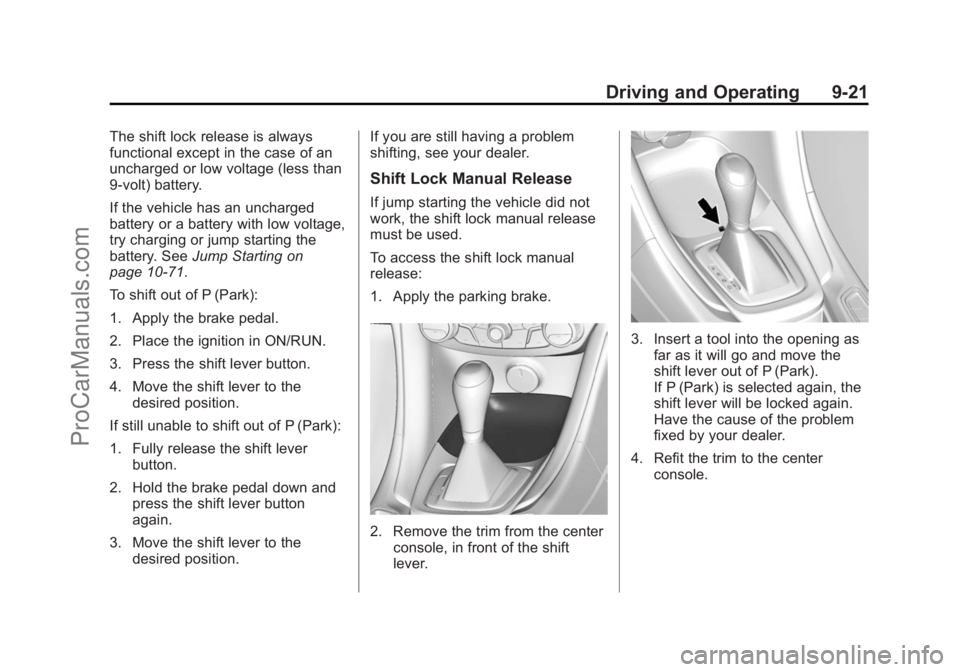
To access the shift lock manual
release:
1. Apply the parking brake.
2. Remove the trim from the center
console, in front of the shift
lever.
3. Insert a tool into the opening asfar as it will go and move the
shift lever out of P (Park).
If P (Park) is selected again, the
shift lever will be locked again.
Have the cause of the problem
fixed by your dealer.
4. Refit the trim to the center console.
ProCarManuals.com
Page 266 of 435
Black plate (29,1)Chevrolet SS Sedan Owner Manual (GMNA-Localizing-U.S.-7707491) - 2015 -
crc - 9/11/14
Driving and Operating 9-29
If driving safely on a wet road and it
becomes necessary to slam on the
brakes and continue braking to
avoid a sudden obstacle, a
computer senses the wheels are
slowing down. If one of the wheels
is about to stop rolling, the computer
will separately work the brakes at
each wheel.
ABS can change the brake pressure
to each wheel, as required, faster
than any driver could. This can help
you steer around the obstacle while
braking hard.
As the brakes are applied, the
computer keeps receiving updates
on wheel speed and controls
braking pressure accordingly.
Remember: ABS does not change
the time needed to get a foot up to
the brake pedal or always decrease
stopping distance. If you get too
close to the vehicle in front of you,
there will not be enough time to
apply the brakes if that vehiclesuddenly slows or stops. Always
leave enough room up ahead to
stop, even with ABS.
Using ABS
Do not pump the brakes. Just hold
the brake pedal down firmly and let
ABS work. You may hear the ABS
pump or motor operating and feel
the brake pedal pulsate. This is
normal.
Braking in Emergencies
ABS allows you to steer and brake
at the same time. In many
emergencies, steering can help
more than even the very best
braking.
Electric Parking Brake
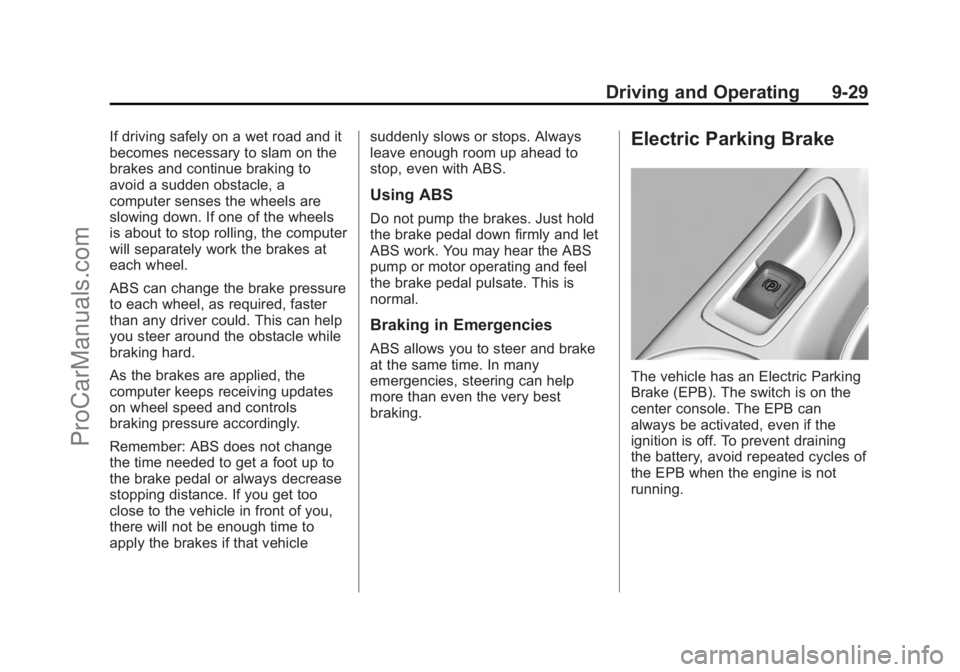
The vehicle has an Electric Parking
Brake (EPB). The switch is on the
center console. The EPB can
always be activated, even if the
ignition is off. To prevent draining
the battery, avoid repeated cycles of
the EPB when the engine is not
running.
ProCarManuals.com
Page 293 of 435
Black plate (56,1)Chevrolet SS Sedan Owner Manual (GMNA-Localizing-U.S.-7707491) - 2015 -
crc - 9/11/14
9-56 Driving and Operating
Conversions and
Add-Ons
Add-On Electrical
Equipment
{Caution
Some electrical equipment can
damage the vehicle or cause
components to not work and
would not be covered by the
warranty. Always check with your
dealer before adding electrical
equipment.
Add-on equipment can drain the
vehicle's 12-volt battery, even if the
vehicle is not operating.
The vehicle has an airbag system.
Before attempting to add anything
electrical to the vehicle, see
Servicing the Airbag-Equipped
Vehicle on page 3-25 andAdding
Equipment to the Airbag-Equipped
Vehicle on page 3-26.
ProCarManuals.com