tow CHEVROLET SS 2015 Owner's Manual
[x] Cancel search | Manufacturer: CHEVROLET, Model Year: 2015, Model line: SS, Model: CHEVROLET SS 2015Pages: 435, PDF Size: 6.27 MB
Page 250 of 435
Black plate (13,1)Chevrolet SS Sedan Owner Manual (GMNA-Localizing-U.S.-7707491) - 2015 -
crc - 9/11/14
Driving and Operating 9-13
“Steps for Determining Correct
Load Limit–
1.Locate the statement "The
combined weight of
occupants and cargo should
never exceed XXX kg or
XXX lbs." on your vehicle’s
placard.
2.Determine the combined
weight of the driver and
passengers that will be riding
in your vehicle.
3.Subtract the combined
weight of the driver and
passengers from XXX kg or
XXX lbs.
4.The resulting figure equals
the available amount of cargo
and luggage load capacity.
For example, if the "XXX"
amount equals 1400 lbs. and
there will be five 150 lb
passengers in your vehicle,
the amount of available cargoand luggage load capacity is
650 lbs. (1400-750 (5 x 150)
= 650 lbs.)
5.Determine the combined
weight of luggage and cargo
being loaded on the vehicle.
That weight may not safely
exceed the available cargo
and luggage load capacity
calculated in Step 4.
6.If your vehicle will be towing
a trailer, load from your trailer
will be transferred to your
vehicle. Consult this manual
to determine how this
reduces the available cargo
and luggage load capacity of
your vehicle.”
See Trailer Towing on page 9-55
for important information on
towing a trailer, towing safety
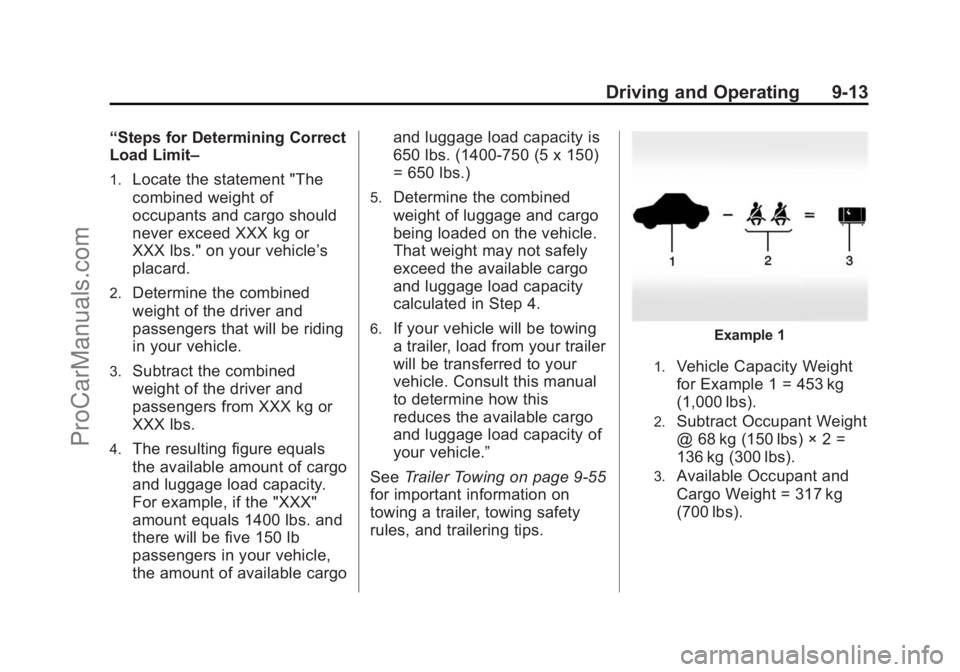
rules, and trailering tips.Example 1
1.Vehicle Capacity Weight
for Example 1 = 453 kg
(1,000 lbs).
2.Subtract Occupant Weight
@ 68 kg (150 lbs) × 2 =
136 kg (300 lbs).
3.Available Occupant and
Cargo Weight = 317 kg
(700 lbs).
ProCarManuals.com
Page 257 of 435
Black plate (20,1)Chevrolet SS Sedan Owner Manual (GMNA-Localizing-U.S.-7707491) - 2015 -
crc - 9/11/14
9-20 Driving and Operating
Shifting Into Park
(Automatic Transmission)
1. Hold the brake pedal down andset the parking brake.
See Electric Parking Brake on
page 9-29.
2. Hold the button on the shift lever and push the lever toward the
front of the vehicle into P (Park).
3. Turn the ignition off.
Leaving the Vehicle With the
Engine Running
{Warning
It can be dangerous to leave the
vehicle with the engine running.
It could overheat and catch fire.
It is dangerous to get out of the
vehicle if the shift lever is not fully
in P (Park) with the parking brake
firmly set. The vehicle can roll. (Continued)
Warning (Continued)
Do not leave the vehicle when the
engine is running. If you have left
the engine running, the vehicle
can move suddenly. You or others
could be injured. To be sure the
vehicle will not move, even when
you are on fairly level ground,
always set the parking brake and
move the shift lever to P (Park).
SeeShifting Into Park (Automatic
Transmission) on page 9-20.
If you have to leave the vehicle with
the engine running, the vehicle must
be in P (Park) and the parking
brake set.
Release the button and check that
the shift lever cannot be moved out
of P (Park).
Torque Lock
Torque lock is when the weight of
the vehicle puts too much force on
the parking pawl in the transmission. This happens when
parking on a hill and shifting the
transmission into P (Park) is not
done properly and then it is difficult
to shift out of P (Park). To prevent
torque lock, set the parking brake
and then shift into P (Park). To find
out how, see
“Shifting Into Park”
listed previously.
If torque lock does occur, the
vehicle may need to be pushed
uphill by another vehicle to relieve
the parking pawl pressure, so you
can shift out of P (Park).
Shifting out of Park
(Automatic Transmission)
This vehicle is equipped with an
electronic shift lock release system.
The shift lock release is designed to
prevent movement of the shift lever
out of P (Park), unless the ignition is
in ON/RUN and the brake pedal is
applied.
ProCarManuals.com
Page 259 of 435
Black plate (22,1)Chevrolet SS Sedan Owner Manual (GMNA-Localizing-U.S.-7707491) - 2015 -
crc - 9/11/14
9-22 Driving and Operating
Parking
With a manual transmission, before
getting out of the vehicle, move the
shift lever into R (Reverse) if parking
on a downhill slope. On a level
surface or an uphill slope, use
1 (First) gear. Apply the parking
brake. Turn the wheels toward the
curb for a downhill slope, or away
from the curb for an uphill slope.
Once the shift lever has been
placed into gear with the clutch
pedal pressed in, turn the ignition to
OFF, and release the clutch.
Parking over Things
That Burn
{Warning
Things that can burn could touch
hot exhaust parts under the
vehicle and ignite. Do not park
over papers, leaves, dry grass,
or other things that can burn.
Engine Exhaust
{Warning
Engine exhaust contains carbon
monoxide (CO) which cannot be
seen or smelled. Exposure to CO
can cause unconsciousness and
even death.
Exhaust may enter the vehicle if:
.The vehicle idles in areas
with poor ventilation (parking
garages, tunnels, deep snow
that may block underbody
airflow or tail pipes).
.The exhaust smells or
sounds strange or different.
.The exhaust system leaks
due to corrosion or damage.
.The vehicle exhaust system
has been modified, damaged,
or improperly repaired.(Continued)
Warning (Continued)
.There are holes or openings
in the vehicle body from
damage or aftermarket
modifications that are not
completely sealed.
If unusual fumes are detected or
if it is suspected that exhaust is
coming into the vehicle:
.Drive it only with the windows
completely down.
.Have the vehicle repaired
immediately.
Never park the vehicle with the
engine running in an enclosed
area such as a garage or a
building that has no fresh air
ventilation.
ProCarManuals.com
Page 263 of 435
Black plate (26,1)Chevrolet SS Sedan Owner Manual (GMNA-Localizing-U.S.-7707491) - 2015 -
crc - 9/11/14
9-26 Driving and Operating
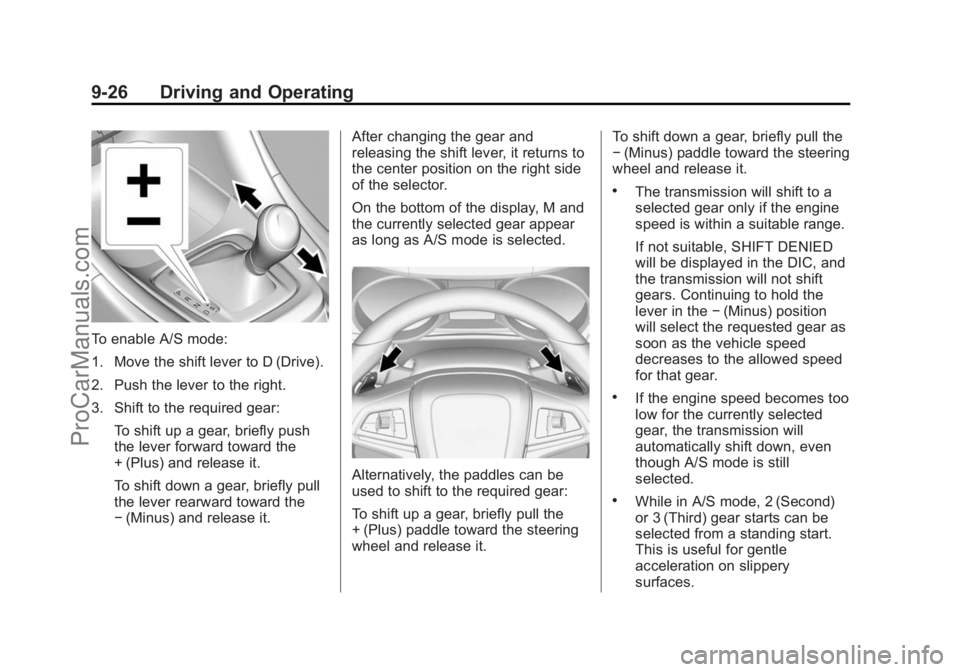
To enable A/S mode:
1. Move the shift lever to D (Drive).
2. Push the lever to the right.
3. Shift to the required gear:To shift up a gear, briefly push
the lever forward toward the
+ (Plus) and release it.
To shift down a gear, briefly pull
the lever rearward toward the
−(Minus) and release it. After changing the gear and
releasing the shift lever, it returns to
the center position on the right side
of the selector.
On the bottom of the display, M and
the currently selected gear appear
as long as A/S mode is selected.
Alternatively, the paddles can be
used to shift to the required gear:
To shift up a gear, briefly pull the
+ (Plus) paddle toward the steering
wheel and release it. To shift down a gear, briefly pull the
−
(Minus) paddle toward the steering
wheel and release it.
.The transmission will shift to a
selected gear only if the engine
speed is within a suitable range.
If not suitable, SHIFT DENIED
will be displayed in the DIC, and
the transmission will not shift
gears. Continuing to hold the
lever in the −(Minus) position
will select the requested gear as
soon as the vehicle speed
decreases to the allowed speed
for that gear.
.If the engine speed becomes too
low for the currently selected
gear, the transmission will
automatically shift down, even
though A/S mode is still
selected.
.While in A/S mode, 2 (Second)
or 3 (Third) gear starts can be
selected from a standing start.
This is useful for gentle
acceleration on slippery
surfaces.
ProCarManuals.com
Page 276 of 435
Black plate (39,1)Chevrolet SS Sedan Owner Manual (GMNA-Localizing-U.S.-7707491) - 2015 -
crc - 9/11/14
Driving and Operating 9-39
1(On/Off):Press to turn the
cruise control system on and off.
A white indicator comes on in the
instrument cluster when cruise is
turned on.
*(Cancel): Press to disengage
cruise control without erasing the
set speed from memory.
RES/+ (Resume/Accel): If there is
a set speed in memory, move the
thumbwheel up briefly to resume to
that speed or hold upwards to
accelerate. If cruise control is
already active, use to increase
vehicle speed.
SET/− (Set/Coast): Move the
thumbwheel down briefly to set the
speed and activate cruise control.
If cruise control is already active,
use to decrease speed. Setting Cruise Control
If
1is on when not in use, SET/- or
RES/+ could get bumped and go
into cruise when not desired.
Keep
1off when cruise control is
not being used.
To set a speed:
1. Press
1.
2. Get to the speed desired.
3. Move the thumbwheel down toward SET/− and release it.
4. Remove foot from the accelerator.
The cruise control indicator on the
instrument cluster turns green after
cruise control has been set to the
desired speed. See Instrument
Cluster on page 5-7. Resuming a Set Speed
If the cruise control is set at a
desired speed and then the brakes
are applied or
*is pressed, the
cruise control is disengaged without
erasing the set speed from memory.
Once the vehicle reaches about
40 km/h (25 mph) or more, move the
thumbwheel up toward RES/+
briefly. The vehicle returns to the
previous set speed.
Increasing Speed While Using
Cruise Control
If the cruise control system is
already activated:
.Move the thumbwheel up toward
RES/+ and hold it until the
desired speed is reached, then
release it.
.To increase the speed in small
increments, move the
thumbwheel up toward RES/+
briefly. For each press, the
vehicle goes about 1.6 km/h
(1 mph) faster.
ProCarManuals.com
Page 277 of 435
Black plate (40,1)Chevrolet SS Sedan Owner Manual (GMNA-Localizing-U.S.-7707491) - 2015 -
crc - 9/11/14
9-40 Driving and Operating
The speedometer reading can be
displayed in either English or metric
units. SeeDriver Information Center
(DIC) on page 5-20. The increment
value used depends on the units
displayed.
Reducing Speed While Using
Cruise Control
If the cruise control system is
already activated:
.Move the thumbwheel toward
SET/− and hold until the desired
lower speed is reached, then
release it.
.To decrease the vehicle speed in
small increments, move the
thumbwheel toward SET/−
briefly. For each press, the
vehicle goes about 1.6 km/h
(1 mph) slower.
The speedometer reading can be
displayed in either English or metric
units. See Driver Information Center
(DIC) on page 5-20. The increment
value used depends on the units
displayed. Passing Another Vehicle While
Using Cruise Control
Use the accelerator pedal to
increase the vehicle speed. When
you take your foot off the pedal, the
vehicle slows down to the previously
set cruise control speed. While
pressing the accelerator pedal or
shortly following the release to
override cruise control, briefly
moving the thumbwheel toward
SET/–
will result in cruise control set
to the current vehicle speed.
Using Cruise Control on Hills
How well the cruise control works
on hills depends upon the vehicle
speed, load, and the steepness of
the hills. When going up steep hills,
you might have to step on the
accelerator pedal to maintain the
vehicle speed. When going
downhill, you might have to brake or
shift to a lower gear to keep your
speed down. If the brake pedal is
applied, cruise control will
disengage. Ending Cruise Control
There are four ways to disengage
cruise control:
.Step lightly on the brake pedal
or clutch for a manual
transmission.
.Press*.
.Shift the transmission to
N (Neutral).
.To turn off the cruise control,
press
1.
Erasing Speed Memory
The cruise control set speed is
erased from memory if
1is pressed
or if the vehicle is turned off.
ProCarManuals.com
Page 286 of 435
Black plate (49,1)Chevrolet SS Sedan Owner Manual (GMNA-Localizing-U.S.-7707491) - 2015 -
crc - 9/11/14
Driving and Operating 9-49
zone starts at approximately the
middle of the vehicle and goes back
5 m (16 ft).
How the System Works
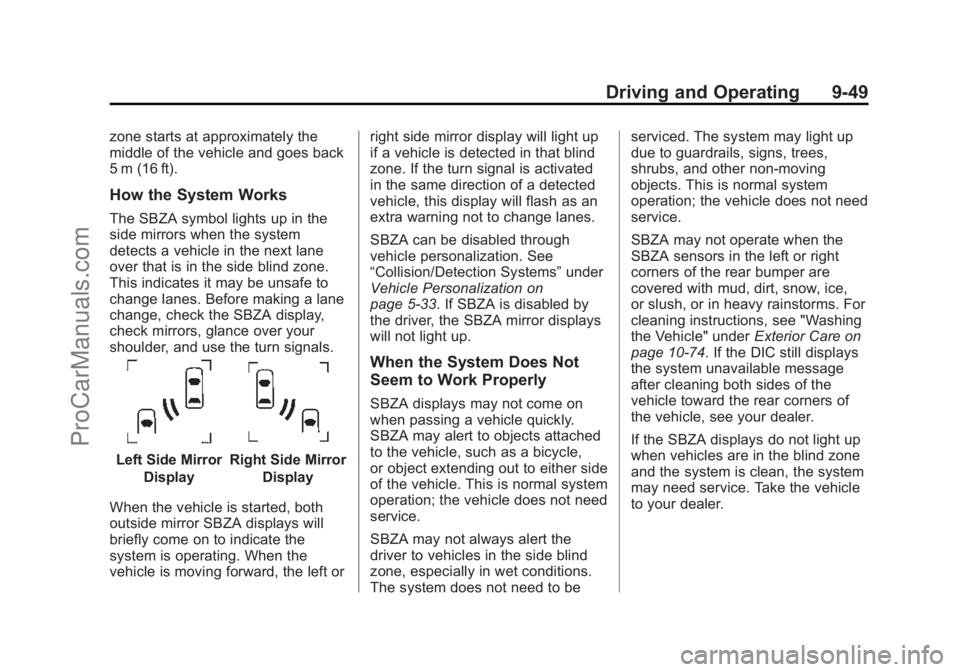
The SBZA symbol lights up in the
side mirrors when the system
detects a vehicle in the next lane
over that is in the side blind zone.
This indicates it may be unsafe to
change lanes. Before making a lane
change, check the SBZA display,
check mirrors, glance over your
shoulder, and use the turn signals.
Left Side MirrorDisplayRight Side Mirror Display
When the vehicle is started, both
outside mirror SBZA displays will
briefly come on to indicate the
system is operating. When the
vehicle is moving forward, the left or right side mirror display will light up
if a vehicle is detected in that blind
zone. If the turn signal is activated
in the same direction of a detected
vehicle, this display will flash as an
extra warning not to change lanes.
SBZA can be disabled through
vehicle personalization. See
“Collision/Detection Systems”
under
Vehicle Personalization on
page 5-33. If SBZA is disabled by
the driver, the SBZA mirror displays
will not light up.
When the System Does Not
Seem to Work Properly
SBZA displays may not come on
when passing a vehicle quickly.
SBZA may alert to objects attached
to the vehicle, such as a bicycle,
or object extending out to either side
of the vehicle. This is normal system
operation; the vehicle does not need
service.
SBZA may not always alert the
driver to vehicles in the side blind
zone, especially in wet conditions.
The system does not need to be serviced. The system may light up
due to guardrails, signs, trees,
shrubs, and other non-moving
objects. This is normal system
operation; the vehicle does not need
service.
SBZA may not operate when the
SBZA sensors in the left or right
corners of the rear bumper are
covered with mud, dirt, snow, ice,
or slush, or in heavy rainstorms. For
cleaning instructions, see "Washing
the Vehicle" under
Exterior Care on
page 10-74. If the DIC still displays
the system unavailable message
after cleaning both sides of the
vehicle toward the rear corners of
the vehicle, see your dealer.
If the SBZA displays do not light up
when vehicles are in the blind zone
and the system is clean, the system
may need service. Take the vehicle
to your dealer.
ProCarManuals.com
Page 292 of 435
Black plate (55,1)Chevrolet SS Sedan Owner Manual (GMNA-Localizing-U.S.-7707491) - 2015 -
crc - 9/11/14
Driving and Operating 9-55
Filling a Portable Fuel
Container
{Warning
Filling a portable fuel container
while it is in the vehicle can cause
fuel vapors that can ignite either
by static electricity or other
means. You or others could be
badly burned and the vehicle
could be damaged. Always:
.Use approved fuel
containers.
.Remove the container from
the vehicle, trunk, or pickup
bed before filling.
.Place the container on the
ground.
.Place the nozzle inside the fill
opening of the container
before dispensing fuel, and(Continued)
Warning (Continued)
keep it in contact with the fill
opening until filling is
complete.
.Fill the container no more
than 95% full to allow for
expansion.
.Do not smoke, light matches,
or use lighters while
pumping fuel.
.Avoid using cell phones or
other electronic devices.
Trailer Towing
The vehicle is neither designed nor
intended to tow a trailer.
ProCarManuals.com
Page 295 of 435
Black plate (2,1)Chevrolet SS Sedan Owner Manual (GMNA-Localizing-U.S.-7707491) - 2015 -
crc - 9/16/14
10-2 Vehicle Care
Different Size Tires andWheels . . . . . . . . . . . . . . . . . . . 10-52
Uniform Tire Quality Grading . . . . . . . . . . . . . . . . . . . 10-52
Wheel Alignment and Tire
Balance . . . . . . . . . . . . . . . . . . . 10-54
Wheel Replacement . . . . . . . . 10-54
Tire Chains . . . . . . . . . . . . . . . . . 10-55
If a Tire Goes Flat . . . . . . . . . . 10-56
Tire Sealant and Compressor Kit . . . . . . . . . . . 10-57
Storing the Tire Sealant and Compressor Kit . . . . . . . . . . . 10-64
Tire Changing . . . . . . . . . . . . . . 10-65
Full-Size Spare Tire . . . . . . . . 10-70
Jump Starting
Jump Starting . . . . . . . . . . . . . . 10-71
Towing the Vehicle
Towing the Vehicle . . . . . . . . . 10-73
Recreational Vehicle Towing . . . . . . . . . . . . . . . . . . . . 10-74
Appearance Care
Exterior Care . . . . . . . . . . . . . . . 10-74
Interior Care . . . . . . . . . . . . . . . . 10-79
Floor Mats . . . . . . . . . . . . . . . . . . 10-82
General Information
For service and parts needs, visit
your dealer. You will receive
genuine GM parts and GM-trained
and supported service people.
Genuine GM parts have one of
these marks:
California Proposition
65 Warning
Most motor vehicles, including this
one, contain and/or emit chemicals
known to the State of California to cause cancer and birth defects or
other reproductive harm. Engine
exhaust, many parts and systems,
many fluids, and some component
wear by-products contain and/or
emit these chemicals.
California Perchlorate
Materials Requirements
Certain types of automotive
applications, such as airbag
initiators, safety belt pretensioners,
and lithium batteries contained in
Remote Keyless Entry transmitters,
may contain perchlorate materials.
Special handling may be necessary.
For additional information, see
www.dtsc.ca.gov/hazardouswaste/
perchlorate.
Accessories and
Modifications
Adding non‐dealer accessories or
making modifications to the vehicle
can affect vehicle performance and
safety, including such things as
airbags, braking, stability, ride and
ProCarManuals.com
Page 300 of 435
Black plate (7,1)Chevrolet SS Sedan Owner Manual (GMNA-Localizing-U.S.-7707491) - 2015 -
crc - 9/16/14
Vehicle Care 10-7
{Warning
The engine oil dipstick handle
may be hot; it could burn you.
Use a towel or glove to touch the
dipstick handle.
2. Pull out the dipstick and wipe it with a clean paper towel or cloth,
then push it back in all the way.
Remove it again, keeping the tip
down, and check the level.
When to Add Engine Oil
If the oil is at the lower mark at the
tip of the dipstick, add 1 L (1 qt) of
the recommended oil and then
recheck the level. See “Selecting
the Right Engine Oil” in this section
for an explanation of what kind of oil to use. For engine oil crankcase
capacity, see
Capacities and
Specifications on page 12-2
{Caution
Do not add too much oil. Oil
levels above or below the
acceptable operating range
shown on the dipstick are harmful
to the engine. If you find that you
have an oil level above the
operating range, the engine could
be damaged. You should drain
out the excess oil or limit driving
of the vehicle and seek a service
professional to remove the
excess amount of oil.
See Engine Compartment Overview
on page 10-5
Add enough oil to reach the upper
mark on the dipstick. Push the
dipstick all the way back in when
through.
Selecting the Right Engine Oil
Selecting the right engine oil
depends on both the proper oil
specification and viscosity grade.
See Recommended Fluids and
Lubricants on page 11-12.
Specification
Ask for and use engine oils that
meet the dexos1™ specification.
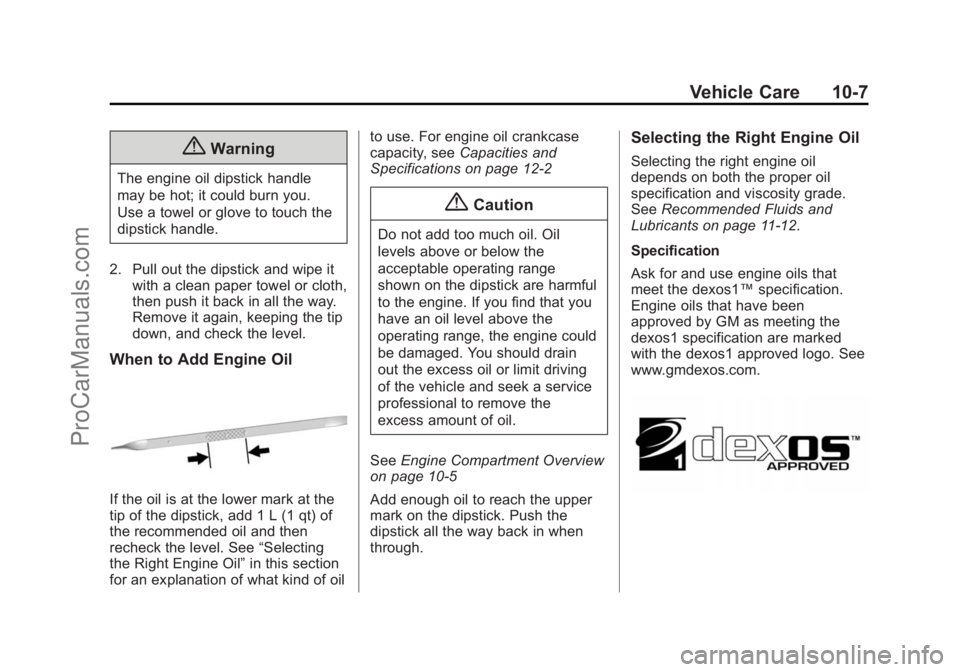
Engine oils that have been
approved by GM as meeting the
dexos1 specification are marked
with the dexos1 approved logo. See
www.gmdexos.com.
ProCarManuals.com