turn signal CHEVROLET SS 2015 Owner's Manual
[x] Cancel search | Manufacturer: CHEVROLET, Model Year: 2015, Model line: SS, Model: CHEVROLET SS 2015Pages: 435, PDF Size: 6.27 MB
Page 248 of 435
Black plate (11,1)Chevrolet SS Sedan Owner Manual (GMNA-Localizing-U.S.-7707491) - 2015 -
crc - 9/11/14
Driving and Operating 9-11
If it takes some time for help to
arrive, now and then when you run
the engine, push the accelerator
pedal slightly so the engine runs
faster than the idle speed. This
keeps the battery charged to restart
the vehicle and to signal for help
with the headlamps. Do this as little
as possible to save fuel.
If the Vehicle Is Stuck
Slowly and cautiously spin the
wheels to free the vehicle when
stuck in sand, mud, ice, or snow.
If stuck too severely for the traction
system to free the vehicle, turn the
traction system off and use the
rocking method. SeeTraction
Control/Electronic Stability Control
on page 9-32.
{Warning
If the vehicle's tires spin at high
speed, they can explode, and you
or others could be injured. The
(Continued)
Warning (Continued)
vehicle can overheat, causing an
engine compartment fire or other
damage. Spin the wheels as little
as possible and avoid going
above 56 km/h (35 mph).
Rocking the Vehicle to Get
it Out
Turn the steering wheel left and
right to clear the area around the
front wheels. Turn off any traction
system. Shift back and forth
between R (Reverse) and a low
forward gear, spinning the wheels
as little as possible. To prevent
transmission wear, wait until the
wheels stop spinning before shifting
gears. Release the accelerator
pedal while shifting, and press
lightly on the accelerator pedal
when the transmission is in gear.
Slowly spinning the wheels in the
forward and reverse directions
causes a rocking motion that could
free the vehicle. If that does not get the vehicle out after a few tries, it
might need to be towed out. If the
vehicle does need to be towed out,
see
Towing the Vehicle on
page 10-73.
Vehicle Load Limits
It is very important to know how
much weight the vehicle can
carry. This weight is called the
vehicle capacity weight and
includes the weight of all
occupants, cargo, and all
nonfactory-installed options.
Two labels on the vehicle show
how much weight it may
properly carry, the Tire and
Loading Information label and
the Certification label.
ProCarManuals.com
Page 253 of 435
Black plate (16,1)Chevrolet SS Sedan Owner Manual (GMNA-Localizing-U.S.-7707491) - 2015 -
crc - 9/11/14
9-16 Driving and Operating
Starting and
Operating
New Vehicle Break-In
Use the following precautions to
improve performance:
.For the first 1000 km (621 mi):
Do not make full throttle starts.
Avoid downshifting to brake or
slow the vehicle.
Do not drive at any one constant
speed.
Use moderate acceleration in
lower gears.
Avoid vehicle speeds above
110 km/h (68 mph).
.Between the first 1000 km
(621 mi) and 5000 km (3,107 mi),
heavy acceleration in lower
gears may be used.
Vehicle speeds above 110 km/h
(68 mph) should be limited to
five minutes per use.
.Avoid making hard stops for the
first 350 km (217 mi) to avoid
premature wear and early
replacement of brakes.
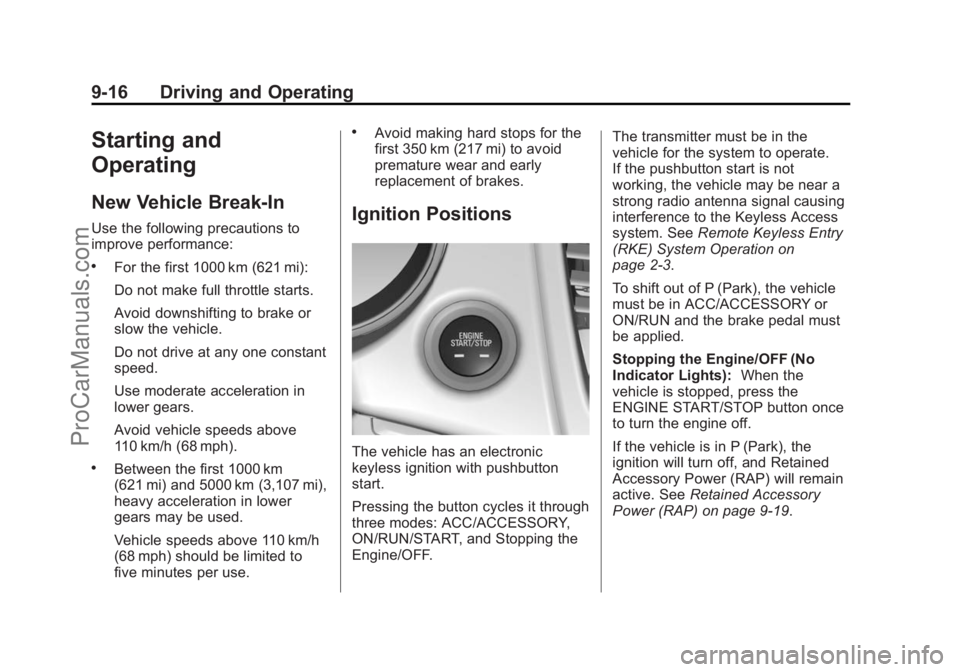
Ignition Positions
The vehicle has an electronic
keyless ignition with pushbutton
start.
Pressing the button cycles it through
three modes: ACC/ACCESSORY,
ON/RUN/START, and Stopping the
Engine/OFF.The transmitter must be in the
vehicle for the system to operate.
If the pushbutton start is not
working, the vehicle may be near a
strong radio antenna signal causing
interference to the Keyless Access
system. See
Remote Keyless Entry
(RKE) System Operation on
page 2-3.
To shift out of P (Park), the vehicle
must be in ACC/ACCESSORY or
ON/RUN and the brake pedal must
be applied.
Stopping the Engine/OFF (No
Indicator Lights): When the
vehicle is stopped, press the
ENGINE START/STOP button once
to turn the engine off.
If the vehicle is in P (Park), the
ignition will turn off, and Retained
Accessory Power (RAP) will remain
active. See Retained Accessory
Power (RAP) on page 9-19.
ProCarManuals.com
Page 281 of 435
Black plate (44,1)Chevrolet SS Sedan Owner Manual (GMNA-Localizing-U.S.-7707491) - 2015 -
crc - 9/11/14
9-44 Driving and Operating
on or off through Vehicle
Personalization. SeeVehicle
Personalization on page 5-33.
Automatic Parking
Assist (APA)
If equipped, the APA system
searches for and steers the vehicle
into parallel or perpendicular parking
spots. When using APA, you must
still shift gears, and control the
brakes and accelerator. The Driver
information Center (DIC) and
audible beeps help to guide parking
maneuvers.
{Warning
APA does not apply the brakes.
APA may not detect objects in the
parking space, objects that are
soft or narrow, objects high off the
ground such as flatbed trucks,
or objects below ground level
such as large potholes. Always
verify that the parking space is
(Continued)
Warning (Continued)
appropriate for parking a vehicle.
APA does not respond to changes
in the parking space, such as
movement of an adjacent vehicle,
or a person or object entering the
parking space. APA does not
detect or avoid traffic that is
behind or alongside of the
vehicle. Always be prepared to
stop the vehicle during the
parking maneuver.
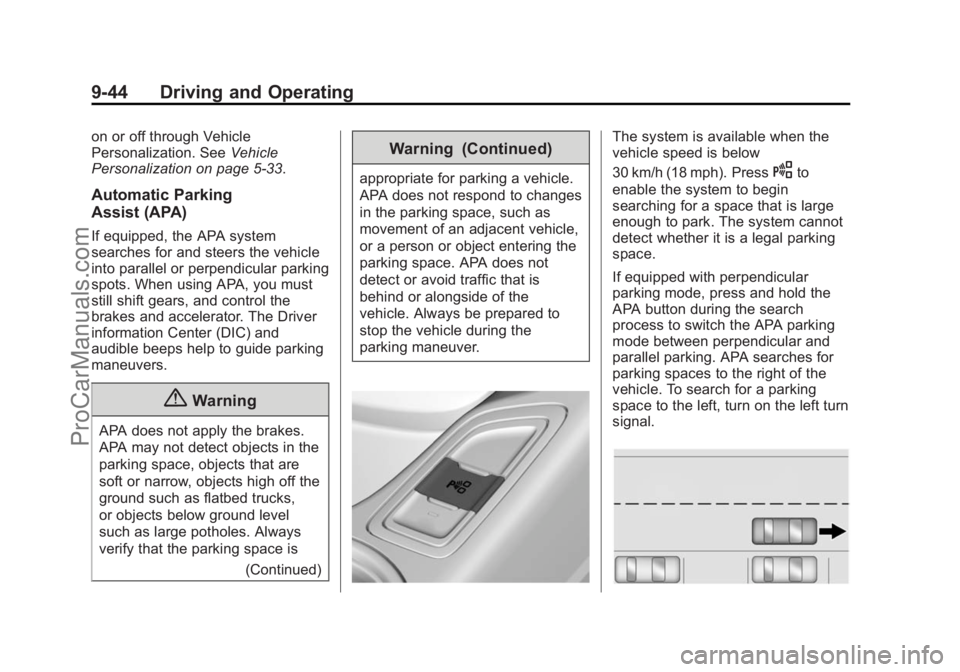
The system is available when the
vehicle speed is below
30 km/h (18 mph). Press
Oto
enable the system to begin
searching for a space that is large
enough to park. The system cannot
detect whether it is a legal parking
space.
If equipped with perpendicular
parking mode, press and hold the
APA button during the search
process to switch the APA parking
mode between perpendicular and
parallel parking. APA searches for
parking spaces to the right of the
vehicle. To search for a parking
space to the left, turn on the left turn
signal.
ProCarManuals.com
Page 285 of 435
Black plate (48,1)Chevrolet SS Sedan Owner Manual (GMNA-Localizing-U.S.-7707491) - 2015 -
crc - 9/11/14
9-48 Driving and Operating
alert will occur. Consider traffic and
weather conditions when selecting
the alert timing. The range of
selectable alert timing may not be
appropriate for all drivers and
driving conditions.
Unnecessary Alerts
FCA may provide unnecessary
alerts for turning vehicles, vehicles
in other lanes, objects that are not
vehicles, or shadows. These alerts
are normal operation and the
vehicle does not need service.
Cleaning the System
If the FCA system does not seem to
operate properly, cleaning the
outside of the windshield in front of
the camera sensor and the front of
the vehicle may correct the issue.
Side Blind Zone
Alert (SBZA)
If equipped, the SBZA system is a
lane-changing aid that assists
drivers with avoiding crashes that
occur with vehicles in the side blind
zone (or spot) areas. The SBZA
warning display will light up in the
corresponding outside side mirror
and will flash if the turn signal is on.
{Warning
SBZA does not alert the driver to
vehicles rapidly approaching
outside of the side blind zones,
pedestrians, bicyclists,
or animals. It may not provide
alerts when changing lanes under
all driving conditions. Failure to
use proper care when changing
lanes may result in injury, death,
or vehicle damage. Before
making a lane change, always(Continued)
Warning (Continued)
check mirrors, glance over your
shoulder, and use the turn
signals.
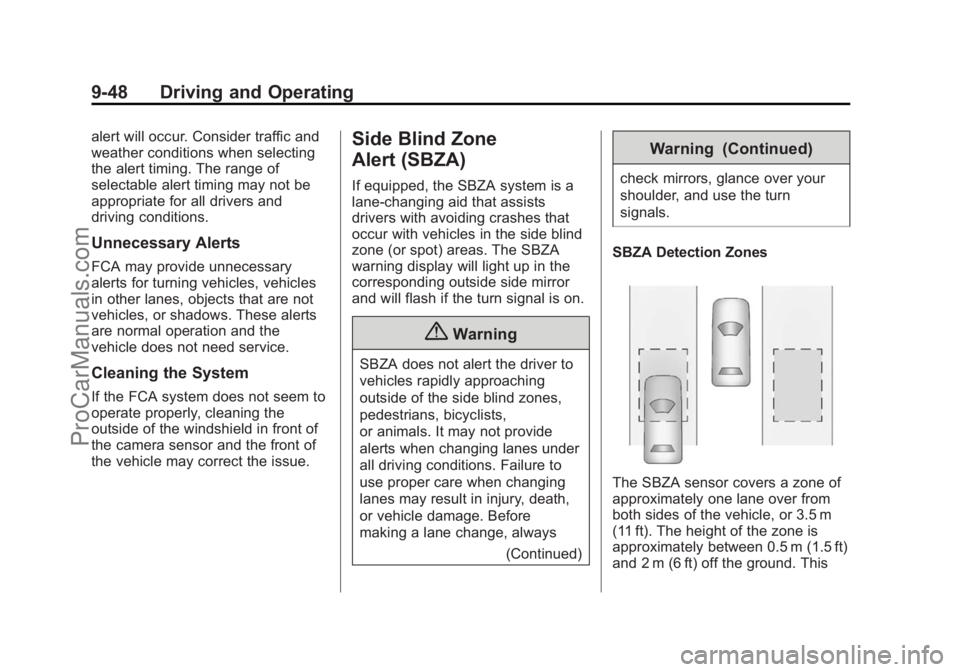
SBZA Detection Zones
The SBZA sensor covers a zone of
approximately one lane over from
both sides of the vehicle, or 3.5 m
(11 ft). The height of the zone is
approximately between 0.5 m (1.5 ft)
and 2 m (6 ft) off the ground. This
ProCarManuals.com
Page 286 of 435
Black plate (49,1)Chevrolet SS Sedan Owner Manual (GMNA-Localizing-U.S.-7707491) - 2015 -
crc - 9/11/14
Driving and Operating 9-49
zone starts at approximately the
middle of the vehicle and goes back
5 m (16 ft).
How the System Works
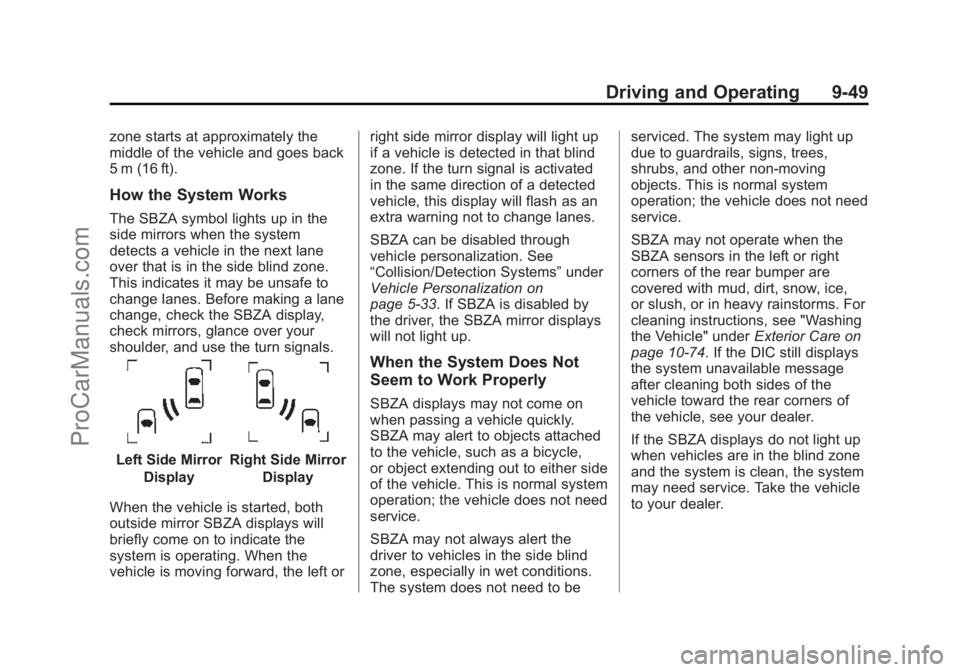
The SBZA symbol lights up in the
side mirrors when the system
detects a vehicle in the next lane
over that is in the side blind zone.
This indicates it may be unsafe to
change lanes. Before making a lane
change, check the SBZA display,
check mirrors, glance over your
shoulder, and use the turn signals.
Left Side MirrorDisplayRight Side Mirror Display
When the vehicle is started, both
outside mirror SBZA displays will
briefly come on to indicate the
system is operating. When the
vehicle is moving forward, the left or right side mirror display will light up
if a vehicle is detected in that blind
zone. If the turn signal is activated
in the same direction of a detected
vehicle, this display will flash as an
extra warning not to change lanes.
SBZA can be disabled through
vehicle personalization. See
“Collision/Detection Systems”
under
Vehicle Personalization on
page 5-33. If SBZA is disabled by
the driver, the SBZA mirror displays
will not light up.
When the System Does Not
Seem to Work Properly
SBZA displays may not come on
when passing a vehicle quickly.
SBZA may alert to objects attached
to the vehicle, such as a bicycle,
or object extending out to either side
of the vehicle. This is normal system
operation; the vehicle does not need
service.
SBZA may not always alert the
driver to vehicles in the side blind
zone, especially in wet conditions.
The system does not need to be serviced. The system may light up
due to guardrails, signs, trees,
shrubs, and other non-moving
objects. This is normal system
operation; the vehicle does not need
service.
SBZA may not operate when the
SBZA sensors in the left or right
corners of the rear bumper are
covered with mud, dirt, snow, ice,
or slush, or in heavy rainstorms. For
cleaning instructions, see "Washing
the Vehicle" under
Exterior Care on
page 10-74. If the DIC still displays
the system unavailable message
after cleaning both sides of the
vehicle toward the rear corners of
the vehicle, see your dealer.
If the SBZA displays do not light up
when vehicles are in the blind zone
and the system is clean, the system
may need service. Take the vehicle
to your dealer.
ProCarManuals.com
Page 287 of 435
Black plate (50,1)Chevrolet SS Sedan Owner Manual (GMNA-Localizing-U.S.-7707491) - 2015 -
crc - 9/11/14
9-50 Driving and Operating
When SBZA is disabled for any
reason other than the driver turning
it off, the Side Blind Zone Alert On
option will not be available on the
personalization menu.
Radio Frequency Information
SeeRadio Frequency Statement on
page 13-12.
Lane Departure
Warning (LDW)
If equipped, LDW may help avoid
crashes due to unintentional lane
departures. It may provide an alert if
the vehicle is crossing a detected
lane without using a turn signal in
that direction. LDW uses a camera
sensor to detect the lane markings
at speeds of 56 km/h (35 mph) or
greater.
{Warning
The LDW system does not steer
the vehicle. The LDW system
may not:
.Provide enough time to avoid
a crash.
.Detect lane markings under
poor weather or visibility
conditions. This can occur if
the windshield or headlamps
are blocked by dirt, snow,
or ice; if they are not in
proper condition; or if the sun
shines directly into the
camera.
.Detect road edges.
.Detect lanes on winding or
hilly roads.
If LDW only detects lane
markings on one side of the road,
it will only warn you when
departing the lane on the side
where it has detected a lane (Continued)
Warning (Continued)
marking. Always keep your
attention on the road and
maintain proper vehicle position
within the lane, or vehicle
damage, injury, or death could
occur. Always keep the
windshield, headlamps, and
camera sensors clean and in
good repair. Do not use LDW in
bad weather conditions.
How the System Works
The LDW camera sensor is on the
windshield ahead of the rearview
mirror.
ProCarManuals.com
Page 288 of 435
Black plate (51,1)Chevrolet SS Sedan Owner Manual (GMNA-Localizing-U.S.-7707491) - 2015 -
crc - 9/11/14
Driving and Operating 9-51
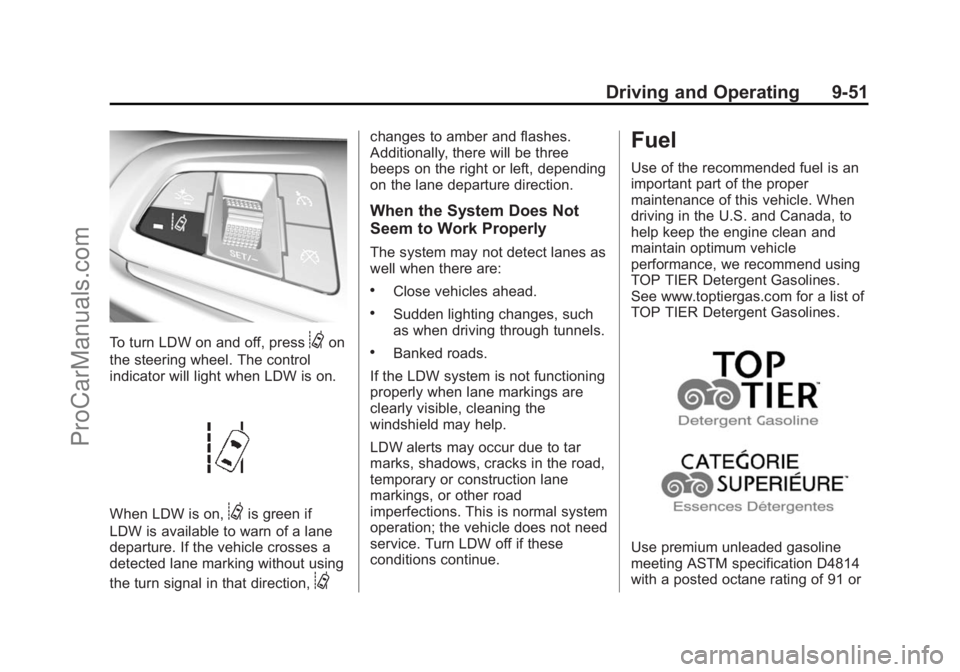
To turn LDW on and off, press@on
the steering wheel. The control
indicator will light when LDW is on.
When LDW is on,@is green if
LDW is available to warn of a lane
departure. If the vehicle crosses a
detected lane marking without using
the turn signal in that direction,
@
changes to amber and flashes.
Additionally, there will be three
beeps on the right or left, depending
on the lane departure direction.
When the System Does Not
Seem to Work Properly
The system may not detect lanes as
well when there are:
.Close vehicles ahead.
.Sudden lighting changes, such
as when driving through tunnels.
.Banked roads.
If the LDW system is not functioning
properly when lane markings are
clearly visible, cleaning the
windshield may help.
LDW alerts may occur due to tar
marks, shadows, cracks in the road,
temporary or construction lane
markings, or other road
imperfections. This is normal system
operation; the vehicle does not need
service. Turn LDW off if these
conditions continue.
Fuel
Use of the recommended fuel is an
important part of the proper
maintenance of this vehicle. When
driving in the U.S. and Canada, to
help keep the engine clean and
maintain optimum vehicle
performance, we recommend using
TOP TIER Detergent Gasolines.
See www.toptiergas.com for a list of
TOP TIER Detergent Gasolines.
Use premium unleaded gasoline
meeting ASTM specification D4814
with a posted octane rating of 91 or
ProCarManuals.com
Page 418 of 435
Black plate (7,1)Chevrolet SS Sedan Owner Manual (GMNA-Localizing-U.S.-7707491) - 2015 -
crc - 9/11/14
OnStar 14-7
in that area. The wireless service
provider must also have coverage,
network capacity, reception, and
technology compatible with OnStar
services. Service involving location
information about the vehicle cannot
work unless GPS signals are
available, unobstructed, and
compatible with the OnStar
hardware. OnStar services may not
work if the OnStar equipment is not
properly installed or it has not been
properly maintained. If equipment or
software is added, connected,
or modified, OnStar services may
not work. Other problems beyond
the control of OnStar may prevent
service such as hills, tall buildings,
tunnels, weather, electrical system
design and architecture of the
vehicle, damage to the vehicle in a
crash, or wireless phone network
congestion or jamming.
SeeRadio Frequency Statement on
page 13-12.Services for People with
Disabilities
Advisors provide services to help
subscribers with physical disabilities
and medical conditions.
Press
Qfor help with:
.Locating a gas station with an
attendant to pump gas.
.Finding a hotel, restaurant, etc.,
that meets accessibility needs.
.Providing directions to the
closest hospital or pharmacy in
urgent situations.
TTY Users
OnStar has the ability to
communicate to deaf,
hard-of-hearing, or speech-impaired
customers while in the vehicle. The
available dealer-installed TTY
system can provide in-vehicle
access to all of the OnStar services,
except Virtual Advisor and OnStar
Turn-by-Turn Navigation.
OnStar Personal Identification
Number (PIN)
A PIN is needed to access some of
the OnStar services, like Remote
Door Unlock and Stolen Vehicle
Assistance. The PIN will need to be
changed the first time when
speaking with an Advisor. To
change the OnStar PIN, contact an
OnStar Advisor by pressing
Qor
calling 1-888-4-ONSTAR.
Warranty
OnStar equipment may be
warranted as part of the vehicle
warranty.
Languages
The vehicle can be programmed to
respond in multiple languages.
Press
Qand ask for an Advisor.
Advisors are available in English,
Spanish, and French. Available
languages may vary by country.
ProCarManuals.com
Page 419 of 435
Black plate (8,1)Chevrolet SS Sedan Owner Manual (GMNA-Localizing-U.S.-7707491) - 2015 -
crc - 9/11/14
14-8 OnStar
Potential Issues
OnStar cannot perform Remote
Door Unlock or Stolen Vehicle
Assistance after the vehicle has
been off continuously for five days.
After five days, OnStar can contact
Roadside Assistance and a
locksmith to help gain access to the
vehicle.
Global Positioning
System (GPS)
.Obstruction of the GPS can
occur in a large city with tall
buildings; in parking garages;
around airports; in tunnels,
underpasses; or in an area with
very dense trees. If GPS signals
are not available, the OnStar
system should still operate to
call OnStar. However, OnStar
could have difficulty identifying
the exact location.
.In emergency situations, OnStar
can use the last stored GPS
location to send to emergency
responders.A temporary loss of GPS can cause
loss of the ability to send a
Turn-by-Turn Navigation route. The
Advisor may give a verbal route or
may ask for a call back after the
vehicle is driven into an open area.
Cellular and GPS Antennas
Do not place items over or near the
antenna to prevent blocking cellular
and GPS signal reception. Cellular
reception is required for OnStar to
send remote signals to the vehicle.
Unable to Connect to OnStar
Message
If there is limited cellular coverage
or the cellular network has reached
maximum capacity, this message
may come on. Press
Qto try the
call again or try again after driving a
few miles into another cellular area.
Vehicle and Power Issues
OnStar services require a vehicle
electrical system, wireless service,
and GPS satellite technologies to be
available and operating for features to function properly. These systems
may not operate if the battery is
discharged or disconnected.
Add-on Electrical Equipment
The OnStar system is integrated
into the electrical architecture of the
vehicle. Do not add any electrical
equipment. See
Add-On Electrical
Equipment on page 9-56. Added
electrical equipment may interfere
with the operation of the OnStar
system and cause it to not operate.
Privacy
The complete OnStar Privacy
Statement may be found at
www.onstar.com (U.S.),
or www.onstar.ca (Canada). We
recommend that you review it. If you
have any questions, call
1-888-4-ONSTAR (1-888-466-7827)
or press
Qto speak with an
Advisor. Users of wireless
communications are cautioned that
the privacy of any information sent
via wireless cellular communications
cannot be assured. Third parties
ProCarManuals.com
Page 431 of 435
Black plate (10,1)Chevrolet SS Sedan Owner Manual (GMNA-Localizing-U.S.-7707491) - 2015 -
crc - 9/11/14
i-10 INDEX
Roadside AssistanceProgram . . . . . . . . . . . . . . . . . . . . . . 13-5
Roof Sunroof . . . . . . . . . . . . . . . . . . . . . . . 2-20
Roof Rack System . . . . . . . . . . . . . . 4-3
Rotation, Tires . . . . . . . . . . . . . . . . 10-48
Routing, Engine Drive Belt . . . . . 12-3
Running the Vehicle While Parked . . . . . . . . . . . . . . . . . . . . . . . 9-23
S
Safety Belts . . . . . . . . . . . . . . . . . . . . 3-8Care . . . . . . . . . . . . . . . . . . . . . . . . . . 3-14
Extender . . . . . . . . . . . . . . . . . . . . . . 3-13
How to Wear Safety Belts
Properly . . . . . . . . . . . . . . . . . . . . . 3-10
Lap-Shoulder Belt . . . . . . . . . . . . 3-11
Reminders . . . . . . . . . . . . . . . . . . . . . 5-9
Replacing after a Crash . . . . . . 3-14
Use During Pregnancy . . . . . . . . 3-13
Safety Defects Reporting Canadian Government . . . . . . 13-13
General Motors . . . . . . . . . . . . . 13-13
U.S. Government . . . . . . . . . . . 13-12
Safety Locks . . . . . . . . . . . . . . . . . . . 2-12
Safety System Check . . . . . . . . . . 3-13 Satellite Radio . . . . . . . . . . . . . . . . . 7-14
Scheduling Appointments . . . . . . 13-7
Sealant Kit, Tire . . . . . . . . . . . . . . 10-57
Seats
Head Restraints . . . . . . . . . . . . . . . 3-2
Heated and Ventilated Front . . . 3-6
Lumbar Adjustment, Front . . . . . 3-4
Memory . . . . . . . . . . . . . . . . . . . . . . . . 3-5
Power Adjustment, Front . . . . . . 3-3
Reclining Seatbacks . . . . . . . . . . . 3-4
Securing Child
Restraints . . . . . . . . . . . . . . 3-41, 3-43
Security Light . . . . . . . . . . . . . . . . . . . . . . . . . . 5-19
Messages . . . . . . . . . . . . . . . . . . . . 5-30
OnStar
®. . . . . . . . . . . . . . . . . . . . . . 14-3
Vehicle . . . . . . . . . . . . . . . . . . . . . . . 2-14
Vehicle Alarm . . . . . . . . . . . . . . . . . 2-14
Service Accessories andModifications . . . . . . . . . . . . . . . . 10-2
Doing Your Own Work . . . . . . . . 10-3
Engine Soon Light . . . . . . . . . . . . 5-12
Maintenance Records . . . . . . .11-14
Maintenance, General Information . . . . . . . . . . . . . . . . . . 11-1 Service (cont'd)
Parts Identification Label . . . . . 12-1
Publications Ordering
Information . . . . . . . . . . . . . . . . .13-11
Scheduling Appointments . . . . . 13-7
Vehicle Messages . . . . . . . . . . . . 5-30
Vehicle Soon Light . . . . . . . . . . . . 5-14
Service Electric Parking Brake Light . . . . . . . . . . . . . . . . . . . 5-15
Services Special Application . . . . . . . . . . . 11-8
Servicing the Airbag . . . . . . . . . . . 3-25
Shift Lock Control Function Check, Automatic
Transmission . . . . . . . . . . . . . . . . 10-23
Shifting Into Park . . . . . . . . . . . . . . . . . . . . . . 9-20
Out of Park . . . . . . . . . . . . . . . . . . . 9-20
Side Blind Zone Alert (SBZA) . . . . . . . . . . . . . . . . . 9-48
Signals, Turn and Lane-Change . . . . . . . . . . . . . . . . . 6-3
Software Updates . . . . . . . . . . . . . 7-10
Special Application Services . . . 11-8
Specifications and
Capacities . . . . . . . . . . . . . . . . . . . . 12-2
Speedometer . . . . . . . . . . . . . . . . . . . 5-8
ProCarManuals.com