lock CHEVROLET SS 2015 Repair Manual
[x] Cancel search | Manufacturer: CHEVROLET, Model Year: 2015, Model line: SS, Model: CHEVROLET SS 2015Pages: 435, PDF Size: 6.27 MB
Page 201 of 435
Black plate (60,1)Chevrolet SS Sedan Owner Manual (GMNA-Localizing-U.S.-7707491) - 2015 -
crc - 9/11/14
7-60 Infotainment System
.All other buttons on the pop-up
screen operate as described
under“Route Guidance Not
Active.”
Previous Destinations
Previously downloaded OnStar
destinations are saved under
Previous Destinations in the
navigation system, where they can
be accessed or saved to the
Address Book.
Configure Menu
The Configuration Menu is used to
adjust features and preferences,
such as Sound, Radio, Nav
(Navigation), Display, or Time
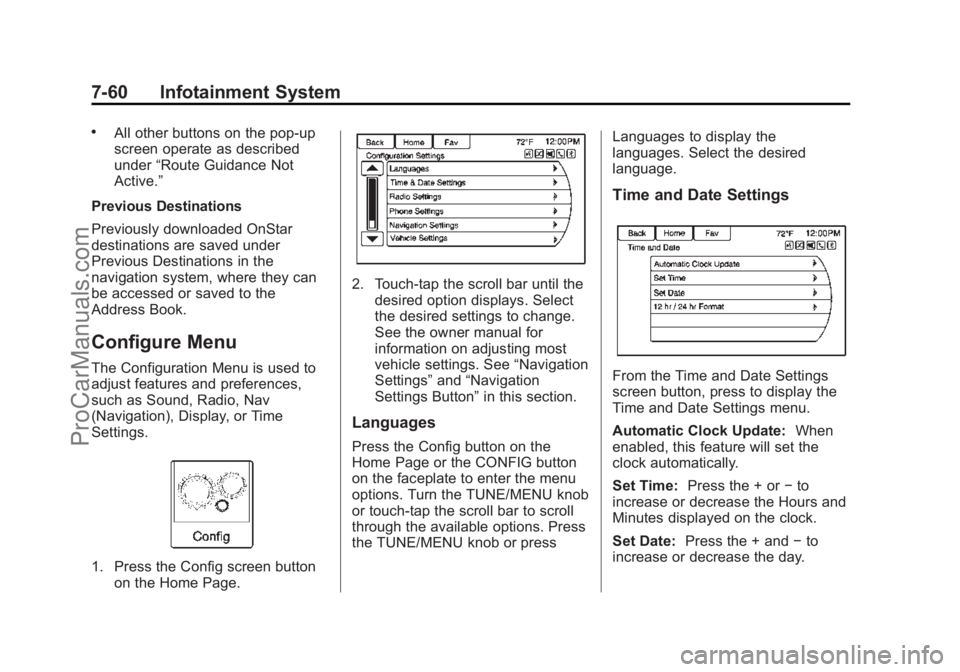
Settings.
1. Press the Config screen button on the Home Page.
2. Touch-tap the scroll bar until thedesired option displays. Select
the desired settings to change.
See the owner manual for
information on adjusting most
vehicle settings. See “Navigation
Settings” and“Navigation
Settings Button” in this section.
Languages
Press the Config button on the
Home Page or the CONFIG button
on the faceplate to enter the menu
options. Turn the TUNE/MENU knob
or touch-tap the scroll bar to scroll
through the available options. Press
the TUNE/MENU knob or press Languages to display the
languages. Select the desired
language.
Time and Date Settings
From the Time and Date Settings
screen button, press to display the
Time and Date Settings menu.
Automatic Clock Update:
When
enabled, this feature will set the
clock automatically.
Set Time: Press the + or −to
increase or decrease the Hours and
Minutes displayed on the clock.
Set Date: Press the + and −to
increase or decrease the day.
ProCarManuals.com
Page 224 of 435
Black plate (83,1)Chevrolet SS Sedan Owner Manual (GMNA-Localizing-U.S.-7707491) - 2015 -
crc - 9/11/14
Infotainment System 7-83
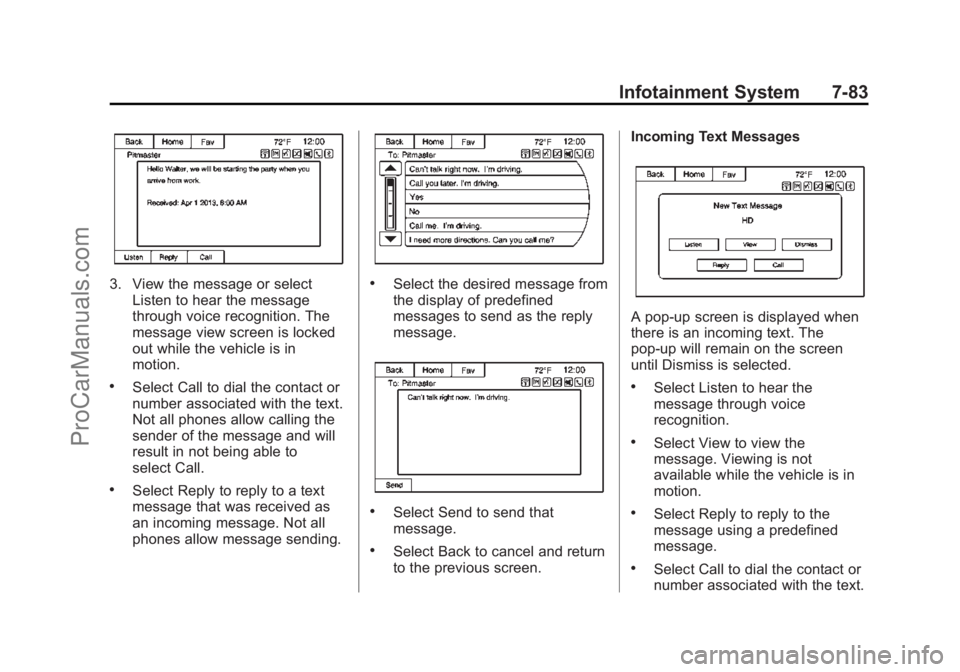
3. View the message or selectListen to hear the message
through voice recognition. The
message view screen is locked
out while the vehicle is in
motion.
.Select Call to dial the contact or
number associated with the text.
Not all phones allow calling the
sender of the message and will
result in not being able to
select Call.
.Select Reply to reply to a text
message that was received as
an incoming message. Not all
phones allow message sending.
.Select the desired message from
the display of predefined
messages to send as the reply
message.
.Select Send to send that
message.
.Select Back to cancel and return
to the previous screen. Incoming Text Messages
A pop-up screen is displayed when
there is an incoming text. The
pop-up will remain on the screen
until Dismiss is selected.
.Select Listen to hear the
message through voice
recognition.
.Select View to view the
message. Viewing is not
available while the vehicle is in
motion.
.Select Reply to reply to the
message using a predefined
message.
.Select Call to dial the contact or
number associated with the text.
ProCarManuals.com
Page 226 of 435
Black plate (85,1)Chevrolet SS Sedan Owner Manual (GMNA-Localizing-U.S.-7707491) - 2015 -
crc - 9/11/14
Infotainment System 7-85
Fees and Taxes: Subscription fee,
taxes, one time activation fee, and
other fees may apply. Subscription
fee is consumer only. All fees and
programming subject to change.
Subscriptions subject to Customer
Agreement available at
www.siriusxm.com. SiriusXM
®
service only available in the
48 contiguous United States and
Canada.
Explicit Language Notice: Channels
with frequent explicit language are
indicated with an“XL”preceding the
channel name. Channel blocking is
available for SiriusXM Satellite
Radio receivers by notifying
SiriusXM:
.USA Customers —See
www.siriusxm.com or call
1-866-635-2349. It is prohibited to copy, decompile,
disassemble, reverse engineer,
hack, manipulate, or otherwise
make available any technology or
software incorporated in receivers
compatible with the SiriusXM
®
Satellite Radio System or that
support the SiriusXM website, the
Online Service or any of its content.
Furthermore, the AMBER voice
compression software included in
this product is protected by
intellectual property rights including
patent rights, copyrights, and trade
secrets of Digital Voice
Systems, Inc.
General Requirements:
.A License Agreement from
SiriusXM®is required for any
product that incorporates
SiriusXM Technology and/or for
use of any of the SiriusXM
marks to be manufactured,
distributed, or marketed in the
SiriusXM Service Area.
Gracenote
Gracenote®, Gracenote logo and
logotype, and the "Powered by
Gracenote" logo are either a
registered trademark or a trademark
of Gracenote, Inc. in the United
States and/or other countries.
Bluetooth
The Bluetooth®word mark and
logos are owned by the Bluetooth®
SIG, Inc. and any use of such marks
by General Motors is under license.
Other trademarks and trade names
are those of their respective owners.
Pandora (If Equipped)
Pandora is a registered trademark
of Pandora Media, Inc., used under
license.
ProCarManuals.com
Page 233 of 435
Black plate (2,1)Chevrolet SS Sedan Owner Manual (GMNA-Localizing-U.S.-7707491) - 2015 -
crc - 9/11/14
8-2 Climate Controls
5. Front Defrost
6. ZONE
7. Passenger Temperature Control
8. Recirculation
9. Fan Control
10. Rear Window Defogger
Automatic Operation
AUTO (Automatic):When this
button is pressed, the system
automatically controls the inside
temperature, the air delivery mode,
the air conditioning compressor, and
the fan speed. When AUTO appears
in the display, the system is in full
automatic operation. If any of the
controls are manually adjusted, the
AUTO indicator turns off in the
display.
1. Press the AUTO button, if the AUTO indicator does not appear
on the display.
2. Adjust the temperature to a comfortable setting.
3. Adjust the air outlets as desired. 4. Let the system stabilize for a few
minutes.
In cold weather, the system will limit
the blower speed until the engine
has warmed up.
Do not cover the solar sensor in the
center of the instrument panel, near
the windshield. See “Sensors”later
in this section.
The automatic climate control
system may not work as desired if
one or more of the instrument panel
outlets are closed.
Manual Operation
On/Off: Press9to turn the
system on or off.
9(Fan Control): Turn clockwise
or counterclockwise to increase or
decrease the fan speed. The fan
speed appears on the infotainment
display.
Press the AUTO button to return to
automatic operation. Driver and Passenger
Temperature Controls:
The
temperature can be adjusted
separately for the driver and the
passenger. Turn the temperature
controls clockwise or
counterclockwise to increase or
decrease the temperature.
The temperature setting between
21°C (70°F) and 23°C (74°F) is
recommended.
The temperature settings for each
side are shown in the temperature
control knob displays and the
infotainment display. If the
temperature control is past 30°C
(86°F), the display shows HI
(hottest). Turning it past 16°C
(61°F), shows LO (coolest).
ZONE: Press to synchronize the
driver and passenger temperatures.
Single-Zone Mode: All zones are
set to the same temperature. “Driver
has control” will be displayed on the
infotainment display. Turn the driver
temperature control to adjust the
system temperature.
ProCarManuals.com
Page 237 of 435
Black plate (6,1)Chevrolet SS Sedan Owner Manual (GMNA-Localizing-U.S.-7707491) - 2015 -
crc - 9/11/14
8-6 Climate Controls
Operation Tips
.Clear away any ice, snow,
or leaves from the air inlets at
the base of the windshield that
may block the flow of air into the
vehicle.
.Use of non-GM approved hood
deflectors may adversely affect
performance of the system.
.Keep the path under the front
seats clear of objects to help
circulate the air inside the
vehicle more effectively.
Maintenance
Passenger Compartment
Air Filter
The vehicle has a passenger
compartment air filter that filters the
outside air entering the vehicle. The
filter removes contaminants, such
as pollen and dust. See your dealer
for more information about filter
replacement.
ProCarManuals.com
Page 238 of 435
Black plate (1,1)Chevrolet SS Sedan Owner Manual (GMNA-Localizing-U.S.-7707491) - 2015 -
crc - 9/11/14
Driving and Operating 9-1
Driving and
Operating
Driving Information
Distracted Driving . . . . . . . . . . . . . 9-2
Defensive Driving . . . . . . . . . . . . . 9-3
Drunk Driving . . . . . . . . . . . . . . . . . 9-3
Control of a Vehicle . . . . . . . . . . . 9-3
Braking . . . . . . . . . . . . . . . . . . . . . . . 9-3
Steering . . . . . . . . . . . . . . . . . . . . . . . 9-4
Off-Road Recovery . . . . . . . . . . . . 9-4
Loss of Control . . . . . . . . . . . . . . . . 9-5
Track Events and CompetitiveDriving . . . . . . . . . . . . . . . . . . . . . . . 9-5
Driving on Wet Roads . . . . . . . . . 9-8
Hill and Mountain Roads . . . . . . 9-9
Winter Driving . . . . . . . . . . . . . . . . . 9-9
If the Vehicle Is Stuck . . . . . . . . 9-11
Vehicle Load Limits . . . . . . . . . . 9-11
Starting and Operating
New Vehicle Break-In . . . . . . . . 9-16
Ignition Positions . . . . . . . . . . . . 9-16
Starting the Engine . . . . . . . . . . 9-18
Retained Accessory Power (RAP) . . . . . . . . . . . . . . . 9-19 Shifting Into Park (Automatic
Transmission) . . . . . . . . . . . . . . 9-20
Shifting out of Park (Automatic Transmission) . . . . . . . . . . . . . . 9-20
Parking . . . . . . . . . . . . . . . . . . . . . . 9-22
Parking over Things
That Burn . . . . . . . . . . . . . . . . . . 9-22
Engine Exhaust
Engine Exhaust . . . . . . . . . . . . . . 9-22
Running the Vehicle WhileParked . . . . . . . . . . . . . . . . . . . . . 9-23
Automatic Transmission
Automatic Transmission . . . . . 9-23
Manual Mode . . . . . . . . . . . . . . . . 9-25
Manual Transmission
Manual Transmission . . . . . . . . 9-27
Brakes
Antilock BrakeSystem (ABS) . . . . . . . . . . . . . . 9-28
Electric Parking Brake . . . . . . . 9-29
Brake Assist . . . . . . . . . . . . . . . . . 9-31
Hill Start Assist (HSA) . . . . . . . 9-31
Ride Control Systems
Traction Control/Electronic Stability Control . . . . . . . . . . . . 9-32
Driver Mode Control . . . . . . . . . 9-34
Track Driver Mode . . . . . . . . . . . 9-36
Limited-Slip Rear Axle . . . . . . . 9-38
Cruise Control
Cruise Control . . . . . . . . . . . . . . . 9-38
Driver Assistance Systems
Driver Assistance Systems . . . . . . . . . . . . . . . . . . . . 9-41
Assistance Systems for Parking or Backing . . . . . . . . . 9-41
Assistance Systems for Driving . . . . . . . . . . . . . . . . . . . . . 9-46
Forward Collision Alert (FCA) System . . . . . . . . . . . . . . . . . . . . . 9-46
Side Blind Zone Alert (SBZA) . . . . . . . . . . . . . . . 9-48
Lane Departure Warning (LDW) . . . . . . . . . . . . . 9-50
Fuel
Fuel . . . . . . . . . . . . . . . . . . . . . . . . . 9-51
California FuelRequirements . . . . . . . . . . . . . . 9-52
Fuels in Foreign Countries . . . 9-53
ProCarManuals.com
Page 241 of 435
Black plate (4,1)Chevrolet SS Sedan Owner Manual (GMNA-Localizing-U.S.-7707491) - 2015 -
crc - 9/11/14
9-4 Driving and Operating
If the engine ever stops while the
vehicle is being driven, brake
normally but do not pump the
brakes. Doing so could make the
pedal harder to push down. If the
engine stops, there will be some
power brake assist but it will be
used when the brake is applied.
Once the power assist is used up, it
can take longer to stop and the
brake pedal will be harder to push.
Steering
Electric Power Steering
The vehicle has electric power
steering. It does not have power
steering fluid. Regular maintenance
is not required.
If power steering assist is lost due
to a system malfunction, the vehicle
can be steered, but may require
increased effort.
See your dealer if there is a
problem.If the steering wheel is turned until it
reaches the end of its travel and is
held against that position for an
extended period of time, power
steering assist may be reduced.
If the steering assist is used for an
extended period of time, power
assist may be reduced.
Normal use of the power steering
assist should return when the
system cools down.
See specific vehicle steering
messages under
Service Vehicle
Messages on page 5-30. See your
dealer if there is a problem.
Curve Tips
.Take curves at a reasonable
speed.
.Reduce speed before entering a
curve.
.Maintain a reasonable steady
speed through the curve.
.Wait until the vehicle is out of
the curve before accelerating
gently into the straightaway.
Steering in Emergencies
.There are some situations when
steering around a problem may
be more effective than braking.
.Holding both sides of the
steering wheel allows you to turn
180 degrees without removing
a hand.
.The Antilock Brake System
(ABS) allows steering while
braking.
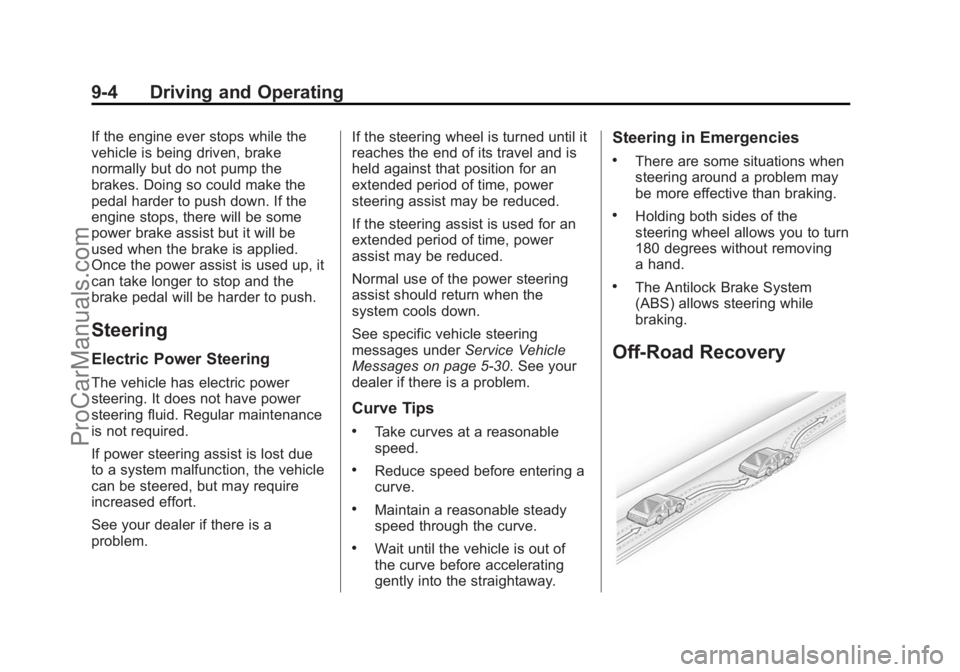
Off-Road Recovery
ProCarManuals.com
Page 242 of 435
Black plate (5,1)Chevrolet SS Sedan Owner Manual (GMNA-Localizing-U.S.-7707491) - 2015 -
crc - 9/11/14
Driving and Operating 9-5
The vehicle's right wheels can drop
off the edge of a road onto the
shoulder while driving. Follow
these tips:
1. Ease off the accelerator andthen, if there is nothing in the
way, steer the vehicle so that it
straddles the edge of the
pavement.
2. Turn the steering wheel about one-eighth of a turn, until the
right front tire contacts the
pavement edge.
3. Turn the steering wheel to go straight down the roadway.
Loss of Control
Skidding
There are three types of skids that
correspond to the vehicle's three
control systems:
.Braking Skid —wheels are not
rolling.
.Steering or Cornering Skid —
too much speed or steering in a
curve causes tires to slip and
lose cornering force.
.Acceleration Skid —too much
throttle causes the driving
wheels to spin.
Defensive drivers avoid most skids
by taking reasonable care suited to
existing conditions, and by not
overdriving those conditions. But
skids are always possible.
If the vehicle starts to slide, follow
these suggestions:
.Ease your foot off the
accelerator pedal and steer the
way you want the vehicle to go.
The vehicle may straighten out.
Be ready for a second skid if it
occurs.
.Slow down and adjust your
driving according to weather
conditions. Stopping distance
can be longer and vehicle
control can be affected when
traction is reduced by water,
snow, ice, gravel, or other material on the road. Learn to
recognize warning clues
—such
as enough water, ice, or packed
snow on the road to make a
mirrored surface —and slow
down when you have any doubt.
.Try to avoid sudden steering,
acceleration, or braking,
including reducing vehicle speed
by shifting to a lower gear. Any
sudden changes could cause
the tires to slide.
Remember: Antilock brakes help
avoid only the braking skid.
Track Events and
Competitive Driving
Track events or competitive driving
may affect the vehicle warranty. See
the warranty manual before using
the vehicle for track testing or other
competitive driving.
ProCarManuals.com
Page 244 of 435
Black plate (7,1)Chevrolet SS Sedan Owner Manual (GMNA-Localizing-U.S.-7707491) - 2015 -
crc - 9/11/14
Driving and Operating 9-7
medium brake application. Drive
for at least 1 km (0.6 mi)
between applying the brakes.
This first step may be skipped if
there are more than 320 km
(200 mi) on the brake pads.
2. Repeatedly apply the brakes from 100 km/h (60 mph) to
25 km/h (15 mph) while
decelerating at 0.8 g. This is a
hard brake application, without
activating the Antilock Brake
System (ABS). Drive for at least
1 km (0.6 mi) between stops.
Repeat until the brake pedal
travel starts to increase.
Depending on conditions, this
should take no longer than 25
brake applications.
3. Cool down: Drive at 100 km/h (60 mph) for approximately
15 km (10 mi) without using the
brakes.
4. Apply the brakes 25 times from 100 km/h (60 mph) to 50 km/h
(30 mph) while decelerating at
0.4 g. This is a medium brake application. Drive for at least
1 km (0.6 mi) between
applications.
Rear Axle
The rear axle fluid temperatures
may be higher than when driving in
severe conditions. Drain and refill
with new fluid after the first racing or
competitive driving event, and then
after every 24 hours of racing or
competitive driving. See
Recommended Fluids and
Lubricants on page 11-12.
{Caution
During a first time track or racing
event, high rear axle
temperatures can occur. Damage
could be caused to the rear axle
and would not be covered by the
vehicle warranty. Do not drive as
long or as fast the first time the
vehicle is driven on the track or
raced. For extended track use, GM
recommends installing a rear
differential cooler to protect the
rear axle.
Wheel Alignment
For racing and competitive driving,
the vehicle load should be limited to
the driver only and no cargo. The
tires should be inflated cold to at
least 250 kPa (36 psi).
{Caution
Using these wheel alignment
settings may cause excessive tire
wear. Only use these wheel
alignment settings for racing or
competitive driving. Excessive tire
wear is not covered under the
vehicle warranty.
Front Alignment Specification
.Caster: 6.0 +/- 1.25 degrees
.Camber: -0.9 +/- 0.1 degrees
ProCarManuals.com
Page 246 of 435
Black plate (9,1)Chevrolet SS Sedan Owner Manual (GMNA-Localizing-U.S.-7707491) - 2015 -
crc - 9/11/14
Driving and Operating 9-9
Hill and Mountain Roads
Driving on steep hills or through
mountains is different than driving
on flat or rolling terrain. Tips for
driving in these conditions include:
.Keep the vehicle serviced and in
good shape.
.Check all fluid levels and brakes,
tires, cooling system, and
transmission.
.Shift to a lower gear when going
down steep or long hills.
{Warning
Using the brakes to slow the
vehicle on a long downhill slope
can cause brake overheating, can
reduce brake performance, and
could result in a loss of braking.
Shift the transmission to a lower
gear to let the engine assist the
brakes on a steep downhill slope.
{Warning
Coasting downhill in N (Neutral)
or with the ignition off is
dangerous. This can cause
overheating of the brakes and
loss of steering. Always have the
engine running and the vehicle
in gear.
.Stay in your own lane. Do not
swing wide or cut across the
center of the road. Drive at
speeds that let you stay in your
own lane.
.Be alert on top of hills;
something could be in your lane
(stalled car, accident).
.Pay attention to special road
signs (falling rocks area, winding
roads, long grades, passing or
no-passing zones) and take
appropriate action.
Winter Driving
Driving on Snow or Ice
Drive carefully when there is snow
or ice between the tires and the
road, creating less traction or grip.
Wet ice can occur at about 0°C
(32°F) when freezing rain begins to
fall, resulting in even less traction.
Avoid driving on wet ice or in
freezing rain until roads can be
treated with salt or sand.
Drive with caution, whatever the
condition. Accelerate gently so
traction is not lost. Accelerating too
quickly causes the wheels to spin
and makes the surface under the
tires slick, so there is even less
traction.
Traction Control should be turned
on. SeeTraction Control/Electronic
Stability Control on page 9-32.
The Antilock Brake System (ABS)
improves vehicle stability during
hard stops on slippery roads, but
ProCarManuals.com