steering CHEVROLET SS 2015 Repair Manual
[x] Cancel search | Manufacturer: CHEVROLET, Model Year: 2015, Model line: SS, Model: CHEVROLET SS 2015Pages: 435, PDF Size: 6.27 MB
Page 273 of 435
Black plate (36,1)Chevrolet SS Sedan Owner Manual (GMNA-Localizing-U.S.-7707491) - 2015 -
crc - 9/11/14
9-36 Driving and Operating
provide the best handling while
providing a smooth ride. The
Touring and Sport modes will feel
similar on a smooth road. These
settings can be changed when
driving conditions change.
If a malfunction occurs with the
MRC system, the appropriate
message will display in the DIC.
SeeRide Control System Messages
on page 5-30.
Electric Power Steering (EPS)
Sport: Adjusted for use with MRC
Touring and Sport Mode.
Competitive: For spirited and track
driving.
Pedal Mode
Standard: Default accelerator pedal
response.
Track: See Track Driver Mode on
page 9-36.Track Driver Mode
Track Driver Mode and Launch
Control are systems designed to
allow increased performance while
accelerating and/or cornering. This
is accomplished by regulating and
optimizing the engine, brakes, and
suspension performance. These
modes are for use at a closed
course race track and are not
intended for use on public roads.
These systems will not compensate
for driver inexperience or lack of
familiarity with the race track.
{Warning
Track Driver Mode and Launch
Control change the way
StabiliTrak and TCS perform and
should not be used on public
roads. These modes should only
be used on closed courses by
experienced drivers.
{Caution
Attempting to shift when the drive
wheels are spinning and do not
have traction may cause damage
to the transmission. Damage
caused by misuse of the vehicle
is not covered by the vehicle
warranty. Do not attempt to shift
when the drive wheels do not
have traction.
Racing will result in the premature
wear of brakes, tires, and driveline
components. Inspect and replace
components as necessary.
ProCarManuals.com
Page 274 of 435
Black plate (37,1)Chevrolet SS Sedan Owner Manual (GMNA-Localizing-U.S.-7707491) - 2015 -
crc - 9/11/14
Driving and Operating 9-37
The modes and available settings are:Driver Mode TCS StabiliTrak Launch Control *Torque
Vectoring MRC
EPS Pedal
Mode
Track Competitive Competitive On On Performance/
Track Competitive Track
In Track Driver Mode, TCS and
StabiliTrak are adjusted and Launch
Control is available. Adjust your
driving style to account for the more
available performance. See “Launch
Control” later in this section.
Track Driver Mode will return to the
previous setting, Touring, Sport or
Performance, when the vehicle is
restarted.
Press the StabiliTrak OFF button
twice quickly to set Track Driver
Mode. Messages display in the
Driver Information Center (DIC).
See Ride Control System Messages
on page 5-30. Also, the StabiliTrak
OFF light stays on when the vehicle
is in Track Driver Mode. To return the vehicle to normal TCS
and StabiliTrak operation, press the
StabiliTrak OFF button. Track Driver
Mode will return to the previous
setting.
Pedal Mode
In Track Driver Mode or with TCS
off, the accelerator pedal response
is changed to allow for smoother
throttle control on a track.
Launch Control (Manual
Transmissions Only)
This feature is available in Track
Driver Mode, and allows the vehicle
to reach high levels of acceleration
in a straight line. Launch Control
adjusts tire slip during standing start
launches. Use this feature duringclosed course race events where
consistent zero to sixty and quarter
mile times are desirable.
Launch Control is only
available when:
.Track Driver Mode is selected.
.The vehicle is not moving.
.The steering wheel is pointing
straight.
.The clutch pedal is pressed and
the vehicle is in 1 (First) gear.
.The accelerator pedal is rapidly
applied to wide open throttle.
This feature initially limits engine
speed as the accelerator pedal is
rapidly pressed to wide open
throttle. A smooth, quick release of
ProCarManuals.com
Page 282 of 435
Black plate (45,1)Chevrolet SS Sedan Owner Manual (GMNA-Localizing-U.S.-7707491) - 2015 -
crc - 9/11/14
Driving and Operating 9-45
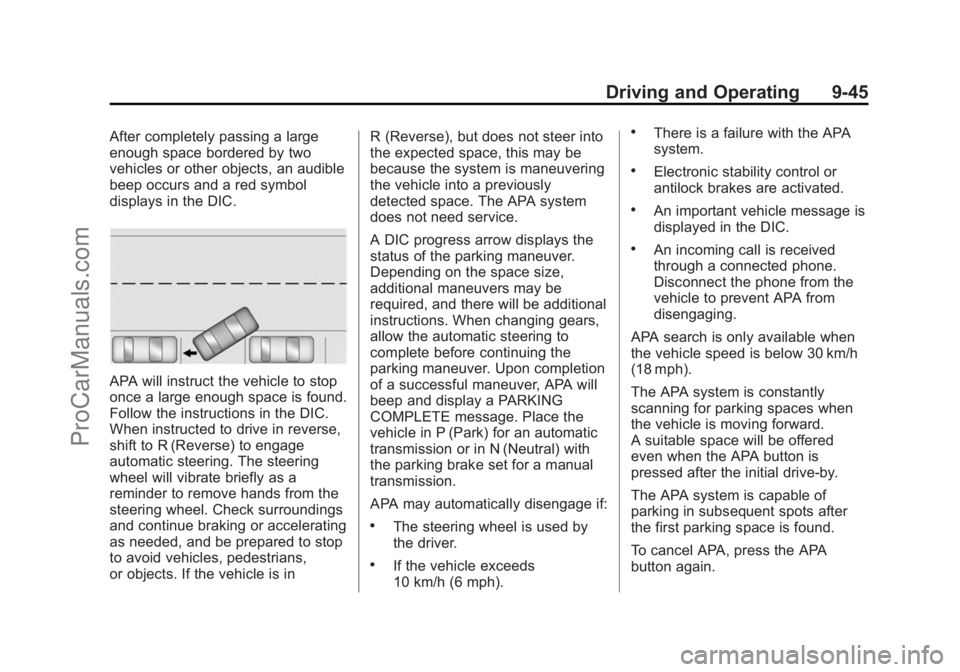
After completely passing a large
enough space bordered by two
vehicles or other objects, an audible
beep occurs and a red symbol
displays in the DIC.
APA will instruct the vehicle to stop
once a large enough space is found.
Follow the instructions in the DIC.
When instructed to drive in reverse,
shift to R (Reverse) to engage
automatic steering. The steering
wheel will vibrate briefly as a
reminder to remove hands from the
steering wheel. Check surroundings
and continue braking or accelerating
as needed, and be prepared to stop
to avoid vehicles, pedestrians,
or objects. If the vehicle is inR (Reverse), but does not steer into
the expected space, this may be
because the system is maneuvering
the vehicle into a previously
detected space. The APA system
does not need service.
A DIC progress arrow displays the
status of the parking maneuver.
Depending on the space size,
additional maneuvers may be
required, and there will be additional
instructions. When changing gears,
allow the automatic steering to
complete before continuing the
parking maneuver. Upon completion
of a successful maneuver, APA will
beep and display a PARKING
COMPLETE message. Place the
vehicle in P (Park) for an automatic
transmission or in N (Neutral) with
the parking brake set for a manual
transmission.
APA may automatically disengage if:
.The steering wheel is used by
the driver.
.If the vehicle exceeds
10 km/h (6 mph).
.There is a failure with the APA
system.
.Electronic stability control or
antilock brakes are activated.
.An important vehicle message is
displayed in the DIC.
.An incoming call is received
through a connected phone.
Disconnect the phone from the
vehicle to prevent APA from
disengaging.
APA search is only available when
the vehicle speed is below 30 km/h
(18 mph).
The APA system is constantly
scanning for parking spaces when
the vehicle is moving forward.
A suitable space will be offered
even when the APA button is
pressed after the initial drive-by.
The APA system is capable of
parking in subsequent spots after
the first parking space is found.
To cancel APA, press the APA
button again.
ProCarManuals.com
Page 283 of 435
Black plate (46,1)Chevrolet SS Sedan Owner Manual (GMNA-Localizing-U.S.-7707491) - 2015 -
crc - 9/11/14
9-46 Driving and Operating
When the System Does Not Seem
to Work Properly
The APA system may require a
short period of driving along curves
to calibrate.
Assistance Systems for
Driving
If equipped, when driving the
vehicle, Forward Collision Alert
(FCA), Lane Departure Warning
(LDW), and Side Blind Zone Alert
(SBZA) can help to avoid a crash or
reduce crash damage.
Forward Collision Alert
(FCA) System
If equipped, the FCA system may
help to avoid or reduce the harm
caused by front-end crashes. When
approaching a vehicle ahead too
quickly, FCA provides a red flashing
alert on the windshield and rapidly
beeps. FCA also lights an amber
visual alert if following another
vehicle much too closely.FCA detects vehicles within a
distance of approximately 60 m
(197 ft) and operates at speeds
above 40 km/h (25 mph).
{Warning
FCA is a warning system and
does not apply the brakes. When
approaching a slower-moving or
stopped vehicle ahead too rapidly,
or when following a vehicle too
closely, FCA may not provide a
warning with enough time to help
avoid a crash. FCA does not warn
of pedestrians, animals, signs,
guardrails, bridges, construction
barrels, or other objects. Be ready
to take action and apply the
brakes. For more information, see
Defensive Driving on page 9-3.
FCA can be disabled with the FCA
steering wheel control.
Detecting the Vehicle Ahead
FCA warnings will not occur unless
the FCA system detects a vehicle
ahead. When a vehicle is detected,
the vehicle ahead indicator will
display green on the windshield.
Vehicles may not be detected on
curves, highway exit ramps, or hills;
or due to poor visibility. FCA will not
detect another vehicle ahead until it
is completely in the driving lane.
{Warning
FCA does not provide a warning
to help avoid a crash, unless it
detects a vehicle. FCA may not
detect a vehicle ahead if the FCA
sensor is blocked by dirt, snow, (Continued)
ProCarManuals.com
Page 284 of 435
Black plate (47,1)Chevrolet SS Sedan Owner Manual (GMNA-Localizing-U.S.-7707491) - 2015 -
crc - 9/11/14
Driving and Operating 9-47
Warning (Continued)
or ice, or if the windshield is
damaged. It may also not detect a
vehicle on winding or hilly roads,
or in conditions that can limit
visibility such as fog, rain,
or snow, or if the headlamps or
windshield are not cleaned or in
proper condition. Keep the
windshield, headlamps, and FCA
sensors clean and in good repair.
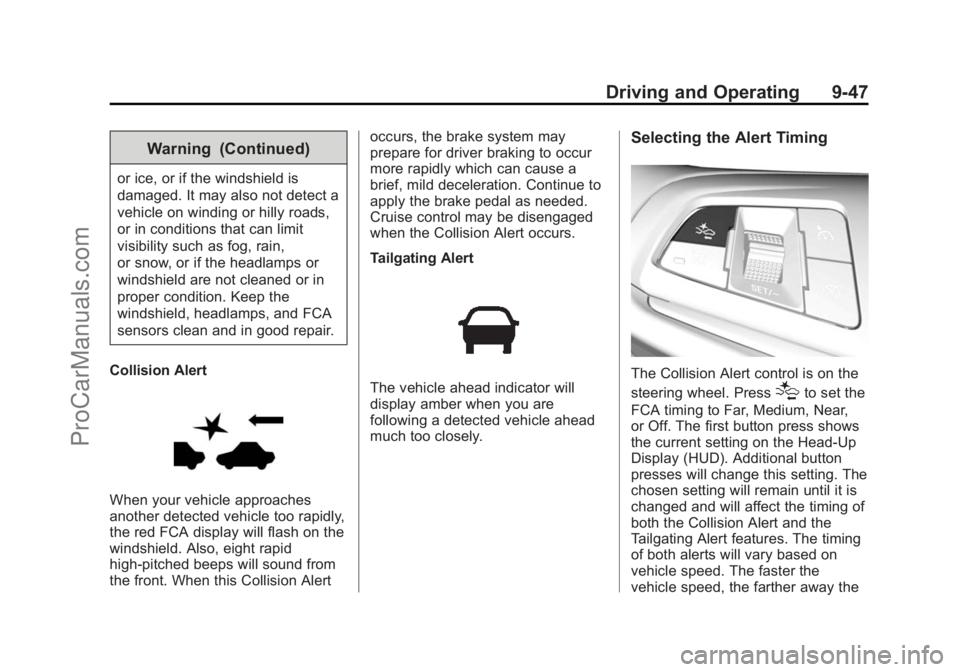
Collision Alert
When your vehicle approaches
another detected vehicle too rapidly,
the red FCA display will flash on the
windshield. Also, eight rapid
high-pitched beeps will sound from
the front. When this Collision Alert occurs, the brake system may
prepare for driver braking to occur
more rapidly which can cause a
brief, mild deceleration. Continue to
apply the brake pedal as needed.
Cruise control may be disengaged
when the Collision Alert occurs.
Tailgating Alert
The vehicle ahead indicator will
display amber when you are
following a detected vehicle ahead
much too closely.
Selecting the Alert Timing
The Collision Alert control is on the
steering wheel. Press
[to set the
FCA timing to Far, Medium, Near,
or Off. The first button press shows
the current setting on the Head-Up
Display (HUD). Additional button
presses will change this setting. The
chosen setting will remain until it is
changed and will affect the timing of
both the Collision Alert and the
Tailgating Alert features. The timing
of both alerts will vary based on
vehicle speed. The faster the
vehicle speed, the farther away the
ProCarManuals.com
Page 288 of 435
Black plate (51,1)Chevrolet SS Sedan Owner Manual (GMNA-Localizing-U.S.-7707491) - 2015 -
crc - 9/11/14
Driving and Operating 9-51
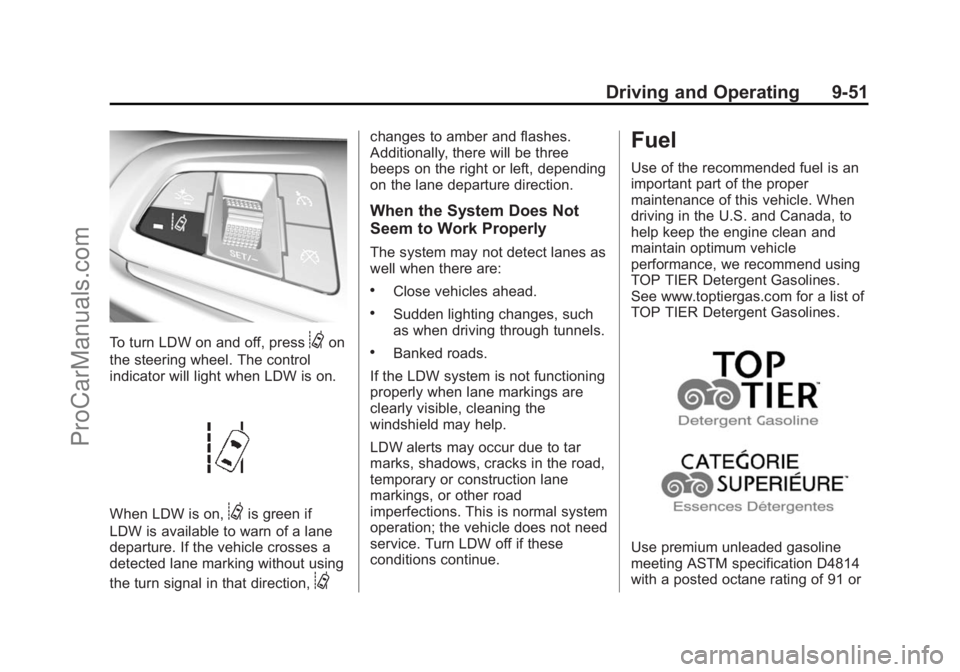
To turn LDW on and off, press@on
the steering wheel. The control
indicator will light when LDW is on.
When LDW is on,@is green if
LDW is available to warn of a lane
departure. If the vehicle crosses a
detected lane marking without using
the turn signal in that direction,
@
changes to amber and flashes.
Additionally, there will be three
beeps on the right or left, depending
on the lane departure direction.
When the System Does Not
Seem to Work Properly
The system may not detect lanes as
well when there are:
.Close vehicles ahead.
.Sudden lighting changes, such
as when driving through tunnels.
.Banked roads.
If the LDW system is not functioning
properly when lane markings are
clearly visible, cleaning the
windshield may help.
LDW alerts may occur due to tar
marks, shadows, cracks in the road,
temporary or construction lane
markings, or other road
imperfections. This is normal system
operation; the vehicle does not need
service. Turn LDW off if these
conditions continue.
Fuel
Use of the recommended fuel is an
important part of the proper
maintenance of this vehicle. When
driving in the U.S. and Canada, to
help keep the engine clean and
maintain optimum vehicle
performance, we recommend using
TOP TIER Detergent Gasolines.
See www.toptiergas.com for a list of
TOP TIER Detergent Gasolines.
Use premium unleaded gasoline
meeting ASTM specification D4814
with a posted octane rating of 91 or
ProCarManuals.com
Page 297 of 435
Black plate (4,1)Chevrolet SS Sedan Owner Manual (GMNA-Localizing-U.S.-7707491) - 2015 -
crc - 9/16/14
10-4 Vehicle Care
Hood
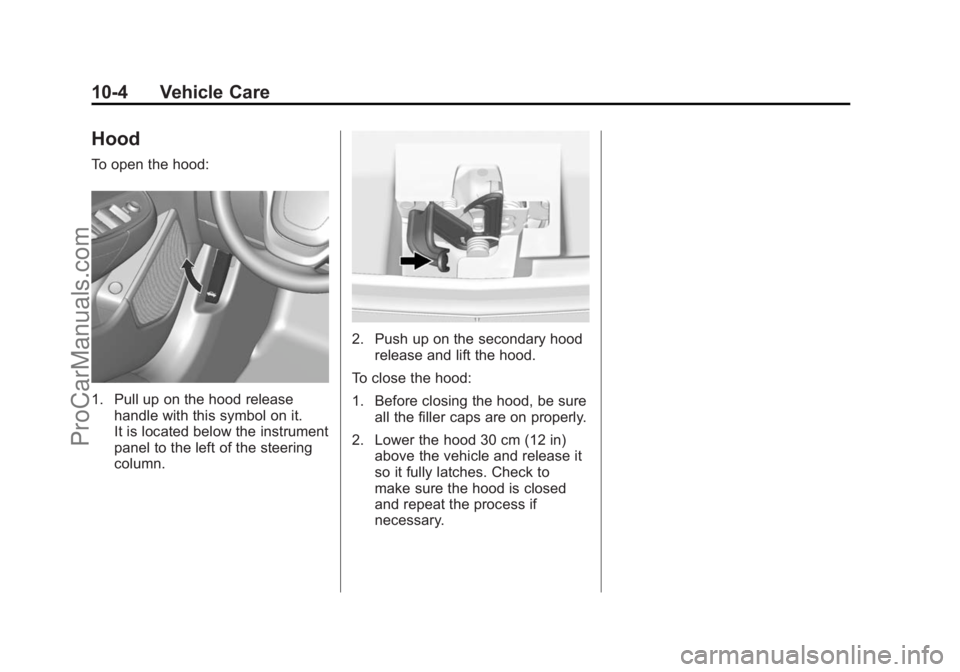
To open the hood:
1. Pull up on the hood releasehandle with this symbol on it.
It is located below the instrument
panel to the left of the steering
column.
2. Push up on the secondary hoodrelease and lift the hood.
To close the hood:
1. Before closing the hood, be sure all the filler caps are on properly.
2. Lower the hood 30 cm (12 in) above the vehicle and release it
so it fully latches. Check to
make sure the hood is closed
and repeat the process if
necessary.
ProCarManuals.com
Page 322 of 435
Black plate (29,1)Chevrolet SS Sedan Owner Manual (GMNA-Localizing-U.S.-7707491) - 2015 -
crc - 9/16/14
Vehicle Care 10-29
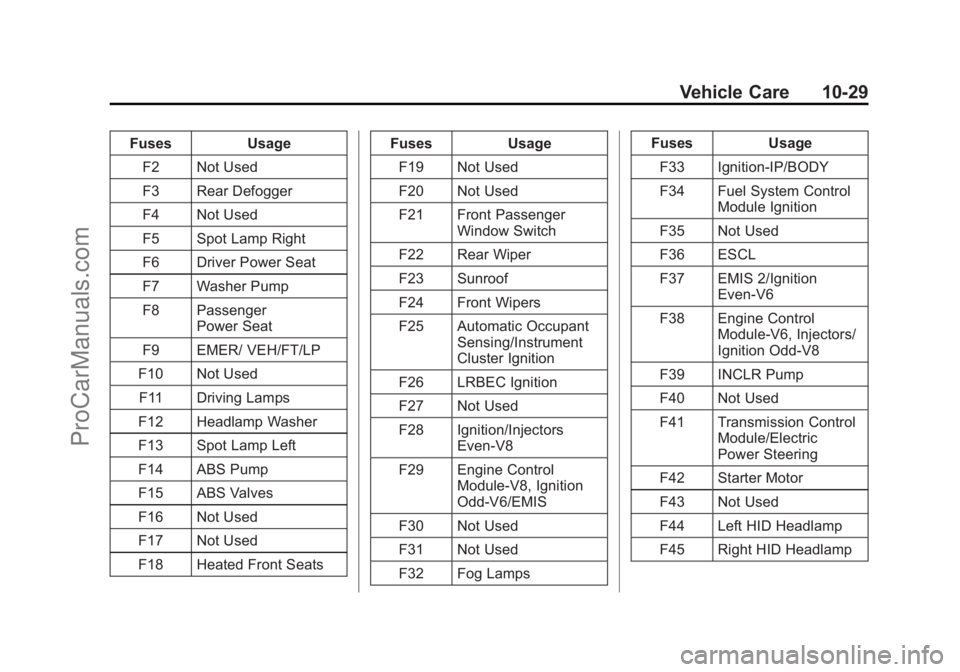
FusesUsage
F2 Not Used
F3 Rear Defogger
F4 Not Used
F5 Spot Lamp Right
F6 Driver Power Seat
F7 Washer Pump
F8 Passenger Power Seat
F9 EMER/ VEH/FT/LP
F10 Not Used F11 Driving Lamps
F12 Headlamp Washer
F13 Spot Lamp Left
F14 ABS Pump
F15 ABS Valves
F16 Not Used
F17 Not Used
F18 Heated Front Seats Fuses
Usage
F19 Not Used
F20 Not Used
F21 Front Passenger Window Switch
F22 Rear Wiper
F23 Sunroof
F24 Front Wipers
F25 Automatic Occupant Sensing/Instrument
Cluster Ignition
F26 LRBEC Ignition
F27 Not Used
F28 Ignition/Injectors Even-V8
F29 Engine Control Module-V8, Ignition
Odd-V6/EMIS
F30 Not Used
F31 Not Used
F32 Fog Lamps Fuses
Usage
F33 Ignition-IP/BODY
F34 Fuel System Control Module Ignition
F35 Not Used
F36 ESCL
F37 EMIS 2/Ignition Even-V6
F38 Engine Control Module-V6, Injectors/
Ignition Odd-V8
F39 INCLR Pump
F40 Not Used
F41 Transmission Control Module/Electric
Power Steering
F42 Starter Motor
F43 Not Used
F44 Left HID Headlamp
F45 Right HID Headlamp
ProCarManuals.com
Page 325 of 435
Black plate (32,1)Chevrolet SS Sedan Owner Manual (GMNA-Localizing-U.S.-7707491) - 2015 -
crc - 9/16/14
10-32 Vehicle Care
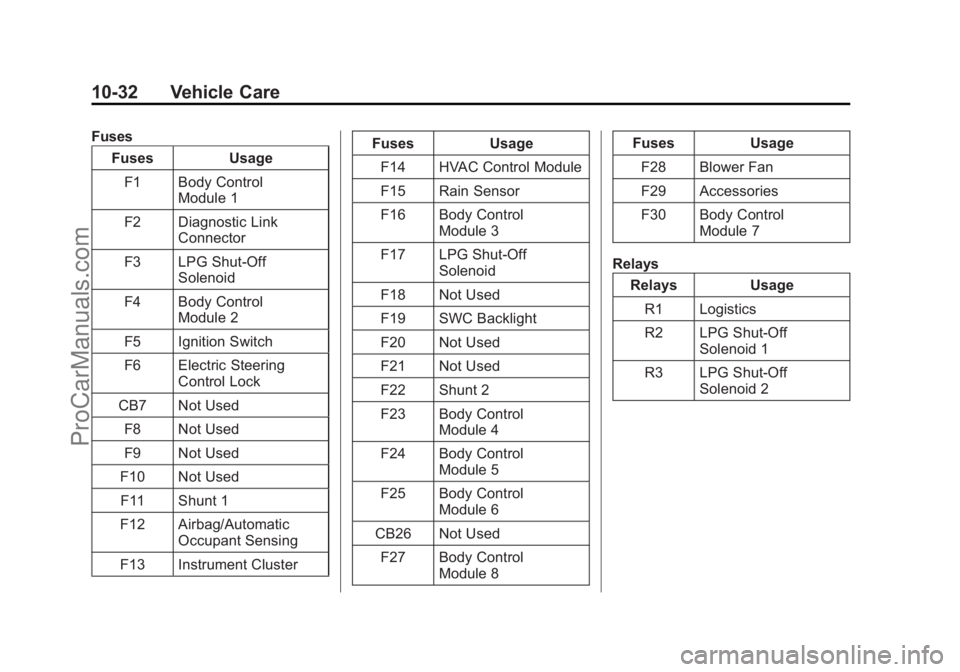
FusesFuses Usage
F1 Body Control Module 1
F2 Diagnostic Link Connector
F3 LPG Shut-Off Solenoid
F4 Body Control Module 2
F5 Ignition Switch
F6 Electric Steering Control Lock
CB7 Not Used F8 Not Used
F9 Not Used
F10 Not Used F11 Shunt 1
F12 Airbag/Automatic Occupant Sensing
F13 Instrument Cluster Fuses Usage
F14 HVAC Control Module
F15 Rain Sensor
F16 Body Control Module 3
F17 LPG Shut-Off Solenoid
F18 Not Used
F19 SWC Backlight
F20 Not Used
F21 Not Used
F22 Shunt 2
F23 Body Control Module 4
F24 Body Control Module 5
F25 Body Control Module 6
CB26 Not Used F27 Body Control Module 8 Fuses Usage
F28 Blower Fan
F29 Accessories
F30 Body Control Module 7
Relays Relays Usage
R1 Logistics
R2 LPG Shut-Off Solenoid 1
R3 LPG Shut-Off Solenoid 2
ProCarManuals.com
Page 349 of 435
Black plate (56,1)Chevrolet SS Sedan Owner Manual (GMNA-Localizing-U.S.-7707491) - 2015 -
crc - 9/16/14
10-56 Vehicle Care
If a Tire Goes Flat
It is unusual for a tire to blow out
while driving, especially if the tires
are maintained properly. SeeTires
on page 10-35. If air goes out of a
tire, it is much more likely to leak
out slowly. But if there is ever a
blowout, here are a few tips about
what to expect and what to do:
If a front tire fails, the flat tire
creates a drag that pulls the vehicle
toward that side. Take your foot off
the accelerator pedal and grip the
steering wheel firmly. Steer to
maintain lane position, and then
gently brake to a stop, well off the
road, if possible.
A rear blowout, particularly on a
curve, acts much like a skid and
may require the same correction as
used in a skid. Stop pressing the
accelerator pedal and steer to
straighten the vehicle. It may be
very bumpy and noisy. Gently brake
to a stop, well off the road,
if possible.{Warning
Driving on a flat tire will cause
permanent damage to the tire.
Re-inflating a tire after it has been
driven on while severely
underinflated or flat may cause a
blowout and a serious crash.
Never attempt to re-inflate a tire
that has been driven on while
severely underinflated or flat.
Have your dealer or an authorized
tire service center repair or
replace the flat tire as soon as
possible.
{Warning
Lifting a vehicle and getting under
it to do maintenance or repairs is
dangerous without the
appropriate safety equipment and
training. If a jack is provided with
the vehicle, it is designed only for
(Continued)
Warning (Continued)
changing a flat tire. If it is used for
anything else, you or others could
be badly injured or killed if the
vehicle slips off the jack. If a jack
is provided with the vehicle, only
use it for changing a flat tire.
If a tire goes flat, avoid further tire
and wheel damage by driving slowly
to a level place, well off the road,
if possible. Turn on the hazard
warning flashers. See Hazard
Warning Flashers on page 6-3.
ProCarManuals.com