ESP CHEVROLET SS 2016 User Guide
[x] Cancel search | Manufacturer: CHEVROLET, Model Year: 2016, Model line: SS, Model: CHEVROLET SS 2016Pages: 397, PDF Size: 7.17 MB
Page 198 of 397
Chevrolet SS Sedan Owner Manual (GMNA-Localizing-U.S.-9234782) - 2016 -
CRC - 8/24/15
Infotainment System 197
Connecting to a Different Phone
or Device
To connect to a different cell phone,
the system looks for the next
available cell phone. Depending on
the cell phone to be connected, this
command may need to be repeated.1. Press
b/g. The system
responds “Please say a
command,” followed by a tone.
2. Say “Change Phone.”
. To select a device, press
the name on the display.
. If another cell phone is not
found, the original phone
remains connected.
Making a Call Using Phone
Book and Infotainment
Controls
For cell phones that support the
phone book feature, the Bluetooth
system can use the contacts stored
on the cell phone to make calls. See
the cell phone manufacturer‘s user
guide or contact the wireless
provider to find out if this feature is
supported. When a cell phone supports the
phone book feature, the Phone
Book and Call Lists menus are
automatically available.
The Phone Book menu allows
access to the phone book stored in
the cell phone to make a call.
The Call Lists menu allows access
to the phone numbers from the
Incoming Calls, Outgoing Calls, and
Missed Calls menus on the cell
phone to make a call.
The radio will display the first 1,000
contacts and the phone numbers for
each contact including Home, Work,
Mobile, and Other.
To make a call using the Phone
Book menu:
1. Press
5/>once on the radio
or the Phone screen button.
2. Select Phone Book.
3. Select the letter group of the phone book entry to scroll
through the list of names/
numbers.
4. Select the name. 5. Select the number to call.
To make a call using the Call
Lists menu:
1. Press
5/>once on the radio
or the Phone screen button.
2. Select Call Lists.
3. Select the Incoming Calls, Outgoing Calls, or Missed
Calls list.
4. Select the name or number to call.
Making a Call Using the
Infotainment Controls
To make a call:
1. Press
5/>once on the radio
or the Phone screen button.
2. Press Enter Number.
3. Enter the phone number.
4. Select OK to start dialing the number.
5. Select Call to place the call.
To make a call using voice
recognition, see “Making a Call”
under Bluetooth 0193
ii.
ProCarManuals.com
Page 200 of 397
Chevrolet SS Sedan Owner Manual (GMNA-Localizing-U.S.-9234782) - 2016 -
CRC - 8/24/15
Infotainment System 199
Muting a Call
During a call, all sounds from inside
the vehicle can be muted so that the
person on the other end of the call
cannot hear them.
Using the Infotainment Controls
Turn and press the TUNE/MENU
knob and select Mute Call. Press
again to cancel mute.
Transferring a Call
Audio can be transferred between
the Bluetooth system and the cell
phone.
The cell phone must be paired and
connected with the Bluetooth
system before a call can be
transferred.
To Transfer Audio from the
Bluetooth System to a Cell Phone
During a call with the audio in the
vehicle, press the Transfer Call
button on the screen or press and
hold the
b/gbutton on the
steering wheel. To Transfer Audio to the Bluetooth
System from a Cell Phone
Use the audio transfer feature on
the cell phone. See your cell phone
manufacturer's user guide for more
information. Press the Transfer call
button on the screen or press and
hold the
b/gbutton on the
steering wheel.
Dual Tone Multi-Frequency
(DTMF) Tones
The in-vehicle Bluetooth system can
send numbers during a call. This is
used when calling a menu-driven
phone system.
Using the Infotainment Controls
1. Turn and press the TUNE/ MENU knob and select Enter
Number.
2. Enter the phone number, or select Enter Number on the
screen and select digits, then
press OK.
Hands-Free Phone
Using Bluetooth Voice
Recognition
To use voice recognition, press the
b/gbutton on the steering wheel.
Use the commands below for the
various voice features. For
additional information, say “Help”
while in a voice recognition menu.
Making a Call
Calls can be made using the
following commands.
Dial or Call : These commands can
be used interchangeably to dial a
phone number.
Digit Dial : This command allows a
phone number to be dialed by
entering the digits one at a time.
Re-dial : This command dials the
last number used on the cell phone.
Using the “Dial”or“Call”
Command
To call a number:
1. Press
b/g. The system
responds “Please say a
command,” followed by a tone.
ProCarManuals.com
Page 201 of 397
Chevrolet SS Sedan Owner Manual (GMNA-Localizing-U.S.-9234782) - 2016 -
CRC - 8/24/15
200 Infotainment System
2. Say“Dial”or“Call.”
3. Say the entire number without pausing, followed by “Dial.”
Once connected, the person called
will be heard through the audio
speakers.
To call using a name tag:
1. Press
b/g. The system
responds “Please say a
command,” followed by a tone.
2. Say “Dial”or“Call” and then
say the name tag. For example
“Call John at Work.”
Once connected, the person called
will be heard through the audio
speakers.
Using the “Digit Dial” Command
This allows a phone number to be
dialed by entering the digits one at
a time.
1. Press
b/g. The system
responds “Please say a
command,” followed by a tone.
2. Say “Digit Dial.” 3. Say each digit, one at a time,
to dial. After each digit is
entered, the system repeats
back the digit it heard followed
by a tone. After the last digit
has been entered, say “Dial.”
If an unwanted number is repeated
back, say “Clear”to clear the last
number.
Once connected, the person called
will be heard through the audio
speakers.
Using the “Re-dial”Command
1. Press
b/g. The system
responds “Please say a
command,” followed by a tone.
2. After the tone, say “Re-dial.”
The system dials the last
number called from the
connected cell phone.
Once connected, the person called
will be heard through the audio
speakers.
Clearing the System
Unless information is deleted out of
the vehicle Bluetooth system, it will
be retained. This includes phone
pairing information. For directions
on how to delete this information,
see “Deleting a Paired Phone/
Device.”
Text Messaging
For vehicles equipped with
Bluetooth capability, the system,
if equipped with text messaging, can
display text messages, play back a
message over the audio system,
and send a predefined message.
Not all phones support all functions
and work with Bluetooth. The radio
only supports the receipt of SMS
text messages. A request may need
to be accepted on the phone or
some phone settings may need to
be changed to allow text messaging
to function. See the cell phone
manufacturer ’s user guide.
ProCarManuals.com
Page 205 of 397
Chevrolet SS Sedan Owner Manual (GMNA-Localizing-U.S.-9234782) - 2016 -
CRC - 8/24/15
204 Infotainment System
registered trademark or a trademark
of Gracenote, Inc. in the United
States and/or other countries.
Bluetooth
The Bluetooth®word mark and
logos are owned by the Bluetooth®
SIG, Inc. and any use of such marks
by General Motors is under license.
Other trademarks and trade names
are those of their respective owners.
Pandora (If Equipped)
Pandora is a registered trademark
of Pandora Media, Inc., used under
license.
Manufactured under license from
Dolby Laboratories. Dolby and the
double-D symbol are trademarks of
Dolby Laboratories.
Map End User License
Agreement (Optional
Equipment Applies Where
Equipped)
END USER TERMS
The data (“Data”) is provided for
your personal, internal use only and
not for resale. It is protected by
copyright, and is subject to the
following terms and conditions
which are agreed to by you, on the
one hand, and Panasonic
Automotive Systems Company of
America (“PANASONIC”) and its
licensors (including their licensors
and suppliers) on the other hand.
© 2014 HERE North America, LLC.
All rights reserved.
In addition, the Lonely Planet Travel
Guide content is subject to the
following supplier notices (if
equipped):
© 2014 Lonely Planet Publications
Pty Ltd. All rights reserved.
PANASONIC and its content
providers have tried to make this
information as accurate as possible, but it is provided
“as is”and
PANASONIC and its content
providers accept no responsibility
for any loss, injury or inconvenience
resulting from this information. You
should verify critical information (like
visas, health and safety) before you
travel.
TERMS AND CONDITIONS
Personal Use Only. You agree to
use this Data together with the
General Motors MyLink or IntelliLink
Connected Navigation Radio
Platform for the solely personal,
non-commercial purposes for which
you were licensed, and not for
service bureau, time-sharing or
other similar purposes. Accordingly,
but subject to the restrictions set
forth in the following paragraphs,
you agree not to otherwise
reproduce, copy, modify, decompile,
disassemble, create any derivative
works of, or reverse engineer any
portion of this Data, and may not
transfer or distribute it in any form,
for any purpose, except to the
extent permitted by mandatory laws.
ProCarManuals.com
Page 206 of 397
Chevrolet SS Sedan Owner Manual (GMNA-Localizing-U.S.-9234782) - 2016 -
CRC - 8/24/15
Infotainment System 205
Restrictions
Except where you have been
specifically licensed to do so by
PANASONIC, and without limiting
the preceding paragraph, you may
not (a) use this Data with any
products, systems, or applications
installed or otherwise connected to
or in communication with vehicles,
capable of vehicle navigation,
positioning, dispatch, real time route
guidance, fleet management or
similar applications; or (b) with or in
communication with any positioning
devices or any mobile or
wireless-connected electronic or
computer devices, including without
limitation cellular phones, palmtop
and handheld computers, pagers,
and personal digital assistants
or PDAs
Warning
The Data may contain inaccurate or
incomplete information due to the
passage of time, changing
circumstances, sources used and
the nature of collectingcomprehensive geographic data,
any of which may lead to incorrect
results.
No Warranty
This Data is provided to you
“as is,”
and you agree to use it at your own
risk. PANASONIC and its licensors
(and their licensors and suppliers)
make no guarantees,
representations or warranties of any
kind, express or implied, arising by
law or otherwise, including but not
limited to, content, quality, accuracy,
completeness, effectiveness,
reliability, fitness for a particular
purpose, usefulness, use or results
to be obtained from this Data,
or that the Data or server will be
uninterrupted or error-free.
Disclaimer of Warranty
PANASONIC AND ITS LICENSORS
(INCLUDING THEIR LICENSORS
AND SUPPLIERS) DISCLAIM ANY
WARRANTIES, EXPRESS OR
IMPLIED, OF QUALITY,
PERFORMANCE, MERCHANTABILITY, FITNESS
FOR A PARTICULAR PURPOSE
OR NON-INFRINGEMENT. Some
States, Territories and Countries do
not allow certain warranty
exclusions, so to that extent the
above exclusion may not apply
to you.
Disclaimer of Liability
PANASONIC AND ITS LICENSORS
(INCLUDING THEIR LICENSORS
AND SUPPLIERS) SHALL NOT BE
LIABLE TO YOU: IN RESPECT OF
ANY CLAIM, DEMAND OR
ACTION, IRRESPECTIVE OF THE
NATURE OF THE CAUSE OF THE
CLAIM, DEMAND OR ACTION
ALLEGING ANY LOSS, INJURY
OR DAMAGES, DIRECT OR
INDIRECT, WHICH MAY RESULT
FROM THE USE OR POSSESSION
OF THE INFORMATION; OR FOR
ANY LOSS OF PROFIT, REVENUE,
CONTRACTS OR SAVINGS, OR
ANY OTHER DIRECT, INDIRECT,
INCIDENTAL, SPECIAL OR
CONSEQUENTIAL DAMAGES
ProCarManuals.com
Page 207 of 397
Chevrolet SS Sedan Owner Manual (GMNA-Localizing-U.S.-9234782) - 2016 -
CRC - 8/24/15
206 Infotainment System
ARISING OUT OF YOUR USE OF
OR INABILITY TO USE THIS
INFORMATION, ANY DEFECT IN
THE INFORMATION, OR THE
BREACH OF THESE TERMS OR
CONDITIONS, WHETHER IN AN
ACTION IN CONTRACT OR TORT
OR BASED ON A WARRANTY,
EVEN IF PANASONIC OR ITS
LICENSORS HAVE BEEN
ADVISED OF THE POSSIBILITY
OF SUCH DAMAGES. Some
States, Territories and Countries do
not allow certain liability exclusions
or damages limitations, so to that
extent the above may not apply
to you.
Export Control
PANASONIC shall not export from
anywhere any part of the Data or
any direct product thereof except in
compliance with, and with all
licenses and approvals required
under, applicable export laws, rules
and regulations, including but not
limited to the laws, rules and
regulations administered by the
Office of Foreign Assets Control of
the U.S. Department of Commerce
and the Bureau of Industry andSecurity of the U.S. Department of
Commerce. To the extent that any
such export laws, rules or
regulations prohibit HERE from
complying with any of its obligations
hereunder to deliver or distribute
Data, such failure shall be excused
and shall not constitute a breach of
this Agreement.
Entire Agreement
These terms and conditions
constitute the entire agreement
between PANASONIC (and its
licensors, including their licensors
and suppliers) and you pertaining to
the subject matter hereof, and
supersedes in their entirety any and
all written or oral agreements
previously existing between us with
respect to such subject matter.
Governing Law
The above terms and conditions
shall be governed by the laws of the
State of Illinois (with respect to use
of Data for the Americas and/or the
Asia Pacific territories), and the laws
of The Netherlands (with respect to
Data for the Middle East, Africa,
Russia and Europe territories),
without giving effect to (i) its conflict
of laws provisions, or (ii) the United
Nations Convention for Contracts for
the International Sale of Goods,
which is explicitly excluded. You
agree to submit to the jurisdiction of
the State of Illinois for any and all
disputes, claims and actions arising
from or in connection with the Data
provided to you hereunder.
Government End Users
If the Data is being acquired by or
on behalf of the United States
government or any other entity
seeking or applying rights similar to
those customarily claimed by the
United States government, this Data
is a
“commercial item” as that term
is defined at 48 C.F.R. (“FAR”)
2.101, is licensed in accordance
with these End-User Terms, and
each copy of Data delivered or
otherwise furnished shall be marked
and embedded as appropriate with
the following “Notice of Use,” and
shall be treated in accordance with
such Notice:
ProCarManuals.com
Page 218 of 397
Chevrolet SS Sedan Owner Manual (GMNA-Localizing-U.S.-9234782) - 2016 -
CRC - 8/24/15
Driving and Operating 217
Curve Tips
.Take curves at a reasonable
speed.
. Reduce speed before entering a
curve.
. Maintain a reasonable steady
speed through the curve.
. Wait until the vehicle is out of
the curve before accelerating
gently into the straightaway.
Steering in Emergencies
.There are some situations when
steering around a problem may
be more effective than braking.
. Holding both sides of the
steering wheel allows you to turn
180 degrees without removing
a hand.
. The Antilock Brake System
(ABS) allows steering while
braking.
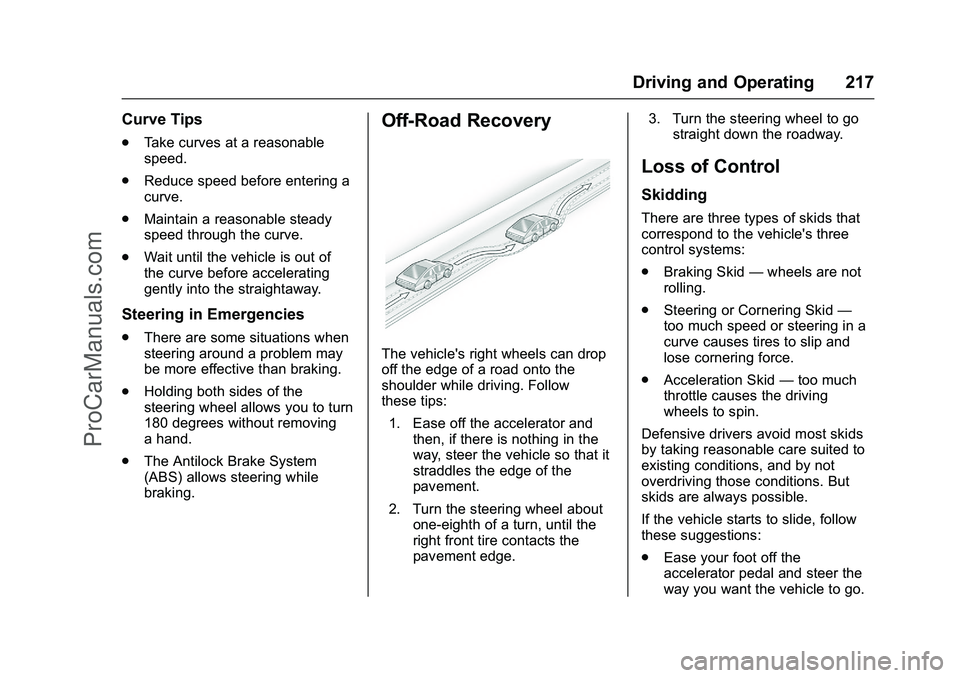
Off-Road Recovery
The vehicle's right wheels can drop
off the edge of a road onto the
shoulder while driving. Follow
these tips:
1. Ease off the accelerator and then, if there is nothing in the
way, steer the vehicle so that it
straddles the edge of the
pavement.
2. Turn the steering wheel about one-eighth of a turn, until the
right front tire contacts the
pavement edge. 3. Turn the steering wheel to go
straight down the roadway.
Loss of Control
Skidding
There are three types of skids that
correspond to the vehicle's three
control systems:
.Braking Skid —wheels are not
rolling.
. Steering or Cornering Skid —
too much speed or steering in a
curve causes tires to slip and
lose cornering force.
. Acceleration Skid —too much
throttle causes the driving
wheels to spin.
Defensive drivers avoid most skids
by taking reasonable care suited to
existing conditions, and by not
overdriving those conditions. But
skids are always possible.
If the vehicle starts to slide, follow
these suggestions:
. Ease your foot off the
accelerator pedal and steer the
way you want the vehicle to go.
ProCarManuals.com
Page 223 of 397
Chevrolet SS Sedan Owner Manual (GMNA-Localizing-U.S.-9234782) - 2016 -
CRC - 8/24/15
222 Driving and Operating
Winter Driving
Driving on Snow or Ice
Snow or ice between the tires and
the road creates less traction or
grip, so drive carefully. Wet ice can
occur at about 0 °C (32 °F) when
freezing rain begins to fall. Avoid
driving on wet ice or in freezing rain
until roads can be treated.
For Slippery Road Driving:
.Accelerate gently. Accelerating
too quickly causes the wheels to
spin and makes the surface
under the tires slick.
. Turn on Traction Control. See
Traction Control/Electronic
Stability Control 0242
ii.
. The Antilock Brake System
(ABS) improves vehicle stability
during hard stops, but the
brakes should be applied sooner
than when on dry pavement.
See Antilock Brake System
(ABS) 0239
ii.
. Allow greater following distance
and watch for slippery spots. Icy
patches can occur on otherwise clear roads in shaded areas.
The surface of a curve or an
overpass can remain icy when
the surrounding roads are clear.
Avoid sudden steering
maneuvers and braking while
on ice.
. Turn off cruise control.
Blizzard Conditions
Stop the vehicle in a safe place and
signal for help. Stay with the vehicle
unless there is help nearby.
If possible, use Roadside
Assistance. See Roadside
Assistance Program 0365
ii. To get
help and keep everyone in the
vehicle safe:
. Turn on the hazard warning
flashers.
. Tie a red cloth to an outside
mirror.
{Warning
Snow can trap engine exhaust
under the vehicle. This may
cause exhaust gases to get
inside. Engine exhaust contains
carbon monoxide (CO), which
cannot be seen or smelled. It can
cause unconsciousness and even
death.
If the vehicle is stuck in snow:
. Clear snow from the base of
the vehicle, especially any
blocking the exhaust pipe.
. Open a window about 5 cm
(2 in) on the vehicle side
that is away from the wind,
to bring in fresh air.
. Fully open the air outlets on
or under the instrument
panel.
. Adjust the climate control
system to circulate the air
inside the vehicle and set
(Continued)
ProCarManuals.com
Page 231 of 397
Chevrolet SS Sedan Owner Manual (GMNA-Localizing-U.S.-9234782) - 2016 -
CRC - 8/24/15
230 Driving and Operating
pedal applied on vehicles with
a manual transmission. When
the engine begins cranking, let
go of the button.
The idle speed will go down as
the engine gets warm. Do not
race the engine immediately
after starting it.
If the RKE transmitter is not in
the vehicle, if there is
interference, or the RKE
battery is low, a Driver
Information Center (DIC)
message will display. See
Driver Information Center (DIC)
0105
iiand Remote Keyless
Entry (RKE) System Operation
0 24
ii.
Caution
Cranking the engine for long
periods of time, by returning the
ignition to the START position
immediately after cranking has
ended, can overheat and damage
the cranking motor, and drain the
(Continued)
Caution (Continued)
battery. Wait at least 15 seconds
between each try, to let the
cranking motor cool down.
2. If the engine does not start after five to 10 seconds,
especially in very cold weather
(below −18 °C or 0 °F), it could
be flooded with too much
gasoline. Try pushing the
accelerator pedal all the way to
the floor and holding it there as
you press ENGINE START/
STOP, for up to a maximum of
15 seconds. Wait at least
15 seconds between each try,
to allow the cranking motor to
cool down. When the engine
starts, let go of the button, and
the accelerator. If the vehicle
starts briefly but then stops
again, do the same thing. This
clears the extra gasoline from
the engine. Do not race the
engine immediately after
starting it. Operate the engine and transmission gently until
the oil warms up and lubricates
all moving parts.
Retained Accessory
Power (RAP)
The power windows will operate
when the ignition is in the ON/RUN
or ACC/ACCESSORY positions.
Once the ignition is turned off, RAP
allows the power windows to
continue to operate for up to
10 minutes. If a door is opened
during this time, they will be
deactivated.
The audio system will be
deactivated only if the driver door is
opened.
Shifting Into Park
(Automatic Transmission)
1. Hold the brake pedal down and
set the parking brake.
See Electric Parking Brake
0 240
ii.
ProCarManuals.com
Page 237 of 397
Chevrolet SS Sedan Owner Manual (GMNA-Localizing-U.S.-9234782) - 2016 -
CRC - 8/24/15
236 Driving and Operating
Sport Shift mode can be selected
where maximum responsiveness is
required.
When operated in Sport Shift mode,
the transmission will delay upshifts
and allow earlier downshifts.
Performance Mode
In addition, the transmission can
sense aggressive driving, at which
point it may delay upshifting and
downshift earlier when braking. This
is designed to maximize vehicle
performance. SeeTransmission
Messages 0116
ii
To activate sport shift mode:
1. Move the shift lever to D (Drive).
2. Push the shift lever to the right.
Sport Mode On is displayed on
the DIC.
Do not move the shift lever to
+ (Plus) or −(Minus), otherwise
Active Select mode will be
enabled. 3. To return to Normal Shift mode,
move the shift lever left, to
D (Drive). Sport Mode Off is
displayed on the DIC.
On the bottom of the display, S
appears as long as Sport Shift
mode is selected.
Normal Shift Mode
Normal shift mode is recommended
for normal or freeway driving, as it
provides optimum fuel economy.
When the shift lever is moved to
D (Drive), normal shift mode is
selected.
Manual Mode
Active Select (A/S) Mode
A/S mode allows gears to be
selected manually.
It can also provide engine braking
by selecting the appropriate lower
gear on a steep downhill grade.
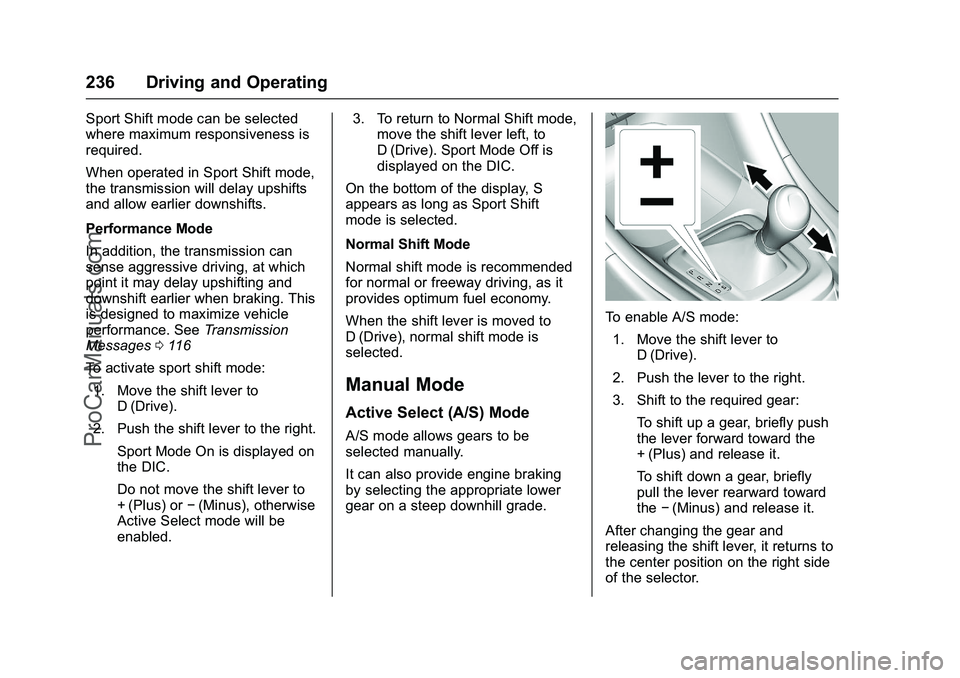
To enable A/S mode: 1. Move the shift lever to D (Drive).
2. Push the lever to the right.
3. Shift to the required gear: To shift up a gear, briefly push
the lever forward toward the
+ (Plus) and release it.
To shift down a gear, briefly
pull the lever rearward toward
the−(Minus) and release it.
After changing the gear and
releasing the shift lever, it returns to
the center position on the right side
of the selector.
ProCarManuals.com