parking brake CHEVROLET SS 2016 User Guide
[x] Cancel search | Manufacturer: CHEVROLET, Model Year: 2016, Model line: SS, Model: CHEVROLET SS 2016Pages: 397, PDF Size: 7.17 MB
Page 232 of 397
Chevrolet SS Sedan Owner Manual (GMNA-Localizing-U.S.-9234782) - 2016 -
CRC - 8/24/15
Driving and Operating 231
2. Hold the button on the shiftlever and push the lever toward
the front of the vehicle into
P (Park).
3. Turn the ignition off.
Leaving the Vehicle With the
Engine Running
{Warning
It can be dangerous to leave the
vehicle with the engine running.
It could overheat and catch fire.
It is dangerous to get out of the
vehicle if the shift lever is not fully
in P (Park) with the parking brake
firmly set. The vehicle can roll.
Do not leave the vehicle when the
engine is running. If you have left
the engine running, the vehicle
can move suddenly. You or others
could be injured. To be sure the
vehicle will not move, even when
you are on fairly level ground,
always set the parking brake and (Continued)
Warning (Continued)
move the shift lever to P (Park).
SeeShifting Into Park (Automatic
Transmission) 0230
ii.
If you have to leave the vehicle with
the engine running, the vehicle must
be in P (Park) and the parking
brake set.
Release the button and check that
the shift lever cannot be moved out
of P (Park).
Torque Lock
Torque lock is when the weight of
the vehicle puts too much force on
the parking pawl in the
transmission. This happens when
parking on a hill and shifting the
transmission into P (Park) is not
done properly and then it is difficult
to shift out of P (Park). To prevent
torque lock, set the parking brake
and then shift into P (Park). To find
out how, see “Shifting Into Park”
listed previously. If torque lock does occur, the
vehicle may need to be pushed
uphill by another vehicle to relieve
the parking pawl pressure, so you
can shift out of P (Park).
Shifting out of Park
This vehicle is equipped with an
electronic shift lock release system.
The shift lock release is designed to
prevent movement of the shift lever
out of P (Park), unless the ignition is
in ON/RUN and the brake pedal is
applied.
The shift lock release is always
functional except in the case of an
uncharged or low voltage (less than
9-volt) battery.
If the vehicle has an uncharged
battery or a battery with low voltage,
try charging or jump starting the
battery. See
Jump Starting - North
America 0331
ii.
To shift out of P (Park):
1. Apply the brake pedal.
2. Place the ignition in ON/RUN.
3. Press the shift lever button.
ProCarManuals.com
Page 233 of 397
Chevrolet SS Sedan Owner Manual (GMNA-Localizing-U.S.-9234782) - 2016 -
CRC - 8/24/15
232 Driving and Operating
4. Move the shift lever to thedesired position.
If still unable to shift out of P (Park): 1. Fully release the shift lever button.
2. Hold the brake pedal down and press the shift lever button
again.
3. Move the shift lever to the desired position.
If you are still having a problem
shifting, see your dealer.
Shift Lock Manual Release
If jump starting the vehicle did not
work, the shift lock manual release
must be used.
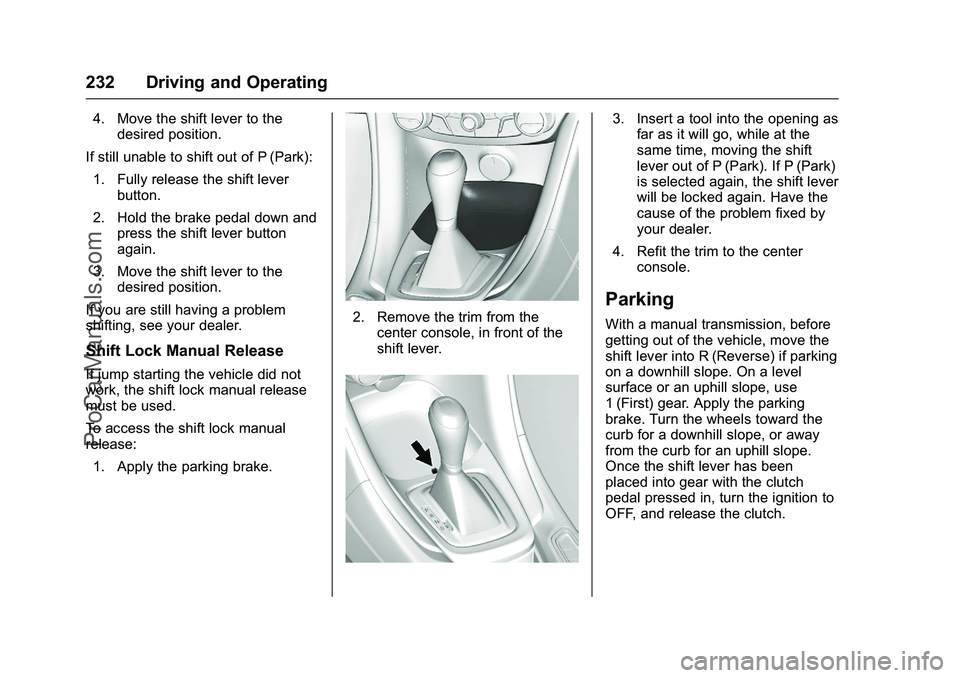
To access the shift lock manual
release: 1. Apply the parking brake.
2. Remove the trim from the center console, in front of the
shift lever.
3. Insert a tool into the opening asfar as it will go, while at the
same time, moving the shift
lever out of P (Park). If P (Park)
is selected again, the shift lever
will be locked again. Have the
cause of the problem fixed by
your dealer.
4. Refit the trim to the center console.
Parking
With a manual transmission, before
getting out of the vehicle, move the
shift lever into R (Reverse) if parking
on a downhill slope. On a level
surface or an uphill slope, use
1 (First) gear. Apply the parking
brake. Turn the wheels toward the
curb for a downhill slope, or away
from the curb for an uphill slope.
Once the shift lever has been
placed into gear with the clutch
pedal pressed in, turn the ignition to
OFF, and release the clutch.
ProCarManuals.com
Page 235 of 397
Chevrolet SS Sedan Owner Manual (GMNA-Localizing-U.S.-9234782) - 2016 -
CRC - 8/24/15
234 Driving and Operating
Running the Vehicle
While Parked
It is better not to park with the
engine running.
If the vehicle is left with the engine
running, follow the proper steps to
be sure the vehicle will not move.
SeeShifting Into Park (Automatic
Transmission) 0230
iiand Engine
Exhaust 0233ii.
Automatic
Transmission
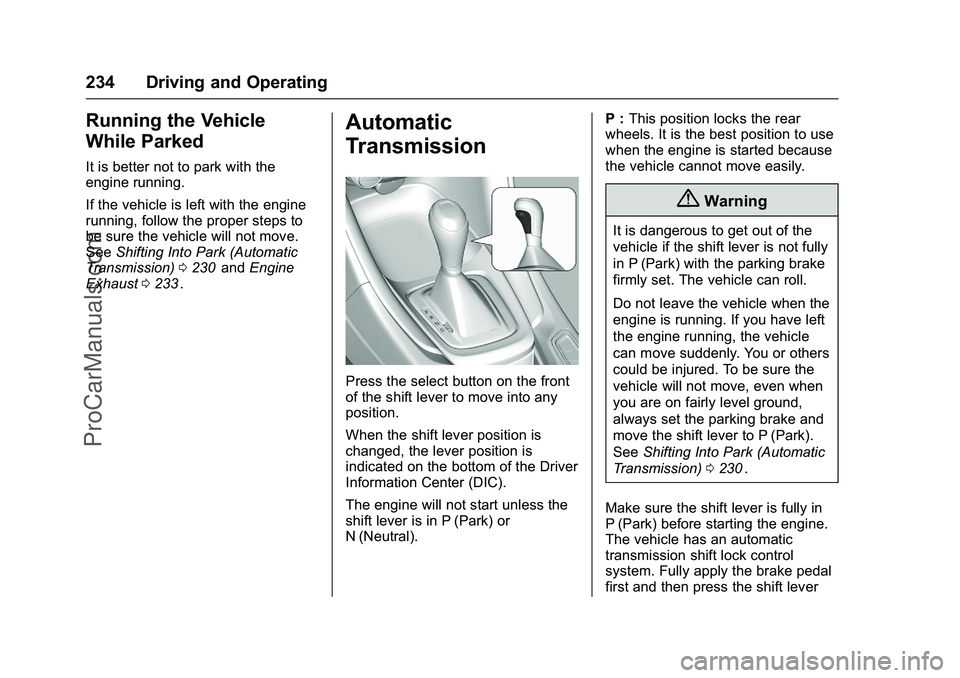
Press the select button on the front
of the shift lever to move into any
position.
When the shift lever position is
changed, the lever position is
indicated on the bottom of the Driver
Information Center (DIC).
The engine will not start unless the
shift lever is in P (Park) or
N (Neutral). P :
This position locks the rear
wheels. It is the best position to use
when the engine is started because
the vehicle cannot move easily.
{Warning
It is dangerous to get out of the
vehicle if the shift lever is not fully
in P (Park) with the parking brake
firmly set. The vehicle can roll.
Do not leave the vehicle when the
engine is running. If you have left
the engine running, the vehicle
can move suddenly. You or others
could be injured. To be sure the
vehicle will not move, even when
you are on fairly level ground,
always set the parking brake and
move the shift lever to P (Park).
See Shifting Into Park (Automatic
Transmission) 0230
ii.
Make sure the shift lever is fully in
P (Park) before starting the engine.
The vehicle has an automatic
transmission shift lock control
system. Fully apply the brake pedal
first and then press the shift lever
ProCarManuals.com
Page 241 of 397
Chevrolet SS Sedan Owner Manual (GMNA-Localizing-U.S.-9234782) - 2016 -
CRC - 8/24/15
240 Driving and Operating
avoid a sudden obstacle, a
computer senses the wheels are
slowing down. If one of the wheels
is about to stop rolling, the computer
will separately work the brakes at
each wheel.
ABS can change the brake pressure
to each wheel, as required, faster
than any driver could. This can help
you steer around the obstacle while
braking hard.
As the brakes are applied, the
computer keeps receiving updates
on wheel speed and controls
braking pressure accordingly.
Remember: ABS does not change
the time needed to get a foot up to
the brake pedal or always decrease
stopping distance. If you get too
close to the vehicle in front of you,
there will not be enough time to
apply the brakes if that vehicle
suddenly slows or stops. Always
leave enough room up ahead to
stop, even with ABS.Using ABS
Do not pump the brakes. Just hold
the brake pedal down firmly and let
ABS work. You may hear the ABS
pump or motor operating and feel
the brake pedal pulsate. This is
normal.
Braking in Emergencies
ABS allows you to steer and brake
at the same time. In many
emergencies, steering can help
more than even the very best
braking.
Electric Parking Brake
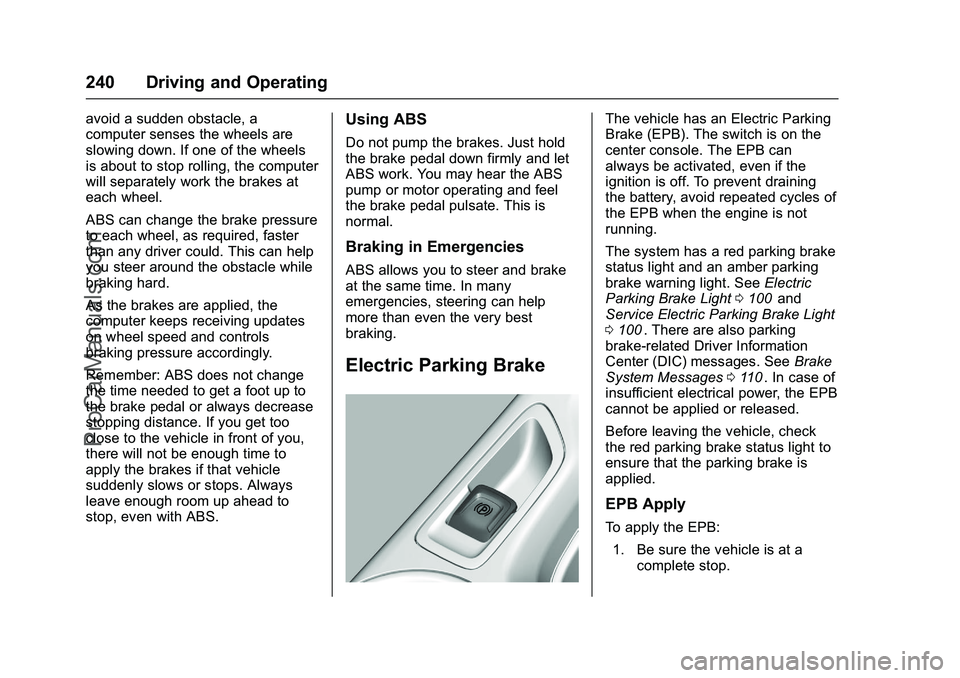
The vehicle has an Electric Parking
Brake (EPB). The switch is on the
center console. The EPB can
always be activated, even if the
ignition is off. To prevent draining
the battery, avoid repeated cycles of
the EPB when the engine is not
running.
The system has a red parking brake
status light and an amber parking
brake warning light. SeeElectric
Parking Brake Light 0100
iiand
Service Electric Parking Brake Light
0 100
ii. There are also parking
brake-related Driver Information
Center (DIC) messages. See Brake
System Messages 0110
ii. In case of
insufficient electrical power, the EPB
cannot be applied or released.
Before leaving the vehicle, check
the red parking brake status light to
ensure that the parking brake is
applied.
EPB Apply
To apply the EPB:
1. Be sure the vehicle is at a complete stop.
ProCarManuals.com
Page 242 of 397
Chevrolet SS Sedan Owner Manual (GMNA-Localizing-U.S.-9234782) - 2016 -
CRC - 8/24/15
Driving and Operating 241
2. Lift up the EPB switchmomentarily.
The red parking brake status light
will flash and then stay on once the
EPB is fully applied. If the red
parking brake status light flashes
continuously, then the EPB is only
partially applied or there is a
problem with the EPB. A DIC
message will display. Release the
EPB and try to apply it again. If the
light does not come on, or keeps
flashing, have the vehicle serviced.
Do not drive the vehicle if the red
parking brake status light is flashing.
See your dealer. See Electric
Parking Brake Light 0100
ii.
If the amber parking brake warning
light is on, lift up on the EPB switch
and hold it up. Continue to hold the
switch until the red parking brake
status light remains on. If the amber
parking brake warning light remains
on, see your dealer.
If the EPB is applied while the
vehicle is moving, the vehicle will
decelerate as long as the switch is held up. If the switch is held up until
the vehicle comes to a stop, the
EPB will remain applied.
If the EPB fails to apply, the rear
wheels should be blocked to
prevent vehicle movement.
EPB Release
To release the EPB:
1. Place the ignition in the ACC/ ACCESSORY or ON/RUN
position.
2. Apply and hold the brake pedal.
3. Push down momentarily on the EPB switch.
The EPB is released when the red
parking brake status light is off.
If the amber parking brake warning
light is on, release the EPB by
pushing down on the EPB switch
and holding it down. Continue to
hold the switch until the red parking
brake status light is off. If either light
stays on after release is attempted,
see your dealer.
Caution
Driving with the parking brake on
can overheat the brake system
and cause premature wear or
damage to brake system parts.
Make sure that the parking brake
is fully released and the brake
warning light is off before driving.
Automatic EPB Release
The EPB will automatically release if
the vehicle is running, placed into
gear, and an attempt is made to
drive away. Avoid rapid acceleration
when the EPB is applied, to
preserve parking brake lining life.
The EPB can also be used to
prevent roll back for vehicles with a
manual transmission taking off on a
hill. When no roll back is desired, an
applied EPB will allow both feet to
be used for the clutch and
accelerator pedals in preparation for
starting the vehicle moving in the
intended direction. In this case,
there is no need to push the switch
to release the EPB.
ProCarManuals.com
Page 251 of 397
Chevrolet SS Sedan Owner Manual (GMNA-Localizing-U.S.-9234782) - 2016 -
CRC - 8/24/15
250 Driving and Operating
The speedometer reading can be
displayed in either English or metric
units. SeeDriver Information Center
(DIC) 0105
ii. The increment value
used depends on the units
displayed.
Passing Another Vehicle While
Using Cruise Control
Use the accelerator pedal to
increase the vehicle speed. When
you take your foot off the pedal, the
vehicle slows down to the previously
set cruise control speed. While
pressing the accelerator pedal or
shortly following the release to
override cruise control, briefly
moving the thumbwheel toward
SET/– will result in cruise control set
to the current vehicle speed.
Using Cruise Control on Hills
How well the cruise control works
on hills depends upon the vehicle
speed, load, and the steepness of
the hills. When going up steep hills,
you might have to step on the
accelerator pedal to maintain the
vehicle speed. When going
downhill, you might have to brake or
shift to a lower gear to keep your speed down. If the brake pedal is
applied, cruise control will
disengage.
Ending Cruise Control
There are four ways to disengage
cruise control:
.
Step lightly on the brake pedal
or clutch for a manual
transmission.
. Press
*.
. Shift the transmission to
N (Neutral).
. To turn off the cruise control,
press
1.
Erasing Speed Memory
The cruise control set speed is
erased from memory if
1is pressed
or if the vehicle is turned off.
Driver Assistance
Systems
This vehicle may have features that
work together to help avoid crashes
or reduce crash damage while
driving, backing, and parking. Read
this entire section before using
these systems.
{Warning
Do not rely on the Driver
Assistance Systems. These
systems do not replace the need
for paying attention and driving
safely. You may not hear or see
alerts or warnings provided by
these systems. Failure to use
proper care when driving may
result in injury, death, or vehicle
damage. See Defensive Driving
0 215
ii.
(Continued)
ProCarManuals.com
Page 252 of 397
Chevrolet SS Sedan Owner Manual (GMNA-Localizing-U.S.-9234782) - 2016 -
CRC - 8/24/15
Driving and Operating 251
Warning (Continued)
Under many conditions, these
systems will not:. Detect children,
pedestrians, bicyclists,
or animals.
. Detect vehicles or objects
outside the area monitored
by the system.
. Work at all driving speeds.
. Warn you or provide you
with enough time to avoid a
crash.
. Work under poor visibility or
bad weather conditions.
. Work if the detection sensor
is not cleaned or is covered
by ice, snow, mud, or dirt.
Complete attention is always
required while driving, and you
should be ready to take action
and apply the brakes and/or steer
the vehicle to avoid crashes. Audible Alert
Some driver assistance features
alert the driver of obstacles by
beeping. To change the volume of
the warning chime, see
“Comfort
and Convenience” underVehicle
Personalization 0117
ii.
Assistance Systems for
Parking or Backing
If equipped, the Rear Vision Camera
(RVC), Rear Parking Assist (RPA),
Front Parking Assist (FPA), Rear
Cross Traffic Alert (RCTA), and
Automatic Parking Assist (APA) may
help the driver park or avoid objects.
Always check around the vehicle
when parking or backing.
Rear Vision Camera (RVC)
When the vehicle is shifted into
R (Reverse), the RVC displays an
image of the area behind the vehicle
in the center stack display. When
the vehicle is shifted out of
R (Reverse), the screen returns to
the previous content, after a short
delay. To see the previous content
sooner, press one of the radio buttons. If the message Service
Rear Camera System is displayed,
the vehicle may need service.
1. View Displayed by the
Camera
ProCarManuals.com
Page 254 of 397
Chevrolet SS Sedan Owner Manual (GMNA-Localizing-U.S.-9234782) - 2016 -
CRC - 8/24/15
Driving and Operating 253
An obstacle is indicated by audible
beeps. The interval between the
beeps becomes shorter as the
vehicle gets closer to the obstacle.
When the distance is less than
30 cm (12 in) the beeping is a
continuous tone for three seconds.
Beeps for Front Parking Assist are
higher pitched than for Rear Parking
Assist.
Rear Cross Traffic Alert (RCTA)
If equipped, RCTA displays a red
warning triangle with a left or right
pointing arrow on the RVC screen to
warn of traffic coming from the left
or right. This system detects objects
coming from up to 20 m (65 ft) from
the left or right side behind the
vehicle. When an object is detected
beeps sound from the left or right
side, depending on the direction of
the detected vehicle.Turning the Features On or Off
TheXbutton near the shift lever
is used to turn on or off the Front
and Rear Parking Assist. The
indicator light next to the button
comes on when the features are on
and turns off when the features
have been disabled. The system is
on each time the vehicle is started.
The Rear Vision Camera (RVC),
parking assist symbols, guidance
lines, and Rear Cross Traffic Alert
(RCTA) (if equipped) can be turned
on or off through Vehicle
Personalization. See Vehicle
Personalization 0117
ii.
Automatic Parking
Assist (APA)
If equipped, the APA system
searches for and steers the vehicle
into parallel or perpendicular parking
spots. When using APA, you must
still shift gears, and control the
brakes and accelerator. The Driver
information Center (DIC) and
audible beeps help to guide parking
maneuvers.
{Warning
APA does not apply the brakes.
APA may not detect objects in the
parking space, objects that are
soft or narrow, objects high off the
ground such as flatbed trucks,
or objects below ground level
such as large potholes. Always
verify that the parking space is
appropriate for parking a vehicle.
APA does not respond to changes
in the parking space, such as
movement of an adjacent vehicle,
or a person or object entering the
(Continued)
ProCarManuals.com
Page 256 of 397
Chevrolet SS Sedan Owner Manual (GMNA-Localizing-U.S.-9234782) - 2016 -
CRC - 8/28/15
Driving and Operating 255
wheel will vibrate briefly as a
reminder to remove hands from the
steering wheel. Check surroundings
and continue braking or accelerating
as needed, and be prepared to stop
to avoid vehicles, pedestrians,
or objects. If the vehicle is in
R (Reverse), but does not steer into
the expected space, this may be
because the system is maneuvering
the vehicle into a previously
detected space. The APA system
does not need service.
A DIC progress arrow displays the
status of the parking maneuver.
Depending on the space size,
additional maneuvers may be
required, and there will be additional
instructions. When changing gears,
allow the automatic steering to
complete before continuing the
parking maneuver. Upon completion
of a successful maneuver, APA will
beep and display a PARKING
COMPLETE message. Place the
vehicle in P (Park) for an automatic
transmission or in N (Neutral) with
the parking brake set for a manual
transmission.APA may automatically disengage if:
.
The steering wheel is used by
the driver.
. If the vehicle exceeds
10 km/h (6 mph).
. There is a failure with the APA
system.
. Electronic stability control or
antilock brakes are activated.
. An important vehicle message is
displayed in the DIC.
APA search is only available when
the vehicle speed is below 30 km/h
(18 mph).
The APA system is constantly
scanning for parking spaces when
the vehicle is moving forward.
A suitable space will be offered
even when the APA button is
pressed after the initial drive-by. The APA system is capable of
parking in subsequent spots after
the first parking space is found.
To cancel APA, press the APA
button again.
When the System Does Not Seem
to Work Properly
The APA system may require a
short period of driving along curves
to calibrate.
Assistance Systems for
Driving
If equipped, when driving the
vehicle in a forward gear, Forward
Collision Alert (FCA), Lane
Departure Warning (LDW), and Side
Blind Zone Alert (SBZA) can help to
avoid a crash or reduce crash
damage.
Forward Collision Alert
(FCA) System
If equipped, the FCA system may
help to avoid or reduce the harm
caused by front-end crashes. When
approaching a vehicle ahead too
ProCarManuals.com
Page 287 of 397
Chevrolet SS Sedan Owner Manual (GMNA-Localizing-U.S.-9234782) - 2016 -
CRC - 8/24/15
286 Vehicle Care
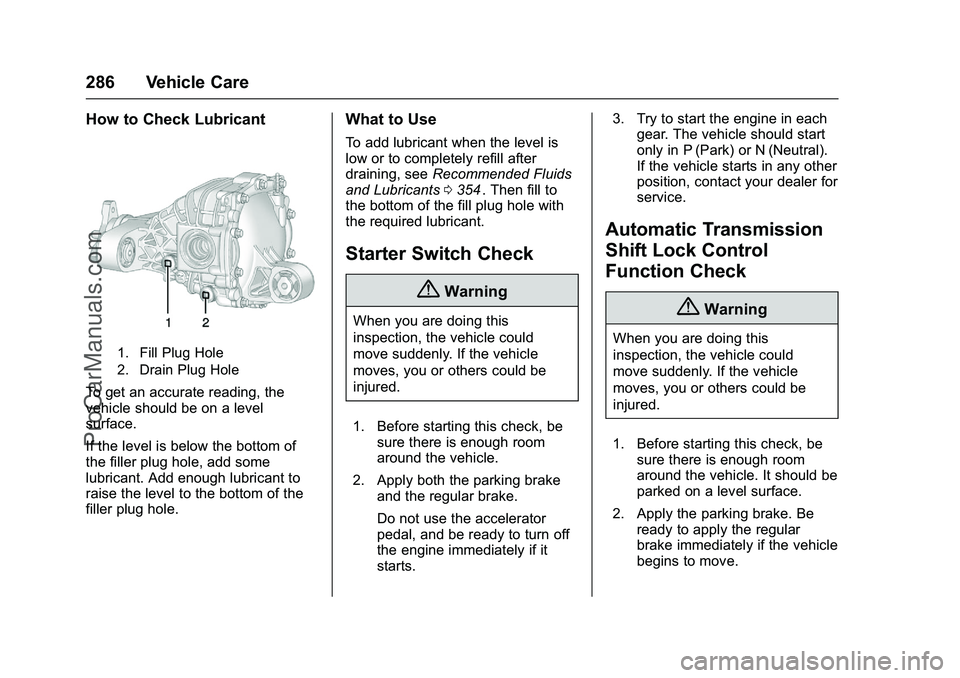
How to Check Lubricant
1. Fill Plug Hole
2. Drain Plug Hole
To get an accurate reading, the
vehicle should be on a level
surface.
If the level is below the bottom of
the filler plug hole, add some
lubricant. Add enough lubricant to
raise the level to the bottom of the
filler plug hole.
What to Use
To add lubricant when the level is
low or to completely refill after
draining, seeRecommended Fluids
and Lubricants 0354
ii. Then fill to
the bottom of the fill plug hole with
the required lubricant.
Starter Switch Check
{Warning
When you are doing this
inspection, the vehicle could
move suddenly. If the vehicle
moves, you or others could be
injured.
1. Before starting this check, be sure there is enough room
around the vehicle.
2. Apply both the parking brake and the regular brake.
Do not use the accelerator
pedal, and be ready to turn off
the engine immediately if it
starts. 3. Try to start the engine in each
gear. The vehicle should start
only in P (Park) or N (Neutral).
If the vehicle starts in any other
position, contact your dealer for
service.
Automatic Transmission
Shift Lock Control
Function Check
{Warning
When you are doing this
inspection, the vehicle could
move suddenly. If the vehicle
moves, you or others could be
injured.
1. Before starting this check, be sure there is enough room
around the vehicle. It should be
parked on a level surface.
2. Apply the parking brake. Be ready to apply the regular
brake immediately if the vehicle
begins to move.
ProCarManuals.com