tow CHEVROLET SS 2016 Owner's Manual
[x] Cancel search | Manufacturer: CHEVROLET, Model Year: 2016, Model line: SS, Model: CHEVROLET SS 2016Pages: 397, PDF Size: 7.17 MB
Page 233 of 397
Chevrolet SS Sedan Owner Manual (GMNA-Localizing-U.S.-9234782) - 2016 -
CRC - 8/24/15
232 Driving and Operating
4. Move the shift lever to thedesired position.
If still unable to shift out of P (Park): 1. Fully release the shift lever button.
2. Hold the brake pedal down and press the shift lever button
again.
3. Move the shift lever to the desired position.
If you are still having a problem
shifting, see your dealer.
Shift Lock Manual Release
If jump starting the vehicle did not
work, the shift lock manual release
must be used.
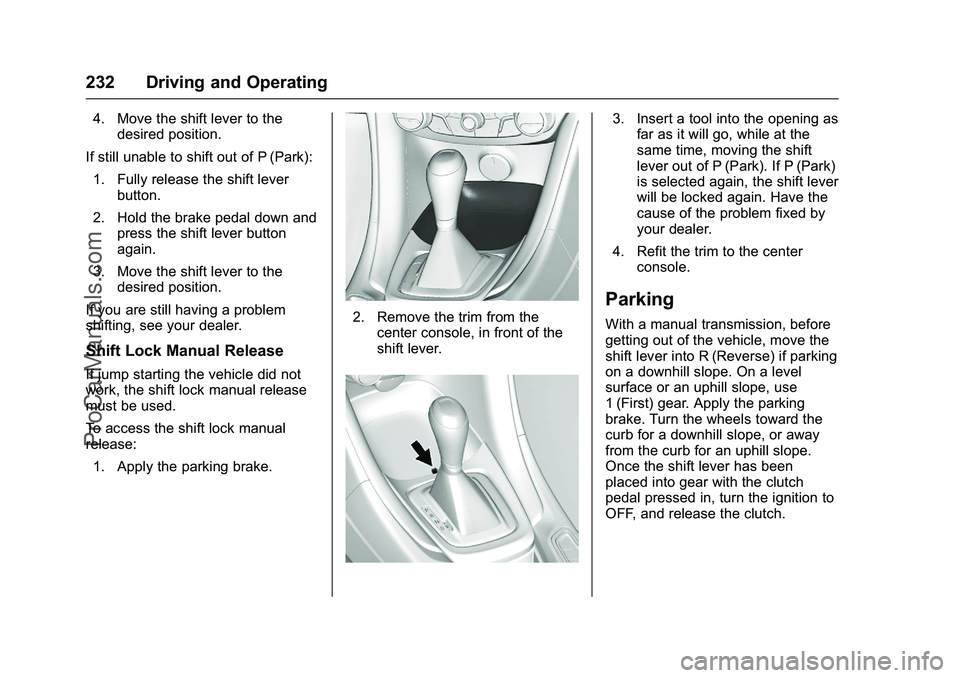
To access the shift lock manual
release: 1. Apply the parking brake.
2. Remove the trim from the center console, in front of the
shift lever.
3. Insert a tool into the opening asfar as it will go, while at the
same time, moving the shift
lever out of P (Park). If P (Park)
is selected again, the shift lever
will be locked again. Have the
cause of the problem fixed by
your dealer.
4. Refit the trim to the center console.
Parking
With a manual transmission, before
getting out of the vehicle, move the
shift lever into R (Reverse) if parking
on a downhill slope. On a level
surface or an uphill slope, use
1 (First) gear. Apply the parking
brake. Turn the wheels toward the
curb for a downhill slope, or away
from the curb for an uphill slope.
Once the shift lever has been
placed into gear with the clutch
pedal pressed in, turn the ignition to
OFF, and release the clutch.
ProCarManuals.com
Page 237 of 397
Chevrolet SS Sedan Owner Manual (GMNA-Localizing-U.S.-9234782) - 2016 -
CRC - 8/24/15
236 Driving and Operating
Sport Shift mode can be selected
where maximum responsiveness is
required.
When operated in Sport Shift mode,
the transmission will delay upshifts
and allow earlier downshifts.
Performance Mode
In addition, the transmission can
sense aggressive driving, at which
point it may delay upshifting and
downshift earlier when braking. This
is designed to maximize vehicle
performance. SeeTransmission
Messages 0116
ii
To activate sport shift mode:
1. Move the shift lever to D (Drive).
2. Push the shift lever to the right.
Sport Mode On is displayed on
the DIC.
Do not move the shift lever to
+ (Plus) or −(Minus), otherwise
Active Select mode will be
enabled. 3. To return to Normal Shift mode,
move the shift lever left, to
D (Drive). Sport Mode Off is
displayed on the DIC.
On the bottom of the display, S
appears as long as Sport Shift
mode is selected.
Normal Shift Mode
Normal shift mode is recommended
for normal or freeway driving, as it
provides optimum fuel economy.
When the shift lever is moved to
D (Drive), normal shift mode is
selected.
Manual Mode
Active Select (A/S) Mode
A/S mode allows gears to be
selected manually.
It can also provide engine braking
by selecting the appropriate lower
gear on a steep downhill grade.
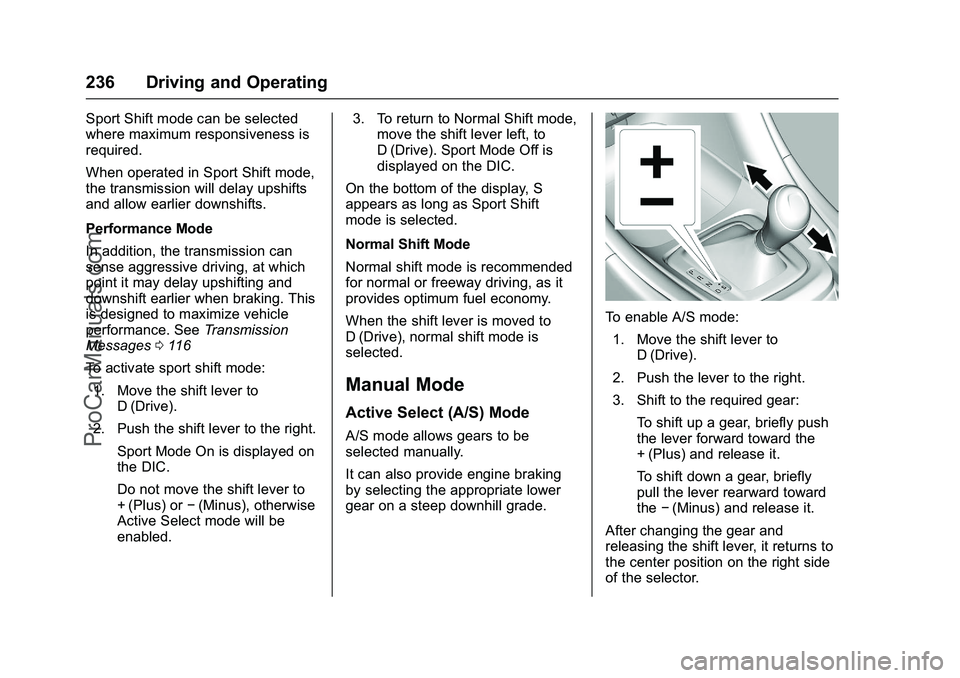
To enable A/S mode: 1. Move the shift lever to D (Drive).
2. Push the lever to the right.
3. Shift to the required gear: To shift up a gear, briefly push
the lever forward toward the
+ (Plus) and release it.
To shift down a gear, briefly
pull the lever rearward toward
the−(Minus) and release it.
After changing the gear and
releasing the shift lever, it returns to
the center position on the right side
of the selector.
ProCarManuals.com
Page 238 of 397
Chevrolet SS Sedan Owner Manual (GMNA-Localizing-U.S.-9234782) - 2016 -
CRC - 8/24/15
Driving and Operating 237
On the bottom of the display, M and
the currently selected gear appear
as long as A/S mode is selected.
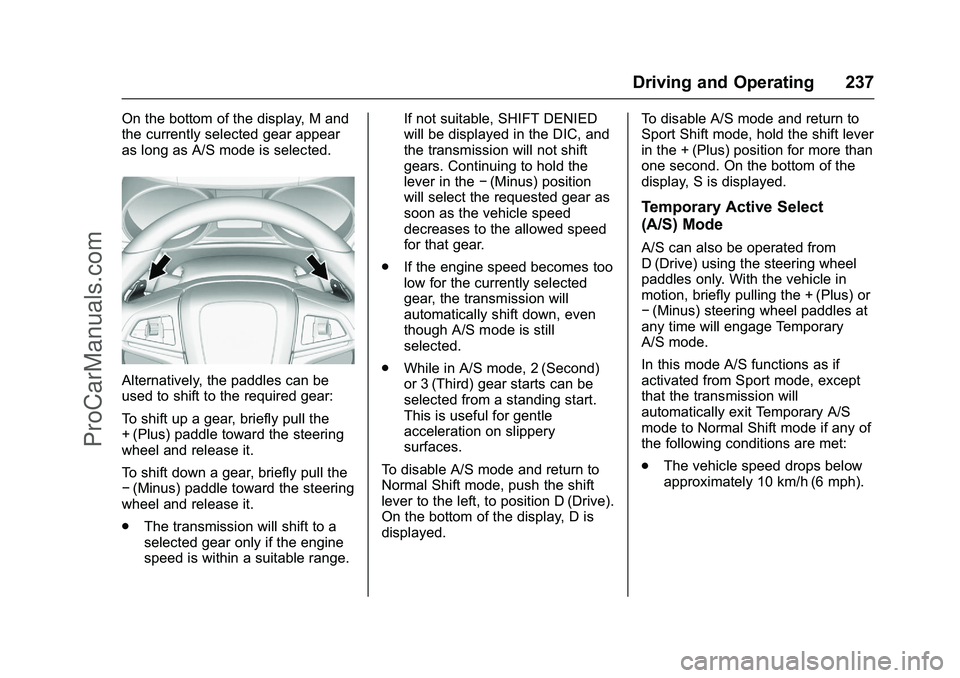
Alternatively, the paddles can be
used to shift to the required gear:
To shift up a gear, briefly pull the
+ (Plus) paddle toward the steering
wheel and release it.
To shift down a gear, briefly pull the
−(Minus) paddle toward the steering
wheel and release it.
. The transmission will shift to a
selected gear only if the engine
speed is within a suitable range. If not suitable, SHIFT DENIED
will be displayed in the DIC, and
the transmission will not shift
gears. Continuing to hold the
lever in the
−(Minus) position
will select the requested gear as
soon as the vehicle speed
decreases to the allowed speed
for that gear.
. If the engine speed becomes too
low for the currently selected
gear, the transmission will
automatically shift down, even
though A/S mode is still
selected.
. While in A/S mode, 2 (Second)
or 3 (Third) gear starts can be
selected from a standing start.
This is useful for gentle
acceleration on slippery
surfaces.
To disable A/S mode and return to
Normal Shift mode, push the shift
lever to the left, to position D (Drive).
On the bottom of the display, D is
displayed. To disable A/S mode and return to
Sport Shift mode, hold the shift lever
in the + (Plus) position for more than
one second. On the bottom of the
display, S is displayed.
Temporary Active Select
(A/S) Mode
A/S can also be operated from
D (Drive) using the steering wheel
paddles only. With the vehicle in
motion, briefly pulling the + (Plus) or
−
(Minus) steering wheel paddles at
any time will engage Temporary
A/S mode.
In this mode A/S functions as if
activated from Sport mode, except
that the transmission will
automatically exit Temporary A/S
mode to Normal Shift mode if any of
the following conditions are met:
. The vehicle speed drops below
approximately 10 km/h (6 mph).
ProCarManuals.com
Page 250 of 397
Chevrolet SS Sedan Owner Manual (GMNA-Localizing-U.S.-9234782) - 2016 -
CRC - 8/24/15
Driving and Operating 249
*(Cancel) :Press to disengage
cruise control without erasing the
set speed from memory.
RES/+ (Resume/Accel) : If there is
a set speed in memory, move the
thumbwheel up briefly to resume to
that speed or hold upwards to
accelerate. If cruise control is
already active, use to increase
vehicle speed.
SET/− (Set/Coast) : Move the
thumbwheel down briefly to set the
speed and activate cruise control.
If cruise control is already active,
use to decrease speed.
Setting Cruise Control
If
1is on when not in use, SET/- or
RES/+ could get bumped and go
into cruise when not desired. Keep
1off when cruise control is not
being used.
To set a speed:
1. Press
1.
2. Get to the speed desired.
3. Move the thumbwheel down toward SET/− and release it. 4. Remove foot from the
accelerator.
The cruise control indicator on the
instrument cluster turns green after
cruise control has been set to the
desired speed. See Instrument
Cluster 093
ii.
Resuming a Set Speed
If the cruise control is set at a
desired speed and then the brakes
are applied or
*is pressed, the
cruise control is disengaged without
erasing the set speed from memory.
Once the vehicle reaches about
40 km/h (25 mph) or more, move the
thumbwheel up toward RES/+
briefly. The vehicle returns to the
previous set speed.
Increasing Speed While Using
Cruise Control
If the cruise control system is
already activated:
. Move the thumbwheel up toward
RES/+ and hold it until the
desired speed is reached, then
release it. .
To increase the speed in small
increments, move the
thumbwheel up toward RES/+
briefly. For each press, the
vehicle goes about 1.6 km/h
(1 mph) faster.
The speedometer reading can be
displayed in either English or metric
units. See Driver Information Center
(DIC) 0105
ii. The increment value
used depends on the units
displayed.
Reducing Speed While Using
Cruise Control
If the cruise control system is
already activated:
. Move the thumbwheel toward
SET/− and hold until the desired
lower speed is reached, then
release it.
. To decrease the vehicle speed in
small increments, move the
thumbwheel toward SET/−
briefly. For each press, the
vehicle goes about 1.6 km/h
(1 mph) slower.
ProCarManuals.com
Page 251 of 397
Chevrolet SS Sedan Owner Manual (GMNA-Localizing-U.S.-9234782) - 2016 -
CRC - 8/24/15
250 Driving and Operating
The speedometer reading can be
displayed in either English or metric
units. SeeDriver Information Center
(DIC) 0105
ii. The increment value
used depends on the units
displayed.
Passing Another Vehicle While
Using Cruise Control
Use the accelerator pedal to
increase the vehicle speed. When
you take your foot off the pedal, the
vehicle slows down to the previously
set cruise control speed. While
pressing the accelerator pedal or
shortly following the release to
override cruise control, briefly
moving the thumbwheel toward
SET/– will result in cruise control set
to the current vehicle speed.
Using Cruise Control on Hills
How well the cruise control works
on hills depends upon the vehicle
speed, load, and the steepness of
the hills. When going up steep hills,
you might have to step on the
accelerator pedal to maintain the
vehicle speed. When going
downhill, you might have to brake or
shift to a lower gear to keep your speed down. If the brake pedal is
applied, cruise control will
disengage.
Ending Cruise Control
There are four ways to disengage
cruise control:
.
Step lightly on the brake pedal
or clutch for a manual
transmission.
. Press
*.
. Shift the transmission to
N (Neutral).
. To turn off the cruise control,
press
1.
Erasing Speed Memory
The cruise control set speed is
erased from memory if
1is pressed
or if the vehicle is turned off.
Driver Assistance
Systems
This vehicle may have features that
work together to help avoid crashes
or reduce crash damage while
driving, backing, and parking. Read
this entire section before using
these systems.
{Warning
Do not rely on the Driver
Assistance Systems. These
systems do not replace the need
for paying attention and driving
safely. You may not hear or see
alerts or warnings provided by
these systems. Failure to use
proper care when driving may
result in injury, death, or vehicle
damage. See Defensive Driving
0 215
ii.
(Continued)
ProCarManuals.com
Page 260 of 397
Chevrolet SS Sedan Owner Manual (GMNA-Localizing-U.S.-9234782) - 2016 -
CRC - 8/24/15
Driving and Operating 259
If SBZA is disabled by the driver,
the SBZA mirror displays will not
light up.
When the System Does Not
Seem to Work Properly
SBZA displays may not come on
when passing a vehicle quickly or
for a stopped vehicle. SBZA may
alert to objects attached to the
vehicle, such as a bicycle, or object
extending out to either side of the
vehicle. This is normal system
operation; the vehicle does not need
service.
SBZA may not always alert the
driver to vehicles in the side blind
zone, especially in wet conditions.
The system does not need to be
serviced. The system may light up
due to guardrails, signs, trees,
shrubs, and other non-moving
objects. This is normal system
operation; the vehicle does not need
service.
SBZA may not operate when the
SBZA sensors in the left or right
corners of the rear bumper are
covered with mud, dirt, snow, ice,
or slush, or in heavy rainstorms. Forcleaning instructions, see "Washing
the Vehicle" under
Exterior Care
0 335
ii. If the DIC still displays the
system unavailable message after
cleaning both sides of the vehicle
toward the rear corners of the
vehicle, see your dealer.
If the SBZA displays do not light up
when vehicles are in the blind zone
and the system is clean, the system
may need service. Take the vehicle
to your dealer.
When SBZA is disabled for any
reason other than the driver turning
it off, the Side Blind Zone Alert On
option will not be available on the
personalization menu.
Radio Frequency Information
See Radio Frequency Statement
0 371ii.
Lane Departure
Warning (LDW)
If equipped, LDW may help avoid
crashes due to unintentional lane
departures. It may provide an alert if
the vehicle is crossing a detected
lane without using a turn signal in that direction. LDW uses a camera
sensor to detect the lane markings
at speeds of 56 km/h (35 mph) or
greater.
{Warning
The LDW system does not steer
the vehicle. The LDW system
may not:
. Provide enough time to
avoid a crash.
. Detect lane markings under
poor weather or visibility
conditions. This can occur if
the windshield or
headlamps are blocked by
dirt, snow, or ice; if they are
not in proper condition; or if
the sun shines directly into
the camera.
. Detect road edges.
. Detect lanes on winding or
hilly roads.
(Continued)
ProCarManuals.com
Page 265 of 397
Chevrolet SS Sedan Owner Manual (GMNA-Localizing-U.S.-9234782) - 2016 -
CRC - 8/24/15
264 Driving and Operating
Filling a Portable Fuel
Container
{Warning
Filling a portable fuel container
while it is in the vehicle can cause
fuel vapors that can ignite either
by static electricity or other
means. You or others could be
badly burned and the vehicle
could be damaged. Always:. Use approved fuel
containers.
. Remove the container from
the vehicle, trunk, or pickup
bed before filling.
. Place the container on the
ground.
. Place the nozzle inside the
fill opening of the container
before dispensing fuel, and
keep it in contact with the fill
opening until filling is
complete.
(Continued)
Warning (Continued)
.Fill the container no more
than 95% full to allow for
expansion.
. Do not smoke, light
matches, or use lighters
while pumping fuel.
. Avoid using cell phones or
other electronic devices.
Trailer Towing
The vehicle is neither designed nor
intended to tow a trailer.
ProCarManuals.com
Page 268 of 397
Chevrolet SS Sedan Owner Manual (GMNA-Localizing-U.S.-9234782) - 2016 -
CRC - 8/24/15
Vehicle Care 267
Tire Sealant andCompressor Kit . . . . . . . . . . . . . 319
Storing the Tire Sealant and Compressor Kit . . . . . . . . . . . . . 325
Tire Changing . . . . . . . . . . . . . . . . 326
Full-Size Spare Tire . . . . . . . . . . 330
Jump Starting
Jump Starting - North
America . . . . . . . . . . . . . . . . . . . . . 331
Towing the Vehicle
Towing the Vehicle . . . . . . . . . . . 334
Recreational VehicleTowing . . . . . . . . . . . . . . . . . . . . . . 334
Appearance Care
Exterior Care . . . . . . . . . . . . . . . . . 335
Interior Care . . . . . . . . . . . . . . . . . . 339
Floor Mats . . . . . . . . . . . . . . . . . . . . 342
General Information
For service and parts needs, visit
your dealer. You will receive
genuine GM parts and GM-trained
and supported service people.
Genuine GM parts have one of
these marks:
California Proposition
65 Warning
WARNING: Most motor vehicles,
including this one, contain and/or
emit chemicals known to the State of California to cause cancer and
birth defects or other reproductive
harm. Engine exhaust, many parts
and systems, many fluids, and
some component wear by-products
contain and/or emit these
chemicals.
See
Battery - North America 0284
iiand Jump Starting - North America
0 331ii.
California Perchlorate
Materials Requirements
Certain types of automotive
applications, such as airbag
initiators, safety belt pretensioners,
and lithium batteries contained in
Remote Keyless Entry transmitters,
may contain perchlorate materials.
Special handling may be necessary.
For additional information, see
www.dtsc.ca.gov/hazardouswaste/
perchlorate.
ProCarManuals.com
Page 272 of 397
Chevrolet SS Sedan Owner Manual (GMNA-Localizing-U.S.-9234782) - 2016 -
CRC - 8/24/15
Vehicle Care 271
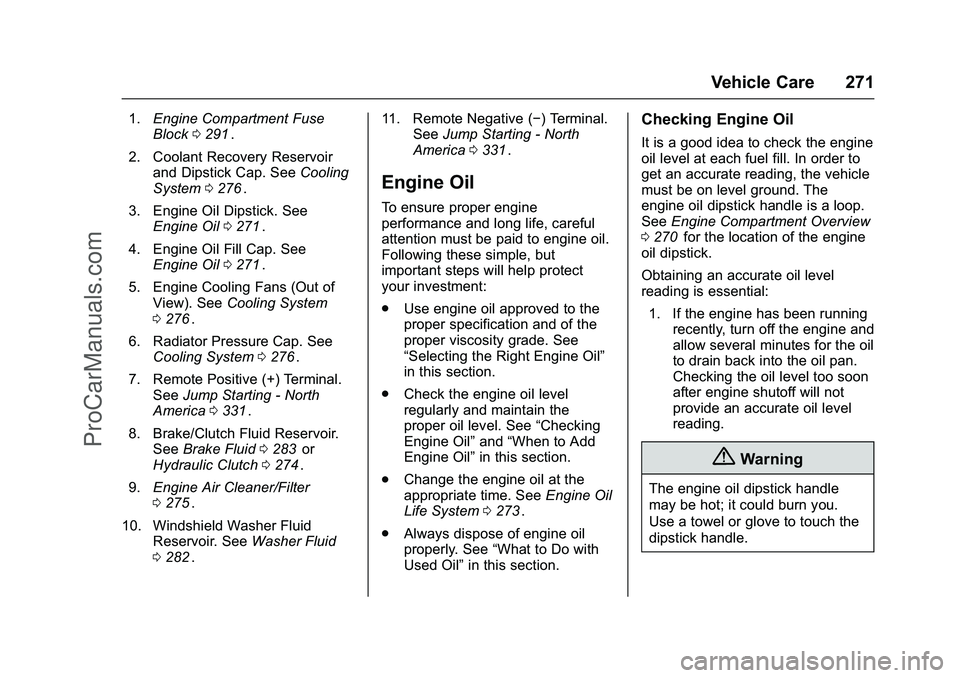
1.Engine Compartment Fuse
Block 0291ii.
2. Coolant Recovery Reservoir and Dipstick Cap. See Cooling
System 0276
ii.
3. Engine Oil Dipstick. See Engine Oil 0271
ii.
4. Engine Oil Fill Cap. See Engine Oil 0271
ii.
5. Engine Cooling Fans (Out of View). See Cooling System
0 276
ii.
6. Radiator Pressure Cap. See Cooling System 0276
ii.
7. Remote Positive (+) Terminal. See Jump Starting - North
America 0331
ii.
8. Brake/Clutch Fluid Reservoir. See Brake Fluid 0283
iior
Hydraulic Clutch 0274ii.
9. Engine Air Cleaner/Filter
0275
ii.
10. Windshield Washer Fluid Reservoir. See Washer Fluid
0 282
ii. 11. Remote Negative (−) Terminal.
SeeJump Starting - North
America 0331
ii.
Engine Oil
To ensure proper engine
performance and long life, careful
attention must be paid to engine oil.
Following these simple, but
important steps will help protect
your investment:
.
Use engine oil approved to the
proper specification and of the
proper viscosity grade. See
“Selecting the Right Engine Oil”
in this section.
. Check the engine oil level
regularly and maintain the
proper oil level. See “Checking
Engine Oil” and“When to Add
Engine Oil” in this section.
. Change the engine oil at the
appropriate time. See Engine Oil
Life System 0273
ii.
. Always dispose of engine oil
properly. See “What to Do with
Used Oil” in this section.
Checking Engine Oil
It is a good idea to check the engine
oil level at each fuel fill. In order to
get an accurate reading, the vehicle
must be on level ground. The
engine oil dipstick handle is a loop.
SeeEngine Compartment Overview
0 270
iifor the location of the engine
oil dipstick.
Obtaining an accurate oil level
reading is essential:
1. If the engine has been running recently, turn off the engine and
allow several minutes for the oil
to drain back into the oil pan.
Checking the oil level too soon
after engine shutoff will not
provide an accurate oil level
reading.
{Warning
The engine oil dipstick handle
may be hot; it could burn you.
Use a towel or glove to touch the
dipstick handle.
ProCarManuals.com
Page 273 of 397
Chevrolet SS Sedan Owner Manual (GMNA-Localizing-U.S.-9234782) - 2016 -
CRC - 8/24/15
272 Vehicle Care
2. Pull out the dipstick and wipe itwith a clean paper towel or
cloth, then push it back in all
the way. Remove it again,
keeping the tip down, and
check the level.
When to Add Engine Oil
If the oil is at the lower mark at the
tip of the dipstick, add 1 L (1 qt) of
the recommended oil and then
recheck the level. See “Selecting
the Right Engine Oil” in this section
for an explanation of what kind of oil
to use. For engine oil crankcase
capacity, see Capacities and
Specifications 0358
ii
Caution
Do not add too much oil. Oil
levels above or below the
acceptable operating range
shown on the dipstick are harmful
to the engine. If you find that you
have an oil level above the
operating range, the engine could
be damaged. You should drain
out the excess oil or limit driving
of the vehicle and seek a service
professional to remove the
excess amount of oil.
See Engine Compartment Overview
0 270
ii
Add enough oil to reach the upper
mark on the dipstick. Push the
dipstick all the way back in when
through.
Selecting the Right Engine Oil
Selecting the right engine oil
depends on both the proper oil
specification and viscosity grade.
See Recommended Fluids and
Lubricants 0354
ii. Specification
Ask for and use engine oils that
meet the dexos1™
specification.
Engine oils that have been
approved by GM as meeting the
dexos1 specification are marked
with the dexos1 approved logo. See
www.gmdexos.com.
Caution
Failure to use the recommended
engine oil or equivalent can result
in engine damage not covered by
the vehicle warranty.
Viscosity Grade
Use SAE 5W-30 viscosity grade
engine oil.
Cold Temperature Operation: In an
area of extreme cold, where the
temperature falls below −29 °C
ProCarManuals.com