door lock CHEVROLET SS 2016 Owner's Guide
[x] Cancel search | Manufacturer: CHEVROLET, Model Year: 2016, Model line: SS, Model: CHEVROLET SS 2016Pages: 397, PDF Size: 7.17 MB
Page 137 of 397
Chevrolet SS Sedan Owner Manual (GMNA-Localizing-U.S.-9234782) - 2016 -
CRC - 8/24/15
136 Infotainment System
Caution
Do not attach a device with a
suction cup to the display. This
may cause damage and would
not be covered by the warranty.
Software Updates
See the websites for more
information.
Website Information
In the U.S., see www.chevrolet.com
Radio
AM-FM Radio
Playing the Radio
VOL/O(Volume/Power) :
. Press to turn the radio on or off.
. Turn to increase or decrease the
volume of the active source.
The steering wheel controls can
also be used to adjust the volume.
See Steering Wheel Controls 0131
ii.
Radio Operation
The radio will work when the key is
in ON/RUN or ACC/ACCESSORY.
When the key is turned from ON/
RUN to LOCK/OFF, the radio will
continue to work for 10 minutes or
until the driver door is opened.
The radio can be turned on by
pressing the power button on the
radio and will stay on for
10 minutes. Opening the driver door
will not turn the radio off when
pressing the power button. Some radios may stay on longer
and reset the time for 10 minutes if
there are any additional presses of
any radio button.
The radio can be turned off at any
time by pressing the power button.
Audio Source
Press SRCE or SRC on the steering
wheel controls to display and scroll
through the available sources AM,
FM, XM (if equipped), Pandora (if
equipped), Stitcher, USB, and
Bluetooth Audio.
Infotainment System Settings
Tone Settings
To access the tone settings, press
the Tone Settings button on the
Home Page. Tone settings are
specific to each source.
To adjust the settings:
.
Bass: Press + or −to change
the level.
. Mid (Midrange): Press + or −to
change the level.
. Treble: Press + or −to change
the level.
ProCarManuals.com
Page 150 of 397
Chevrolet SS Sedan Owner Manual (GMNA-Localizing-U.S.-9234782) - 2016 -
CRC - 8/24/15
Infotainment System 149
Pandora voice control will not work
until Pandora is launched the first
time during that ignition cycle.
Pandora Skip Limit
Pandora limits the number of skips
allowed on their service. When the
skip limit is reached,
,will not skip
the currently playing track, but
,
feedback will be recorded.
Pandora Advertisement
Pandora may display
advertisements. Artist name and
track title will not be displayed and
the skip track button is not
available.
Switching Between Pandora and
Stitcher
To switch between Pandora and
Stitcher, press the application icon
on the iPhone, iPod touch, or iPad.
This is not required for Android
devices. See Stitcher Internet Radio
0 150
ii.
Pandora Troubleshooting
Unable to Connect Device to
Vehicle
If the device is unable to connect to
the USB or Bluetooth:
1. Turn the vehicle off.
2. Remove the key from the ignition.
3. Open and close the driver door, wait about 30 seconds, and try
to connect the device again.
Unable to Start Pandora
If the device is unable to launch
Pandora:
. Check that the latest version of
Pandora is installed.
. Check that there is an active
account logged into Pandora.
. Have at least one station
created.
. For Android and BlackBerry
devices, check that the device is
paired with the vehicle, and the
Bluetooth icon on the display is
highlighted. .
For iPhone, iPod touch, or iPad
devices, check that the USB
cable is connected to the USB
port and the screen is unlocked.
. Close Pandora on the device
and launch again. Devices that
allow multitasking may require
an extra step to quit the Pandora
application. See the cell phone
manufacturer's user guide.
Thumbs Up or Thumbs Down
Error
If there is an error trying to rate a
track with the
,or-buttons, the
message “Thumbs Down Error” or
“Thumbs Up Error” will display.
Press OK to retry.
Loss of Audio
Loss of Pandora audio can happen
in different ways:
. Weak or lost data connection.
. Device needs to be charged.
. Application needs to be
relaunched.
. Connection between phone and
radio lost.
ProCarManuals.com
Page 154 of 397
Chevrolet SS Sedan Owner Manual (GMNA-Localizing-U.S.-9234782) - 2016 -
CRC - 8/24/15
Infotainment System 153
-(Thumbs Up) :When pressed,
Stitcher stores this information
and
-is highlighted for the
remainder of the show. This helps
Stitcher provide a personalized
listening experience.
l(Next Show) : When pressed,
Stitcher changes to the next show.
J(Play/Pause) : Press on the
radio to pause playback. Press
again to resume.
Stitcher Advertisement
Stitcher may display
advertisements. Artist name and title
may not display and the skip track
button is not available.
Stitcher Troubleshooting
Unable to Connect Device to
Vehicle
If the device is unable to connect to
the USB or Bluetooth:
1. Turn the vehicle off.
2. Remove the key from the ignition. 3. Open and close the driver door,
wait about 30 seconds, and try
to connect the device again.
The battery saver and task manager
applications on the phone can
cause Stitcher to function
incorrectly. Remove those apps
from the phone or remove Stitcher
and Bluetooth from the task lists.
Unable to Start Stitcher
If the device is unable to launch
Stitcher:
. Check that the latest version of
Stitcher is installed.
. Check that there is an active
account logged into Stitcher.
. For Android devices, check that
the device is paired with the
vehicle, and the Bluetooth icon
on the display is highlighted.
. For iPhone, iPod touch, or iPad
devices, check that the USB
cable is connected to the USB
port and the screen is unlocked
and the Home Page is showing. .
Close Stitcher on the device and
launch again. Devices that allow
multitasking may require an
extra step to quit the Stitcher
application. See the cell phone
manufacturer's user guide.
Loss of Audio
Loss of Stitcher audio can happen
due to:
. Weak or lost data connection.
. Device needs to be charged.
. Application needs to be
relaunched.
. Connection between phone and
radio is lost.
. If any iPhone, iPod touch,
or iPad is connected to
Bluetooth and the dock
connector, go to the Airplay icon
on the device and select dock
connector or disconnect and
reconnect the dock connector on
the device.
. The volume is too low. Turn up
the volume on the device.
ProCarManuals.com
Page 264 of 397
Chevrolet SS Sedan Owner Manual (GMNA-Localizing-U.S.-9234782) - 2016 -
CRC - 8/24/15
Driving and Operating 263
Warning (Continued)
.Fuel can spray out if the fuel
cap is opened too quickly.
This spray can happen if the
tank is nearly full, and is
more likely in hot weather.
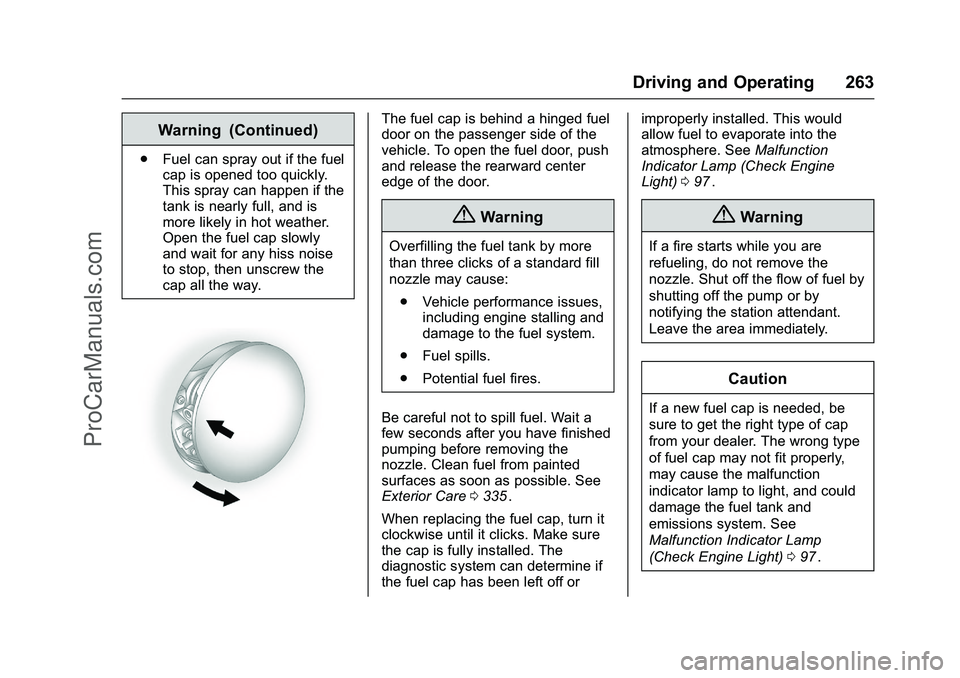
Open the fuel cap slowly
and wait for any hiss noise
to stop, then unscrew the
cap all the way.
The fuel cap is behind a hinged fuel
door on the passenger side of the
vehicle. To open the fuel door, push
and release the rearward center
edge of the door.
{Warning
Overfilling the fuel tank by more
than three clicks of a standard fill
nozzle may cause:
. Vehicle performance issues,
including engine stalling and
damage to the fuel system.
. Fuel spills.
. Potential fuel fires.
Be careful not to spill fuel. Wait a
few seconds after you have finished
pumping before removing the
nozzle. Clean fuel from painted
surfaces as soon as possible. See
Exterior Care 0335
ii.
When replacing the fuel cap, turn it
clockwise until it clicks. Make sure
the cap is fully installed. The
diagnostic system can determine if
the fuel cap has been left off or improperly installed. This would
allow fuel to evaporate into the
atmosphere. See
Malfunction
Indicator Lamp (Check Engine
Light) 097
ii.
{Warning
If a fire starts while you are
refueling, do not remove the
nozzle. Shut off the flow of fuel by
shutting off the pump or by
notifying the station attendant.
Leave the area immediately.
Caution
If a new fuel cap is needed, be
sure to get the right type of cap
from your dealer. The wrong type
of fuel cap may not fit properly,
may cause the malfunction
indicator lamp to light, and could
damage the fuel tank and
emissions system. See
Malfunction Indicator Lamp
(Check Engine Light) 097
ii.
ProCarManuals.com
Page 295 of 397
Chevrolet SS Sedan Owner Manual (GMNA-Localizing-U.S.-9234782) - 2016 -
CRC - 8/24/15
294 Vehicle Care
RelaysUsage
R10 INCLR Pump R11 Not Used
R12 Rear Wiper Control
R13 Fog Lamps
R14 Low-Beam Headlamps
R15 High-Beam Headlamps
R16 Starter
R17 Run/Crank
R18 Brake Vacuum Pump
R19 Air Conditioning Control
R20 Horn
Relays R3, R4, R12, R13, and R20
are PCB mounted relays.Instrument Panel Fuse
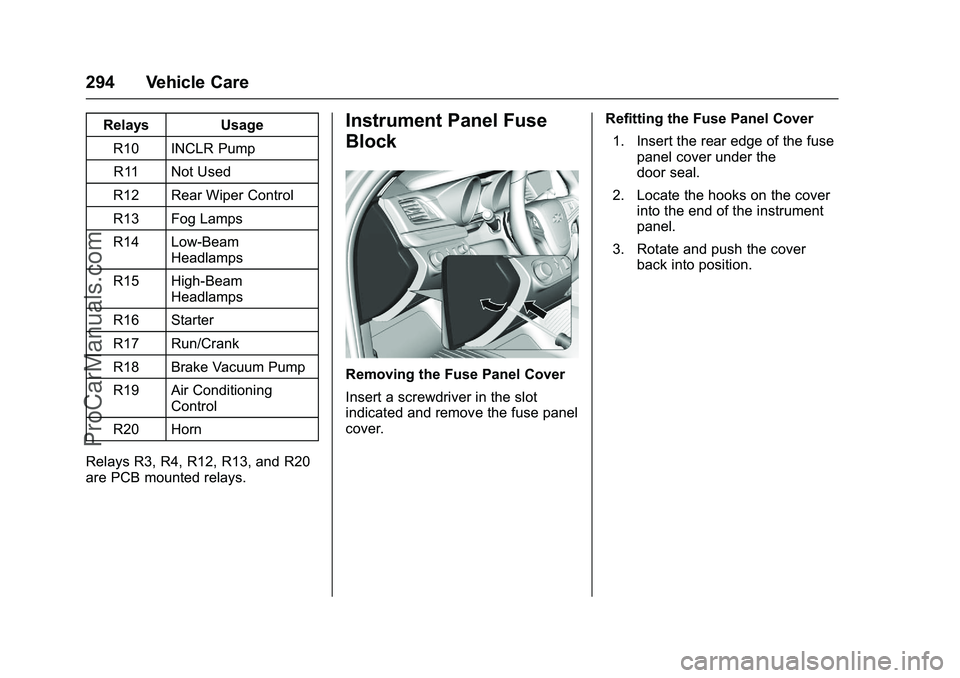
Block
Removing the Fuse Panel Cover
Insert a screwdriver in the slot
indicated and remove the fuse panel
cover. Refitting the Fuse Panel Cover
1. Insert the rear edge of the fuse panel cover under the
door seal.
2. Locate the hooks on the cover into the end of the instrument
panel.
3. Rotate and push the cover back into position.
ProCarManuals.com
Page 322 of 397
Chevrolet SS Sedan Owner Manual (GMNA-Localizing-U.S.-9234782) - 2016 -
CRC - 8/24/15
Vehicle Care 321
If a tire goes flat, avoid further tire
and wheel damage by driving slowly
to a level place. Turn on the hazard
warning flashers. SeeHazard
Warning Flashers 0124
ii.
See If a Tire Goes Flat 0318
iifor
other important safety warnings.
Do not remove any objects that
have penetrated the tire.
1. Remove the tire sealant and compressor kit from its storage
location. See Storing the Tire
Sealant and Compressor Kit
0 325
ii.
2. Remove the sealant/air hose (5) from the side of the
compressor.
3. Remove the power plug (6).
4. Place the kit on the ground. Make sure the tire valve stem
is positioned close to the
ground so the hose will
reach it.
5. Remove the valve stem cap from the flat tire by turning it
counterclockwise. 6. Attach the sealant/air hose (5)
onto the tire valve. Turn it
clockwise until it is tight.
7. Switch the on/off switch (1) to the O position.
8. Plug the power plug (6) into the power outlet in the vehicle.
Unplug all items from other
accessory power outlets. See
Power Outlets 091
ii.
If the vehicle has an accessory
power outlet, do not use the
cigarette lighter.
If the vehicle only has a
cigarette lighter, use the
cigarette lighter.
Do not pinch the power plug
cord in the door or window.
9. Start the vehicle. The vehicle must be running while using
the air compressor.
10. Switch the on/off switch (1) to the I position.
The compressor will inject
sealant and air into the tire. Sealant may leak from the
puncture hole until the vehicle
is driven and the hole has
sealed.
The pressure gauge (2) will
initially show a high pressure
while the compressor pushes
the sealant into the tire. Once
the sealant is completely
dispersed into the tire, the
pressure will quickly drop and
start to rise again as the tire
inflates with air only.
11. Inflate the tire to the recommended inflation
pressure using the pressure
gauge (2). The recommended
inflation pressure can be found
on the Tire and Loading
Information label. See Tire
Pressure 0305
ii.
The pressure gauge (2) may
read higher than the actual tire
pressure while the compressor
is on. Turn the compressor off
to get an accurate pressure
reading. The compressor may
be turned on/off until the
correct pressure is reached.
ProCarManuals.com
Page 325 of 397
Chevrolet SS Sedan Owner Manual (GMNA-Localizing-U.S.-9234782) - 2016 -
CRC - 8/24/15
324 Vehicle Care
7. Plug the power plug (6) into theaccessory power outlet in the
vehicle. Unplug all items from
other accessory power outlets.
See Power Outlets 091
ii.
If the vehicle has an accessory
power outlet, do not use the
cigarette lighter.
If the vehicle only has a
cigarette lighter, use the
cigarette lighter.
Do not pinch the power plug
cord in the door or window.
8. Start the vehicle. The vehicle must be running while using
the air compressor.
9. Switch the on/off switch (1) to the I position.
The compressor will inflate the
tire with air only.
10. Inflate the tire to the recommended inflation
pressure using the pressure
gauge (2). The recommended
inflation pressure can be found
on the Tire and Loading
Information label. See Tire
Pressure 0305
ii. The pressure gauge (2) may
read higher than the actual tire
pressure while the compressor
is on. Turn the compressor off
to get an accurate reading. The
compressor may be turned on/
off until the correct pressure is
reached.
11. Switch the on/off switch (1) to the O position.
Be careful while handling the
tire sealant and compressor kit
as it could be warm after
usage.
12. Unplug the power plug (6) and the air only hose (4).
13. Replace the tire valve stem cap.
14. Place the equipment in the original storage location in the
vehicle.
Removal and Installation of the
Sealant Canister
After repairing a tire, replace the tire
sealant canister. To remove the sealant canister:
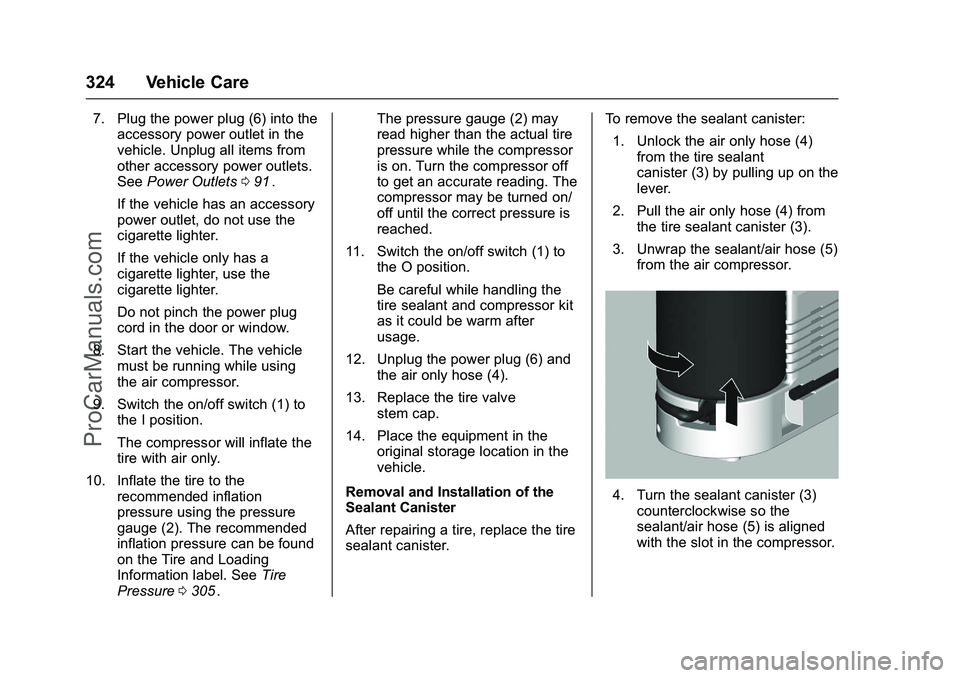
1. Unlock the air only hose (4) from the tire sealant
canister (3) by pulling up on the
lever.
2. Pull the air only hose (4) from the tire sealant canister (3).
3. Unwrap the sealant/air hose (5) from the air compressor.
4. Turn the sealant canister (3)
counterclockwise so the
sealant/air hose (5) is aligned
with the slot in the compressor.
ProCarManuals.com
Page 329 of 397
Chevrolet SS Sedan Owner Manual (GMNA-Localizing-U.S.-9234782) - 2016 -
CRC - 8/24/15
328 Vehicle Care
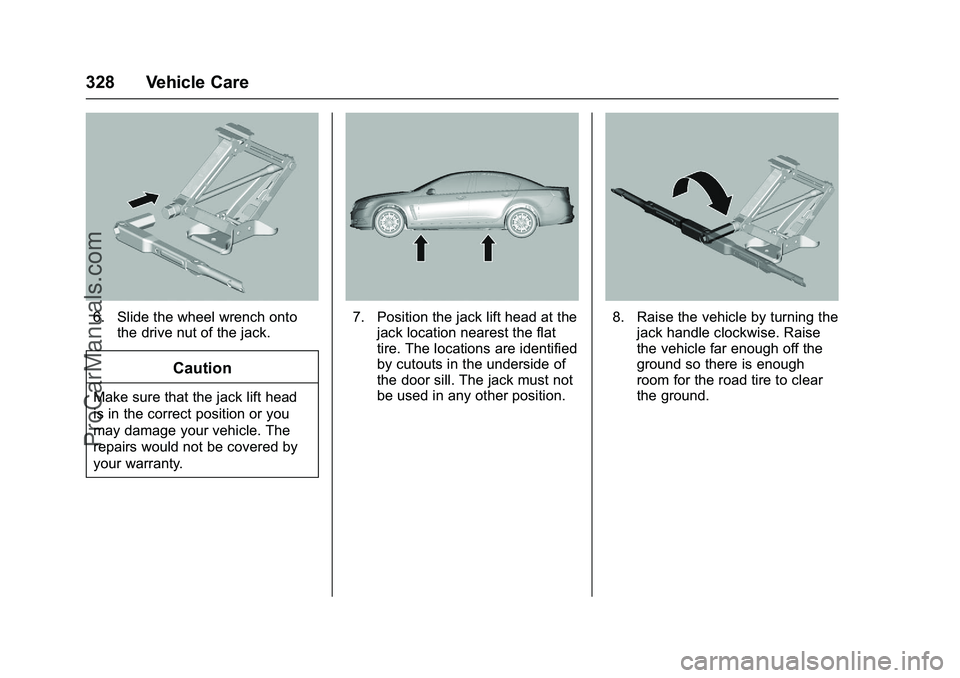
6. Slide the wheel wrench ontothe drive nut of the jack.
Caution
Make sure that the jack lift head
is in the correct position or you
may damage your vehicle. The
repairs would not be covered by
your warranty.
7. Position the jack lift head at thejack location nearest the flat
tire. The locations are identified
by cutouts in the underside of
the door sill. The jack must not
be used in any other position.8. Raise the vehicle by turning thejack handle clockwise. Raise
the vehicle far enough off the
ground so there is enough
room for the road tire to clear
the ground.
ProCarManuals.com
Page 340 of 397
Chevrolet SS Sedan Owner Manual (GMNA-Localizing-U.S.-9234782) - 2016 -
CRC - 8/24/15
Vehicle Care 339
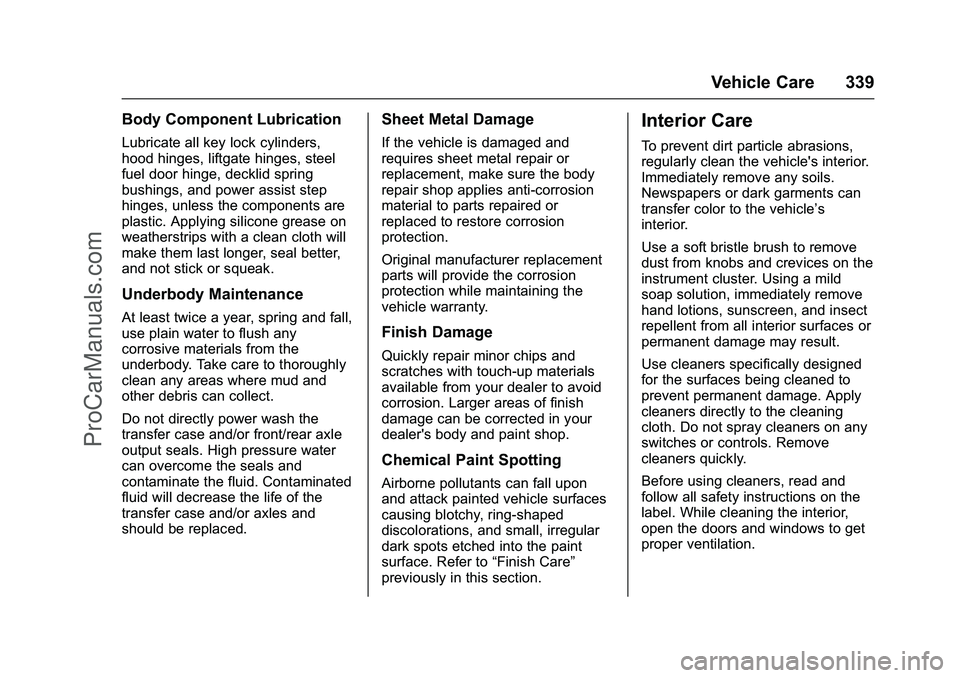
Body Component Lubrication
Lubricate all key lock cylinders,
hood hinges, liftgate hinges, steel
fuel door hinge, decklid spring
bushings, and power assist step
hinges, unless the components are
plastic. Applying silicone grease on
weatherstrips with a clean cloth will
make them last longer, seal better,
and not stick or squeak.
Underbody Maintenance
At least twice a year, spring and fall,
use plain water to flush any
corrosive materials from the
underbody. Take care to thoroughly
clean any areas where mud and
other debris can collect.
Do not directly power wash the
transfer case and/or front/rear axle
output seals. High pressure water
can overcome the seals and
contaminate the fluid. Contaminated
fluid will decrease the life of the
transfer case and/or axles and
should be replaced.
Sheet Metal Damage
If the vehicle is damaged and
requires sheet metal repair or
replacement, make sure the body
repair shop applies anti-corrosion
material to parts repaired or
replaced to restore corrosion
protection.
Original manufacturer replacement
parts will provide the corrosion
protection while maintaining the
vehicle warranty.
Finish Damage
Quickly repair minor chips and
scratches with touch-up materials
available from your dealer to avoid
corrosion. Larger areas of finish
damage can be corrected in your
dealer's body and paint shop.
Chemical Paint Spotting
Airborne pollutants can fall upon
and attack painted vehicle surfaces
causing blotchy, ring-shaped
discolorations, and small, irregular
dark spots etched into the paint
surface. Refer to“Finish Care”
previously in this section.
Interior Care
To prevent dirt particle abrasions,
regularly clean the vehicle's interior.
Immediately remove any soils.
Newspapers or dark garments can
transfer color to the vehicle’s
interior.
Use a soft bristle brush to remove
dust from knobs and crevices on the
instrument cluster. Using a mild
soap solution, immediately remove
hand lotions, sunscreen, and insect
repellent from all interior surfaces or
permanent damage may result.
Use cleaners specifically designed
for the surfaces being cleaned to
prevent permanent damage. Apply
cleaners directly to the cleaning
cloth. Do not spray cleaners on any
switches or controls. Remove
cleaners quickly.
Before using cleaners, read and
follow all safety instructions on the
label. While cleaning the interior,
open the doors and windows to get
proper ventilation.
ProCarManuals.com
Page 355 of 397
Chevrolet SS Sedan Owner Manual (GMNA-Localizing-U.S.-9234782) - 2016 -
CRC - 8/24/15
354 Service and Maintenance
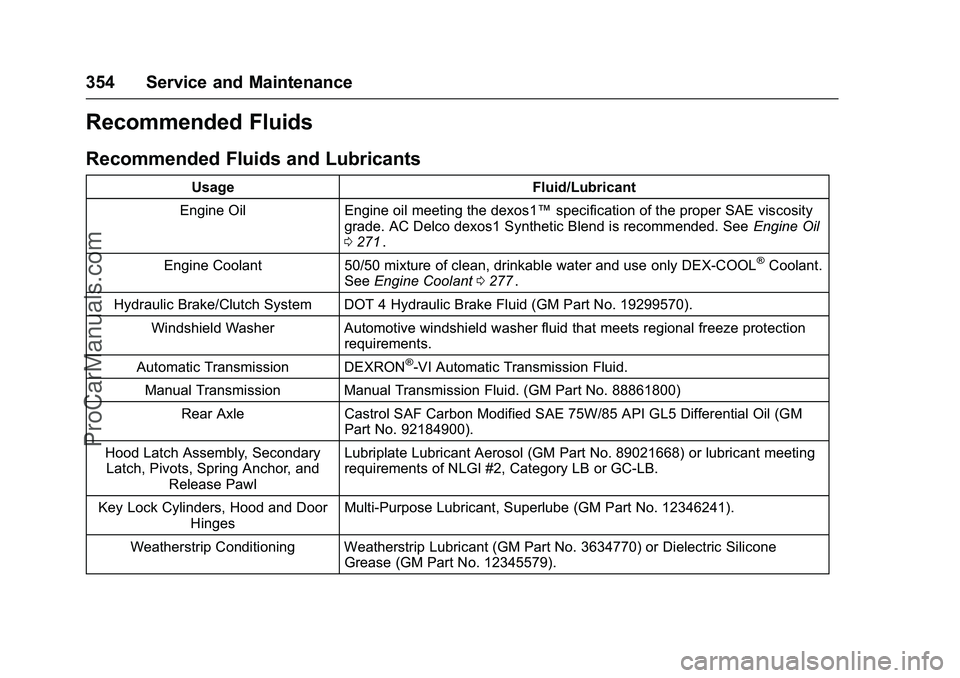
Recommended Fluids
Recommended Fluids and Lubricants
UsageFluid/Lubricant
Engine Oil Engine oil meeting the dexos1™ specification of the proper SAE viscosity
grade. AC Delco dexos1 Synthetic Blend is recommended. See Engine Oil
0 271
ii.
Engine Coolant 50/50 mixture of clean, drinkable water and use only DEX-COOL
®Coolant.
See Engine Coolant 0277ii.
Hydraulic Brake/Clutch System DOT 4 Hydraulic Brake Fluid (GM Part No. 19299570). Windshield Washer Automotive windshield washer fluid that meets regional freeze protection requirements.
Automatic Transmission DEXRON
®-VI Automatic Transmission Fluid.
Manual Transmission Manual Transmission Fluid. (GM Part No. 88861800) Rear Axle Castrol SAF Carbon Modified SAE 75W/85 API GL5 Differential Oil (GM
Part No. 92184900).
Hood Latch Assembly, Secondary Latch, Pivots, Spring Anchor, and Release Pawl Lubriplate Lubricant Aerosol (GM Part No. 89021668) or lubricant meeting
requirements of NLGI #2, Category LB or GC-LB.
Key Lock Cylinders, Hood and Door Hinges Multi-Purpose Lubricant, Superlube (GM Part No. 12346241).
Weatherstrip Conditioning Weatherstrip Lubricant (GM Part No. 3634770) or Dielectric Silicone Grease (GM Part No. 12345579).
ProCarManuals.com