warning CHEVROLET SS 2016 Repair Manual
[x] Cancel search | Manufacturer: CHEVROLET, Model Year: 2016, Model line: SS, Model: CHEVROLET SS 2016Pages: 397, PDF Size: 7.17 MB
Page 115 of 397
Chevrolet SS Sedan Owner Manual (GMNA-Localizing-U.S.-9234782) - 2016 -
CRC - 8/24/15
114 Instruments and Controls
This message could be due to the
camera being blocked. Cleaning the
outside of the windshield behind the
rearview mirror may correct the
issue.
PARK ASSIST OFF
This message displays when the
Parking Assist system has been
turned off or when there is a
temporary condition causing the
system to be disabled.
SERVICE FRONT CAMERA
If this message remains on after
continued driving, the vehicle needs
service. Do not use the Lane
Departure Warning (LDW) and
Forward Collision Alert (FCA)
features. Take the vehicle to your
dealer.
SERVICE PARKING ASSIST
This message displays if there is a
problem with the Parking Assist
system. Do not use this system to
help you park. See your dealer for
service.
SERVICE SIDE DETECTION
SYSTEM
If this message remains on after
continued driving, the vehicle needs
service. Side Blind Zone Alert
(SBZA) and Rear Cross Traffic Alert
(RCTA) features will not work. Take
the vehicle to your dealer.
SIDE BLIND ZONE ALERT OFF
This message indicates that the
driver has turned the Side Blind
Zone Alert (SBZA) system off.
SIDE DETECTION SYSTEM
UNAVAILABLE
This message indicates that Side
Blind Zone Alert (SBZA) and Rear
Cross Traffic Alert (RCTA) are
disabled either because the sensor
is blocked and cannot detect
vehicles in the blind zone, or the
vehicle is passing through an open
area, such as the desert, where
there is insufficient data for
operation. This message may also
activate during heavy rain or due to
road spray. The vehicle does notneed service. For cleaning, see
"Washing the Vehicle" under
Exterior Care
0335
ii.
Ride Control System
Messages
SERVICE TRACTION
CONTROL
This message displays when there
is a problem with the Traction
Control System (TCS). See Traction
Control/Electronic Stability Control
0 242
ii.
SERVICE STABILITRAK
This message displays if there is a
problem with the StabiliTrak system.
See Traction Control/Electronic
Stability Control 0242
ii.
Security Messages
THEFT ATTEMPTED
This message displays if the vehicle
detects a tamper condition.
ProCarManuals.com
Page 116 of 397
Chevrolet SS Sedan Owner Manual (GMNA-Localizing-U.S.-9234782) - 2016 -
CRC - 8/24/15
Instruments and Controls 115
Service Vehicle Messages
SERVICE AC SYSTEM
This message displays if there is a
problem with the air conditioning
system. Take the vehicle to your
dealer for service.
SERVICE POWER STEERING
This message displays and a chime
may sound when there may be a
problem with the power steering
system. If this message displays
and a reduction in steering
performance or loss of power
steering assistance is noticed, see
your dealer.
SERVICE SUSPENSION
SYSTEM
This message displays when the
Magnetic Ride Control system has
detected a malfunction and the
vehicle speed will be limited. The
system must be serviced. See your
dealer. SeeDriver Mode Control
0 244
iiand “SPEED LIMITED TO
XXX” under Vehicle Speed
Messages 0117
ii.
SERVICE VEHICLE SOON
This message displays if there is a
problem with the vehicle. Take the
vehicle to your dealer for service.
Starting the Vehicle
Messages
PRESS BRAKE TO START
This message is displayed when
attempting to start an automatic
transmission equipped vehicle
without first pressing the brake
pedal.
PRESS CLUTCH TO START
This message is displayed when
attempting to start a manual
transmission equipped vehicle
without first pressing the clutch
pedal.
SERVICE KEYLESS START
SYSTEM
This message is displayed if there is
a problem with the pushbutton start
system. Take the vehicle to your
dealer for service.
Tire Messages
SERVICE TIRE MONITOR
SYSTEM
This message displays if there is a
problem with the Tire Pressure
Monitor System (TPMS). See Tire
Pressure Monitor Operation 0308
iifor more information.
TIRE LEARNING ACTIVE
This message displays when the
system is learning new tires. See
Tire Pressure Monitor Operation
0308
iifor more information.
TIRE PRESSURE LOW ADD
AIR TO TIRE
On vehicles with the Tire Pressure
Monitor System (TPMS), this
message displays when the
pressure in one or more of the
vehicle's tires is low.
There is also an icon with the
warning that will indicate the
location of the low tire.
The low tire pressure warning light
will also come on. See Tire
Pressure Light 0103
ii.
ProCarManuals.com
Page 124 of 397
Chevrolet SS Sedan Owner Manual (GMNA-Localizing-U.S.-9234782) - 2016 -
CRC - 8/24/15
Lighting 123
Lighting
Exterior Lighting
Exterior Lamp Controls . . . . . . . 123
Headlamp High/Low-BeamChanger . . . . . . . . . . . . . . . . . . . . 123
Flash-to-Pass . . . . . . . . . . . . . . . . 123
Daytime Running Lamps (DRL) . . . . . . . . . . . . . . . 124
Automatic Headlamp System . . . . . . . . . . . . . . . . . . . . . . 124
Hazard Warning Flashers . . . . . 124
Turn and Lane-Change Signals . . . . . . . . . . . . . . . . . . . . . . 125
Interior Lighting
Instrument Panel IlluminationControl . . . . . . . . . . . . . . . . . . . . . . 125
Dome Lamps . . . . . . . . . . . . . . . . . 126
Reading Lamps . . . . . . . . . . . . . . 126
Lighting Features
Entry Lighting . . . . . . . . . . . . . . . . 127
Exit Lighting . . . . . . . . . . . . . . . . . . 127
Battery Power Protection . . . . . 127
Exterior Lighting
Exterior Lamp Controls
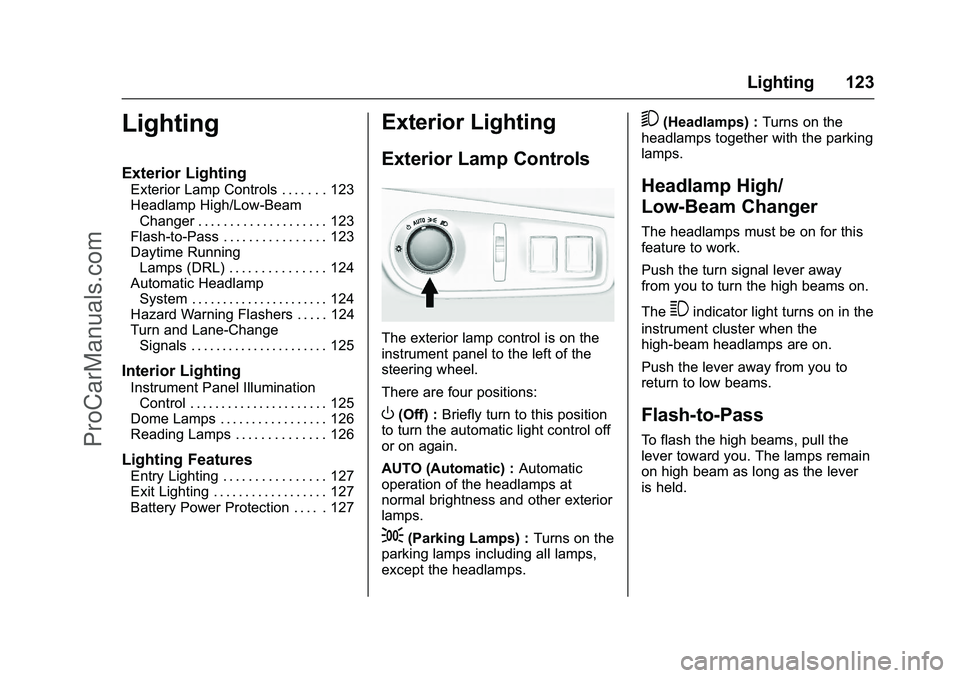
The exterior lamp control is on the
instrument panel to the left of the
steering wheel.
There are four positions:
O(Off) : Briefly turn to this position
to turn the automatic light control off
or on again.
AUTO (Automatic) : Automatic
operation of the headlamps at
normal brightness and other exterior
lamps.
;(Parking Lamps) : Turns on the
parking lamps including all lamps,
except the headlamps.
5(Headlamps) : Turns on the
headlamps together with the parking
lamps.
Headlamp High/
Low-Beam Changer
The headlamps must be on for this
feature to work.
Push the turn signal lever away
from you to turn the high beams on.
The
3indicator light turns on in the
instrument cluster when the
high-beam headlamps are on.
Push the lever away from you to
return to low beams.
Flash-to-Pass
To flash the high beams, pull the
lever toward you. The lamps remain
on high beam as long as the lever
is held.
ProCarManuals.com
Page 125 of 397
Chevrolet SS Sedan Owner Manual (GMNA-Localizing-U.S.-9234782) - 2016 -
CRC - 8/24/15
124 Lighting
Daytime Running
Lamps (DRL)
The vehicle has DRL that illuminate
at full intensity when the following
occur:
.During daylight conditions.
. The engine is running.
If the lamp control is turned to
;
or5the DRL will illuminate at
reduced intensity.
Automatic Headlamp
System
When it is dark enough outside and
the exterior lamp control is in the
automatic position, the headlamps
and parking lamps will turn on and
off automatically. See Exterior Lamp
Controls 0123
ii.
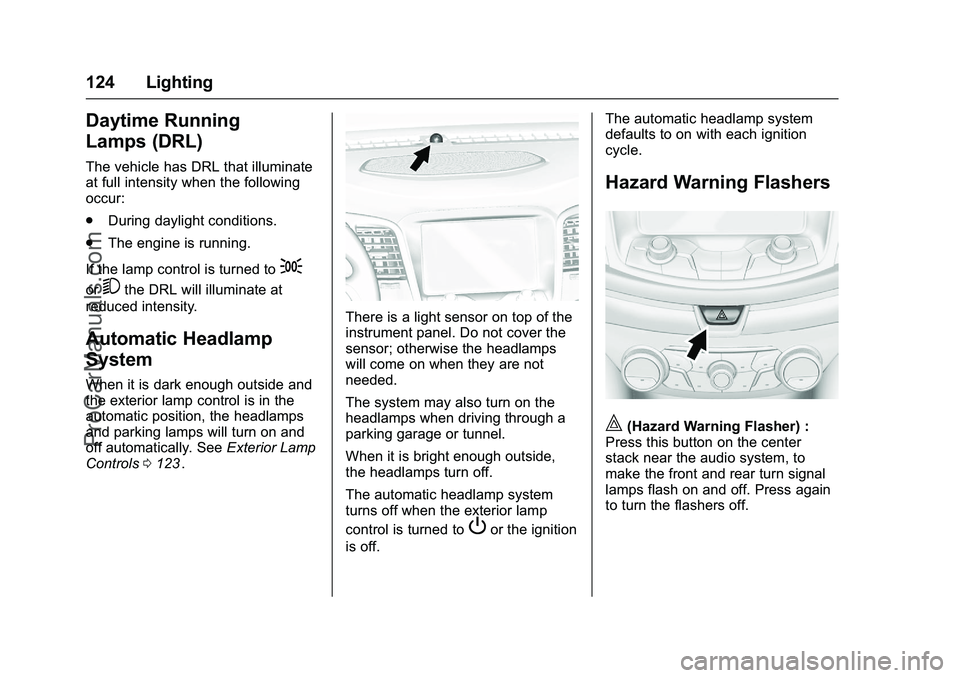
There is a light sensor on top of the
instrument panel. Do not cover the
sensor; otherwise the headlamps
will come on when they are not
needed.
The system may also turn on the
headlamps when driving through a
parking garage or tunnel.
When it is bright enough outside,
the headlamps turn off.
The automatic headlamp system
turns off when the exterior lamp
control is turned to
Por the ignition
is off. The automatic headlamp system
defaults to on with each ignition
cycle.
Hazard Warning Flashers
|(Hazard Warning Flasher) :
Press this button on the center
stack near the audio system, to
make the front and rear turn signal
lamps flash on and off. Press again
to turn the flashers off.
ProCarManuals.com
Page 129 of 397
Chevrolet SS Sedan Owner Manual (GMNA-Localizing-U.S.-9234782) - 2016 -
CRC - 8/24/15
128 Infotainment System
Infotainment
System
Introduction
Infotainment . . . . . . . . . . . . . . . . . . 128
Overview . . . . . . . . . . . . . . . . . . . . . 129
Steering Wheel Controls . . . . . . 131
Using the System . . . . . . . . . . . . 131
Software Updates . . . . . . . . . . . . 136
Radio
AM-FM Radio . . . . . . . . . . . . . . . . 136
Radio Data System (RDS) . . . . 138
Satellite Radio . . . . . . . . . . . . . . . . 139
Radio Reception . . . . . . . . . . . . . . 144
Backglass Antenna . . . . . . . . . . . 145
Multi-Band Antenna . . . . . . . . . . 145
Quick Info . . . . . . . . . . . . . . . . . . . . 145
Pandora Internet Radio . . . . . . . 146
Stitcher Internet Radio . . . . . . . . 150
Pictures . . . . . . . . . . . . . . . . . . . . . . 154
Audio Players
USB . . . . . . . . . . . . . . . . . . . . . . . . . . 155
Bluetooth Audio . . . . . . . . . . . . . . 161
OnStar System
OnStar System . . . . . . . . . . . . . . . 162
Navigation
Using the NavigationSystem . . . . . . . . . . . . . . . . . . . . . . 163
Maps . . . . . . . . . . . . . . . . . . . . . . . . . 166
Navigation Symbols . . . . . . . . . . 167
Destination . . . . . . . . . . . . . . . . . . . 169
OnStar
®Destination
Download . . . . . . . . . . . . . . . . . . . 179
Configure Menu . . . . . . . . . . . . . . 180
Global Positioning System (GPS) . . . . . . . . . . . . . . 185
Vehicle Positioning . . . . . . . . . . . 185
Problems with Route Guidance . . . . . . . . . . . . . . . . . . . 186
If the System Needs Service . . . . . . . . . . . . . . . . . . . . . 186
Map Data Updates . . . . . . . . . . . 186
Database Coverage Explanations . . . . . . . . . . . . . . . . 187
Voice Recognition
Voice Recognition . . . . . . . . . . . . 187
Bluetooth Phone/Devices
Bluetooth . . . . . . . . . . . . . . . . . . . . . 193
Text Messaging . . . . . . . . . . . . . . . 200
Trademarks and License
Agreements
Trademarks and LicenseAgreements . . . . . . . . . . . . . . . . . 203
Introduction
Infotainment
Read the following pages to
become familiar with these features.
{Warning
Taking your eyes off the road for
too long or too often while using
any infotainment feature can
cause a crash. You or others
could be injured or killed. Do not
give extended attention to
infotainment tasks while driving.
Limit your glances at the vehicle
displays and focus your attention
on driving. Use voice commands
whenever possible.
The infotainment system has built-in
features intended to help avoid
distraction by disabling some
functions when driving. These
functions may gray out when they
are unavailable. Many infotainment
ProCarManuals.com
Page 144 of 397
Chevrolet SS Sedan Owner Manual (GMNA-Localizing-U.S.-9234782) - 2016 -
CRC - 8/24/15
Infotainment System 143
.Showtimes
Theater information includes
address, phone number, distance,
and amenities.
SiriusXM Travel Link Weather
Whether near home or on a long
road trip, detailed weather
information is available.
From the Home Page, press the
SiriusXM Weather screen button.
The system displays the current
weather page.
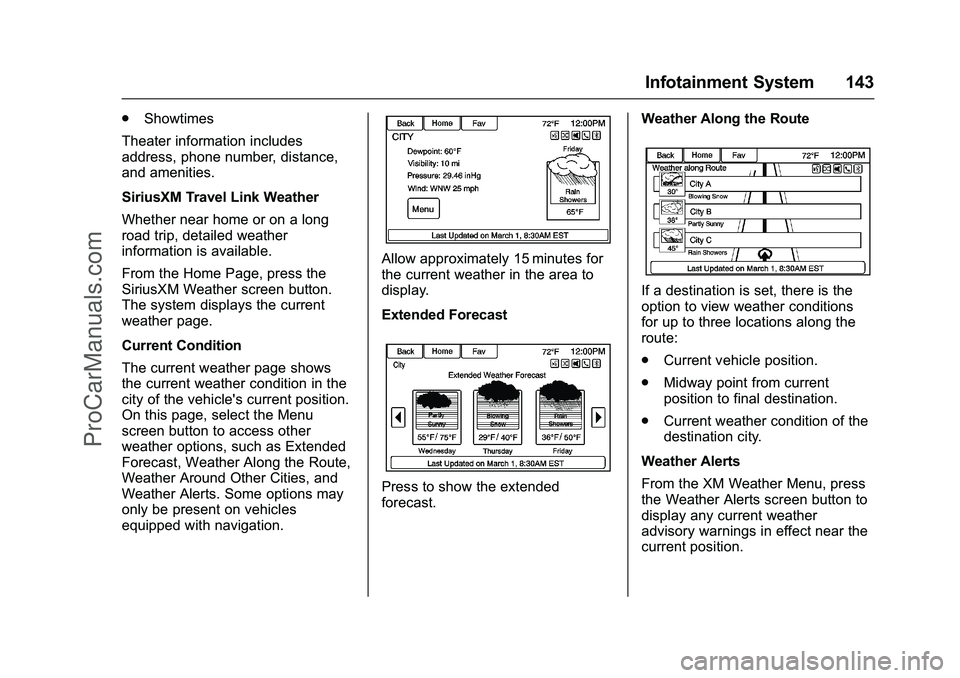
Current Condition
The current weather page shows
the current weather condition in the
city of the vehicle's current position.
On this page, select the Menu
screen button to access other
weather options, such as Extended
Forecast, Weather Along the Route,
Weather Around Other Cities, and
Weather Alerts. Some options may
only be present on vehicles
equipped with navigation.
Allow approximately 15 minutes for
the current weather in the area to
display.
Extended Forecast
Press to show the extended
forecast. Weather Along the Route
If a destination is set, there is the
option to view weather conditions
for up to three locations along the
route:
.
Current vehicle position.
. Midway point from current
position to final destination.
. Current weather condition of the
destination city.
Weather Alerts
From the XM Weather Menu, press
the Weather Alerts screen button to
display any current weather
advisory warnings in effect near the
current position.
ProCarManuals.com
Page 206 of 397
Chevrolet SS Sedan Owner Manual (GMNA-Localizing-U.S.-9234782) - 2016 -
CRC - 8/24/15
Infotainment System 205
Restrictions
Except where you have been
specifically licensed to do so by
PANASONIC, and without limiting
the preceding paragraph, you may
not (a) use this Data with any
products, systems, or applications
installed or otherwise connected to
or in communication with vehicles,
capable of vehicle navigation,
positioning, dispatch, real time route
guidance, fleet management or
similar applications; or (b) with or in
communication with any positioning
devices or any mobile or
wireless-connected electronic or
computer devices, including without
limitation cellular phones, palmtop
and handheld computers, pagers,
and personal digital assistants
or PDAs
Warning
The Data may contain inaccurate or
incomplete information due to the
passage of time, changing
circumstances, sources used and
the nature of collectingcomprehensive geographic data,
any of which may lead to incorrect
results.
No Warranty
This Data is provided to you
“as is,”
and you agree to use it at your own
risk. PANASONIC and its licensors
(and their licensors and suppliers)
make no guarantees,
representations or warranties of any
kind, express or implied, arising by
law or otherwise, including but not
limited to, content, quality, accuracy,
completeness, effectiveness,
reliability, fitness for a particular
purpose, usefulness, use or results
to be obtained from this Data,
or that the Data or server will be
uninterrupted or error-free.
Disclaimer of Warranty
PANASONIC AND ITS LICENSORS
(INCLUDING THEIR LICENSORS
AND SUPPLIERS) DISCLAIM ANY
WARRANTIES, EXPRESS OR
IMPLIED, OF QUALITY,
PERFORMANCE, MERCHANTABILITY, FITNESS
FOR A PARTICULAR PURPOSE
OR NON-INFRINGEMENT. Some
States, Territories and Countries do
not allow certain warranty
exclusions, so to that extent the
above exclusion may not apply
to you.
Disclaimer of Liability
PANASONIC AND ITS LICENSORS
(INCLUDING THEIR LICENSORS
AND SUPPLIERS) SHALL NOT BE
LIABLE TO YOU: IN RESPECT OF
ANY CLAIM, DEMAND OR
ACTION, IRRESPECTIVE OF THE
NATURE OF THE CAUSE OF THE
CLAIM, DEMAND OR ACTION
ALLEGING ANY LOSS, INJURY
OR DAMAGES, DIRECT OR
INDIRECT, WHICH MAY RESULT
FROM THE USE OR POSSESSION
OF THE INFORMATION; OR FOR
ANY LOSS OF PROFIT, REVENUE,
CONTRACTS OR SAVINGS, OR
ANY OTHER DIRECT, INDIRECT,
INCIDENTAL, SPECIAL OR
CONSEQUENTIAL DAMAGES
ProCarManuals.com
Page 215 of 397
Chevrolet SS Sedan Owner Manual (GMNA-Localizing-U.S.-9234782) - 2016 -
CRC - 8/24/15
214 Driving and Operating
Driving and
Operating
Driving Information
Distracted Driving . . . . . . . . . . . . 215
Defensive Driving . . . . . . . . . . . . . 215
Drunk Driving . . . . . . . . . . . . . . . . . 215
Control of a Vehicle . . . . . . . . . . . 216
Braking . . . . . . . . . . . . . . . . . . . . . . . 216
Steering . . . . . . . . . . . . . . . . . . . . . . 216
Off-Road Recovery . . . . . . . . . . . 217
Loss of Control . . . . . . . . . . . . . . . 217
Track Events and CompetitiveDriving . . . . . . . . . . . . . . . . . . . . . . 218
Driving on Wet Roads . . . . . . . . 220
Hill and Mountain Roads . . . . . 221
Winter Driving . . . . . . . . . . . . . . . . 222
If the Vehicle Is Stuck . . . . . . . . 223
Vehicle Load Limits . . . . . . . . . . . 223
Starting and Operating
New Vehicle Break-In . . . . . . . . . 227
Ignition Positions . . . . . . . . . . . . . 227
Starting the Engine . . . . . . . . . . . 229
Retained Accessory Power (RAP) . . . . . . . . . . . . . . . . 230
Shifting Into Park (Automatic Transmission) . . . . . . . . . . . . . . . 230
Shifting out of Park . . . . . . . . . . . 231 Parking . . . . . . . . . . . . . . . . . . . . . . . 232
Parking over Things
That Burn . . . . . . . . . . . . . . . . . . . 233
Engine Exhaust
Engine Exhaust . . . . . . . . . . . . . . 233
Running the Vehicle WhileParked . . . . . . . . . . . . . . . . . . . . . . 234
Automatic Transmission
Automatic Transmission . . . . . . 234
Manual Mode . . . . . . . . . . . . . . . . . 236
Manual Transmission
Manual Transmission . . . . . . . . . 238
Brakes
Antilock BrakeSystem (ABS) . . . . . . . . . . . . . . . 239
Electric Parking Brake . . . . . . . . 240
Brake Assist . . . . . . . . . . . . . . . . . . 242
Hill Start Assist (HSA) . . . . . . . . 242
Ride Control Systems
Traction Control/Electronic
Stability Control . . . . . . . . . . . . . 242
Driver Mode Control . . . . . . . . . . 244
Track Driver Mode . . . . . . . . . . . . 246
Limited-Slip Rear Axle . . . . . . . . 248
Cruise Control
Cruise Control . . . . . . . . . . . . . . . . 248
Driver Assistance Systems
Driver Assistance Systems . . . 250
Assistance Systems for Parking or Backing . . . . . . . . . . 251
Assistance Systems for Driving . . . . . . . . . . . . . . . . . . . . . . 255
Forward Collision Alert (FCA) System . . . . . . . . . . . . . . . . . . . . . . 255
Side Blind Zone Alert (SBZA) . . . . . . . . . . . . . . . . 257
Lane Departure Warning (LDW) . . . . . . . . . . . . . 259
Fuel
Fuel . . . . . . . . . . . . . . . . . . . . . . . . . . 261
California FuelRequirements . . . . . . . . . . . . . . . 262
Fuels in Foreign Countries . . . 262
Fuel Additives . . . . . . . . . . . . . . . . 262
Filling the Tank . . . . . . . . . . . . . . . 262
Filling a Portable Fuel
Container . . . . . . . . . . . . . . . . . . . 264
Trailer Towing
Trailer Towing . . . . . . . . . . . . . . . . 264
Conversions and Add-Ons
Add-On ElectricalEquipment . . . . . . . . . . . . . . . . . . 265
ProCarManuals.com
Page 216 of 397
Chevrolet SS Sedan Owner Manual (GMNA-Localizing-U.S.-9234782) - 2016 -
CRC - 8/24/15
Driving and Operating 215
Driving Information
Distracted Driving
Distraction comes in many forms
and can take your focus from the
task of driving. Exercise good
judgment and do not let other
activities divert your attention away
from the road. Many local
governments have enacted laws
regarding driver distraction. Become
familiar with the local laws in
your area.
To avoid distracted driving, always
keep your eyes on the road, hands
on the wheel, and mind on the drive.
.Do not use a phone in
demanding driving situations.
Use a hands-free method to
place or receive necessary
phone calls.
. Watch the road. Do not read,
take notes, or look up
information on phones or other
electronic devices.
. Designate a front seat
passenger to handle potential
distractions. .
Become familiar with vehicle
features before driving, such as
programming favorite radio
stations and adjusting climate
control and seat settings.
Program all trip information into
any navigation device prior to
driving.
. Wait until the vehicle is parked
to retrieve items that have fallen
to the floor.
. Stop or park the vehicle to tend
to children.
. Keep pets in an appropriate
carrier or restraint.
. Avoid stressful conversations
while driving, whether with a
passenger or on a cell phone.
{Warning
Taking your eyes off the road too
long or too often could cause a
crash resulting in injury or death.
Focus your attention on driving. Refer to the Infotainment section for
more information on using that
system, including pairing and using
a cell phone.
Defensive Driving
Defensive driving means
“always
expect the unexpected.” The first
step in driving defensively is to wear
the safety belt. See Safety Belts
0 50
ii.
. Assume that other road users
(pedestrians, bicyclists, and
other drivers) are going to be
careless and make mistakes.
Anticipate what they might do
and be ready.
. Allow enough following distance
between you and the driver in
front of you.
. Focus on the task of driving.
Drunk Driving
Death and injury associated with
drinking and driving is a global
tragedy.
ProCarManuals.com
Page 217 of 397
Chevrolet SS Sedan Owner Manual (GMNA-Localizing-U.S.-9234782) - 2016 -
CRC - 8/24/15
216 Driving and Operating
{Warning
Drinking and then driving is very
dangerous. Your reflexes,
perceptions, attentiveness, and
judgment can be affected by even
a small amount of alcohol. You
can have a serious—or even
fatal —collision if you drive after
drinking.
Do not drink and drive or ride with
a driver who has been drinking.
Ride home in a cab; or if you are
with a group, designate a driver
who will not drink.
Control of a Vehicle
Braking, steering, and accelerating
are important factors in helping to
control a vehicle while driving.
Braking
Braking action involves perception
time and reaction time. Deciding to
push the brake pedal is perception
time. Actually doing it is
reaction time. Average driver reaction time is
about three-quarters of a second. In
that time, a vehicle moving at
100 km/h (60 mph) travels 20 m
(66 ft), which could be a lot of
distance in an emergency.
Helpful braking tips to keep in mind
include:
.
Keep enough distance between
you and the vehicle in front
of you.
. Avoid needless heavy braking.
. Keep pace with traffic.
If the engine ever stops while the
vehicle is being driven, brake
normally but do not pump the
brakes. Doing so could make the
pedal harder to push down. If the
engine stops, there will be some
power brake assist but it will be
used when the brake is applied.
Once the power assist is used up, it
can take longer to stop and the
brake pedal will be harder to push.
Steering
Electric Power Steering
The vehicle has electric power
steering. It does not have power
steering fluid. Regular maintenance
is not required.
If power steering assist is lost due
to a system malfunction, the vehicle
can be steered, but may require
increased effort.
See your dealer if there is a
problem.
If the steering wheel is turned until it
reaches the end of its travel and is
held against that position for an
extended period of time, power
steering assist may be reduced.
If the steering assist is used for an
extended period of time, power
assist may be reduced.
Normal use of the power steering
assist should return when the
system cools down.
See specific vehicle steering
messages under Service Vehicle
Messages 0115
ii. See your dealer if
there is a problem.
ProCarManuals.com