Fan CHEVROLET SSR 2003 1.G User Guide
[x] Cancel search | Manufacturer: CHEVROLET, Model Year: 2003, Model line: SSR, Model: CHEVROLET SSR 2003 1.GPages: 374, PDF Size: 2.55 MB
Page 83 of 374
Running the Engine While Parked
It is better not to park with the engine running. But if you
ever have to, here are some things to know.
{CAUTION:
Idling the engine with the climate control
system off could allow dangerous exhaust into
your vehicle. See the earlier caution under
Engine Exhaust on page 2-22.
Also, idling in a closed-in place can let deadly
carbon monoxide (CO) into your vehicle even if
the climate control fan is at the highest setting.
One place this can happen is a garage.
Exhaust — with CO — can come in easily.
NEVER park in a garage with the engine
running.
Another closed-in place can be a blizzard. See
Winter Driving on page 4-26.
{CAUTION:
It can be dangerous to get out of your vehicle
if the shift lever is not fully in PARK (P) with
the parking brake rmly set. Your vehicle can
roll. Do not leave your vehicle when the engine
is running unless you have to. If you have left
the engine running, the vehicle can move
suddenly. You or others could be injured. To
be sure your vehicle will not move, even when
you are on fairly level ground, always set your
parking brake and move the shift lever to
PARK (P).
Follow the proper steps to be sure your vehicle will not
move. SeeShifting Into Park (P) on page 2-20.
If you are pulling a trailer, seeTowing a Trailer on
page 4-38.
2-23
Page 122 of 374
Climate Controls
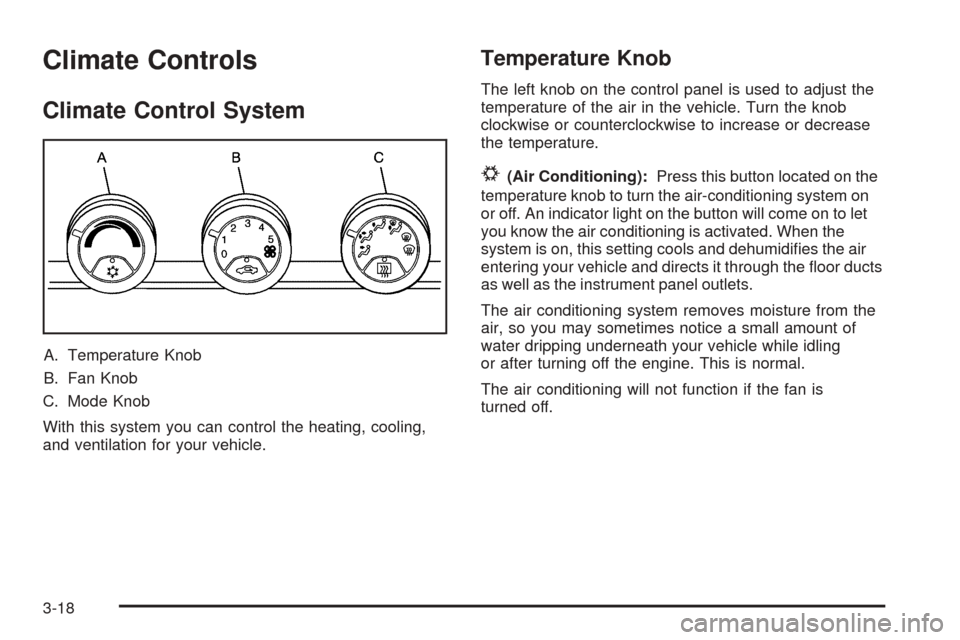
Climate Control System
A. Temperature Knob
B. Fan Knob
C. Mode Knob
With this system you can control the heating, cooling,
and ventilation for your vehicle.
Temperature Knob
The left knob on the control panel is used to adjust the
temperature of the air in the vehicle. Turn the knob
clockwise or counterclockwise to increase or decrease
the temperature.
#(Air Conditioning):Press this button located on the
temperature knob to turn the air-conditioning system on
or off. An indicator light on the button will come on to let
you know the air conditioning is activated. When the
system is on, this setting cools and dehumidies the air
entering your vehicle and directs it through the oor ducts
as well as the instrument panel outlets.
The air conditioning system removes moisture from the
air, so you may sometimes notice a small amount of
water dripping underneath your vehicle while idling
or after turning off the engine. This is normal.
The air conditioning will not function if the fan is
turned off.
3-18
Page 123 of 374
Fan Knob
The center knob on the control panel is used to control
the fan speed. Turn the knob clockwise or
counterclockwise to increase or decrease the fan speed.
?(Recirculation):This mode keeps outside air
from coming in the vehicle. It can be used to prevent
outside air and odors from entering your vehicle or help
heat or cool the air inside your vehicle more quickly.
Press this button on the fan knob to turn the recirculation
mode on or off. An indicator light on the button will
come on to let you know the recirculation mode
is activated.
Recirculation is only available in the bi-level and vent
modes. If you push the recirculation button while
the system is in any other mode, the light on the button
will ash to indicate that recirculation is not available.
Mode Knob
The right knob on the control panel is used to direct the
airow inside your vehicle. Turn the knob to select
one of the following modes:
H(Vent):Select this mode to direct air to the
instrument panel outlets.
)(Bi-Level):Select this mode to direct approximately
half of the air to the instrument panel outlets, and the
remaining air to the oor outlets and the defroster
and side window outlets. Cooler air is directed to the
upper outlets and warmer air to the oor outlets.
6(Floor):Select this mode to direct air to the oor
outlets. Recirculation does not work in this mode.
3-19
Page 124 of 374
Defogging and Defrosting
Fog on the inside of windows is a result of high humidity
(moisture) condensing on the cool window glass.
This can be minimized if the climate control system is
used properly. There are two modes to clear fog or
frost from your windshield and side windows. Use the
defog mode to clear the windows of fog or moisture
and warm the passengers. Use the defrost mode
to remove fog or frost from the windshield more quickly.
For best results, clear all snow and ice from the
windshield before defrosting.
/(Floor/Defog):This mode directs half of the air to
the windshield and the side window outlets and the other
half to the oor outlets. When you select this mode,
the system runs the air-conditioning compressor unless
the outside temperature is at or below freezing.
Recirculation is not available in this mode.
0(Defrost):This mode directs most of the air to the
windshield, with some air directed to the side window
outlets and the oor outlets. When you select this mode,
the system runs the air-conditioning compressor
unless the outside temperature is at or below freezing.
Recirculation is not available in this mode.
1(Maximum Defrost):This mode directs most of
the air to the windshield, with some air directed to
the side window outlets and the oor outlets. The rear
window defogger and heated outside mirrors will turn on,
and the fan speed will be at the highest setting (5).
The temperature will be at the hottest setting also.
Recirculation is not available in this mode.
If this mode was selected when you turn your vehicle
off, the warmest temperature and highest fan speed will
be restored when the vehicle is started, regardless of
the temperature and fan setting.
Do not drive the vehicle until all the windows are clear.
3-20
Page 264 of 374
If No Steam Is Coming From Your
Engine
If you get an engine overheat warning but see or
hear no steam, the problem may not be too serious.
Sometimes the engine can get a little too hot when you:
Climb a long hill on a hot day.
Stop after high-speed driving.
Idle for long periods in traffic.
Tow a trailer. See “Driving on Grades” under
Towing a Trailer on page 4-38.
If you get the overheat warning with no sign of steam,
try this for a minute or so:
1. In heavy traffic, let the engine idle in NEUTRAL (N)
while stopped. If it is safe to do so, pull off the road,
shift to PARK (P) or NEUTRAL (N) and let the
engine idle.
2. Turn on your heater to full hot at the highest fan
speed and open the window as necessary.
If you no longer have the overheat warning, you can
drive. Just to be safe, drive slower for about 10 minutes.
If the warning doesn’t come back on, you can drive
normally.
If the warning continues, pull over, stop, and park your
vehicle right away.If there’s still no sign of steam, idle the engine for
three minutes while you’re parked. If you still have the
warning, turn off the engine and get everyone out of the
vehicle until it cools down.
You may decide not to lift the hood but to get service
help right away.
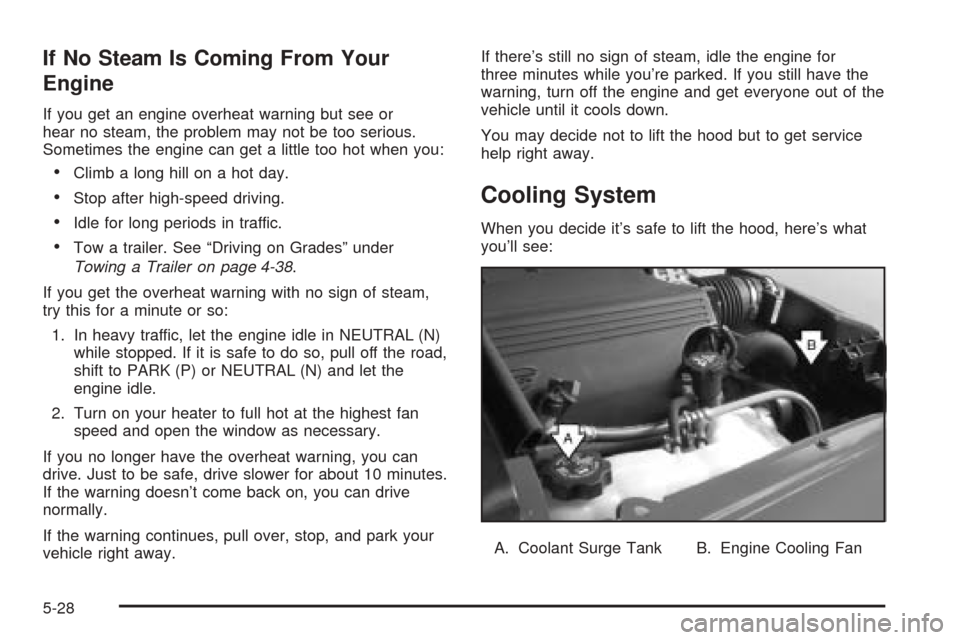
Cooling System
When you decide it’s safe to lift the hood, here’s what
you’ll see:
A. Coolant Surge Tank B. Engine Cooling Fan
5-28
Page 274 of 374
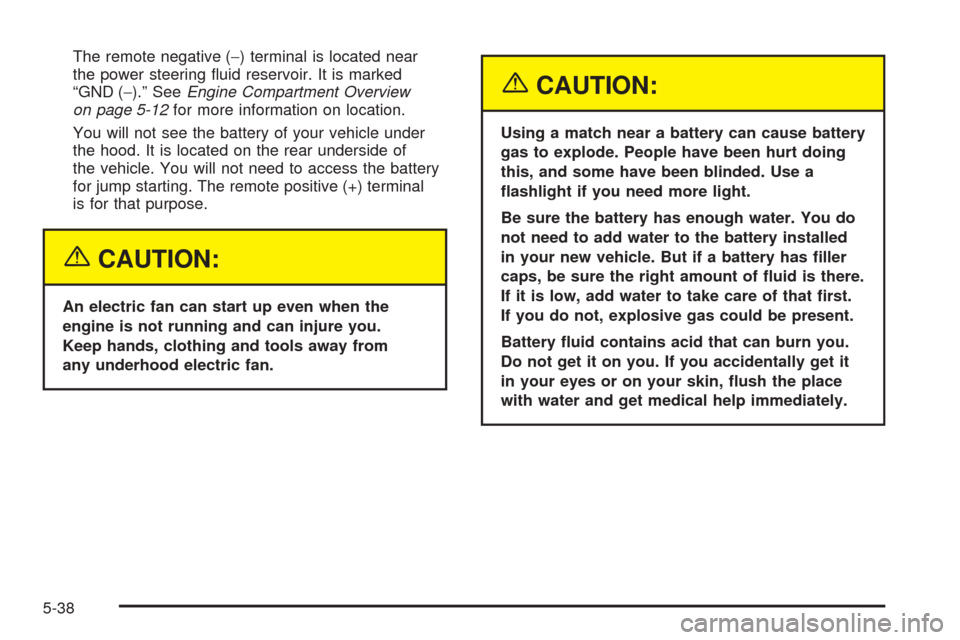
The remote negative (−) terminal is located near
the power steering uid reservoir. It is marked
“GND (−).” SeeEngine Compartment Overview
on page 5-12for more information on location.
You will not see the battery of your vehicle under
the hood. It is located on the rear underside of
the vehicle. You will not need to access the battery
for jump starting. The remote positive (+) terminal
is for that purpose.
{CAUTION:
An electric fan can start up even when the
engine is not running and can injure you.
Keep hands, clothing and tools away from
any underhood electric fan.
{CAUTION:
Using a match near a battery can cause battery
gas to explode. People have been hurt doing
this, and some have been blinded. Use a
ashlight if you need more light.
Be sure the battery has enough water. You do
not need to add water to the battery installed
in your new vehicle. But if a battery has ller
caps, be sure the right amount of uid is there.
If it is low, add water to take care of that rst.
If you do not, explosive gas could be present.
Battery uid contains acid that can burn you.
Do not get it on you. If you accidentally get it
in your eyes or on your skin, ush the place
with water and get medical help immediately.
5-38
Page 275 of 374
{CAUTION:
Fans or other moving engine parts can injure
you badly. Keep your hands away from moving
parts once the engine is running.
5. Check that the jumper cables don’t have loose or
missing insulation. If they do, you could get a
shock. The vehicles could also be damaged, too.
Before you connect the cables, here are some
basic things you should know. Positive (+) will go to
positive (+) or to a remote positive (+) terminal if
the vehicle has one. Negative (−) will go to a heavy,
unpainted metal engine part or to a remote
negative (−) terminal if the vehicle has one.
Don’t connect positive (+) to the negative (−)or
you will get a short that would damage the battery
and maybe other parts, too. And don’t connect
the negative (−) cable to negative (−) terminal on
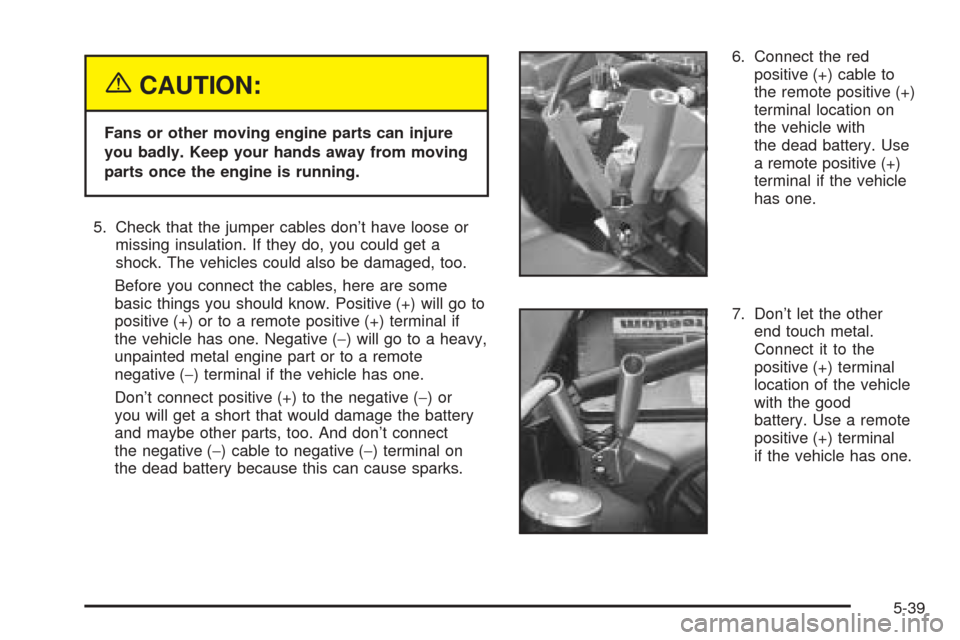
the dead battery because this can cause sparks.6. Connect the red
positive (+) cable to
the remote positive (+)
terminal location on
the vehicle with
the dead battery. Use
a remote positive (+)
terminal if the vehicle
has one.
7. Don’t let the other
end touch metal.
Connect it to the
positive (+) terminal
location of the vehicle
with the good
battery. Use a remote
positive (+) terminal
if the vehicle has one.
5-39
Page 322 of 374
Fuses Usage
6 Ignition
7 Driver’s Side High Beam Headlamp
8Passenger’s Side High Beam
Headlamp
9 Ignition
10Instrument Panel Cluster, Driver
Information Center (DIC)
11 Driver’s Side Low Beam Headlamp
12Passenger’s Side Low Beam
Headlamp
13 Powertrain Control Module (PCM)
14 Air Bag System
15 Truck Body Controller
16 Truck Body Control, Ignition
17 Driver’s Side Stoplamp/Turn Signals
18Passenger’s Side Stoplamp/
Turn Signals
19 Back-up Lamps
20 Throttle Actuator Control (TAC)
21 Fog LampsFuses Usage
22 Horn
23 Injector A
24 Injector B
25 Oxygen Sensor A
26 Oxygen Sensor B
27 Windshield Washer
28 Cigarette Lighter
29 Powertrain Control Module (PCM)
30 Blank
31 Cargo Cover Release
32 Hazard Warning Flashers
33 Stoplamps
44 Engine Cooling Fan
45 Climate Control Fan
46 Ignition A
47 Ignition B
48 Anti-lock Brake System (ABS)
49 Body Fuse
5-86
Page 361 of 374
Certication/Tire Label.....................................4-35
Chains, Tire...................................................5-64
Change Trans (Transmission) Fluid....................3-46
Charging System Light....................................3-27
Check
Engine Light...............................................3-30
Gages Warning Light...................................3-36
Check Engine Light.........................................3-30
Check Oil Level..............................................3-46
Checking Brake Fluid......................................5-34
Checking Coolant............................................5-26
Checking Engine Oil........................................5-14
Checking the Automatic Transmission
Fluid Level.................................................5-23
Checking Things Under the Hood......................5-10
Chemical Paint Spotting...................................5-78
Child Restraints
Child Restraint Systems...............................1-25
Infants and Young Children...........................1-22
Lower Anchorages and Top Tethers for
Children (LATCH System)..........................1-31
Older Children.............................................1-20
Securing a Child Restraint Designed for the
LATCH System........................................1-33Child Restraints (cont.)
Securing a Child Restraint in the Passenger
Seat Position...........................................1-36
Top Strap...................................................1-29
Top Strap Anchor Location............................1-31
Cigarette Lighter.............................................3-17
Cleaning
Inside of Your Vehicle..................................5-73
Outside of Your Vehicle................................5-75
Underbody Maintenance...............................5-78
Weatherstrips..............................................5-75
Cleaning Aluminum Wheels..............................5-77
Cleaning Exterior Lamps/Lenses.......................5-76
Cleaning Fabric/Carpet....................................5-73
Cleaning Glass Surfaces..................................5-75
Cleaning Interior Plastic Components.................5-75
Cleaning Leather............................................5-74
Cleaning the Top of the Instrument Panel...........5-75
Cleaning the Windshield and Wiper Blades.........5-77
Cleaning Tires................................................5-78
Cleaning Vinyl................................................5-74
Climate Control System...................................3-18
Outlet Adjustment........................................3-21
Content Theft-Deterrent....................................2-12
3
Page 363 of 374
Driving On Grades..........................................4-47
Driving on Snow or Ice....................................4-26
Driving Through Deep Standing Water...............4-19
Driving Through Flowing Water.........................4-19
Driving with a Trailer.......................................4-46
E
Electrical System
Add-On Equipment......................................5-81
Fuses and Circuit Breakers...........................5-82
Headlamps.................................................5-81
Power Windows and Other Power Options......5-81
Windshield Wiper Fuses...............................5-81
Emergency Cargo Cover Release Handle...........2-34
Emissions Inspection and Maintenance
Programs...................................................3-33
Engine
Air Cleaner/Filter.........................................5-20
Battery.......................................................5-36
Change Engine Oil Light...............................3-35
Check and Service Engine Soon Light............3-30
Compartment Overview................................5-12
Coolant......................................................5-24
Coolant Temperature Gage...........................3-30
Cooling System Inspection............................6-14
Cover........................................................5-19
Exhaust.....................................................2-22
Oil .............................................................5-14Engine (cont.)
Overheating................................................5-27
Reduced Power Light...................................3-36
Starting......................................................2-16
Engine Compartment Fuse Block......................5-85
Engine Coolant Hot Idle Engine........................3-46
Engine Coolant Level Check.............................. 6-9
Engine Cover Insert........................................5-19
Engine Oil Additives........................................5-17
Engine Oil Level Check..................................... 6-9
Engine Oil Scheduled Maintenance..................... 6-5
Engine Overheated Stop Engine.......................3-47
Erasing HomeLink
®Buttons..............................2-30
Exit Lighting...................................................3-14
Express Down Window....................................2-11
Extender, Safety Belt.......................................1-19
Exterior Lamps...............................................3-11
F
Fan Knob......................................................3-19
Filter
Engine Air Cleaner......................................5-20
Finding a Program Type (PTY) Station.......3-63, 3-72
Finding a Station....................................3-60, 3-69
Finish Care....................................................5-76
Finish Damage...............................................5-78
Flash-to-Pass................................................... 3-6
Flat Tire........................................................5-65
5