audio CHEVROLET SSR 2004 1.G User Guide
[x] Cancel search | Manufacturer: CHEVROLET, Model Year: 2004, Model line: SSR, Model: CHEVROLET SSR 2004 1.GPages: 398, PDF Size: 2.49 MB
Page 188 of 398

To use this feature set the volume at the desires level.
Press the AUTO VOL button until AVOL appears on
the display. This feature works best at lower volume
settings where background noise may be louder than the
audio. At high volume settings, where the audio is
much louder than the background noise, there will be no
change in the audio level. To turn automatic volume
off, press the AUTO VOL button until AVOL OFF
appears on the display.
RCL (Recall):Press this knob to switch the display
between the radio station frequency and the time. Press
this knob with the ignition off to display the time.
To change the default on the display, press the knob
until you see the display you want, then hold the
knob for two seconds. The radio will produce one beep
and the selected display will now be the default.Finding a Station
AM FM:Press this button to switch between FM1,
FM2, and AM. The display will show your selection.
TUNE:Turn this knob to select radio stations.
sSEEKt:Press the right or the left arrow to go to
the next or to the previous station and stay there.
The radio will seek only to stations that are in the
selected band and only to those with a strong signal.
sSCANt:Press and hold either SCAN arrow
for two seconds until SC appears on the display and
you hear a beep. The radio will go to a station, play for
a few seconds, then go on to the next station. Press
either SCAN arrow again to stop scanning.
To scan preset stations, press and hold either SCAN
arrow for more than four seconds. PRESET SCAN will
appear on the display and you will hear a double
beep. The radio will go to a preset station stored on
your pushbuttons, play for a few seconds, then go on to
the next preset station. Press either SCAN arrow
again to stop scanning presets.
The radio will scan only to stations that are in the
selected band and only to those with a strong signal.
3-72
Page 189 of 398

Setting Preset Stations
The six numbered pushbuttons let you return to your
favorite stations. You can set up to 18 stations (six FM1,
six FM2, and six AM) by performing the following steps:
1. Turn the radio on.
2. Press AM FM to select FM1, FM2, or AM.
3. Tune in the desired station.
4. Press AUTO EQ to select the equalization.
5. Press and hold one of the six numbered
pushbuttons until you hear a beep. Whenever you
press that numbered pushbutton, the station
you set will return and the equalization that you
selected will be automatically stored for that
pushbutton.
6. Repeat the steps for each pushbutton.
Setting the Tone (Bass/Treble)
AUDIO:Push the AUDIO knob until BASS, MID, or
TREB appears on the display. Turn the knob to increase
or to decrease. If a station is weak or noisy, you may
want to decrease the treble.To adjust bass, midrange, or treble to the middle
position, select BASS, MID, or TREB and push and hold
the AUDIO knob. The radio will produce one beep
and adjust the display level to zero.
To adjust all tone and speaker controls to the middle
position, push and hold the AUDIO knob when no tone
or speaker control is displayed. CENTERED will
appear on the display and you will hear a beep.
AUTO EQ (Automatic Equalization):Press this button
to select customized equalization settings designed
for country, jazz, talk, pop, rock, and classical.
To return to the manual mode, press the AUTO EQ
button until CUSTOM appears on the display. Then you
will be able to manually adjust the bass, midrange,
and treble using the AUDIO knob.
If your vehicle is equipped with Bose
®, your audio
system allows you to choose from three different
equalization settings: normal, driver, and spacious.
These settings can be used while listening to the radio
or the CD player.
3-73
Page 190 of 398

NORMAL:This setting provides the best overall vehicle
sound quality for all seating locations.
DRIVER:This setting gives the driver the best sound
quality.
SPACIOUS:This setting makes the listening space
seem larger.
The radio can save separate AUTO EQ settings for
each preset and source.
The Bose system will automatically adjust the
equalization to compensate for the change in acoustics
when the convertible top is down. You will hear a
momentary mute when the equalization switches just at
the end of the top down cycle and just at the beginning
of the top up cycle.Adjusting the Speakers (Balance/Fade)
AUDIO:To adjust the balance between the right
and the left speakers, push the AUDIO knob until BAL
appears on the display. Turn the knob to move the
sound toward the left or the right speakers.
To adjust the fade between the front and rear speakers,
push and hold the AUDIO knob until FAD appears on
the display. Turn the knob to move the sound toward the
front or the rear speakers.
To adjust the balance and the fade to the middle
position, select balance or fade and push and hold the
AUDIO knob. The radio will beep once and will
adjust the display level to the middle position.
To adjust all tone and speaker controls to the middle
position, push and hold the AUDIO knob when no tone
or speaker controls are displayed. CENTERED will
appear on the display and you will hear a beep.
3-74
Page 191 of 398

Radio Data System (RDS)
Your audio system is equipped with a Radio Data
System (RDS). RDS features are available for use only
on FM stations that broadcast RDS information.
With RDS, your radio can do the following:
Seek to stations broadcasting the selected type of
programming
Receive announcements concerning local and
national emergencies
Display messages from radio stations
Seek to stations with traffic announcements
This system relies upon receiving specic information
from these stations and will only work when the
information is available. In rare cases, a radio station
may broadcast incorrect information that will cause
the radio features to work improperly. If this happens,
contact the radio station.
While you are tuned to an RDS station, the station
name or the call letters will appear on the display instead
of the frequency. RDS stations may also provide the
time of day, a program type (PTY) for current
programming, and the name of the program being
broadcast.
Finding a Program Type (PTY) Station
To select and nd a desired PTY perform the
following:
1. Press the P-TYPE button to activate program type
select mode. P-TYPE and the last selected PTY will
appear on the display.
2. Turn the P-TYPE knob to select a PTY.
3. Once the desired PTY is displayed, press either
SEEK arrow to select the PTY and take you to
the PTY’s rst station.
4. If you want to go to another station within that PTY
and the PTY is displayed, press either SEEK arrow
once. If the PTY is not displayed, press either
SEEK arrow twice to display the PTY and then to
go to another station.
5. Press the P-TYPE button to exit program type
select mode.
If PTY times out and is no longer on the display, go
back to Step 1.
If both P-TYPE and TRAF are on, the radio will search
for stations with the selected PTY and traffic
announcements.
3-75
Page 202 of 398
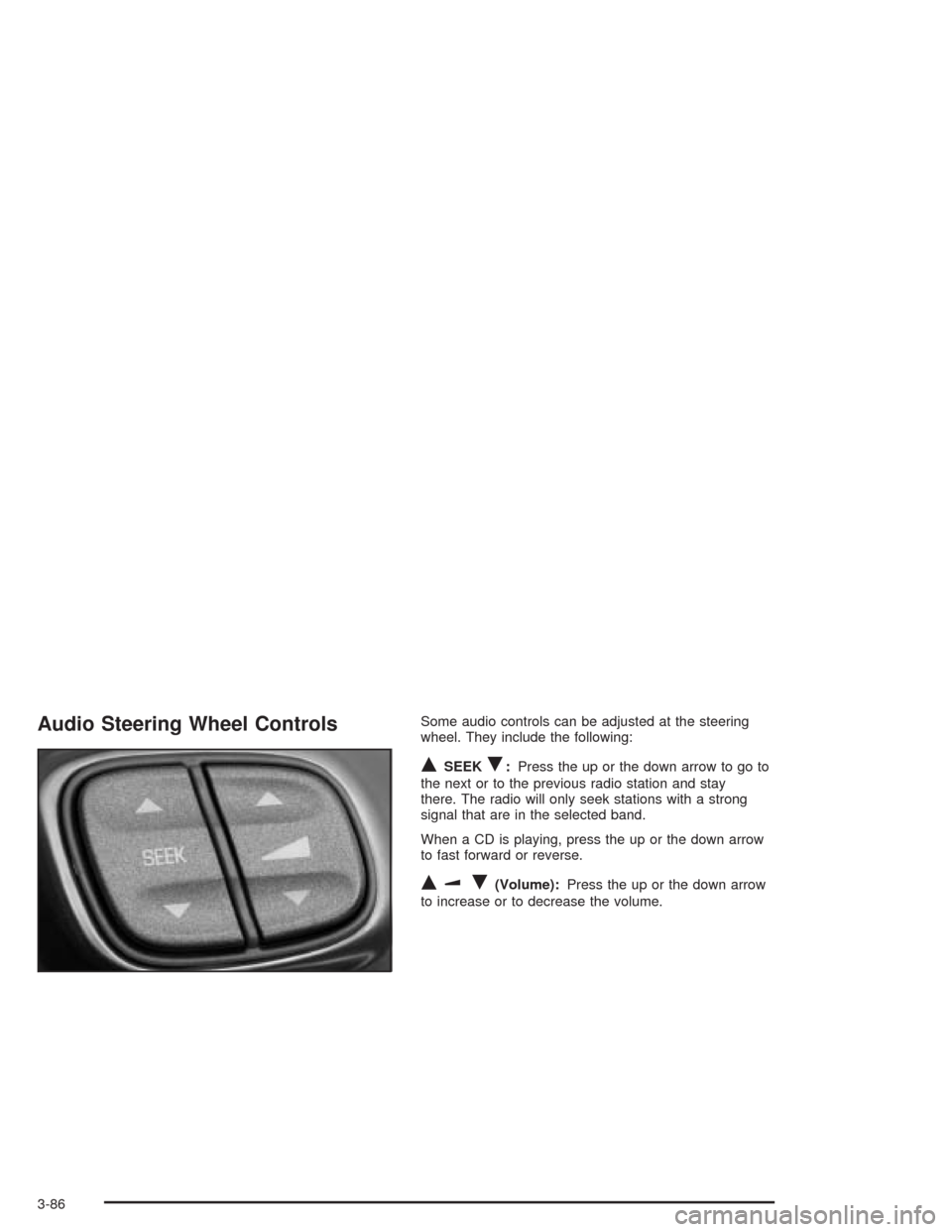
Audio Steering Wheel ControlsSome audio controls can be adjusted at the steering
wheel. They include the following:
QSEEKR:Press the up or the down arrow to go to
the next or to the previous radio station and stay
there. The radio will only seek stations with a strong
signal that are in the selected band.
When a CD is playing, press the up or the down arrow
to fast forward or reverse.
QuR(Volume):Press the up or the down arrow
to increase or to decrease the volume.
3-86
Page 293 of 398
Vehicle Storage
If you are not going to drive your vehicle for 25 days
or more, remove the black, negative (−) cable from the
battery. This will help keep your battery from
running down.
{CAUTION:
Batteries have acid that can burn you and
gas that can explode. You can be badly hurt if
you are not careful. SeeJump Starting on
page 5-37for tips on working around a battery
without getting hurt.
Contact your dealer to learn how to prepare your
vehicle for longer storage periods.
Also, for your audio system, seeTheft-Deterrent
Feature on page 3-85.
Jump Starting
If your battery has run down, you may want use another
vehicle and some jumper cables to start your vehicle.
Be sure to follow the steps below to do it safely.
{CAUTION:
Batteries can hurt you. They can be dangerous
because:
They contain acid that can burn you.
They contain gas that can explode or
ignite.
They contain enough electricity to
burn you.
If you do not follow these steps exactly, some
or all of these things can hurt you.
5-37
Page 383 of 398
A
Accessing the Tire Inator Kit...........................5-68
Accessory Power Outlets.................................3-17
Adding Washer Fluid.......................................5-32
Additional Program Information.........................7-10
Additives, Fuel................................................. 5-6
Add-On Electrical Equipment............................5-83
Add-On Equipment..........................................4-38
Adjusting the Speakers (Balance/Fade)......3-64, 3-74
Air Bag
Off Light.....................................................3-28
Readiness Light..........................................3-26
Air Bag Systems.............................................1-42
Air Bag Off Switch.......................................1-51
How Does an Air Bag Restrain?....................1-48
Servicing Your Air Bag-Equipped Vehicle.........1-55
What Makes an Air Bag Inate?....................1-48
What Will You See After an Air Bag Inates?......1-49
When Should an Air Bag Inate?...................1-47
Where Are the Air Bags?..............................1-45
Air Cleaner/Filter, Engine.................................5-19
Air Compressor..............................................5-69
Airbag Sensing and Diagnostic Module (SDM)....7-10
AM ...............................................................3-87
Antenna, Integrated Windshield.........................3-87
Anti-lock Brake System..................................... 4-7
Anti-Lock Brake, System Warning Light..............3-31Appearance Care............................................5-74
Care of Safety Belts....................................5-77
Chemical Paint Spotting...............................5-80
Cleaning the Inside of Your Vehicle................5-74
Cleaning the Outside of Your Vehicle..............5-77
Finish Damage............................................5-80
Sheet Metal Damage...................................5-80
Underbody Maintenance...............................5-80
Vehicle Care/Appearance Materials................5-81
Weatherstrips..............................................5-77
Ashtrays........................................................3-18
Audio System(s).............................................3-61
Audio Steering Wheel Controls......................3-86
Care of Your CD Player...............................3-87
Care of Your CDs........................................3-87
Integrated Windshield Antenna.......................3-87
Radio with CD............................................3-62
Radio with Six-Disc CD................................3-71
Setting the Time..........................................3-61
Theft-Deterrent Feature................................3-85
Understanding Radio Reception.....................3-87
Automatic Headlamp System............................3-13
Automatic Transmission
Fluid..........................................................5-20
Operation...................................................2-16
Auxiliary Gage Package...................................3-41
1
Page 395 of 398

Specications, Capacities.................................5-92
Speedometer..................................................3-25
Starting Your Engine.......................................2-15
Steering........................................................4-11
Steering in Emergencies..................................4-12
Steering Tips..................................................4-11
Steering Wheel Controls, Audio.........................3-86
Steering Wheel, Tilt Wheel................................. 3-5
Stop Vehicle..................................................3-54
Storage
Side-Saddle................................................2-41
Storage Areas
Cargo Net System.......................................2-36
Center Console Storage Area........................2-30
Cupholder(s)...............................................2-30
Glove Box..................................................2-30
Instrument Panel Storage Area......................2-30
Map Pocket................................................2-30
Stuck in Sand, Mud, Ice or Snow......................4-31
Sun Visors.....................................................2-11
Switchbanks
Center Console...........................................3-17
T
Tachometer....................................................3-25
Tailgate........................................................... 2-8Taillamps.......................................................5-47
TCS Warning Light..........................................3-31
Temperature Knob...........................................3-19
Testing the Alarm............................................2-12
Theft-Deterrent, Radio.....................................3-85
Theft-Deterrent Systems...................................2-11
Content Theft-Deterrent................................2-11
Passlock
®...................................................2-13
Tilt Wheel........................................................ 3-5
Tire Inator Kit Storage....................................5-73
Tire Sealant...................................................5-68
Tire Sidewall Labeling......................................5-52
Tire Size.......................................................5-54
Tire Terminology and Denitions........................5-55
Tires.............................................................5-51
Buying New Tires........................................5-60
Chains.......................................................5-65
If a Tire Goes Flat.......................................5-66
Ination - Tire Pressure................................5-58
Inspection and Rotation................................5-59
Tire Inator Kit............................................5-67
Uniform Tire Quality Grading.........................5-61
Wheel Alignment and Tire Balance.................5-63
Wheel Replacement.....................................5-63
When It Is Time for New Tires......................5-60
13