steering CHEVROLET SSR 2004 1.G User Guide
[x] Cancel search | Manufacturer: CHEVROLET, Model Year: 2004, Model line: SSR, Model: CHEVROLET SSR 2004 1.GPages: 398, PDF Size: 2.49 MB
Page 121 of 398

Tilt Wheel
A tilt wheel allows you to adjust the steering wheel
before you drive. You can raise it to the highest level to
allow more room for the driver to enter and exit the
vehicle.
The tilt lever is located on
the driver’s side of the
steering column, under the
turn signal lever.
To tilt, hold the steering wheel and pull the tilt lever
toward you. Move the wheel to a comfortable level, then
release the tilt lever to lock the wheel in place.
Do not adjust the steering wheel while driving.
Turn Signal/Multifunction Lever
The lever on the left side of the steering column
includes the following:
GTurn and Lane Change Signals
3Headlamp High/Low-Beam Changer
Flash-to-Pass Feature
NWindshield Wipers
JQWindshield Washer
ICruise Control
3-5
Page 128 of 398

Exterior Lamps
O(Exterior and Interior Lamps Controls):These
controls (B) are located to the left of the steering wheel
and are used to operate the exterior and interior
lamps. Information on the exterior lamps follows.
D(Interior Lamps Control):The interior lamp control
(A) is used to adjust the brightness of the instrument
panel lights. For more information on interior lamps, see
Interior Lamps on page 3-15.The exterior lamps control operates the following
systems:
Headlamps
Taillamps
Parking Lamps
License Lamps
Sidemarker Lamps
Instrument Panel Lights
Interior Courtesy Lamps
O(Fog Lamp Indicator Light):This light illuminates
when the fog lamps are turned on. See “Fog Lamps”
later in this section for more information.
AUTO (Automatic Headlamp System):Turning the
exterior lamps control to this position activates the
automatic headlamp system. See “Automatic Headlamp
System” following in this section for more information.
;(Parking Lamps):Turning the exterior lamps
control to this position turns on the parking lamps,
license plate lamps, the sidemarker lamps and
the instrument panel lights.
2(Headlamps):Turning the exterior lamps control to
this position turns on the headlamps, together with
the previously listed lamps and lights.
3-12
Page 131 of 398
Interior Lamps
Instrument Panel BrightnessO
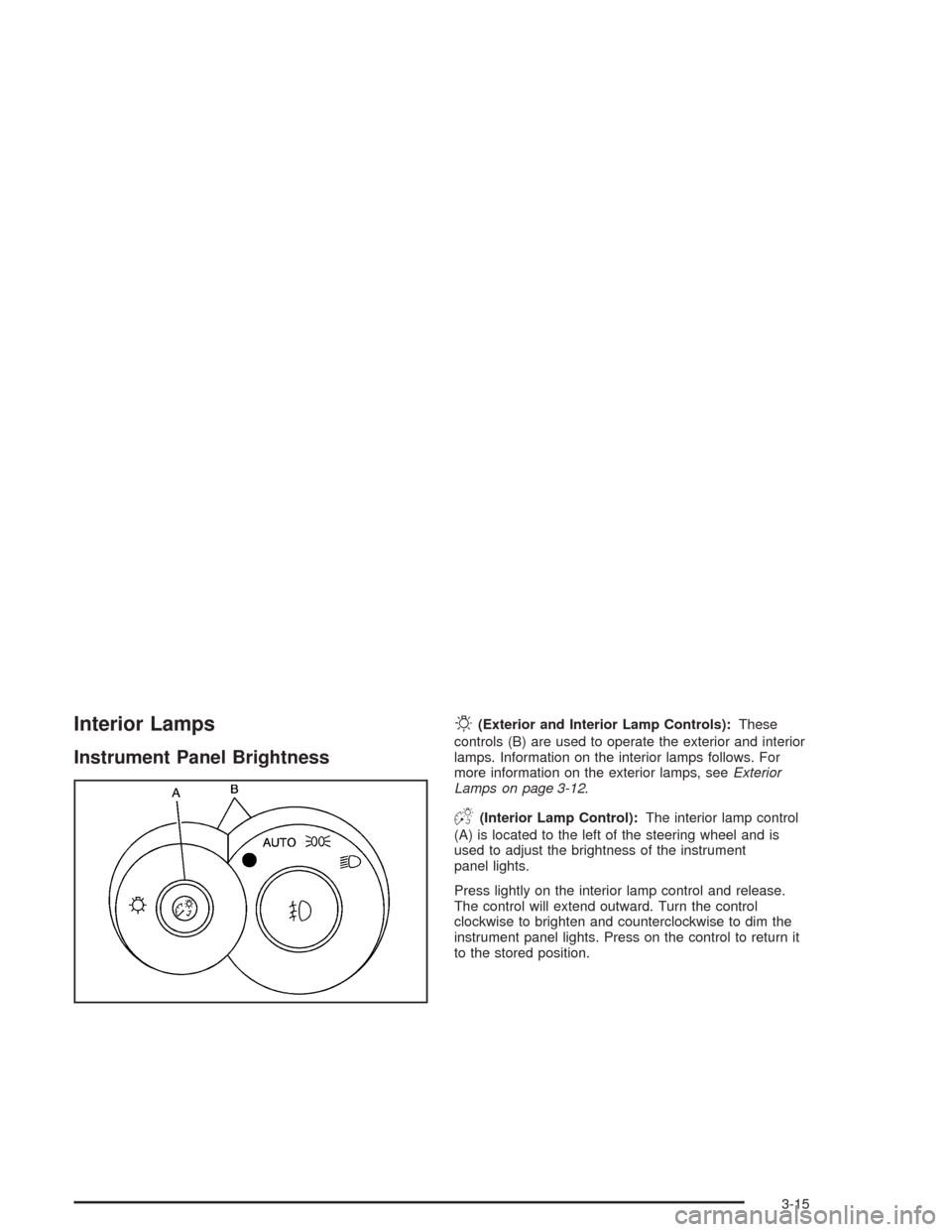
(Exterior and Interior Lamp Controls):These
controls (B) are used to operate the exterior and interior
lamps. Information on the interior lamps follows. For
more information on the exterior lamps, seeExterior
Lamps on page 3-12.
D(Interior Lamp Control):The interior lamp control
(A) is located to the left of the steering wheel and is
used to adjust the brightness of the instrument
panel lights.
Press lightly on the interior lamp control and release.
The control will extend outward. Turn the control
clockwise to brighten and counterclockwise to dim the
instrument panel lights. Press on the control to return it
to the stored position.
3-15
Page 141 of 398
Speedometer and Odometer
The speedometer lets you see your speed in both miles
per hour (mph) and kilometers per hour (km/h).
The odometer shows how far your vehicle has been
driven, in either miles (used in the United States)
or kilometers (used in Canada).
The odometer mileage can be checked without the
vehicle running. Turn the ignition to RUN and press the
trip information button located on the steering wheel.
SeeDIC Controls and Displays on page 3-44for more
information.
You may wonder what happens if your vehicle needs a
new odometer installed. If the new one can be set to
the mileage total of the old odometer, then it must
be. But if it can’t, then it’s set at zero, and a label must
be put on the driver’s door to show the old mileage
reading when the new odometer was installed.
Trip Odometer
The trip odometer can tell you how far your vehicle
has been driven since you last set the trip odometer
to zero.
Your trip odometer is part of your Driver Information
Center (DIC). The trip information button toggles
to display your trip odometer, Trip A, and Trip B
functions. See “Trip Odometer” underDIC Controls and
Displays on page 3-44for more information.
Tachometer
Notice:If you operate the engine with the
tachometer in the shaded warning area, your vehicle
could be damaged, and the damages would not
be covered by your warranty. Do not operate
the engine with the tachometer in the shaded
warning area.
The tachometer displays the engine speed in revolutions
per minute (rpm).
Fuel will shut off at about 6500 rpm. It will turn back on
again once the vehicle rpm drops below 6500.
3-25
Page 160 of 398

The following situations can cause the transmission to
operate at higher temperatures:
Towing a trailer
Hot outside air temperatures
Hauling a large or heavy load
Low transmission uid level
High transmission uid level
Engine overheating
A temporary solution to hotter transmission operating
temperatures may be to let the transmission cool down.
If the transmission is operated at higher temperatures
on a frequent basis, seeScheduled Maintenance
on page 6-4for the proper transmission maintenance
intervals.
Driver Information Center (DIC)
The Driver Information Center (DIC) gives you the
status of many of your vehicle’s systems. It is also used
to display driver personalization features and
warning/status messages. The DIC display is located on
the instrument panel cluster. The DIC buttons are
located on the steering wheel.
The DIC comes on when the ignition is on. After a short
delay the DIC will display the current driver and the
information that was last displayed before the engine
was turned off.
If a problem is detected, a warning message will appear
on the display. Be sure to take any message that
appears on the display seriously and remember that
clearing the message will only make the message
disappear, not correct the problem.
DIC Controls and Displays
The DIC has different modes which can be accessed by
pressing the four buttons located on the steering wheel.
The button functions are listed in the following pages.
3-44
Page 171 of 398

Turn Signal On
If a turn signal is left on for 3/4 mile (1.2 km), this
message will appear on the display and you will hear a
chime. Move the turn signal/multifunction lever to the
off position. Press the select button to acknowledge this
message and clear it from the display. SeeTurn
Signal/Multifunction Lever on page 3-5for more
information.
Unknown Speed
This message will be displayed when trying to raise or
lower the convertible top and the roof controller
cannot communicate with the Powertrain Control
Module (PCM). See your dealer for service.
DIC Vehicle Personalization
Your vehicle has a personalization feature that allows
you to program certain features to a preferred setting for
up to two drivers. The number of programmable
features varies depending upon which model of the
vehicle you purchased. Once the features are
programmed, the saved settings are recalled by pressing
the unlock button on the remote keyless entry
transmitter, 1 or 2, or by pressing the appropriatememory button, 1 or 2, located on the outboard side of
the driver’s seat. SeeMemory Seat on page 2-52
for more information.
The following is a list of available programmable
options:
AUTOMATIC LOCKING
AUTOMATIC UNLOCKING
REMOTE LOCK FEEDBACK
REMOTE UNLOCK FEEDBACK
HEADLAMPS ON AT EXIT
PERIMETER LIGHTING
SEAT POSITION RECALL (If equipped)
DISPLAY LANGUAGE
DISPLAY UNITS (U.S./MET)
y(Personalization):Press this button located on the
steering wheel to access the vehicle personalization
menu and customize the personalization settings
on your vehicle.
3-55
Page 202 of 398
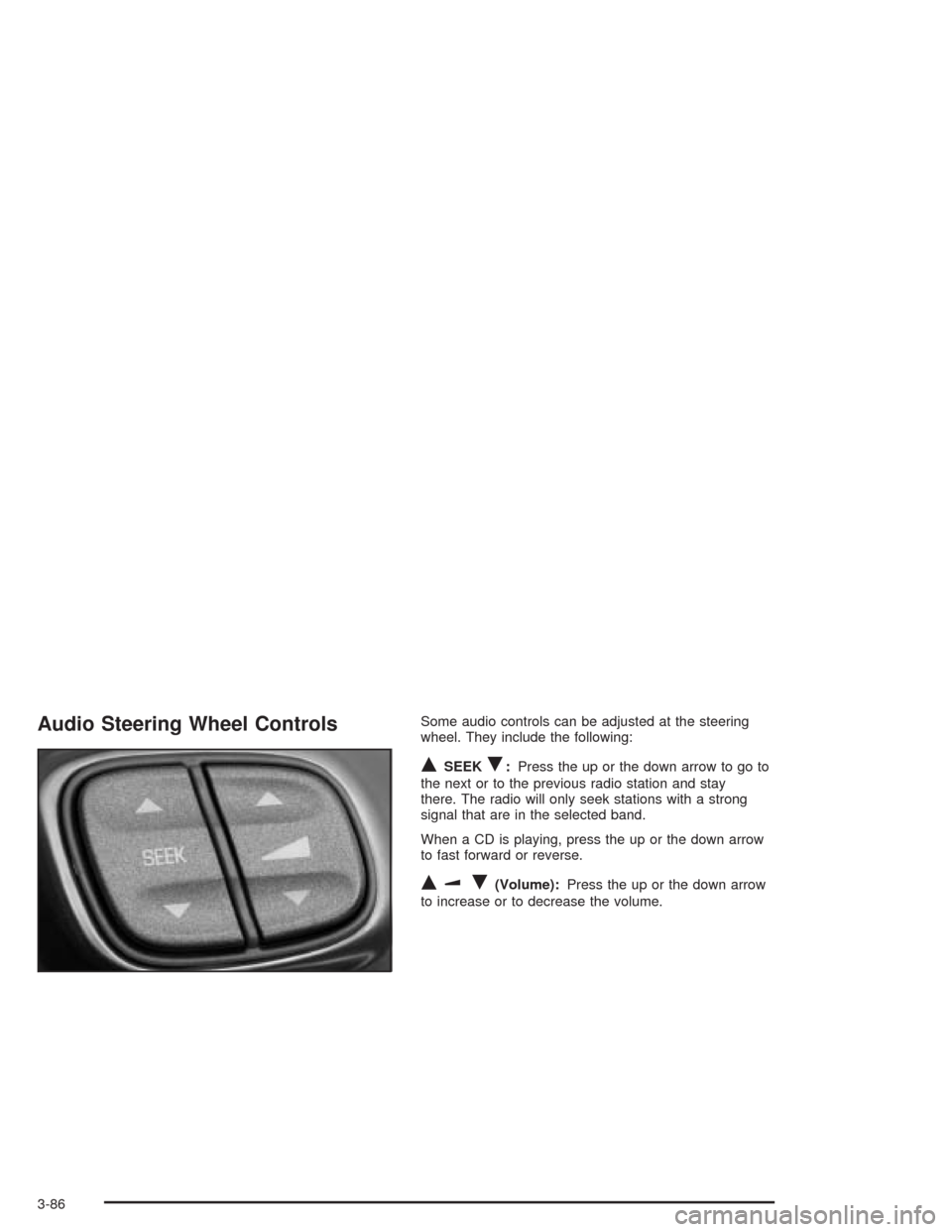
Audio Steering Wheel ControlsSome audio controls can be adjusted at the steering
wheel. They include the following:
QSEEKR:Press the up or the down arrow to go to
the next or to the previous radio station and stay
there. The radio will only seek stations with a strong
signal that are in the selected band.
When a CD is playing, press the up or the down arrow
to fast forward or reverse.
QuR(Volume):Press the up or the down arrow
to increase or to decrease the volume.
3-86
Page 205 of 398
Your Driving, the Road, and Your Vehicle..........4-2
Defensive Driving...........................................4-2
Drunken Driving.............................................4-3
Control of a Vehicle........................................4-6
Braking.........................................................4-6
Traction Control System (TCS).........................4-9
Steering......................................................4-11
Off-Road Recovery.......................................4-13
Passing.......................................................4-13
Loss of Control.............................................4-15
Driving at Night............................................4-16
Driving in Rain and on Wet Roads..................4-17
City Driving..................................................4-20Freeway Driving...........................................4-21
Before Leaving on a Long Trip.......................4-23
Highway Hypnosis........................................4-24
Hill and Mountain Roads................................4-24
Winter Driving..............................................4-26
If You Are Stuck: In Sand, Mud, Ice or Snow . . .4-31
Towing..........................................................4-32
Towing Your Vehicle.....................................4-32
Recreational Vehicle Towing...........................4-32
Loading Your Vehicle....................................4-32
Trailer Recommendations...............................4-38
Towing a Trailer...........................................4-39
Section 4 Driving Your Vehicle
4-1
Page 210 of 398
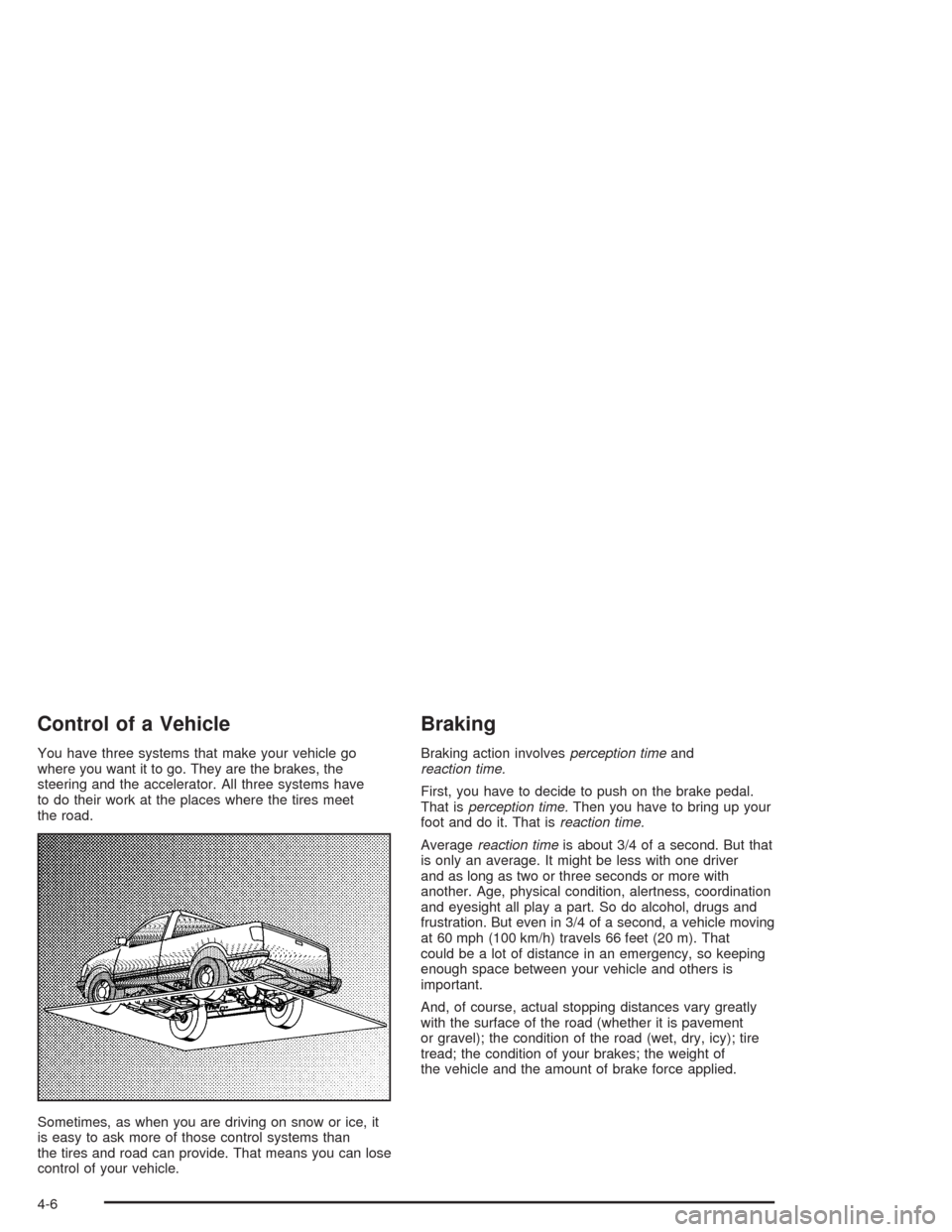
Control of a Vehicle
You have three systems that make your vehicle go
where you want it to go. They are the brakes, the
steering and the accelerator. All three systems have
to do their work at the places where the tires meet
the road.
Sometimes, as when you are driving on snow or ice, it
is easy to ask more of those control systems than
the tires and road can provide. That means you can lose
control of your vehicle.
Braking
Braking action involvesperception timeand
reaction time.
First, you have to decide to push on the brake pedal.
That isperception time.Then you have to bring up your
foot and do it. That isreaction time.
Averagereaction timeis about 3/4 of a second. But that
is only an average. It might be less with one driver
and as long as two or three seconds or more with
another. Age, physical condition, alertness, coordination
and eyesight all play a part. So do alcohol, drugs and
frustration. But even in 3/4 of a second, a vehicle moving
at 60 mph (100 km/h) travels 66 feet (20 m). That
could be a lot of distance in an emergency, so keeping
enough space between your vehicle and others is
important.
And, of course, actual stopping distances vary greatly
with the surface of the road (whether it is pavement
or gravel); the condition of the road (wet, dry, icy); tire
tread; the condition of your brakes; the weight of
the vehicle and the amount of brake force applied.
4-6
Page 213 of 398

Remember: Anti-lock does not change the time you
need to get your foot up to the brake pedal or always
decrease stopping distance. If you get too close to
the vehicle in front of you, you will not have time to apply
your brakes if that vehicle suddenly slows or stops.
Always leave enough room up ahead to stop, even
though you have anti-lock brakes.
Using Anti-Lock
Do not pump the brakes. Just hold the brake pedal
down rmly and let anti-lock work for you. You may feel
the brakes vibrate, or you may notice some noise,
but this is normal.
Braking in Emergencies
With anti-lock, you can steer and brake at the same
time. In many emergencies, steering can help you more
than even the very best braking.
Traction Control System (TCS)
Your vehicle has a Traction Control System (TCS) that
limits wheel spin. This is especially useful in slippery
road conditions. The system operates only if it senses
that one or both of the rear wheels are spinning or
beginning to lose traction. When this happens,
the system reduces engine power and may also upshift
the transmission to limit wheel spin.
You may feel or hear the system working, but this is
normal.
If your vehicle is in cruise control when the traction
control system begins to limit wheel spin, the cruise
control will automatically disengage. When road
conditions allow you to safely use it again, you may
re-engage the cruise control. See “Cruise Control”
inTurn Signal/Multifunction Lever on page 3-5.
The Traction Control System operates in all transmission
shift lever positions. But the system can upshift the
transmission only as high as the shift lever position
you’ve chosen, so you should use the lower gears only
when necessary. SeeAutomatic Transmission
Operation on page 2-16.
4-9