radio CHEVROLET SSR 2005 1.G Owners Manual
[x] Cancel search | Manufacturer: CHEVROLET, Model Year: 2005, Model line: SSR, Model: CHEVROLET SSR 2005 1.GPages: 388, PDF Size: 2.5 MB
Page 63 of 388

Trailer Hitch Keys
If your vehicle has the GM Accessory Trailer Hitch,
three keys are provided for the receiving hitch lock.
All three keys operate the receiving hitch lock.
See “Hitches” underTowing a Trailer on page 4-35
for additional information.
Remote Keyless Entry System
Your keyless entry system operates on a radio
frequency subject to Federal Communications
Commission (FCC) Rules and with Industry Canada.
This device complies with Part 15 of the FCC Rules.
Operation is subject to the following two conditions:
1. This device may not cause interference.
2. This device must accept any interference received,
including interference that may cause undesired
operation of the device.
This device complies with RSS-210 of Industry Canada.
Operation is subject to the following two conditions:
1. This device may not cause interference.
2. This device must accept any interference received,
including interference that may cause undesired
operation of the device.
Changes or modications to this system by other than
an authorized service facility could void authorization to
use this equipment.
2-5
Page 74 of 388
Ignition Positions
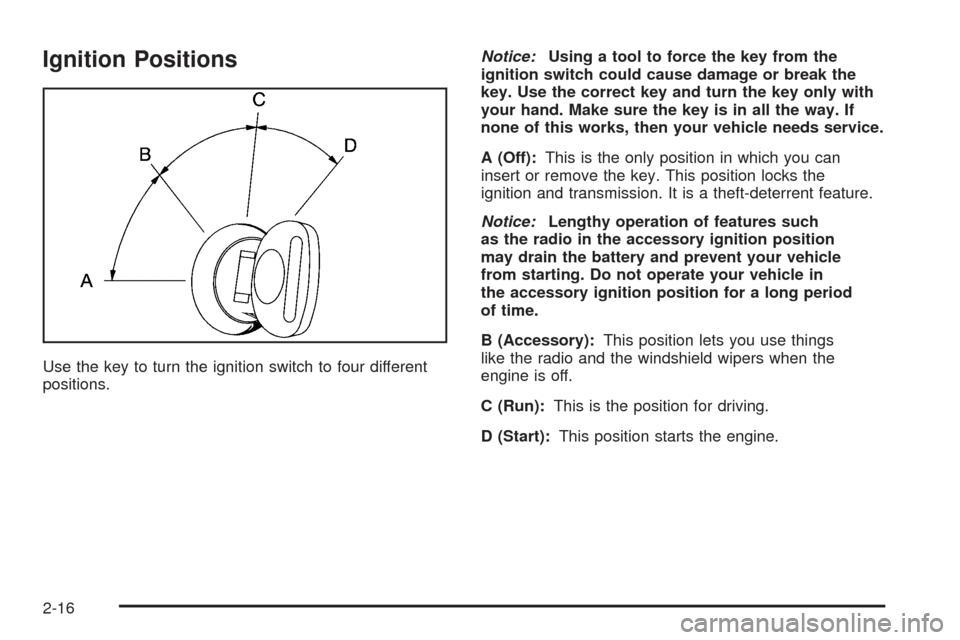
Use the key to turn the ignition switch to four different
positions.Notice:Using a tool to force the key from the
ignition switch could cause damage or break the
key. Use the correct key and turn the key only with
your hand. Make sure the key is in all the way. If
none of this works, then your vehicle needs service.
A (Off):This is the only position in which you can
insert or remove the key. This position locks the
ignition and transmission. It is a theft-deterrent feature.
Notice:Lengthy operation of features such
as the radio in the accessory ignition position
may drain the battery and prevent your vehicle
from starting. Do not operate your vehicle in
the accessory ignition position for a long period
of time.
B (Accessory):This position lets you use things
like the radio and the windshield wipers when the
engine is off.
C (Run):This is the position for driving.
D (Start):This position starts the engine.
2-16
Page 75 of 388
Key Release Button
(Manual Transmission)
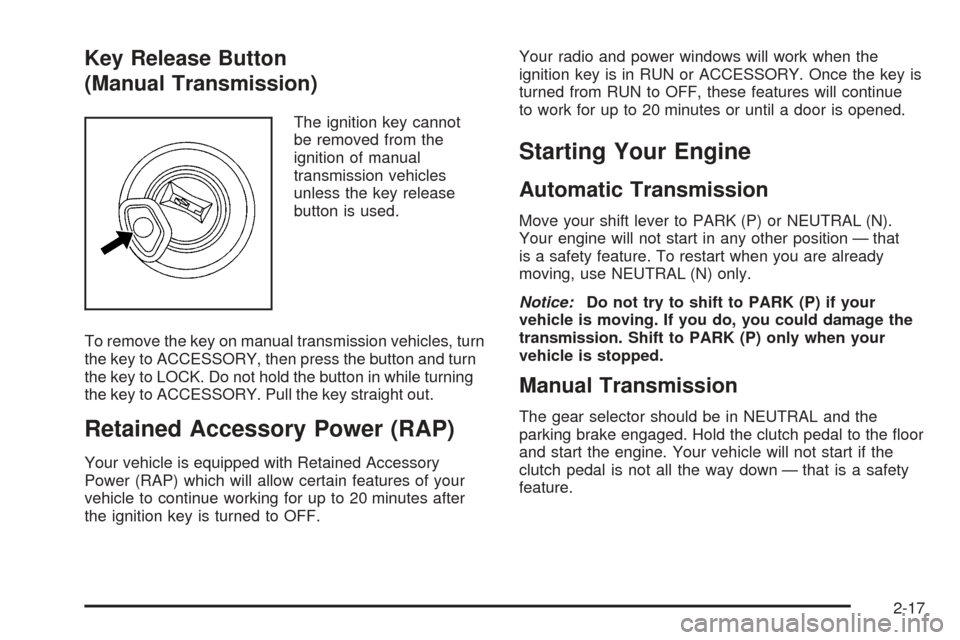
The ignition key cannot
be removed from the
ignition of manual
transmission vehicles
unless the key release
button is used.
To remove the key on manual transmission vehicles, turn
the key to ACCESSORY, then press the button and turn
the key to LOCK. Do not hold the button in while turning
the key to ACCESSORY. Pull the key straight out.
Retained Accessory Power (RAP)
Your vehicle is equipped with Retained Accessory
Power (RAP) which will allow certain features of your
vehicle to continue working for up to 20 minutes after
the ignition key is turned to OFF.Your radio and power windows will work when the
ignition key is in RUN or ACCESSORY. Once the key is
turned from RUN to OFF, these features will continue
to work for up to 20 minutes or until a door is opened.
Starting Your Engine
Automatic Transmission
Move your shift lever to PARK (P) or NEUTRAL (N).
Your engine will not start in any other position — that
is a safety feature. To restart when you are already
moving, use NEUTRAL (N) only.
Notice:Do not try to shift to PARK (P) if your
vehicle is moving. If you do, you could damage the
transmission. Shift to PARK (P) only when your
vehicle is stopped.
Manual Transmission
The gear selector should be in NEUTRAL and the
parking brake engaged. Hold the clutch pedal to the oor
and start the engine. Your vehicle will not start if the
clutch pedal is not all the way down — that is a safety
feature.
2-17
Page 89 of 388
If your vehicle is equipped with the HomeLink®
Transmitter, it complies with Part 15 of the FCC Rules.
Operation is subject to the following two conditions:
(1) this device may not cause harmful interference, and
(2) this device must accept any interference received,
including interference that may cause undesired
operation.
This device complies with RSS-210 of Industry Canada.
Operation is subject to the following two conditions:
(1) this device may not cause interference, and (2) this
device must accept any interference received,
including interference that may cause undesired
operation of the device.
Changes and modications to this system by other than
an authorized service facility could void authorization
to use this equipment.
Programming the HomeLink®
Do not use the HomeLink®Transmitter with any garage
door opener that does not have the “stop and reverse”
feature. This includes any garage door opener model
manufactured before April 1, 1982. If you have a newer
garage door opener with rolling codes, please be
sure to follow Steps 6 through 8 to complete the
programming of your HomeLink
®Transmitter.Read the instructions completely before attempting to
program the HomeLink
®Transmitter. Because of
the steps involved, it may be helpful to have another
person available to assist you in programming the
transmitter.
Keep the original transmitter for use in other vehicles
as well as for future HomeLink
®programming. It is
also recommended that upon the sale of the vehicle,
the programmed HomeLink
®buttons should be erased
for security purposes. Refer to “Erasing HomeLink®
Buttons” or, for assistance, contact HomeLink®on the
Internet at: www.homelink.com or by calling
1-800-355-3515.
Be sure that people and objects are clear of the garage
door or gate operator you are programming. When
programming a garage door, it is advised to park outside
of the garage.
It is recommended that a new battery be installed in
your hand-held transmitter for quicker and more
accurate transmission of the radio frequency.
2-31
Page 91 of 388
8. Return to the vehicle. Firmly press and hold the
programmed HomeLink®button for two seconds,
then release. Repeat the press/hold/release
sequence a second time, and depending on the
brand of the garage door opener (or other rolling
code device), repeat this sequence a third time
to complete the programming.
HomeLink
®should now activate your rolling-code
equipped device.
To program the remaining two HomeLink
®buttons,
begin with Step 2 of “Programming HomeLink®.”
You do not want to repeat Step 1, as this will erase
all previous programming.
Gate Operator and Canadian
Programming
Canadian radio-frequency laws require transmitter
signals to “time out” or quit after several seconds
of transmission. This may not be long enough for
HomeLink
®to pick up the signal during programming.
Similarly, some U.S. gate operators are manufactured
to “time out” in the same manner.If you live in Canada, or you are having difficulty
programming a gate operator by using the
“Programming HomeLink
®” procedures (regardless of
where you live), replace Step 3 under “Programming
HomeLink
®” with the following:
Continue to press and hold the HomeLink
®button
while you press and release every two seconds (cycle)
your hand-held transmitter until the frequency signal
has been successfully accepted by HomeLink
®.
The indicator light will ash slowly at rst and then
rapidly. Proceed with Step 4 under “Programming
HomeLink
®” to complete.
Using HomeLink®
Press and hold the appropriate HomeLink®button
for at least half of a second. The indicator light will
come on while the signal is being transmitted.
2-33
Page 120 of 388

Change Engine Oil Light................................3-37
Security Light...............................................3-37
Cruise Control Light......................................3-37
Reduced Engine Power Light.........................3-38
Highbeam On Light.......................................3-38
Check Gages Warning Light...........................3-38
Fuel Gage...................................................3-39
Auxiliary Gage Package.................................3-40
Driver Information Center (DIC).......................3-42
DIC Controls and Displays.............................3-42
DIC Warnings and Messages.........................3-45
DIC Vehicle Personalization............................3-52Audio System(s).............................................3-58
Setting the Time...........................................3-59
Radio with CD..............................................3-59
Radio with Six-Disc CD.................................3-71
Theft-Deterrent Feature..................................3-82
Audio Steering Wheel Controls.......................3-82
Radio Reception...........................................3-83
Care of Your CDs.........................................3-83
Care of Your CD Player................................3-83
Integrated Windshield Antenna........................3-83
Section 3 Instrument Panel
3-2
Page 132 of 388

Daytime Running Lamps (DRL)
Daytime Running Lamps (DRL) can make it easier for
others to see the front of your vehicle during the
day. DRL can be helpful in many different driving
conditions, but they can be especially helpful in the short
periods after dawn and before sunset. Fully functional
daytime running lamps are required on all vehicles
®rst sold in Canada.
The DRL system will make your headlamps come
on at reduced brightness when the following conditions
are met:
·The ignition is on,
·the exterior lamps knob is in AUTO,
·the light sensor detects daytime light, and
·the automatic transmission is not in PARK (P)
or the parking brake is not set on a manual
transmission.
When the DRL are on, only your headlamps will be on.
The taillamps, sidemarker and other lamps won't be
on. The instrument panel won't be lit up either. When it begins to get dark, the headlamps will
automatically switch from DRL to the regular headlamps.
To idle your vehicle with the DRL off, put your
automatic transmission in PARK (P). The DRL will
stay off until you shift out of PARK (P). If you have a
manual transmission, set the parking brake when
the ignition is off and then start your vehicle. The DRL
will stay off until you release the parking brake.
Automatic Headlamp System
When it is dark enough outside, your automatic
headlamp system will turn on your headlamps at the
normal brightness along with other lamps such as
the taillamps, sidemarker, parking lamps and the
instrument panel lights when the exterior lamps knob is
turned to AUTO. See
Exterior Lamps on page 3-12for more information. The radio lights will also be on.
Your vehicle is equipped with a light sensor on the top
of the instrument panel. Be sure it is not covered or
the system will be on whenever the ignition is on.
The system may also turn on your lights when driving
through a parking garage, heavy overcast weather
or a tunnel. This is normal.
3-14
Page 136 of 388
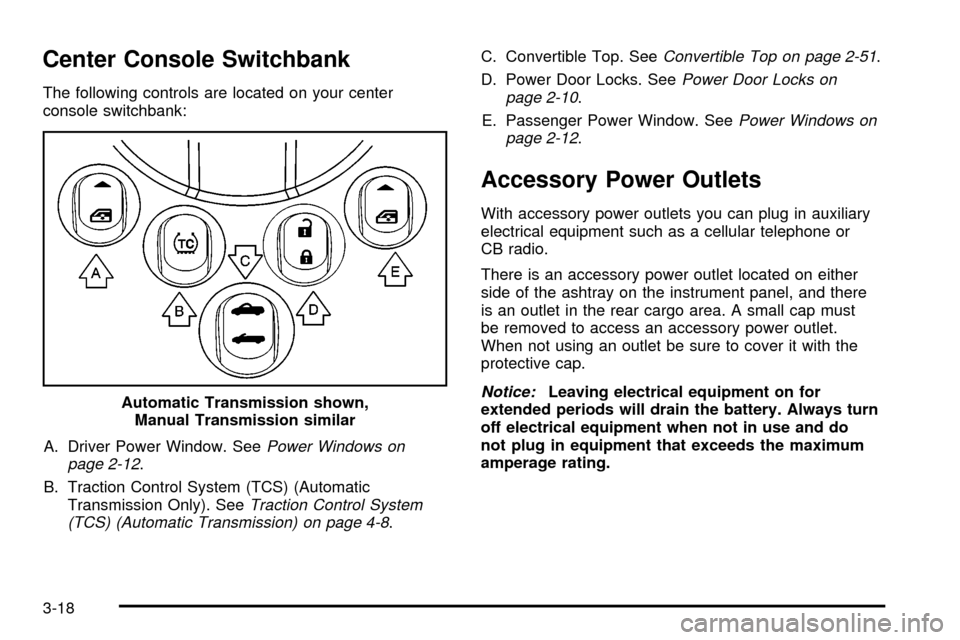
Center Console Switchbank
The following controls are located on your center
console switchbank:A. Driver Power Window. See
Power Windows on
page 2-12.
B. Traction Control System (TCS) (Automatic Transmission Only). See
Traction Control System
(TCS) (Automatic Transmission) on page 4-8. C. Convertible Top. See
Convertible Top on page 2-51.
D. Power Door Locks. See
Power Door Locks on
page 2-10.
E. Passenger Power Window. See
Power Windows on
page 2-12.
Accessory Power Outlets
With accessory power outlets you can plug in auxiliary
electrical equipment such as a cellular telephone or
CB radio.
There is an accessory power outlet located on either
side of the ashtray on the instrument panel, and there
is an outlet in the rear cargo area. A small cap must
be removed to access an accessory power outlet.
When not using an outlet be sure to cover it with the
protective cap.
Notice:Leaving electrical equipment on for
extended periods will drain the battery. Always turn
off electrical equipment when not in use and do
not plug in equipment that exceeds the maximum
amperage rating.
Automatic Transmission shown,
Manual Transmission similar
3-18
Page 147 of 388

{CAUTION:
If the airbag readiness light ever comes on
when you have turned off the passenger's
frontal airbag, it means that something may be
wrong with the airbag system. The passenger's
frontal airbag could in¯ate even though the
switch is off. If this ever happens, do not let
anyone whom the national government has
identi®ed as a member of a passenger airbag
risk group sit in the passenger's position
(for example, do not secure a rear-facing
child restraint in your vehicle) until you have
your vehicle serviced. See
Airbag Off Switch
on page 1-47
.
Charging System Light
The charging system light
will come on brie¯y when
you turn on the ignition,
but the engine is not
running, as a check to
show you it is working.
It should go out once the engine is running. If it stays
on, or comes on while you are driving, you may have
a problem with the charging system. It could indicate
that you have problems with a generator drive belt, or
another electrical problem. Have it checked right
away. Driving while this light is on could drain your
battery.
If you must drive a short distance with the light on,
be certain to turn off all your accessories, such as the
radio and air conditioner.
3-29
Page 176 of 388
Display Units ± U.S./MET
The feature allows you to choose the measurement
units. Press the personalization button until DISPLAY
UNITS ± U.S./MET appears in the display. To access
the modes for DISPLAY UNITS ± U.S./MET, press
the select button. Once DISPLAY UNITS ± U.S./MET is
selected, press the select button to scroll through the
following modes:
Mode 1:UNITS: U.S. (ENGLISH)
Mode 2: UNITS: METRIC (km/L)
Mode 3: UNITS: METRIC (L/100km)
If you choose Mode 1, all information will be displayed
in English units.
If you choose Mode 2 or 3, all information will be
displayed in metric units.
Scroll through the list of modes. When the mode you
want is displayed on the DIC, press the personalization
button to set your choice, return to the personalization
menu, and advance to the next programmable feature.
Audio System(s)
Notice:Before adding any sound equipment to
your vehicle, like a tape player, CB radio, mobile
telephone, or two-way radio, make sure that it can
be added by checking with your dealer. Also,
check federal rules covering mobile radio and
telephone units. If sound equipment can be added,
it is very important to do it properly. Added
sound equipment may interfere with the operation
of your vehicle's engine, radio, or other systems,
and even damage them. Your vehicle's systems may
interfere with the operation of sound equipment
that has been added improperly.
Figure out which audio system is in your vehicle, ®nd
out what your audio system can do, and how to operate
all of its controls.
3-58