roof CHEVROLET SSR 2006 1.G User Guide
[x] Cancel search | Manufacturer: CHEVROLET, Model Year: 2006, Model line: SSR, Model: CHEVROLET SSR 2006 1.GPages: 390, PDF Size: 2.44 MB
Page 162 of 390

Fuel Level Low
If the fuel level is low in the vehicle’s gas tank, this
message will appear on the DIC and you will hear a
chime. You will also see the check gages warning light
on the instrument panel cluster. SeeCheck Gages
Warning Light on page 3-38for more information. Refuel
as soon as possible. SeeFilling the Tank on page 5-8
andFuel Gage on page 3-39for more information. Press
the select button to acknowledge and clear the
message from the display.
Hdr (Header) Latch Switch Fault
This message will be displayed on the DIC when trying
to raise or lower the convertible top and there is a
fault with this switch. If the message persists, see your
GM dealer for service.
Manually Open Tonneau
This message will be displayed on the DIC when trying
to raise or lower the convertible top while the
convertible top and roof tonneau are where the system
cannot verify their position. The roof system may
need to be restored manually to a stable position by
fully opening the roof tonneau and boot cover panel. See
Convertible Top on page 2-45for more information.
Oil Pressure Low Stop Engine
{CAUTION:
Do not keep driving if the oil pressure is low. If
you do, your engine can become so hot that it
catches re. You or others could be burned.
Check your oil as soon as possible and have
your vehicle serviced.
Notice:Lack of proper engine oil maintenance may
damage the engine. The repairs would not be
covered by your warranty. Always follow the
maintenance schedule in this manual for changing
engine oil.
If the oil pressure is low in your vehicle, this message
will be displayed on the DIC. Stop the vehicle as
soon as possible and do not drive it until the cause of
the low oil pressure has been corrected. Check your oil
as soon as possible and have your vehicle serviced
by your GM dealer. SeeEngine Oil on page 5-13andOil
Pressure Gage on page 3-36for more information.
3-48
Page 163 of 390
Passenger Door Ajar
If the passenger’s door is not fully closed, this message
will appear on the display and you will hear a chime.
Stop the vehicle, check the door for obstacles, and close
the door again. Fully closing the passenger’s door will
clear this message from the display, or you can
press the select button to acknowledge the message
and clear it from the DIC display.
Reduce Speed
This message will be displayed on the DIC when trying
to raise or lower the convertible top while the vehicle
is in motion. Stop the vehicle and continue pressing the
brake pedal before trying to raise or lower the top
again. SeeConvertible Top on page 2-45for more
information. The message will clear from the display
once the vehicle is stopped, or you can press the select
button to acknowledge this message and clear it from
the DIC display.
Rfa X Battery Low
If a remote keyless entry transmitter battery is low, this
message will appear on the DIC. The battery needs
to be replaced in the transmitter. Press the select button
to acknowledge this message and clear it from the
DIC display. See “Battery Replacement” underRemote
Keyless Entry System Operation on page 2-6for
battery replacement instructions.
Roof Ajar
This message will be displayed on the DIC when trying
to release the cargo cover and the convertible top is
not fully open or closed. Make sure your convertible top
is in the full-closed or full-open position before trying
to release your cargo cover. SeeConvertible Top
on page 2-45andCargo Cover on page 2-35for more
information. This message will clear once the
convertible top is open or closed, or you can press the
select button to acknowledge the message and clear
it from the DIC display.
If this message repeatedly occurs while not trying to
release the cargo cover, see your GM dealer for service.
Roof Cycle Timeout
This message will be displayed on the DIC when the
convertible top has not completed its movement
from one position to another within the programmed
time limit. When this message appears, the convertible
top will stop moving. Release the convertible top
switch and make sure there is nothing blocking the path
of the top. If the path is clear, press the convertible
top switch again. SeeConvertible Top on page 2-45for
more information.
3-49
Page 164 of 390
When operating the top in low temperatures, such as
below 32°F (0°C), the time needed to cycle the top will
increase. This may cause the top movement to stop
and the Roof Cycle Timeout message to appear on the
DIC display. If this occurs, you may release the
convertible top switch and press it again to continue the
cycle. Make sure nothing is blocking the path of the
top before pressing the switch again. It may be
necessary to do this several times to complete the
cycle, depending on the outside temperature. See
Convertible Top on page 2-45for more information.
Notice:If you operate the convertible top switch
continuously while the ignition is in ACCESSORY,
the battery will drain and you might not be able
to start your vehicle. Do not use the convertible top
switch for extended periods of time when the
ignition is in ACCESSORY.
Roof Hall Switch Fault
This message will be displayed on the DIC when trying
to raise or lower the convertible top and there is a
fault with this switch. If the message persists, see your
GM dealer for service.
Service Air Bag
If there is a problem with the airbag system, this
message will be displayed on the DIC. The airbag
readiness light may also be displayed on the instrument
panel cluster. See your GM dealer for service. Press
the select button to acknowledge this message and clear
it from the display. SeeServicing Your Airbag-Equipped
Vehicle on page 1-51andAirbag Readiness Light on
page 3-27for more information.
Service Brake System
If a problem occurs with the brake system, this message
will appear on the DIC. The brake system warning
light and the anti-lock brake system warning light may
also be displayed on the instrument panel cluster.
SeeBrake System Warning Light on page 3-30and
Anti-Lock Brake System Warning Light on page 3-31for
more information. If this message appears, stop as
soon as possible and turn off the vehicle. Restart the
vehicle and check for the message on the DIC display. If
the message is still displayed, or appears again when
you begin driving, the brake system needs service. See
your GM dealer. SeeBrakes on page 5-32for more
information. Press the select button to acknowledge this
message and clear it from the display.
3-50
Page 166 of 390

Turn Signal On
If a turn signal is left on for 3/4 mile (1.2 km), this
message will appear on the display and you will hear a
chime. Move the turn signal/multifunction lever to the
off position. Press the select button to acknowledge this
message and clear it from the display. SeeTurn
Signal/Multifunction Lever on page 3-7for more
information.
Unknown Speed
This message will be displayed when trying to raise or
lower the convertible top and the roof controller
cannot communicate with the Powertrain Control
Module (PCM). See your GM dealer for service.
DIC Vehicle Personalization
Your vehicle has a personalization feature that allows
you to program certain features to a preferred setting for
up to two drivers. The number of programmable
features varies depending upon which model of the
vehicle you purchased. Once the features are
programmed, the saved settings are recalled by pressing
the unlock button on the remote keyless entry
transmitter, 1 or 2, or by pressing the appropriate
memory button, 1 or 2, located on the outboard side of
the driver’s seat. SeeMemory Seat on page 2-53
for more information.The following is a list of available
programmable options:
•AUTOMATIC LOCKING (Automatic
Transmission only)
•AUTOMATIC UNLOCKING
•REMOTE LOCK FEEDBACK
•REMOTE UNLOCK FEEDBACK
•HEADLAMPS ON AT EXIT
•PERIMETER LIGHTING
•SEAT POSITION RECALL, if equipped
•ALARM WARNING TYPE
•DISPLAY LANGUAGE
•DISPLAY UNITS – U.S./MET
q(Personalization):Press this button located on the
steering wheel to access the vehicle personalization
menu and customize the personalization settings
on your vehicle.
3-52
Page 336 of 390
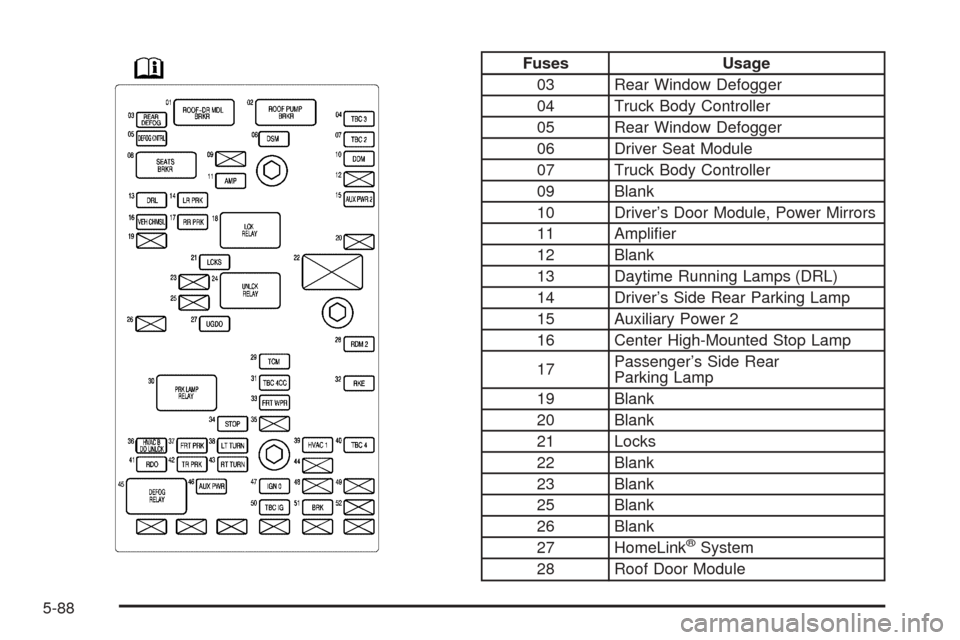
Fuses Usage
03 Rear Window Defogger
04 Truck Body Controller
05 Rear Window Defogger
06 Driver Seat Module
07 Truck Body Controller
09 Blank
10 Driver’s Door Module, Power Mirrors
11 Amplifier
12 Blank
13 Daytime Running Lamps (DRL)
14 Driver’s Side Rear Parking Lamp
15 Auxiliary Power 2
16 Center High-Mounted Stop Lamp
17Passenger’s Side Rear
Parking Lamp
19 Blank
20 Blank
21 Locks
22 Blank
23 Blank
25 Blank
26 Blank
27 HomeLink
®System
28 Roof Door Module
5-88
Page 337 of 390

Fuses Usage
29 Transmission Control Module
31 Truck Body Controller
32 Remote Keyless Entry (RKE)
33 Windshield Wipers
34 Stoplamps
35 Blank
36Climate Control System, Driver’s
Door Unlock
37 Front Parking Lamps
38 Driver’s Side Turn Signal
39 Climate Control System
40 Truck Body Controller
41 Radio
42 Trailer Parking Lamps
43 Passenger’s Side Turn Signal
44 Blank
46 Accessory Power Outlets
47 IgnitionFuses Usage
48 Blank
49 Blank
50 Truck Body Controller, Ignition
51 Brakes
52 Blank
Relays Usage
18 Locks
24 Unlock
30 Parking Lamps
45Rear Window Defogger, Outside
Power Heated Mirrors
Circuit
BreakersUsage
01 Roof & Door Module
02 Roof Pump
08 Power Seats
5-89
Page 340 of 390

Relays Usage
42 Powertrain
43 Starter
44 Fuel Pump
45 Cargo Cover Release
46 Windshield Washer
47 Headlamp Driver Module (HDM)
48 Fog Lamps
49 High Beam Headlamps
50 Horn
51 Air Conditioning
Miscellaneous Usage
52 Instrument Panel Battery
Relay Center
There is a relay center located in the area where the
convertible top is stored when it is open. To access the
relay center, do the following:
1. Open the convertible top until the roof tonneau and
the boot cover panel are upright so that you can
reach into the convertible top storage area as
shown. SeeLowering the Convertible Top on
page 2-47for more information.
5-92