radio CHEVROLET SSR 2006 1.G Owner's Guide
[x] Cancel search | Manufacturer: CHEVROLET, Model Year: 2006, Model line: SSR, Model: CHEVROLET SSR 2006 1.GPages: 390, PDF Size: 2.44 MB
Page 195 of 390
To use repeat, do the following:
•To repeat the track you are listening to, press and
release the RPT button. RPT will appear on the
display. Press RPT again to turn off repeat play.
•To repeat the CD you are listening to, press and
hold the RPT button for two seconds. RPT will
appear on the display. Press RPT again to turn off
repeat play.
RDM (Random):With random, you can listen to the
tracks in random, rather than sequential, order, on
one CD or on all of the CDs. To use random, do one of
the following:
•To play the tracks on the CD you are listening to in
random order, press and release the RDM button.
RANDOM ONE will appear on the display. Press
RDM again to turn off random play.
•To play the tracks on all of the CDs that are loaded
in random order, press and hold RDM for more
than two seconds. You will hear a beep and
RANDOM ALL will appear on the display. Press
RDM again to turn off random play.AUTO EQ (Automatic Equalization):Press AUTO EQ
to select the equalization setting while playing a CD.
The equalization will be stored whenever a CD is played.
For more information on AUTO EQ, see “AUTO EQ”
listed previously in this section.
©SEEK¨:Press the left arrow to go to the start of the
current track, if more than ten seconds have played.
Press the right arrow to go to the next track. If either
arrow is held or pressed more than once, the player will
continue moving backward or forward through the CD.
©SCAN¨:To scan one CD, press and hold either
SCAN arrow for more than two seconds until SCAN
appears on the display and you hear a beep. The radio
will go to the next track, play for 10 seconds, then go
on to the next track. Press either SCAN arrow again, to
stop scanning.
To scan all loaded CDs, press and hold either SCAN
arrow for more than four seconds until CD SCAN
appears on the display and you hear a beep. Use this
feature to listen to 10 seconds of the first track of
each loaded CD. Press either SCAN arrow again, to
stop scanning.
3-81
Page 196 of 390

INFO (Information):Press this knob to see how long
the current track has been playing. To change the
default on the display, track or elapsed time, press the
knob until you see the display you want, then hold
the knob until the display flashes. The selected display
will now be the default.
BAND:Press this button to listen to the radio when a
CD is playing. The inactive CD(s) will remain safely
inside the radio for future listening.
Using Song List Mode
The six-disc CD changer has a feature called song list.
This feature is capable of saving 20 track selections.
To save tracks into the song list feature, perform
the following steps:
1. Turn the CD player on and load it with at least
one CD. See “LOAD CD” listed previously in this
section for more information.
2. Check to see that the CD changer is not in song list
mode. S-LIST should not appear on the display. If
S-LIST is present, press the SONG LIST button
to turn it off.3. Select the desired CD by pressing the numbered
pushbutton and then use the SEEK or TYPE right
arrow to locate the track to be saved. The track will
begin to play.
4. Press and hold the SONG LIST button to save
the track into memory. When SONG LIST is
pressed, one beep will be heard immediately. After
two seconds of continuously pressing the SONG
LIST button, two beeps will sound to confirm
the track has been saved.
5. Repeat Steps 3 and 4 for saving other selections.
S-LIST FULL will appear on the display if you try to save
more than 20 selections.
To play the song list, press the SONG LIST button.
One beep will be heard and S-LIST will appear on the
display. The recorded tracks will begin to play in
the order they were saved.
Seek through the song list by using the SEEK or TYPE
arrows. Seeking past the last saved track will return
to the first saved track.
3-82
Page 198 of 390

CD Messages
CHECK CD:If this message appears on the display
and/or the CD comes out, it could be for one of the
following reasons:
•It is very hot. When the temperature returns to
normal, the CD should play.
•You are driving on a very rough road. When the
road becomes smoother, the CD should play.
•The CD is dirty, scratched, wet, or upside down.
•The air is very humid. If so, wait about an hour and
try again.
•There may have been a problem while burning
the CD.
•The label may be caught in the CD player.
If the CD is not playing correctly, for any other reason,
try a known good CD.
If any error occurs repeatedly or if an error cannot be
corrected, contact your GM dealer. If the radio displays
an error message, write it down and provide it to
your GM dealer when reporting the problem.
Theft-Deterrent Feature
THEFTLOCK®is designed to discourage theft of
your vehicle’s radio. The feature works automatically
by learning a portion of the Vehicle Identification
Number (VIN). If the radio is moved to a different
vehicle, it will not operate and LOCKED will appear on
the display.
When the radio and vehicle are turned off, the blinking
red light indicates that THEFTLOCK
®is armed.
With THEFTLOCK
®activated, the radio will not operate
if stolen.
3-84
Page 199 of 390

Audio Steering Wheel Controls
Some audio controls can be adjusted at the steering
wheel. They include the following:
QSEEKR:Press the up or the down arrow to go to
the next or to the previous radio station and stay
there. The radio will only seek stations with a strong
signal that are in the selected band.
Press and hold the seek button to scroll through the
preset radio stations.When a CD is playing, press the up or the down arrow
to fast forward or reverse.
QuR(Volume):Press the up or the down arrow
to increase or to decrease the volume.
Radio Reception
You may experience frequency interference and static
during normal radio reception if items such as cellphone
chargers, vehicle convenience accessories, and
external electronic devices are plugged into the
accessory power outlet. If there is interference or static,
unplug the item from the accessory power outlet.
AM
The range for most AM stations is greater than for FM,
especially at night. The longer range can cause
station frequencies to interfere with each other. For
better radio reception, most AM radio stations will boost
the power levels during the day, and then reduce
these levels during the night. Static can also occur when
things like storms and power lines interfere with radio
reception. When this happens, try reducing the treble on
your radio.
3-85
Page 285 of 390
Jump Starting
If your battery has run down, you may want to use
another vehicle and some jumper cables to start your
vehicle. Be sure to use the following steps to do it safely.
{CAUTION:
Batteries can hurt you. They can be dangerous
because:
They contain acid that can burn you.
They contain gas that can explode
or ignite.
They contain enough electricity to
burn you.
If you do not follow these steps exactly, some
or all of these things can hurt you.
Notice:Ignoring these steps could result in costly
damage to your vehicle that would not be covered
by your warranty.
Trying to start your vehicle by pushing or pulling it
will not work, and it could damage your vehicle.
1. Check the other vehicle. It must have a 12-volt
battery with a negative ground system.Notice:If the other vehicle’s system is not a 12-volt
system with a negative ground, both vehicles can
be damaged. Only use vehicles with 12-volt systems
with negative grounds to jump start your vehicle.
2. Get the vehicles close enough so the jumper cables
can reach, but be sure the vehicles are not touching
each other. If they are, it could cause a ground
connection you do not want. You would not be able
to start your vehicle and the bad grounding could
damage the electrical systems.
To avoid the possibility of the vehicles rolling, set
the parking brake firmly on both vehicles involved in
the jump start procedure. Put an automatic
transmission in PARK (P) or a manual transmission
in NEUTRAL before setting the parking brake.
Notice:If you leave your radio or other accessories
on during the jump starting procedure, they could
be damaged. The repairs would not be covered
by your warranty. Always turn off your radio and
other accessories when jump starting your vehicle.
3. Turn off the ignition on both vehicles. Unplug
unnecessary accessories plugged into the cigarette
lighter or the accessory power outlets. Turn off
the radio and all lamps that are not needed. This
will avoid sparks and help save both batteries. And
it could save the radio!
5-37
Page 320 of 390
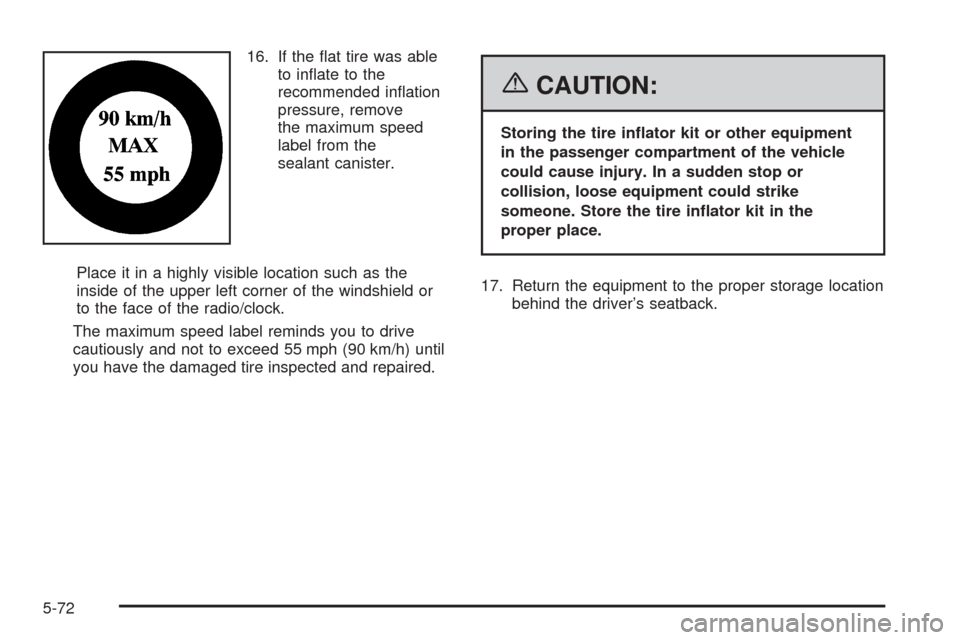
16. If the flat tire was able
to inflate to the
recommended inflation
pressure, remove
the maximum speed
label from the
sealant canister.
Place it in a highly visible location such as the
inside of the upper left corner of the windshield or
to the face of the radio/clock.
The maximum speed label reminds you to drive
cautiously and not to exceed 55 mph (90 km/h) until
you have the damaged tire inspected and repaired.
{CAUTION:
Storing the tire inator kit or other equipment
in the passenger compartment of the vehicle
could cause injury. In a sudden stop or
collision, loose equipment could strike
someone. Store the tire inator kit in the
proper place.
17. Return the equipment to the proper storage location
behind the driver’s seatback.
5-72
Page 325 of 390
Lighter colored interiors may require more frequent
cleaning. Use care because newspapers and garments
that transfer color to your home furnishings may also
transfer color to your vehicle’s interior.
When cleaning your vehicle’s interior, only use cleaners
specifically designed for the surfaces being cleaned.
Permanent damage may result from using cleaners on
surfaces for which they were not intended. Use glass
cleaner only on glass. Remove any accidental over-spray
from other surfaces immediately. To prevent over-spray,
apply cleaner directly to the cleaning cloth.
Notice:If you use abrasive cleaners when cleaning
glass surfaces on your vehicle, you could scratch
the glass and/or cause damage to the integrated
radio antenna and the rear window defogger. When
cleaning the glass on your vehicle, use only a
soft cloth and glass cleaner.
Many cleaners contain solvents that may become
concentrated in your vehicle’s breathing space. Before
using cleaners, read and adhere to all safety
instructions on the label. While cleaning your vehicle’s
interior, maintain adequate ventilation by opening
your vehicle’s doors and windows.
Dust may be removed from small buttons and knobs
using a small brush with soft bristles.Your GM dealer has a product for cleaning your
vehicle’s glass. Should it become necessary, you can
also obtain a product from your GM dealer to remove
odors from your vehicle’s upholstery.
Do not clean your vehicle using the following cleaners
or techniques:
•Never use a knife or any other sharp object to
remove a soil from any interior surface.
•Never use a stiff brush. It can cause damage to
your vehicle’s interior surfaces.
•Never apply heavy pressure or rub aggressively
with a cleaning cloth. Use of heavy pressure
can damage your interior and does not improve the
effectiveness of soil removal.
•Use only mild, neutral-pH soaps. Avoid laundry
detergents or dishwashing soaps with degreasers.
Using too much soap will leave a residue that
leaves streaks and attracts dirt. For liquid cleaners,
about 20 drops per gallon (3.78 L) of water is a
good guide.
•Do not heavily saturate your upholstery
while cleaning.
•Damage to your vehicle’s interior may result from
the use of many organic solvents such as naptha,
alcohol, etc.
5-77
Page 335 of 390
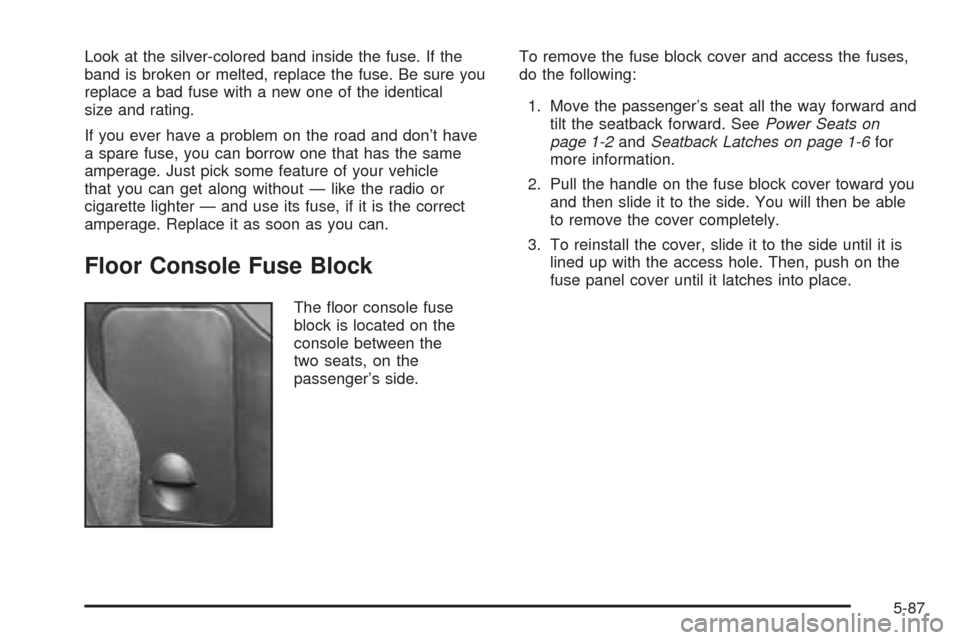
Look at the silver-colored band inside the fuse. If the
band is broken or melted, replace the fuse. Be sure you
replace a bad fuse with a new one of the identical
size and rating.
If you ever have a problem on the road and don’t have
a spare fuse, you can borrow one that has the same
amperage. Just pick some feature of your vehicle
that you can get along without — like the radio or
cigarette lighter — and use its fuse, if it is the correct
amperage. Replace it as soon as you can.
Floor Console Fuse Block
The floor console fuse
block is located on the
console between the
two seats, on the
passenger’s side.To remove the fuse block cover and access the fuses,
do the following:
1. Move the passenger’s seat all the way forward and
tilt the seatback forward. SeePower Seats on
page 1-2andSeatback Latches on page 1-6for
more information.
2. Pull the handle on the fuse block cover toward you
and then slide it to the side. You will then be able
to remove the cover completely.
3. To reinstall the cover, slide it to the side until it is
lined up with the access hole. Then, push on the
fuse panel cover until it latches into place.
5-87
Page 337 of 390

Fuses Usage
29 Transmission Control Module
31 Truck Body Controller
32 Remote Keyless Entry (RKE)
33 Windshield Wipers
34 Stoplamps
35 Blank
36Climate Control System, Driver’s
Door Unlock
37 Front Parking Lamps
38 Driver’s Side Turn Signal
39 Climate Control System
40 Truck Body Controller
41 Radio
42 Trailer Parking Lamps
43 Passenger’s Side Turn Signal
44 Blank
46 Accessory Power Outlets
47 IgnitionFuses Usage
48 Blank
49 Blank
50 Truck Body Controller, Ignition
51 Brakes
52 Blank
Relays Usage
18 Locks
24 Unlock
30 Parking Lamps
45Rear Window Defogger, Outside
Power Heated Mirrors
Circuit
BreakersUsage
01 Roof & Door Module
02 Roof Pump
08 Power Seats
5-89
Page 379 of 390

A
Accessories and Modifications............................ 5-3
Accessory Power Outlet(s)...............................3-19
Adding Equipment to Your Airbag-Equipped
Vehicle.......................................................1-52
Additives, Fuel................................................. 5-6
Add-On Electrical Equipment............................5-86
Air Cleaner/Filter, Engine.................................5-18
Air Conditioning..............................................3-21
Airbag
Off Light.....................................................3-28
Readiness Light..........................................3-27
Airbag Sensing and Diagnostic Module (SDM)...... 7-9
Airbag System................................................1-40
Adding Equipment to Your Airbag-Equipped
Vehicle...................................................1-52
Airbag Off Switch........................................1-48
How Does an Airbag Restrain?......................1-46
Servicing Your Airbag-Equipped Vehicle..........1-51
What Makes an Airbag Inflate?......................1-46
What Will You See After an Airbag Inflates?....1-47
When Should an Airbag Inflate?....................1-45
Where Are the Airbags?...............................1-42
Antenna, Integrated Windshield.........................3-86
Anti-Lock Brake System (ABS)........................... 4-7
Anti-Lock Brake, System Warning Light..............3-31
Appearance Care
Aluminum or Chrome-Plated Wheels..............5-82
Care of Safety Belts....................................5-79Appearance Care (cont.)
Chemical Paint Spotting...............................5-83
Cleaning Exterior Lamps/Lenses....................5-80
Cleaning the Inside of Your Vehicle................5-76
Fabric/Carpet..............................................5-78
Finish Care.................................................5-80
Finish Damage............................................5-83
Instrument Panel, Vinyl, and Other
Plastic Surfaces.......................................5-79
Leather......................................................5-78
Sheet Metal Damage...................................5-83
Tires..........................................................5-82
Underbody Maintenance...............................5-83
Vehicle Care/Appearance Materials................5-84
Washing Your Vehicle...................................5-80
Weatherstrips..............................................5-79
Windshield and Wiper Blades........................5-81
Ashtray(s)......................................................3-20
Audio System(s).............................................3-58
Audio Steering Wheel Controls......................3-85
Care of Your CD Player...............................3-86
Care of Your CDs........................................3-86
Integrated Windshield Antenna.......................3-86
Radio with CD............................................3-60
Radio with Six-Disc CD................................3-72
Setting the Time..........................................3-60
Theft-Deterrent Feature................................3-84
Understanding Radio Reception.....................3-85
Automatic Headlamp System............................3-15
1