engine oil CHEVROLET SSR 2006 1.G Owners Manual
[x] Cancel search | Manufacturer: CHEVROLET, Model Year: 2006, Model line: SSR, Model: CHEVROLET SSR 2006 1.GPages: 390, PDF Size: 2.44 MB
Page 116 of 390
Engine Coolant Temperature Gage..................3-32
Malfunction Indicator Lamp.............................3-33
Oil Pressure Gage........................................3-36
Change Engine Oil Light................................3-37
Security Light...............................................3-37
Cruise Control Light......................................3-37
Reduced Engine Power Light.........................3-38
Highbeam On Light.......................................3-38
Check Gages Warning Light...........................3-38
Fuel Gage...................................................3-39
Auxiliary Gage Package.................................3-40
Driver Information Center (DIC).......................3-42
DIC Controls and Displays.............................3-42
DIC Warnings and Messages.........................3-45
DIC Vehicle Personalization............................3-52Audio System(s).............................................3-58
Setting the Time...........................................3-60
Radio with CD..............................................3-60
Radio with Six-Disc CD.................................3-72
Theft-Deterrent Feature..................................3-84
Audio Steering Wheel Controls.......................3-85
Radio Reception...........................................3-85
Care of Your CDs.........................................3-86
Care of the CD Player...................................3-86
Integrated Windshield Antenna........................3-86
Section 3 Instrument Panel
3-2
Page 150 of 390
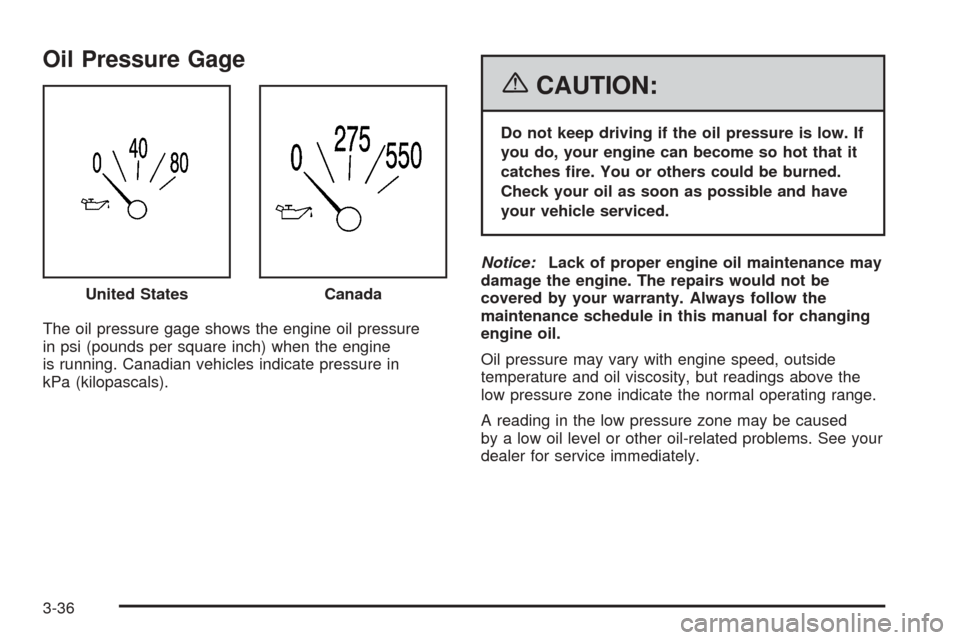
Oil Pressure Gage
The oil pressure gage shows the engine oil pressure
in psi (pounds per square inch) when the engine
is running. Canadian vehicles indicate pressure in
kPa (kilopascals).
{CAUTION:
Do not keep driving if the oil pressure is low. If
you do, your engine can become so hot that it
catches re. You or others could be burned.
Check your oil as soon as possible and have
your vehicle serviced.
Notice:Lack of proper engine oil maintenance may
damage the engine. The repairs would not be
covered by your warranty. Always follow the
maintenance schedule in this manual for changing
engine oil.
Oil pressure may vary with engine speed, outside
temperature and oil viscosity, but readings above the
low pressure zone indicate the normal operating range.
A reading in the low pressure zone may be caused
by a low oil level or other oil-related problems. See your
dealer for service immediately. United States
Canada
3-36
Page 151 of 390

Change Engine Oil Light
This light is displayed
when the engine oil needs
to be changed.
Once the engine oil has been changed, the light must
be reset. Until it is reset, the light will be displayed when
the engine is on. For more information on resetting
the system, seeEngine Oil Life System on page 5-16.
See alsoScheduled Maintenance on page 6-4.
Security Light
For information
regarding this light, see
Theft-Deterrent Systems
on page 2-13.
Cruise Control Light
This light comes on
whenever you set your
cruise control.
The light will go out when the cruise control is
turned off. SeeCruise Control on page 3-10for
more information.
3-37
Page 152 of 390
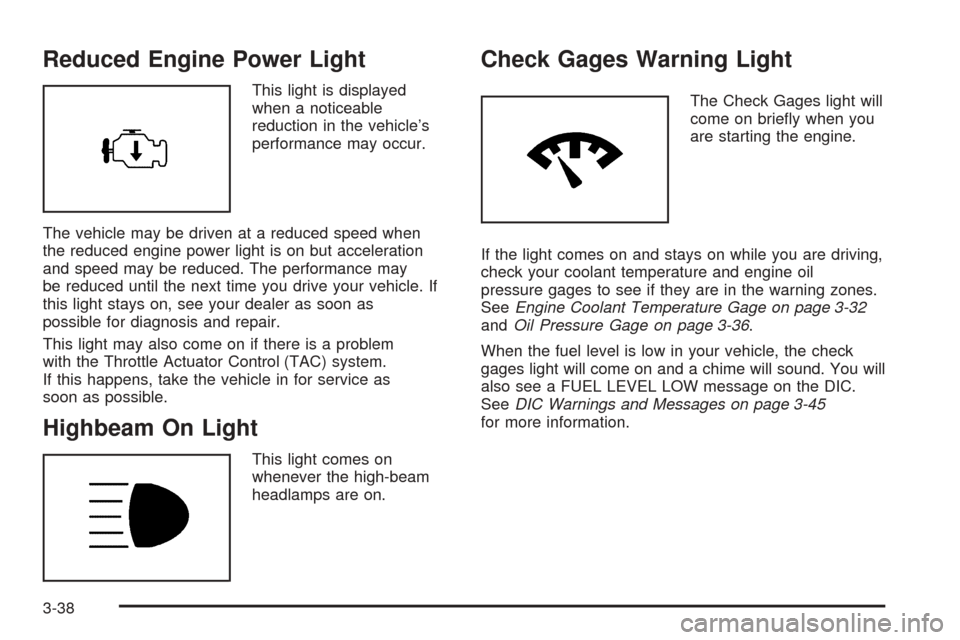
Reduced Engine Power Light
This light is displayed
when a noticeable
reduction in the vehicle’s
performance may occur.
The vehicle may be driven at a reduced speed when
the reduced engine power light is on but acceleration
and speed may be reduced. The performance may
be reduced until the next time you drive your vehicle. If
this light stays on, see your dealer as soon as
possible for diagnosis and repair.
This light may also come on if there is a problem
with the Throttle Actuator Control (TAC) system.
If this happens, take the vehicle in for service as
soon as possible.
Highbeam On Light
This light comes on
whenever the high-beam
headlamps are on.
Check Gages Warning Light
The Check Gages light will
come on briefly when you
are starting the engine.
If the light comes on and stays on while you are driving,
check your coolant temperature and engine oil
pressure gages to see if they are in the warning zones.
SeeEngine Coolant Temperature Gage on page 3-32
andOil Pressure Gage on page 3-36.
When the fuel level is low in your vehicle, the check
gages light will come on and a chime will sound. You will
also see a FUEL LEVEL LOW message on the DIC.
SeeDIC Warnings and Messages on page 3-45
for more information.
3-38
Page 156 of 390

Driver Information Center (DIC)
The Driver Information Center (DIC) gives you the
status of many of your vehicle’s systems. It is also used
to display driver personalization features and
warning/status messages. The DIC display is located on
the instrument panel cluster. The DIC buttons are
located on the steering wheel.
The DIC comes on when the ignition is on. After a short
delay the DIC will display the current driver and the
information that was last displayed before the engine
was turned off.
If a problem is detected, a warning message will appear
on the display. Be sure to take any message that
appears on the display seriously and remember that
clearing the message will only make the message
disappear, not correct the problem.
DIC Controls and Displays
The DIC has different modes which can be accessed by
pressing the four buttons located on the steering wheel.
The button functions are listed in the following pages.A.
3(Trip Information):Press this button to
display the odometer, trip odometer, timer, and outside
air temperature.
B.
r(Fuel Information):Press this button to display
the current fuel and engine oil information.
C.
q(Personalization):Press this button to access
the vehicle personalization menu and customize
the personalization settings on your vehicle.
D.
r(Select):Press this button to reset certain
DIC functions, acknowledge DIC warning messages
and clear them from the DIC, and set your
personalization settings.
3-42
Page 158 of 390
Fuel Information
r
(Fuel Information):Press this button to scroll
through the range, average fuel economy, instant fuel
economy, and engine oil life.
Fuel Range
Press the fuel information button until RANGE appears to
display the remaining distance you can drive without
refueling. It is based on fuel economy and the fuel
remaining in the tank. The display will show FUEL LEVEL
LOW and a chime will sound if the fuel level is low. The
check gages warning light on the instrument panel cluster
will also be illuminated. SeeCheck Gages Warning Light
on page 3-38for more information.
The fuel economy data used to determine fuel range is
an average of recent driving conditions. As your
driving conditions change, this data is gradually updated.
Fuel range cannot be reset.
Average Fuel Economy
Press the fuel information button until AVG. ECON
appears in the display. Average fuel economy is how
many miles per gallon (MPG), kilometers per liter (km/L),
or liters per 100 kilometers (L/100 km) your vehicle is
getting based on current and past driving conditions.
Press and hold the select button while AVG. ECON is
displayed to reset the average fuel economy. Average
fuel economy will then be calculated starting from
that point. If the average fuel economy is not reset, it
will be continually updated each time you drive.
Instant Fuel Economy
Press the fuel information button until INST. ECON
appears in the display. Instant fuel economy is
how many miles per gallon (MPG), kilometers per
liter (km/L), or liters per 100 kilometers (L/100 km) your
vehicle is at the particular moment in time. The
instant fuel economy cannot be reset.
3-44
Page 159 of 390

Engine Oil Life
Press the fuel information button until ENGINE OIL LIFE
appears in the display. The engine oil life system
shows an estimate of the oil’s remaining useful life. It
will show 100% when the system is reset after an
oil change. It will alert you to change your oil on a
schedule consistent with your driving conditions.
Always reset the engine oil life after an oil change. To
reset the engine oil life system, seeEngine Oil Life
System on page 5-16.
The engine oil life reading in the DIC does not replace
the need to maintain your vehicle as recommended
in the Maintenance Schedule in this manual. SeeEngine
Oil on page 5-13,Change Engine Oil Light on
page 3-37, andScheduled Maintenance on page 6-4.
Personalization
q
(Personalization):Press this button to access the
vehicle personalization menu and customize the
personalization settings on your vehicle. SeeDIC
Vehicle Personalization on page 3-52for more
information.
Select
r
(Select):Press this button to reset certain DIC
functions, acknowledge DIC warning messages
and clear them from the DIC, and set your
personalization settings.
DIC Warnings and Messages
Messages are displayed on the DIC to notify the driver
that the status of the vehicle has changed and that
some action may be needed by the driver to correct the
condition. Multiple messages may appear one after
another. Some messages may not require immediate
action but you should press the select button to
acknowledge that you received the message and clear it
from the display. Some messages cannot be cleared
from the display because they are more urgent. These
messages require action before they can be removed
from the DIC display. The following are the possible
messages that can be displayed and some information
about them.
3-45
Page 160 of 390
Battery Not Charging
If the battery is not charging during operation, this
message will appear on the DIC. The charging system
light may also be displayed on the instrument panel
cluster. SeeCharging System Light on page 3-30for
more information. Driving your vehicle when the battery is
not charging properly can drain the battery. Have the
electrical system checked by your GM dealer as soon as
possible. Press the select button to acknowledge this
message and clear it from the DIC display.
Battery Voltage Too High
This message will be displayed when the battery
voltage is higher than normal and you try to raise or
lower the convertible top. The charging system light may
also be displayed on the instrument panel cluster.
SeeCharging System Light on page 3-30for more
information. Press the select button to acknowledge the
message and clear it from the DIC display.
Battery Voltage Too Low
This message will be displayed when the battery
voltage is lower than normal and you try to raise or
lower the convertible top. The charging system light may
also be displayed on the instrument panel cluster.
SeeCharging System Light on page 3-30for more
information. Press the select button to acknowledge the
message and clear it from the DIC display.
Cargo Cover Ajar
This message will be displayed when trying to open or
close the convertible top while the cargo cover is
open. Make sure the cargo cover is fully closed before
trying to open or close the convertible top. This
message will clear itself from the DIC once the cargo
cover is closed.
Change Trans (Transmission) Fluid
(Automatic Transmission Only)
If the transmission fluid needs to be changed, this
message will appear on the DIC. SeeAutomatic
Transmission Fluid on page 5-20andScheduled
Maintenance on page 6-4for more information.
Check Oil Level
If the oil level in the vehicle is low, this message will
appear on the DIC. Check the oil level and add oil
as necessary. SeeEngine Oil on page 5-13for more
information. Press the select button to acknowledge this
message and clear it from the DIC display.
3-46
Page 162 of 390

Fuel Level Low
If the fuel level is low in the vehicle’s gas tank, this
message will appear on the DIC and you will hear a
chime. You will also see the check gages warning light
on the instrument panel cluster. SeeCheck Gages
Warning Light on page 3-38for more information. Refuel
as soon as possible. SeeFilling the Tank on page 5-8
andFuel Gage on page 3-39for more information. Press
the select button to acknowledge and clear the
message from the display.
Hdr (Header) Latch Switch Fault
This message will be displayed on the DIC when trying
to raise or lower the convertible top and there is a
fault with this switch. If the message persists, see your
GM dealer for service.
Manually Open Tonneau
This message will be displayed on the DIC when trying
to raise or lower the convertible top while the
convertible top and roof tonneau are where the system
cannot verify their position. The roof system may
need to be restored manually to a stable position by
fully opening the roof tonneau and boot cover panel. See
Convertible Top on page 2-45for more information.
Oil Pressure Low Stop Engine
{CAUTION:
Do not keep driving if the oil pressure is low. If
you do, your engine can become so hot that it
catches re. You or others could be burned.
Check your oil as soon as possible and have
your vehicle serviced.
Notice:Lack of proper engine oil maintenance may
damage the engine. The repairs would not be
covered by your warranty. Always follow the
maintenance schedule in this manual for changing
engine oil.
If the oil pressure is low in your vehicle, this message
will be displayed on the DIC. Stop the vehicle as
soon as possible and do not drive it until the cause of
the low oil pressure has been corrected. Check your oil
as soon as possible and have your vehicle serviced
by your GM dealer. SeeEngine Oil on page 5-13andOil
Pressure Gage on page 3-36for more information.
3-48
Page 221 of 390

Before Leaving on a Long Trip
Make sure you are ready. Try to be well rested. If you
must start when you are not fresh — such as after
a day’s work — do not plan to make too many miles that
first part of the journey. Wear comfortable clothing
and shoes you can easily drive in.
Is your vehicle ready for a long trip? If you keep it
serviced and maintained, it is ready to go. If it needs
service, have it done before starting out. Of course, you
will find experienced and able service experts in GM
dealerships all across North America. They will be ready
and willing to help if you need it.
Here are some things you can check before a trip:
•Windshield Washer Fluid:Is the reservoir full? Are
all windows clean inside and outside?
•Wiper Blades:Are they in good shape?
•Fuel, Engine Oil, Other Fluids:Have you checked
all levels?
•Lamps:Are they all working? Are the lenses clean?
•Tires:They are vitally important to a safe,
trouble-free trip. Is the tread good enough for
long-distance driving? Are the tires all inflated to the
recommended pressure?
•Weather Forecasts:What is the weather outlook
along your route? Should you delay your trip a
short time to avoid a major storm system?
•Maps:Do you have up-to-date maps?
Highway Hypnosis
Is there actually such a condition as highway hypnosis?
Or is it just plain falling asleep at the wheel? Call it
highway hypnosis, lack of awareness, or whatever.
There is something about an easy stretch of road with
the same scenery, along with the hum of the tires on the
road, the drone of the engine, and the rush of the
wind against the vehicle that can make you sleepy. Do
not let it happen to you! If it does, your vehicle can
leave the road in less than a second, and you could
crash and be injured.
What can you do about highway hypnosis? First, be
aware that it can happen.
Then here are some tips:
•Make sure your vehicle is well ventilated, with a
comfortably cool interior.
•Keep your eyes moving. Scan the road ahead and
to the sides. Check your mirrors and your
instruments frequently.
•If you get sleepy, pull off the road into a rest,
service, or parking area and take a nap, get some
exercise, or both. For safety, treat drowsiness
on the highway as an emergency.
4-21