maintenance schedule CHEVROLET SSR 2006 1.G Owners Manual
[x] Cancel search | Manufacturer: CHEVROLET, Model Year: 2006, Model line: SSR, Model: CHEVROLET SSR 2006 1.GPages: 390, PDF Size: 2.44 MB
Page 1 of 390
Seats and Restraint Systems........................... 1-1
Front Seats
............................................... 1-2
Safety Belts
.............................................. 1-6
Child Restraints
.......................................1-20
Airbag System
.........................................1-40
Restraint System Check
............................1-52
Features and Controls..................................... 2-1
Keys
........................................................ 2-3
Doors and Locks
....................................... 2-8
Windows
.................................................2-11
Theft-Deterrent Systems
............................2-13
Starting and Operating Your Vehicle
...........2-15
Mirrors
....................................................2-27
Universal Home Remote System
................2-30
Storage Areas
.........................................2-34
Convertible Top
.......................................2-45
Vehicle Personalization
.............................2-53
Instrument Panel............................................. 3-1
Instrument Panel Overview
.......................... 3-4
Climate Controls
......................................3-21
Warning Lights, Gages, and Indicators
........3-24
Driver Information Center (DIC)
..................3-42
Audio System(s)
.......................................3-58Driving Your Vehicle....................................... 4-1
Your Driving, the Road, and Your Vehicle
..... 4-2
Towing
...................................................4-35
Service and Appearance Care.......................... 5-1
Service
..................................................... 5-3
Fuel
......................................................... 5-5
Checking Things Under the Hood
...............5-10
Rear Axle
...............................................5-42
Headlamp Aiming
.....................................5-43
Bulb Replacement
....................................5-43
Windshield Wiper Blade Replacement
.........5-49
Tires
......................................................5-51
Appearance Care
.....................................5-76
Vehicle Identification
.................................5-85
Electrical System
......................................5-86
Capacities and Specifications
.....................5-95
Maintenance Schedule..................................... 6-1
Maintenance Schedule
................................ 6-2
Customer Assistance and Information.............. 7-1
Customer Assistance and Information
........... 7-2
Reporting Safety Defects
...........................7-13
Index................................................................ 1
2006 Chevrolet SSR Owner ManualM
Page 150 of 390
Oil Pressure Gage
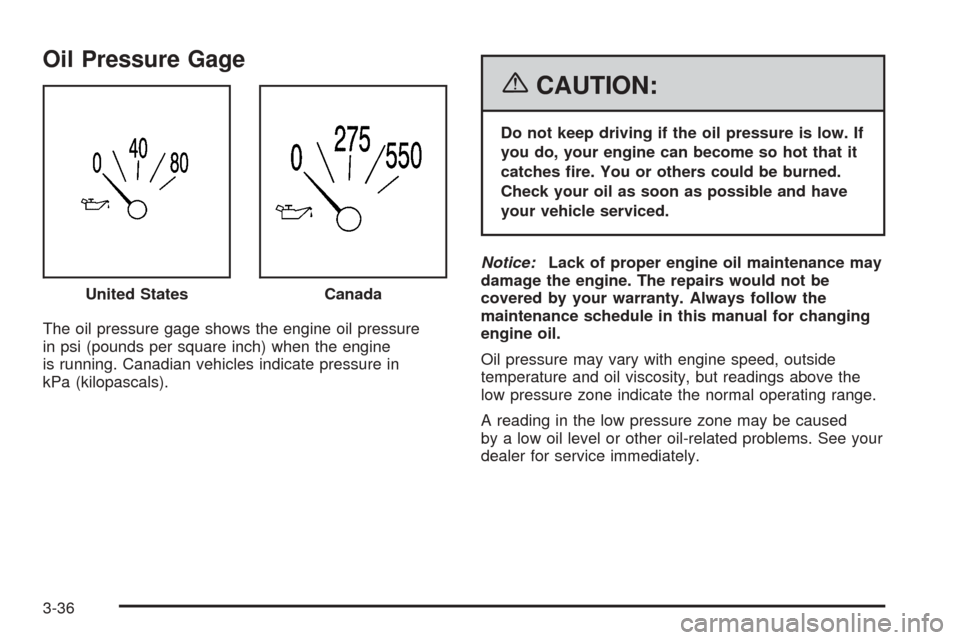
The oil pressure gage shows the engine oil pressure
in psi (pounds per square inch) when the engine
is running. Canadian vehicles indicate pressure in
kPa (kilopascals).
{CAUTION:
Do not keep driving if the oil pressure is low. If
you do, your engine can become so hot that it
catches re. You or others could be burned.
Check your oil as soon as possible and have
your vehicle serviced.
Notice:Lack of proper engine oil maintenance may
damage the engine. The repairs would not be
covered by your warranty. Always follow the
maintenance schedule in this manual for changing
engine oil.
Oil pressure may vary with engine speed, outside
temperature and oil viscosity, but readings above the
low pressure zone indicate the normal operating range.
A reading in the low pressure zone may be caused
by a low oil level or other oil-related problems. See your
dealer for service immediately. United States
Canada
3-36
Page 151 of 390

Change Engine Oil Light
This light is displayed
when the engine oil needs
to be changed.
Once the engine oil has been changed, the light must
be reset. Until it is reset, the light will be displayed when
the engine is on. For more information on resetting
the system, seeEngine Oil Life System on page 5-16.
See alsoScheduled Maintenance on page 6-4.
Security Light
For information
regarding this light, see
Theft-Deterrent Systems
on page 2-13.
Cruise Control Light
This light comes on
whenever you set your
cruise control.
The light will go out when the cruise control is
turned off. SeeCruise Control on page 3-10for
more information.
3-37
Page 159 of 390

Engine Oil Life
Press the fuel information button until ENGINE OIL LIFE
appears in the display. The engine oil life system
shows an estimate of the oil’s remaining useful life. It
will show 100% when the system is reset after an
oil change. It will alert you to change your oil on a
schedule consistent with your driving conditions.
Always reset the engine oil life after an oil change. To
reset the engine oil life system, seeEngine Oil Life
System on page 5-16.
The engine oil life reading in the DIC does not replace
the need to maintain your vehicle as recommended
in the Maintenance Schedule in this manual. SeeEngine
Oil on page 5-13,Change Engine Oil Light on
page 3-37, andScheduled Maintenance on page 6-4.
Personalization
q
(Personalization):Press this button to access the
vehicle personalization menu and customize the
personalization settings on your vehicle. SeeDIC
Vehicle Personalization on page 3-52for more
information.
Select
r
(Select):Press this button to reset certain DIC
functions, acknowledge DIC warning messages
and clear them from the DIC, and set your
personalization settings.
DIC Warnings and Messages
Messages are displayed on the DIC to notify the driver
that the status of the vehicle has changed and that
some action may be needed by the driver to correct the
condition. Multiple messages may appear one after
another. Some messages may not require immediate
action but you should press the select button to
acknowledge that you received the message and clear it
from the display. Some messages cannot be cleared
from the display because they are more urgent. These
messages require action before they can be removed
from the DIC display. The following are the possible
messages that can be displayed and some information
about them.
3-45
Page 160 of 390
Battery Not Charging
If the battery is not charging during operation, this
message will appear on the DIC. The charging system
light may also be displayed on the instrument panel
cluster. SeeCharging System Light on page 3-30for
more information. Driving your vehicle when the battery is
not charging properly can drain the battery. Have the
electrical system checked by your GM dealer as soon as
possible. Press the select button to acknowledge this
message and clear it from the DIC display.
Battery Voltage Too High
This message will be displayed when the battery
voltage is higher than normal and you try to raise or
lower the convertible top. The charging system light may
also be displayed on the instrument panel cluster.
SeeCharging System Light on page 3-30for more
information. Press the select button to acknowledge the
message and clear it from the DIC display.
Battery Voltage Too Low
This message will be displayed when the battery
voltage is lower than normal and you try to raise or
lower the convertible top. The charging system light may
also be displayed on the instrument panel cluster.
SeeCharging System Light on page 3-30for more
information. Press the select button to acknowledge the
message and clear it from the DIC display.
Cargo Cover Ajar
This message will be displayed when trying to open or
close the convertible top while the cargo cover is
open. Make sure the cargo cover is fully closed before
trying to open or close the convertible top. This
message will clear itself from the DIC once the cargo
cover is closed.
Change Trans (Transmission) Fluid
(Automatic Transmission Only)
If the transmission fluid needs to be changed, this
message will appear on the DIC. SeeAutomatic
Transmission Fluid on page 5-20andScheduled
Maintenance on page 6-4for more information.
Check Oil Level
If the oil level in the vehicle is low, this message will
appear on the DIC. Check the oil level and add oil
as necessary. SeeEngine Oil on page 5-13for more
information. Press the select button to acknowledge this
message and clear it from the DIC display.
3-46
Page 162 of 390

Fuel Level Low
If the fuel level is low in the vehicle’s gas tank, this
message will appear on the DIC and you will hear a
chime. You will also see the check gages warning light
on the instrument panel cluster. SeeCheck Gages
Warning Light on page 3-38for more information. Refuel
as soon as possible. SeeFilling the Tank on page 5-8
andFuel Gage on page 3-39for more information. Press
the select button to acknowledge and clear the
message from the display.
Hdr (Header) Latch Switch Fault
This message will be displayed on the DIC when trying
to raise or lower the convertible top and there is a
fault with this switch. If the message persists, see your
GM dealer for service.
Manually Open Tonneau
This message will be displayed on the DIC when trying
to raise or lower the convertible top while the
convertible top and roof tonneau are where the system
cannot verify their position. The roof system may
need to be restored manually to a stable position by
fully opening the roof tonneau and boot cover panel. See
Convertible Top on page 2-45for more information.
Oil Pressure Low Stop Engine
{CAUTION:
Do not keep driving if the oil pressure is low. If
you do, your engine can become so hot that it
catches re. You or others could be burned.
Check your oil as soon as possible and have
your vehicle serviced.
Notice:Lack of proper engine oil maintenance may
damage the engine. The repairs would not be
covered by your warranty. Always follow the
maintenance schedule in this manual for changing
engine oil.
If the oil pressure is low in your vehicle, this message
will be displayed on the DIC. Stop the vehicle as
soon as possible and do not drive it until the cause of
the low oil pressure has been corrected. Check your oil
as soon as possible and have your vehicle serviced
by your GM dealer. SeeEngine Oil on page 5-13andOil
Pressure Gage on page 3-36for more information.
3-48
Page 246 of 390

When You Are Ready to Leave After
Parking on a Hill
1. Apply your regular brakes and hold the pedal down
while you:
•Start your engine.
•Shift into a gear.
•Release the parking brake.
2. Let up on the brake pedal.
3. Drive slowly until the trailer is clear of the chocks.
4. Stop and have someone pick up and store
the chocks.
Maintenance When Trailer Towing
Your vehicle will need service more often when you’re
pulling a trailer. SeeScheduled Maintenance on
page 6-4for more information. Things that are especially
important in trailer operation are automatic transmission
fluid (don’t overfill), engine oil, axle lubricant, belt,
cooling system and brake system. Each of these is
covered in this manual. If you’re trailering, it’s a
good idea to review these sections before you start
your trip.
Check periodically to see that all hitch nuts and bolts
are tight.
4-46
Page 266 of 390

Engine Cover
Your vehicle has a removable engine cover.
To remove the engine cover do the following:
1. Unscrew the four bolts from the engine.
2. Lift off the cover.
3. To reinstall the engine cover, reverse the steps.
Engine Air Cleaner/Filter
SeeEngine Compartment Overview on page 5-12for
the location of the engine air cleaner/filter.
When to Inspect the Engine Air
Cleaner/Filter
Inspect the air cleaner/filter at the MaintenanceII
intervals and replace it at the first oil change after each
50,000 mile (83 000 km) interval. SeeScheduled
Maintenance on page 6-4for more information. If you
are driving in dusty/dirty conditions, inspect the filter
at each engine oil change.
5-18
Page 270 of 390

Consistency of Readings
Always check the fluid level at least twice using the
procedure described previously. Consistency (repeatable
readings) is important to maintaining proper fluid level. If
inconsistent readings continue, contact your dealer.
How to Add Automatic
Transmission Fluid
Refer to the Maintenance Schedule to determine what
kind of transmission fluid to use. SeeRecommended
Fluids and Lubricants on page 6-12.
Add fluid only after checking the transmission fluid while
it is hot. A cold check is used only as a reference. If
the fluid level is low, add only enough of the proper fluid
to bring the level up to the HOT area for a hot check.
It does not take much fluid, generally less than one pint
(0.5 L). Do not overfill.
Notice:Use of the incorrect automatic transmission
uid may damage your vehicle, and the damages
may not be covered by your warranty. Always
use the automatic transmission uid listed in
Recommended Fluids and Lubricants on page 6-12.
•After adding fluid, recheck the fluid level as
described under “How to Check Automatic
Transmission Fluid,” earlier in this section.
•When the correct fluid level is obtained, push the
dipstick back in all the way; then flip the handle
down to lock the dipstick in place.
Manual Transmission Fluid
When to Check Manual
Transmission Fluid
A good time to have the manual transmission fluid
checked is when the engine oil is changed. However,
the fluid in your manual transmission does not
require changing.
How to Check Manual
Transmission Fluid
Because this operation can be a little difficult, you
may choose to have this done at the dealership
service department.
If you do it yourself, be sure to follow all the instructions
here, or you could get a false reading.
Notice:Too much or too little uid can damage your
transmission. Too little uid could cause the
transmission to overheat. Be sure to get an accurate
reading if you check your transmission uid.
Check the fluid level only when your engine is off, the
vehicle is parked on a level place, and the transmission
is cool enough for you to rest your fingers on the
transmission case.
5-22
Page 271 of 390
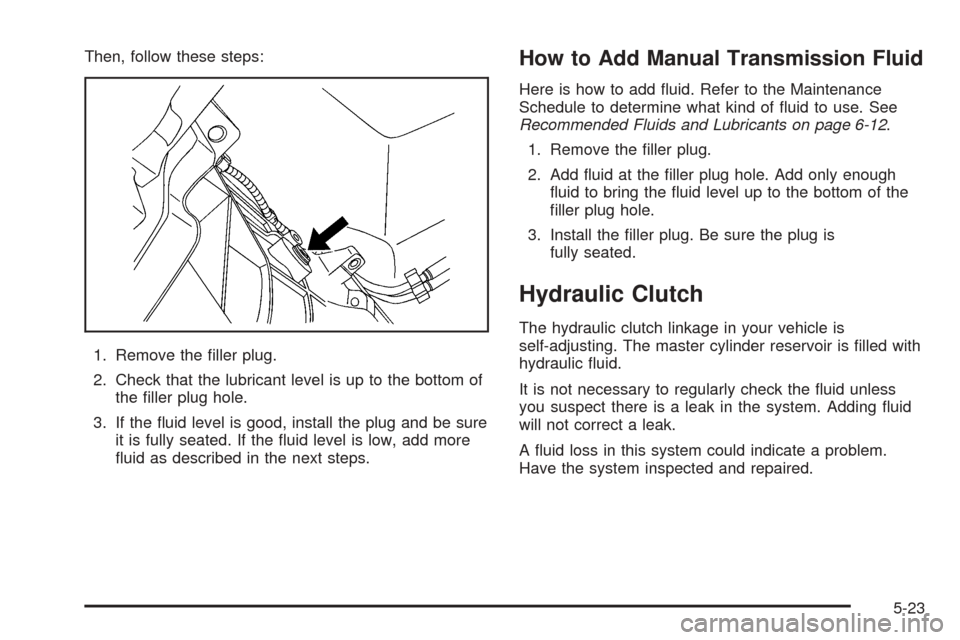
Then, follow these steps:
1. Remove the filler plug.
2. Check that the lubricant level is up to the bottom of
the filler plug hole.
3. If the fluid level is good, install the plug and be sure
it is fully seated. If the fluid level is low, add more
fluid as described in the next steps.How to Add Manual Transmission Fluid
Here is how to add fluid. Refer to the Maintenance
Schedule to determine what kind of fluid to use. See
Recommended Fluids and Lubricants on page 6-12.
1. Remove the filler plug.
2. Add fluid at the filler plug hole. Add only enough
fluid to bring the fluid level up to the bottom of the
filler plug hole.
3. Install the filler plug. Be sure the plug is
fully seated.
Hydraulic Clutch
The hydraulic clutch linkage in your vehicle is
self-adjusting. The master cylinder reservoir is filled with
hydraulic fluid.
It is not necessary to regularly check the fluid unless
you suspect there is a leak in the system. Adding fluid
will not correct a leak.
A fluid loss in this system could indicate a problem.
Have the system inspected and repaired.
5-23