remote control CHEVROLET SUBURBAN 2003 9.G User Guide
[x] Cancel search | Manufacturer: CHEVROLET, Model Year: 2003, Model line: SUBURBAN, Model: CHEVROLET SUBURBAN 2003 9.GPages: 552, PDF Size: 3.44 MB
Page 286 of 552
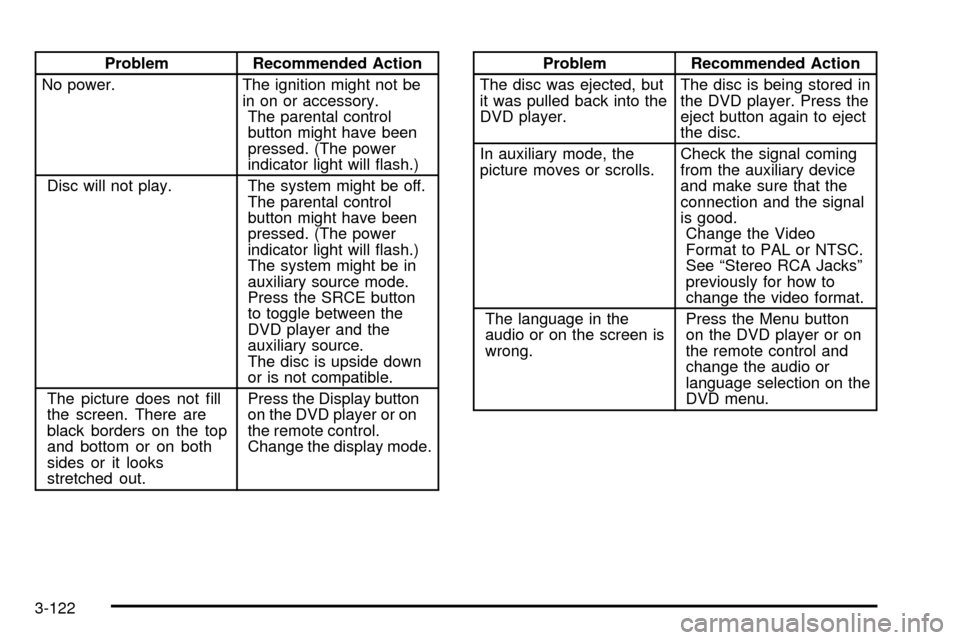
Problem Recommended Action
No power. The ignition might not be
in on or accessory.
The parental control
button might have been
pressed. (The power
indicator light will ¯ash.)
Disc will not play. The system might be off.
The parental control
button might have been
pressed. (The power
indicator light will ¯ash.)
The system might be in
auxiliary source mode.
Press the SRCE button
to toggle between the
DVD player and the
auxiliary source.
The disc is upside down
or is not compatible.
The picture does not ®ll
the screen. There are
black borders on the top
and bottom or on both
sides or it looks
stretched out.Press the Display button
on the DVD player or on
the remote control.
Change the display mode.Problem Recommended Action
The disc was ejected, but
it was pulled back into the
DVD player.The disc is being stored in
the DVD player. Press the
eject button again to eject
the disc.
In auxiliary mode, the
picture moves or scrolls.Check the signal coming
from the auxiliary device
and make sure that the
connection and the signal
is good.
Change the Video
Format to PAL or NTSC.
See ªStereo RCA Jacksº
previously for how to
change the video format.
The language in the
audio or on the screen is
wrong.Press the Menu button
on the DVD player or on
the remote control and
change the audio or
language selection on the
DVD menu.
3-122
Page 287 of 552

Problem Recommended Action
The remote control does
not work.Point the remote control
directly at the infrared
window below the video
screen while using.
Check that the batteries
are not dead or put in
wrong.
The parental control
button might have been
pressed. (The power
indicator light will ¯ash.)
After stopping the player,
I push Play but
sometimes the DVD
starts where I left off and
sometimes at the
beginning.If the stop button was
pressed one time, the
DVD player will resume
playing where the DVD
was stopped. If the stop
button was pressed two
times the DVD player will
begin to play from the
beginning of the DVD.
The auxiliary source is
running but there is no
picture or sound.Press the SRCE button
to change from the DVD
player mode to the
auxiliary source mode.
Check to make sure that
the auxiliary source is
connected to the inputs
properly.Problem Recommended Action
My disc is stuck in the
player. The Load/Eject
button does not work.Press the Load/Eject
button on the DVD player.
Turn the power off, then
on again, then press the
Load/Eject button on the
DVD player.
Do not attempt to forcibly
remove the disc from the
DVD player. This could
permanently damage the
DVD player.
Sometimes the wireless
headphone audio cuts
out or buzzes.This could be caused by
interference from cellular
telephone towers or by
using your cellular
telephone in the vehicle.
I lost the remote and/or
the headphones.See your dealer for
assistance.
What is the best way to
clean the video screen?Wipe the video screen
with a soft cloth that is
damp with water.
3-123
Page 288 of 552
Rear Seat Audio (RSA)
This feature allows rear seat passengers to listen to any
of the audio sources: radio, cassette tapes, CDs,
DVDs, or XMŸ (48 contiguous US states, if equipped)
depending on your vehicles options. In the event
that the front seat passengers are listening to any of
these remote sources the rear seat passengers can only
listen to the remote source being used by the front
seat passengers or FM, AM, or the radios internal CD.
For example, rear seat passengers may listen to
cassette tape, CDs, or DVDs through the headphones
while the driver listens to the radio through the front
speakers. The rear seat passengers have control of the
volume for each set of headphones. The front seat
audio controls always override the RSA controls.
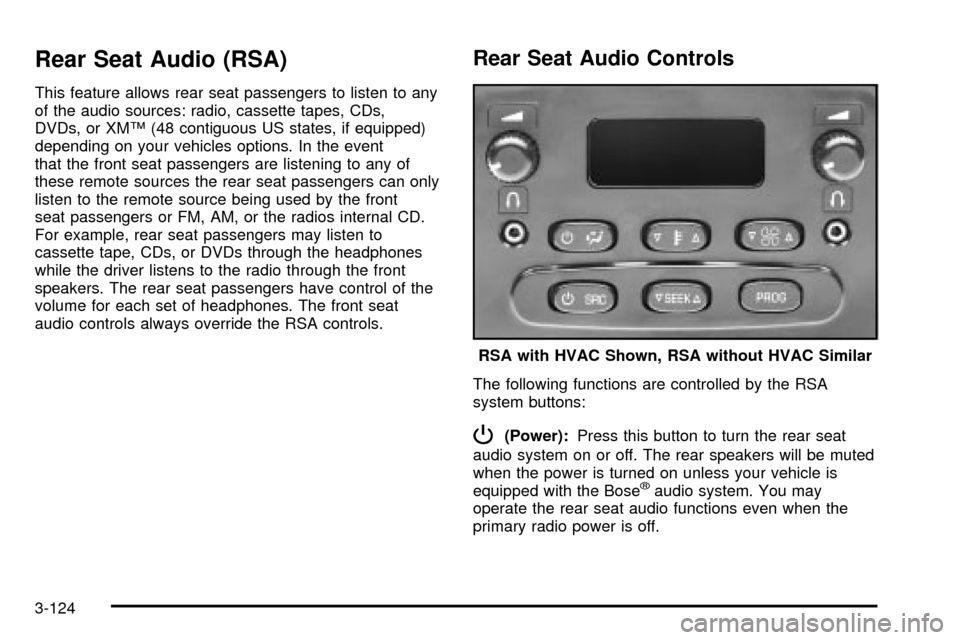
Rear Seat Audio Controls
The following functions are controlled by the RSA
system buttons:
P(Power):Press this button to turn the rear seat
audio system on or off. The rear speakers will be muted
when the power is turned on unless your vehicle is
equipped with the Bose
žaudio system. You may
operate the rear seat audio functions even when the
primary radio power is off.RSA with HVAC Shown, RSA without HVAC Similar
3-124
Page 546 of 552

Radios (cont.)
Radio with Six-Disc CD..............................3-101
Rear Seat Audio........................................3-124
Setting the Time for Radios with Radio Data
Systems (RDS)........................................3-73
Setting the Time for Radios without Radio
Data Systems (RDS)................................3-72
Theft-Deterrent..........................................3-125
Understanding Reception............................3-127
RDS Messages.............................3-81, 3-92, 3-105
REAR ACCESS OPEN....................................3-67
Rear Air Conditioning and Heating System and
Electronic Climate Controls...........................3-34
Rear Air Conditioning and Heating System.........3-32
Rear Air Conditioning System...........................3-31
Rear Axle......................................................5-56
Locking......................................................4-12
Rear Door Security Locks................................2-13
Rear Safety Belt Comfort Guides......................1-44
Rear Seat Audio Controls...............................3-124
Rear Seat Audio (RSA)..................................3-124
Rear Seat Entertainment System.....................3-114
Rear Seat Operation......................................... 1-9
Rear Seat Outside Passenger Positions.............1-40
Rear Seat Passengers, Safety Belts..................1-40
Rear Storage Area..........................................2-63
Rear Window Defogger............................3-23, 3-30Rearview Mirror, Automatic Dimming with
Compass and Temperature Display................2-49
Rearview Mirror, Automatic Dimming with
OnStar
ž, Compass and Temperature Display . . . 2-45
Rearview Mirrors.............................................2-45
Reclining Seatbacks.......................................... 1-6
Reclining the Seatbacks...................................1-21
Recreational Vehicle Towing.............................4-59
REDUCED ENGINE POWER...........................3-68
Remote Alarm.................................................. 2-6
Remote Control.............................................3-117
Remote Keyless Entry System, Operation............ 2-5
Remote Keyless Entry System............................ 2-4
Removing the 50/50 Split Bench Seat................1-14
Removing the Bench Seat................................1-19
Removing the Flat Tire and Installing
the Spare Tire.............................................5-82
Removing the Spare Tire and Tools...................5-78
REPLACE LIFTGATE FUSE.............................3-68
Replacement Bulbs.........................................5-66
Replacing Brake System Parts..........................5-48
Replacing Restraint System Parts After a Crash . . 1-89
Replacing the 50/50 Split Bench Seat................1-15
Replacing the Bench Seat................................1-20
Reporting Safety Defects.................................7-10
Canadian Government..................................7-10
General Motors...........................................7-10
United States Government............................7-10
14
Page 550 of 552

Torque Lock...................................................2-41
Total Weight on Your Vehicle's Tires..................4-71
Tow/Haul Mode Light.......................................3-52
Tow/Haul Mode...............................................2-29
Towing..........................................................4-59
Recreational Vehicle.....................................4-59
Towing a Trailer..........................................4-65
Your Vehicle...............................................4-59
TRACTION ACTIVE........................................3-71
Traction Control Operation................................4-13
TRACTION SYS LIMITED................................3-71
Traction.........................................................4-10
Assist System (TAS)....................................4-10
Off Light.....................................................3-44
Stabilitrak
žSystem......................................4-12
Trailer Brakes.................................................4-73
Trailer Wiring Harness.....................................4-77
Trailer...........................................................4-65
Recommendations.......................................4-65
Transfer Case and Front Axle (Four-Wheel Drive)
Inspection...................................................6-17
Transfer Case........................................5-55, 5-57
TRANSMISSION HOT.....................................3-71
Transmission Operation, Automatic....................2-26
Transmission, Transaxle, Transfer Case Unit
Repair Manual............................................7-11Transmission..................................................5-26
Fluid, Automatic...........................................5-26
Temperature Gage.......................................3-46
Transportation Options...................................... 7-8
Traveling to Remote Areas...............................4-27
Trip Information Button....................................3-54
Trip Odometer................................................3-38
Turn and Lane-Change Signals.......................... 3-8
TURN SIGNAL ON.........................................3-71
Turn Signal/Multifunction Lever........................... 3-7
Turn Signals When Towing a Trailer..................4-75U
Underbody Flushing Service.............................6-15
Underhood Fuse Block...................................5-113
Understanding Radio Reception.......................3-127
Uniform Tire Quality Grading............................5-72
United States ± Customer Assistance.................. 7-5
Used Replacement Wheels..............................5-75
Using Cleaner on Fabric................................5-100
Using HomeLink
ž...........................................2-60
Using Song List Mode...................................3-112
Using the Recovery Hooks...............................4-57
18