display CHEVROLET SUBURBAN 2008 10.G User Guide
[x] Cancel search | Manufacturer: CHEVROLET, Model Year: 2008, Model line: SUBURBAN, Model: CHEVROLET SUBURBAN 2008 10.GPages: 538, PDF Size: 2.86 MB
Page 151 of 538
Compass Variance
The mirror is set in zone eight upon leaving the
factory. It will be necessary to adjust the compass to
compensate for compass variance if the vehicle is
outside zone eight. Under certain circumstances,
as during a long distance cross-country trip, it will be
necessary to adjust for compass variance. Compass
variance is the difference between earth’s magnetic
north and true geographic north. If not adjusted
to account for compass variance, your compass
could give false readings.
To adjust for compass variance:
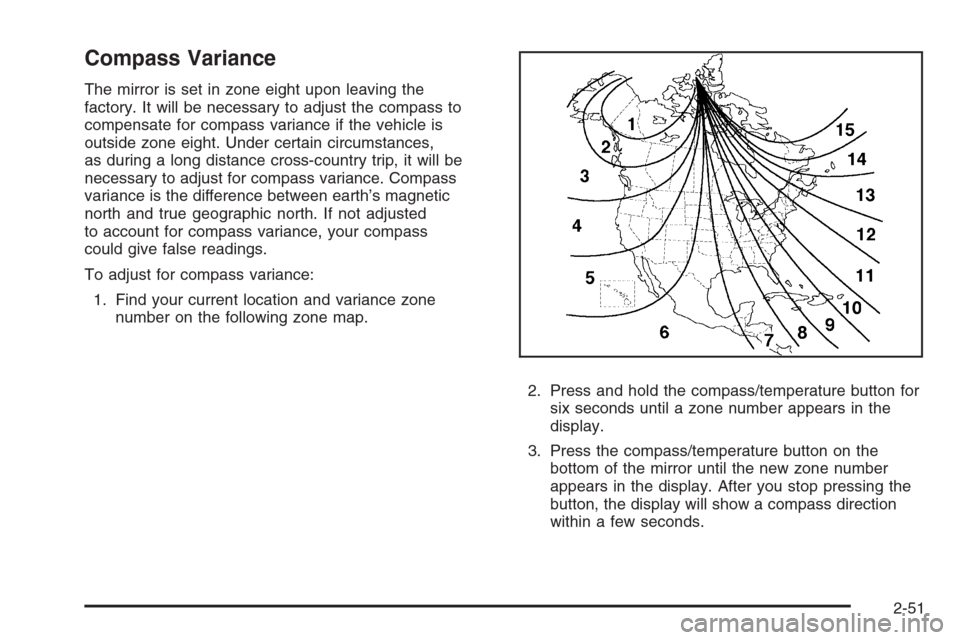
1. Find your current location and variance zone
number on the following zone map.
2. Press and hold the compass/temperature button for
six seconds until a zone number appears in the
display.
3. Press the compass/temperature button on the
bottom of the mirror until the new zone number
appears in the display. After you stop pressing the
button, the display will show a compass direction
within a few seconds.
2-51
Page 155 of 538
Ground Illumination Lamps
The mirrors may also include ground illumination lamps
in the base of the mirror. These lamps help to see
the area near the base of the front doors when it is
dark out.
Outside Automatic Dimming Mirror
If your vehicle has this feature, the driver’s outside mirror
will adjust for the glare of headlamps behind you. This
feature is controlled by the on and off settings found
on the electrochromic inside mirror. SeeAutomatic
Dimming Rearview Mirror with OnStar
®, Compass and
Temperature Display on page 2-47orAutomatic
Dimming Rearview Mirror with Compass and
Temperature Display on page 2-49for more information.
Park Tilt Mirrors
Vehicles with the memory package have a passenger
and/or driver mirror that will tilt to a preselected position
when the vehicle is in REVERSE (R). This feature
lets the driver view the curb when parallel parking.
The mirror(s) return to the original position when the
vehicle is shifted out of REVERSE (R), or the ignition
is turned off.Turn this feature on or off through the Driver Information
Center (DIC). SeeDIC Vehicle Customization (With
DIC Buttons) on page 3-67for more information.
Outside Convex Mirror
{CAUTION:
A convex mirror can make things (like other
vehicles) look farther away than they really are.
If you cut too sharply into the right lane, you
could hit a vehicle on your right. Check your
inside mirror or glance over your shoulder
before changing lanes.
The passenger side mirror may have convex glass.
A convex mirror’s surface is curved so more can
be seen from the driver seat.
2-55
Page 157 of 538
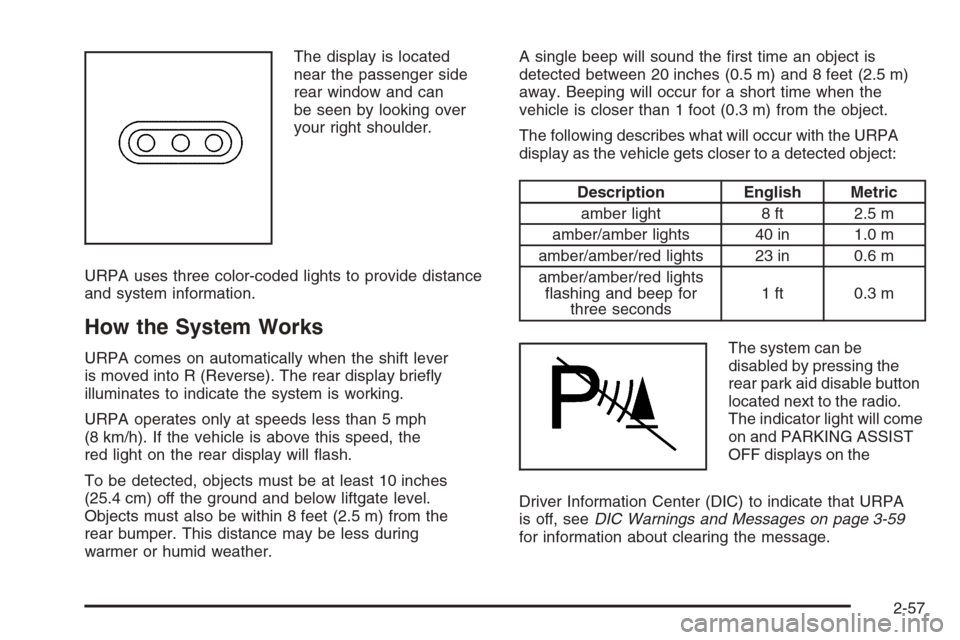
The display is located
near the passenger side
rear window and can
be seen by looking over
your right shoulder.
URPA uses three color-coded lights to provide distance
and system information.
How the System Works
URPA comes on automatically when the shift lever
is moved into R (Reverse). The rear display briey
illuminates to indicate the system is working.
URPA operates only at speeds less than 5 mph
(8 km/h). If the vehicle is above this speed, the
red light on the rear display will ash.
To be detected, objects must be at least 10 inches
(25.4 cm) off the ground and below liftgate level.
Objects must also be within 8 feet (2.5 m) from the
rear bumper. This distance may be less during
warmer or humid weather.A single beep will sound the rst time an object is
detected between 20 inches (0.5 m) and 8 feet (2.5 m)
away. Beeping will occur for a short time when the
vehicle is closer than 1 foot (0.3 m) from the object.
The following describes what will occur with the URPA
display as the vehicle gets closer to a detected object:
Description English Metric
amber light 8 ft 2.5 m
amber/amber lights 40 in 1.0 m
amber/amber/red lights 23 in 0.6 m
amber/amber/red lights
ashing and beep for
three seconds1 ft 0.3 m
The system can be
disabled by pressing the
rear park aid disable button
located next to the radio.
The indicator light will come
on and PARKING ASSIST
OFF displays on the
Driver Information Center (DIC) to indicate that URPA
is off, seeDIC Warnings and Messages on page 3-59
for information about clearing the message.
2-57
Page 158 of 538
When the System Does Not Seem to
Work Properly
If the URPA system will not activate due to a temporary
condition, the message PARKING ASSIST OFF will
be displayed on the DIC and a red light will be shown on
the rear URPA display when the shift lever is moved
into R (Reverse). This occurs under the following
conditions:
The driver disables the system.
The parking brake pedal is depressed.
The ultrasonic sensors are not clean. Keep the
vehicle’s rear bumper free of mud, dirt, snow,
ice and slush. For cleaning instructions, see
Washing Your Vehicle on page 5-112.
A trailer was attached to the vehicle, or a bicycle or
an object was hanging out of the liftgate during the
last drive cycle, the red light may illuminate in
the rear display. Once the attached object is
removed, URPA will return to normal operation.
A tow bar is attached to the vehicle.
The vehicle’s bumper is damaged. Take the vehicle
to your dealer/retailer to repair the system.
Other conditions may affect system performance,
such as vibrations from a jackhammer or the
compression of air brakes on a very large truck.
If the system is still disabled, after driving forward at
least 15 mph (25 km/h), take the vehicle to your
dealer/retailer.
2-58
Page 176 of 538
Oil Pressure Gage........................................3-47
Oil Pressure Light.........................................3-48
Security Light...............................................3-48
Fog Lamp Light............................................3-48
Cruise Control Light......................................3-49
Highbeam On Light.......................................3-49
Tow/Haul Mode Light....................................3-49
Fuel Gage...................................................3-49
Low Fuel Warning Light.................................3-50
Driver Information Center (DIC).......................3-51
DIC Operation and Displays
(With DIC Buttons)....................................3-51
DIC Operation and Displays
(Without DIC Buttons)................................3-56
DIC Warnings and Messages.........................3-59
DIC Vehicle Customization (With DIC Buttons). . . .3-67Audio System(s).............................................3-75
Setting the Clock..........................................3-76
Radio(s) (MP3).............................................3-78
Using an MP3 (Radio with CD
or Six-Disc CD Player)...............................3-95
Using an MP3 (Radio with CD
and DVD Player).......................................3-99
XM Radio Messages...................................3-104
Navigation/Radio System..............................3-105
Rear Seat Entertainment (RSE) System.........3-105
Rear Seat Audio (RSA)................................3-114
Theft-Deterrent Feature................................3-116
Audio Steering Wheel Controls......................3-116
Radio Reception.........................................3-117
Rear Side Window Antenna..........................3-118
XM™ Satellite Radio Antenna System............3-118
Section 3 Instrument Panel
3-2
Page 193 of 538
Dome Lamp Override
The dome lamp override button is located next to the
exterior lamps control.
k(Dome Off):Press the button in and the dome
lamps remain off when a door is opened. Press
the button again to return it to the extended position so
that the dome lamps come on when a door is opened.
Entry Lighting
Your vehicle has an illuminated entry feature.
When the doors are opened, the dome lamps will come
on if the dome override button is in the extended
position. If the dome override button is pressed in, the
lamps will not come on.
Exit Lighting
The interior lamps come on when the key is removed
from the ignition. They turn off automatically in
20 seconds. The lights do not come on if the dome
override button is pressed in.
Reading Lamps
If your vehicle has reading lamps they are located on
the overhead console.To turn on the reading lamps, press the button
located next to each lamp. To turn them off, press the
button again.
Your vehicle may also have reading lamps in other
locations. To turn the lamps on or off, press the button
located next to the lamp.
The lamps are xed and cannot be adjusted.
Electric Power Management
The vehicle has Electric Power Management (EPM)
that estimates the battery’s temperature and state
of charge. It then adjusts the voltage for best
performance and extended life of the battery.
When the battery’s state of charge is low, the voltage is
raised slightly to quickly put the charge back in. When
the state of charge is high, the voltage is lowered slightly
to prevent overcharging. If the vehicle has a voltmeter
gage or a voltage display on the Driver Information
Center (DIC), you may see the voltage move up
or down. This is normal. If there is a problem, an alert
will be displayed.
The battery can be discharged at idle if the electrical
loads are very high. This is true for all vehicles.
This is because the generator (alternator) may not be
spinning fast enough at idle to produce all the power
that is needed for very high electrical loads.
3-19
Page 194 of 538
A high electrical load occurs when several of the
following loads are on: headlamps, high beams, fog
lamps, rear window defogger, climate control fan at high
speed, heated seats, engine cooling fans, trailer
loads, and loads plugged into accessory power outlets.
EPM works to prevent excessive discharge of the
battery. It does this by balancing the generator’s output
and the vehicle’s electrical needs. It can increase
engine idle speed to generate more power, whenever
needed. It can temporarily reduce the power demands of
some accessories.
Normally, these actions occur in steps or levels, without
being noticeable. In rare cases at the highest levels
of corrective action, this action may be noticeable
to the driver. If so, a Driver Information Center (DIC)
message might be displayed, such as Battery Saver
Active or Service Battery Charging System. If this
message is displayed, it is recommended that the
driver reduce the electrical loads as much as possible.
SeeDIC Warnings and Messages on page 3-59.
Battery Run-Down Protection
This feature shuts off the dome, and reading lamps
if they are left on for more than 10 minutes when
the ignition is off. This will keep the battery from
running down.
Accessory Power Outlet(s)
Accessory power outlets can be used to connect
auxiliary electrical equipment, such as a cellular
telephone or CB radio.
There are two under the climate controls, one inside
the center oor console, one on the rear of the center
oor console and one accessory power outlet in the
rear cargo area on the passenger side.
To use an accessory power outlet, remove the protective
cap. When not in use, always cover the accessory
power outlet with the protective cap.
The accessory power outlets are powered, even with
the ignition off. Continuing to use accessory power
outlets while the ignition is in LOCK/OFF may cause
the vehicle’s battery to run down.
Notice:If electrical devices are left plugged into
a power outlet, the battery may drain causing
your vehicle not to start or damage to the battery.
This would not be covered by the warranty.
Always unplug all electrical devices when turning
off your vehicle.
3-20
Page 199 of 538
Driver’s Side Temperature Control
The driver’s side temperature buttons are used to
adjust the temperature of the air coming through the
system on the driver’s side. The temperature can
be adjusted even if the system is turned off. This is
possible since outside air will always ow through the
system as the vehicle is moving forward unless it is
set to recirculation mode. See “Recirculation” later in
this section.
Press the + or−buttons to increase or decrease the
cabin temperature. The driver side temperature display
will show the temperature setting decreasing or
increasing.
Passenger’s Side Temperature Control
The passenger’s temperature buttons can be used to
change the temperature of the air coming through
the system on the passenger’s side of the vehicle.
The temperature can be adjusted even if the system
is turned off. This is possible since outside air will always
ow through the system as the vehicle is moving
forward unless it is set to recirculation mode. See
“Recirculation” later in this section.
Press the + or−buttons to increase or decrease the
cabin temperature. The passenger side display will show
the temperature setting decreasing or increasing.The passenger’s temperature setting can be set to
match the driver’s temperature setting by pressing the
PASS button and turning off the PASS indicator.
When the passenger’s temperature setting is set
different than the driver’s setting, the indicator on the
PASS button will illuminate and both the driver’s
side and passenger’s side temperature displays will
be shown.
Automatic Operation
AUTO (Automatic):When automatic operation is
active the system will control the inside temperature,
the air delivery, and the fan speed.
Use the steps below to place the entire system in
automatic mode:
1. Press the AUTO button.
When AUTO is selected, the display will change
to show the current temperature(s) and AUTO will
be lit on the display. The current delivery mode
and fan speed will also be displayed for
approximately 5 seconds.
When AUTO is selected, the air conditioning
operation and air inlet will be automatically
controlled. The air conditioning compressor will
run when the outside temperature is over about
40°F (4°C). The air inlet will normally be set
to outside air.
3-25
Page 200 of 538
If it is hot outside, the air inlet may automatically
switch to recirculate inside air to help quickly
cool down the vehicle. The light on the button will
illuminate in recirculation.
2. Set the driver’s and passenger’s temperature.
To nd your comfort setting, start with a 74°F (23°C)
temperature setting and allow about 20 minutes
for the system to regulate. Use the driver’s or
passenger’s temperature buttons to adjust the
temperature setting as necessary. If you choose the
temperature setting of 60°F (15°C), the system
will remain at the maximum cooling setting. If you
choose the temperature setting of 90°F (32°C),
the system will remain at the maximum heat setting.
Choosing either maximum setting will not cause
the vehicle to heat or cool any faster.
Be careful not to cover the solar sensor located on the
top of the instrument panel near the windshield. This
sensor regulates air temperature based on sun load and
also turns on the headlamps. For more information on
the solar sensor, see “Sensors” later in this section.
To avoid blowing cold air in cold weather, the system will
delay turning on the fan until warm air is available.
The length of delay depends on the engine coolant
temperature. Pressing the fan switch will override this
delay and change the fan to a selected speed.O(On/Off):Press this button to turn off the climate
control system. Outside air will still enter the vehicle, and
will be directed to the oor. This direction can be
changed by pressing the mode button. Recirculation
can be selected once vent or bi-level mode has
been selected. The temperature can also be adjusted
using either temperature button. If the air delivery mode
or temperature settings are adjusted with the system
off, the display will illuminate briey to show you
the settings and then return off. Press the on/off button
or the up down arrows on the fan switch, the defrost
button, AUTO button, or the air conditioning button
to turn the system on when it is off.
Manual Operation
You may manually adjust the air delivery mode or
fan speed.
y9z(Fan):The buttons with the fan symbols
allow you to manually adjust the fan speed. Press the up
arrow to increase fan speed and the down arrow to
decrease fan speed.
Pressing one of these buttons when the system is off
will turn the system on. Pressing one of these buttons
when in automatic control will place the fan under
manual control. The fan setting will remain displayed
and the AUTO light will turn off. The air delivery
mode will remain under automatic control.
3-26
Page 201 of 538
yNz(Mode):Press the mode up and down
buttons to manually change the direction of the airow
in the vehicle. Repeatedly press the button until the
desired mode appears on the display. Pressing one of
these buttons when the system is off will change air
delivery mode without turning the system on. Pressing
one of these buttons when in automatic control will place
the mode under manual control.
The air delivery mode setting will be displayed and the
AUTO light will turn off. The fan will remain under
automatic control.
H(Vent):This setting will deliver air to the instrument
panel outlets.
)(Bi-Level):This mode directs half of the air to the
instrument panel outlets and half to the oor outlets.
The ow can be divided between vent and oor outlets
depending upon where the knob is placed between
the settings. A little air is directed towards the windshield
and side window outlets. Cooler air is directed to the
upper outlets and warmer air to the oor outlets.
6(Floor):This mode directs most of the air to the
oor outlets, with some of the air directed to the
windshield, side window outlets, and second row oor
outlets. In this mode, the system automatically
selects outside air.
-(Defog):See “Defogging and Defrosting” later in
this section.
@(Recirculation):Press this button to turn the
recirculation mode on. When the button is pressed,
an indicator light comes on.
This mode keeps outside air from entering the vehicle.
It can be used to reduce outside air and prevent
odors from entering the vehicle. Recirculation may also
help cool the air inside the vehicle more quickly once
the temperature inside the vehicle is less than the
outside temperature.
The recirculation mode cannot be used with oor,
defrost, or defogging modes. If you try to select
recirculation in one of those modes, the indicator will
ash three times and turn off. The air conditioning
compressor will also come on when this mode is
activated. While in recirculation mode the windows may
fog when the weather is cold and damp. To clear the
fog, select either the defog or defrost mode and increase
the fan speed. Recirculation mode can be turned off
by pressing the button again, or turning off the engine.
AUX:For vehicles with the rear heat and air
conditioning controls. Press the AUX button to turn the
rear climate control system on or off. SeeRear Air
Conditioning and Heating System and Electronic Climate
Controls on page 3-32.
3-27