display CHEVROLET SUBURBAN 2009 Owners Manual
[x] Cancel search | Manufacturer: CHEVROLET, Model Year: 2009, Model line: SUBURBAN, Model: CHEVROLET SUBURBAN 2009Pages: 578, PDF Size: 3.04 MB
Page 325 of 578
SRCE (Source):Press this button to switch between
the radio (AM/FM), XM™ (if equipped), CD, and if
the vehicle has these features, DVD, front auxiliary, and
rear auxiliary.
©¨(Seek):When listening to FM, AM, or XM™
(if equipped), press the left
©or right¨seek arrow to
go to the previous or to the next station or channel
and stay there. This function is inactive, with some
radios, if the front seat passengers are listening to the
radio.
Press and hold the left
©or right¨seek arrow until
the display ashes, to tune to an individual station.
The display stops ashing after the buttons have not
been pushed for more than two seconds. This function is
inactive, with some radios, if the front seat passengers
are listening to the radio.
While listening to a disc, press the left
©seek arrow to
go back to the start of the current track or chapter
(if more than ten seconds have played). Press the
right
¨seek arrow to go to the next track or chapter
on the disc. This function is inactive, with some radios, if
the front seat passengers are listening to the disc.When a DVD video menu is being displayed, press the
left
©or right¨seek arrow to perform a cursor up or
down on the menu. Hold the left
©or right¨arrow to
perform a cursor left or right on the menu.
PROG (Program):Press this button to go to the next
preset radio station or channel set on the main
radio. This function is inactive, with some radios, if the
front seat passengers are listening to the radio.
When a CD or DVD audio disc is playing, press this
button to go to the beginning of the CD or DVD audio.
This function is inactive, with some radios, if the
front seat passengers are listening to the disc.
When a disc is playing in the CD or DVD changer,
press this button to select the next disc, if multiple discs
are loaded. This function is inactive, with some radios,
if the front seat passengers are listening to the disc.
When a DVD video menu is being displayed, press the
PROG button to perform the menu function, enter.
3-137
Page 335 of 578
If the system fails to turn on or activate, the StabiliTrak
light along with one of the following messages will
be displayed on the Driver Information Center (DIC):
TRACTION CONTROL OFF, SERVICE TRACTION
CONTROL, STABILITRAK OFF, SERVICE
STABILITRAK. If these DIC messages appear, make
sure the StabiliTrak system has not been turned off
using the StabiliTrak on/off button. Then turn the steering
wheel clockwise from the nine o’clock position to the
three o’clock position. If this clears the message(s), the
vehicle does not need servicing. If this does not clear the
message(s), then turn the vehicle off, wait 15 seconds,
and then turn it back on again to reset the system. If any
of these messages still appear on the Driver Information
Center (DIC), the vehicle should be taken in for service.
For more information on the DIC messages, seeDriver
Information Center (DIC) on page 3-51.
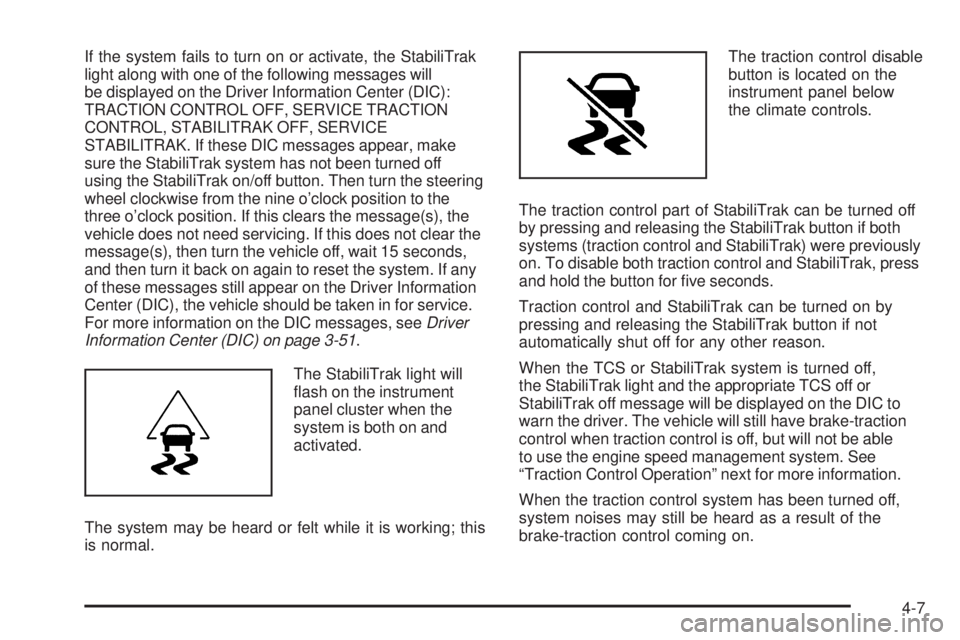
The StabiliTrak light will
ash on the instrument
panel cluster when the
system is both on and
activated.
The system may be heard or felt while it is working; this
is normal.The traction control disable
button is located on the
instrument panel below
the climate controls.
The traction control part of StabiliTrak can be turned off
by pressing and releasing the StabiliTrak button if both
systems (traction control and StabiliTrak) were previously
on. To disable both traction control and StabiliTrak, press
and hold the button for ve seconds.
Traction control and StabiliTrak can be turned on by
pressing and releasing the StabiliTrak button if not
automatically shut off for any other reason.
When the TCS or StabiliTrak system is turned off,
the StabiliTrak light and the appropriate TCS off or
StabiliTrak off message will be displayed on the DIC to
warn the driver. The vehicle will still have brake-traction
control when traction control is off, but will not be able
to use the engine speed management system. See
“Traction Control Operation” next for more information.
When the traction control system has been turned off,
system noises may still be heard as a result of the
brake-traction control coming on.
4-7
Page 336 of 578
It is recommended to leave the system on for normal
driving conditions, but it may be necessary to turn the
system off if the vehicle is stuck in sand, mud, ice or
snow, and you want to “rock” the vehicle to attempt to
free it. It may also be necessary to turn off the system
when driving in extreme off-road conditions where high
wheel spin is required. SeeIf Your Vehicle is Stuck in
Sand, Mud, Ice, or Snow on page 4-31.
Traction Control Operation
The traction control system is part of the StabiliTrak
system. Traction control limits wheel spin by reducing
engine power to the wheels (engine speed management)
and by applying brakes to each individual wheel
(brake-traction control) as necessary.
The traction control system is enabled automatically
when the vehicle is started. It will activate and the
StabiliTrak light will ash if it senses that any of
the wheels are spinning or beginning to lose traction
while driving. If traction control is turned off, only
the brake-traction control portion of traction control will
work. The engine speed management will be disabled.
In this mode, engine power is not reduced automatically
and the driven wheels can spin more freely. This can
cause the brake-traction control to activate constantly.Notice:If the wheel(s) of one axle is allowed to spin
excessively while the StabiliTrak, ABS and brake
warning lights and any relevant DIC messages are
displayed, the transfer case could be damaged.
The repairs would not be covered by the vehicle
warranty. Reduce engine power and do not spin
the wheel(s) excessively while these lights and
messages are displayed.
The traction control system may activate on dry
or rough roads or under conditions such as heavy
acceleration while turning or abrupt upshifts/downshifts
of the transmission. When this happens, a reduction
in acceleration may be noticed, or a noise or vibration
may be heard. This is normal.
If cruise control is being used when the system
activates, the StabiliTrak light will ash and cruise
control will automatically disengage. Cruise control
may be reengaged when road conditions allow.
SeeCruise Control on page 3-12.
StabiliTrak may also turn off automatically if it
determines that a problem exists with the system.
If the problem does not clear itself after restarting
the vehicle, see your dealer/retailer for service.
4-8
Page 389 of 578
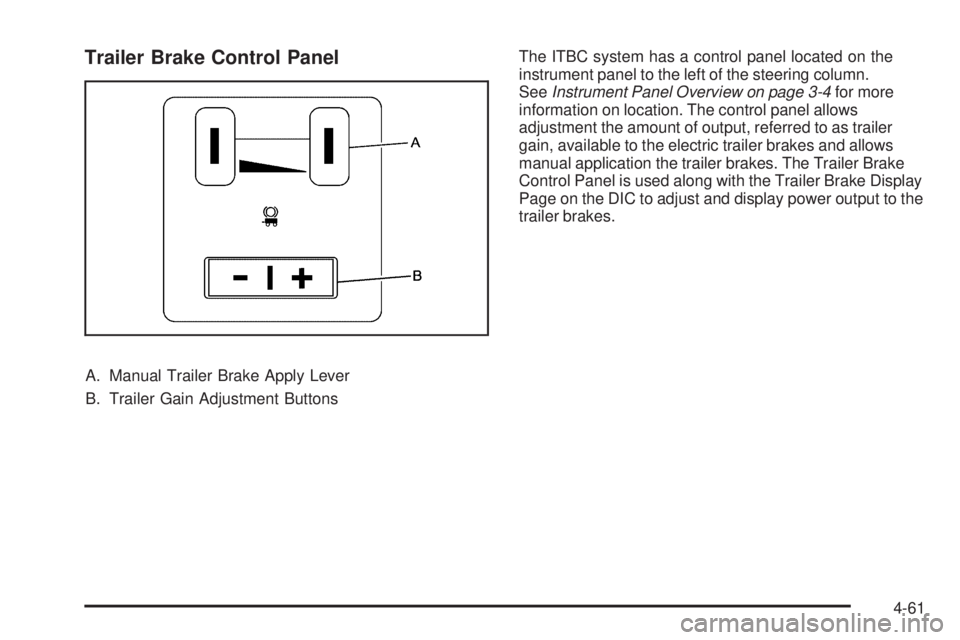
Trailer Brake Control Panel
A. Manual Trailer Brake Apply Lever
B. Trailer Gain Adjustment ButtonsThe ITBC system has a control panel located on the
instrument panel to the left of the steering column.
SeeInstrument Panel Overview on page 3-4for more
information on location. The control panel allows
adjustment the amount of output, referred to as trailer
gain, available to the electric trailer brakes and allows
manual application the trailer brakes. The Trailer Brake
Control Panel is used along with the Trailer Brake Display
Page on the DIC to adjust and display power output to the
trailer brakes.
4-61
Page 390 of 578
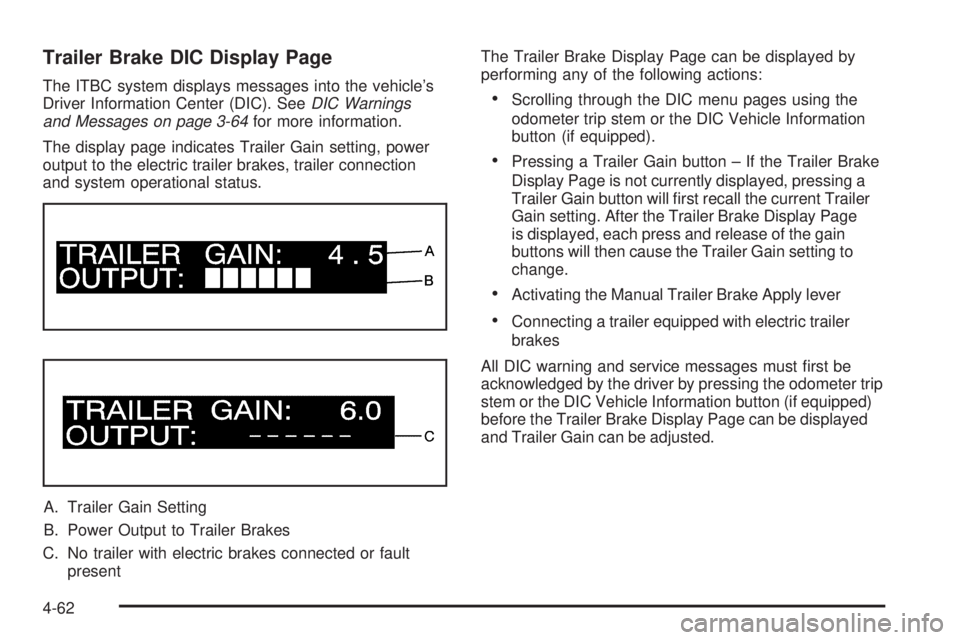
Trailer Brake DIC Display Page
The ITBC system displays messages into the vehicle’s
Driver Information Center (DIC). SeeDIC Warnings
and Messages on page 3-64for more information.
The display page indicates Trailer Gain setting, power
output to the electric trailer brakes, trailer connection
and system operational status.
A. Trailer Gain Setting
B. Power Output to Trailer Brakes
C. No trailer with electric brakes connected or fault
presentThe Trailer Brake Display Page can be displayed by
performing any of the following actions:Scrolling through the DIC menu pages using the
odometer trip stem or the DIC Vehicle Information
button (if equipped).
Pressing a Trailer Gain button – If the Trailer Brake
Display Page is not currently displayed, pressing a
Trailer Gain button will rst recall the current Trailer
Gain setting. After the Trailer Brake Display Page
is displayed, each press and release of the gain
buttons will then cause the Trailer Gain setting to
change.
Activating the Manual Trailer Brake Apply lever
Connecting a trailer equipped with electric trailer
brakes
All DIC warning and service messages must rst be
acknowledged by the driver by pressing the odometer trip
stem or the DIC Vehicle Information button (if equipped)
before the Trailer Brake Display Page can be displayed
and Trailer Gain can be adjusted.
4-62
Page 391 of 578
TRAILER GAIN – This setting is displayed anytime the
Trailer Brake Display Page is active. This setting can be
adjusted from 0.0 to 10.0 with either a trailer connected
or disconnected. To adjust the Trailer Gain, press one of
the Trailer Gain adjustment buttons located on the Trailer
Brake Control Panel. Press and hold a gain button to
cause the Trailer Gain to continuously adjust. To turn the
output to the trailer off, adjust the Trailer Gain setting to
0.0 (zero).
0.0 (zero) gain is the factory default setting. To properly
adjust trailer gain, see the Trailer Gain Adjustment
Procedure later in this section.
TRAILER OUTPUT – This is displayed any time a
trailer with electric brakes is connected. Output to the
electric brakes is based on the amount of vehicle braking
present and relative to the Trailer Gain setting. Output is
displayed from 0 to 10 bars for each gain setting.
The Trailer Output will indicate “------“ontheTrailer
Brake Display Page whenever the following occur:
No trailer is connected.
A trailer without electric brakes is connected
(no DIC message is displayed).
A trailer with electric brakes has become
disconnected (a CHECK TRAILER WIRING
message will also be displayed on the DIC).
There is a fault present in the wiring to the electric
trailer brakes (a CHECK TRAILER WIRING
message will also be displayed on the DIC).
There is a fault in the ITBC system (a SERVICE
TRAILER BRAKE SYSTEM message will also
be displayed in the DIC).
Manual Trailer Brake Apply
The Manual Trailer Brake Apply Lever is located on
the Trailer Brake Control Panel and is used to apply
the trailer’s electric brakes independent of the vehicle’s
brakes. This lever is used in the Trailer Gain Adjustment
Procedure to properly adjust the power output to the
trailer brakes. Sliding the lever to the left will apply only
the trailer brakes. The power output to the trailer is
indicated in the Trailer Brake Display Page in the DIC.
If the vehicle’s service brakes are applied while using
the Manual Trailer Brake Apply Lever, the trailer output
power will be the greater of the two.
The trailer and the vehicle’s brake lamps will come on
when either vehicle braking or manual trailer brakes
are applied.
4-63
Page 392 of 578
Trailer Gain Adjustment Procedure
Trailer Gain should be set for a specic trailering
condition and must be adjusted any time vehicle loading,
trailer loading or road surface conditions change.
Setting the Trailer Gain properly is needed for the best
trailer stopping performance. A trailer that is over-gained
may result in locked trailer brakes. A trailer that is
under-gained may result in not enough trailer braking.
Both of these conditions may result in poorer stopping
and stability of the vehicle and trailer.
Use the following procedure to correctly adjust Trailer
Gain for each towing condition:
1. Make sure the trailer brakes are in proper working
condition.
2. Connect a properly loaded trailer to the vehicle
and make all necessary mechanical and electrical
connections. SeeLoading the Vehicle on page 4-33
for more information.
3. After the electrical connection is made to a trailer
equipped with electric brakes:
A TRAILER CONNECTED message will be
briey displayed on the DIC display.
The Trailer Brake Display Page will appear on
the DIC showing TRAILER GAIN and TRAILER
OUTPUT.
In the Trailer Output display on the DIC, “------“
will disappear if there is no error present.
Connecting a trailer without electric brakes
will not clear the six dashed lines.
4. Adjust the Trailer Gain by using the gain adjustment
(+ /−) buttons on the Trailer Brake Control Panel.
5. Drive the vehicle with the trailer attached on a
level road surface representative of the towing
condition and free of traffic at about 20 to 25 mph
(32 to 40 km/h) and fully apply the Manual Trailer
Brake Apply lever.
Adjusting trailer gain at speeds lower than
20 to 25 mph (32 to 40 km/h) may result in
an incorrect gain setting.
6. Adjust the Trailer Gain to just below the point of
trailer wheel lock-up, indicated by trailer wheel
squeal or tire smoke when a trailer wheel locks.
Trailer wheel lock-up may not occur if towing
a heavily loaded trailer. In this case, adjust the
Trailer Gain to the highest allowable setting for
the towing condition.
7. Re-adjust Trailer Gain any time vehicle loading,
trailer loading or road surface conditions change
or if trailer wheel lock-up is noticed at any time
while towing
4-64
Page 393 of 578
Other ITBC Related DIC Messages
In addition to displaying TRAILER GAIN and TRAILER
OUTPUT through the DIC, trailer connection and
ITBC system status is displayed in the DIC.
TRAILER CONNECTED – This message will be
briey displayed when a trailer with electric brakes
is rst connected to the vehicle. This message will
automatically turn off in about ten seconds. The driver
can also acknowledge this message before it
automatically turns off.
CHECK TRAILER WIRING – This message will be
displayed if:
1. The ITBC system rst determines connection to
a trailer with electric brakes and then the trailer
harness becomes disconnected from the vehicle.
If the disconnect occurs while the vehicle is
stationary, this message will automatically turn
off in about thirty seconds. This message will also
turn off if the driver acknowledges this message
off or if the trailer harness is re-connected.
If the disconnect occurs while the vehicle is moving,
this message will continue until the ignition is turned
off. This message will also turn off if the driver
acknowledges this message off or if the trailer
harness is re-connected.2. There is an electrical fault in the wiring to the
electric trailer brakes. This message will continue
as long as there is an electrical fault in the trailer
wiring. This message will also turn off if the driver
acknowledges this message off.
To determine if the electrical fault is on the vehicle side
or trailer side of the trailer wiring harness connection,
do the following:
1. Disconnect the trailer wiring harness from the
vehicle.
2. Turn the ignition OFF.
3. Wait ten seconds, then turn the ignition back
to RUN.
4. If the CHECK TRAILER WIRING message
re-appears, the electrical fault is on the vehicle side.
If the CHECK TRAILER WIRING message only
re-appears when connecting the trailer wiring
harness to the vehicle, the electrical fault is on
the trailer side.
4-65
Page 394 of 578
SERVICE TRAILER BRAKE SYSTEM – This message
will be displayed when there is a problem with the
ITBC system. If this message persists over multiple
ignition cycles there is problem with the ITBC system.
Take the vehicle to an authorized dealer/retailer to have
the ITBC system diagnosed and repaired.
If either the CHECK TRAILER WIRING or SERVICE
TRAILER BRAKE SYSTEM message is displayed while
driving the vehicle, power is no longer available to the
trailer brakes. When traffic conditions allow, carefully
pull the vehicle over to the side of the road and turn the
ignition off. Check the wiring connection to the trailer and
turn the ignition back on. If either of these messages
continues, either the vehicle or trailer needs service.
An authorized dealer/retailer may be able to diagnose
and repair problems with the trailer. However, any
diagnosis and repair of the trailer is not covered under
the vehicle warranty. Please contact your trailer dealer
for assistance with trailer repairs and trailer warranty
information.Driving with a Trailer
{CAUTION:
When towing a trailer, exhaust gases may collect
at the rear of the vehicle and enter if the liftgate,
trunk/hatch, or rear-most window is open.
Engine exhaust contains carbon monoxide (CO)
which cannot be seen or smelled. It can cause
unconsciousness and even death.
To maximize safety when towing a trailer:
Have the exhaust system inspected for
leaks and make necessary repairs before
starting a trip.
Never drive with the liftgate, trunk/hatch, or
rear-most window open.
Fully open the air outlets on or under the
instrument panel.
Adjust the Climate Control system to a setting
that brings in only outside air and set the fan
speed to the highest setting. See Climate
Control System in the Index.
For more information about carbon monoxide, see
Engine Exhaust on page 2-50.
4-66
Page 411 of 578
If the vehicle has a Driver Information Center (DIC), the
TIGHTEN GAS CAP message displays if the fuel cap is
not properly installed.
{CAUTION:
If a re starts while you are refueling, do not
remove the nozzle. Shut off the ow of fuel by
shutting off the pump or by notifying the station
attendant. Leave the area immediately.
Notice:If you need a new fuel cap, be sure to get
the right type. Your dealer/retailer can get one
for you. If you get the wrong type, it may not t
properly. This may cause the malfunction indicator
lamp to light and may damage the fuel tank and
emissions system. SeeMalfunction Indicator Lamp
on page 3-43.
Filling a Portable Fuel Container
{CAUTION:
Never ll a portable fuel container while it is in the
vehicle. Static electricity discharge from the
container can ignite the fuel vapor. You can be
badly burned and the vehicle damaged if this
occurs. To help avoid injury to you and others:
Dispense fuel only into approved containers.
Do not ll a container while it is inside a
vehicle, in a vehicle’s trunk, pickup bed, or on
any surface other than the ground.
Bring the ll nozzle in contact with the inside
of the ll opening before operating the nozzle.
Contact should be maintained until the lling
is complete.
Do not smoke while pumping fuel.
Do not use a cellular phone while
pumping fuel.
5-11