cooling CHEVROLET SUBURBAN 2009 Owner's Manual
[x] Cancel search | Manufacturer: CHEVROLET, Model Year: 2009, Model line: SUBURBAN, Model: CHEVROLET SUBURBAN 2009Pages: 578, PDF Size: 3.04 MB
Page 432 of 578
How to Add Coolant to the Surge Tank
{CAUTION:
You can be burned if you spill coolant on hot
engine parts. Coolant contains ethylene glycol and
it will burn if the engine parts are hot enough.
Do not spill coolant on a hot engine.
Notice:This vehicle has a specic coolant ll
procedure. Failure to follow this procedure could
cause the engine to overheat and be severely
damaged.
{CAUTION:
An electric engine cooling fan under the hood can
start up even when the engine is not running and
can cause injury. Keep hands, clothing, and tools
away from any underhood electric fan.
{CAUTION:
Steam and scalding liquids from a hot cooling
system can blow out and burn you badly. They are
under pressure, and if you turn the surge tank
pressure cap — even a little — they can come out
at high speed. Never turn the cap when the
cooling system, including the surge tank pressure
cap, is hot. Wait for the cooling system and surge
tank pressure cap to cool if you ever have to turn
the pressure cap.
5-32
Page 433 of 578
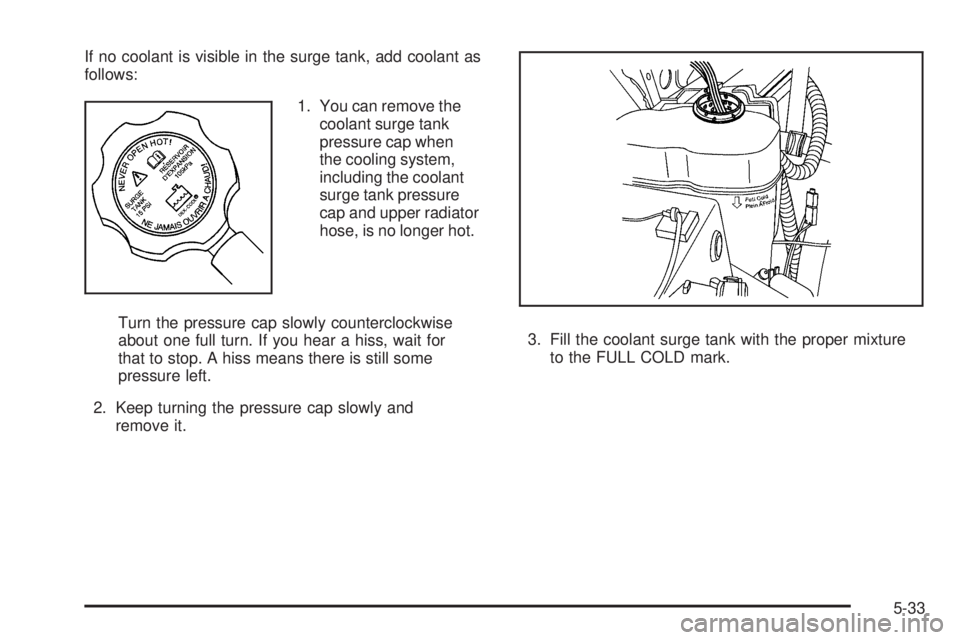
If no coolant is visible in the surge tank, add coolant as
follows:
1. You can remove the
coolant surge tank
pressure cap when
the cooling system,
including the coolant
surge tank pressure
cap and upper radiator
hose, is no longer hot.
Turn the pressure cap slowly counterclockwise
about one full turn. If you hear a hiss, wait for
that to stop. A hiss means there is still some
pressure left.
2. Keep turning the pressure cap slowly and
remove it.3. Fill the coolant surge tank with the proper mixture
to the FULL COLD mark.
5-33
Page 434 of 578
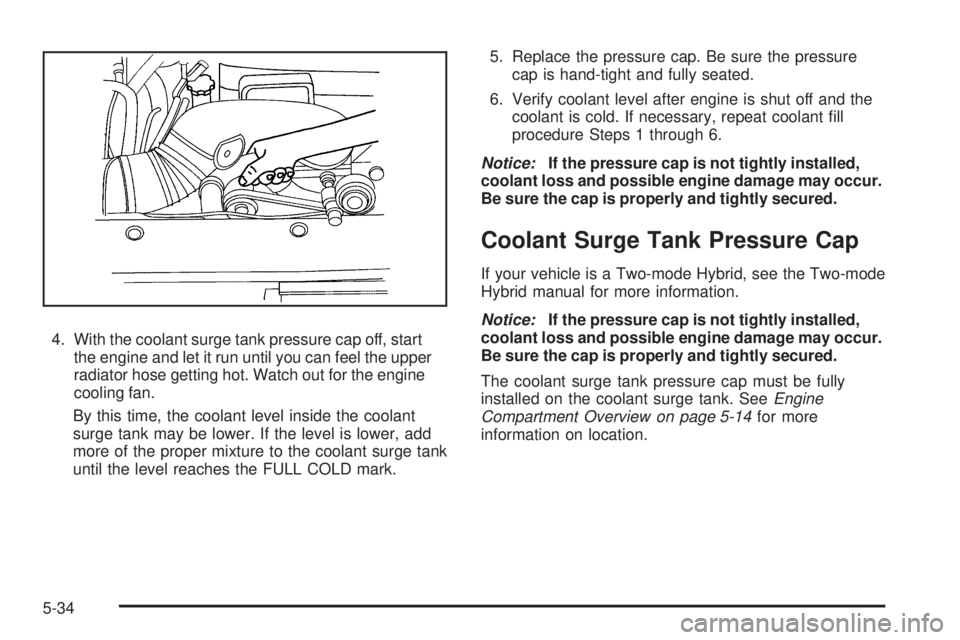
4. With the coolant surge tank pressure cap off, start
the engine and let it run until you can feel the upper
radiator hose getting hot. Watch out for the engine
cooling fan.
By this time, the coolant level inside the coolant
surge tank may be lower. If the level is lower, add
more of the proper mixture to the coolant surge tank
until the level reaches the FULL COLD mark.5. Replace the pressure cap. Be sure the pressure
cap is hand-tight and fully seated.
6. Verify coolant level after engine is shut off and the
coolant is cold. If necessary, repeat coolant ll
procedure Steps 1 through 6.
Notice:If the pressure cap is not tightly installed,
coolant loss and possible engine damage may occur.
Be sure the cap is properly and tightly secured.
Coolant Surge Tank Pressure Cap
If your vehicle is a Two-mode Hybrid, see the Two-mode
Hybrid manual for more information.
Notice:If the pressure cap is not tightly installed,
coolant loss and possible engine damage may occur.
Be sure the cap is properly and tightly secured.
The coolant surge tank pressure cap must be fully
installed on the coolant surge tank. SeeEngine
Compartment Overview on page 5-14for more
information on location.
5-34
Page 435 of 578
Engine Overheating
The vehicle has several indicators to warn of engine
overheating.
There is a coolant temperature gage on your vehicle’s
instrument panel. SeeEngine Coolant Temperature
Gage on page 3-42.
In addition, ENGINE OVERHEATED STOP ENGINE,
ENGINE OVERHEATED IDLE ENGINE, and a ENGINE
POWER IS REDUCED message comes on in the Driver
Information Center (DIC) on the instrument panel. See
DIC Warnings and Messages on page 3-64.
You may decide not to lift the hood when this warning
appears, but instead get service help right away.
SeeRoadside Assistance Program on page 7-7.
If you do decide to lift the hood, make sure the vehicle
is parked on a level surface.Then check to see if the engine cooling fans are
running. If the engine is overheating, both fans should
be running. If they are not, do not continue to run
the engine and have the vehicle serviced.
Notice:Engine damage from running your engine
without coolant is not covered by your warranty. See
Overheated Engine Protection Operating Mode on
page 5-37for information on driving to a safe place
in an emergency.
Notice:If the engine catches re while driving with
no coolant, the vehicle can be badly damaged.
The costly repairs would not be covered by
the vehicle warranty. SeeOverheated Engine
Protection Operating Mode on page 5-37for
information on driving to a safe place in an
emergency.
5-35
Page 437 of 578
If the temperature overheat gage is no longer in the
overheat zone or an overheat warning no longer displays,
the vehicle can be driven. Continue to drive the vehicle
slow for about 10 minutes. Keep a safe vehicle distance
from the car in front of you. If the warning does not come
back on, continue to drive normally.
If the warning continues, pull over, stop, and park the
vehicle right away.
If there is no sign of steam, idle the engine for
three minutes while parked. If the warning is still
displayed, turn off the engine until it cools down.
Also, see “Overheated Engine Protection Operating
Mode” later in this section.
Overheated Engine Protection
Operating Mode
If an overheated engine condition exists and the
ENGINE POWER IS REDUCED message is displayed,
an overheat protection mode which alternates ring
groups of cylinders helps prevent engine damage. In this
mode, you will notice a loss in power and engine
performance. This operating mode allows the vehicle to
be driven to a safe place in an emergency. Driving
extended miles (km) and/or towing a trailer in the
overheat protection mode should be avoided.Notice:After driving in the overheated engine
protection operating mode, to avoid engine damage,
allow the engine to cool before attempting any repair.
The engine oil will be severely degraded. Repair the
cause of coolant loss, change the oil and reset the oil
life system. SeeEngine Oil on page 5-15.
Engine Fan Noise
If the vehicle has a clutched engine cooling fan, when the
clutch is engaged, the fan spins faster to provide more air
to cool the engine. In most everyday driving conditions,
the fan is spinning slower and the clutch is not fully
engaged. This improves fuel economy and reduces fan
noise. Under heavy vehicle loading, trailer towing, and/or
high outside temperatures, the fan speed increases as
the clutch more fully engages, so you may hear an
increase in fan noise. This is normal and should not be
mistaken as the transmission slipping or making extra
shifts. It is merely the cooling system functioning properly.
The fan will slow down when additional cooling is not
required and the clutch disengages.
You may also hear this fan noise when you start the
engine. It will go away as the fan clutch partially
disengages.
5-37
Page 438 of 578
If the vehicle has electric cooling fans, you may hear the
fans spinning at low speed during most everyday driving.
The fans may turn off if no cooling is required. Under
heavy vehicle loading, trailer towing, and/or high outside
temperatures, or if you are operating the air conditioning
system, the fans may change to high speed and you
may hear an increase in fan noise. This is normal and
indicates that the cooling system is functioning properly.
The fans will change to low speed when additional
cooling is no longer required.
Power Steering Fluid
If the vehicle is a Two-mode Hybrid, see the Two-mode
Hybrid manual for more information.
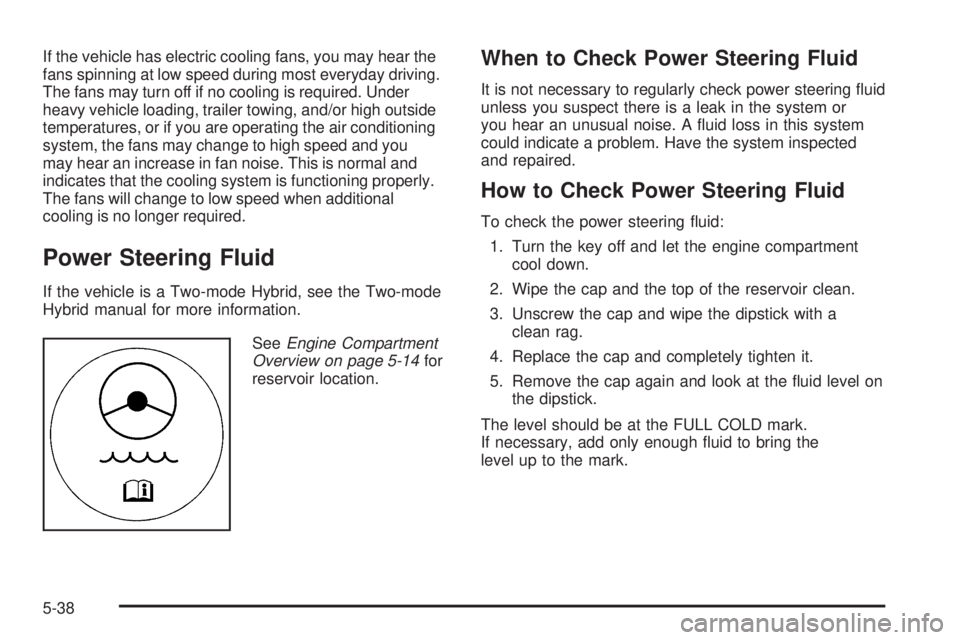
SeeEngine Compartment
Overview on page 5-14for
reservoir location.
When to Check Power Steering Fluid
It is not necessary to regularly check power steering uid
unless you suspect there is a leak in the system or
you hear an unusual noise. A uid loss in this system
could indicate a problem. Have the system inspected
and repaired.
How to Check Power Steering Fluid
To check the power steering uid:
1. Turn the key off and let the engine compartment
cool down.
2. Wipe the cap and the top of the reservoir clean.
3. Unscrew the cap and wipe the dipstick with a
clean rag.
4. Replace the cap and completely tighten it.
5. Remove the cap again and look at the uid level on
the dipstick.
The level should be at the FULL COLD mark.
If necessary, add only enough uid to bring the
level up to the mark.
5-38
Page 483 of 578
Your dealer/retailer will know the kind of wheel you need.
Each new wheel should have the same load-carrying
capacity, diameter, width, offset, and be mounted
the same way as the one it replaces.
If you need to replace any of your wheels, wheel bolts,
wheel nuts, or Tire Pressure Monitor System (TPMS)
sensors, replace them only with new GM original
equipment parts. This way, you will be sure to have the
right wheel, wheel bolts, wheel nuts, and TPMS
sensors for your vehicle.
{CAUTION:
Using the wrong replacement wheels, wheel bolts,
or wheel nuts on your vehicle can be dangerous. It
could affect the braking and handling of your
vehicle, make your tires lose air and make you
lose control. You could have a collision in which
you or others could be injured. Always use the
correct wheel, wheel bolts, and wheel nuts for
replacement.Notice:The wrong wheel can also cause problems
with bearing life, brake cooling, speedometer or
odometer calibration, headlamp aim, bumper height,
vehicle ground clearance, and tire or tire chain
clearance to the body and chassis.
SeeChanging a Flat Tire on page 5-86for more
information.
Used Replacement Wheels
{CAUTION:
Putting a used wheel on the vehicle is dangerous.
You cannot know how it has been used or how far
it has been driven. It could fail suddenly and
cause a crash. If you have to replace a wheel, use
a new GM original equipment wheel.
5-83
Page 521 of 578
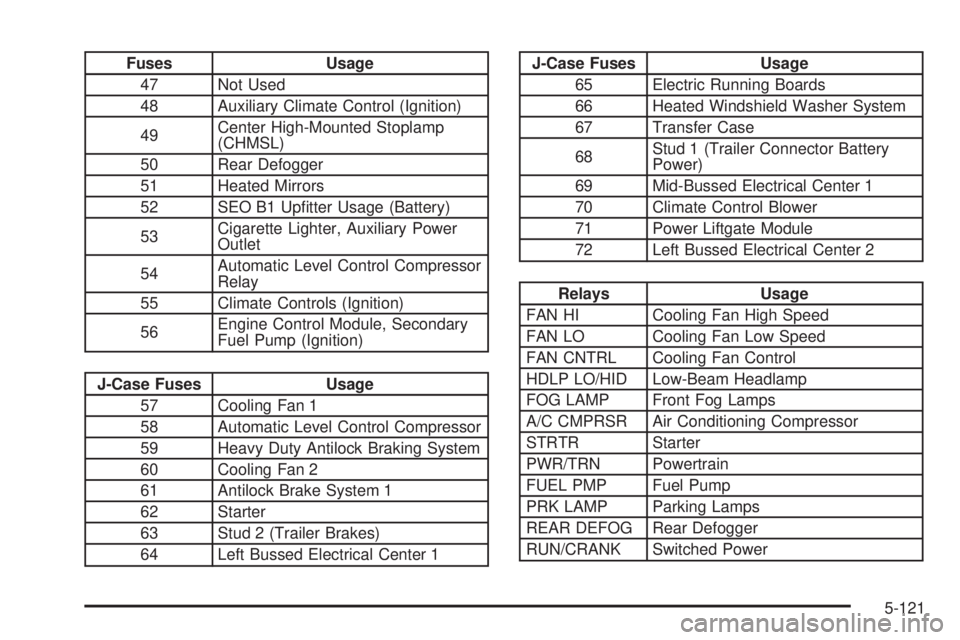
Fuses Usage
47 Not Used
48 Auxiliary Climate Control (Ignition)
49Center High-Mounted Stoplamp
(CHMSL)
50 Rear Defogger
51 Heated Mirrors
52 SEO B1 Uptter Usage (Battery)
53Cigarette Lighter, Auxiliary Power
Outlet
54Automatic Level Control Compressor
Relay
55 Climate Controls (Ignition)
56Engine Control Module, Secondary
Fuel Pump (Ignition)
J-Case Fuses Usage
57 Cooling Fan 1
58 Automatic Level Control Compressor
59 Heavy Duty Antilock Braking System
60 Cooling Fan 2
61 Antilock Brake System 1
62 Starter
63 Stud 2 (Trailer Brakes)
64 Left Bussed Electrical Center 1
J-Case Fuses Usage
65 Electric Running Boards
66 Heated Windshield Washer System
67 Transfer Case
68Stud 1 (Trailer Connector Battery
Power)
69 Mid-Bussed Electrical Center 1
70 Climate Control Blower
71 Power Liftgate Module
72 Left Bussed Electrical Center 2
Relays Usage
FAN HI Cooling Fan High Speed
FAN LO Cooling Fan Low Speed
FAN CNTRL Cooling Fan Control
HDLP LO/HID Low-Beam Headlamp
FOG LAMP Front Fog Lamps
A/C CMPRSR Air Conditioning Compressor
STRTR Starter
PWR/TRN Powertrain
FUEL PMP Fuel Pump
PRK LAMP Parking Lamps
REAR DEFOG Rear Defogger
RUN/CRANK Switched Power
5-121
Page 522 of 578
Capacities and Specications
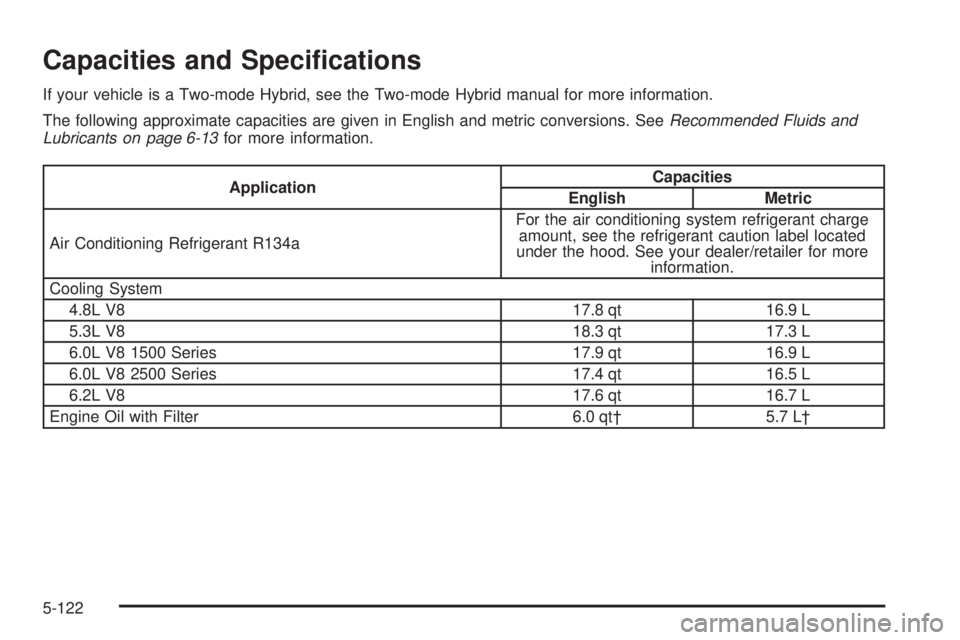
If your vehicle is a Two-mode Hybrid, see the Two-mode Hybrid manual for more information.
The following approximate capacities are given in English and metric conversions. SeeRecommended Fluids and
Lubricants on page 6-13for more information.
ApplicationCapacities
English Metric
Air Conditioning Refrigerant R134aFor the air conditioning system refrigerant charge
amount, see the refrigerant caution label located
under the hood. See your dealer/retailer for more
information.
Cooling System
4.8L V8 17.8 qt 16.9 L
5.3L V8 18.3 qt 17.3 L
6.0L V8 1500 Series 17.9 qt 16.9 L
6.0L V8 2500 Series 17.4 qt 16.5 L
6.2L V8 17.6 qt 16.7 L
Engine Oil with Filter 6.0 qt† 5.7 L†
5-122
Page 529 of 578
Scheduled Maintenance
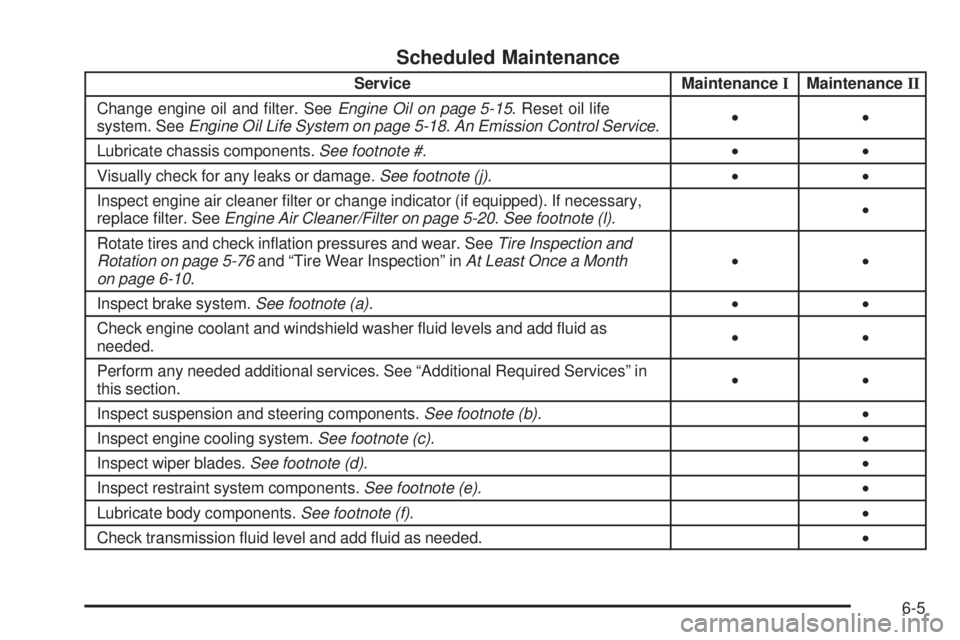
Service MaintenanceIMaintenanceII
Change engine oil and lter. SeeEngine Oil on page 5-15. Reset oil life
system. SeeEngine Oil Life System on page 5-18.An Emission Control Service.••
Lubricate chassis components.See footnote #.••
Visually check for any leaks or damage.See footnote (j).••
Inspect engine air cleaner lter or change indicator (if equipped). If necessary,
replace lter. SeeEngine Air Cleaner/Filter on page 5-20.See footnote (l).•
Rotate tires and check ination pressures and wear. SeeTire Inspection and
Rotation on page 5-76and “Tire Wear Inspection” inAt Least Once a Month
on page 6-10.••
Inspect brake system.See footnote (a).••
Check engine coolant and windshield washer uid levels and add uid as
needed.••
Perform any needed additional services. See “Additional Required Services” in
this section.••
Inspect suspension and steering components.See footnote (b).•
Inspect engine cooling system.See footnote (c).•
Inspect wiper blades.See footnote (d).•
Inspect restraint system components.See footnote (e).•
Lubricate body components.See footnote (f).•
Check transmission uid level and add uid as needed.•
6-5