mirror controls CHEVROLET SUBURBAN 2009 Owners Manual
[x] Cancel search | Manufacturer: CHEVROLET, Model Year: 2009, Model line: SUBURBAN, Model: CHEVROLET SUBURBAN 2009Pages: 578, PDF Size: 3.04 MB
Page 1 of 578
Seats and Restraint System............................. 1-1
Head Restraints
......................................... 1-2
Front Seats
............................................... 1-4
Rear Seats
..............................................1-14
Safety Belts
.............................................1-32
Child Restraints
.......................................1-54
Airbag System
.........................................1-81
Restraint System Check
............................1-98
Features and Controls..................................... 2-1
Keys
........................................................ 2-3
Doors and Locks
......................................2-10
Windows
.................................................2-19
Theft-Deterrent Systems
............................2-22
Starting and Operating Your Vehicle
...........2-26
Mirrors
....................................................2-52
Object Detection Systems
..........................2-56
OnStar
®System
......................................2-68
Universal Home Remote System
................2-71
Storage Areas
.........................................2-78
Sunroof
..................................................2-81Instrument Panel............................................. 3-1
Instrument Panel Overview
.......................... 3-4
Climate Controls
......................................3-22
Warning Lights, Gages, and Indicators
........3-34
Driver Information Center (DIC)
..................3-51
Audio System(s)
.......................................3-83
Driving Your Vehicle....................................... 4-1
Your Driving, the Road, and the Vehicle
....... 4-2
Towing
...................................................4-43
Service and Appearance Care.......................... 5-1
Service
..................................................... 5-3
Fuel
......................................................... 5-5
Checking Things Under the Hood
...............5-12
Rear Axle
...............................................5-49
Four-Wheel Drive
.....................................5-51
Front Axle
...............................................5-52
Headlamp Aiming
.....................................5-53
Bulb Replacement
....................................5-56
Windshield Wiper Blade Replacement
.........5-59
Tires
......................................................5-61
2009 Chevrolet Tahoe, Suburban Owner ManualM
Page 5 of 578
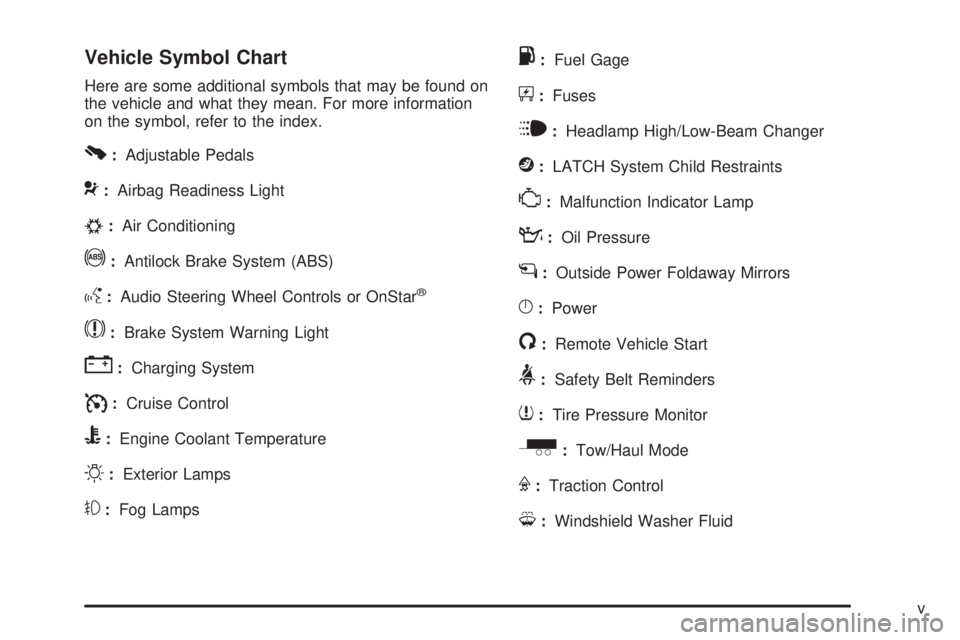
Vehicle Symbol Chart
Here are some additional symbols that may be found on
the vehicle and what they mean. For more information
on the symbol, refer to the index.
0:Adjustable Pedals
9:Airbag Readiness Light
#:Air Conditioning
!:Antilock Brake System (ABS)
g:Audio Steering Wheel Controls or OnStar®
$:Brake System Warning Light
":Charging System
I:Cruise Control
B:Engine Coolant Temperature
O:Exterior Lamps
#:Fog Lamps
.:Fuel Gage
+:Fuses
i:Headlamp High/Low-Beam Changer
j:LATCH System Child Restraints
*:Malfunction Indicator Lamp
::Oil Pressure
g:Outside Power Foldaway Mirrors
}:Power
/:Remote Vehicle Start
>:Safety Belt Reminders
7:Tire Pressure Monitor
_:Tow/Haul Mode
F:Traction Control
M:Windshield Washer Fluid
v
Page 11 of 578
Power Seats
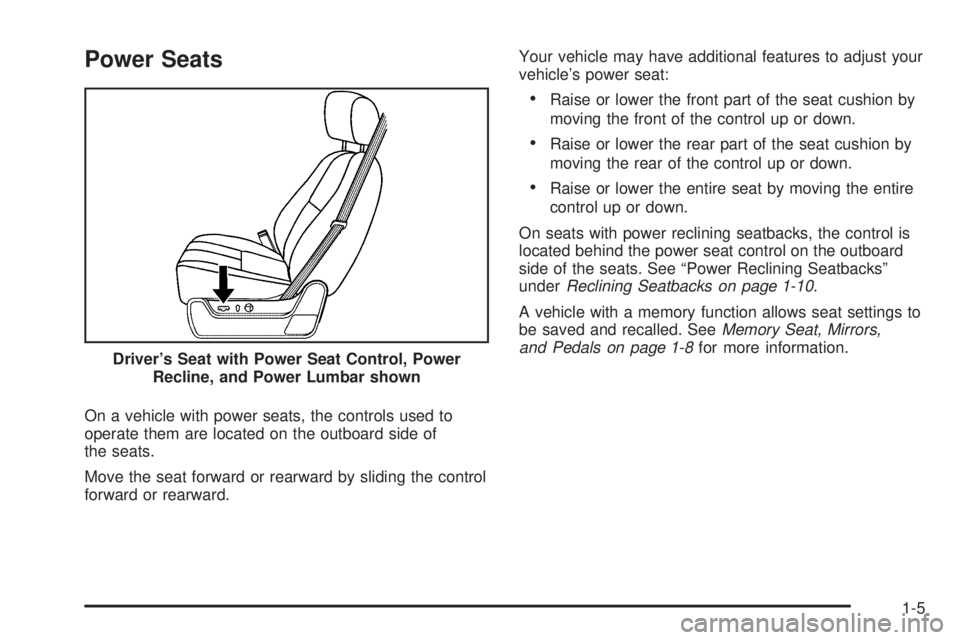
On a vehicle with power seats, the controls used to
operate them are located on the outboard side of
the seats.
Move the seat forward or rearward by sliding the control
forward or rearward.Your vehicle may have additional features to adjust your
vehicle’s power seat:
Raise or lower the front part of the seat cushion by
moving the front of the control up or down.
Raise or lower the rear part of the seat cushion by
moving the rear of the control up or down.
Raise or lower the entire seat by moving the entire
control up or down.
On seats with power reclining seatbacks, the control is
located behind the power seat control on the outboard
side of the seats. See “Power Reclining Seatbacks”
underReclining Seatbacks on page 1-10.
A vehicle with a memory function allows seat settings to
be saved and recalled. SeeMemory Seat, Mirrors,
and Pedals on page 1-8for more information.
Driver’s Seat with Power Seat Control, Power
Recline, and Power Lumbar shown
1-5
Page 13 of 578
The vehicle may have additional features to adjust your
vehicle’s power seat:
To raise the height of the lumbar support, press
and hold the top of the control.
To lower the height of the lumbar support, press
and hold the bottom of the control.
Release the control when the lower seatback reaches
the desired level of lumbar support.
Your vehicle may have a memory function which allows
seat settings to be saved and recalled. SeeMemory
Seat, Mirrors, and Pedals on page 1-8for more
information.
Keep in mind that as your seating position changes, as
it may during long trips, so should the position of
your lumbar support. Adjust the seat as needed.
Heated Seats
On vehicles with heated front seats, the controls are
located on the driver and passenger doors.
I(Heated Seatback):Press to turn on the heated
seatback.
J(Heated Seat and Seatback):Press to turn on the
heated seat and seatback.
The light on the button will come on to indicate that the
feature is working. Press the button to cycle through
the temperature settings of high, medium, and low and
to turn the heat to the seat off. Indicator lights will
show the level of heat selected: three for high, two for
medium, and one for low.
The heated seats will be canceled 10 seconds after the
ignition is turned off. To use the heated seat feature
after restarting the vehicle, press the heated seat
or seatback button again.
1-7
Page 14 of 578
Heated and Cooled Seats
If the front seats have the heated and cooled seat
feature, the buttons used to control this feature
are located on the front doors near the door handle.
{(Cooled Seat):To cool the entire seat, press
the button with the cooled seat symbol.
This symbol will appear on the climate control display to
indicate that the feature is on. Press the button to
cycle through the temperature settings of high, medium,
and low and to turn the cooled seat off. Indicator
bars next to the symbol designate the level of cooling
selected: three for high, two for medium, and one
for low.
+(Heated Seatback):To heat only the seatback,
press the button with the heated seatback symbol.
This symbol will appear on the climate control display to
indicate that the feature is on. Press the button to cycle
through the temperature settings of high, medium, and
low and to turn the heated seatback off. Indicator bars
next to the symbol designate the level of heat selected:
three for high, two for medium, and one for low.
z(Heated Seat and Seatback):To heat the entire
seat, press the button with the heated seat and seatback
symbol.This symbol will appear on the climate control display to
indicate that the feature is on. Press the button to cycle
through the temperature settings of high, medium, and
low and to turn the heated seat off. Indicator bars next to
the symbol designate the level of heat selected: three for
high, two for medium, and one for low.
The heated and cooled seats will be canceled after the
ignition is turned off. To use the heated and cooled
seat feature after the vehicle is started, you will need to
press the appropriate seat button again.
Memory Seat, Mirrors, and Pedals
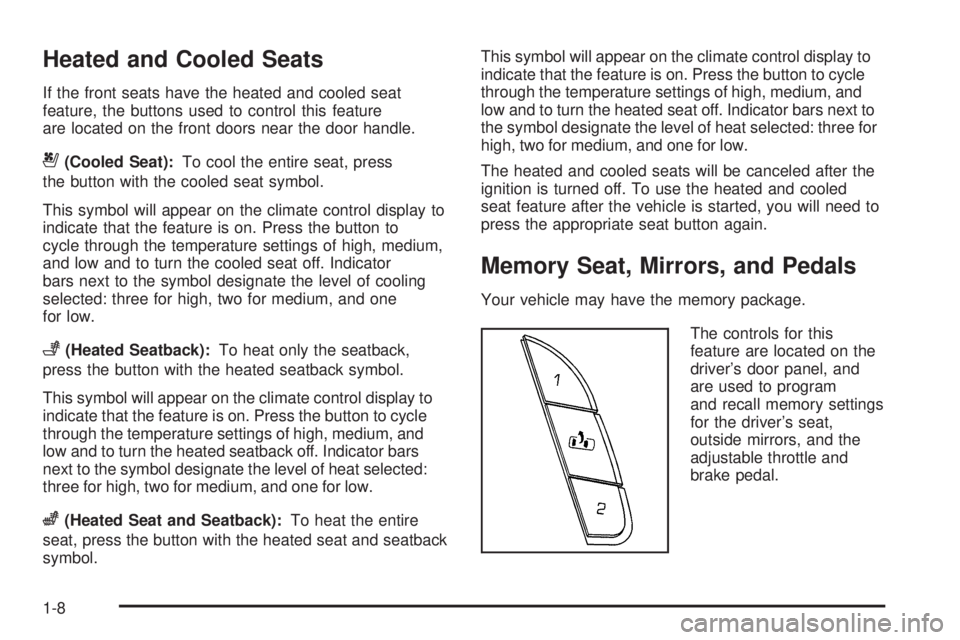
Your vehicle may have the memory package.
The controls for this
feature are located on the
driver’s door panel, and
are used to program
and recall memory settings
for the driver’s seat,
outside mirrors, and the
adjustable throttle and
brake pedal.
1-8
Page 15 of 578
To save seating positions in memory:
1. Adjust the driver’s seat, including the seatback
recliner and lumbar, both outside mirrors, and
the throttle and brake pedals to a comfortable
position.
SeeOutside Power Mirrors on page 2-53and
Adjustable Throttle and Brake Pedal on page 2-30
for more information.
Not all mirrors, adjustable throttles and brake
pedals, or power lumbar will have the ability to save
and recall their positions.
2. Press and hold button 1 until two beeps sound to
indicate that the position has been stored.
A second seating, lumbar, mirror, and throttle and brake
pedal position can be programmed by repeating the
above steps and pressing button 2.
To recall the memory positions, the vehicle must be in
PARK (P). Press and release either button 1 or button 2
corresponding to the desired driving position. The
seat, outside mirrors, and adjustable throttle and brake
pedals will move to the position previously stored.
You will hear a single beep.If you use the remote keyless entry transmitter to enter
your vehicle and the remote recall memory feature
is on, automatic seat, adjustable mirror, and adjustable
pedal movements will occur. See “MEMORY SEAT
RECALL” underDIC Vehicle Customization (With DIC
Buttons) on page 3-74for more information.
To stop recall movement of the memory function at any
time, press one of the power seat controls, memory
buttons, power mirror buttons, or adjustable pedal
switch.
If something has blocked the driver’s seat and/or the
adjustable pedals while recalling a memory position, the
driver’s seat and/or the adjustable pedals recall may
stop working. If this happens, remove the obstruction
and press the appropriate control for the area that is not
responding for two seconds. Try recalling the memory
position again by pressing the appropriate memory
button. If the memory position is still not recalling, see
your dealer for service.
1-9
Page 107 of 578
Keys...............................................................2-3
Remote Keyless Entry (RKE) System................2-4
Remote Keyless Entry (RKE) System
Operation...................................................2-5
Remote Vehicle Start......................................2-8
Doors and Locks............................................2-10
Door Locks..................................................2-10
Power Door Locks........................................2-10
Delayed Locking...........................................2-11
Programmable Automatic Door Locks..............2-11
Rear Door Security Locks..............................2-11
Lockout Protection........................................2-12
Liftgate/Liftglass............................................2-13
Power Liftgate..............................................2-15
Power Assist Steps.......................................2-18
Windows........................................................2-19
Power Windows............................................2-20
Sun Visors...................................................2-21
Theft-Deterrent Systems..................................2-22
Content Theft-Deterrent.................................2-22
PASS-Key
®III+ Electronic Immobilizer.............2-24
PASS-Key®III+ Electronic Immobilizer
Operation.................................................2-24Starting and Operating Your Vehicle................2-26
New Vehicle Break-In....................................2-26
Ignition Positions..........................................2-26
Retained Accessory Power (RAP)...................2-28
Starting the Engine.......................................2-28
Adjustable Throttle and Brake Pedal................2-30
Engine Coolant Heater..................................2-30
Active Fuel Management™.............................2-31
Automatic Transmission Operation...................2-32
Tow/Haul Mode............................................2-38
Four-Wheel Drive..........................................2-40
Parking Brake..............................................2-45
Shifting Into Park..........................................2-47
Shifting Out of Park......................................2-49
Parking Over Things That Burn.......................2-49
Engine Exhaust............................................2-50
Running the Vehicle While Parked..................2-51
Mirrors...........................................................2-52
Manual Rearview Mirror.................................2-52
Automatic Dimming Rearview Mirror................2-52
Outside Manual Mirrors..................................2-52
Outside Towing Mirrors..................................2-53
Outside Power Mirrors...................................2-53
Outside Power Foldaway Mirrors.....................2-54
Section 2 Features and Controls
2-1
Page 108 of 578
Outside Automatic Dimming Mirror..................2-54
Park Tilt Mirrors............................................2-55
Outside Convex Mirror...................................2-55
Outside Heated Mirrors..................................2-55
Object Detection Systems...............................2-56
Ultrasonic Rear Parking Assist (URPA)............2-56
Side Blind Zone Alert (SBZA).........................2-58
Rear Vision Camera (RVC)............................2-62
OnStar
®System.............................................2-68
Universal Home Remote System......................2-71
Universal Home Remote System Operation
(With Three Round LED)............................2-72Storage Areas................................................2-78
Glove Box...................................................2-78
Cupholders..................................................2-78
Center Console Storage.................................2-79
Luggage Carrier...........................................2-79
Rear Storage Area........................................2-80
Rear Seat Armrest........................................2-80
Cargo Cover................................................2-80
Sunroof.........................................................2-81
Section 2 Features and Controls
2-2
Page 159 of 578
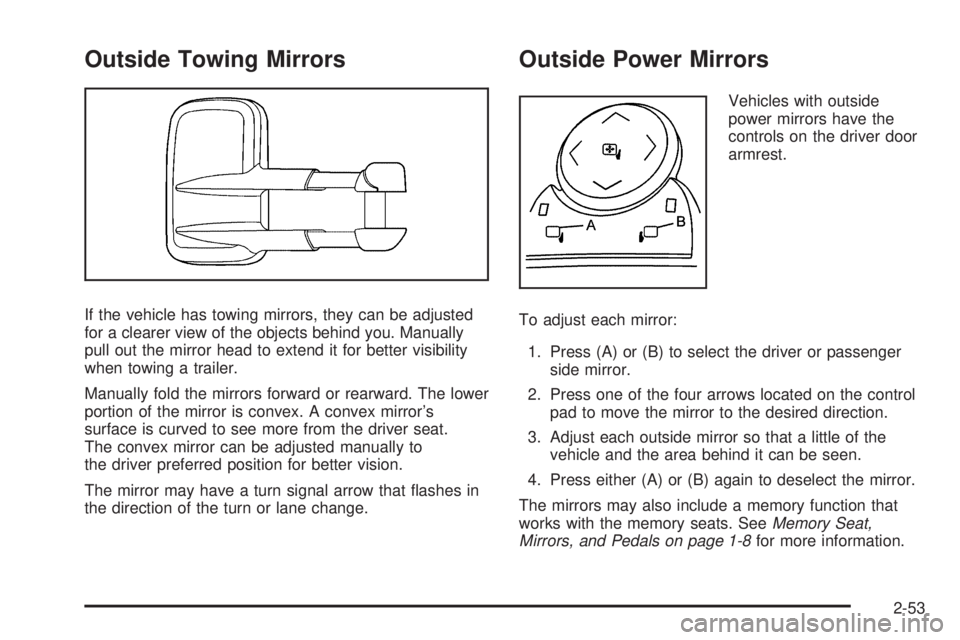
Outside Towing Mirrors
If the vehicle has towing mirrors, they can be adjusted
for a clearer view of the objects behind you. Manually
pull out the mirror head to extend it for better visibility
when towing a trailer.
Manually fold the mirrors forward or rearward. The lower
portion of the mirror is convex. A convex mirror’s
surface is curved to see more from the driver seat.
The convex mirror can be adjusted manually to
the driver preferred position for better vision.
The mirror may have a turn signal arrow that ashes in
the direction of the turn or lane change.
Outside Power Mirrors
Vehicles with outside
power mirrors have the
controls on the driver door
armrest.
To adjust each mirror:
1. Press (A) or (B) to select the driver or passenger
side mirror.
2. Press one of the four arrows located on the control
pad to move the mirror to the desired direction.
3. Adjust each outside mirror so that a little of the
vehicle and the area behind it can be seen.
4. Press either (A) or (B) again to deselect the mirror.
The mirrors may also include a memory function that
works with the memory seats. SeeMemory Seat,
Mirrors, and Pedals on page 1-8for more information.
2-53
Page 160 of 578
Manually fold the mirrors inward to prevent damage when
going through an automatic car wash. To fold, push the
mirror toward the vehicle. Push the mirror outward, to
return to its original position.
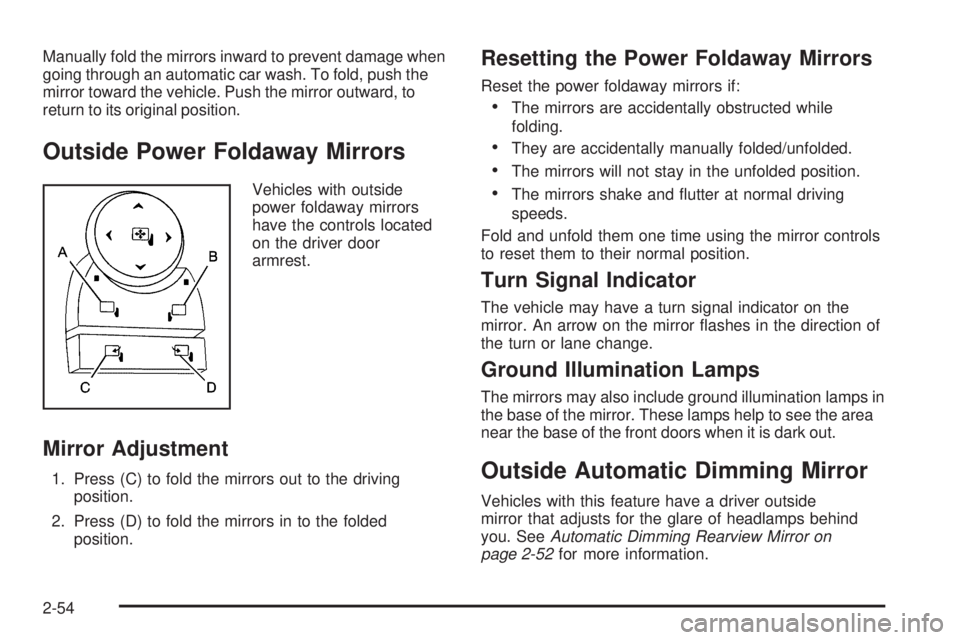
Outside Power Foldaway Mirrors
Vehicles with outside
power foldaway mirrors
have the controls located
on the driver door
armrest.
Mirror Adjustment
1. Press (C) to fold the mirrors out to the driving
position.
2. Press (D) to fold the mirrors in to the folded
position.
Resetting the Power Foldaway Mirrors
Reset the power foldaway mirrors if:
The mirrors are accidentally obstructed while
folding.
They are accidentally manually folded/unfolded.
The mirrors will not stay in the unfolded position.
The mirrors shake and utter at normal driving
speeds.
Fold and unfold them one time using the mirror controls
to reset them to their normal position.
Turn Signal Indicator
The vehicle may have a turn signal indicator on the
mirror. An arrow on the mirror ashes in the direction of
the turn or lane change.
Ground Illumination Lamps
The mirrors may also include ground illumination lamps in
the base of the mirror. These lamps help to see the area
near the base of the front doors when it is dark out.
Outside Automatic Dimming Mirror
Vehicles with this feature have a driver outside
mirror that adjusts for the glare of headlamps behind
you. SeeAutomatic Dimming Rearview Mirror on
page 2-52for more information.
2-54