seat adjustment CHEVROLET SUBURBAN 2009 Owners Manual
[x] Cancel search | Manufacturer: CHEVROLET, Model Year: 2009, Model line: SUBURBAN, Model: CHEVROLET SUBURBAN 2009Pages: 578, PDF Size: 3.04 MB
Page 54 of 578
Shoulder Belt Height Adjuster
The vehicle has a shoulder belt height adjuster for the
driver and right front passenger positions.
Adjust the height so that the shoulder portion of the belt
is centered on the shoulder. The belt should be away
from the face and neck, but not falling off the shoulder.
Improper shoulder belt height adjustment could
reduce the effectiveness of the safety belt in a crash.
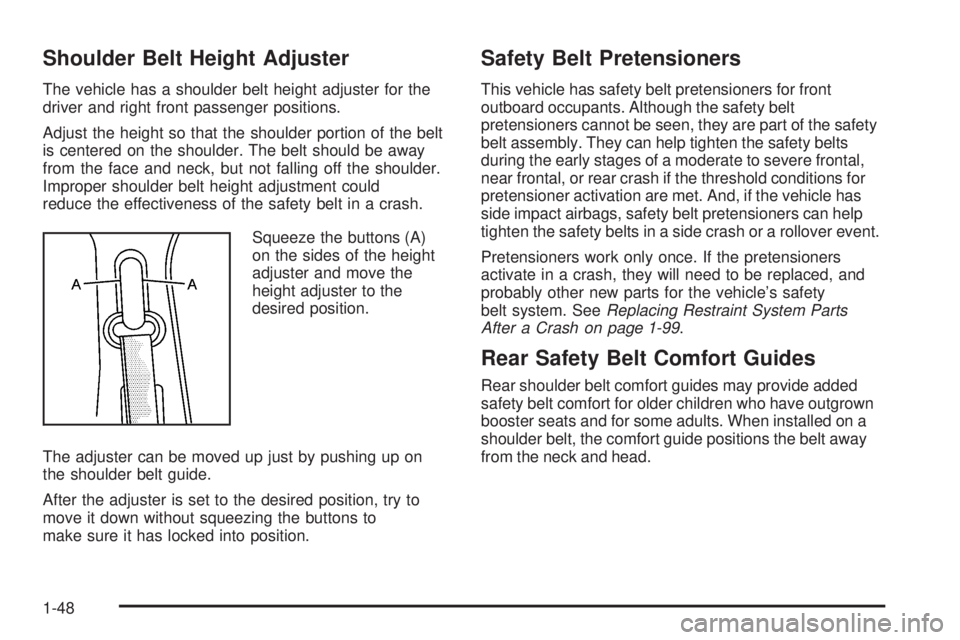
Squeeze the buttons (A)
on the sides of the height
adjuster and move the
height adjuster to the
desired position.
The adjuster can be moved up just by pushing up on
the shoulder belt guide.
After the adjuster is set to the desired position, try to
move it down without squeezing the buttons to
make sure it has locked into position.
Safety Belt Pretensioners
This vehicle has safety belt pretensioners for front
outboard occupants. Although the safety belt
pretensioners cannot be seen, they are part of the safety
belt assembly. They can help tighten the safety belts
during the early stages of a moderate to severe frontal,
near frontal, or rear crash if the threshold conditions for
pretensioner activation are met. And, if the vehicle has
side impact airbags, safety belt pretensioners can help
tighten the safety belts in a side crash or a rollover event.
Pretensioners work only once. If the pretensioners
activate in a crash, they will need to be replaced, and
probably other new parts for the vehicle’s safety
belt system. SeeReplacing Restraint System Parts
After a Crash on page 1-99.
Rear Safety Belt Comfort Guides
Rear shoulder belt comfort guides may provide added
safety belt comfort for older children who have outgrown
booster seats and for some adults. When installed on a
shoulder belt, the comfort guide positions the belt away
from the neck and head.
1-48
Page 136 of 578
Adjustable Throttle and Brake Pedal
On vehicles with this feature, you can change the
position of the throttle and brake pedals.
No adjustment to the pedals can be made when the
vehicle is in R (Reverse) or while using the cruise
control.
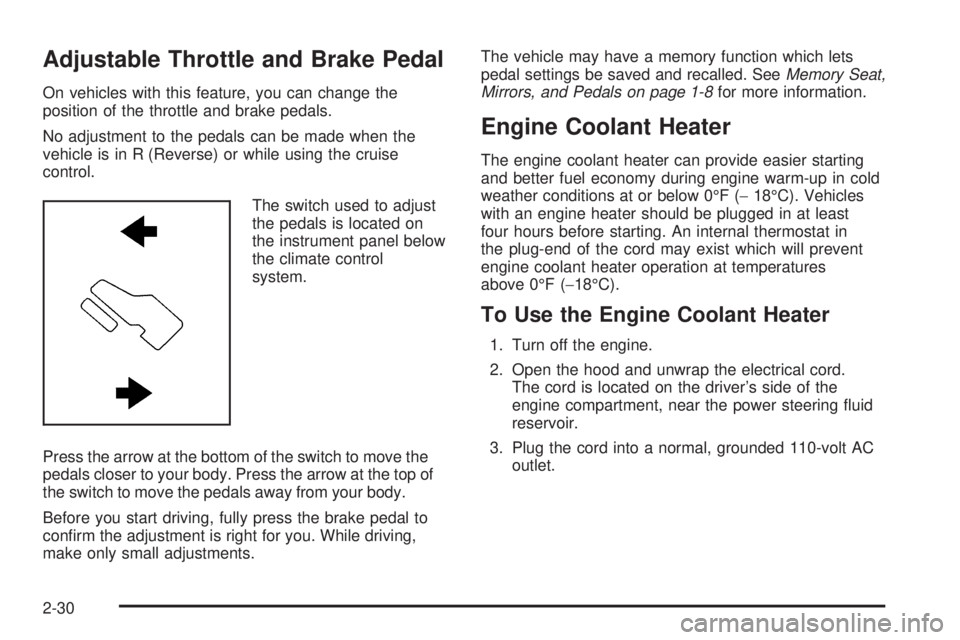
The switch used to adjust
the pedals is located on
the instrument panel below
the climate control
system.
Press the arrow at the bottom of the switch to move the
pedals closer to your body. Press the arrow at the top of
the switch to move the pedals away from your body.
Before you start driving, fully press the brake pedal to
conrm the adjustment is right for you. While driving,
make only small adjustments.The vehicle may have a memory function which lets
pedal settings be saved and recalled. SeeMemory Seat,
Mirrors, and Pedals on page 1-8for more information.
Engine Coolant Heater
The engine coolant heater can provide easier starting
and better fuel economy during engine warm-up in cold
weather conditions at or below 0°F (−18°C). Vehicles
with an engine heater should be plugged in at least
four hours before starting. An internal thermostat in
the plug-end of the cord may exist which will prevent
engine coolant heater operation at temperatures
above 0°F (−18°C).
To Use the Engine Coolant Heater
1. Turn off the engine.
2. Open the hood and unwrap the electrical cord.
The cord is located on the driver’s side of the
engine compartment, near the power steering uid
reservoir.
3. Plug the cord into a normal, grounded 110-volt AC
outlet.
2-30
Page 218 of 578
The interior temperature sensors located in the headliner
above the driver side seat and if equipped, in the
headliner above the second row seats measure the
temperature of the air inside the vehicle.
There is also an exterior temperature sensor located
behind the front grille. This sensor reads the outside air
temperature and helps maintain the temperature
inside the vehicle. Any cover on the front of the vehicle
could cause a false reading in the displayed
temperature.
The climate control system uses the information from
these sensors to maintain your comfort setting by
adjusting the outlet temperature, fan speed, and the air
delivery mode. The system may also supply cooler
air to the side of the vehicle facing the sun. The
recirculation mode will also be used as needed to
maintain cool outlet temperatures.
Outlet Adjustment
Use the air outlets located in the center and on the side
of the instrument panel to direct the airow.
Operation Tips
Keep the hood and front air inlets free of ice, snow,
or any other obstruction (such as leaves). The
heater and defroster will work far better, reducing
the chance of fogging the inside of the windows.
When you enter a vehicle in cold weather, press
the fan up button to the maximum fan level
before driving. This helps clear the intake ducts of
snow and moisture, and reduces the chance of
fogging the inside of the window.
Keep the air path under the front seats clear of
objects. This helps air to circulate throughout
the vehicle.
Adding outside equipment to the front of the
vehicle, such as hood-air deectors, may affect the
performance of the heating and air conditioning
system. Check with your dealer/retailer before
adding equipment to the outside of the vehicle.
3-30
Page 292 of 578
To use a portable audio player, connect a
3.5 mm (1/8 inch) cable to the radio’s front auxiliary
input jack. When a device is connected, press the
radio CD/AUX button to begin playing audio from the
device over the vehicle speakers.
For optimal sound quality, increase the portable audio
device’s volume to the loudest level.
It is always best to power the portable audio device
through its own battery while playing.
O(Power/Volume):Turn clockwise or
counterclockwise to increase or decrease the
volume of the portable player. Additional volume
adjustments might have to be made from the portable
device if the volume is not loud or soft enough.
BAND:Press to listen to the radio when a portable
audio device is playing. The portable audio device also
continues to play.
CD/AUX (CD/Auxiliary):Press to play a CD when a
portable audio device is playing. Press again and
the system begins playing audio from the connected
portable audio player. If a portable audio player is
not connected, “No Input Device Found” displays.DVD/CD AUX (CD/Auxiliary):Press this button to
cycle through DVD, CD, or Auxiliary when listening to
the radio. The DVD/CD text label and a message
showing track or chapter number displays when a disc
is in either slot. Press this button again and the
system automatically searches for an auxiliary input
device, such as a portable audio player. If a portable
audio player is not connected, “No Aux Input Device”
displays. If a disc is in both the DVD slot and the CD slot
the DVD/CD AUX button cycles between the two
sources and does not indicate “No Aux Input Device”. If
a front auxiliary device is connected, the DVD/CD AUX
button cycles through all available options, such as:
DVD slot, CD slot, Front Auxiliary, and Rear Auxiliary
(if available). See “Using the Auxiliary Input Jack(s)”
later in this section, or “Audio/Video (A/V) Jacks” under,
Rear Seat Entertainment (RSE) System on page 3-127
for more information.
3-104
Page 566 of 578
Climate Control System...................................3-22
Dual Automatic............................................3-24
Outlet Adjustment........................................3-30
Rear Air Conditioning and Heating System......3-31
Rear Air Conditioning and Heating System,
Electronic................................................3-32
Clock, Setting.................................................3-84
Collision Damage Repair..................................7-11
Compass.......................................................3-61
Content Theft-Deterrent....................................2-22
Control of a Vehicle.......................................... 4-3
Coolant
Engine.......................................................5-29
Engine Temperature Gage............................3-42
Surge Tank Pressure Cap.............................5-34
Cooled Seats................................................... 1-8
Cooling System..............................................5-28
Courtesy Transportation Program......................7-10
Cruise Control................................................3-12
Light..........................................................3-49
Cupholders....................................................2-78
Customer Assistance......................................... 7-6
Offices......................................................... 7-6
Text Telephone (TTY) Users........................... 7-6
Customer Information
Service Publications Ordering Information........7-15
Customer Satisfaction Procedure........................ 7-2D
Damage Repair, Collision.................................7-11
Data Recorders
Event.........................................................7-17
Daytime Running Lamps (DRL).........................3-16
Defensive Driving............................................. 4-2
Delayed Locking.............................................2-11
DIC Compass.................................................3-61
Disc, MP3..........................................3-105, 3-109
Doing Your Own Service Work........................... 5-4
Dome Lamp Override......................................3-19
Dome Lamps .................................................3-18
Door
Delayed Locking..........................................2-11
Locks........................................................2-10
Power Locks...............................................2-10
Programmable Automatic Door Locks.............2-11
Rear Door Security Locks.............................2-11
Driver Information Center (DIC).........................3-51
DIC Operation and Displays..................3-52, 3-58
DIC Vehicle Customization............................3-74
DIC Warnings and Messages........................3-64
Driving
At Night.....................................................4-25
Before a Long Trip......................................4-27
Better Fuel Economy..................................... 4-2
4