ESP CHEVROLET SUBURBAN 2012 10.G User Guide
[x] Cancel search | Manufacturer: CHEVROLET, Model Year: 2012, Model line: SUBURBAN, Model: CHEVROLET SUBURBAN 2012 10.GPages: 514, PDF Size: 7.54 MB
Page 247 of 514

Black plate (53,1)Chevrolet Tahoe/Suburban Owner Manual - 2012
Infotainment System 7-53
Transferring Audio from the
Bluetooth System to a Cell Phone
During a call with the audio in the
vehicle:
1. Press
b/g.
2. Say “Transfer Call.”
Transferring Audio to the
Bluetooth System from a Cell
Phone
During a call with the audio on the
cell phone, press
b/g. The audio
transfers to the vehicle. If the audio
does not transfer to the vehicle, use
the audio transfer feature on the
cell phone. See your cell phone
manufacturer's user guide for more
information.
Voice Pass-Thru
Voice pass‐thru allows access to the
voice recognition commands on the
cell phone. See your cell phone
manufacturer's user guide to see if
the cell phone supports this feature. To access contacts stored in the cell
phone:
1. Press and hold
b/gfor
two seconds.
2. Say “Bluetooth.” This command
can be skipped.
3. Say “Voice.” The system
responds “OK, accessing
The cell phone's normal prompt
messages will go through their cycle
according to the phone's operating
instructions.
Dual Tone Multi-Frequency
(DTMF) Tones
The Bluetooth system can send
numbers and the numbers stored as
name tags during a call. You can
use this feature when calling a
menu‐driven phone system.
Account numbers can also be
stored for use. Sending a Number or Name Tag
During a Call
1. Press
b/g. The system
responds “Ready,”followed by
a tone.
2. Say “Dial.”
3. Say the number or name tag to send.
Clearing the System
Unless information is deleted out of
the in‐vehicle Bluetooth system, it
will be retained indefinitely. This
includes all saved name tags in the
phone book and phone pairing
information. For information on how
to delete this information, see the
previous section “Deleting a Paired
Phone” and the previous sections
on deleting name tags.
Page 248 of 514
Black plate (54,1)Chevrolet Tahoe/Suburban Owner Manual - 2012
7-54 Infotainment System
Other Information
The Bluetooth®word mark and
logos are owned by the Bluetooth®
SIG, Inc. and any use of such marks
by General Motors is under license.
Other trademarks and trade names
are those of their respective owners.
See Radio Frequency Statement on
page 13‑20 for information
regarding Part 15 of the Federal
Communications Commission (FCC)
rules and Industry Canada
Standards RSS-GEN/210/220/310.
Trademarks and
License Agreements
Manufactured under license
under U.S. Patent #'s: 5,451,942;
5,956,674; 5,974,380; 5,978,762;
6,487,535 & other U.S. and
worldwide patents issued &
pending. DTS and the Symbol are
registered trademarks and DTS
Digital Surround and the DTS logos
are trademarks of DTS Inc. All
Rights Reserved.
Manufactured under license from
Dolby Laboratories. Dolby and the
double-D symbol are trademarks of
Dolby Laboratories.
Page 267 of 514
Black plate (5,1)Chevrolet Tahoe/Suburban Owner Manual - 2012
Driving and Operating 9-5
Off-Road Recovery
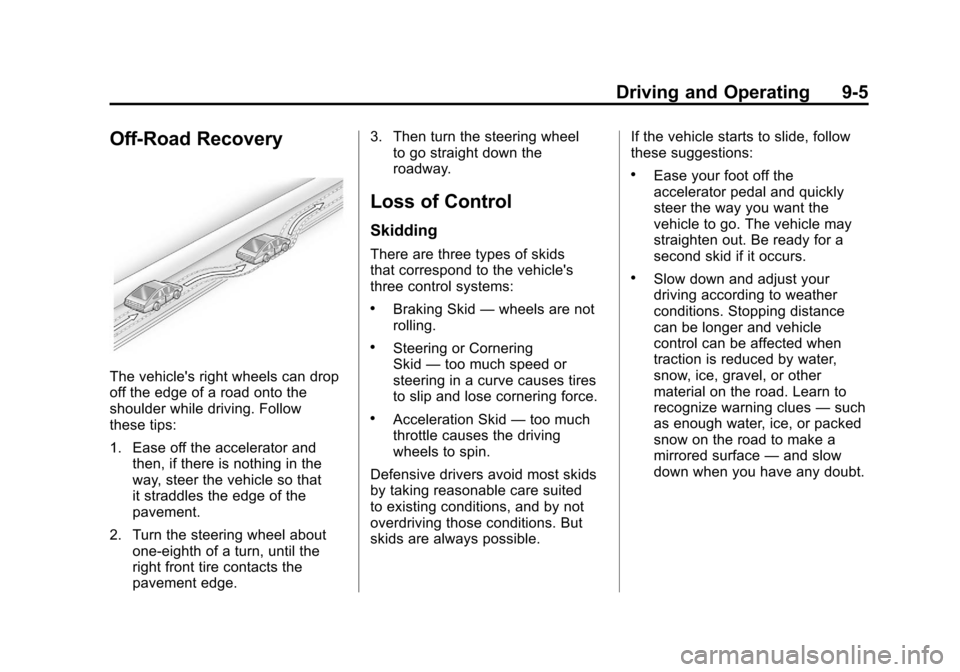
The vehicle's right wheels can drop
off the edge of a road onto the
shoulder while driving. Follow
these tips:
1. Ease off the accelerator andthen, if there is nothing in the
way, steer the vehicle so that
it straddles the edge of the
pavement.
2. Turn the steering wheel about one-eighth of a turn, until the
right front tire contacts the
pavement edge. 3. Then turn the steering wheel
to go straight down the
roadway.
Loss of Control
Skidding
There are three types of skids
that correspond to the vehicle's
three control systems:
.Braking Skid —wheels are not
rolling.
.Steering or Cornering
Skid —too much speed or
steering in a curve causes tires
to slip and lose cornering force.
.Acceleration Skid —too much
throttle causes the driving
wheels to spin.
Defensive drivers avoid most skids
by taking reasonable care suited
to existing conditions, and by not
overdriving those conditions. But
skids are always possible. If the vehicle starts to slide, follow
these suggestions:
.Ease your foot off the
accelerator pedal and quickly
steer the way you want the
vehicle to go. The vehicle may
straighten out. Be ready for a
second skid if it occurs.
.Slow down and adjust your
driving according to weather
conditions. Stopping distance
can be longer and vehicle
control can be affected when
traction is reduced by water,
snow, ice, gravel, or other
material on the road. Learn to
recognize warning clues
—such
as enough water, ice, or packed
snow on the road to make a
mirrored surface —and slow
down when you have any doubt.
Page 276 of 514
Black plate (14,1)Chevrolet Tahoe/Suburban Owner Manual - 2012
9-14 Driving and Operating
Blizzard Conditions
Being stuck in snow can be a
serious situation. Stay with the
vehicle unless there is help nearby.
If possible, use theRoadside
Assistance Program (U.S. and
Canada) on page 13‑7 orRoadside
Assistance Program (Mexico) on
page 13‑9. To get help and keep
everyone in the vehicle safe:
.Turn on the hazard warning
flashers.
.Tie a red cloth to an outside
mirror.
{WARNING
Snow can trap engine exhaust
under the vehicle. This may
cause exhaust gases to get
inside. Engine exhaust contains
carbon monoxide (CO) which
cannot be seen or smelled. It can
cause unconsciousness and even
death.
(Continued)
WARNING (Continued)
If the vehicle is stuck in the snow:
.Clear away snow from around
the base of your vehicle,
especially any that is blocking
the exhaust pipe.
.Check again from time to
time to be sure snow does
not collect there.
.Open a window about 5 cm
(2 in) on the side of the
vehicle that is away from the
wind to bring in fresh air.
.Fully open the air outlets on
or under the instrument
panel.
.Adjust the climate control
system to a setting that
circulates the air inside the
vehicle and set the fan speed
to the highest setting. See
“Climate Control Systems” in
the Index.
(Continued)
WARNING (Continued)
For more information about
carbon monoxide, see Engine
Exhaust on page 9‑29.
Run the engine for short periods
only as needed to keep warm, but
be careful.
To save fuel, run the engine for only
short periods as needed to warm
the vehicle and then shut the engine
off and close the window most of
the way to save heat. Repeat this
until help arrives but only when you
feel really uncomfortable from the
cold. Moving about to keep warm
also helps.
Page 287 of 514
Black plate (25,1)Chevrolet Tahoe/Suburban Owner Manual - 2012
Driving and Operating 9-25
Notice:Cranking the engine for
long periods of time, by returning
the key to the START position
immediately after cranking has
ended, can overheat and damage
the cranking motor, and drain the
battery. Wait at least 15 seconds
between each try, to let the
cranking motor cool down.
2. If the engine does not start
after 5‐10 seconds, especially in
very cold weather (below −18°C
or 0°F), it could be flooded with
too much gasoline. Try pushing
the accelerator pedal all the way
to the floor and holding it there
as you hold the key in START
for up to a maximum of
15 seconds. Wait at least
15 seconds between each try, to
allow the cranking motor to cool
down. When the engine starts,
let go of the key and accelerator. If the vehicle starts briefly but
then stops again, repeat these
steps. This clears the extra
gasoline from the engine. Do not
race the engine immediately
after starting it. Operate the
engine and transmission gently
until the oil warms up and
lubricates all moving parts.
Notice: The engine is designed to
work with the electronics in the
vehicle. If you add electrical
parts or accessories, you could
change the way the engine
operates. Before adding electrical
equipment, check with your
dealer. If you do not, the engine
might not perform properly. Any
resulting damage would not be
covered by the vehicle warranty.Engine Heater
The engine coolant heater can
provide easier starting and better
fuel economy during engine
warm-up in cold weather conditions
at or below −18°C (0°F). Vehicles
with an engine heater should be
plugged in at least four hours before
starting. An internal thermostat in
the plug-end of the cord may exist
which will prevent engine coolant
heater operation at temperatures
above −18°C (0°F).
To Use the Engine Coolant
Heater
1. Turn off the engine.
2. Open the hood and unwrap
the electrical cord. The cord
is secured to the Engine
Compartment Fuse Block with
a clip. Carefully remove the
wire tie which secures the
electrical cord. Do not cut the
electrical cord.
Page 293 of 514
Black plate (31,1)Chevrolet Tahoe/Suburban Owner Manual - 2012
Driving and Operating 9-31
Automatic
Transmission
If the vehicle is a hybrid, see the
hybrid supplement for more
information.
If the vehicle is has an automatic
transmission, it has an electronic
shift position indicator within the
instrument panel cluster. This
display comes on when the ignition
key is turned to the ON/RUN
position.
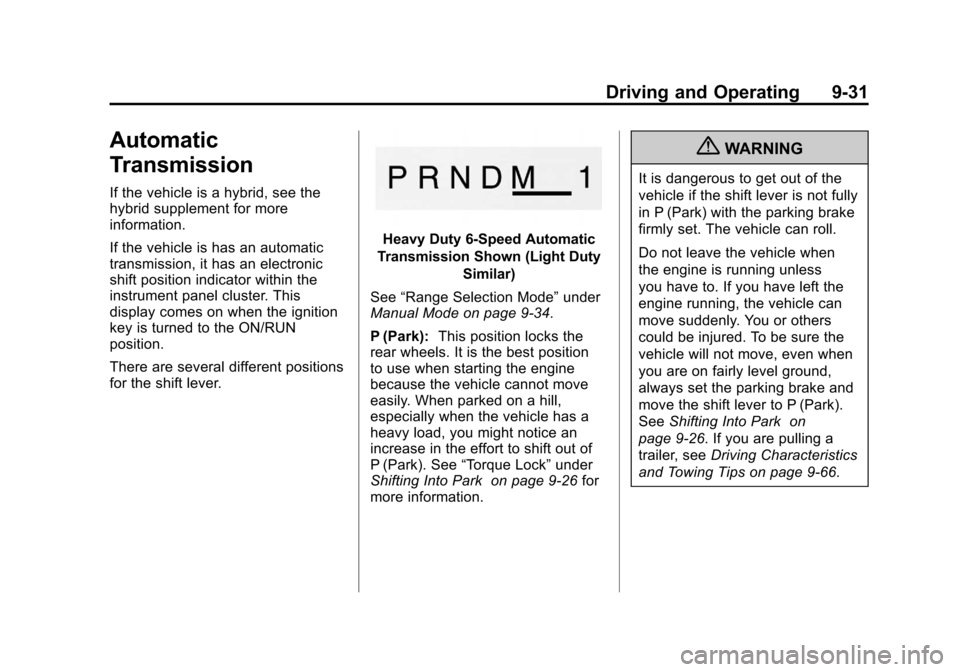
There are several different positions
for the shift lever.
Heavy Duty 6-Speed Automatic
Transmission Shown (Light Duty Similar)
See “Range Selection Mode” under
Manual Mode on page 9‑34.
P (Park): This position locks the
rear wheels. It is the best position
to use when starting the engine
because the vehicle cannot move
easily. When parked on a hill,
especially when the vehicle has a
heavy load, you might notice an
increase in the effort to shift out of
P (Park). See “Torque Lock” under
Shifting Into Park on page 9‑26 for
more information.
{WARNING
It is dangerous to get out of the
vehicle if the shift lever is not fully
in P (Park) with the parking brake
firmly set. The vehicle can roll.
Do not leave the vehicle when
the engine is running unless
you have to. If you have left the
engine running, the vehicle can
move suddenly. You or others
could be injured. To be sure the
vehicle will not move, even when
you are on fairly level ground,
always set the parking brake and
move the shift lever to P (Park).
See Shifting Into Park on
page 9‑26. If you are pulling a
trailer, see Driving Characteristics
and Towing Tips on page 9‑66.
Page 303 of 514
Black plate (41,1)Chevrolet Tahoe/Suburban Owner Manual - 2012
Driving and Operating 9-41
Excessively shifting the transfer
case into or out of the different
modes may cause the transfer case
to enter the shift protection mode.
This will protect the transfer case
from possible damage and will only
allow the transfer case to respond
to one shift per 10 seconds. The
transfer case may stay in this mode
for up to three minutes.
Four-Wheel Drive (Single
Speed Automatic
Transfer Case)
If the vehicle has four-wheel drive,
you can send the engine's driving
power to all four wheels for extra
traction. Read the following before
using four-wheel drive.Notice:
Driving on clean, dry
pavement in Four-Wheel Drive
High for an extended period of
time may cause premature wear
on the vehicle's powertrain. Do
not drive on clean, dry pavement
in Four-Wheel Drive High for
extended periods of time.
While driving on clean dry pavement
and during tight turns, you may
experience a vibration in the
steering system.
Front Axle
The front axle engages and
disengages automatically when you
shift the transfer case. Some delay
for the axle to engage or disengage
is normal.
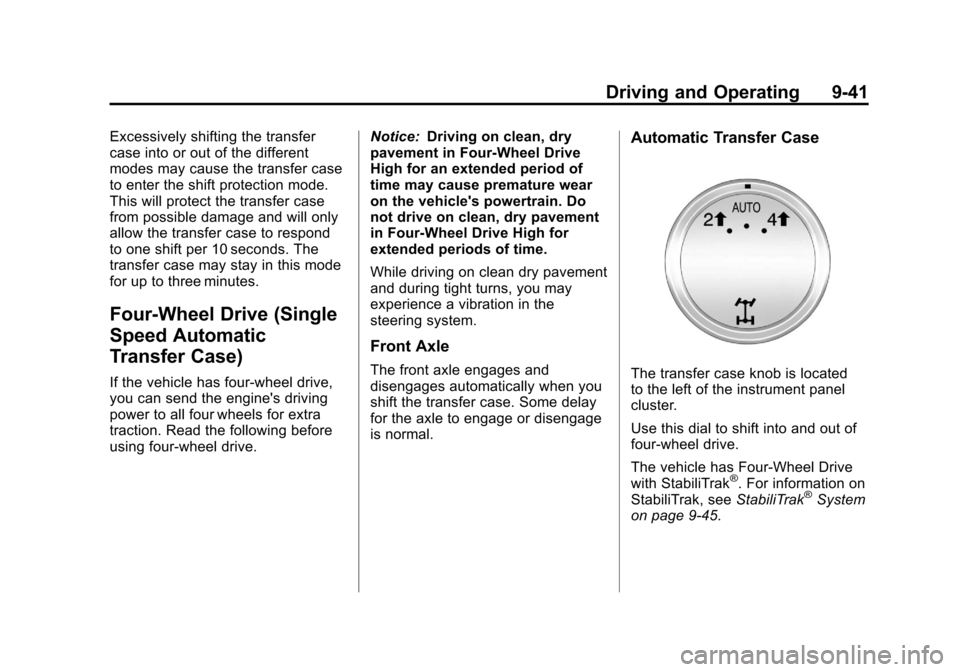
Automatic Transfer Case
The transfer case knob is located
to the left of the instrument panel
cluster.
Use this dial to shift into and out of
four-wheel drive.
The vehicle has Four-Wheel Drive
with StabiliTrak
®. For information on
StabiliTrak, see StabiliTrak®System
on page 9‑45.
Page 304 of 514
Black plate (42,1)Chevrolet Tahoe/Suburban Owner Manual - 2012
9-42 Driving and Operating
You can choose among three
driving settings:
Indicator lights in the switch show
you which setting you are in. The
indicator lights will come on briefly
when you turn on the ignition and
the last chosen setting will stay on.
If the lights do not come on, you
should take the vehicle to your
dealer for service. An indicator light
will flash while shifting. It will stay on
when the shift is completed. If for
some reason the transfer case
cannot make a requested shift, it will
return to the last chosen setting.
2
m(Two-Wheel Drive High):This
setting is used for driving in most
street and highway situations.
The front axle is not engaged in
two-wheel drive. This setting also
provides the best fuel economy.
AUTO (Automatic Four-Wheel
Drive): This setting is ideal for
use when road surface traction
conditions are variable. When driving the vehicle in AUTO, the
front axle is engaged, and the
vehicle's power is sent to the front
and rear wheels automatically
based on driving conditions. Driving
in this mode results in slightly lower
fuel economy than Two-Wheel
Drive High.
4
m(Four-Wheel Drive High):
Use
the Four-Wheel Drive High position
when you need extra traction, such
as on snowy or icy roads or in most
off-road situations. This setting also
engages the front axle to help drive
the vehicle. This is the best setting
to use when plowing snow.
Service Four‐Wheel Drive
If the SERVICE 4 WHEEL DRIVE
message stays on, you should
take the vehicle to your dealer for
service. See “SERVICE 4 WHEEL
DRIVE” message under
Transmission Messages on
page 5‑43. Shifting Into Four-Wheel Drive
High or AUTO (Automatic
Four-Wheel Drive)
Turn the knob to the Four-Wheel
Drive High or AUTO position. This
can be done at any speed. The
indicator light will flash while
shifting. It will remain on when the
shift is completed.
Shifting Into Two-Wheel
Drive High
Turn the knob to the Two-Wheel
Drive High position. This can be
done at any speed. The indicator
light will flash while shifting. It
will remain on when the shift is
completed.
Excessively shifting the transfer
case into or out of the different
modes may cause the transfer case
to enter the shift protection mode.
This will protect the transfer case
from possible damage and will only
allow the transfer case to respond
to one shift per 10 seconds. The
transfer case may stay in this mode
for up to three minutes.
Page 317 of 514

Black plate (55,1)Chevrolet Tahoe/Suburban Owner Manual - 2012
Driving and Operating 9-55
does not need service. For cleaning,
see“Washing the Vehicle” under
Exterior Care on page 10‑93.
SERVICE SIDE BLIND ZONE
ALERT SYSTEM: If this message
appears, both SBZA displays will
remain on indicating there is a
problem with the SBZA system.
If these displays remain on after
continued driving, the system needs
service. Take the vehicle to your
dealer.
FCC Information
See Radio Frequency Statement on
page 13‑20 for information
regarding Part 15 of the Federal
Communications Commission (FCC)
rules and Industry Canada
Standards RSS-GEN/210/220/310.
Frequency of operation:
24.05GHz –24.25GHz
Field Strength: Not greater than
2.5V/m peak (0.25V/m average) at a
distance of 3m The manufacturer is not
responsible for any radio or
TV interference caused by
unauthorized modifications to this
equipment. Such modifications
could void the user's authority to
operate the equipment.
Rear Vision
Camera (RVC)
If available, the Rear Vision Camera
(RVC) system displays part of the
scene behind the vehicle.
{WARNING
The RVC system does not display
pedestrians, bicyclists, animals,
or any other object located
outside the camera's field of view,
below the bumper, or under the
vehicle.
Do not back the vehicle using
only the RVC screen or by using
the screen during longer, higher
(Continued)
WARNING (Continued)
speed backing maneuvers,
or where there could be
cross-traffic. Perceived distances
may be different from actual
distances.
Failure to use proper care before
backing may result in injury,
death, or vehicle damage. Always
check before backing by checking
behind and around the vehicle.
Vehicles without Navigation
System
The RVC system displays a view of
the area behind the vehicle. When
the vehicle is on and shifted into
R (Reverse) the video image
appears on the inside rearview
mirror. The video image disappears
after the vehicle is shifted out of
R (Reverse).
Page 329 of 514
Black plate (67,1)Chevrolet Tahoe/Suburban Owner Manual - 2012
Driving and Operating 9-67
Driving with a Trailer
{WARNING
When towing a trailer, exhaust
gases may collect at the rear
of the vehicle and enter if the
liftgate, trunk/hatch, or rear-most
window is open.
Engine exhaust contains Carbon
Monoxide (CO) which cannot be
seen or smelled. It can cause
unconsciousness and even death.
To maximize safety when towing
a trailer:
.Have the exhaust system
inspected for leaks and make
necessary repairs before
starting a trip.
.Never drive with the liftgate,
trunk/hatch, or rear-most
window open.(Continued)
WARNING (Continued)
.Fully open the air outlets
on or under the instrument
panel.
.Adjust the Climate Control
system to a setting that
brings in only outside air and
set the fan speed to the
highest setting. See Climate
Control System in the Index.
For more information about
Carbon Monoxide, see Engine
Exhaust on page 9‑29.
Towing a trailer requires a certain
amount of experience. The
combination you are driving is
longer and not as responsive as the
vehicle itself. Get acquainted with
the handling and braking of the rig
before setting out for the open road.
Before starting, check all trailer
hitch parts and attachments,
safety chains, electrical connectors,
lamps, tires and mirrors. If the trailer has electric brakes, start the
combination moving and then
apply the trailer brake controller by
hand to be sure the brakes work.
During the trip, check occasionally
to be sure that the load is secure
and the lamps and any trailer
brakes still work.
Following Distance
Stay at least twice as far behind the
vehicle ahead as you would when
driving the vehicle without a trailer.
This can help to avoid heavy
braking and sudden turns.
Passing
More passing distance is
needed when towing a trailer. The
combination will not accelerate
as quickly and is longer so it is
necessary to go much farther
beyond the passed vehicle before
returning to the lane.