AUX CHEVROLET SUBURBAN 2012 10.G Owner's Manual
[x] Cancel search | Manufacturer: CHEVROLET, Model Year: 2012, Model line: SUBURBAN, Model: CHEVROLET SUBURBAN 2012 10.GPages: 514, PDF Size: 7.54 MB
Page 236 of 514
Black plate (42,1)Chevrolet Tahoe/Suburban Owner Manual - 2012
7-42 Infotainment System
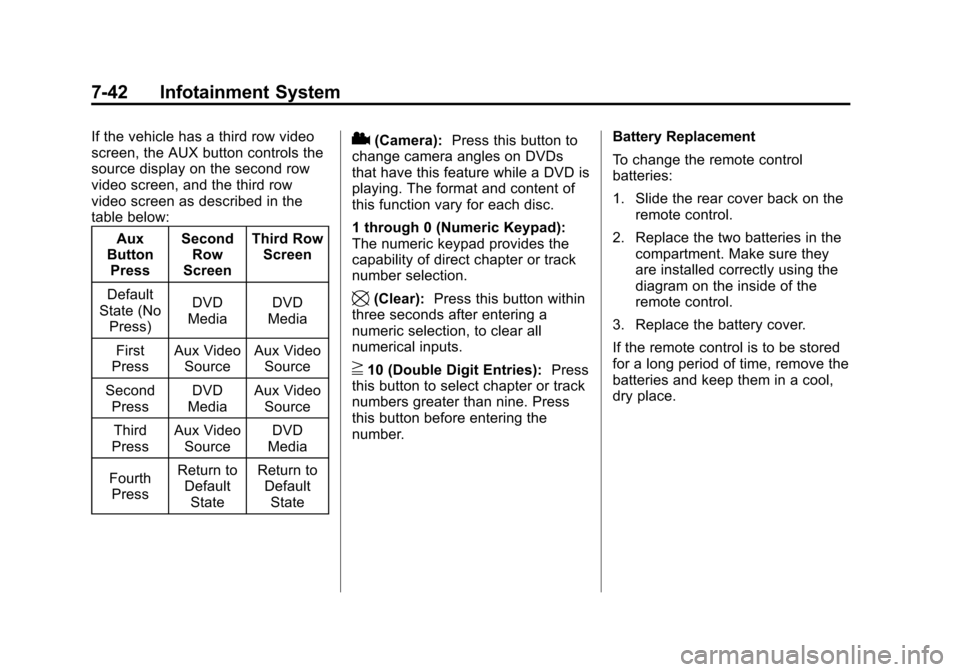
If the vehicle has a third row video
screen, the AUX button controls the
source display on the second row
video screen, and the third row
video screen as described in the
table below:Aux
Button Press Second
Row
Screen Third Row
Screen
Default
State (No Press) DVD
Media DVD
Media
First
Press Aux Video
Source Aux Video
Source
Second Press DVD
Media Aux Video
Source
Third
Press Aux Video
Source DVD
Media
Fourth Press Return to
Default
State Return to
Default
State2(Camera): Press this button to
change camera angles on DVDs
that have this feature while a DVD is
playing. The format and content of
this function vary for each disc.
1 through 0 (Numeric Keypad):
The numeric keypad provides the
capability of direct chapter or track
number selection.
\(Clear): Press this button within
three seconds after entering a
numeric selection, to clear all
numerical inputs.
}10 (Double Digit Entries): Press
this button to select chapter or track
numbers greater than nine. Press
this button before entering the
number. Battery Replacement
To change the remote control
batteries:
1. Slide the rear cover back on the
remote control.
2. Replace the two batteries in the compartment. Make sure they
are installed correctly using the
diagram on the inside of the
remote control.
3. Replace the battery cover.
If the remote control is to be stored
for a long period of time, remove the
batteries and keep them in a cool,
dry place.
Page 237 of 514
Black plate (43,1)Chevrolet Tahoe/Suburban Owner Manual - 2012
Infotainment System 7-43
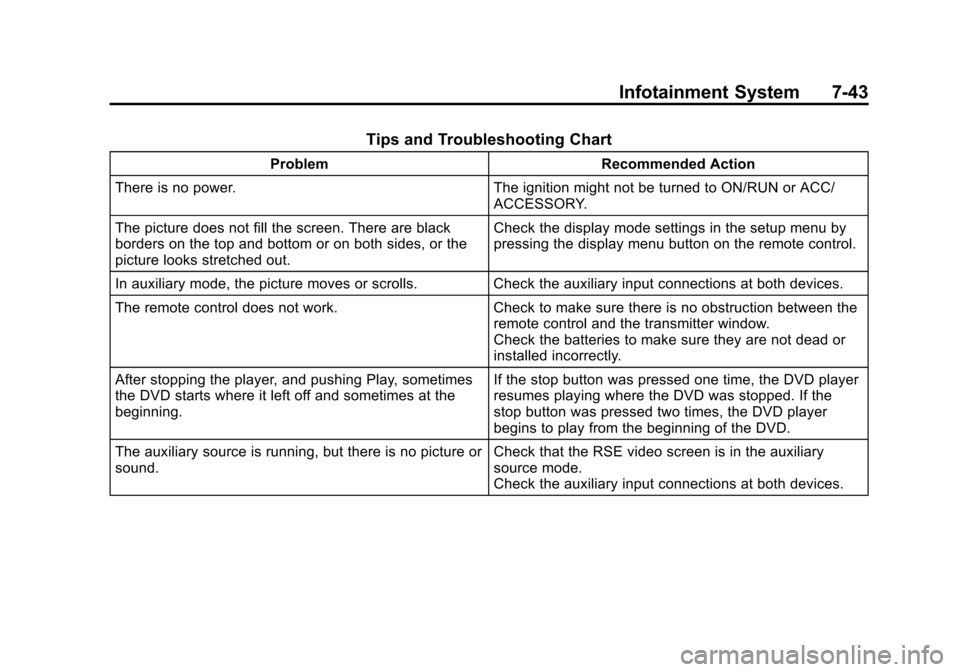
Tips and Troubleshooting Chart
ProblemRecommended Action
There is no power. The ignition might not be turned to ON/RUN or ACC/
ACCESSORY.
The picture does not fill the screen. There are black
borders on the top and bottom or on both sides, or the
picture looks stretched out. Check the display mode settings in the setup menu by
pressing the display menu button on the remote control.
In auxiliary mode, the picture moves or scrolls. Check the auxiliary input connections at both devices.
The remote control does not work. Check to make sure there is no obstruction between the
remote control and the transmitter window.
Check the batteries to make sure they are not dead or
installed incorrectly.
After stopping the player, and pushing Play, sometimes
the DVD starts where it left off and sometimes at the
beginning. If the stop button was pressed one time, the DVD player
resumes playing where the DVD was stopped. If the
stop button was pressed two times, the DVD player
begins to play from the beginning of the DVD.
The auxiliary source is running, but there is no picture or
sound. Check that the RSE video screen is in the auxiliary
source mode.
Check the auxiliary input connections at both devices.
Page 238 of 514
Black plate (44,1)Chevrolet Tahoe/Suburban Owner Manual - 2012
7-44 Infotainment System
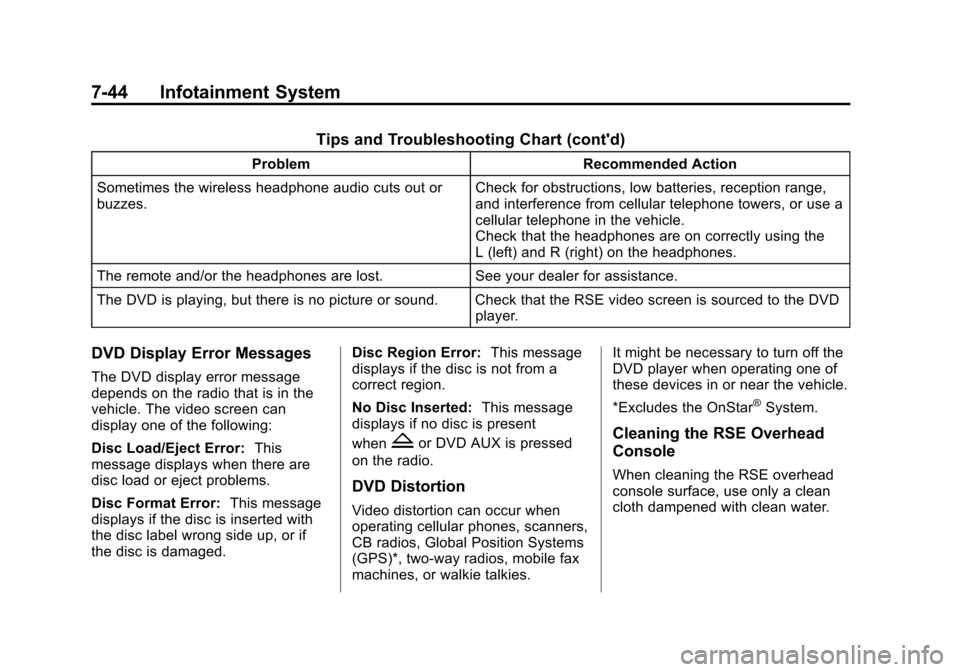
Tips and Troubleshooting Chart (cont'd)
ProblemRecommended Action
Sometimes the wireless headphone audio cuts out or
buzzes. Check for obstructions, low batteries, reception range,
and interference from cellular telephone towers, or use a
cellular telephone in the vehicle.
Check that the headphones are on correctly using the
L (left) and R (right) on the headphones.
The remote and/or the headphones are lost. See your dealer for assistance.
The DVD is playing, but there is no picture or sound. Check that the RSE video screen is sourced to the DVD player.
DVD Display Error Messages
The DVD display error message
depends on the radio that is in the
vehicle. The video screen can
display one of the following:
Disc Load/Eject Error:This
message displays when there are
disc load or eject problems.
Disc Format Error: This message
displays if the disc is inserted with
the disc label wrong side up, or if
the disc is damaged. Disc Region Error:
This message
displays if the disc is not from a
correct region.
No Disc Inserted: This message
displays if no disc is present
when
Zor DVD AUX is pressed
on the radio.
DVD Distortion
Video distortion can occur when
operating cellular phones, scanners,
CB radios, Global Position Systems
(GPS)*, two-way radios, mobile fax
machines, or walkie talkies. It might be necessary to turn off the
DVD player when operating one of
these devices in or near the vehicle.
*Excludes the OnStar
®System.
Cleaning the RSE Overhead
Console
When cleaning the RSE overhead
console surface, use only a clean
cloth dampened with clean water.
Page 239 of 514
Black plate (45,1)Chevrolet Tahoe/Suburban Owner Manual - 2012
Infotainment System 7-45
Cleaning the Video Screen
When cleaning the video screen,
use only a clean cloth dampened
with clean water. Use care when
directly touching or cleaning the
screen, as damage could result.
Rear Seat Audio (RSA)
System
Vehicles with this feature allow the
rear seat passengers to listen to
and control any of the music
sources: radio, CDs, DVDs, or other
auxiliary sources. However, the rear
seat passengers can only control
the music sources the front seat
passengers are not listening to
(except on some radios where dual
control is allowed). For example,
rear seat passengers can control
and listen to a CD through the
headphones, while the driver listens
to the radio through the front
speakers. The rear seat passengers
have control of the volume for each
set of headphones.The radio functionality is controlled
by both the RSA and the front radio.
Only one band can be tuned to at
one time. Changing the band on the
RSA or the front radio will change
the band on the other system,
if they are both sourced to the radio.
The RSA functions operate even
when the main radio is off. The front
audio system will display the
headphone icon when the RSA is
on, and will disappear from the
display when it is off.
Audio can be heard through wired
headphones (not included) plugged
into the jacks on the RSA. If the
vehicle has this feature, audio can
also be heard on Channel 2 of the
wireless headphones.
The audio system mutes the rear
speakers when the RSA audio is
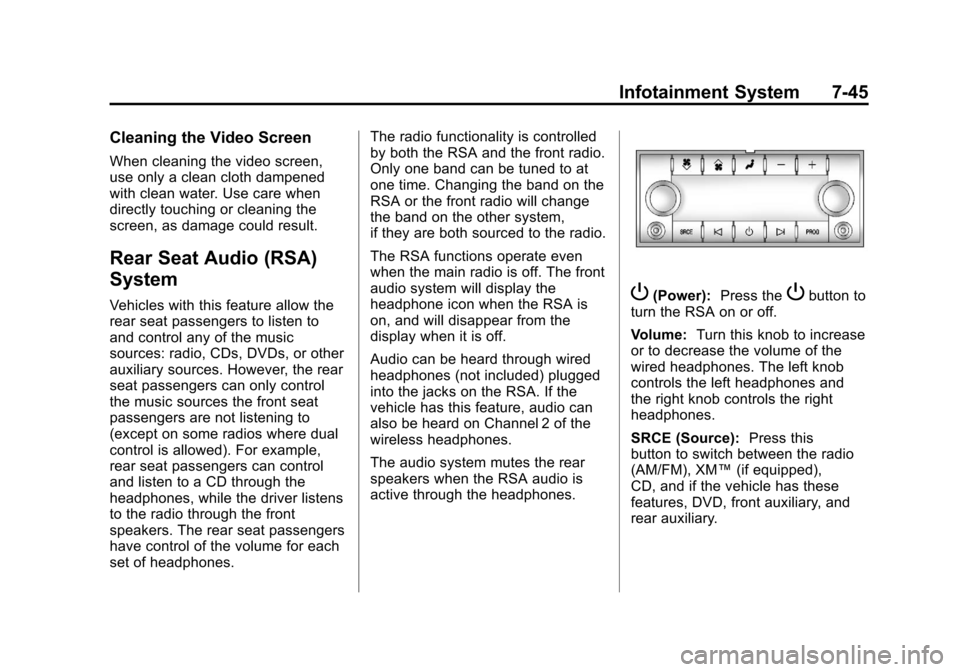
active through the headphones.P(Power):
Press thePbutton to
turn the RSA on or off.
Volume: Turn this knob to increase
or to decrease the volume of the
wired headphones. The left knob
controls the left headphones and
the right knob controls the right
headphones.
SRCE (Source): Press this
button to switch between the radio
(AM/FM), XM™ (if equipped),
CD, and if the vehicle has these
features, DVD, front auxiliary, and
rear auxiliary.
Page 350 of 514
Black plate (88,1)Chevrolet Tahoe/Suburban Owner Manual - 2012
9-88 Driving and Operating
This has the effect of reducing the
load on the front. However, the front
GAWR, rear GAWR, and the Gross
Vehicle Weight Rating (GVWR)
must never be exceeded.
{WARNING
On some vehicles that have
certain front mounted equipment,
such as a snow plow, it may be
possible to load the front axle to
the front gross axle weight rating
(GAWR) but not have enough
weight on the rear axle to have
proper braking performance.
If the brakes cannot work
properly, you could have a crash.
To help the brakes work properly
when a snow plow is installed,
always follow the snow plow
manufacturer or installer's
recommendation for rear ballast
to ensure a proper front and rear
weight distribution ratio, even
though the actual front weight(Continued)
WARNING (Continued)
may be less than the front
GAWR, and the total vehicle
weight is less than the gross
vehicle weight rating (GVWR).
Maintaining a proper front and
rear weight distribution ratio is
necessary to provide proper
braking performance.
Total vehicle reserve capacity is the
difference between the GVWR and
the weight of the vehicle with full
fuel and passengers. It is the
amount of weight that can be added
to the vehicle before reaching
theGVWR. Keep in mind that
reserve capacity numbers are
intended as a guide when selecting
the amount of equipment or cargo
the vehicle can carry. If you are
unsure of the vehicle's front, rear,
or total weight, go to a weigh station
and weigh the vehicle. Your dealer
can also help you with this. The total vehicle reserve capacity
for the vehicle can be found in the
lower right corner of the
Certification/Tire label as shown
previously.
See your dealer for additional
advice and information about
using a snow plow on the vehicle.
Also, see
Vehicle Load Limits on
page 9‑16.
Emergency Roof Lamp
Provisions
Vehicles with the RPO VYU snow
plow prep package also have an
emergency roof lamp provision
package, RPO TRW. Wiring for the
emergency roof lamp is provided
above the overhead console. See
Auxiliary Roof-Mounted Lamp on
page 6‑6 for switch location.
Page 390 of 514
Black plate (40,1)Chevrolet Tahoe/Suburban Owner Manual - 2012
10-40 Vehicle Care
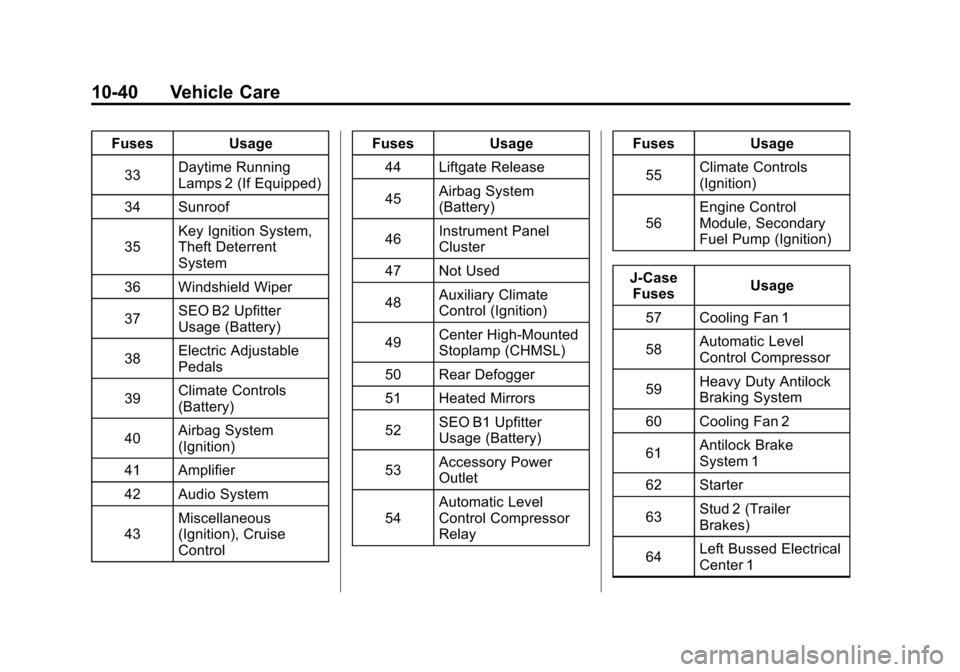
FusesUsage
33 Daytime Running
Lamps 2 (If Equipped)
34 Sunroof
35 Key Ignition System,
Theft Deterrent
System
36 Windshield Wiper
37 SEO B2 Upfitter
Usage (Battery)
38 Electric Adjustable
Pedals
39 Climate Controls
(Battery)
40 Airbag System
(Ignition)
41 Amplifier
42 Audio System
43 Miscellaneous
(Ignition), Cruise
Control Fuses
Usage
44 Liftgate Release
45 Airbag System
(Battery)
46 Instrument Panel
Cluster
47 Not Used
48 Auxiliary Climate
Control (Ignition)
49 Center High-Mounted
Stoplamp (CHMSL)
50 Rear Defogger
51 Heated Mirrors
52 SEO B1 Upfitter
Usage (Battery)
53 Accessory Power
Outlet
54 Automatic Level
Control Compressor
Relay Fuses
Usage
55 Climate Controls
(Ignition)
56 Engine Control
Module, Secondary
Fuel Pump (Ignition)
J-Case Fuses Usage
57 Cooling Fan 1
58 Automatic Level
Control Compressor
59 Heavy Duty Antilock
Braking System
60 Cooling Fan 2
61 Antilock Brake
System 1
62 Starter
63 Stud 2 (Trailer
Brakes)
64 Left Bussed Electrical
Center 1
Page 501 of 514

Black plate (1,1)Chevrolet Tahoe/Suburban Owner Manual - 2012
INDEX i-1
A
Accessories andModifications . . . . . . . . . . . . . . . . . 10-3
Accessory Power . . . . . . . . . . . . . . 9-26
Active Fuel Management
®. . . . . 9-28
Add-On Electrical Equipment . . . . . . . . . . . . . . . . . . . 9-85
Adding a Snow Plow or Similar Equipment . . . . . . . . . . . . 9-85
Additional Information, OnStar
®. . . . . . . . . . . . . . . . . . . . . . 14-5
Adjustable Throttle and Brake Pedal . . . . . . . . . . . . . . . . . . 9-22
Adjustments Lumbar, Front Seats . . . . . . . . . . . 3-4
Air Cleaner/Filter, Engine . . . . . 10-14
Air Vents . . . . . . . . . . . . . . . . . . . . . . 8-13
Airbag
Adding Equipment to theVehicle . . . . . . . . . . . . . . . . . . . . . . 3-42
Airbag System Check . . . . . . . . . . . . . . . . . . . . . . . . 3-44
How Does an AirbagRestrain? . . . . . . . . . . . . . . . . . . . 3-35
Passenger Sensing
System . . . . . . . . . . . . . . . . . . . . . . 3-37 Airbag System (cont'd)
What Makes an Airbag
Inflate? . . . . . . . . . . . . . . . . . . . . . . 3-35
What Will You See after an
Airbag Inflates? . . . . . . . . . . . . . 3-36
When Should an Airbag Inflate? . . . . . . . . . . . . . . . . . . . . . . 3-33
Where Are the Airbags? . . . . . . 3-31
Airbags
Passenger Status Indicator . . . 5-17
Readiness Light . . . . . . . . . . . . . . 5-16
Servicing Airbag-EquippedVehicles . . . . . . . . . . . . . . . . . . . . . 3-42
System Check . . . . . . . . . . . . . . . . 3-29
Alarm System Anti-theft . . . . . . . . . . . . . . . . . . . . . . 2-13
AM-FM Radio . . . . . . . . . . . . . . . . . . . 7-8
Antenna Rear Side Window . . . . . . . . . . . . 7-13
Satellite Radio . . . . . . . . . . . . . . . . 7-14
Anti-theft Alarm System . . . . . . . . . . . . . . . . 2-13
Alarm System Messages . . . . . 5-42
Antilock Brake System (ABS) . . . . . . . . . . . . . . . . 9-43
Warning Light . . . . . . . . . . . . . . . . . 5-22 Appearance Care
Exterior . . . . . . . . . . . . . . . . . . . . . 10-93
Interior . . . . . . . . . . . . . . . . . . . . . . 10-96
Armrest Storage . . . . . . . . . . . . . . . . 4-1
Assistance Program, Roadside . . . . . . . . . . . . . . . 13-7, 13-9
Audio Players . . . . . . . . . . . . . . . . . 7-14
CD . . . . . . . . . . . . . . . . . . . . . . . . . . . 7-14
CD/DVD . . . . . . . . . . . . . . . . . . . . . . 7-20
Audio System Radio Reception . . . . . . . . . . . . . . 7-13
Rear Seat (RSA) . . . . . . . . . . . . . 7-45
Theft-Deterrent Feature . . . . . . . . 7-3
Automatic Dimming Mirrors . . . . . . . . . . . . . . 2-18
Door Locks . . . . . . . . . . . . . . . . . . . . 2-8
Headlamp System . . . . . . . . . . . . . 6-3
Level Control . . . . . . . . . . . . . . . . . 9-48
Automatic Transmission . . . . . . . 9-31 Fluid . . . . . . . . . . . . . . . . . . . . . . . . .10-11
Manual Mode . . . . . . . . . . . . . . . . . 9-34
Shift Lock ControlFunction Check . . . . . . . . . . . 10-30
Auxiliary Roof Mounted Lamp . . . . . . . . . . . 6-6
Page 502 of 514

Black plate (2,1)Chevrolet Tahoe/Suburban Owner Manual - 2012
i-2 INDEX
Auxiliary Devices . . . . . . . . . . . . . . 7-30
Axle, Front . . . . . . . . . . . . . . . . . . . . 10-27
Axle, Rear . . . . . . . . . . . . . . . . . . . . 10-28
B
Battery . . . . . . . . . . . . . . . . . . . . . . . 10-26Jump Starting . . . . . . . . . . . . . . . 10-82
Load Management . . . . . . . . . . . . . 6-9
Power Protection . . . . . . . . . . . . . . 6-9
Voltage and ChargingMessages . . . . . . . . . . . . . . . . . . . 5-35
Blade Replacement, Wiper . . . 10-31
Bluetooth . . . . . . . . . . . . . . . . . . . . . . 7-47
Brake Pedal and AdjustableThrottle . . . . . . . . . . . . . . . . . . . . . . 9-22
Brake System Warning Light . . . 5-21
Brakes . . . . . . . . . . . . . . . . . . . . . . . . 10-24 Antilock . . . . . . . . . . . . . . . . . . . . . . . 9-43
Assist . . . . . . . . . . . . . . . . . . . . . . . . . 9-44
Fluid . . . . . . . . . . . . . . . . . . . . . . . . 10-25
Parking . . . . . . . . . . . . . . . . . . . . . . . 9-44
System Messages . . . . . . . . . . . . 5-35 Braking . . . . . . . . . . . . . . . . . . . . . . . . . 9-4
Break-In, New Vehicle . . . . . . . . . 9-21
Bulb Replacement . . . . . . . . . . . . 10-36
Fog Lamps . . . . . . . . . . . . . . . . . . . . 6-6
Halogen Bulbs . . . . . . . . . . . . . . 10-34
Headlamp Aiming . . . . . . . . . . . 10-32
Headlamps . . . . . . . . . . . . . . . . . 10-34
License Plate Lamps . . . . . . . 10-35
Taillamps, Turn Signal,Stoplamps, and
Back-up Lamps . . . . . . . . . . . 10-34
Buying New Tires . . . . . . . . . . . . . 10-59
C
Calibration . . . . . . . . . . . . . . . . . . . . . . 5-6
California Fuel Requirements . . . . . . . . . . . 9-61
Perchlorate MaterialsRequirements . . . . . . . . . . . . . . . 10-3
Warning . . . . . . . . . . . . . . . . . . . . . . 10-3
Camera, Rear Vision . . . . . . . . . . 9-55
Canadian Vehicle Owners . . . . . . . . iii
Capacities and Specifications . . . . . . . . . . . . . . . . 12-2 Carbon Monoxide
Engine Exhaust . . . . . . . . . . . . . . . 9-29
Liftgate . . . . . . . . . . . . . . . . . . 2-9, 2-10
Winter Driving . . . . . . . . . . . . . . . . 9-13
Cargo Cover . . . . . . . . . . . . . . . . . . . . . . . . . . 4-2
Cautions, Danger, and
Warnings . . . . . . . . . . . . . . . . . . . . . . . . iv
CD Player . . . . . . . . . . . . . . . . . . . . . 7-14
CD/DVD Player . . . . . . . . . . . . . . . . 7-20
Center Console Storage . . . . . . . . 4-2
Center Seat . . . . . . . . . . . . . . . . . . . . 3-4
Chains, Tire . . . . . . . . . . . . . . . . . . 10-64
Charging System Light . . . . . . . . 5-18
Check Engine Light . . . . . . . . . . . . . . . . . . 5-18
Ignition
Transmission Lock . . . . . . . . 10-30
Child Restraints Infants and YoungChildren . . . . . . . . . . . . . . . . . . . . . 3-47
Lower Anchors and Tethers for Children . . . . . . . . . 3-53
Older Children . . . . . . . . . . . . . . . . 3-45
Securing . . . . . . . . . . 3-60, 3-63, 3-64
Systems . . . . . . . . . . . . . . . . . . . . . . 3-49
Page 503 of 514

Black plate (3,1)Chevrolet Tahoe/Suburban Owner Manual - 2012
INDEX i-3
Circuit Breakers . . . . . . . . . . . . . . 10-37
CleaningExterior Care . . . . . . . . . . . . . . . 10-93
Interior Care . . . . . . . . . . . . . . . . 10-96
Climate Control Systems . . . . . . . 8-1 Air Conditioning . . . . . . . . . . . . . . . 8-1
Dual Automatic . . . . . . . . . . . . . . . . 8-4
Heating . . . . . . . . . . . . . . . . . . . . . . . . 8-1
Rear . . . . . . . . . . . . . . . . . . . . 8-10, 8-11
Clock . . . . . . . . . . . . . . . . . . . . . . . . . . . 5-8
Cluster, Instrument . . . . . . . . . . . . 5-11
Collision Damage Repair . . . . . 13-14
Compass . . . . . . . . . . . . . . . . . . . . . . . 5-6
Connections, OnStar
®. . . . . . . . . 14-4
Continuous Damping Control (CDC) . . . . . . . . . . . . . . . . 9-48
Control of a Vehicle . . . . . . . . . . . . . 9-4
Convex Mirrors . . . . . . . . . . . . . . . . 2-16
Coolant Engine . . . . . . . . . . . . . . . . . . . . . . 10-16
Engine TemperatureGauge . . . . . . . . . . . . . . . . . . . . . . 5-14
Cooling System . . . . . . . . . . . . . . . 10-15 Engine Messages . . . . . . . . . . . . 5-37 Courtesy Transportation
Program . . . . . . . . . . . . . . . . . . . . . 13-13
Cover Cargo . . . . . . . . . . . . . . . . . . . . . . . . . . 4-2
Cruise Control . . . . . . . . . . . . . . . . . 9-49 Light . . . . . . . . . . . . . . . . . . . . . . . . . . 5-25
Cupholders . . . . . . . . . . . . . . . . . . . . . 4-1
Customer Assistance . . . . . . . . . . 13-6
Offices . . . . . . . . . . . . . . . . . . 13-4, 13-5
Text Telephone (TTY)Users . . . . . . . . . . . . . . . . . . . . . . . 13-6
Customer Information Service PublicationsOrdering Information . . . . . . 13-16
Customer Satisfaction Procedure . . . . . . . . . . . . . . 13-1, 13-3
D
Damage Repair, Collision . . . . . 13-14
Danger, Warnings, and
Cautions . . . . . . . . . . . . . . . . . . . . . . . . iv
Data Recorders, Event . . . . . . . 13-19
Daytime Running Lamps (DRL) . . . . . . . . . . . . . . . . . . 6-3 Defensive Driving . . . . . . . . . . . . . . . 9-3
Delayed Locking . . . . . . . . . . . . . . . . 2-8
Devices, Auxiliary . . . . . . . . . . . . . 7-30
Diagnostics, OnStar
®. . . . . . . . . . 14-5
Distracted Driving . . . . . . . . . . . . . . . 9-2
Dome Lamps . . . . . . . . . . . . . . . . . . . 6-7
Door Ajar Messages . . . . . . . . . . . . . . . 5-36
Delayed Locking . . . . . . . . . . . . . . . 2-8
Locks . . . . . . . . . . . . . . . . . . . . . . . . . . 2-7
Power Locks . . . . . . . . . . . . . . . . . . . 2-8
Drive Belt Routing, Engine . . . . . 12-4
Driver Information Center (DIC) . . . . . . . . . . . . . . . . . 5-26
Driving Characteristics and
Towing Tips . . . . . . . . . . . . . . . . . 9-66
Defensive . . . . . . . . . . . . . . . . . . . . . . 9-3
Drunk . . . . . . . . . . . . . . . . . . . . . . . . . . 9-3
For Better Fuel Economy . . . . . 1-27
Highway Hypnosis . . . . . . . . . . . . 9-12
Hill and Mountain Roads . . . . . . 9-12
If the Vehicle is Stuck . . . . . . . . . 9-15
Loss of Control . . . . . . . . . . . . . . . . 9-5
Page 506 of 514

Black plate (6,1)Chevrolet Tahoe/Suburban Owner Manual - 2012
i-6 INDEX
Glass Replacement . . . . . . . . . . . 10-32
Glove Box . . . . . . . . . . . . . . . . . . . . . . 4-1
GM Mobility ReimbursementProgram . . . . . . . . . . . . . . . . . . . . . . 13-7
H
Halogen Bulbs . . . . . . . . . . . . . . . . 10-34
Hazard Warning Flashers . . . . . . . 6-5
Head Restraints . . . . . . . . . . . . . . . . 3-2
HeadlampsAiming . . . . . . . . . . . . . . . . . . . . . . 10-32
Automatic . . . . . . . . . . . . . . . . . . . . . . 6-3
Bulb Replacement . . . . . . . . . . 10-34
Daytime RunningLamps (DRL) . . . . . . . . . . . . . . . . . 6-3
Flash-to-Pass . . . . . . . . . . . . . . . . . . 6-3
High-Beam On Light . . . . . . . . . . 5-25
High/Low Beam Changer . . . . . . 6-2
Heated Rear Seats . . . . . . . . . . . . . . . . . . . 3-10
Heated and Ventilated Front Seats . . . . . . . . . . . . . . . . . . . . . . . . . 3-9
Heated Mirrors . . . . . . . . . . . . . . . . . 2-18 Heater
Engine . . . . . . . . . . . . . . . . . . . . . . . . 9-25
Heating and Air Conditioning . . . 8-1
High-Beam On Light . . . . . . . . . . . 5-25
Highway Hypnosis . . . . . . . . . . . . . 9-12
Hill and Mountain Roads . . . . . . . 9-12
Hill Start Assist (HSA) . . . . . . . . . 9-44
Hood . . . . . . . . . . . . . . . . . . . . . . . . . . 10-5
Horn . . . . . . . . . . . . . . . . . . . . . . . . . . . . 5-4
How to Wear Safety Belts Properly . . . . . . . . . . . . . . . . . . . . . . 3-20
I
Ignition Positions . . . . . . . . . . . . . . 9-22
Ignition Transmission Lock
Check . . . . . . . . . . . . . . . . . . . . . . . 10-30
Immobilizer . . . . . . . . . . . . . . . . . . . . 2-14
Infants and Young Children, Restraints . . . . . . . . . . . . . . . . . . . . 3-47
Infotainment . . . . . . . . . . . . . . . . . . . . 7-1
Instrument Cluster . . . . . . . . . . . . . 5-11
Instrument Panel Overview . . . . . 1-2
Introduction . . . . . . . . . . . . . . . . . . . . . . . iii
J
Jump Starting . . . . . . . . . . . . . . . . . 10-82
K
Key and Lock Messages . . . . . . . 5-39
Keyless Entry Remote (RKE) System . . . . . . . . 2-3
Keys . . . . . . . . . . . . . . . . . . . . . . . . . . . . 2-2
L
Labeling, Tire Sidewall . . . . . . . . 10-45
Lamp Messages . . . . . . . . . . . . . . . 5-39
Lamps Auxiliary RoofMounted Lamp . . . . . . . . . . . . . . . 6-6
Daytime Running (DRL) . . . . . . . 6-3
Dome . . . . . . . . . . . . . . . . . . . . . . . . . . 6-7
Exterior Controls . . . . . . . . . . . . . . . 6-1
Exterior Lamps Off Reminder . . . . . . . . . . . . . . . . . . . . 6-2
License Plate . . . . . . . . . . . . . . . 10-35
Malfunction Indicator . . . . . . . . . 5-18
Reading . . . . . . . . . . . . . . . . . . . . . . . 6-8