rear CHEVROLET SUBURBAN 2014 10.G Owners Manual
[x] Cancel search | Manufacturer: CHEVROLET, Model Year: 2014, Model line: SUBURBAN, Model: CHEVROLET SUBURBAN 2014 10.GPages: 494, PDF Size: 6.21 MB
Page 1 of 494
(1,1)Chevrolet Tahoe/Suburban Owner Manual (GMNA-Localizing-U.S./Canada/
Mexico-6081502) - 2014 - crc2 - 9/17/13
2014 Chevrolet Tahoe/Suburban Owner ManualM
In Brief. . . . . . . . . . . . . . . . . . . . . . . . 1-1
Instrument Panel . . . . . . . . . . . . . . 1-2
Initial Drive Information . . . . . . . . 1-4
Vehicle Features . . . . . . . . . . . . . 1-20
Performance and Maintenance . . . . . . . . . . . . . . . . 1-26
Keys, Doors, and Windows . . . . . . . . . . . . . . . . . . . . 2-1
Keys and Locks . . . . . . . . . . . . . . . 2-1
Doors . . . . . . . . . . . . . . . . . . . . . . . . . . 2-9
Vehicle Security . . . . . . . . . . . . . . 2-12
Exterior Mirrors . . . . . . . . . . . . . . . 2-15
Interior Mirrors . . . . . . . . . . . . . . . . 2-19
Windows . . . . . . . . . . . . . . . . . . . . . 2-20
Roof . . . . . . . . . . . . . . . . . . . . . . . . . . 2-22
Seats and Restraints . . . . . . . . . 3-1
Head Restraints . . . . . . . . . . . . . . . 3-2
Front Seats . . . . . . . . . . . . . . . . . . . . 3-3
Rear Seats . . . . . . . . . . . . . . . . . . . . 3-9
Safety Belts . . . . . . . . . . . . . . . . . . 3-17
Airbag System . . . . . . . . . . . . . . . . 3-27
Child Restraints . . . . . . . . . . . . . . 3-40 Storage
. . . . . . . . . . . . . . . . . . . . . . . 4-1
Storage Compartments . . . . . . . . 4-1
Additional Storage Features . . . 4-2
Roof Rack System . . . . . . . . . . . . . 4-3
Instruments and Controls . . . . 5-1
Controls . . . . . . . . . . . . . . . . . . . . . . . 5-2
Warning Lights, Gauges, and
Indicators . . . . . . . . . . . . . . . . . . . 5-10
Information Displays . . . . . . . . . . 5-26
Vehicle Messages . . . . . . . . . . . . 5-34
Vehicle Personalization . . . . . . . 5-44
Universal Remote System . . . . 5-52
Lighting . . . . . . . . . . . . . . . . . . . . . . . 6-1
Exterior Lighting . . . . . . . . . . . . . . . 6-1
Interior Lighting . . . . . . . . . . . . . . . . 6-7
Lighting Features . . . . . . . . . . . . . . 6-8
Infotainment System . . . . . . . . . 7-1
Introduction . . . . . . . . . . . . . . . . . . . . 7-1
Radio . . . . . . . . . . . . . . . . . . . . . . . . . 7-10
Audio Players . . . . . . . . . . . . . . . . 7-16
Rear Seat Infotainment . . . . . . . 7-36 Phone . . . . . . . . . . . . . . . . . . . . . . . . 7-48
Trademarks and License
Agreements . . . . . . . . . . . . . . . . . 7-55
Climate Controls . . . . . . . . . . . . . 8-1
Climate Control Systems . . . . . . 8-1
Air Vents . . . . . . . . . . . . . . . . . . . . . 8-12
Driving and Operating . . . . . . . . 9-1
Driving Information . . . . . . . . . . . . . 9-2
Starting and Operating . . . . . . . 9-20
Engine Exhaust . . . . . . . . . . . . . . 9-27
Automatic Transmission . . . . . . 9-28
Drive Systems . . . . . . . . . . . . . . . . 9-33
Brakes . . . . . . . . . . . . . . . . . . . . . . . 9-40
Ride Control Systems . . . . . . . . 9-42
Cruise Control . . . . . . . . . . . . . . . . 9-46
Object Detection Systems . . . . 9-48
Fuel . . . . . . . . . . . . . . . . . . . . . . . . . . 9-55
Towing . . . . . . . . . . . . . . . . . . . . . . . 9-60
Conversions and Add-Ons . . . 9-77
Page 7 of 494
(1,1)Chevrolet Tahoe/Suburban Owner Manual (GMNA-Localizing-U.S./Canada/
Mexico-6081502) - 2014 - crc2 - 9/17/13
In Brief 1-1
In Brief
Instrument Panel
Instrument Panel Overview . . . . 1-2
Initial Drive Information
Initial Drive Information . . . . . . . . 1-4
Remote Keyless Entry (RKE)System . . . . . . . . . . . . . . . . . . . . . . 1-4
Remote Vehicle Start . . . . . . . . . 1-4
Door Locks . . . . . . . . . . . . . . . . . . . 1-5
Liftgate . . . . . . . . . . . . . . . . . . . . . . . . 1-6
Windows . . . . . . . . . . . . . . . . . . . . . . 1-7
Seat Adjustment . . . . . . . . . . . . . . 1-7
Memory Features . . . . . . . . . . . . . 1-9
Second Row Seats . . . . . . . . . . 1-10
Third Row Seats . . . . . . . . . . . . . 1-10
Heated and Ventilated Seats . . . . . . . . . . . . . . . . . . . . . . . 1-10
Head Restraint Adjustment . . . . . . . . . . . . . . . . . 1-10 Safety Belts . . . . . . . . . . . . . . . . . . 1-11
Passenger Sensing
System . . . . . . . . . . . . . . . . . . . . . 1-11
Mirror Adjustment . . . . . . . . . . . . 1-12
Steering Wheel Adjustment . . . . . . . . . . . . . . . . . 1-14
Throttle and Brake Pedal Adjustment . . . . . . . . . . . . . . . . . 1-14
Interior Lighting . . . . . . . . . . . . . . 1-14
Exterior Lighting . . . . . . . . . . . . . 1-15
Windshield Wiper/Washer . . . . 1-16
Climate Controls . . . . . . . . . . . . . 1-17
Transmission . . . . . . . . . . . . . . . . 1-18
Four-Wheel Drive . . . . . . . . . . . . 1-19
Vehicle Features
Radio(s) . . . . . . . . . . . . . . . . . . . . . 1-20
Satellite Radio . . . . . . . . . . . . . . . 1-22
Portable Audio Devices . . . . . . 1-22
Bluetooth
®. . . . . . . . . . . . . . . . . . . 1-22
Steering Wheel Controls . . . . . 1-22
Cruise Control . . . . . . . . . . . . . . . 1-23 Navigation System . . . . . . . . . . . 1-23
Side Blind Zone
Alert (SBZA) . . . . . . . . . . . . . . . 1-24
Rear Vision Camera (RVC) . . . . . . . . . . . . . 1-24
Ultrasonic Parking Assist . . . . 1-24
Power Outlets . . . . . . . . . . . . . . . 1-24
Universal Remote System . . . 1-24
Sunroof . . . . . . . . . . . . . . . . . . . . . . 1-25
Performance and Maintenance
StabiliTrak®System . . . . . . . . . 1-26
Tire Pressure Monitor . . . . . . . . 1-26
Engine Oil Life System . . . . . . 1-26
E85 or FlexFuel . . . . . . . . . . . . . . 1-27
Driving for Better Fuel Economy . . . . . . . . . . . . . . . . . . . 1-27
Roadside Assistance Program . . . . . . . . . . . . . . . . . . . . 1-28
OnStar
®. . . . . . . . . . . . . . . . . . . . . 1-28
Page 9 of 494
(3,1)Chevrolet Tahoe/Suburban Owner Manual (GMNA-Localizing-U.S./Canada/
Mexico-6081502) - 2014 - crc2 - 9/17/13
In Brief 1-3
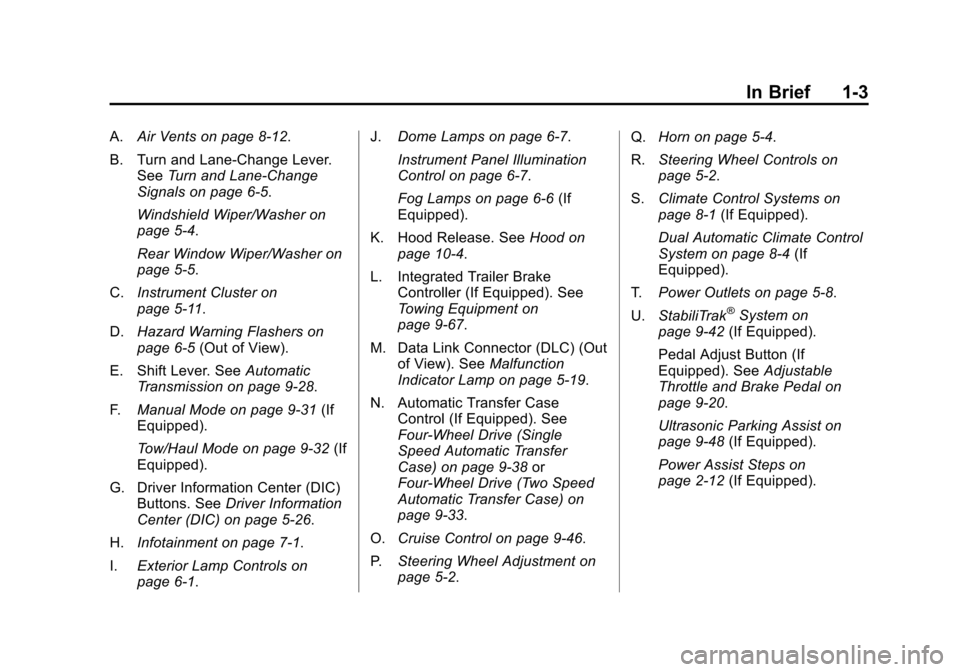
A.Air Vents on page 8-12.
B. Turn and Lane‐Change Lever. See Turn and Lane-Change
Signals on page 6-5.
Windshield Wiper/Washer on
page 5-4.
Rear Window Wiper/Washer on
page 5-5.
C. Instrument Cluster on
page 5-11.
D. Hazard Warning Flashers on
page 6-5 (Out of View).
E. Shift Lever. See Automatic
Transmission on page 9-28.
F. Manual Mode on page 9-31 (If
Equipped).
Tow/Haul Mode on page 9-32 (If
Equipped).
G. Driver Information Center (DIC) Buttons. See Driver Information
Center (DIC) on page 5-26.
H. Infotainment on page 7-1.
I. Exterior Lamp Controls on
page 6-1. J.
Dome Lamps on page 6-7.
Instrument Panel Illumination
Control on page 6-7.
Fog Lamps on page 6-6 (If
Equipped).
K. Hood Release. See Hood on
page 10-4.
L. Integrated Trailer Brake Controller (If Equipped). See
Towing Equipment on
page 9-67.
M. Data Link Connector (DLC) (Out of View). See Malfunction
Indicator Lamp on page 5-19.
N. Automatic Transfer Case Control (If Equipped). See
Four-Wheel Drive (Single
Speed Automatic Transfer
Case) on page 9-38 or
Four-Wheel Drive (Two Speed
Automatic Transfer Case) on
page 9-33.
O. Cruise Control on page 9-46.
P. Steering Wheel Adjustment on
page 5-2. Q.
Horn on page 5-4.
R. Steering Wheel Controls on
page 5-2.
S. Climate Control Systems on
page 8-1 (If Equipped).
Dual Automatic Climate Control
System on page 8-4 (If
Equipped).
T. Power Outlets on page 5-8.
U. StabiliTrak
®System on
page 9-42 (If Equipped).
Pedal Adjust Button (If
Equipped). See Adjustable
Throttle and Brake Pedal on
page 9-20.
Ultrasonic Parking Assist on
page 9-48 (If Equipped).
Power Assist Steps on
page 2-12 (If Equipped).
Page 12 of 494
(6,1)Chevrolet Tahoe/Suburban Owner Manual (GMNA-Localizing-U.S./Canada/
Mexico-6081502) - 2014 - crc2 - 9/17/13
1-6 In Brief
Liftgate
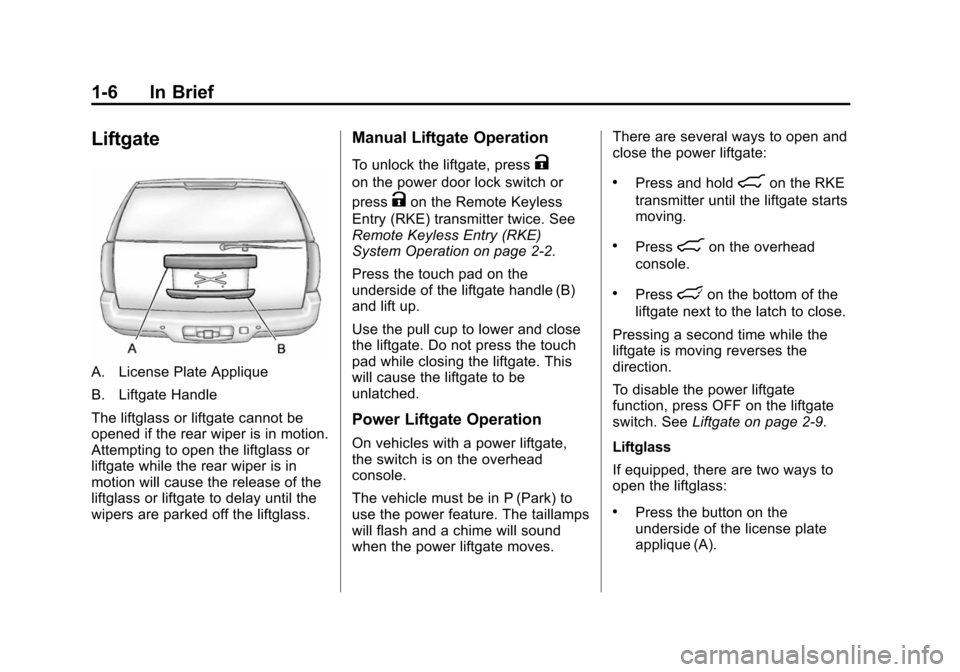
A. License Plate Applique
B. Liftgate Handle
The liftglass or liftgate cannot be
opened if the rear wiper is in motion.
Attempting to open the liftglass or
liftgate while the rear wiper is in
motion will cause the release of the
liftglass or liftgate to delay until the
wipers are parked off the liftglass.
Manual Liftgate Operation
To unlock the liftgate, pressK
on the power door lock switch or
press
Kon the Remote Keyless
Entry (RKE) transmitter twice. See
Remote Keyless Entry (RKE)
System Operation on page 2-2.
Press the touch pad on the
underside of the liftgate handle (B)
and lift up.
Use the pull cup to lower and close
the liftgate. Do not press the touch
pad while closing the liftgate. This
will cause the liftgate to be
unlatched.
Power Liftgate Operation
On vehicles with a power liftgate,
the switch is on the overhead
console.
The vehicle must be in P (Park) to
use the power feature. The taillamps
will flash and a chime will sound
when the power liftgate moves. There are several ways to open and
close the power liftgate:
.Press and hold8on the RKE
transmitter until the liftgate starts
moving.
.Press8on the overhead
console.
.Presslon the bottom of the
liftgate next to the latch to close.
Pressing a second time while the
liftgate is moving reverses the
direction.
To disable the power liftgate
function, press OFF on the liftgate
switch. See Liftgate on page 2-9.
Liftglass
If equipped, there are two ways to
open the liftglass:
.Press the button on the
underside of the license plate
applique (A).
Page 13 of 494
(7,1)Chevrolet Tahoe/Suburban Owner Manual (GMNA-Localizing-U.S./Canada/
Mexico-6081502) - 2014 - crc2 - 9/17/13
In Brief 1-7
.Pressmon the RKE
transmitter.
Windows
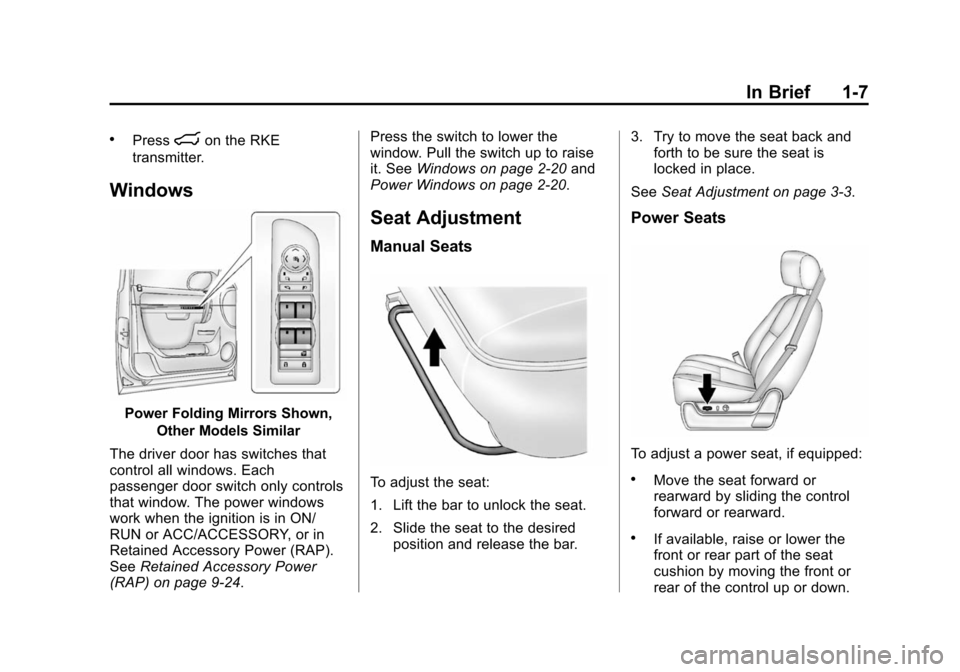
Power Folding Mirrors Shown,
Other Models Similar
The driver door has switches that
control all windows. Each
passenger door switch only controls
that window. The power windows
work when the ignition is in ON/
RUN or ACC/ACCESSORY, or in
Retained Accessory Power (RAP).
See Retained Accessory Power
(RAP) on page 9-24. Press the switch to lower the
window. Pull the switch up to raise
it. See
Windows on page 2-20 and
Power Windows on page 2-20.
Seat Adjustment
Manual Seats
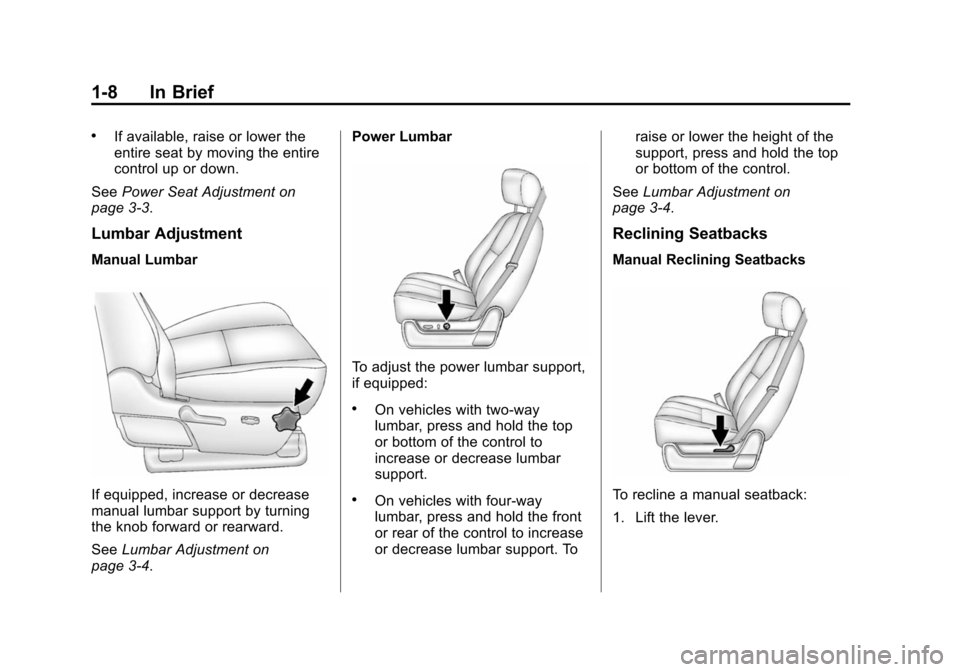
To adjust the seat:
1. Lift the bar to unlock the seat.
2. Slide the seat to the desired position and release the bar. 3. Try to move the seat back and
forth to be sure the seat is
locked in place.
See Seat Adjustment on page 3-3.
Power Seats
To adjust a power seat, if equipped:
.Move the seat forward or
rearward by sliding the control
forward or rearward.
.If available, raise or lower the
front or rear part of the seat
cushion by moving the front or
rear of the control up or down.
Page 14 of 494
(8,1)Chevrolet Tahoe/Suburban Owner Manual (GMNA-Localizing-U.S./Canada/
Mexico-6081502) - 2014 - crc2 - 9/17/13
1-8 In Brief
.If available, raise or lower the
entire seat by moving the entire
control up or down.
See Power Seat Adjustment on
page 3-3.
Lumbar Adjustment
Manual Lumbar
If equipped, increase or decrease
manual lumbar support by turning
the knob forward or rearward.
See Lumbar Adjustment on
page 3-4. Power Lumbar
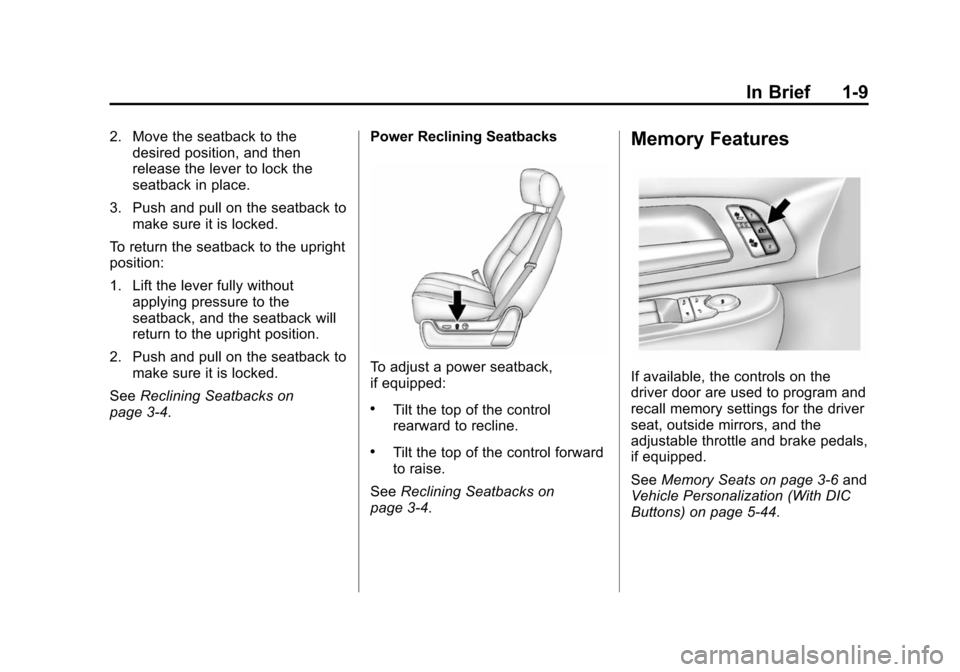
To adjust the power lumbar support,
if equipped:
.On vehicles with two-way
lumbar, press and hold the top
or bottom of the control to
increase or decrease lumbar
support.
.On vehicles with four-way
lumbar, press and hold the front
or rear of the control to increase
or decrease lumbar support. To
raise or lower the height of the
support, press and hold the top
or bottom of the control.
See Lumbar Adjustment on
page 3-4.
Reclining Seatbacks
Manual Reclining Seatbacks
To recline a manual seatback:
1. Lift the lever.
Page 15 of 494
(9,1)Chevrolet Tahoe/Suburban Owner Manual (GMNA-Localizing-U.S./Canada/
Mexico-6081502) - 2014 - crc2 - 9/17/13
In Brief 1-9
2. Move the seatback to thedesired position, and then
release the lever to lock the
seatback in place.
3. Push and pull on the seatback to make sure it is locked.
To return the seatback to the upright
position:
1. Lift the lever fully without applying pressure to the
seatback, and the seatback will
return to the upright position.
2. Push and pull on the seatback to make sure it is locked.
See Reclining Seatbacks on
page 3-4. Power Reclining Seatbacks
To adjust a power seatback,
if equipped:
.Tilt the top of the control
rearward to recline.
.Tilt the top of the control forward
to raise.
See Reclining Seatbacks on
page 3-4.
Memory Features
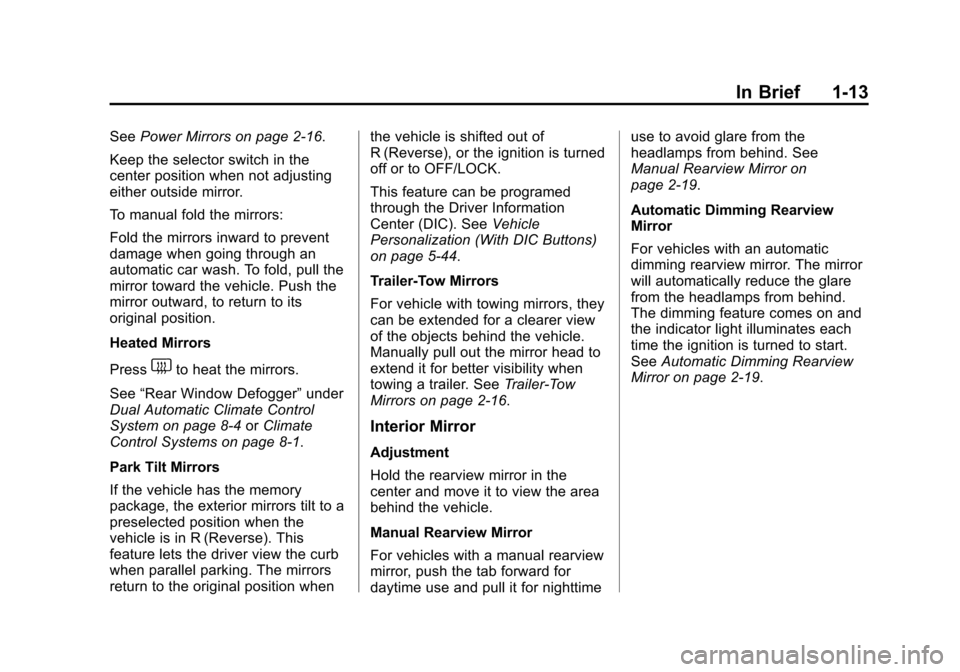
If available, the controls on the
driver door are used to program and
recall memory settings for the driver
seat, outside mirrors, and the
adjustable throttle and brake pedals,
if equipped.
See Memory Seats on page 3-6 and
Vehicle Personalization (With DIC
Buttons) on page 5-44.
Page 19 of 494
(13,1)Chevrolet Tahoe/Suburban Owner Manual (GMNA-Localizing-U.S./Canada/
Mexico-6081502) - 2014 - crc2 - 9/17/13
In Brief 1-13
SeePower Mirrors on page 2-16.
Keep the selector switch in the
center position when not adjusting
either outside mirror.
To manual fold the mirrors:
Fold the mirrors inward to prevent
damage when going through an
automatic car wash. To fold, pull the
mirror toward the vehicle. Push the
mirror outward, to return to its
original position.
Heated Mirrors
Press
1to heat the mirrors.
See “Rear Window Defogger” under
Dual Automatic Climate Control
System on page 8-4 orClimate
Control Systems on page 8-1.
Park Tilt Mirrors
If the vehicle has the memory
package, the exterior mirrors tilt to a
preselected position when the
vehicle is in R (Reverse). This
feature lets the driver view the curb
when parallel parking. The mirrors
return to the original position when the vehicle is shifted out of
R (Reverse), or the ignition is turned
off or to OFF/LOCK.
This feature can be programed
through the Driver Information
Center (DIC). See
Vehicle
Personalization (With DIC Buttons)
on page 5-44.
Trailer-Tow Mirrors
For vehicle with towing mirrors, they
can be extended for a clearer view
of the objects behind the vehicle.
Manually pull out the mirror head to
extend it for better visibility when
towing a trailer. See Trailer-Tow
Mirrors on page 2-16.
Interior Mirror
Adjustment
Hold the rearview mirror in the
center and move it to view the area
behind the vehicle.
Manual Rearview Mirror
For vehicles with a manual rearview
mirror, push the tab forward for
daytime use and pull it for nighttime use to avoid glare from the
headlamps from behind. See
Manual Rearview Mirror on
page 2-19.
Automatic Dimming Rearview
Mirror
For vehicles with an automatic
dimming rearview mirror. The mirror
will automatically reduce the glare
from the headlamps from behind.
The dimming feature comes on and
the indicator light illuminates each
time the ignition is turned to start.
See
Automatic Dimming Rearview
Mirror on page 2-19.
Page 22 of 494
(16,1)Chevrolet Tahoe/Suburban Owner Manual (GMNA-Localizing-U.S./Canada/
Mexico-6081502) - 2014 - crc2 - 9/17/13
1-16 In Brief
See:
.Exterior Lamp Controls on
page 6-1
.Daytime Running Lamps (DRL)
on page 6-3
.Fog Lamps on page 6-6
Windshield Wiper/Washer
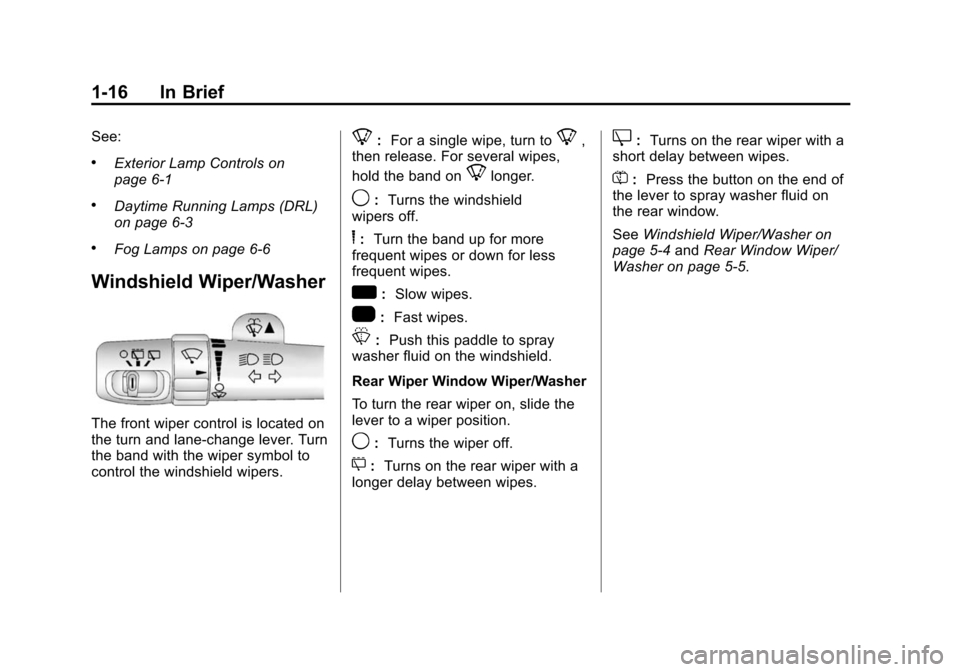
The front wiper control is located on
the turn and lane-change lever. Turn
the band with the wiper symbol to
control the windshield wipers.
8:For a single wipe, turn to8,
then release. For several wipes,
hold the band on
8longer.
9: Turns the windshield
wipers off.
6: Turn the band up for more
frequent wipes or down for less
frequent wipes.
w: Slow wipes.
1: Fast wipes.
L:Push this paddle to spray
washer fluid on the windshield.
Rear Wiper Window Wiper/Washer
To turn the rear wiper on, slide the
lever to a wiper position.
9: Turns the wiper off.
5: Turns on the rear wiper with a
longer delay between wipes.
Z: Turns on the rear wiper with a
short delay between wipes.
=: Press the button on the end of
the lever to spray washer fluid on
the rear window.
See Windshield Wiper/Washer on
page 5-4 andRear Window Wiper/
Washer on page 5-5.
Page 23 of 494
(17,1)Chevrolet Tahoe/Suburban Owner Manual (GMNA-Localizing-U.S./Canada/
Mexico-6081502) - 2014 - crc2 - 9/17/13
In Brief 1-17
Climate Controls
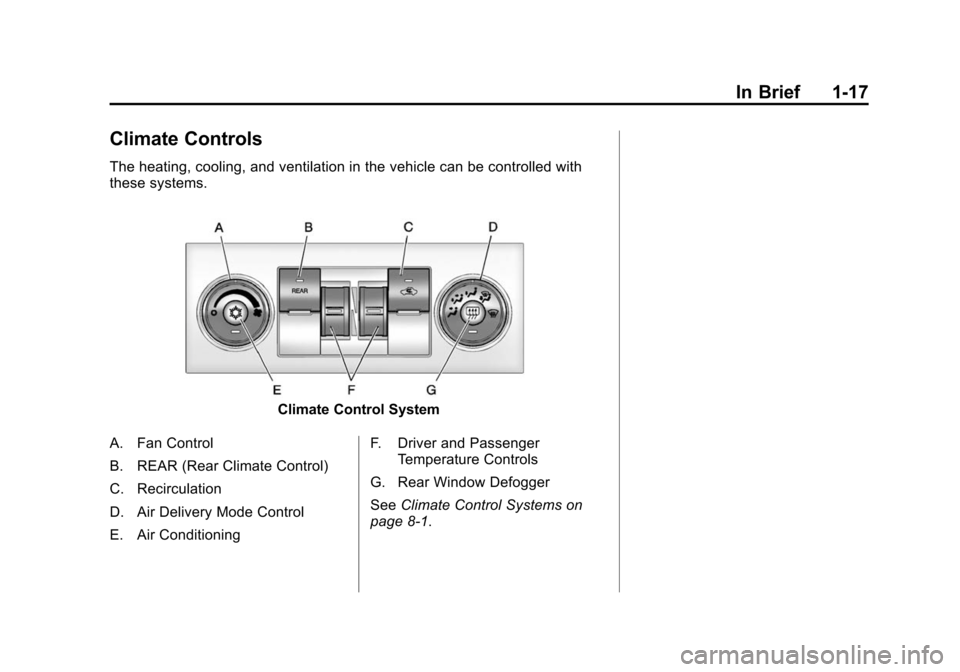
The heating, cooling, and ventilation in the vehicle can be controlled with
these systems.
Climate Control System
A. Fan Control
B. REAR (Rear Climate Control)
C. Recirculation
D. Air Delivery Mode Control
E. Air Conditioning F. Driver and Passenger
Temperature Controls
G. Rear Window Defogger
See Climate Control Systems on
page 8-1.