power steering CHEVROLET SUBURBAN 2016 11.G User Guide
[x] Cancel search | Manufacturer: CHEVROLET, Model Year: 2016, Model line: SUBURBAN, Model: CHEVROLET SUBURBAN 2016 11.GPages: 453, PDF Size: 6.23 MB
Page 71 of 453
Chevrolet Tahoe/Suburban Owner Manual (GMNA-Localizing-U.S./Canada/
Mexico-9159366) - 2016 - crc - 5/19/15
70 Seats and Restraints
RKE transmitters are not labeled
with a number. If your memory seat
position is stored to 1 or 2, but this
position is not automatically
recalling, then change the stored
position or switch RKE transmitters
with the other driver.
Obstructions
If something has blocked the driver
seat, power tilt and telescoping
steering column, and/or adjustable
pedals (if equipped) while recalling
the exit position, the recall may
stop. Remove the obstruction; then
press and hold the appropriate
manual control for the exit feature
not recalling for two seconds. Try
recalling the memory position again
by opening the driver door and
pressing
Kon the RKE transmitter.
If the exit position is still not
recalling, see your dealer for
service.
Heated and Cooled Front
Seats
If equipped, the vehicle may have
heated or heated and cooled seats.
{Warning
If you cannot feel temperature
change or pain to the skin, the
seat heater may cause burns. To
reduce the risk of burns, people
with such a condition should use
care when using the seat heater,
especially for long periods of
time. Do not place anything on
the seat that insulates against
heat, such as a blanket, cushion,
cover, or similar item. This may
cause the seat heater to
overheat. An overheated seat
heater may cause a burn or may
damage the seat.
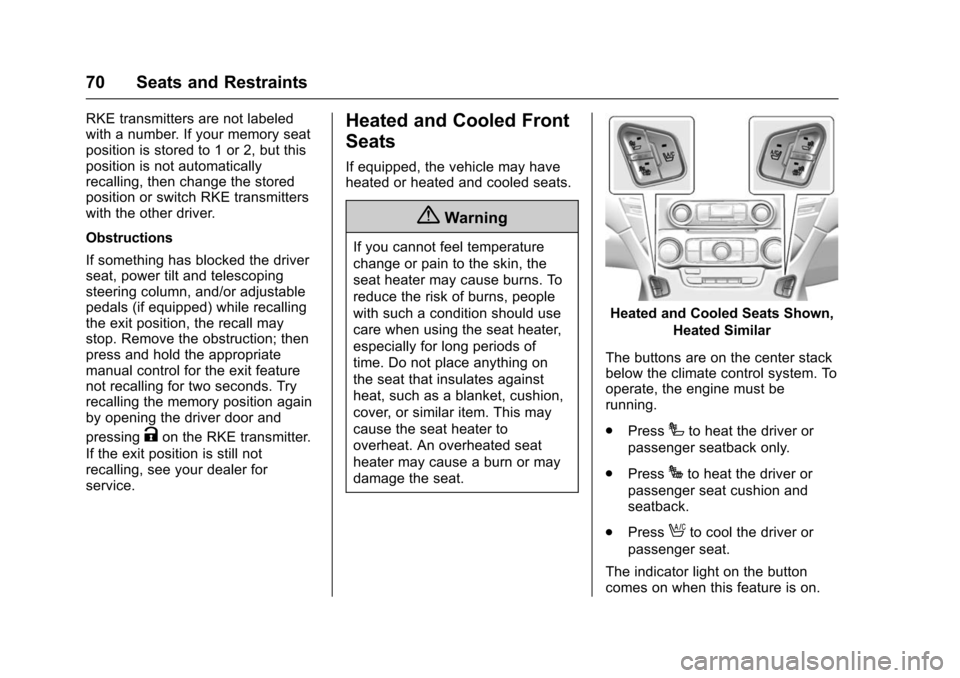
Heated and Cooled Seats Shown,
Heated Similar
The buttons are on the center stack
below the climate control system. To
operate, the engine must be
running.
. Press
Ito heat the driver or
passenger seatback only.
. Press
Jto heat the driver or
passenger seat cushion and
seatback.
. Press
Ato cool the driver or
passenger seat.
The indicator light on the button
comes on when this feature is on.
Page 127 of 453
Chevrolet Tahoe/Suburban Owner Manual (GMNA-Localizing-U.S./Canada/
Mexico-9159366) - 2016 - crc - 5/20/15
126 Instruments and Controls
Instruments and
Controls
Controls
Steering Wheel Adjustment . . . 127
Steering Wheel Controls . . . . . . 128
Heated Steering Wheel . . . . . . . 129
Horn . . . . . . . . . . . . . . . . . . . . . . . . . . 129
Windshield Wiper/Washer . . . . 129
Rear Window Wiper/Washer . . . . . . . . . . . . . . . . . . . . . 131
Compass . . . . . . . . . . . . . . . . . . . . . 132
Clock . . . . . . . . . . . . . . . . . . . . . . . . . 132
Power Outlets . . . . . . . . . . . . . . . . 133
Wireless Charging . . . . . . . . . . . . 135
Warning Lights, Gauges, and
Indicators
Warning Lights, Gauges, and Indicators . . . . . . . . . . . . . . . . . . . 136
Instrument Cluster . . . . . . . . . . . . 137
Speedometer . . . . . . . . . . . . . . . . . 140
Odometer . . . . . . . . . . . . . . . . . . . . . 140
Trip Odometer . . . . . . . . . . . . . . . . 140
Tachometer . . . . . . . . . . . . . . . . . . . 140
Fuel Gauge . . . . . . . . . . . . . . . . . . . 140
Engine Oil Pressure
Gauge . . . . . . . . . . . . . . . . . . . . . . 141 Engine Coolant Temperature
Gauge . . . . . . . . . . . . . . . . . . . . . . 142
Voltmeter Gauge . . . . . . . . . . . . . 143
Safety Belt Reminders . . . . . . . . 144
Airbag Readiness Light . . . . . . . 144
Passenger Airbag Status Indicator . . . . . . . . . . . . . . . . . . . . 145
Charging System Light . . . . . . . 146
Malfunction Indicator Lamp (Check Engine Light) . . . . . . . . 146
Brake System Warning Light . . . . . . . . . . . . . . . . . . . . . . . . 148
Antilock Brake System (ABS) Warning Light . . . . . . . . . . . . . . . 149
Tow/Haul Mode Light . . . . . . . . . 149
Lane Keep Assist (LKA) Light . . . . . . . . . . . . . . . . . . . . . . . . 149
Vehicle Ahead Indicator . . . . . . 150
Traction Off Light . . . . . . . . . . . . . 150
StabiliTrak
®OFF Light . . . . . . . . 150
Traction Control System (TCS)/ StabiliTrak
®Light . . . . . . . . . . . 150
Tire Pressure Light . . . . . . . . . . . 151
Low Fuel Warning Light . . . . . . 151
Security Light . . . . . . . . . . . . . . . . . 151
High-Beam On Light . . . . . . . . . . 152
Front Fog Lamp Light . . . . . . . . . 152
Lamps On Reminder . . . . . . . . . 152
Cruise Control Light . . . . . . . . . . 152
Information Displays
Driver Information Center (DIC) (Base Level) . . . . . . . . . . . . . . . . 153
Driver Information Center (DIC) (Uplevel) . . . . . . . . . . . . . . . . . . . . 155
Head-Up Display (HUD) . . . . . . 157
Vehicle Messages
Vehicle Messages . . . . . . . . . . . . 161
Battery Voltage and Charging
Messages . . . . . . . . . . . . . . . . . . . 161
Brake System Messages . . . . . 162
Compass Messages . . . . . . . . . . 162
Cruise Control Messages . . . . . 162
Door Ajar Messages . . . . . . . . . . 163
Engine Cooling System Messages . . . . . . . . . . . . . . . . . . . 163
Engine Oil Messages . . . . . . . . . 164
Engine Power Messages . . . . . 164
Fuel System Messages . . . . . . . 165
Key and Lock Messages . . . . . 165
Lamp Messages . . . . . . . . . . . . . . 165
Object Detection System
Messages . . . . . . . . . . . . . . . . . . . 166
Ride Control System Messages . . . . . . . . . . . . . . . . . . . 167
Airbag System Messages . . . . 169
Security Messages . . . . . . . . . . . 169
Steering System Messages . . . . . . . . . . . . . . . . . . . 169
Page 129 of 453
Chevrolet Tahoe/Suburban Owner Manual (GMNA-Localizing-U.S./Canada/
Mexico-9159366) - 2016 - crc - 5/20/15
128 Instruments and Controls
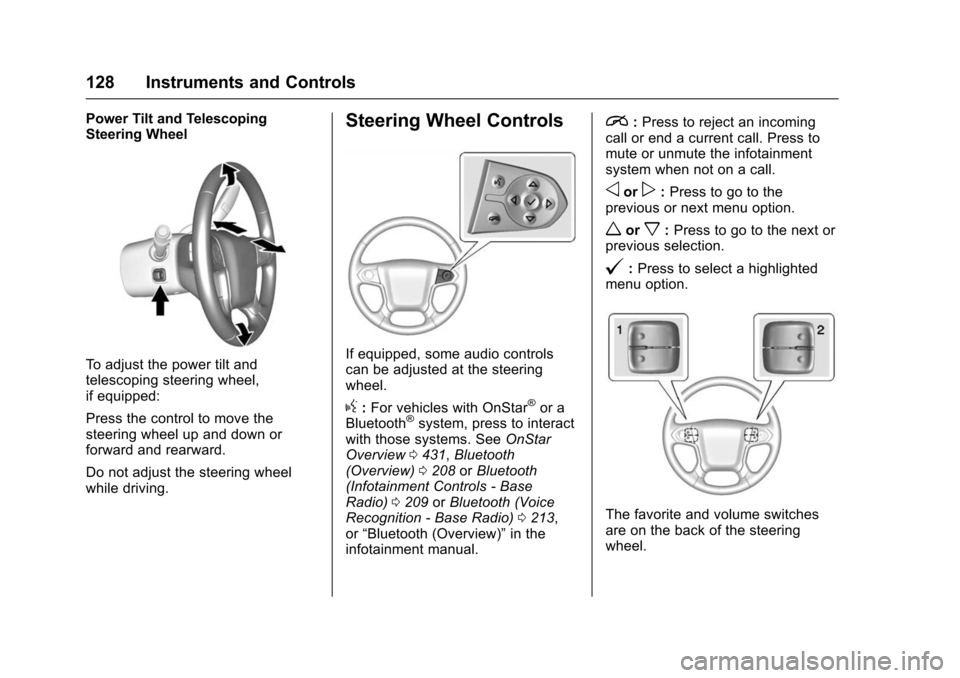
Power Tilt and Telescoping
Steering Wheel
To adjust the power tilt and
telescoping steering wheel,
if equipped:
Press the control to move the
steering wheel up and down or
forward and rearward.
Do not adjust the steering wheel
while driving.
Steering Wheel Controls
If equipped, some audio controls
can be adjusted at the steering
wheel.
g:For vehicles with OnStar®or a
Bluetooth®system, press to interact
with those systems. See OnStar
Overview 0431, Bluetooth
(Overview) 0208 orBluetooth
(Infotainment Controls - Base
Radio) 0209 orBluetooth (Voice
Recognition - Base Radio) 0213,
or “Bluetooth (Overview)” in the
infotainment manual.
i: Press to reject an incoming
call or end a current call. Press to
mute or unmute the infotainment
system when not on a call.
oorp: Press to go to the
previous or next menu option.
worx: Press to go to the next or
previous selection.
@: Press to select a highlighted
menu option.
The favorite and volume switches
are on the back of the steering
wheel.
Page 170 of 453
Chevrolet Tahoe/Suburban Owner Manual (GMNA-Localizing-U.S./Canada/
Mexico-9159366) - 2016 - crc - 5/20/15
Instruments and Controls 169
The message turns off as soon as
the conditions that caused the
message to be displayed are no
longer present.
Airbag System Messages
SERVICE AIRBAG
This message displays if there is a
problem with the airbag system.
Take the vehicle to your dealer for
service.
Security Messages
SERVICE THEFT DETERRENT
SYSTEM
This message displays when there
is a problem with the theft-deterrent
system. The vehicle may or may not
restart, so you may want to take the
vehicle to your dealer before turning
off the engine. SeeImmobilizer
Operation (Key Access) 054 or
Immobilizer Operation (Keyless
Access) 054.
Steering System
Messages
STEERING ASSIST IS
REDUCED DRIVE WITH CARE
This message may display if a
problem occurs with the electric
power steering system. If this
message appears, steering effort
may be slightly higher than normal.
The vehicle is still safe to drive. Use
caution while in reduced assist
mode. If this message is persistent
or appears repeatedly, take the
vehicle to your dealer for service.
See Steering 0230.
SERVICE POWER STEERING
This message displays when there
is a problem with electric power
steering. If this message displays
and a reduction in steering
performance or loss of power
steering assistance is noticed, see
your dealer. See Steering0230.
Starting the Vehicle
Messages
PRESS BRAKE TO START
This message is displayed when
attempting to start the vehicle
without first pressing the brake
pedal.
SERVICE KEYLESS START
SYSTEM
This message is displayed if there is
a problem with the pushbutton start
system. Take the vehicle to your
dealer for service.
Tire Messages
SERVICE TIRE MONITOR
SYSTEM
If equipped with the Tire Pressure
Monitor System (TPMS), this
message displays if a part on the
system is not working properly. The
tire pressure light also flashes and
then remains on during the same
Page 184 of 453
Chevrolet Tahoe/Suburban Owner Manual (GMNA-Localizing-U.S./Canada/
Mexico-9159366) - 2016 - crc - 5/19/15
Lighting 183
Lighting
Exterior Lighting
Exterior Lamp Controls . . . . . . . 183
Exterior Lamps OffReminder . . . . . . . . . . . . . . . . . . . 185
Headlamp High/Low-Beam Changer . . . . . . . . . . . . . . . . . . . . 185
Flash-to-Pass . . . . . . . . . . . . . . . . 185
Daytime Running Lamps (DRL) . . . . . . . . . . . . . . . 186
Automatic Headlamp System . . . . . . . . . . . . . . . . . . . . . . 186
Hazard Warning Flashers . . . . . 187
Turn and Lane-Change Signals . . . . . . . . . . . . . . . . . . . . . . 187
Fog Lamps . . . . . . . . . . . . . . . . . . . 188
Interior Lighting
Instrument Panel Illumination Control . . . . . . . . . . . . . . . . . . . . . . 188
Dome Lamps . . . . . . . . . . . . . . . . . 189
Reading Lamps . . . . . . . . . . . . . . 189
Lighting Features
Entry Lighting . . . . . . . . . . . . . . . . 190
Exit Lighting . . . . . . . . . . . . . . . . . . 190
Battery Load Management . . . 190
Battery Power Protection . . . . . 191
Exterior Lighting
Exterior Lamp Controls
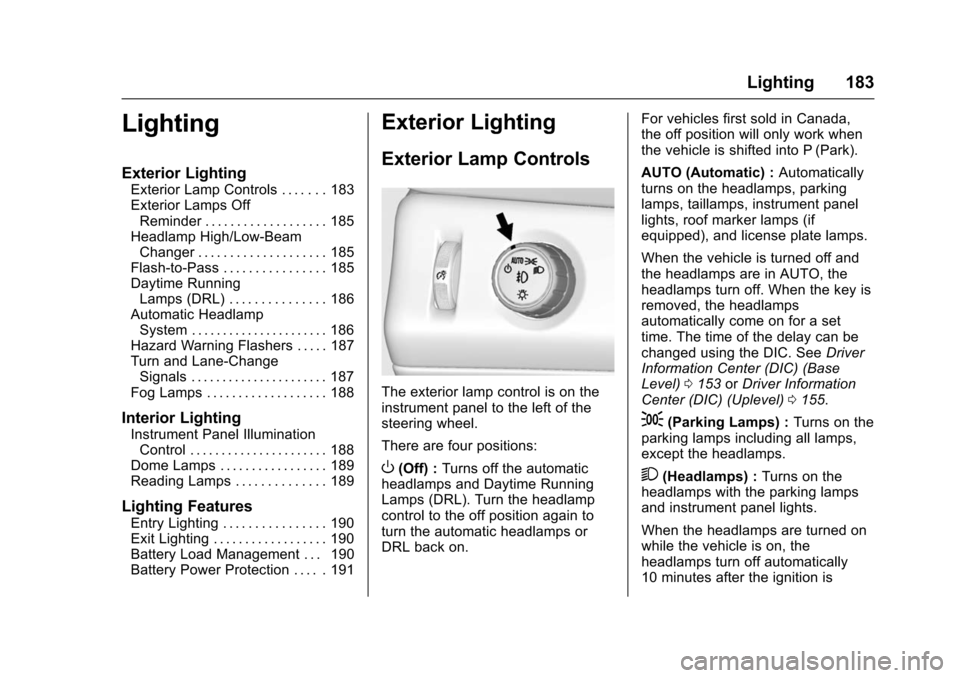
The exterior lamp control is on the
instrument panel to the left of the
steering wheel.
There are four positions:
O(Off) : Turns off the automatic
headlamps and Daytime Running
Lamps (DRL). Turn the headlamp
control to the off position again to
turn the automatic headlamps or
DRL back on. For vehicles first sold in Canada,
the off position will only work when
the vehicle is shifted into P (Park).
AUTO (Automatic) :
Automatically
turns on the headlamps, parking
lamps, taillamps, instrument panel
lights, roof marker lamps (if
equipped), and license plate lamps.
When the vehicle is turned off and
the headlamps are in AUTO, the
headlamps turn off. When the key is
removed, the headlamps
automatically come on for a set
time. The time of the delay can be
changed using the DIC. See Driver
Information Center (DIC) (Base
Level) 0153 orDriver Information
Center (DIC) (Uplevel) 0155.
;(Parking Lamps) : Turns on the
parking lamps including all lamps,
except the headlamps.
2(Headlamps) : Turns on the
headlamps with the parking lamps
and instrument panel lights.
When the headlamps are turned on
while the vehicle is on, the
headlamps turn off automatically
10 minutes after the ignition is
Page 194 of 453
Chevrolet Tahoe/Suburban Owner Manual (GMNA-Localizing-U.S./Canada/
Mexico-9159366) - 2016 - crc - 5/19/15
Infotainment System 193
functions may gray out when they
are unavailable. Many infotainment
features are also available through
the instrument cluster and steering
wheel controls.
Before driving:
.Become familiar with the
operation, faceplate buttons, and
screen buttons.
. Set up the audio by presetting
favorite stations, setting the
tone, and adjusting the
speakers.
. Set up phone numbers in
advance so they can be called
easily by pressing a single
button or by using a single voice
command if equipped with
Bluetooth phone capability.
See Defensive Driving 0229.
To play the infotainment system with
the ignition off, see Retained
Accessory Power (RAP) 0251.Theft-Deterrent Feature
TheftLock®is designed to
discourage theft of the vehicle's
radio by learning a portion of the
Vehicle Identification Number (VIN).
The radio does not operate if it is
stolen or moved to a different
vehicle.
Overview
Infotainment System Overview
The infotainment system is
controlled by using the buttons on
the faceplate and steering wheel
controls, if equipped. See Steering
Wheel Controls 0128.
Page 228 of 453
Chevrolet Tahoe/Suburban Owner Manual (GMNA-Localizing-U.S./Canada/
Mexico-9159366) - 2016 - crc - 5/20/15
Driving and Operating 227
Driving and
Operating
Driving Information
Distracted Driving . . . . . . . . . . . . 228
Defensive Driving . . . . . . . . . . . . . 229
Drunk Driving . . . . . . . . . . . . . . . . . 229
Control of a Vehicle . . . . . . . . . . . 229
Braking . . . . . . . . . . . . . . . . . . . . . . . 229
Steering . . . . . . . . . . . . . . . . . . . . . . 230
Off-Road Recovery . . . . . . . . . . . 230
Loss of Control . . . . . . . . . . . . . . . 231
Off-Road Driving . . . . . . . . . . . . . 231
Driving on Wet Roads . . . . . . . . 236
Hill and Mountain Roads . . . . . 237
Winter Driving . . . . . . . . . . . . . . . . 237
If the Vehicle Is Stuck . . . . . . . . 238
Vehicle Load Limits . . . . . . . . . . . 240
Starting and Operating
New Vehicle Break-In . . . . . . . . . 244
Adjustable Throttle and BrakePedal . . . . . . . . . . . . . . . . . . . . . . . 244
Ignition Positions (Keyless Access) . . . . . . . . . . . . . . . . . . . . . 245
Ignition Positions (Key Access) . . . . . . . . . . . . . . . . . . . . . 247
Starting the Engine . . . . . . . . . . . 248
Engine Heater . . . . . . . . . . . . . . . . 250 Retained Accessory
Power (RAP) . . . . . . . . . . . . . . . . 251
Shifting Into Park . . . . . . . . . . . . . 252
Shifting out of Park . . . . . . . . . . . 253
Parking over Things That Burn . . . . . . . . . . . . . . . . . . . 253
Active Fuel Management
®. . . . 254
Engine Exhaust
Engine Exhaust . . . . . . . . . . . . . . 254
Running the Vehicle While Parked . . . . . . . . . . . . . . . . . . . . . . 255
Automatic Transmission
Automatic Transmission . . . . . . 255
Manual Mode . . . . . . . . . . . . . . . . . 257
Tow/Haul Mode . . . . . . . . . . . . . . . 259
Drive Systems
Four-Wheel Drive . . . . . . . . . . . . . 260
Brakes
Antilock BrakeSystem (ABS) . . . . . . . . . . . . . . . 265
Parking Brake . . . . . . . . . . . . . . . . 265
Brake Assist . . . . . . . . . . . . . . . . . . 266
Hill Start Assist (HSA) . . . . . . . . 266
Ride Control Systems
Traction Control/Electronic Stability Control . . . . . . . . . . . . . 267
Hill Descent Control (HDC) . . . 269 Magnetic Ride Control . . . . . . . . 270
Locking Rear Axle . . . . . . . . . . . . 270
Automatic Level Control . . . . . . 270
Cruise Control
Cruise Control . . . . . . . . . . . . . . . . 271
Adaptive Cruise Control . . . . . . 273
Driver Assistance Systems
Driver Assistance Systems . . . 280
Assistance Systems for
Parking or Backing . . . . . . . . . . 281
Assistance Systems for Driving . . . . . . . . . . . . . . . . . . . . . . 283
Forward Collision Alert (FCA) System . . . . . . . . . . . . . . . . . . . . . . 283
Front Automatic Braking (FAB) System . . . . . . . . . . . . . . . . . . . . . . 286
Side Blind Zone Alert (SBZA) . . . . . . . . . . . . . . . . 287
Lane Change Alert (LCA) . . . . . 287
Lane Departure Warning (LDW) . . . . . . . . . . . . . 289
Lane Keep Assist (LKA) . . . . . 289
Fuel
Fuel . . . . . . . . . . . . . . . . . . . . . . . . . . 291
California Fuel Requirements . . . . . . . . . . . . . . . 292
Fuels in Foreign Countries . . . 292
Fuel Additives . . . . . . . . . . . . . . . . 292
E85 or FlexFuel . . . . . . . . . . . . . . 293
Page 230 of 453
Chevrolet Tahoe/Suburban Owner Manual (GMNA-Localizing-U.S./Canada/
Mexico-9159366) - 2016 - crc - 5/20/15
Driving and Operating 229
Refer to the infotainment section for
more information on using that
system and the navigation system,
if equipped, including pairing and
using a cell phone.
Defensive Driving
Defensive driving means“always
expect the unexpected.” The first
step in driving defensively is to wear
the safety belt. See Safety Belts
0 80.
. Assume that other road users
(pedestrians, bicyclists, and
other drivers) are going to be
careless and make mistakes.
Anticipate what they might do
and be ready.
. Allow enough following distance
between you and the driver in
front of you.
. Focus on the task of driving.
Drunk Driving
Death and injury associated with
drinking and driving is a global
tragedy.
{Warning
Drinking and then driving is very
dangerous. Your reflexes,
perceptions, attentiveness, and
judgment can be affected by even
a small amount of alcohol. You
can have a serious —or even
fatal —collision if you drive after
drinking.
Do not drink and drive or ride with
a driver who has been drinking.
Ride home in a cab; or if you are
with a group, designate a driver
who will not drink.
Control of a Vehicle
Braking, steering, and accelerating
are important factors in helping to
control a vehicle while driving.
Braking
Braking action involves perception
time and reaction time. Deciding to
push the brake pedal is perception
time. Actually doing it is
reaction time. Average driver reaction time is
about three-quarters of a second. In
that time, a vehicle moving at
100 km/h (60 mph) travels 20 m
(66 ft), which could be a lot of
distance in an emergency.
Helpful braking tips to keep in mind
include:
.
Keep enough distance between
you and the vehicle in front
of you.
. Avoid needless heavy braking.
. Keep pace with traffic.
If the engine ever stops while the
vehicle is being driven, brake
normally but do not pump the
brakes. Doing so could make the
pedal harder to push down. If the
engine stops, there will be some
power brake assist but it will be
used when the brake is applied.
Once the power assist is used up, it
can take longer to stop and the
brake pedal will be harder to push.
Page 231 of 453
Chevrolet Tahoe/Suburban Owner Manual (GMNA-Localizing-U.S./Canada/
Mexico-9159366) - 2016 - crc - 5/20/15
230 Driving and Operating
Steering
Electric Power Steering
This vehicle has electric power
steering. It does not have power
steering fluid. Regular maintenance
is not required.
If power steering assist is lost due
to a system malfunction, the vehicle
can be steered, but may require
increased effort.
See your dealer if there is a
problem.
If the steering assist is used for an
extended period of time, power
assist may be reduced.
If the steering wheel is turned until it
reaches the end of its travel, and is
held in that position for an extended
period of time, power steering assist
may be reduced.
Normal use of the power steering
assist should return when the
system cools down.
See specific vehicle steering
messages underSteering System
Messages 0169. See your dealer if
there is a problem.
Curve Tips
. Take curves at a reasonable
speed.
. Reduce speed before entering a
curve.
. Maintain a reasonable steady
speed through the curve.
. Wait until the vehicle is out of
the curve before accelerating
gently into the straightaway.
Steering in Emergencies
.There are some situations when
steering around a problem may
be more effective than braking.
. Holding both sides of the
steering wheel allows you to turn
180 degrees without removing
a hand.
. Antilock Brake System (ABS)
allows steering while braking.
Off-Road Recovery
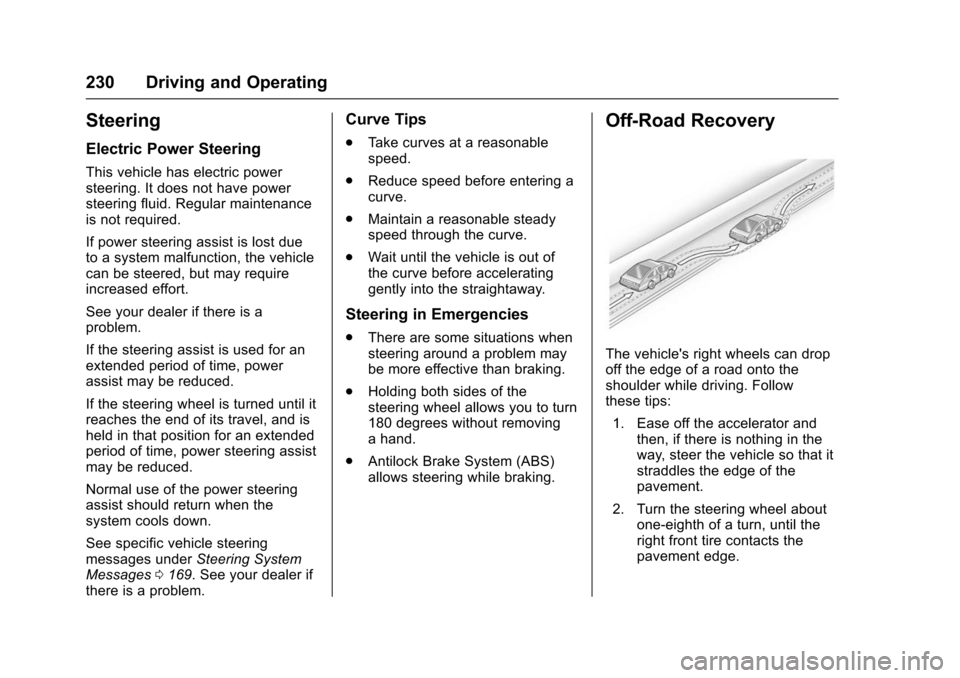
The vehicle's right wheels can drop
off the edge of a road onto the
shoulder while driving. Follow
these tips:
1. Ease off the accelerator and then, if there is nothing in the
way, steer the vehicle so that it
straddles the edge of the
pavement.
2. Turn the steering wheel about one-eighth of a turn, until the
right front tire contacts the
pavement edge.
Page 246 of 453
Chevrolet Tahoe/Suburban Owner Manual (GMNA-Localizing-U.S./Canada/
Mexico-9159366) - 2016 - crc - 5/20/15
Driving and Operating 245
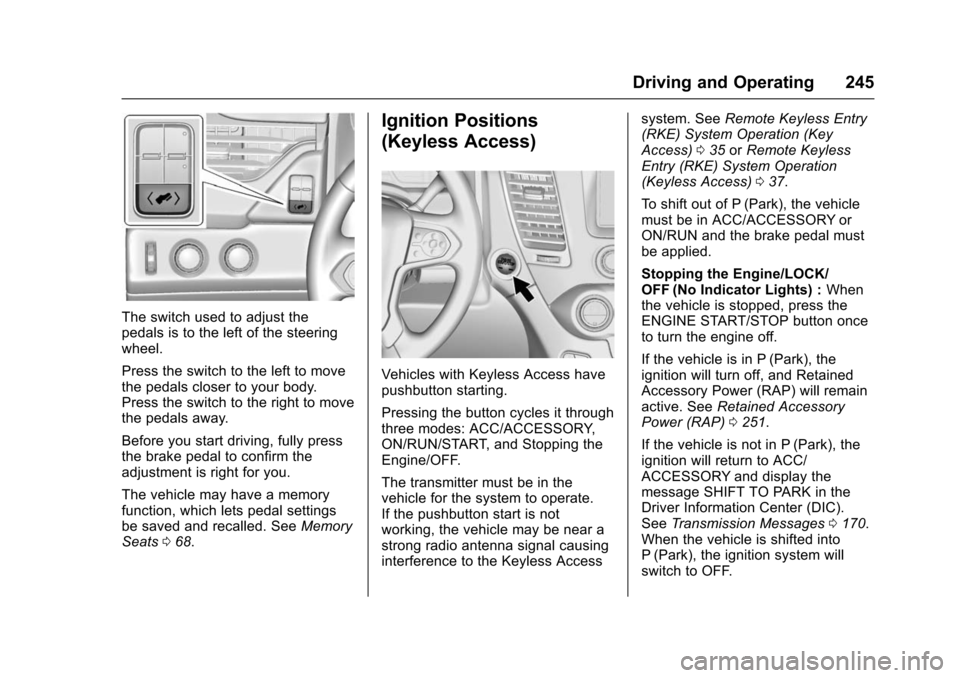
The switch used to adjust the
pedals is to the left of the steering
wheel.
Press the switch to the left to move
the pedals closer to your body.
Press the switch to the right to move
the pedals away.
Before you start driving, fully press
the brake pedal to confirm the
adjustment is right for you.
The vehicle may have a memory
function, which lets pedal settings
be saved and recalled. SeeMemory
Seats 068.
Ignition Positions
(Keyless Access)
Vehicles with Keyless Access have
pushbutton starting.
Pressing the button cycles it through
three modes: ACC/ACCESSORY,
ON/RUN/START, and Stopping the
Engine/OFF.
The transmitter must be in the
vehicle for the system to operate.
If the pushbutton start is not
working, the vehicle may be near a
strong radio antenna signal causing
interference to the Keyless Access system. See
Remote Keyless Entry
(RKE) System Operation (Key
Access) 035 orRemote Keyless
Entry (RKE) System Operation
(Keyless Access) 037.
To shift out of P (Park), the vehicle
must be in ACC/ACCESSORY or
ON/RUN and the brake pedal must
be applied.
Stopping the Engine/LOCK/
OFF (No Indicator Lights) : When
the vehicle is stopped, press the
ENGINE START/STOP button once
to turn the engine off.
If the vehicle is in P (Park), the
ignition will turn off, and Retained
Accessory Power (RAP) will remain
active. See Retained Accessory
Power (RAP) 0251.
If the vehicle is not in P (Park), the
ignition will return to ACC/
ACCESSORY and display the
message SHIFT TO PARK in the
Driver Information Center (DIC).
See Transmission Messages 0170.
When the vehicle is shifted into
P (Park), the ignition system will
switch to OFF.