cruise control CHEVROLET SUBURBAN 2019 Owner's Manual
[x] Cancel search | Manufacturer: CHEVROLET, Model Year: 2019, Model line: SUBURBAN, Model: CHEVROLET SUBURBAN 2019Pages: 460, PDF Size: 6.77 MB
Page 6 of 460
Chevrolet Tahoe/Suburban Owner Manual (GMNA-Localizing-U.S./Canada/
Mexico-12460269) - 2019 - CRC - 9/11/18
In Brief 5
In Brief
Instrument Panel
Instrument Panel Overview . . . . . . 6
Initial Drive Information
Initial Drive Information . . . . . . . . . . 8
Remote Keyless Entry (RKE)System . . . . . . . . . . . . . . . . . . . . . . . . 8
Remote Vehicle Start . . . . . . . . . . . 9
Door Locks . . . . . . . . . . . . . . . . . . . . . 9
Liftgate . . . . . . . . . . . . . . . . . . . . . . . . 10
Windows . . . . . . . . . . . . . . . . . . . . . . . 11
Seat Adjustment . . . . . . . . . . . . . . . 11
Memory Features . . . . . . . . . . . . . . 12
Second Row Seats . . . . . . . . . . . . 12
Third Row Seats . . . . . . . . . . . . . . . 13
Heated and Ventilated Seats . . . 13
Head Restraint Adjustment . . . . 13
Seat Belts . . . . . . . . . . . . . . . . . . . . . 13
Passenger Sensing System . . . 14
Mirror Adjustment . . . . . . . . . . . . . . 14
Steering Wheel Adjustment . . . . 15
Throttle and Brake Pedal Adjustment . . . . . . . . . . . . . . . . . . . 16
Interior Lighting . . . . . . . . . . . . . . . . 16
Exterior Lighting . . . . . . . . . . . . . . . 17
Windshield Wiper/Washer . . . . . . 18
Climate Controls . . . . . . . . . . . . . . . 19 Transmission . . . . . . . . . . . . . . . . . . 19
Four-Wheel Drive . . . . . . . . . . . . . . 20
Vehicle Features
Infotainment System . . . . . . . . . . . 21
Steering Wheel Controls . . . . . . . 21
Cruise Control . . . . . . . . . . . . . . . . . 21
Driver Information
Center (DIC) . . . . . . . . . . . . . . . . . 21
Forward Collision Alert (FCA) System . . . . . . . . . . . . . . . . . . . . . . . 22
Forward Automatic Braking (FAB) . . . . . . . . . . . . . . . . 22
Lane Keep Assist (LKA) (1500 Series) . . . . . . . . . . . . . . . . . . . . . . . 22
Lane Change Alert (LCA) . . . . . . 23
Rear Vision Camera (RVC) . . . . 23
Rear Cross Traffic Alert (RCTA) System . . . . . . . . . . . . . . . . . . . . . . . 23
Park Assist . . . . . . . . . . . . . . . . . . . . 23
Power Outlets . . . . . . . . . . . . . . . . . 23
Universal Remote System . . . . . 24
Sunroof . . . . . . . . . . . . . . . . . . . . . . . . 24
Performance and Maintenance
Traction Control/Electronic Stability Control . . . . . . . . . . . . . . 25
Tire Pressure Monitor . . . . . . . . . . 26
Fuel (5.3L V8 Engine) . . . . . . . . . . 26
Fuel (6.2L V8 Engine) . . . . . . . . . . 26
E85 or FlexFuel . . . . . . . . . . . . . . . . 27 Engine Oil Life System . . . . . . . . 27
Driving for Better Fuel
Economy . . . . . . . . . . . . . . . . . . . . . 27
Roadside Assistance Program . . . . . . . . . . . . . . . . . . . . . . 28
Page 8 of 460

Chevrolet Tahoe/Suburban Owner Manual (GMNA-Localizing-U.S./Canada/
Mexico-12460269) - 2019 - CRC - 9/11/18
In Brief 7
1.Air Vents 0199.
2. Head-Up Display (HUD) 0167
(If Equipped).
3.
gTraction Control/Electronic
Stability Control 0246.
jPower Assist Steps 052 (If
Equipped).
XPark Assist Button (If
Equipped). See Assistance
Systems for Parking or Backing
0 261.
ALane Keep Assist (LKA)
(1500 Series) 0271 (If
Equipped).
0Pedal Adjust Switch (If
Equipped). See Adjustable
Throttle and Brake Pedal
0 220.
4. Turn Signal Lever. See Turn
and Lane-Change Signals
0 187.
Windshield Wiper/Washer
0 135. 5. Favorite Switches (Out of
View). See Steering Wheel
Controls 0135.
Volume Switches (Out of View).
See Steering Wheel Controls
0 135.
6. Instrument Cluster 0145.
7. Hazard Warning Flashers
0187.
8. Shift Lever. See Automatic
Transmission 0231.
Tow/Haul Selector Button. See
Tow/Haul Mode 0238.
Range Selection Mode (If
Equipped). See Manual Mode
0 234 orManual Mode 0236.
9. Light Sensor. See Automatic
Headlamp System 0186.
10. Infotainment 0193.
11. Dual Automatic Climate Control
System 0194.
12. Heated and Ventilated Front
Seats 073 (If Equipped). 13. 110/120-Volt Power Outlet (If
Equipped). See Power Outlets
0 139.
14. Power Outlets 0139 (If
Equipped).
15. Rear Climate Control Buttons. SeeDual Automatic Climate
Control System 0194.
16. Steering Wheel Controls 0135.
17. Horn 0135.
18. Steering Wheel Adjustment
0134.
19. Hood Release. See Hood
0 303.
20. Cruise Control 0250.
Adaptive Cruise Control 0252
(If Equipped).
Forward Collision Alert (FCA)
System 0265 (If Equipped).
Heated Steering Wheel 0135
(If Equipped).
21. Trailer Brake Control Panel (If Equipped). See Towing
Equipment 0289.
Page 21 of 460
Chevrolet Tahoe/Suburban Owner Manual (GMNA-Localizing-U.S./Canada/
Mexico-12460269) - 2019 - CRC - 9/11/18
20 In Brief
While using Range Selection Mode,
cruise control and the Tow/Haul
Mode can be used.
Grade Braking is not available when
Range Selection Mode is active.
SeeTow/Haul Mode 0238.
Four-Wheel Drive
If equipped, the engine's driving
power can be sent to all four wheels
for extra traction.
Automatic Transfer Case
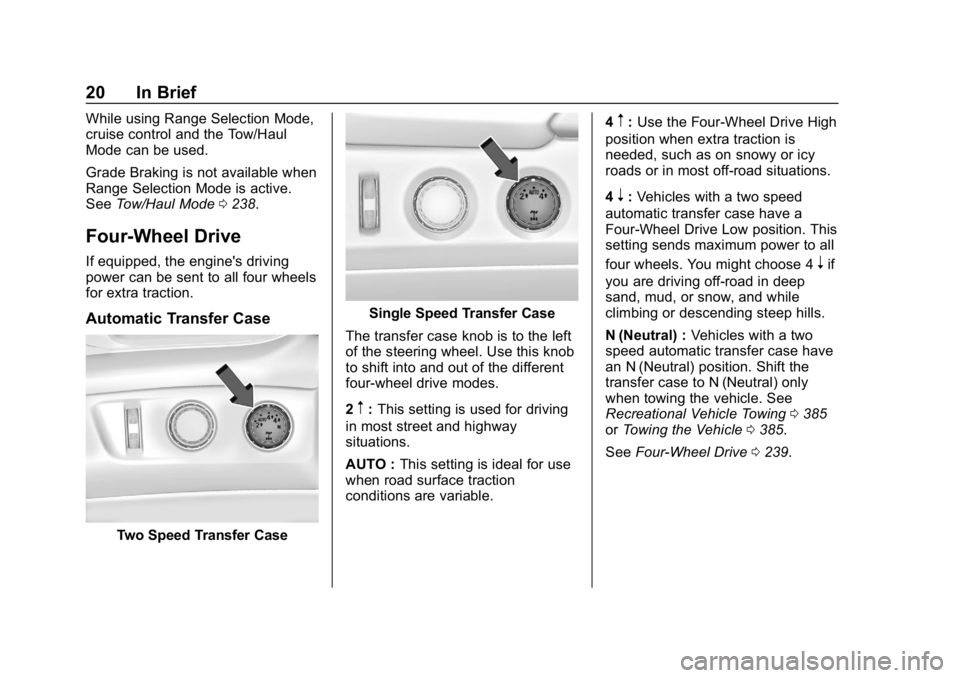
Two Speed Transfer Case
Single Speed Transfer Case
The transfer case knob is to the left
of the steering wheel. Use this knob
to shift into and out of the different
four-wheel drive modes.
2
m: This setting is used for driving
in most street and highway
situations.
AUTO : This setting is ideal for use
when road surface traction
conditions are variable. 4
m:
Use the Four-Wheel Drive High
position when extra traction is
needed, such as on snowy or icy
roads or in most off-road situations.
4
n: Vehicles with a two speed
automatic transfer case have a
Four-Wheel Drive Low position. This
setting sends maximum power to all
four wheels. You might choose 4
nif
you are driving off-road in deep
sand, mud, or snow, and while
climbing or descending steep hills.
N (Neutral) : Vehicles with a two
speed automatic transfer case have
an N (Neutral) position. Shift the
transfer case to N (Neutral) only
when towing the vehicle. See
Recreational Vehicle Towing 0385
or Towing the Vehicle 0385.
See Four-Wheel Drive 0239.
Page 22 of 460
Chevrolet Tahoe/Suburban Owner Manual (GMNA-Localizing-U.S./Canada/
Mexico-12460269) - 2019 - CRC - 9/11/18
In Brief 21
Vehicle Features
Infotainment System
See the infotainment manual for
information on the radio, audio
players, phone, navigation system,
Rear Seat Entertainment (RSE),
and voice or speech recognition,
if equipped. It also includes
information on settings.
Steering Wheel Controls
The infotainment system can be
operated by using the steering
wheel controls. See“Steering Wheel
Controls” in the infotainment
manual.
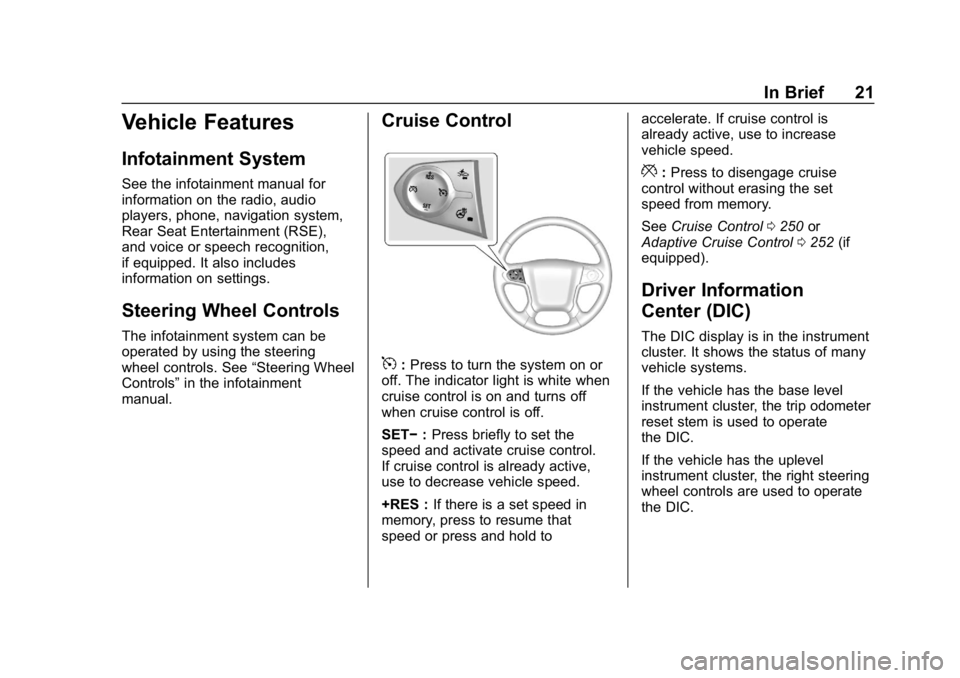
Cruise Control
5: Press to turn the system on or
off. The indicator light is white when
cruise control is on and turns off
when cruise control is off.
SET− :Press briefly to set the
speed and activate cruise control.
If cruise control is already active,
use to decrease vehicle speed.
+RES : If there is a set speed in
memory, press to resume that
speed or press and hold to accelerate. If cruise control is
already active, use to increase
vehicle speed.
*:
Press to disengage cruise
control without erasing the set
speed from memory.
See Cruise Control 0250 or
Adaptive Cruise Control 0252 (if
equipped).
Driver Information
Center (DIC)
The DIC display is in the instrument
cluster. It shows the status of many
vehicle systems.
If the vehicle has the base level
instrument cluster, the trip odometer
reset stem is used to operate
the DIC.
If the vehicle has the uplevel
instrument cluster, the right steering
wheel controls are used to operate
the DIC.
Page 29 of 460
Chevrolet Tahoe/Suburban Owner Manual (GMNA-Localizing-U.S./Canada/
Mexico-12460269) - 2019 - CRC - 9/11/18
28 In Brief
.Avoid fast starts and accelerate
smoothly.
. Brake gradually and avoid
abrupt stops.
. Avoid idling the engine for long
periods of time.
. When road and weather
conditions are appropriate, use
cruise control.
. Always follow posted speed
limits or drive more slowly when
conditions require.
. Keep vehicle tires properly
inflated.
. Combine several trips into a
single trip.
. Replace the vehicle's tires with
the same TPC Spec number
molded into the tire's sidewall
near the size.
. Follow recommended scheduled
maintenance.Roadside Assistance
Program
U.S.: 1-800-243-8872
TTY Users (U.S. Only):
1-888-889-2438
Canada: 1-800-268-6800
New Chevrolet owners are
automatically enrolled in the
Roadside Assistance Program.
See Roadside Assistance Program
0 425.
Page 134 of 460
Chevrolet Tahoe/Suburban Owner Manual (GMNA-Localizing-U.S./Canada/
Mexico-12460269) - 2019 - CRC - 9/11/18
Instruments and Controls 133
Instruments and
Controls
Controls
Steering Wheel Adjustment . . . 134
Steering Wheel Controls . . . . . . 135
Heated Steering Wheel . . . . . . . 135
Horn . . . . . . . . . . . . . . . . . . . . . . . . . . 135
Windshield Wiper/Washer . . . . 135
Rear Window Wiper/Washer . . . . . . . . . . . . . . . . . . . . . 137
Compass . . . . . . . . . . . . . . . . . . . . . 138
Clock . . . . . . . . . . . . . . . . . . . . . . . . . 138
Power Outlets . . . . . . . . . . . . . . . . 139
Wireless Charging . . . . . . . . . . . . 141
Warning Lights, Gauges, and
Indicators
Warning Lights, Gauges, and Indicators . . . . . . . . . . . . . . . . . . . 144
Instrument Cluster . . . . . . . . . . . . 145
Speedometer . . . . . . . . . . . . . . . . . 149
Odometer . . . . . . . . . . . . . . . . . . . . . 149
Trip Odometer . . . . . . . . . . . . . . . . 149
Tachometer . . . . . . . . . . . . . . . . . . . 149
Fuel Gauge . . . . . . . . . . . . . . . . . . . 149
Engine Oil Pressure
Gauge . . . . . . . . . . . . . . . . . . . . . . 150 Engine Coolant Temperature
Gauge . . . . . . . . . . . . . . . . . . . . . . 151
Voltmeter Gauge . . . . . . . . . . . . . 152
Seat Belt Reminders . . . . . . . . . 153
Airbag Readiness Light . . . . . . . 153
Passenger Airbag Status Indicator . . . . . . . . . . . . . . . . . . . . 154
Charging System Light . . . . . . . 155
Malfunction Indicator Lamp . . . 155
Brake System Warning Light . . . . . . . . . . . . . . . . . . . . . . . . 157
Antilock Brake System (ABS) Warning Light . . . . . . . . . . . . . . . 158
Tow/Haul Mode Light . . . . . . . . . 158
Hill Descent Control Light . . . . 158
Lane Keep Assist (LKA) Light (1500 Series) . . . . . . . . . . . . . . . 159
Vehicle Ahead Indicator . . . . . . 159
Traction Off Light . . . . . . . . . . . . . 159
StabiliTrak OFF Light . . . . . . . . . 159
Traction Control System (TCS)/ StabiliTrak Light . . . . . . . . . . . . . 160
Tire Pressure Light . . . . . . . . . . . 160
Low Fuel Warning Light . . . . . . 161
Security Light . . . . . . . . . . . . . . . . . 161
High-Beam On Light . . . . . . . . . . 161
Front Fog Lamp Light . . . . . . . . . 162
Lamps On Reminder . . . . . . . . . 162
Cruise Control Light . . . . . . . . . . 162
Door Ajar Light . . . . . . . . . . . . . . . 162
Information Displays
Driver Information Center (DIC) (Base Level) . . . . . . . . . . . . . . . . 163
Driver Information Center (DIC) (Uplevel) . . . . . . . . . . . . . . . . . . . . 164
Head-Up Display (HUD) . . . . . . 167
Vehicle Messages
Vehicle Messages . . . . . . . . . . . . 171
Engine Power Messages . . . . . 171
Vehicle Speed Messages . . . . . 171
Vehicle Personalization
Vehicle Personalization . . . . . . . 172
Universal Remote System
Universal Remote System . . . . 180
Universal Remote System
Programming . . . . . . . . . . . . . . . 180
Universal Remote System Operation . . . . . . . . . . . . . . . . . . . 182
Page 163 of 460
Chevrolet Tahoe/Suburban Owner Manual (GMNA-Localizing-U.S./Canada/
Mexico-12460269) - 2019 - CRC - 9/11/18
162 Instruments and Controls
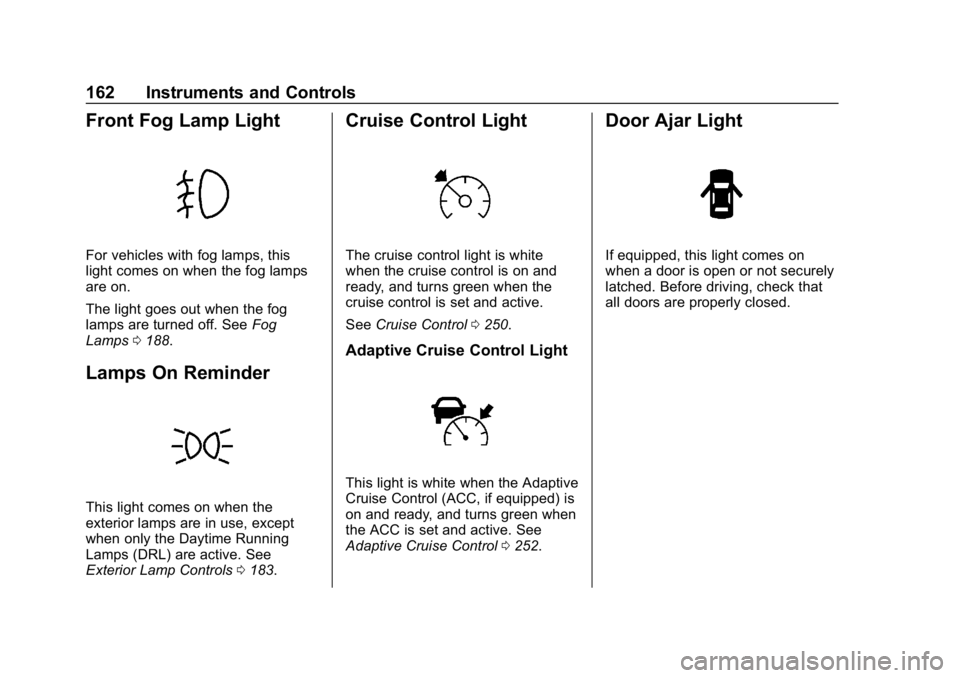
Front Fog Lamp Light
For vehicles with fog lamps, this
light comes on when the fog lamps
are on.
The light goes out when the fog
lamps are turned off. SeeFog
Lamps 0188.
Lamps On Reminder
This light comes on when the
exterior lamps are in use, except
when only the Daytime Running
Lamps (DRL) are active. See
Exterior Lamp Controls 0183.
Cruise Control Light
The cruise control light is white
when the cruise control is on and
ready, and turns green when the
cruise control is set and active.
See Cruise Control 0250.
Adaptive Cruise Control Light
This light is white when the Adaptive
Cruise Control (ACC, if equipped) is
on and ready, and turns green when
the ACC is set and active. See
Adaptive Cruise Control 0252.
Door Ajar Light
If equipped, this light comes on
when a door is open or not securely
latched. Before driving, check that
all doors are properly closed.
Page 169 of 460
Chevrolet Tahoe/Suburban Owner Manual (GMNA-Localizing-U.S./Canada/
Mexico-12460269) - 2019 - CRC - 9/11/18
168 Instruments and Controls
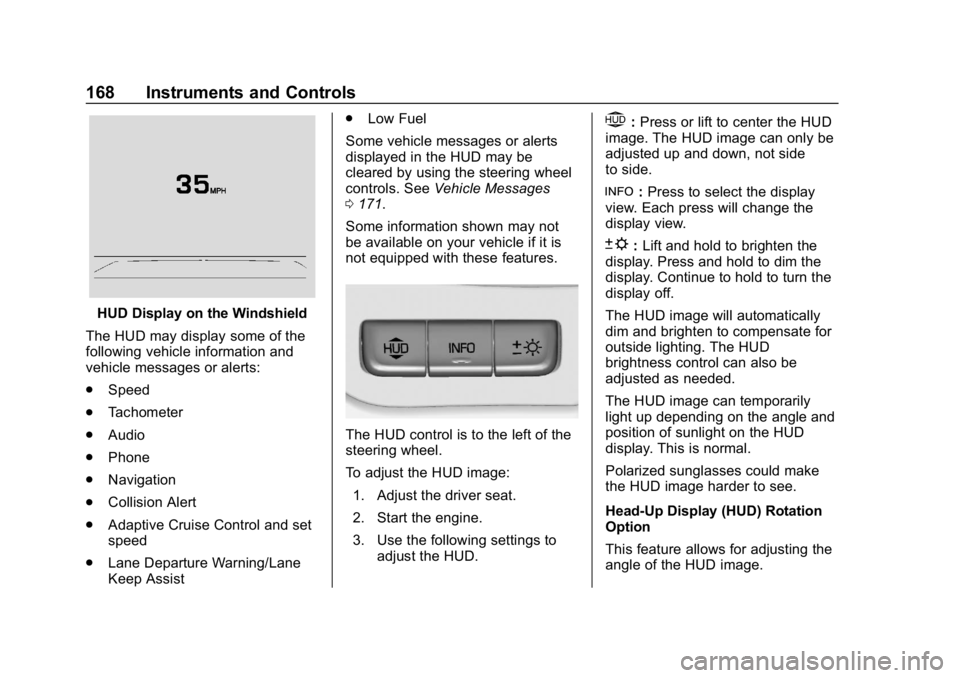
HUD Display on the Windshield
The HUD may display some of the
following vehicle information and
vehicle messages or alerts:
. Speed
. Tachometer
. Audio
. Phone
. Navigation
. Collision Alert
. Adaptive Cruise Control and set
speed
. Lane Departure Warning/Lane
Keep Assist .
Low Fuel
Some vehicle messages or alerts
displayed in the HUD may be
cleared by using the steering wheel
controls. See Vehicle Messages
0 171.
Some information shown may not
be available on your vehicle if it is
not equipped with these features.
The HUD control is to the left of the
steering wheel.
To adjust the HUD image: 1. Adjust the driver seat.
2. Start the engine.
3. Use the following settings to adjust the HUD.
$:Press or lift to center the HUD
image. The HUD image can only be
adjusted up and down, not side
to side.
!: Press to select the display
view. Each press will change the
display view.
D: Lift and hold to brighten the
display. Press and hold to dim the
display. Continue to hold to turn the
display off.
The HUD image will automatically
dim and brighten to compensate for
outside lighting. The HUD
brightness control can also be
adjusted as needed.
The HUD image can temporarily
light up depending on the angle and
position of sunlight on the HUD
display. This is normal.
Polarized sunglasses could make
the HUD image harder to see.
Head-Up Display (HUD) Rotation
Option
This feature allows for adjusting the
angle of the HUD image.
Page 170 of 460
Chevrolet Tahoe/Suburban Owner Manual (GMNA-Localizing-U.S./Canada/
Mexico-12460269) - 2019 - CRC - 9/11/18
Instruments and Controls 169
Presspon the steering wheel
controls while Head-up Display
Rotation is highlighted to enter
Adjust Mode. Press
worxto
adjust the angle of the HUD display.
Press
Vto confirm and save the
setting. To cancel the setting, press
o. The vehicle must be in P (Park).
See Instrument Cluster 0145.
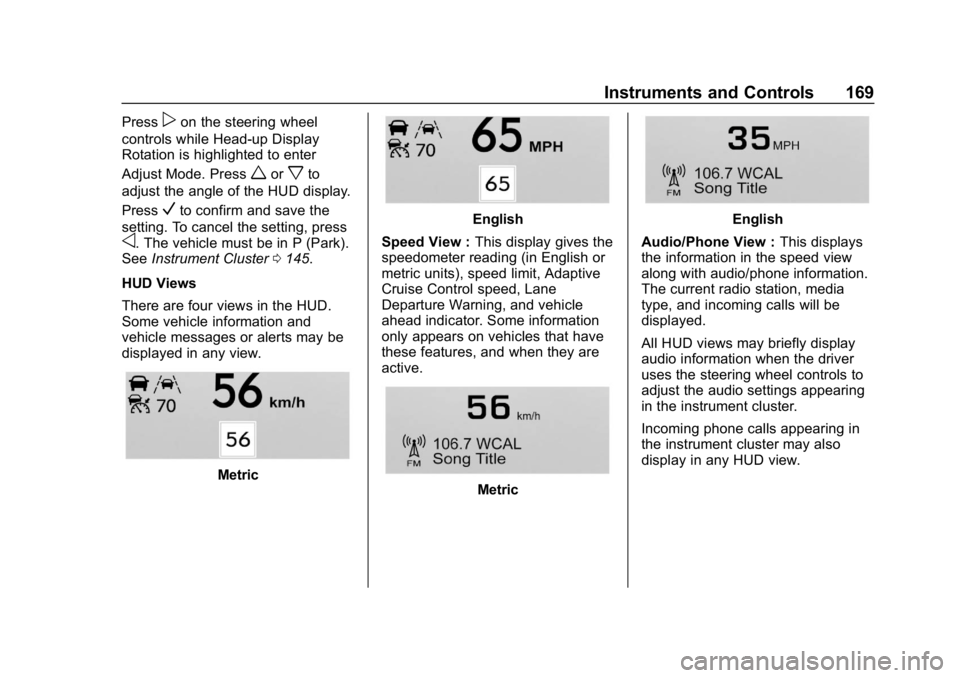
HUD Views
There are four views in the HUD.
Some vehicle information and
vehicle messages or alerts may be
displayed in any view.
Metric
English
Speed View : This display gives the
speedometer reading (in English or
metric units), speed limit, Adaptive
Cruise Control speed, Lane
Departure Warning, and vehicle
ahead indicator. Some information
only appears on vehicles that have
these features, and when they are
active.
Metric
English
Audio/Phone View : This displays
the information in the speed view
along with audio/phone information.
The current radio station, media
type, and incoming calls will be
displayed.
All HUD views may briefly display
audio information when the driver
uses the steering wheel controls to
adjust the audio settings appearing
in the instrument cluster.
Incoming phone calls appearing in
the instrument cluster may also
display in any HUD view.
Page 172 of 460
Chevrolet Tahoe/Suburban Owner Manual (GMNA-Localizing-U.S./Canada/
Mexico-12460269) - 2019 - CRC - 9/11/18
Instruments and Controls 171
Vehicle Messages
Messages displayed on the DIC
indicate the status of the vehicle or
some action that may be needed to
correct a condition. Multiple
messages may appear one after
another.
The messages that do not require
immediate action can be
acknowledged and cleared by
pressing
V. The messages that
require immediate action cannot be
cleared until that action is
performed.
All messages should be taken
seriously; clearing the message
does not correct the problem.
If a SERVICE message appears,
see your dealer.
Follow the instructions given in the
messages. The system displays
messages regarding the following
topics:
. Service Messages
. Fluid Levels
. Vehicle Security .
Brakes
. Steering
. Ride Control Systems
. Driver Assistance Systems
. Cruise Control
. Lighting and Bulb Replacement
. Wiper/Washer Systems
. Doors and Windows
. Seat Belts
. Airbag Systems
. Engine and Transmission
. Tire Pressure
. Battery
Engine Power Messages
ENGINE POWER IS REDUCED
This message displays when the
vehicle's propulsion power is
reduced. A reduction in propulsion
power can affect the vehicle's ability
to accelerate. If this message is on, but there is no observed reduction
in performance, proceed to your
destination. The performance may
be reduced the next time the vehicle
is driven. The vehicle may be driven
while this message is on, but
maximum acceleration and speed
may be reduced. Anytime this
message stays on, or displays
repeatedly, the vehicle should be
taken to your dealer for service as
soon as possible.
Vehicle Speed Messages
SPEED LIMITED TO
XXX KM/H (MPH)
This message shows that the
vehicle speed has been limited to
the speed displayed. The limited
speed is a protection for various
propulsion and vehicle systems,
such as lubrication, thermal,
suspension, Teen Driver if
equipped, or tires.