door lock CHEVROLET SUBURBAN 2020 Owner's Guide
[x] Cancel search | Manufacturer: CHEVROLET, Model Year: 2020, Model line: SUBURBAN, Model: CHEVROLET SUBURBAN 2020Pages: 438, PDF Size: 6.75 MB
Page 112 of 438
Chevrolet Tahoe/Suburban Owner Manual (GMNA-Localizing-U.S./Canada/
Mexico-13566622) - 2020 - CRC - 4/15/19
Storage 111
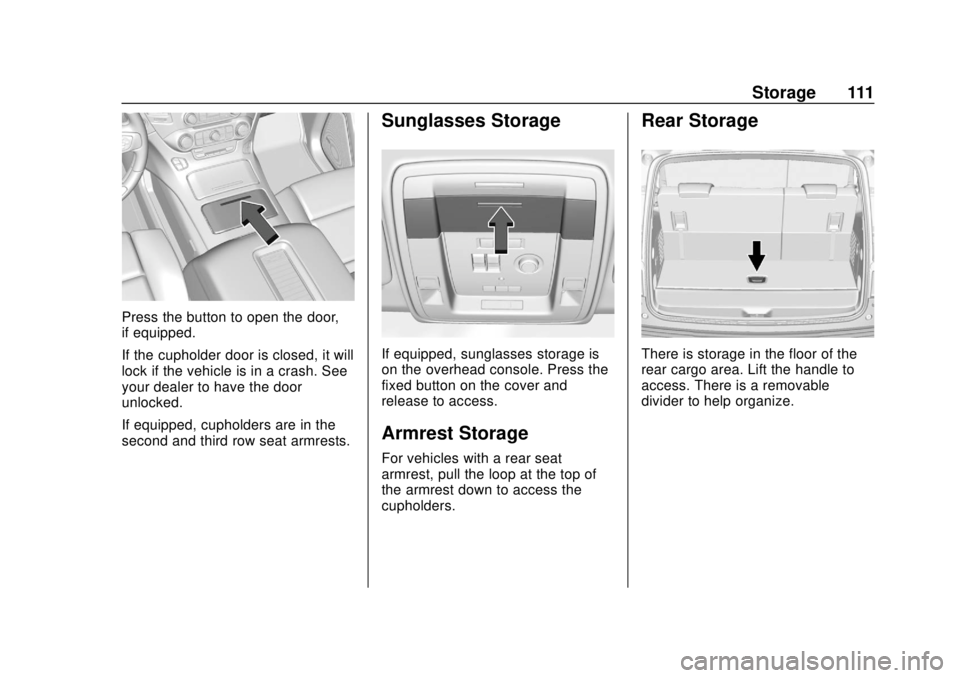
Press the button to open the door,
if equipped.
If the cupholder door is closed, it will
lock if the vehicle is in a crash. See
your dealer to have the door
unlocked.
If equipped, cupholders are in the
second and third row seat armrests.
Sunglasses Storage
If equipped, sunglasses storage is
on the overhead console. Press the
fixed button on the cover and
release to access.
Armrest Storage
For vehicles with a rear seat
armrest, pull the loop at the top of
the armrest down to access the
cupholders.
Rear Storage
There is storage in the floor of the
rear cargo area. Lift the handle to
access. There is a removable
divider to help organize.
Page 116 of 438
Chevrolet Tahoe/Suburban Owner Manual (GMNA-Localizing-U.S./Canada/
Mexico-13566622) - 2020 - CRC - 4/15/19
Instruments and Controls 115
Instruments and
Controls
Controls
Steering Wheel Adjustment . . . 116
Steering Wheel Controls . . . . . . 117
Heated Steering Wheel . . . . . . . 117
Horn . . . . . . . . . . . . . . . . . . . . . . . . . . 117
Windshield Wiper/Washer . . . . 117
Rear Window Wiper/Washer . . . . . . . . . . . . . . . . . . . . . . 119
Compass . . . . . . . . . . . . . . . . . . . . . 120
Clock . . . . . . . . . . . . . . . . . . . . . . . . . 120
Power Outlets . . . . . . . . . . . . . . . . 121
Wireless Charging . . . . . . . . . . . . 123
Warning Lights, Gauges, and
Indicators
Warning Lights, Gauges, and Indicators . . . . . . . . . . . . . . . . . . . 126
Instrument Cluster . . . . . . . . . . . . 127
Speedometer . . . . . . . . . . . . . . . . . 131
Odometer . . . . . . . . . . . . . . . . . . . . . 131
Trip Odometer . . . . . . . . . . . . . . . . 131
Tachometer . . . . . . . . . . . . . . . . . . . 131
Fuel Gauge . . . . . . . . . . . . . . . . . . . 132
Engine Oil Pressure
Gauge . . . . . . . . . . . . . . . . . . . . . . 133 Engine Coolant Temperature
Gauge . . . . . . . . . . . . . . . . . . . . . . 134
Voltmeter Gauge . . . . . . . . . . . . . 134
Seat Belt Reminders . . . . . . . . . 135
Airbag Readiness Light . . . . . . . 136
Passenger Airbag Status Indicator . . . . . . . . . . . . . . . . . . . . 136
Charging System Light . . . . . . . 137
Malfunction Indicator Lamp (Check Engine Light) . . . . . . . . 137
Brake System Warning Light . . . . . . . . . . . . . . . . . . . . . . . . 139
Antilock Brake System (ABS) Warning Light . . . . . . . . . . . . . . . 140
Tow/Haul Mode Light . . . . . . . . . 140
Hill Descent Control Light . . . . 141
Lane Keep Assist (LKA) Light . . . . . . . . . . . . . . . . . . . . . . . . 141
Vehicle Ahead Indicator . . . . . . 141
Traction Off Light . . . . . . . . . . . . . 141
StabiliTrak OFF Light . . . . . . . . . 142
Traction Control System (TCS)/ StabiliTrak Light . . . . . . . . . . . . . 142
Tire Pressure Light . . . . . . . . . . . 142
Low Fuel Warning Light . . . . . . 143
Security Light . . . . . . . . . . . . . . . . . 143
High-Beam On Light . . . . . . . . . . 143
Front Fog Lamp Light . . . . . . . . . 144
Lamps On Reminder . . . . . . . . . 144
Cruise Control Light . . . . . . . . . . 144 Door Ajar Light . . . . . . . . . . . . . . . 144
Information Displays
Driver Information Center (DIC)
(Base Level) . . . . . . . . . . . . . . . . 145
Driver Information Center (DIC) (Uplevel) . . . . . . . . . . . . . . . . . . . . 147
Head-Up Display (HUD) . . . . . . 150
Vehicle Messages
Vehicle Messages . . . . . . . . . . . . 153
Engine Power Messages . . . . . 154
Vehicle Speed Messages . . . . . 154
Vehicle Personalization
Vehicle Personalization . . . . . . . 154
Universal Remote System
Universal Remote System . . . . 163
Universal Remote System Programming . . . . . . . . . . . . . . . 163
Universal Remote System Operation . . . . . . . . . . . . . . . . . . . 165
Page 156 of 438
Chevrolet Tahoe/Suburban Owner Manual (GMNA-Localizing-U.S./Canada/
Mexico-13566622) - 2020 - CRC - 4/15/19
Instruments and Controls 155
Personalization Menus
The following list of menu items may
be available:
.Time and Date
. Language
. Rear Seat Reminder
. Video Voice-Over
. Teen Driver
. Valet Mode
. Radio
. Vehicle
. Bluetooth
. Apple CarPlay
. Android Auto
. Voice
. Display
. Rear Camera
. Return to Factory Settings
. Software Information
. Wi-Fi
Detailed information for each menu
follows.Time and Date
Manually set the time and date. See
Clock 0120.
Language
Select Language, then select from
the available language(s).
The selected language will display
on the system, and voice
recognition will reflect the selected
language.
Rear Seat Reminder
This allows for a chime and a
message when the rear door has
been opened before or during
operation of the vehicle.
Select Off or On.
Video Voice-Over
When activated, the RSI will read
aloud menu titles, menu listings,
pop-ups, alerts, and file titles from
audio and video media.
Select Off or On.
Teen Driver
See “Teen Driver” under“Settings”
in the infotainment manual.
Valet Mode
This will lock the infotainment
system and steering wheel controls.
It may also limit access to vehicle
storage locations, if equipped.
To enable valet mode:
1. Enter a four-digit code on the keypad.
2. Select Enter to go to the confirmation screen.
3. Re-enter the four-digit code.
Select Lock or Unlock to lock or
unlock the system. Touch Back to
go back to the previous menu.
Radio
Select and the following may
display:
. Manage Favorites
. Number of Favorites Shown
. Audible Touch Feedback
Page 157 of 438
Chevrolet Tahoe/Suburban Owner Manual (GMNA-Localizing-U.S./Canada/
Mexico-13566622) - 2020 - CRC - 4/15/19
156 Instruments and Controls
.Auto Volume
. Maximum Startup Volume
. Audio Cue Volume
Manage Favorites
This allows favorites to be edited.
See “Manage Favorites” in
“Settings” under“Radio” in the
infotainment manual.
Number of Favorites Shown
Select to set the number of favorites
to display.
Select the desired number or select
Auto and the infotainment system
will automatically adjust the number
of favorites shown.
Audible Touch Feedback
This allows Audible Touch
Feedback to be turned on or off.
Select Off or On.
Auto Volume
This feature adjusts the volume
based on vehicle speed and
ambient noise. Select Off, Low, Medium-Low,
Medium, Medium-High, or High.
Maximum Startup Volume
This feature sets the maximum
startup volume. If the vehicle is
started and the volume is greater
than this level, the volume is
adjusted to this level. To set the
maximum startup volume, touch +
or
−to increase or decrease.
Audio Cue Volume
This feature sets the volume of
audio files played at system startup
and shutdown.
Select On, then touch + or −to
increase or decrease the volume.
Vehicle
Select and the following may
display:
. Climate and Air Quality
. Collision/Detection Systems
. Comfort and Convenience
. Lighting
. Power Door Locks .
Remote Lock, Unlock, Start
Climate and Air Quality
Select and the following may
display:
.Auto Fan Speed
. Auto Defog
. Auto Rear Defog
Auto Fan Speed
This feature will set the auto fan
speed.
Select Low, Medium, or High.
Auto Defog
When set to On, the auto defog
comes on when the climate control
sensor detects high interior
humidity. Air will be directed to the
windshield.
Select Off or On.
Auto Rear Defog
If equipped, this feature will
automatically turn on the rear
window defogger when the vehicle
is first started in cold weather and
turn off when the vehicle is warmed.
Page 160 of 438
Chevrolet Tahoe/Suburban Owner Manual (GMNA-Localizing-U.S./Canada/
Mexico-13566622) - 2020 - CRC - 4/15/19
Instruments and Controls 159
Power Door Locks
Select and the following may
display:
.Unlocked Door Anti-Lockout
. Auto Door Unlock
. Delayed Door Lock
Unlocked Door Anti-Lockout
When on, this feature will keep the
driver door from locking when the
vehicle is off, the driver door is
open, and locking is requested.
If Off is selected, the Delayed Door
Lock menu will be available.
Select Off or On.
Auto Door Unlock
This allows selection of which of the
doors will automatically unlock when
the vehicle is shifted into P (Park).
Select Off, All Doors, or Driver Door.
Delayed Door Lock
When on, this feature will delay the
locking of the doors. To override the
delay, press the power door lock
switch on the door. Select Off or On.Remote Lock, Unlock, Start
Select and the following may
display:
.
Remote Unlock Light Feedback
. Remote Lock Feedback
. Remote Door Unlock
. Remote Start Auto Cooled Seats
. Remote Start Auto Heat Seats
. Remote Window Operation
. Passive Door Unlock
. Passive Door Lock
. Remote Left in Vehicle Alert
Remote Unlock Light Feedback
When on, the exterior lamps will
flash when unlocking the vehicle
with the RKE transmitter.
Select Off or Flash Lights.
Remote Lock Feedback
This allows selection of what type of
feedback is given when locking the
vehicle with the RKE transmitter. Select Off, Lights and Horn, Lights
Only, or Horn Only.
Remote Door Unlock
This allows selection of which doors
will unlock when pressing
Kon the
RKE transmitter.
Select All Doors or Driver
Door Only.
Remote Start Auto Cooled Seats
If equipped and turned on, this
feature will turn the ventilated seats
on when using remote start on
warm days.
Select Off or On.
Remote Start Auto Heat Seats
If equipped and turned on, this
feature will turn the heated seats on
when using remote start on
cold days.
Select Off or On.
Page 161 of 438
Chevrolet Tahoe/Suburban Owner Manual (GMNA-Localizing-U.S./Canada/
Mexico-13566622) - 2020 - CRC - 4/15/19
160 Instruments and Controls
Remote Window Operation
This allows the windows to be
opened when pressing and holding
Kon the RKE transmitter. See
Remote Keyless Entry (RKE)
System Operation (Key Access)
0 13 or
Remote Keyless Entry (RKE)
System Operation (Keyless Access)
0 16.
Select Off or On.
Passive Door Unlock
This allows the selection of what
doors will unlock when using the
button on the driver door to unlock
the vehicle.
Select Off, All Doors, or Driver Door.
Passive Door Lock
This allows passive locking to be
turned on or off and selects
feedback. See Remote Keyless
Entry (RKE) System Operation (Key
Access) 013 or
Remote Keyless Entry (RKE)
System Operation (Keyless Access)
0 16. Select Off, On with Horn
Chirp, or On.
Remote Left in Vehicle Alert
This feature sounds an alert when
the RKE transmitter is left in the
vehicle. This menu also enables
Remote No Longer in Vehicle Alert.
Select Off or On.
Bluetooth
Select and the following may
display:
.
Pair New Device
. Device Management
. Ringtones
. Voice Mail Numbers
. Text Message Alerts
Pair New Device
Select to pair a new device. See
“Pairing” under“Bluetooth
(Infotainment Controls)” in the
infotainment manual. Device Management
Select to connect to a different
phone source, disconnect a phone,
or delete a phone.
Ringtones
Select to change the ring tone for
the specific phone. The phone does
not need to be connected to change
the ring tones.
Voice Mail Numbers
This feature displays the voice mail
number for all connected phones.
To change the voice mail number,
select EDIT. Type a new number,
then select SAVE.
Text Message Alerts
This feature allows text messages
to be received. See
“Text
Messaging” under“Phone” in the
infotainment manual.
Select Off or On.
Page 170 of 438
Chevrolet Tahoe/Suburban Owner Manual (GMNA-Localizing-U.S./Canada/
Mexico-13566622) - 2020 - CRC - 4/15/19
Lighting 169
.The system detects an
approaching vehicle's
headlamps.
. The system detects a preceding
vehicle's taillamps.
. The outside light is bright
enough that high-beam
headlamps are not required.
. The vehicle's speed drops below
20 km/h (12 mph).
. The IntelliBeam system can be
disabled by the High/Low-Beam
Changer or the Flash-to-Pass
feature. If this happens, the
High/Low-Beam Changer must
be activated on then off within
two seconds to reactivate the
IntelliBeam system. The
instrument cluster light will come
on to indicate the IntelliBeam is
reactivated. See Headlamp
High/Low-Beam Changer 0169
and
Flash-to-Pass 0170.
The high beams may not turn off
automatically if the system cannot
detect another vehicle's lamps
because of any of the following: .
The other vehicle's lamps are
missing, damaged, obstructed
from view, or otherwise
undetected.
. The other vehicle's lamps are
covered with dirt, snow, and/or
road spray.
. The other vehicle's lamps cannot
be detected due to dense
exhaust, smoke, fog, snow, road
spray, mist, or other airborne
obstructions.
. The vehicle's windshield is dirty,
cracked, or obstructed by
something that blocks the view
of the light sensor.
. The vehicle is loaded such that
the front end points upward,
causing the light sensor to aim
high and not detect headlamps
and taillamps.
. The vehicle is being driven on
winding or hilly roads.
The automatic high-beam
headlamps may need to be disabled
if any of the above conditions exist.Exterior Lamps Off
Reminder
A reminder chime sounds when the
headlamps or parking lamps are
manually turned on, the ignition is
off, and a door is open. To disable
the chime, turn the lamps off.
Headlamp High/
Low-Beam Changer
Push the turn signal lever toward
the instrument panel to change the
headlamps from low to high beam.
Pull the turn signal lever toward you
and release it to return to low-beam
headlamps.
When the high-beam headlamps are
on, this indicator light on the
instrument cluster will also be on.
Page 207 of 438
Chevrolet Tahoe/Suburban Owner Manual (GMNA-Localizing-U.S./Canada/
Mexico-13566622) - 2020 - CRC - 4/24/19
206 Driving and Operating
Do not turn the engine off when the
vehicle is moving. This will cause a
loss of power assist in the brake
and steering systems and disable
the airbags.
The vehicle may have an electric
steering column lock. The lock is
activated when the ignition is turned
off and either front door is opened.
A sound may be heard as the lock
actuates or releases. The steering
column lock may not release with
the wheels turned off center. If this
happens, the vehicle may not start.
Move the steering wheel from left to
right while attempting to start the
vehicle. If this does not work, the
vehicle needs service.
If the vehicle must be shut off in an
emergency:1. Brake using a firm and steady pressure. Do not pump the
brakes repeatedly. This may
deplete power assist, requiring
increased brake pedal force.
2. Shift the vehicle to N (Neutral). This can be done while the
vehicle is moving. After shifting to N (Neutral), firmly apply the
brakes and steer the vehicle to
a safe location.
3. Come to a complete stop, shift to P (Park), and turn the
ignition off. The shift lever must
be in P (Park) to turn the
ignition off.
4. Set the parking brake. See Parking Brake 0228.
{Warning
Turning off the vehicle while
moving may cause loss of power
assist in the brake and steering
systems and disable the airbags.
While driving, only shut the
vehicle off in an emergency.
If the vehicle cannot be pulled over,
and must be shut off while driving,
press and hold ENGINE START/
STOP for longer than two seconds,
or press twice in five seconds. ACC/ACCESSORY (Amber
Indicator Light) :
This mode allows
some electrical accessories to be
used when the engine is off.
With the ignition off, pressing the
button one time without the brake
pedal applied will place the ignition
system in ACC/ACCESSORY.
The ignition will switch from ACC/
ACCESSORY to off after
five minutes to prevent battery
rundown.
ON/RUN/START (Green Indicator
Light) : This mode is for driving and
starting. With the ignition off, and
the brake pedal applied, pressing
the button once will turn the ignition
on. Once engine cranking begins,
release the button. Engine cranking
will continue until the engine starts.
See Starting the Engine 0209.
Service Mode
This power mode is available for
service and diagnostics, and to
verify the proper operation of the
malfunction indicator lamp as may
be required for emission inspection
purposes. With the vehicle off, and
Page 208 of 438
Chevrolet Tahoe/Suburban Owner Manual (GMNA-Localizing-U.S./Canada/
Mexico-13566622) - 2020 - CRC - 4/24/19
Driving and Operating 207
the brake pedal not applied,
pressing and holding the button for
more than five seconds will place
the vehicle in Service Mode. The
instruments and audio systems will
operate as they do when the ignition
is on, but the vehicle will not be able
to be driven. The engine will not
start in Service Mode. Press the
button again to turn the ignition off.
Ignition Positions (Key
Access)
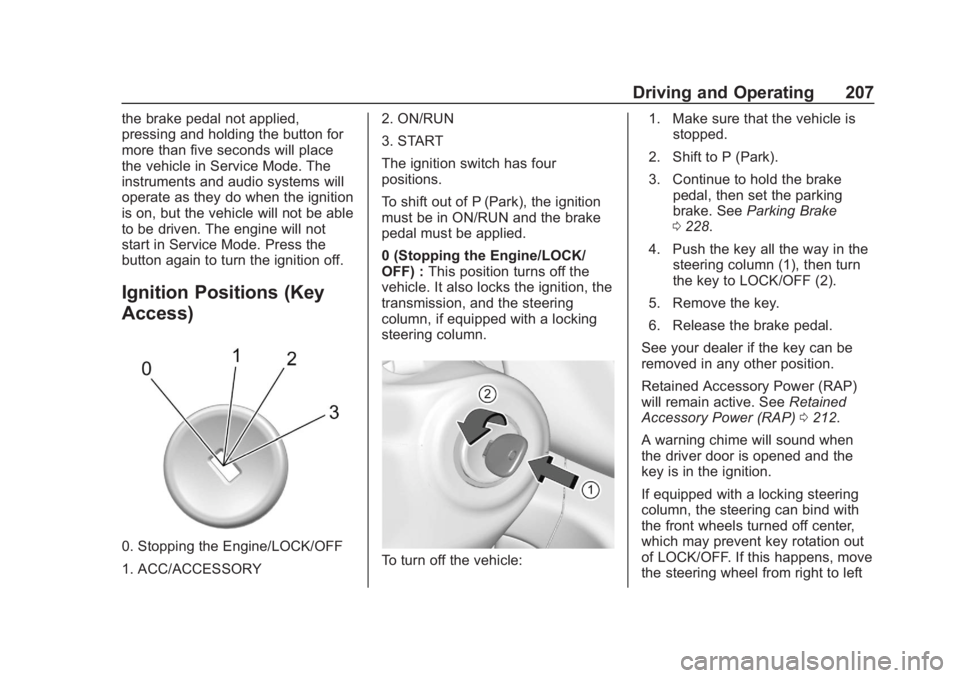
0. Stopping the Engine/LOCK/OFF
1. ACC/ACCESSORY2. ON/RUN
3. START
The ignition switch has four
positions.
To shift out of P (Park), the ignition
must be in ON/RUN and the brake
pedal must be applied.
0 (Stopping the Engine/LOCK/
OFF) :
This position turns off the
vehicle. It also locks the ignition, the
transmission, and the steering
column, if equipped with a locking
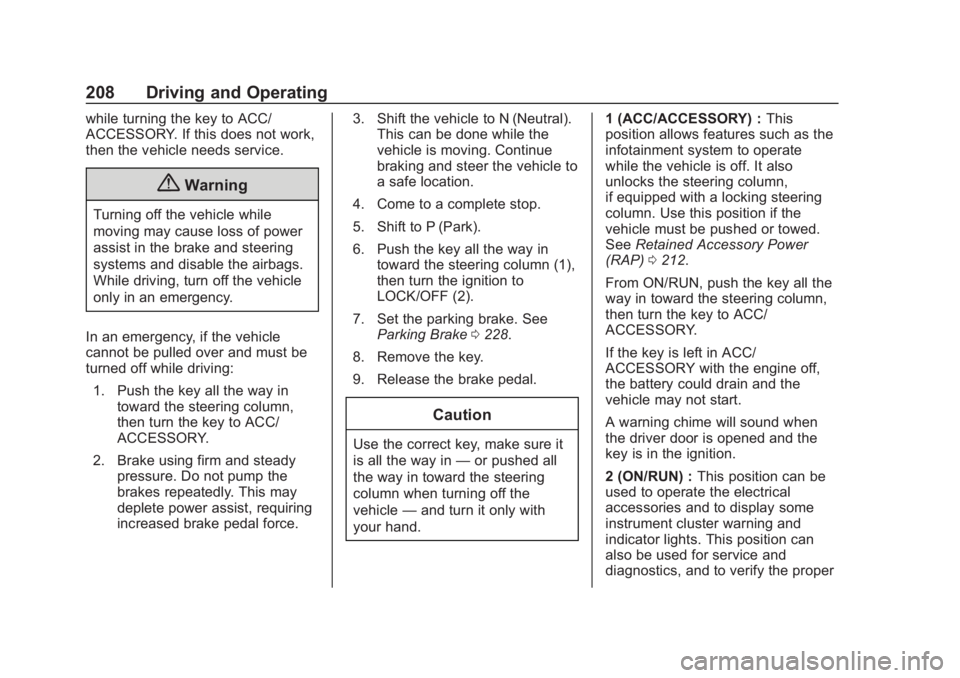
steering column.To turn off the vehicle: 1. Make sure that the vehicle is
stopped.
2. Shift to P (Park).
3. Continue to hold the brake pedal, then set the parking
brake. See Parking Brake
0 228.
4. Push the key all the way in the steering column (1), then turn
the key to LOCK/OFF (2).
5. Remove the key.
6. Release the brake pedal.
See your dealer if the key can be
removed in any other position.
Retained Accessory Power (RAP)
will remain active. See Retained
Accessory Power (RAP) 0212.
A warning chime will sound when
the driver door is opened and the
key is in the ignition.
If equipped with a locking steering
column, the steering can bind with
the front wheels turned off center,
which may prevent key rotation out
of LOCK/OFF. If this happens, move
the steering wheel from right to left
Page 209 of 438
Chevrolet Tahoe/Suburban Owner Manual (GMNA-Localizing-U.S./Canada/
Mexico-13566622) - 2020 - CRC - 4/24/19
208 Driving and Operating
while turning the key to ACC/
ACCESSORY. If this does not work,
then the vehicle needs service.
{Warning
Turning off the vehicle while
moving may cause loss of power
assist in the brake and steering
systems and disable the airbags.
While driving, turn off the vehicle
only in an emergency.
In an emergency, if the vehicle
cannot be pulled over and must be
turned off while driving: 1. Push the key all the way in toward the steering column,
then turn the key to ACC/
ACCESSORY.
2. Brake using firm and steady pressure. Do not pump the
brakes repeatedly. This may
deplete power assist, requiring
increased brake pedal force. 3. Shift the vehicle to N (Neutral).
This can be done while the
vehicle is moving. Continue
braking and steer the vehicle to
a safe location.
4. Come to a complete stop.
5. Shift to P (Park).
6. Push the key all the way in toward the steering column (1),
then turn the ignition to
LOCK/OFF (2).
7. Set the parking brake. See Parking Brake 0228.
8. Remove the key.
9. Release the brake pedal.
Caution
Use the correct key, make sure it
is all the way in —or pushed all
the way in toward the steering
column when turning off the
vehicle —and turn it only with
your hand. 1 (ACC/ACCESSORY) :
This
position allows features such as the
infotainment system to operate
while the vehicle is off. It also
unlocks the steering column,
if equipped with a locking steering
column. Use this position if the
vehicle must be pushed or towed.
See Retained Accessory Power
(RAP) 0212.
From ON/RUN, push the key all the
way in toward the steering column,
then turn the key to ACC/
ACCESSORY.
If the key is left in ACC/
ACCESSORY with the engine off,
the battery could drain and the
vehicle may not start.
A warning chime will sound when
the driver door is opened and the
key is in the ignition.
2 (ON/RUN) : This position can be
used to operate the electrical
accessories and to display some
instrument cluster warning and
indicator lights. This position can
also be used for service and
diagnostics, and to verify the proper