radio controls CHEVROLET SUBURBAN 2020 User Guide
[x] Cancel search | Manufacturer: CHEVROLET, Model Year: 2020, Model line: SUBURBAN, Model: CHEVROLET SUBURBAN 2020Pages: 438, PDF Size: 6.76 MB
Page 165 of 438
Chevrolet Tahoe/Suburban Owner Manual (GMNA-Localizing-U.S./Canada/
Mexico-13566622) - 2020 - CRC - 4/15/19
164 Instruments and Controls
2. At the same time, press andhold both the hand-held
transmitter button and one of
the three Universal Remote
system buttons to be used to
operate the garage door. Do
not release either button until
the indicator light changes from
a slow to a rapid flash. Then
release both buttons.
Some garage door openers
may require substitution of
Step 2 with the procedure
under “Radio Signals for Some
Gate Operators” later in this
section.
3. Press and hold the newly programmed Universal Remote
system button for five seconds
while watching the indicator
light and garage door
activation.
.If the indicator light stays on
continuously or the garage
door moves when the
button is pressed, then
programming is complete.
There is no need to
complete Steps 4–6. .
If the indicator light does
not come on or the garage
door does not move, a
second button press may
be required. For a second
time, press and hold the
newly programmed button
for five seconds. If the light
stays on or the garage door
moves, programming is
complete.
. If the indicator light blinks
rapidly for two seconds,
then changes to a solid light
and the garage door does
not move, continue with
programming Steps 4–6.
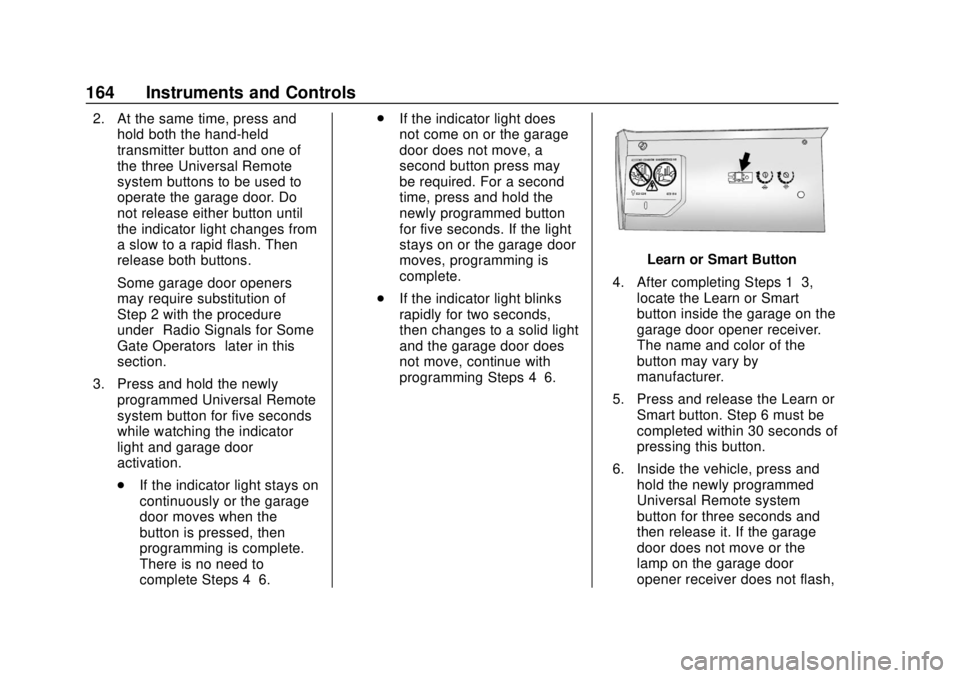
Learn or Smart Button
4. After completing Steps 1–3, locate the Learn or Smart
button inside the garage on the
garage door opener receiver.
The name and color of the
button may vary by
manufacturer.
5. Press and release the Learn or Smart button. Step 6 must be
completed within 30 seconds of
pressing this button.
6. Inside the vehicle, press and hold the newly programmed
Universal Remote system
button for three seconds and
then release it. If the garage
door does not move or the
lamp on the garage door
opener receiver does not flash,
Page 166 of 438
Chevrolet Tahoe/Suburban Owner Manual (GMNA-Localizing-U.S./Canada/
Mexico-13566622) - 2020 - CRC - 4/15/19
Instruments and Controls 165
press and hold the same
button a second time for
three seconds then release it.
Again, if the door does not
move or the garage door lamp
does not flash, press and hold
the same button a third time for
three seconds, then release it.
The Universal Remote system
should now activate the
garage door.
Repeat the process for
programming the two remaining
buttons.
Radio Signals for Some Gate
Operators
For questions or programming help,
see www.homelink.com/gm or call
1-800-355-3515. For calls placed
outside the U.S.A, Canada,
or Puerto Rico, international rates
will apply and may differ based on
landline or mobile phone. Some radio-frequency laws and
gate operators require transmitter
signals to time out or quit after
several seconds of transmission.
This may not be long enough for the
Universal Remote system to pick up
the signal during programming.
If the programming did not work,
replace Step 2 under
“Programming
the Universal Remote System” with
the following:
Press and hold the Universal
Remote system button while
pressing and releasing the
hand-held transmitter button every
two seconds until the signal has
been successfully accepted by the
Universal Remote system. The
Universal Remote system indicator
light will flash slowly at first and then
rapidly. Proceed with Step 3 under
“Programming the Universal Remote
System” to complete.
Universal Remote System
Operation
Using the Universal Remote
System
Press and hold the appropriate
Universal Remote system button for
at least one-half second. The
indicator light will come on while the
signal is being transmitted.
Erasing Universal Remote
System Buttons
Erase all programmed buttons when
vehicle ownership is terminated.
To erase:
1. Press and hold the two outside buttons until the indicator light
begins to flash. This should
take about 10 seconds.
2. Release both buttons.
Page 329 of 438
Chevrolet Tahoe/Suburban Owner Manual (GMNA-Localizing-U.S./Canada/
Mexico-13566622) - 2020 - CRC - 4/15/19
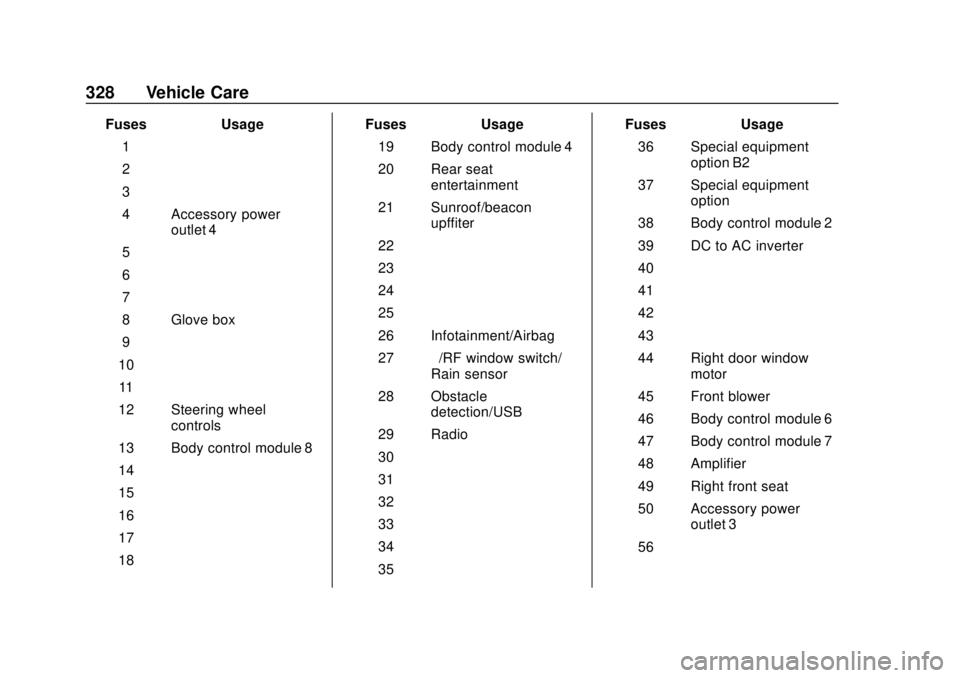
328 Vehicle Care
FusesUsage
1 –
2 –
3 –
4 Accessory power outlet 4
5 –
6 –
7 –
8 Glove box
9 –
10 –
11 –
12 Steering wheel controls
13 Body control module 8
14 –
15 –
16 –
17 –
18 – Fuses
Usage
19 Body control module 4
20 Rear seat entertainment
21 Sunroof/beacon upffiter
22 –
23 –
24 –
25 –
26 Infotainment/Airbag
27 –/RF window switch/
Rain sensor
28 Obstacle detection/USB
29 Radio
30 –
31 –
32 –
33 –
34 –
35 – Fuses
Usage
36 Special equipment option B2
37 Special equipment option
38 Body control module 2
39 DC to AC inverter
40 –
41 –
42 –
43 –
44 Right door window motor
45 Front blower
46 Body control module 6
47 Body control module 7
48 Amplifier
49 Right front seat
50 Accessory power outlet 3
56 –
Page 413 of 438
Chevrolet Tahoe/Suburban Owner Manual (GMNA-Localizing-U.S./Canada/
Mexico-13566622) - 2020 - CRC - 4/15/19
412 Customer Information
Vehicle Data
Recording and
Privacy
The vehicle has a number of
computers that record information
about the vehicle’s performance and
how it is driven or used. For
example, the vehicle uses computer
modules to monitor and control
engine and transmission
performance, to monitor the
conditions for airbag deployment
and deploy them in a crash, and,
if equipped, to provide antilock
braking to help the driver control the
vehicle. These modules may store
data to help the dealer technician
service the vehicle or to help GM
improve safety or features. Some
modules may also store data about
how the vehicle is operated, such as
rate of fuel consumption or average
speed. These modules may retain
personal preferences, such as radio
presets, seat positions, and
temperature settings.
Cybersecurity
GM collects information about the
use of your vehicle including
operational and safety related
information. We collect this
information to provide, evaluate,
improve, and troubleshoot our
products and services and to
develop new products and services.
The protection of vehicle electronics
systems and customer data from
unauthorized outside electronic
access or control is important to
GM. GM maintains appropriate
security standards, practices,
guidelines and controls aimed at
defending the vehicle and the
vehicle service ecosystem against
unauthorized electronic access,
detecting possible malicious activity
in related networks, and responding
to suspected cybersecurity incidents
in a timely, coordinated and effective
manner. Security incidents could
impact your safety or compromise
your private data. To minimize
security risks, please do not connect
your vehicle electronic systems to
unauthorized devices or connectyour vehicle to any unknown or
untrusted networks (such as
Bluetooth, WIFI or similar
technology). In the event you
suspect any security incident
impacting your data or the safe
operation of your vehicle, please
stop operating your vehicle and
contact your dealer.
Event Data Recorders
This vehicle is equipped with an
event data recorder (EDR). The
main purpose of an EDR is to
record, in certain crash or near
crash-like situations, such as an air
bag deployment or hitting a road
obstacle, data that will assist in
understanding how a vehicle’s
systems performed. The EDR is
designed to record data related to
vehicle dynamics and safety
systems for a short period of time,
typically 30 seconds or less. The
EDR in this vehicle is designed to
record such data as:
.
How various systems in your
vehicle were operating;