Latch CHEVROLET SUBURBAN 2021 Owner's Manual
[x] Cancel search | Manufacturer: CHEVROLET, Model Year: 2021, Model line: SUBURBAN, Model: CHEVROLET SUBURBAN 2021Pages: 433, PDF Size: 7.36 MB
Page 4 of 433
Chevrolet Tahoe/Suburban Owner Manual (GMNA-Localizing-U.S./Canada/
Mexico-13690484) - 2021 - CRC - 8/21/20
Introduction 3
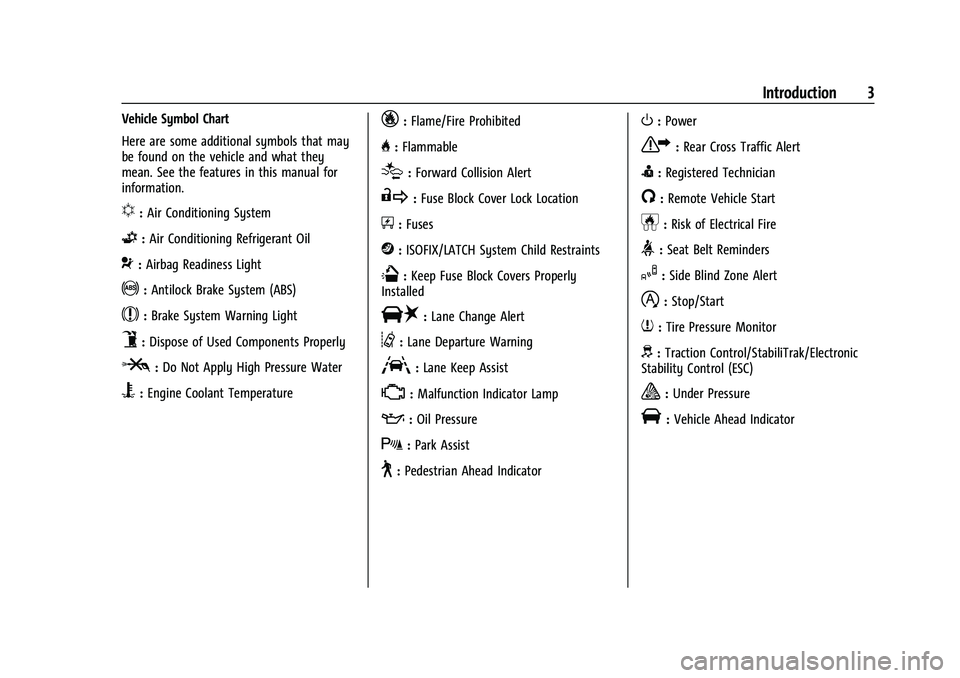
Vehicle Symbol Chart
Here are some additional symbols that may
be found on the vehicle and what they
mean. See the features in this manual for
information.
u:Air Conditioning System
G:Air Conditioning Refrigerant Oil
9:Airbag Readiness Light
!:Antilock Brake System (ABS)
$:Brake System Warning Light
9:Dispose of Used Components Properly
P:Do Not Apply High Pressure Water
B:Engine Coolant Temperature
_:Flame/Fire Prohibited
H: Flammable
[:Forward Collision Alert
R:Fuse Block Cover Lock Location
+:Fuses
j:ISOFIX/LATCH System Child Restraints
Q:Keep Fuse Block Covers Properly
Installed
|: Lane Change Alert
@:Lane Departure Warning
A:Lane Keep Assist
*: Malfunction Indicator Lamp
::Oil Pressure
X:Park Assist
~:Pedestrian Ahead Indicator
O:Power
7:Rear Cross Traffic Alert
I:Registered Technician
/:Remote Vehicle Start
h:Risk of Electrical Fire
>:Seat Belt Reminders
I:Side Blind Zone Alert
h:Stop/Start
7:Tire Pressure Monitor
d:Traction Control/StabiliTrak/Electronic
Stability Control (ESC)
a: Under Pressure
V: Vehicle Ahead Indicator
Page 17 of 433
Chevrolet Tahoe/Suburban Owner Manual (GMNA-Localizing-U.S./Canada/
Mexico-13690484) - 2021 - crc - 8/17/20
16 Keys, Doors, and Windows
.PressQorKon the power door lock
switch.
.Pulling an interior door handle will unlock
the door. Pulling the door handle again
unlatches it.
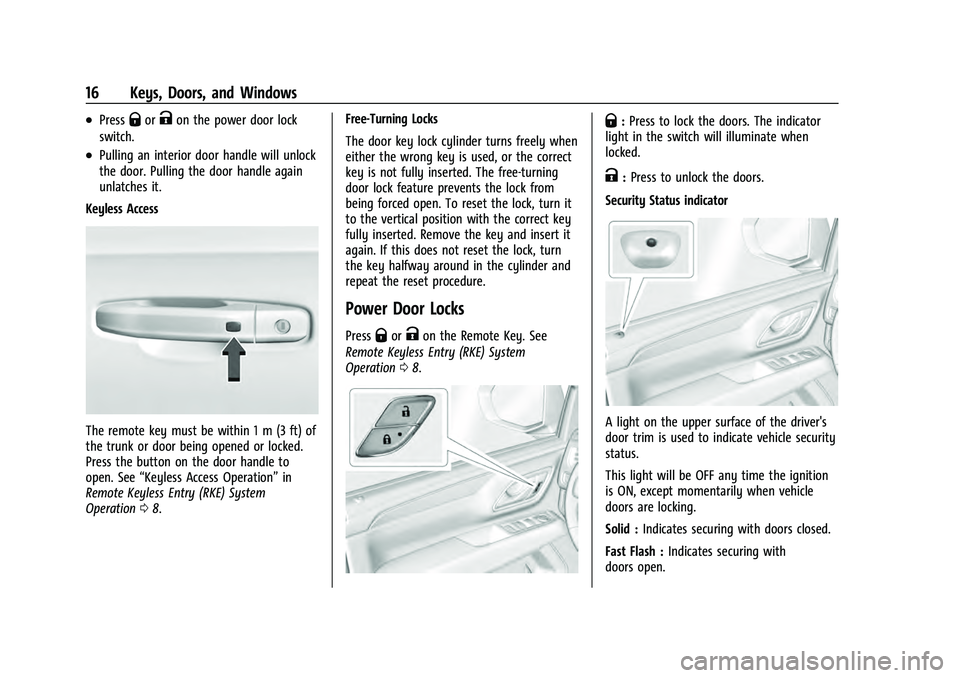
Keyless Access
The remote key must be within 1 m (3 ft) of
the trunk or door being opened or locked.
Press the button on the door handle to
open. See “Keyless Access Operation” in
Remote Keyless Entry (RKE) System
Operation 08. Free-Turning Locks
The door key lock cylinder turns freely when
either the wrong key is used, or the correct
key is not fully inserted. The free-turning
door lock feature prevents the lock from
being forced open. To reset the lock, turn it
to the vertical position with the correct key
fully inserted. Remove the key and insert it
again. If this does not reset the lock, turn
the key halfway around in the cylinder and
repeat the reset procedure.
Power Door Locks
PressQorKon the Remote Key. See
Remote Keyless Entry (RKE) System
Operation 08.
Q:Press to lock the doors. The indicator
light in the switch will illuminate when
locked.
K: Press to unlock the doors.
Security Status indicator
A light on the upper surface of the driver's
door trim is used to indicate vehicle security
status.
This light will be OFF any time the ignition
is ON, except momentarily when vehicle
doors are locking.
Solid : Indicates securing with doors closed.
Fast Flash : Indicates securing with
doors open.
Page 20 of 433
Chevrolet Tahoe/Suburban Owner Manual (GMNA-Localizing-U.S./Canada/
Mexico-13690484) - 2021 - crc - 8/17/20
Keys, Doors, and Windows 19
Press the button (2) above the license plate
to open the liftglass, or press
ctwice
quickly on the remote key. Do not leave the
liftglass open when raising the liftgate.
There will be a delay in the release of the
liftglass if there is an attempt to open it
while the rear wiper is in motion.
Use the pull cup to lower and close the
liftgate. Do not press the touch pad while
closing the liftgate. This will cause the
liftgate to be unlatched.
The liftgate can be opened when locked if
the remote key is within 1 m (3 ft) of the
touch pad. See Remote Keyless Entry (RKE)
System Operation 08.
The liftgate has an electric latch. If the
battery is disconnected or has low voltage,
the liftgate will not open. The liftgate will
resume operation when the battery is
reconnected and charged.
Power Liftgate Operation
{Warning
You or others could be injured if caught
in the path of the power liftgate. Make
sure there is no one in the way of the
liftgate as it is opening and closing.
Caution
Driving with an open and unsecured
liftgate may result in damage to the
power liftgate components.
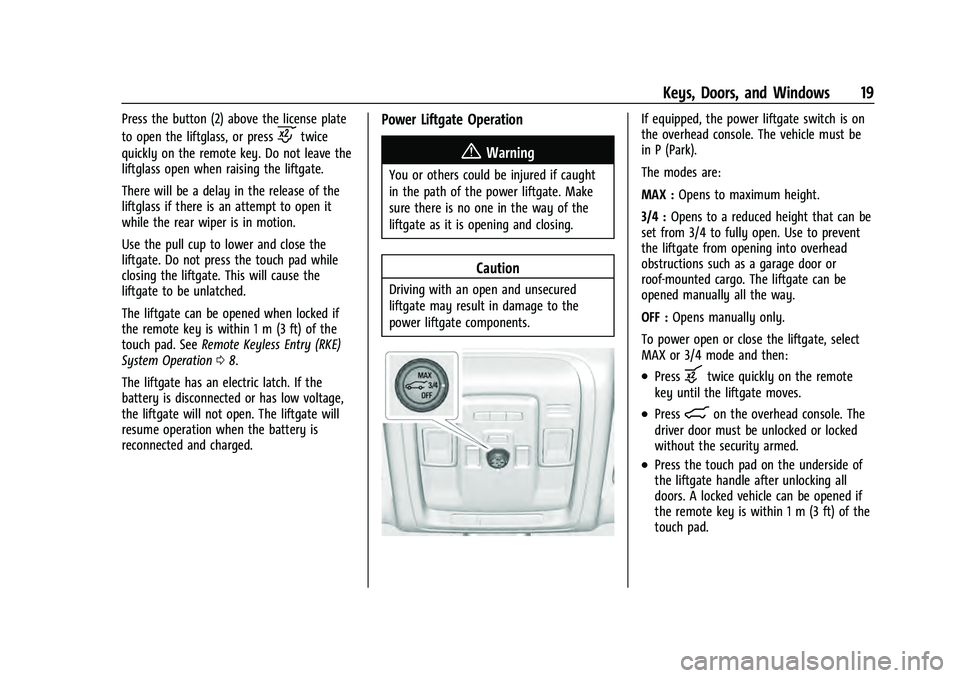
If equipped, the power liftgate switch is on
the overhead console. The vehicle must be
in P (Park).
The modes are:
MAX : Opens to maximum height.
3/4 : Opens to a reduced height that can be
set from 3/4 to fully open. Use to prevent
the liftgate from opening into overhead
obstructions such as a garage door or
roof-mounted cargo. The liftgate can be
opened manually all the way.
OFF : Opens manually only.
To power open or close the liftgate, select
MAX or 3/4 mode and then:
.Pressbtwice quickly on the remote
key until the liftgate moves.
.Press8on the overhead console. The
driver door must be unlocked or locked
without the security armed.
.Press the touch pad on the underside of
the liftgate handle after unlocking all
doors. A locked vehicle can be opened if
the remote key is within 1 m (3 ft) of the
touch pad.
Page 21 of 433
Chevrolet Tahoe/Suburban Owner Manual (GMNA-Localizing-U.S./Canada/
Mexico-13690484) - 2021 - crc - 8/17/20
20 Keys, Doors, and Windows
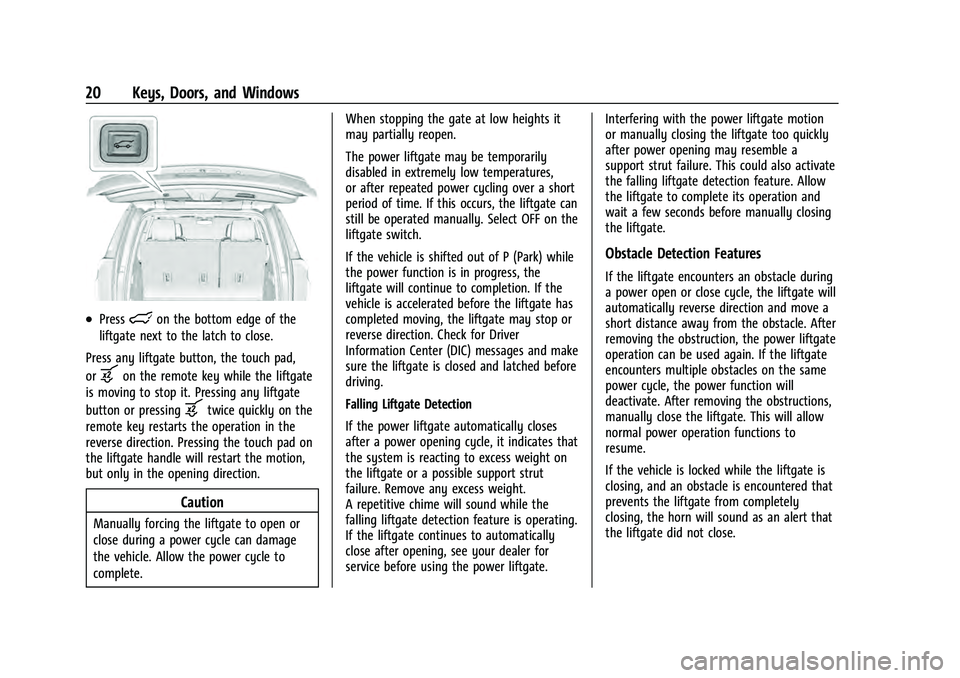
.Presslon the bottom edge of the
liftgate next to the latch to close.
Press any liftgate button, the touch pad,
or
bon the remote key while the liftgate
is moving to stop it. Pressing any liftgate
button or pressing
btwice quickly on the
remote key restarts the operation in the
reverse direction. Pressing the touch pad on
the liftgate handle will restart the motion,
but only in the opening direction.
Caution
Manually forcing the liftgate to open or
close during a power cycle can damage
the vehicle. Allow the power cycle to
complete. When stopping the gate at low heights it
may partially reopen.
The power liftgate may be temporarily
disabled in extremely low temperatures,
or after repeated power cycling over a short
period of time. If this occurs, the liftgate can
still be operated manually. Select OFF on the
liftgate switch.
If the vehicle is shifted out of P (Park) while
the power function is in progress, the
liftgate will continue to completion. If the
vehicle is accelerated before the liftgate has
completed moving, the liftgate may stop or
reverse direction. Check for Driver
Information Center (DIC) messages and make
sure the liftgate is closed and latched before
driving.
Falling Liftgate Detection
If the power liftgate automatically closes
after a power opening cycle, it indicates that
the system is reacting to excess weight on
the liftgate or a possible support strut
failure. Remove any excess weight.
A repetitive chime will sound while the
falling liftgate detection feature is operating.
If the liftgate continues to automatically
close after opening, see your dealer for
service before using the power liftgate.
Interfering with the power liftgate motion
or manually closing the liftgate too quickly
after power opening may resemble a
support strut failure. This could also activate
the falling liftgate detection feature. Allow
the liftgate to complete its operation and
wait a few seconds before manually closing
the liftgate.
Obstacle Detection Features
If the liftgate encounters an obstacle during
a power open or close cycle, the liftgate will
automatically reverse direction and move a
short distance away from the obstacle. After
removing the obstruction, the power liftgate
operation can be used again. If the liftgate
encounters multiple obstacles on the same
power cycle, the power function will
deactivate. After removing the obstructions,
manually close the liftgate. This will allow
normal power operation functions to
resume.
If the vehicle is locked while the liftgate is
closing, and an obstacle is encountered that
prevents the liftgate from completely
closing, the horn will sound as an alert that
the liftgate did not close.
Page 22 of 433
Chevrolet Tahoe/Suburban Owner Manual (GMNA-Localizing-U.S./Canada/
Mexico-13690484) - 2021 - crc - 8/17/20
Keys, Doors, and Windows 21
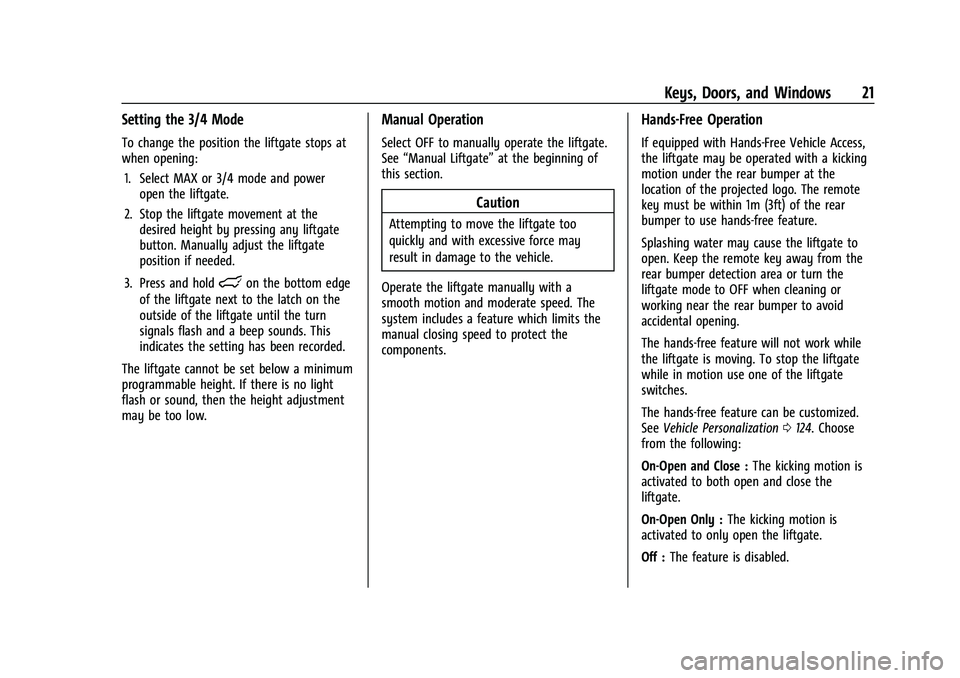
Setting the 3/4 Mode
To change the position the liftgate stops at
when opening:1. Select MAX or 3/4 mode and power open the liftgate.
2. Stop the liftgate movement at the desired height by pressing any liftgate
button. Manually adjust the liftgate
position if needed.
3. Press and hold
lon the bottom edge
of the liftgate next to the latch on the
outside of the liftgate until the turn
signals flash and a beep sounds. This
indicates the setting has been recorded.
The liftgate cannot be set below a minimum
programmable height. If there is no light
flash or sound, then the height adjustment
may be too low.
Manual Operation
Select OFF to manually operate the liftgate.
See “Manual Liftgate” at the beginning of
this section.
Caution
Attempting to move the liftgate too
quickly and with excessive force may
result in damage to the vehicle.
Operate the liftgate manually with a
smooth motion and moderate speed. The
system includes a feature which limits the
manual closing speed to protect the
components.
Hands-Free Operation
If equipped with Hands-Free Vehicle Access,
the liftgate may be operated with a kicking
motion under the rear bumper at the
location of the projected logo. The remote
key must be within 1m (3ft) of the rear
bumper to use hands-free feature.
Splashing water may cause the liftgate to
open. Keep the remote key away from the
rear bumper detection area or turn the
liftgate mode to OFF when cleaning or
working near the rear bumper to avoid
accidental opening.
The hands-free feature will not work while
the liftgate is moving. To stop the liftgate
while in motion use one of the liftgate
switches.
The hands-free feature can be customized.
See Vehicle Personalization 0124. Choose
from the following:
On-Open and Close : The kicking motion is
activated to both open and close the
liftgate.
On-Open Only : The kicking motion is
activated to only open the liftgate.
Off : The feature is disabled.
Page 37 of 433
Chevrolet Tahoe/Suburban Owner Manual (GMNA-Localizing-U.S./Canada/
Mexico-13690484) - 2021 - crc - 8/17/20
36 Seats and Restraints
Seats and Restraints
Head Restraints
Head Restraints . . . . . . . . . . . . . . . . . . . . . . . . 36
Front Seats
Power Seat Adjustment . . . . . . . . . . . . . . . . 39
Lumbar Adjustment . . . . . . . . . . . . . . . . . . . . 39
Reclining Seatbacks . . . . . . . . . . . . . . . . . . . . 40
Memory Seats . . . . . . . . . . . . . . . . . . . . . . . . . 40
Heated and Ventilated Front Seats . . . . . 43
Rear Seats
Rear Seats . . . . . . . . . . . . . . . . . . . . . . . . . . . . . . 44
Heated Rear Seats . . . . . . . . . . . . . . . . . . . . . . 44
Second Row Seats . . . . . . . . . . . . . . . . . . . . . . 45
Third Row Seats . . . . . . . . . . . . . . . . . . . . . . . . 49
Seat Belts
Seat Belts . . . . . . . . . . . . . . . . . . . . . . . . . . . . . . 52
How to Wear Seat Belts Properly . . . . . . . 53
Lap-Shoulder Belt . . . . . . . . . . . . . . . . . . . . . . . 55
Seat Belt Use During Pregnancy . . . . . . . . 58
Seat Belt Extender . . . . . . . . . . . . . . . . . . . . . . 58
Safety System Check . . . . . . . . . . . . . . . . . . . 58
Seat Belt Care . . . . . . . . . . . . . . . . . . . . . . . . . . 58
Replacing Seat Belt System Parts after aCrash . . . . . . . . . . . . . . . . . . . . . . . . . . . . . . . . . 59
Airbag System
Airbag System . . . . . . . . . . . . . . . . . . . . . . . . . . 59 Where Are the Airbags? . . . . . . . . . . . . . . . . 61
When Should an Airbag Inflate? . . . . . . . . 62
What Makes an Airbag Inflate? . . . . . . . . . 63
How Does an Airbag Restrain? . . . . . . . . . 63
What Will You See after an Airbag
Inflates? . . . . . . . . . . . . . . . . . . . . . . . . . . . . . . 63
Passenger Sensing System . . . . . . . . . . . . . 65
Servicing the Airbag-Equipped Vehicle . . . . . . . . . . . . . . . . . . . . . . . . . . . . . . . 68
Adding Equipment to the Airbag-Equipped Vehicle . . . . . . . . . . . . . . 68
Airbag System Check . . . . . . . . . . . . . . . . . . . 69
Replacing Airbag System Parts after a Crash . . . . . . . . . . . . . . . . . . . . . . . . . . . . . . . . . 69
Child Restraints
Older Children . . . . . . . . . . . . . . . . . . . . . . . . . . 70
Infants and Young Children . . . . . . . . . . . . . 71
Child Restraint Systems . . . . . . . . . . . . . . . . . 73
Where to Put the Restraint . . . . . . . . . . . . . 75
Lower Anchors and Tethers for Children(LATCH System) . . . . . . . . . . . . . . . . . . . . . . . 76
Replacing LATCH System Parts After a Crash . . . . . . . . . . . . . . . . . . . . . . . . . . . . . . . . . 82
Securing Child Restraints (With the Seat Belt in the Rear Seat) . . . . . . . . . . . . . . . . . 83
Securing Child Restraints (With the Seat Belt in the Front Passenger Seat) . . . . . 85
Securing Child Restraints (With the Seat Belt in the Center Front Seat) . . . . . . . . 87
Head Restraints
The vehicle’s front seats have adjustable
head restraints in the outboard seating
positions.
{Warning
With head restraints that are not
installed and adjusted properly, there is a
greater chance that occupants will suffer
a neck/spinal injury in a crash. Do not
drive until the head restraints for all
occupants are installed and adjusted
properly.
If your vehicle has rear head restraints
that fold down, always return them to
the full upright position whenever an
occupant is seated in the seat.
Page 50 of 433
Chevrolet Tahoe/Suburban Owner Manual (GMNA-Localizing-U.S./Canada/
Mexico-13690484) - 2021 - crc - 8/17/20
Seats and Restraints 49
3. Press the switch again to release the rearof the seat from the floor. The seat will
tumble forward.
The switches (2) can be used to fold the
third row seatbacks from the cargo area. See
Third Row Seats 049.
Returning the Seat to the Sitting Position
{Warning
If either seatback is not locked, it could
move forward in a sudden stop or crash.
That could cause injury to the person
sitting there. Always push and pull on
the seatbacks to be sure they are locked.
To return the seat to the sitting position
from the tumbled position: 1. Pull the seat down until it latches to the floor. The seatback cannot be raised if
the seat is not latched to the floor.
2. Lift the seatback and push it rearward. Push and pull on the seatback to make
sure it is locked.
3. For the 60/40 split-bench seat, make sure the seat belt in the center seating
position is not caught between the two
seats and is not twisted.
Third Row Seats
Caution
Folding a rear seat with the seat belts
still fastened may cause damage to the
seat or the seat belts. Always unbuckle
the seat belts and return them to their
normal stowed position before folding a
rear seat.
The third row seatbacks can be folded to
increase cargo space. 1. Open the liftgate to access the controls for the third row seat.
2. Make sure that there is nothing under, in front of, or on the seat.
3. If the second row seat is in the full rear position, adjust it forward to allow the
third row seat to fold fully flat.
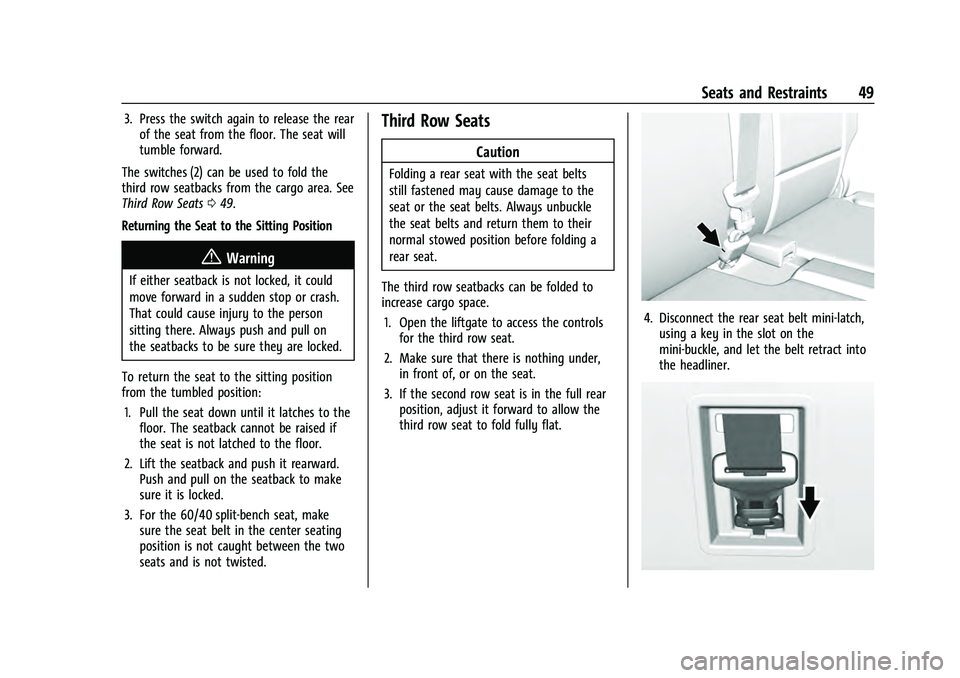
4. Disconnect the rear seat belt mini-latch,using a key in the slot on the
mini-buckle, and let the belt retract into
the headliner.
Page 51 of 433
Chevrolet Tahoe/Suburban Owner Manual (GMNA-Localizing-U.S./Canada/
Mexico-13690484) - 2021 - crc - 8/17/20
50 Seats and Restraints
5. Stow the mini-latch in the holder in theheadliner.
6. Stow the seat belt in the beltstowage clip.
Repeat the steps to fold the other
seatback, if desired.
Power Seatback Folding (If Equipped)
The vehicle must be in P (Park) for this
feature to work.
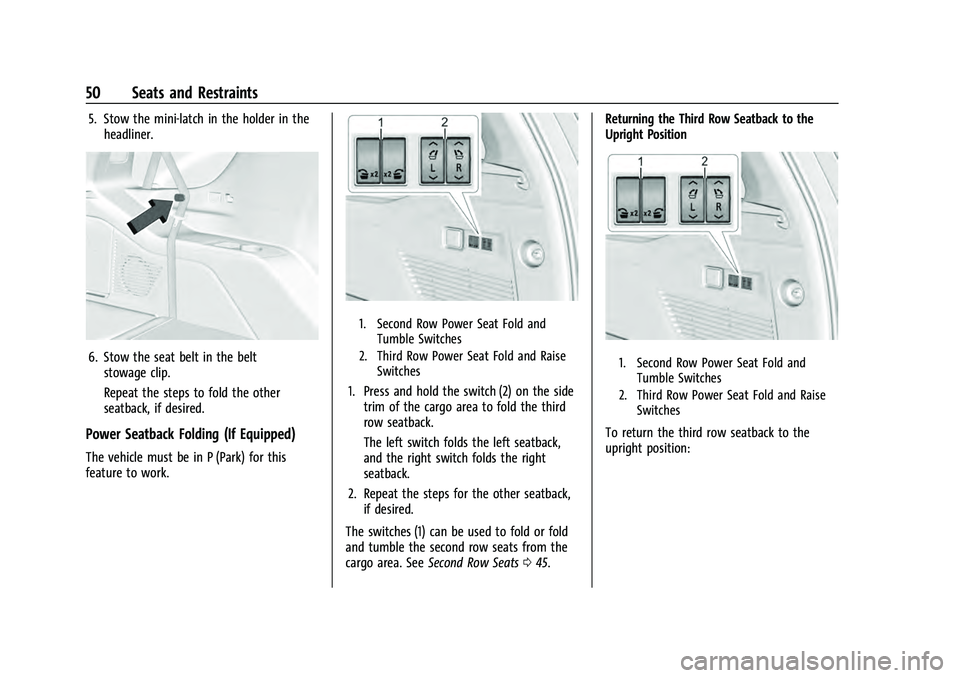
1. Second Row Power Seat Fold and Tumble Switches
2. Third Row Power Seat Fold and Raise Switches
1. Press and hold the switch (2) on the sidetrim of the cargo area to fold the third
row seatback.
The left switch folds the left seatback,
and the right switch folds the right
seatback.
2. Repeat the steps for the other seatback, if desired.
The switches (1) can be used to fold or fold
and tumble the second row seats from the
cargo area. See Second Row Seats 045. Returning the Third Row Seatback to the
Upright Position
1. Second Row Power Seat Fold and
Tumble Switches
2. Third Row Power Seat Fold and Raise Switches
To return the third row seatback to the
upright position:
Page 52 of 433
Chevrolet Tahoe/Suburban Owner Manual (GMNA-Localizing-U.S./Canada/
Mexico-13690484) - 2021 - crc - 8/17/20
Seats and Restraints 51
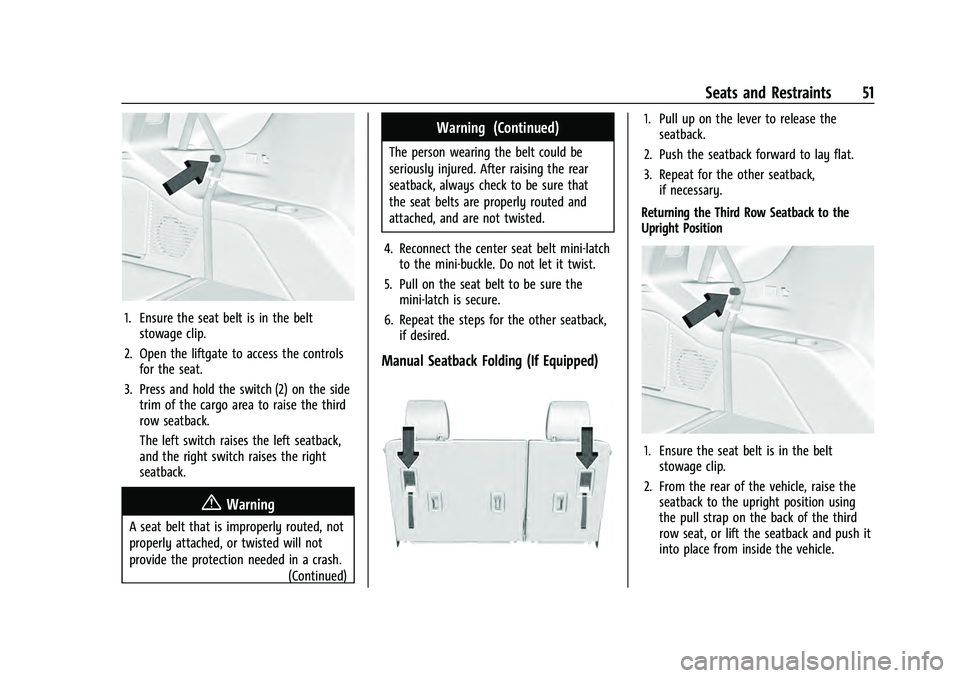
1. Ensure the seat belt is in the beltstowage clip.
2. Open the liftgate to access the controls for the seat.
3. Press and hold the switch (2) on the side trim of the cargo area to raise the third
row seatback.
The left switch raises the left seatback,
and the right switch raises the right
seatback.
{Warning
A seat belt that is improperly routed, not
properly attached, or twisted will not
provide the protection needed in a crash.
(Continued)
Warning (Continued)
The person wearing the belt could be
seriously injured. After raising the rear
seatback, always check to be sure that
the seat belts are properly routed and
attached, and are not twisted.
4. Reconnect the center seat belt mini-latch to the mini-buckle. Do not let it twist.
5. Pull on the seat belt to be sure the mini-latch is secure.
6. Repeat the steps for the other seatback, if desired.
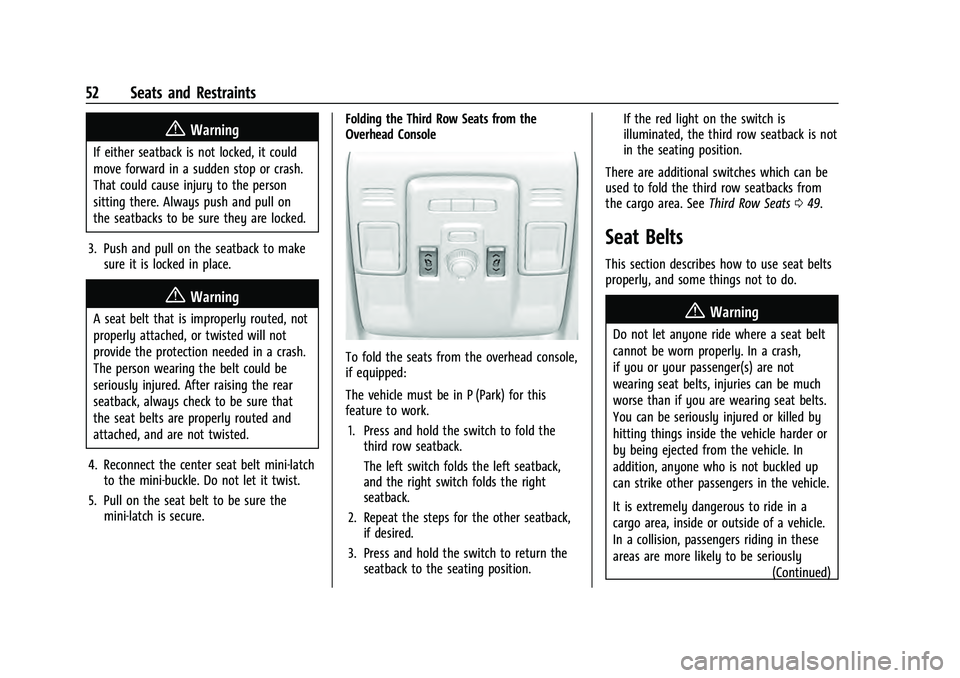
Manual Seatback Folding (If Equipped)
1. Pull up on the lever to release theseatback.
2. Push the seatback forward to lay flat.
3. Repeat for the other seatback, if necessary.
Returning the Third Row Seatback to the
Upright Position
1. Ensure the seat belt is in the belt stowage clip.
2. From the rear of the vehicle, raise the seatback to the upright position using
the pull strap on the back of the third
row seat, or lift the seatback and push it
into place from inside the vehicle.
Page 53 of 433
Chevrolet Tahoe/Suburban Owner Manual (GMNA-Localizing-U.S./Canada/
Mexico-13690484) - 2021 - crc - 8/17/20
52 Seats and Restraints
{Warning
If either seatback is not locked, it could
move forward in a sudden stop or crash.
That could cause injury to the person
sitting there. Always push and pull on
the seatbacks to be sure they are locked.
3. Push and pull on the seatback to make sure it is locked in place.
{Warning
A seat belt that is improperly routed, not
properly attached, or twisted will not
provide the protection needed in a crash.
The person wearing the belt could be
seriously injured. After raising the rear
seatback, always check to be sure that
the seat belts are properly routed and
attached, and are not twisted.
4. Reconnect the center seat belt mini-latch to the mini-buckle. Do not let it twist.
5. Pull on the seat belt to be sure the mini-latch is secure. Folding the Third Row Seats from the
Overhead Console
To fold the seats from the overhead console,
if equipped:
The vehicle must be in P (Park) for this
feature to work.
1. Press and hold the switch to fold the third row seatback.
The left switch folds the left seatback,
and the right switch folds the right
seatback.
2. Repeat the steps for the other seatback, if desired.
3. Press and hold the switch to return the seatback to the seating position. If the red light on the switch is
illuminated, the third row seatback is not
in the seating position.
There are additional switches which can be
used to fold the third row seatbacks from
the cargo area. See Third Row Seats049.
Seat Belts
This section describes how to use seat belts
properly, and some things not to do.
{Warning
Do not let anyone ride where a seat belt
cannot be worn properly. In a crash,
if you or your passenger(s) are not
wearing seat belts, injuries can be much
worse than if you are wearing seat belts.
You can be seriously injured or killed by
hitting things inside the vehicle harder or
by being ejected from the vehicle. In
addition, anyone who is not buckled up
can strike other passengers in the vehicle.
It is extremely dangerous to ride in a
cargo area, inside or outside of a vehicle.
In a collision, passengers riding in these
areas are more likely to be seriously
(Continued)