transmission CHEVROLET SUBURBAN 2022 Owners Manual
[x] Cancel search | Manufacturer: CHEVROLET, Model Year: 2022, Model line: SUBURBAN, Model: CHEVROLET SUBURBAN 2022Pages: 438, PDF Size: 14.08 MB
Page 6 of 438
Chevrolet Tahoe/Suburban Owner Manual (GMNA-Localizing-U.S./Canada/
Mexico-15555985) - 2022 - CRC - 12/3/21
Introduction 5
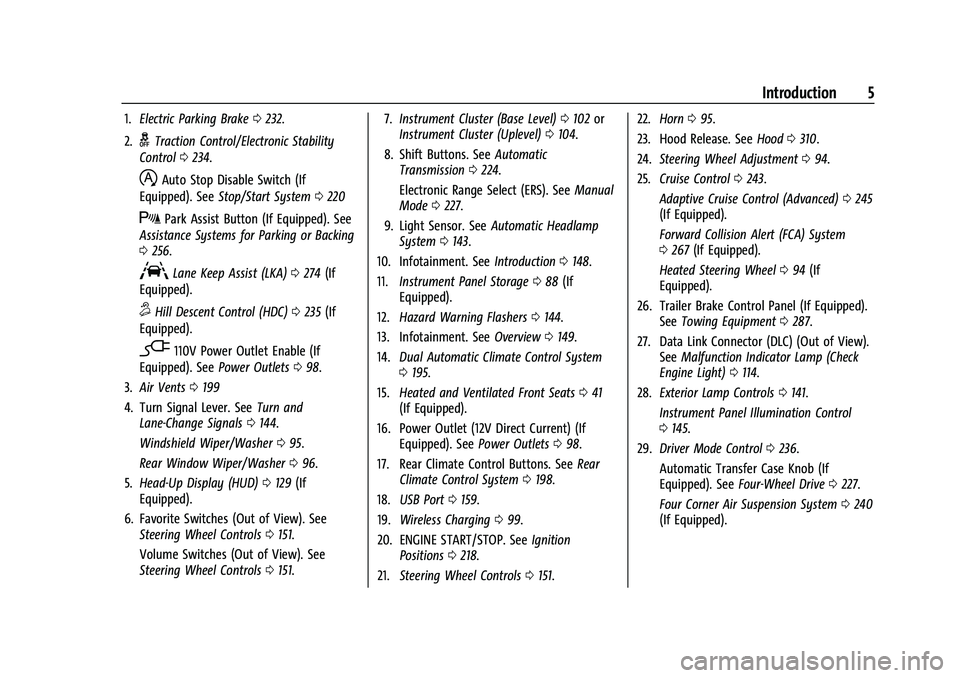
1.Electric Parking Brake 0232.
2.
gTraction Control/Electronic Stability
Control 0234.
hAuto Stop Disable Switch (If
Equipped). See Stop/Start System 0220
XPark Assist Button (If Equipped). See
Assistance Systems for Parking or Backing
0 256.
ALane Keep Assist (LKA) 0274 (If
Equipped).
5Hill Descent Control (HDC) 0235 (If
Equipped).
-110V Power Outlet Enable (If
Equipped). See Power Outlets098.
3. Air Vents 0199
4. Turn Signal Lever. See Turn and
Lane-Change Signals 0144.
Windshield Wiper/Washer 095.
Rear Window Wiper/Washer 096.
5. Head-Up Display (HUD) 0129 (If
Equipped).
6. Favorite Switches (Out of View). See Steering Wheel Controls 0151.
Volume Switches (Out of View). See
Steering Wheel Controls 0151. 7.
Instrument Cluster (Base Level) 0102 or
Instrument Cluster (Uplevel) 0104.
8. Shift Buttons. See Automatic
Transmission 0224.
Electronic Range Select (ERS). See Manual
Mode 0227.
9. Light Sensor. See Automatic Headlamp
System 0143.
10. Infotainment. See Introduction0148.
11. Instrument Panel Storage 088 (If
Equipped).
12. Hazard Warning Flashers 0144.
13. Infotainment. See Overview0149.
14. Dual Automatic Climate Control System
0195.
15. Heated and Ventilated Front Seats 041
(If Equipped).
16. Power Outlet (12V Direct Current) (If Equipped). See Power Outlets098.
17. Rear Climate Control Buttons. See Rear
Climate Control System 0198.
18. USB Port 0159.
19. Wireless Charging 099.
20. ENGINE START/STOP. See Ignition
Positions 0218.
21. Steering Wheel Controls 0151. 22.
Horn 095.
23. Hood Release. See Hood0310.
24. Steering Wheel Adjustment 094.
25. Cruise Control 0243.
Adaptive Cruise Control (Advanced) 0245
(If Equipped).
Forward Collision Alert (FCA) System
0 267 (If Equipped).
Heated Steering Wheel 094 (If
Equipped).
26. Trailer Brake Control Panel (If Equipped). SeeTowing Equipment 0287.
27. Data Link Connector (DLC) (Out of View). SeeMalfunction Indicator Lamp (Check
Engine Light) 0114.
28. Exterior Lamp Controls 0141.
Instrument Panel Illumination Control
0 145.
29. Driver Mode Control 0236.
Automatic Transfer Case Knob (If
Equipped). See Four-Wheel Drive 0227.
Four Corner Air Suspension System 0240
(If Equipped).
Page 16 of 438
Chevrolet Tahoe/Suburban Owner Manual (GMNA-Localizing-U.S./Canada/
Mexico-15555985) - 2022 - CRC - 12/3/21
Keys, Doors, and Windows 15
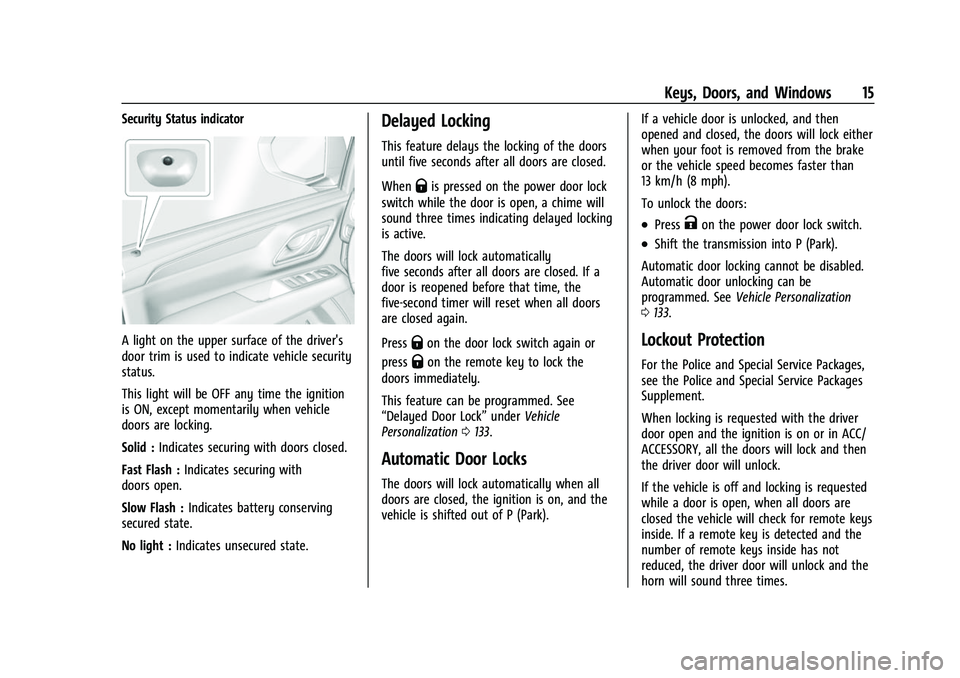
Security Status indicator
A light on the upper surface of the driver's
door trim is used to indicate vehicle security
status.
This light will be OFF any time the ignition
is ON, except momentarily when vehicle
doors are locking.
Solid :Indicates securing with doors closed.
Fast Flash : Indicates securing with
doors open.
Slow Flash : Indicates battery conserving
secured state.
No light : Indicates unsecured state.
Delayed Locking
This feature delays the locking of the doors
until five seconds after all doors are closed.
When
Qis pressed on the power door lock
switch while the door is open, a chime will
sound three times indicating delayed locking
is active.
The doors will lock automatically
five seconds after all doors are closed. If a
door is reopened before that time, the
five-second timer will reset when all doors
are closed again.
Press
Qon the door lock switch again or
press
Qon the remote key to lock the
doors immediately.
This feature can be programmed. See
“Delayed Door Lock” underVehicle
Personalization 0133.
Automatic Door Locks
The doors will lock automatically when all
doors are closed, the ignition is on, and the
vehicle is shifted out of P (Park). If a vehicle door is unlocked, and then
opened and closed, the doors will lock either
when your foot is removed from the brake
or the vehicle speed becomes faster than
13 km/h (8 mph).
To unlock the doors:
.PressKon the power door lock switch.
.Shift the transmission into P (Park).
Automatic door locking cannot be disabled.
Automatic door unlocking can be
programmed. See Vehicle Personalization
0 133.
Lockout Protection
For the Police and Special Service Packages,
see the Police and Special Service Packages
Supplement.
When locking is requested with the driver
door open and the ignition is on or in ACC/
ACCESSORY, all the doors will lock and then
the driver door will unlock.
If the vehicle is off and locking is requested
while a door is open, when all doors are
closed the vehicle will check for remote keys
inside. If a remote key is detected and the
number of remote keys inside has not
reduced, the driver door will unlock and the
horn will sound three times.
Page 22 of 438
Chevrolet Tahoe/Suburban Owner Manual (GMNA-Localizing-U.S./Canada/
Mexico-15555985) - 2022 - CRC - 12/3/21
Keys, Doors, and Windows 21
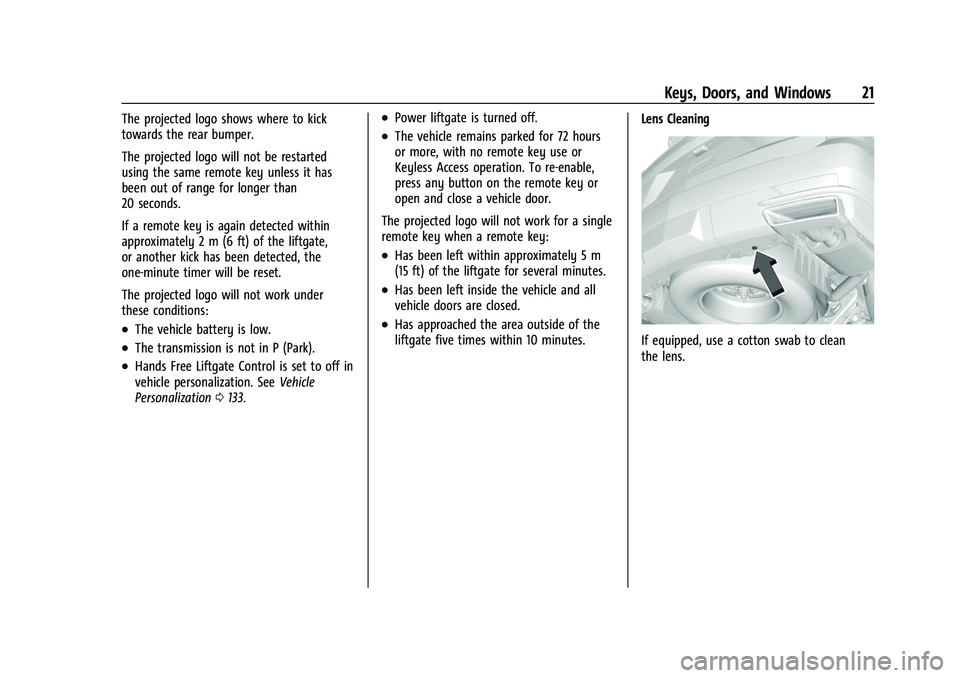
The projected logo shows where to kick
towards the rear bumper.
The projected logo will not be restarted
using the same remote key unless it has
been out of range for longer than
20 seconds.
If a remote key is again detected within
approximately 2 m (6 ft) of the liftgate,
or another kick has been detected, the
one-minute timer will be reset.
The projected logo will not work under
these conditions:
.The vehicle battery is low.
.The transmission is not in P (Park).
.Hands Free Liftgate Control is set to off in
vehicle personalization. SeeVehicle
Personalization 0133.
.Power liftgate is turned off.
.The vehicle remains parked for 72 hours
or more, with no remote key use or
Keyless Access operation. To re-enable,
press any button on the remote key or
open and close a vehicle door.
The projected logo will not work for a single
remote key when a remote key:
.Has been left within approximately 5 m
(15 ft) of the liftgate for several minutes.
.Has been left inside the vehicle and all
vehicle doors are closed.
.Has approached the area outside of the
liftgate five times within 10 minutes. Lens Cleaning
If equipped, use a cotton swab to clean
the lens.
Page 23 of 438
Chevrolet Tahoe/Suburban Owner Manual (GMNA-Localizing-U.S./Canada/
Mexico-15555985) - 2022 - CRC - 12/3/21
22 Keys, Doors, and Windows
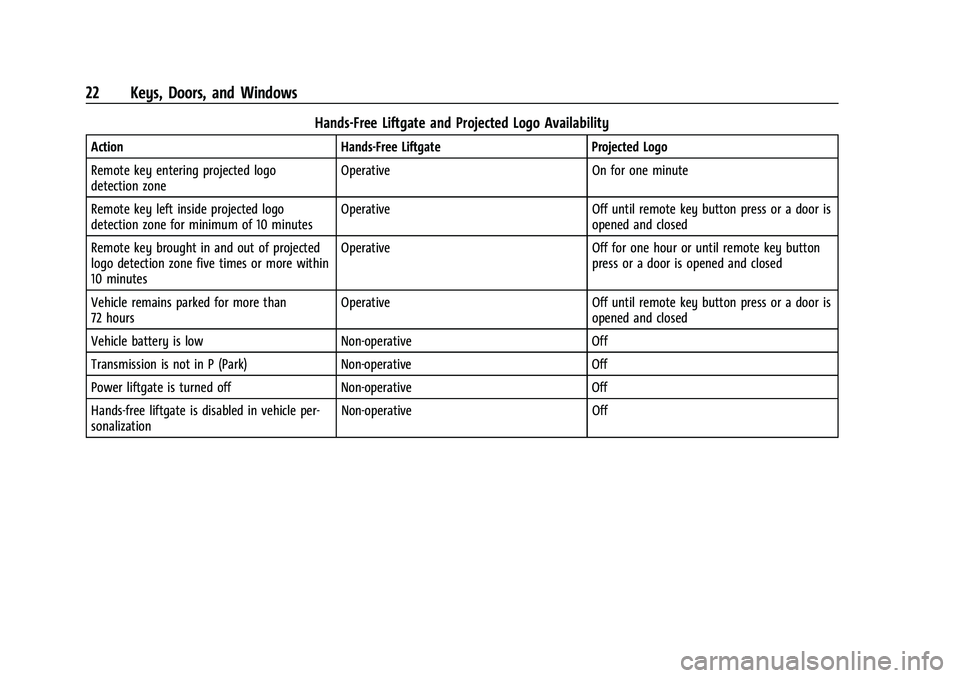
Hands-Free Liftgate and Projected Logo Availability
ActionHands-Free Liftgate Projected Logo
Remote key entering projected logo
detection zone Operative
On for one minute
Remote key left inside projected logo
detection zone for minimum of 10 minutes Operative
Off until remote key button press or a door is
opened and closed
Remote key brought in and out of projected
logo detection zone five times or more within
10 minutes Operative
Off for one hour or until remote key button
press or a door is opened and closed
Vehicle remains parked for more than
72 hours Operative
Off until remote key button press or a door is
opened and closed
Vehicle battery is low Non-operative Off
Transmission is not in P (Park) Non-operative Off
Power liftgate is turned off Non-operative Off
Hands-free liftgate is disabled in vehicle per-
sonalization Non-operative
Off
Page 94 of 438
Chevrolet Tahoe/Suburban Owner Manual (GMNA-Localizing-U.S./Canada/
Mexico-15555985) - 2022 - CRC - 12/3/21
Instruments and Controls 93
Instruments and Controls
Controls
Steering Wheel Adjustment . . . . . . . . . . . . 94
Steering Wheel Controls . . . . . . . . . . . . . . . 94
Heated Steering Wheel . . . . . . . . . . . . . . . . . 94
Horn . . . . . . . . . . . . . . . . . . . . . . . . . . . . . . . . . . . 95
Windshield Wiper/Washer . . . . . . . . . . . . . . 95
Rear Window Wiper/Washer . . . . . . . . . . . 96
Compass . . . . . . . . . . . . . . . . . . . . . . . . . . . . . . . 97
Clock . . . . . . . . . . . . . . . . . . . . . . . . . . . . . . . . . . . 98
Power Outlets . . . . . . . . . . . . . . . . . . . . . . . . . . 98
Wireless Charging . . . . . . . . . . . . . . . . . . . . . . 99
Warning Lights, Gauges, and Indicators
Warning Lights, Gauges, andIndicators . . . . . . . . . . . . . . . . . . . . . . . . . . . . 102
Instrument Cluster (Base Level) . . . . . . . . 102
Instrument Cluster (Uplevel) . . . . . . . . . . . 104
Speedometer . . . . . . . . . . . . . . . . . . . . . . . . . . 107
Odometer . . . . . . . . . . . . . . . . . . . . . . . . . . . . . 107
Trip Odometer . . . . . . . . . . . . . . . . . . . . . . . . . 107
Tachometer . . . . . . . . . . . . . . . . . . . . . . . . . . . . 107
Fuel Gauge . . . . . . . . . . . . . . . . . . . . . . . . . . . . 108
Engine Oil Pressure Gauge . . . . . . . . . . . . 109
Engine Coolant Temperature Gauge . . . . 110
Transmission Temperature Gauge (Uplevel only) . . . . . . . . . . . . . . . . . . . . . . . . 110
Voltmeter Gauge . . . . . . . . . . . . . . . . . . . . . . . 111
Seat Belt Reminders . . . . . . . . . . . . . . . . . . . . 111 Airbag Readiness Light . . . . . . . . . . . . . . . . . 112
Passenger Airbag Status Indicator . . . . . . 113
Charging System Light . . . . . . . . . . . . . . . . . 114
Malfunction Indicator Lamp (Check
Engine Light) . . . . . . . . . . . . . . . . . . . . . . . . . 114
Brake System Warning Light . . . . . . . . . . . 115
Electric Parking Brake Light . . . . . . . . . . . . 116
Service Electric Parking Brake Light . . . . 116
Antilock Brake System (ABS) Warning Light . . . . . . . . . . . . . . . . . . . . . . . . . . . . . . . . . 116
Four-Wheel-Drive Light . . . . . . . . . . . . . . . . . 117
Hill Descent Control Light . . . . . . . . . . . . . . 117
Lane Keep Assist (LKA) Light . . . . . . . . . . . 117
Automatic Emergency Braking (AEB) Disabled Light . . . . . . . . . . . . . . . . . . . . . . . . 118
Vehicle Ahead Indicator . . . . . . . . . . . . . . . . 118
Pedestrian Ahead Indicator . . . . . . . . . . . . . 118
Traction Off Light . . . . . . . . . . . . . . . . . . . . . . 118
StabiliTrak OFF Light . . . . . . . . . . . . . . . . . . . 119
Traction Control System (TCS)/ StabiliTrak Light . . . . . . . . . . . . . . . . . . . . . . 119
Engine Coolant Temperature Warning Light . . . . . . . . . . . . . . . . . . . . . . . . . . . . . . . . . 119
Driver Mode Control Light . . . . . . . . . . . . . 120
Four Corner Air Suspension Light . . . . . . 120
Tire Pressure Light . . . . . . . . . . . . . . . . . . . . . 121
Engine Oil Pressure Light (Uplevel Cluster) . . . . . . . . . . . . . . . . . . . . . . . . . . . . . . 122
Low Fuel Warning Light . . . . . . . . . . . . . . . . 122
Security Light . . . . . . . . . . . . . . . . . . . . . . . . . . 122 High-Beam On Light . . . . . . . . . . . . . . . . . . . 122
Lamps On Reminder . . . . . . . . . . . . . . . . . . . 123
Cruise Control Light . . . . . . . . . . . . . . . . . . . . 123
Door Ajar Light . . . . . . . . . . . . . . . . . . . . . . . . 123
Information Displays
Driver Information Center (DIC) (Base
Level) . . . . . . . . . . . . . . . . . . . . . . . . . . . . . . . . 124
Driver Information Center (DIC) (Uplevel) . . . . . . . . . . . . . . . . . . . . . . . . . . . . . 126
Head-Up Display (HUD) . . . . . . . . . . . . . . . . 129
Vehicle Messages
Vehicle Messages . . . . . . . . . . . . . . . . . . . . . . 132
Engine Power Messages . . . . . . . . . . . . . . . 132
Vehicle Speed Messages . . . . . . . . . . . . . . . 133
Vehicle Personalization
Vehicle Personalization . . . . . . . . . . . . . . . . . 133
Universal Remote System
Universal Remote System . . . . . . . . . . . . . . 138
Universal Remote System Programming . . . . . . . . . . . . . . . . . . . . . . . . 138
Universal Remote System Operation . . . . . . . . . . . . . . . . . . . . . . . . . . . 140
Page 97 of 438
Chevrolet Tahoe/Suburban Owner Manual (GMNA-Localizing-U.S./Canada/
Mexico-15555985) - 2022 - CRC - 12/3/21
96 Instruments and Controls
If the windshield wiper lever is then moved
to OFF before the driver door is opened or
within 10 minutes, the wipers will restart
and move to the base of the windshield.
If the ignition is turned off while the wipers
are performing wipes due to windshield
washing or Rainsense, the wipers continue
to run until they reach the base of the
windshield.
Rainsense
If equipped with Rainsense and the feature
is turned on, a sensor near the top center of
the windshield detects the amount of water
on the windshield and controls the
frequency of the windshield wiper based on
the current sensitivity setting.
Keep this area of the windshield clear of
debris to allow for best system performance.
AUTO :Move the windshield wiper lever to
AUTO. Turn the band on the wiper lever to
adjust the sensitivity.
.Turn the band up for more sensitivity to
moisture.
.Turn the band down for less sensitivity to
moisture.
.Move the windshield wiper lever out of
the AUTO position to deactivate
Rainsense.
To turn the Rainsense feature on or off, see
“Rain Sense Wipers” underVehicle
Personalization 0133.
Wiper Arm Assembly Protection
When using an automatic car wash, move
the windshield wiper lever to OFF. This
disables the automatic Rainsense windshield
wipers.
With Rainsense, if the transmission is in
N (Neutral) and the vehicle speed is very
slow, the wipers will automatically stop at
the base of the windshield.
The wiper operations return to normal when
the transmission is no longer in N (Neutral)
or the vehicle speed has increased.
Windshield Washer
L m:Push the paddle marked with the
windshield washer symbol at the top of the
turn signal lever to spray washer fluid and
activate the wipers. The wipers will continue
until the paddle is released or the maximum
wash time is reached. When the paddle is
released, additional wipes may occur
depending on how long the windshield
washer had been activated. See Washer
Fluid 0324 for information on filling the
windshield washer fluid reservoir.
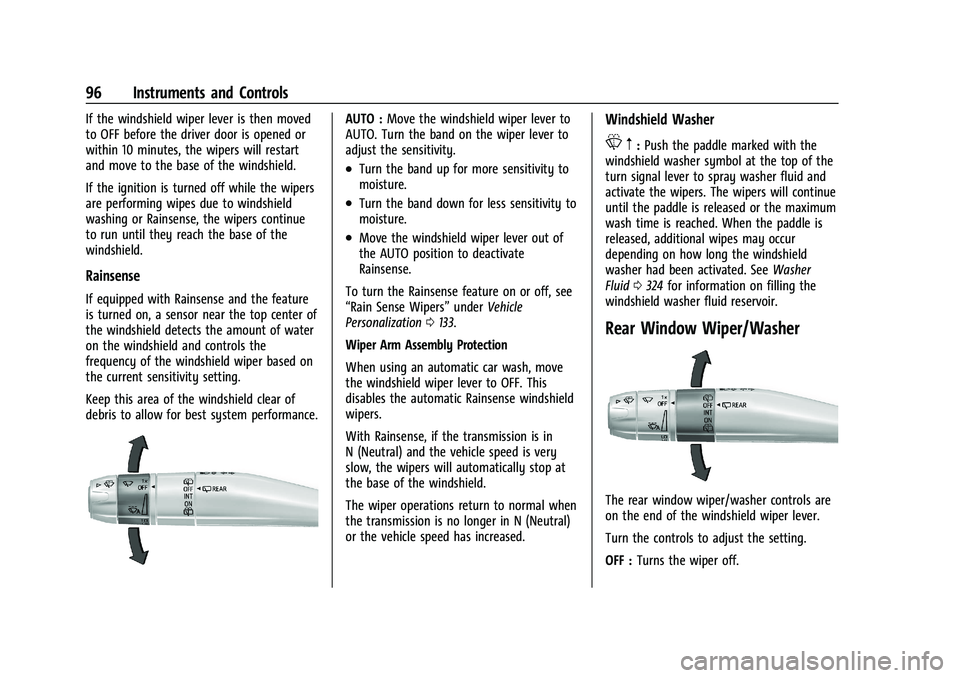
Rear Window Wiper/Washer
The rear window wiper/washer controls are
on the end of the windshield wiper lever.
Turn the controls to adjust the setting.
OFF : Turns the wiper off.
Page 98 of 438
Chevrolet Tahoe/Suburban Owner Manual (GMNA-Localizing-U.S./Canada/
Mexico-15555985) - 2022 - CRC - 12/3/21
Instruments and Controls 97
INT :Turns on the rear wiper with a delay
between wipes.
ON : Turns on the rear wiper.
L:Push the windshield wiper lever
forward to spray washer fluid on the rear
window. The wipers will clear the rear
window and either stop or return to your
preset speed. For more washer cycles, push
and hold the lever.
The rear window wiper/washer will not
operate if the liftgate is open or ajar. If the
liftgate is opened while the rear wiper is on,
the wiper returns to the parked position and
stops.
See “Rear Camera Washer” later in this
section.
Rear Wiper Arm Assembly Protection
When using an automatic car wash, move
the rear wiper control to OFF to disable the
rear wiper. In some vehicles, if the
transmission is in N (Neutral) and the
vehicle speed is very slow, the rear wiper
will automatically park under the rear
spoiler.
The wiper operations return to normal when
the transmission is no longer in N (Neutral)
or the vehicle speed has increased. Auto Wipe in Reverse Gear
If the rear wiper control is off, the rear
wiper will automatically operate
continuously when the transmission is in
R (Reverse), and the front windshield wiper
is performing low or high speed wipes.
If the rear wiper control is off, the
transmission is in R (Reverse), and the front
windshield wiper is performing INT wipes,
then the rear wiper automatically performs
INT wipes.
This feature can be turned on or off. See
Vehicle Personalization
0133.
The windshield washer reservoir is used for
the windshield, rear window, and rear mirror
camera, if equipped. See Rear Camera Mirror
0 28. Check the fluid level in the reservoir if
either washer is not working. See Washer
Fluid 0324.
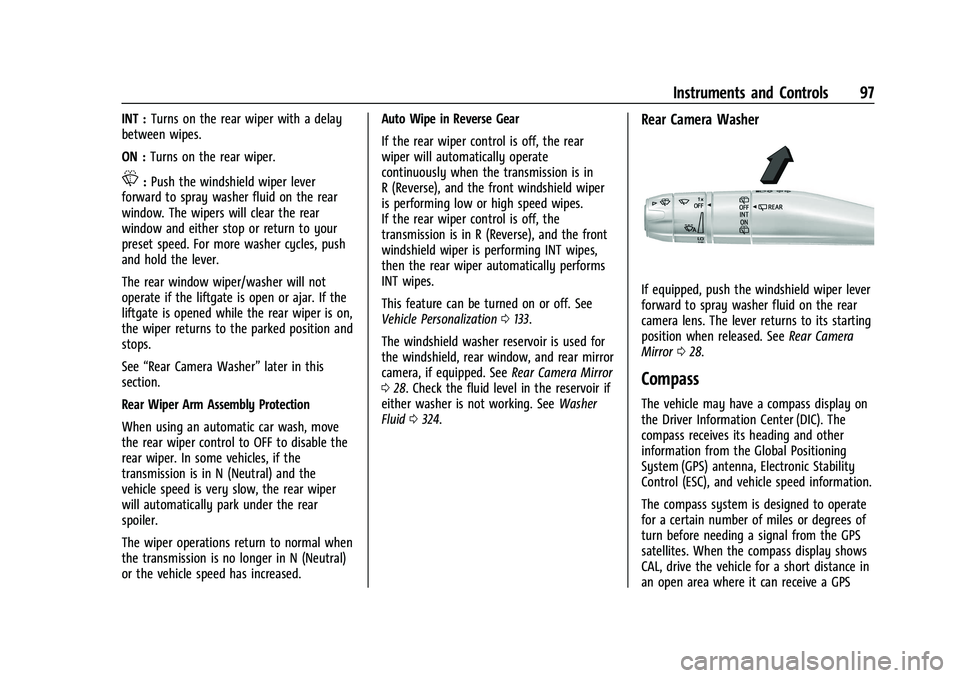
Rear Camera Washer
If equipped, push the windshield wiper lever
forward to spray washer fluid on the rear
camera lens. The lever returns to its starting
position when released. See Rear Camera
Mirror 028.
Compass
The vehicle may have a compass display on
the Driver Information Center (DIC). The
compass receives its heading and other
information from the Global Positioning
System (GPS) antenna, Electronic Stability
Control (ESC), and vehicle speed information.
The compass system is designed to operate
for a certain number of miles or degrees of
turn before needing a signal from the GPS
satellites. When the compass display shows
CAL, drive the vehicle for a short distance in
an open area where it can receive a GPS
Page 105 of 438
Chevrolet Tahoe/Suburban Owner Manual (GMNA-Localizing-U.S./Canada/
Mexico-15555985) - 2022 - CRC - 12/3/21
104 Instruments and Controls
thumbwheel while the desired item is
highlighted. A selected mark will be
displayed next to the selected item.
Info Page Options :Press the thumbwheel
while Info Page Options is displayed to
enter and select the items to be displayed
in the Info app. A selected mark will be
displayed next to the selected item.
Home : Press the thumbwheel to select the
available elements to display. Not all
elements will be available on all vehicles:
Speedometer, Speed Sign, Time, and Fuel
Range.
Speed Warning : Allows the driver to set a
speed that they do not want to exceed. To
set the Speed Warning, press the
thumbwheel when Speed Warning is
displayed, or press the thumbwheel on the
main view to set the speed value. Scroll to
adjust the value. Press the thumbwheel to
set the speed. Once the speed is set, this
feature can be turned off by pressing the
thumbwheel while viewing this page. If the
selected speed limit is exceeded, a pop-up
warning is displayed with a chime.
Software Information : Press the
thumbwheel while Software Information is
highlighted to display open source software
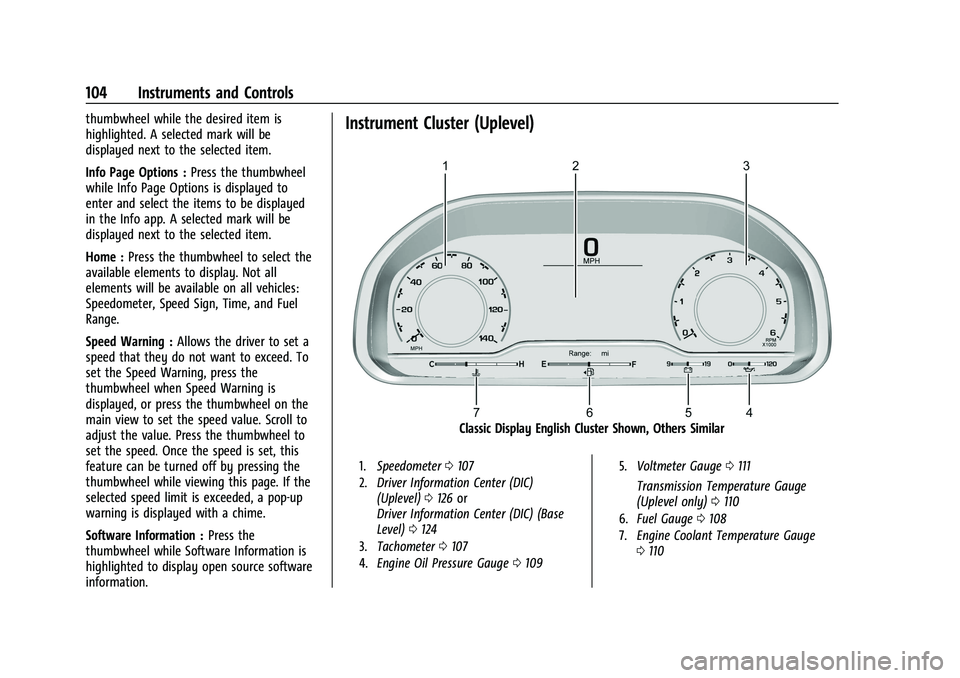
information.Instrument Cluster (Uplevel)
Classic Display English Cluster Shown, Others Similar
1. Speedometer 0107
2. Driver Information Center (DIC)
(Uplevel) 0126 or
Driver Information Center (DIC) (Base
Level) 0124
3. Tachometer 0107
4. Engine Oil Pressure Gauge 0109 5.
Voltmeter Gauge 0111
Transmission Temperature Gauge
(Uplevel only) 0110
6. Fuel Gauge 0108
7. Engine Coolant Temperature Gauge
0110
Page 107 of 438
Chevrolet Tahoe/Suburban Owner Manual (GMNA-Localizing-U.S./Canada/
Mexico-15555985) - 2022 - CRC - 12/3/21
106 Instruments and Controls
Tire Pressure :Shows the approximate
pressures of all four tires. Tire pressure is
displayed in either kilopascal (kPa) or in
pounds per square inch (psi). If the pressure
is low, the value for that tire is shown in
amber.
Average Fuel Economy : Displays average
fuel economy, the best fuel economy over
the selected distance, and a bar graph
showing instantaneous fuel economy
Press the thumbwheel to change the
selected distance. Press and hold the
thumbwheel while this display is active to
reset the best fuel economy and average
fuel economy. This display can also be reset
by selecting reset in the menu
Transmission Fluid Temperature : Shows the
temperature of the automatic transmission
fluid in either degrees Celsius (°C) or degrees
Fahrenheit (°F).
Drive Mode : Displays the state of the drive
mode, ride height, and transfer case. This
info is only available as a right side option
and is the default selection for the
right side.
None : Displays the info area as empty. Audio
Browse music, select from the favorites,
or change the audio source. Use the
thumbwheel to change the station or go to
the next or previous track.
Navigation
If there is an active route, the Turn-by-Turn
directions will appear on the Navigation
Page, if there is no active route a compass
will be displayed.
Phone
If there is no active phone call, view recent
calls, or scroll through contacts. During an
active call, mute the phone or switch to
handset operation.
Options
Use the thumbwheel to scroll through items
in the Options menu.
Display Layout :
Choose Classic, Progressive,
Digital, and Clean layout by pressing the
thumbwheel while the desired item is
highlighted. Exit the Layout menu by
pressing
o. Left/Right Side Info :
Press the thumbwheel
to select the items to be displayed in the
display areas. See "Left/Right Side Info"
previously in this section.
Lower Gauges : Choose one of three gauge
configurations by pressing the thumbwheel
while the desired item is highlighted. The
selected configuration will be displayed at
the bottom of the display.
Maximum displays fuel level, coolant
temperature, engine oil pressure, and
battery voltage. Transmission fluid
temperature displays instead of battery
voltage while in Tow Haul mode.
Medium displays fuel level, and coolant
temperature.
Minimum displays only the fuel level.
Info Page Options : Press the thumbwheel
to select the items to be displayed in the
Info app. See Driver Information Center (DIC)
(Uplevel) 0126 or
Driver Information Center (DIC) (Base Level)
0 124.
Units : Choose US or metric units by
pressing the thumbwheel while the desired
item is highlighted.
Page 111 of 438
Chevrolet Tahoe/Suburban Owner Manual (GMNA-Localizing-U.S./Canada/
Mexico-15555985) - 2022 - CRC - 12/3/21
110 Instruments and Controls
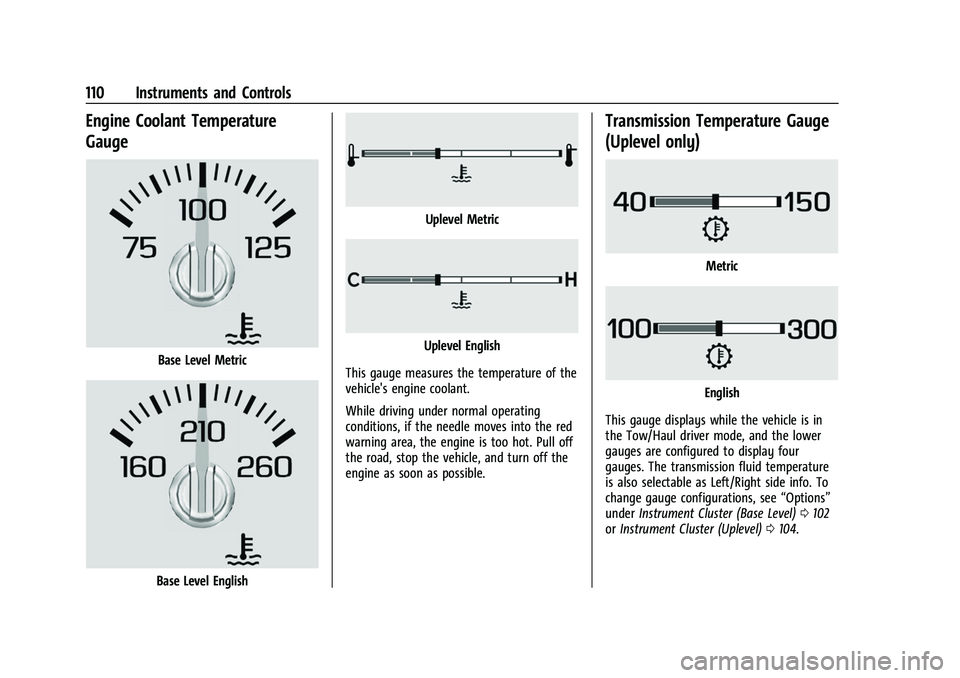
Engine Coolant Temperature
Gauge
Base Level Metric
Base Level English
Uplevel Metric
Uplevel English
This gauge measures the temperature of the
vehicle's engine coolant.
While driving under normal operating
conditions, if the needle moves into the red
warning area, the engine is too hot. Pull off
the road, stop the vehicle, and turn off the
engine as soon as possible.
Transmission Temperature Gauge
(Uplevel only)
Metric
English
This gauge displays while the vehicle is in
the Tow/Haul driver mode, and the lower
gauges are configured to display four
gauges. The transmission fluid temperature
is also selectable as Left/Right side info. To
change gauge configurations, see “Options”
under Instrument Cluster (Base Level) 0102
or Instrument Cluster (Uplevel) 0104.