Wiper CHEVROLET SUBURBAN 2023 Owners Manual
[x] Cancel search | Manufacturer: CHEVROLET, Model Year: 2023, Model line: SUBURBAN, Model: CHEVROLET SUBURBAN 2023Pages: 443, PDF Size: 18.73 MB
Page 7 of 443
Chevrolet Tahoe/Suburban Owner Manual (GMNA-Localizing-U.S./Canada/
Mexico-16416971) - 2023 - CRC - 4/25/22
6 Introduction
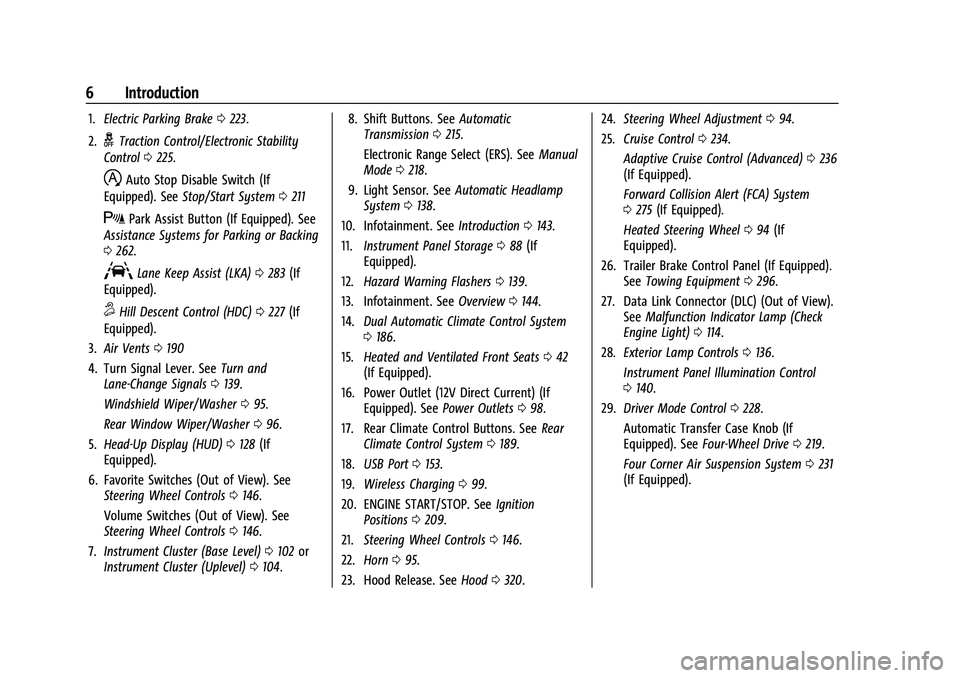
1.Electric Parking Brake 0223.
2.
gTraction Control/Electronic Stability
Control 0225.
hAuto Stop Disable Switch (If
Equipped). See Stop/Start System 0211
XPark Assist Button (If Equipped). See
Assistance Systems for Parking or Backing
0 262.
ALane Keep Assist (LKA) 0283 (If
Equipped).
5Hill Descent Control (HDC) 0227 (If
Equipped).
3. Air Vents 0190
4. Turn Signal Lever. See Turn and
Lane-Change Signals 0139.
Windshield Wiper/Washer 095.
Rear Window Wiper/Washer 096.
5. Head-Up Display (HUD) 0128 (If
Equipped).
6. Favorite Switches (Out of View). See Steering Wheel Controls 0146.
Volume Switches (Out of View). See
Steering Wheel Controls 0146.
7. Instrument Cluster (Base Level) 0102 or
Instrument Cluster (Uplevel) 0104. 8. Shift Buttons. See
Automatic
Transmission 0215.
Electronic Range Select (ERS). See Manual
Mode 0218.
9. Light Sensor. See Automatic Headlamp
System 0138.
10. Infotainment. See Introduction0143.
11. Instrument Panel Storage 088 (If
Equipped).
12. Hazard Warning Flashers 0139.
13. Infotainment. See Overview0144.
14. Dual Automatic Climate Control System
0186.
15. Heated and Ventilated Front Seats 042
(If Equipped).
16. Power Outlet (12V Direct Current) (If Equipped). See Power Outlets098.
17. Rear Climate Control Buttons. See Rear
Climate Control System 0189.
18. USB Port 0153.
19. Wireless Charging 099.
20. ENGINE START/STOP. See Ignition
Positions 0209.
21. Steering Wheel Controls 0146.
22. Horn 095.
23. Hood Release. See Hood0320. 24.
Steering Wheel Adjustment 094.
25. Cruise Control 0234.
Adaptive Cruise Control (Advanced) 0236
(If Equipped).
Forward Collision Alert (FCA) System
0 275 (If Equipped).
Heated Steering Wheel 094 (If
Equipped).
26. Trailer Brake Control Panel (If Equipped). SeeTowing Equipment 0296.
27. Data Link Connector (DLC) (Out of View). SeeMalfunction Indicator Lamp (Check
Engine Light) 0114.
28. Exterior Lamp Controls 0136.
Instrument Panel Illumination Control
0 140.
29. Driver Mode Control 0228.
Automatic Transfer Case Knob (If
Equipped). See Four-Wheel Drive 0219.
Four Corner Air Suspension System 0231
(If Equipped).
Page 19 of 443
Chevrolet Tahoe/Suburban Owner Manual (GMNA-Localizing-U.S./Canada/
Mexico-16416971) - 2023 - CRC - 4/25/22
18 Keys, Doors, and Windows
Doors
Liftgate
{Warning
Exhaust gases can enter the vehicle if it
is driven with the liftgate or trunk/hatch
open, or with any objects that pass
through the seal between the body and
the trunk/hatch or liftgate. Engine
exhaust contains carbon monoxide (CO)
which cannot be seen or smelled. It can
cause unconsciousness and even death.
If the vehicle must be driven with the
liftgate or trunk/hatch open:
.Close all of the windows.
.Fully open the air outlets on or under
the instrument panel.
.Adjust the climate control system to a
setting that brings in only outside air
and set the fan speed to the highest
setting. See“Climate Control Systems”
in the Index.
(Continued)
Warning (Continued)
.If the vehicle is equipped with a
power liftgate, disable the power
liftgate function.
See Engine Exhaust 0214.
Caution
To avoid damage to the liftgate or
liftgate glass, make sure the area above
and behind the liftgate is clear before
opening it.
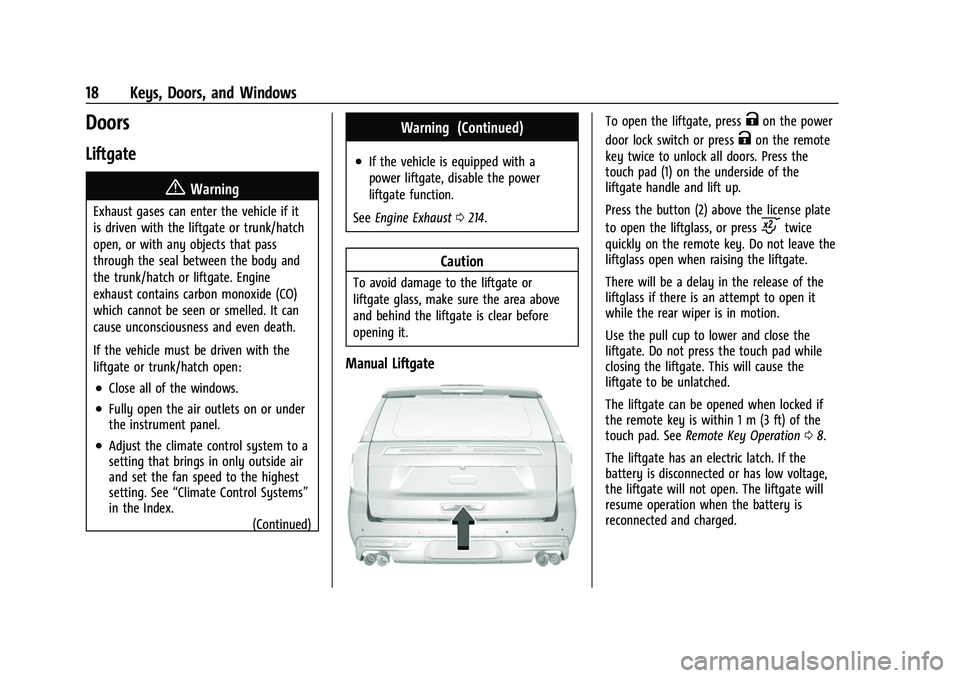
Manual Liftgate
To open the liftgate, pressKon the power
door lock switch or press
Kon the remote
key twice to unlock all doors. Press the
touch pad (1) on the underside of the
liftgate handle and lift up.
Press the button (2) above the license plate
to open the liftglass, or press
ctwice
quickly on the remote key. Do not leave the
liftglass open when raising the liftgate.
There will be a delay in the release of the
liftglass if there is an attempt to open it
while the rear wiper is in motion.
Use the pull cup to lower and close the
liftgate. Do not press the touch pad while
closing the liftgate. This will cause the
liftgate to be unlatched.
The liftgate can be opened when locked if
the remote key is within 1 m (3 ft) of the
touch pad. See Remote Key Operation 08.
The liftgate has an electric latch. If the
battery is disconnected or has low voltage,
the liftgate will not open. The liftgate will
resume operation when the battery is
reconnected and charged.
Page 32 of 443
Chevrolet Tahoe/Suburban Owner Manual (GMNA-Localizing-U.S./Canada/
Mexico-16416971) - 2023 - CRC - 4/25/22
Keys, Doors, and Windows 31
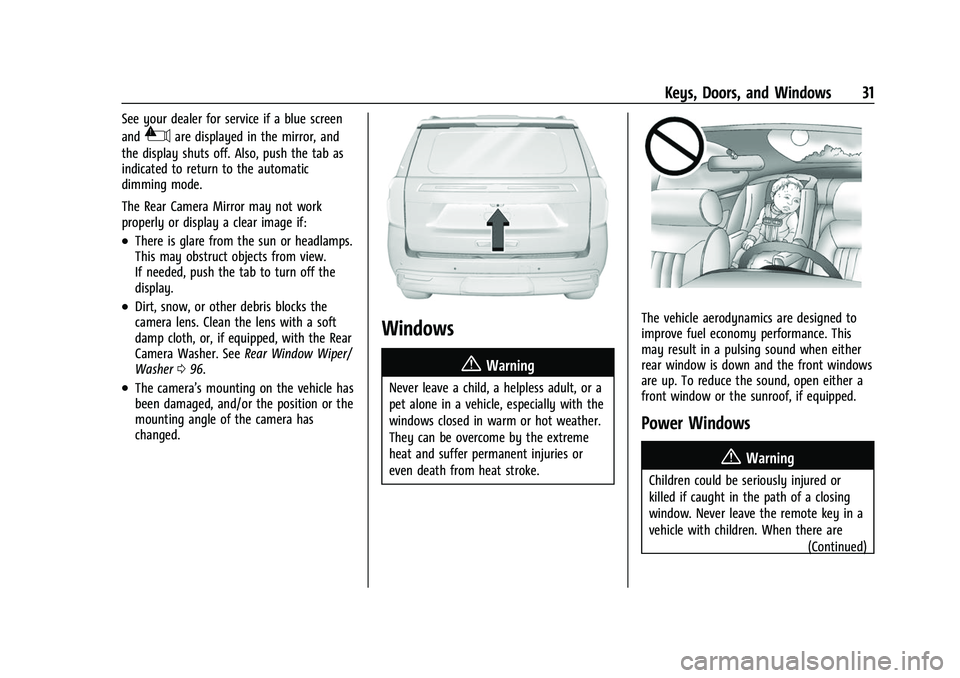
See your dealer for service if a blue screen
and
3are displayed in the mirror, and
the display shuts off. Also, push the tab as
indicated to return to the automatic
dimming mode.
The Rear Camera Mirror may not work
properly or display a clear image if:
.There is glare from the sun or headlamps.
This may obstruct objects from view.
If needed, push the tab to turn off the
display.
.Dirt, snow, or other debris blocks the
camera lens. Clean the lens with a soft
damp cloth, or, if equipped, with the Rear
Camera Washer. See Rear Window Wiper/
Washer 096.
.The camera’s mounting on the vehicle has
been damaged, and/or the position or the
mounting angle of the camera has
changed.
Windows
{
Warning
Never leave a child, a helpless adult, or a
pet alone in a vehicle, especially with the
windows closed in warm or hot weather.
They can be overcome by the extreme
heat and suffer permanent injuries or
even death from heat stroke.
The vehicle aerodynamics are designed to
improve fuel economy performance. This
may result in a pulsing sound when either
rear window is down and the front windows
are up. To reduce the sound, open either a
front window or the sunroof, if equipped.
Power Windows
{Warning
Children could be seriously injured or
killed if caught in the path of a closing
window. Never leave the remote key in a
vehicle with children. When there are (Continued)
Page 94 of 443
Chevrolet Tahoe/Suburban Owner Manual (GMNA-Localizing-U.S./Canada/
Mexico-16416971) - 2023 - CRC - 4/25/22
Instruments and Controls 93
Instruments and Controls
Controls
Steering Wheel Adjustment . . . . . . . . . . . . 94
Heated Steering Wheel . . . . . . . . . . . . . . . . . 94
Horn . . . . . . . . . . . . . . . . . . . . . . . . . . . . . . . . . . . 95
Windshield Wiper/Washer . . . . . . . . . . . . . . 95
Rear Window Wiper/Washer . . . . . . . . . . . 96
Compass . . . . . . . . . . . . . . . . . . . . . . . . . . . . . . . 97
Clock . . . . . . . . . . . . . . . . . . . . . . . . . . . . . . . . . . . 97
Power Outlets . . . . . . . . . . . . . . . . . . . . . . . . . . 98
Wireless Charging . . . . . . . . . . . . . . . . . . . . . . 99
Warning Lights, Gauges, and Indicators
Warning Lights, Gauges, andIndicators . . . . . . . . . . . . . . . . . . . . . . . . . . . . 101
Instrument Cluster (Base Level) . . . . . . . . 102
Instrument Cluster (Uplevel) . . . . . . . . . . . 104
Speedometer . . . . . . . . . . . . . . . . . . . . . . . . . . 107
Odometer . . . . . . . . . . . . . . . . . . . . . . . . . . . . . 107
Trip Odometer . . . . . . . . . . . . . . . . . . . . . . . . . 107
Tachometer . . . . . . . . . . . . . . . . . . . . . . . . . . . . 107
Fuel Gauge . . . . . . . . . . . . . . . . . . . . . . . . . . . . 107
Engine Oil Pressure Gauge . . . . . . . . . . . . 108
Engine Coolant Temperature Gauge . . . 109
Transmission Temperature Gauge (Uplevel only) . . . . . . . . . . . . . . . . . . . . . . . . 110
Voltmeter Gauge . . . . . . . . . . . . . . . . . . . . . . 110
Seat Belt Reminders . . . . . . . . . . . . . . . . . . . . 111
Airbag Readiness Light . . . . . . . . . . . . . . . . . 112 Passenger Airbag Status Indicator . . . . . . 113
Charging System Light . . . . . . . . . . . . . . . . . 113
Malfunction Indicator Lamp (Check
Engine Light) . . . . . . . . . . . . . . . . . . . . . . . . . 114
Brake System Warning Light . . . . . . . . . . . 115
Electric Parking Brake Light . . . . . . . . . . . . 116
Service Electric Parking Brake Light . . . . 116
Antilock Brake System (ABS) Warning
Light . . . . . . . . . . . . . . . . . . . . . . . . . . . . . . . . . 116
Four-Wheel-Drive Light . . . . . . . . . . . . . . . . . 116
Hill Descent Control Light . . . . . . . . . . . . . . 117
Lane Keep Assist (LKA) Light . . . . . . . . . . . 117
Automatic Emergency Braking (AEB) Disabled Light . . . . . . . . . . . . . . . . . . . . . . . . 117
Vehicle Ahead Indicator . . . . . . . . . . . . . . . . 117
Pedestrian Ahead Indicator . . . . . . . . . . . . . 118
Traction Off Light . . . . . . . . . . . . . . . . . . . . . . 118
StabiliTrak OFF Light . . . . . . . . . . . . . . . . . . . 118
Traction Control System (TCS)/ StabiliTrak Light . . . . . . . . . . . . . . . . . . . . . . 118
Engine Coolant Temperature Warning Light . . . . . . . . . . . . . . . . . . . . . . . . . . . . . . . . . 119
Driver Mode Control Light . . . . . . . . . . . . . 119
Four Corner Air Suspension Light . . . . . . 120
Tire Pressure Light . . . . . . . . . . . . . . . . . . . . . 121
Engine Oil Pressure Light . . . . . . . . . . . . . . . 121
Low Fuel Warning Light . . . . . . . . . . . . . . . . 122
Security Light . . . . . . . . . . . . . . . . . . . . . . . . . . 122
High-Beam On Light . . . . . . . . . . . . . . . . . . . 122
Lamps On Reminder . . . . . . . . . . . . . . . . . . . 122 Cruise Control Light . . . . . . . . . . . . . . . . . . . . 122
Door Ajar Light . . . . . . . . . . . . . . . . . . . . . . . . 123
Information Displays
Driver Information Center (DIC) (Base
Level) . . . . . . . . . . . . . . . . . . . . . . . . . . . . . . . . 123
Driver Information Center (DIC) (Uplevel) . . . . . . . . . . . . . . . . . . . . . . . . . . . . . 126
Head-Up Display (HUD) . . . . . . . . . . . . . . . . 128
Vehicle Messages
Vehicle Messages . . . . . . . . . . . . . . . . . . . . . . 132
Engine Power Messages . . . . . . . . . . . . . . . 132
Vehicle Speed Messages . . . . . . . . . . . . . . . 132
Universal Remote System
Universal Remote System . . . . . . . . . . . . . . 132
Universal Remote System Programming . . . . . . . . . . . . . . . . . . . . . . . . 133
Universal Remote System Operation . . . 134
Page 96 of 443
Chevrolet Tahoe/Suburban Owner Manual (GMNA-Localizing-U.S./Canada/
Mexico-16416971) - 2023 - CRC - 4/25/22
Instruments and Controls 95
If equipped with auto heated seats, the
heated steering wheel will turn on when the
auto heated seat is activated. The heated
steering wheel indicator will display the
state of the steering wheel heat.
SeeHeated and Ventilated Front Seats 042.
Horn
To sound the horn, pressaon the
steering wheel.
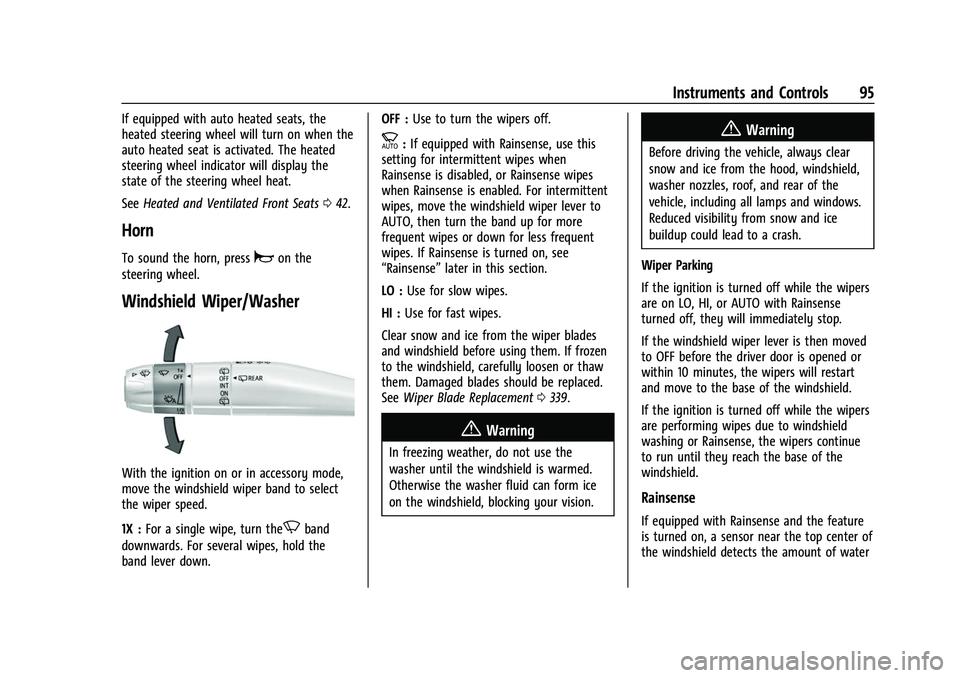
Windshield Wiper/Washer
With the ignition on or in accessory mode,
move the windshield wiper band to select
the wiper speed.
1X : For a single wipe, turn the
Nband
downwards. For several wipes, hold the
band lever down. OFF :
Use to turn the wipers off.
c:If equipped with Rainsense, use this
setting for intermittent wipes when
Rainsense is disabled, or Rainsense wipes
when Rainsense is enabled. For intermittent
wipes, move the windshield wiper lever to
AUTO, then turn the band up for more
frequent wipes or down for less frequent
wipes. If Rainsense is turned on, see
“Rainsense” later in this section.
LO : Use for slow wipes.
HI : Use for fast wipes.
Clear snow and ice from the wiper blades
and windshield before using them. If frozen
to the windshield, carefully loosen or thaw
them. Damaged blades should be replaced.
See Wiper Blade Replacement 0339.
{Warning
In freezing weather, do not use the
washer until the windshield is warmed.
Otherwise the washer fluid can form ice
on the windshield, blocking your vision.
{Warning
Before driving the vehicle, always clear
snow and ice from the hood, windshield,
washer nozzles, roof, and rear of the
vehicle, including all lamps and windows.
Reduced visibility from snow and ice
buildup could lead to a crash.
Wiper Parking
If the ignition is turned off while the wipers
are on LO, HI, or AUTO with Rainsense
turned off, they will immediately stop.
If the windshield wiper lever is then moved
to OFF before the driver door is opened or
within 10 minutes, the wipers will restart
and move to the base of the windshield.
If the ignition is turned off while the wipers
are performing wipes due to windshield
washing or Rainsense, the wipers continue
to run until they reach the base of the
windshield.
Rainsense
If equipped with Rainsense and the feature
is turned on, a sensor near the top center of
the windshield detects the amount of water
Page 97 of 443
Chevrolet Tahoe/Suburban Owner Manual (GMNA-Localizing-U.S./Canada/
Mexico-16416971) - 2023 - CRC - 4/25/22
96 Instruments and Controls
on the windshield and controls the
frequency of the windshield wiper based on
the current sensitivity setting.
Keep this area of the windshield clear of
debris to allow for best system performance.
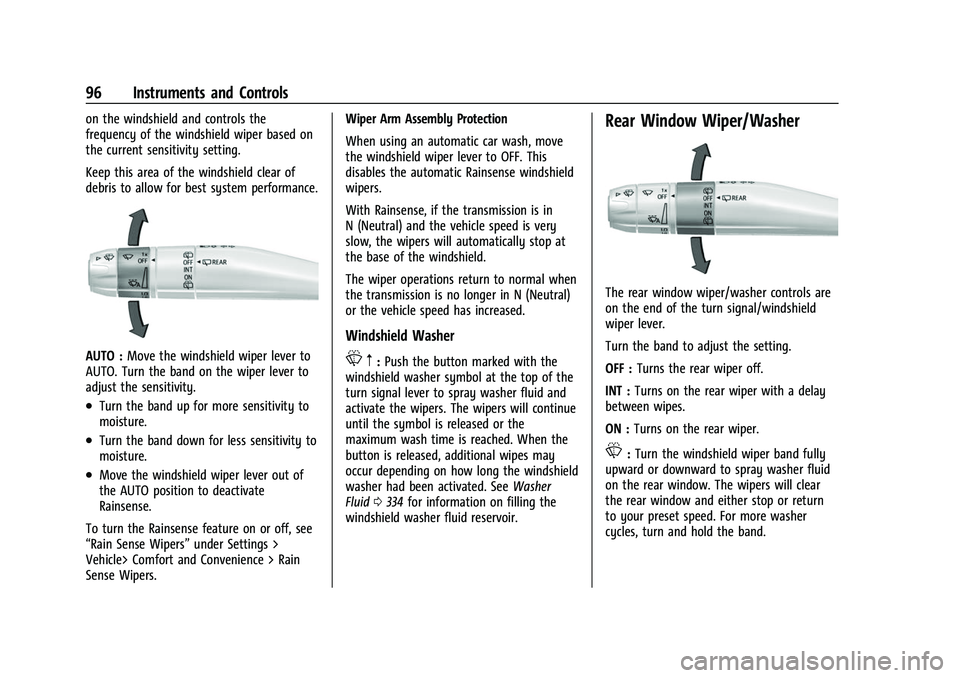
AUTO :Move the windshield wiper lever to
AUTO. Turn the band on the wiper lever to
adjust the sensitivity.
.Turn the band up for more sensitivity to
moisture.
.Turn the band down for less sensitivity to
moisture.
.Move the windshield wiper lever out of
the AUTO position to deactivate
Rainsense.
To turn the Rainsense feature on or off, see
“Rain Sense Wipers” under Settings >
Vehicle> Comfort and Convenience > Rain
Sense Wipers. Wiper Arm Assembly Protection
When using an automatic car wash, move
the windshield wiper lever to OFF. This
disables the automatic Rainsense windshield
wipers.
With Rainsense, if the transmission is in
N (Neutral) and the vehicle speed is very
slow, the wipers will automatically stop at
the base of the windshield.
The wiper operations return to normal when
the transmission is no longer in N (Neutral)
or the vehicle speed has increased.
Windshield Washer
L
m:Push the button marked with the
windshield washer symbol at the top of the
turn signal lever to spray washer fluid and
activate the wipers. The wipers will continue
until the symbol is released or the
maximum wash time is reached. When the
button is released, additional wipes may
occur depending on how long the windshield
washer had been activated. See Washer
Fluid 0334 for information on filling the
windshield washer fluid reservoir.
Rear Window Wiper/Washer
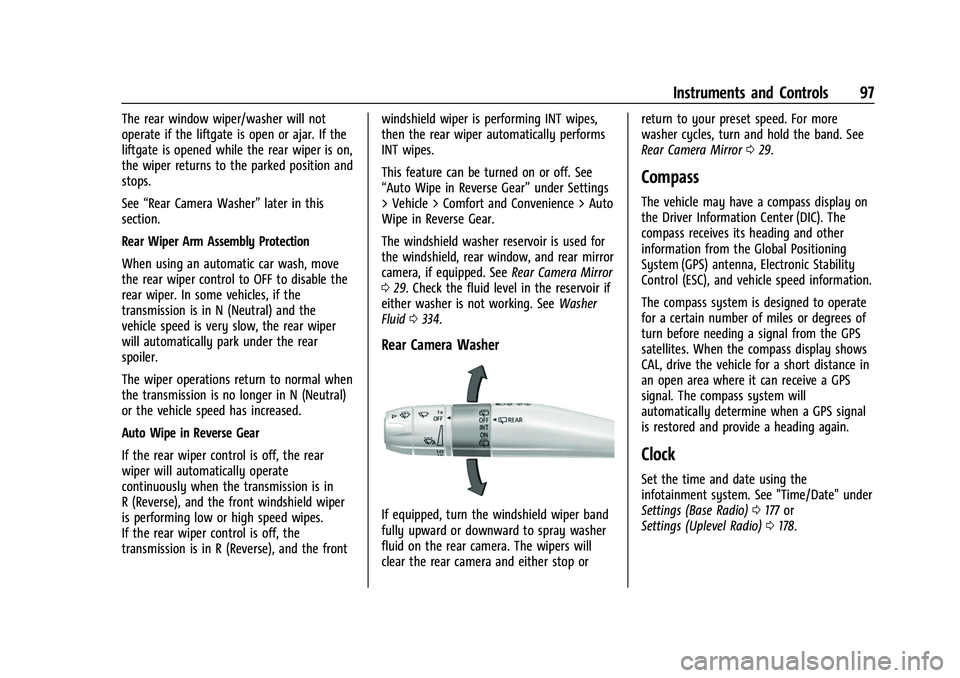
The rear window wiper/washer controls are
on the end of the turn signal/windshield
wiper lever.
Turn the band to adjust the setting.
OFF : Turns the rear wiper off.
INT : Turns on the rear wiper with a delay
between wipes.
ON : Turns on the rear wiper.
L:Turn the windshield wiper band fully
upward or downward to spray washer fluid
on the rear window. The wipers will clear
the rear window and either stop or return
to your preset speed. For more washer
cycles, turn and hold the band.
Page 98 of 443
Chevrolet Tahoe/Suburban Owner Manual (GMNA-Localizing-U.S./Canada/
Mexico-16416971) - 2023 - CRC - 4/25/22
Instruments and Controls 97
The rear window wiper/washer will not
operate if the liftgate is open or ajar. If the
liftgate is opened while the rear wiper is on,
the wiper returns to the parked position and
stops.
See“Rear Camera Washer” later in this
section.
Rear Wiper Arm Assembly Protection
When using an automatic car wash, move
the rear wiper control to OFF to disable the
rear wiper. In some vehicles, if the
transmission is in N (Neutral) and the
vehicle speed is very slow, the rear wiper
will automatically park under the rear
spoiler.
The wiper operations return to normal when
the transmission is no longer in N (Neutral)
or the vehicle speed has increased.
Auto Wipe in Reverse Gear
If the rear wiper control is off, the rear
wiper will automatically operate
continuously when the transmission is in
R (Reverse), and the front windshield wiper
is performing low or high speed wipes.
If the rear wiper control is off, the
transmission is in R (Reverse), and the front windshield wiper is performing INT wipes,
then the rear wiper automatically performs
INT wipes.
This feature can be turned on or off. See
“Auto Wipe in Reverse Gear”
under Settings
> Vehicle > Comfort and Convenience > Auto
Wipe in Reverse Gear.
The windshield washer reservoir is used for
the windshield, rear window, and rear mirror
camera, if equipped. See Rear Camera Mirror
0 29. Check the fluid level in the reservoir if
either washer is not working. See Washer
Fluid 0334.
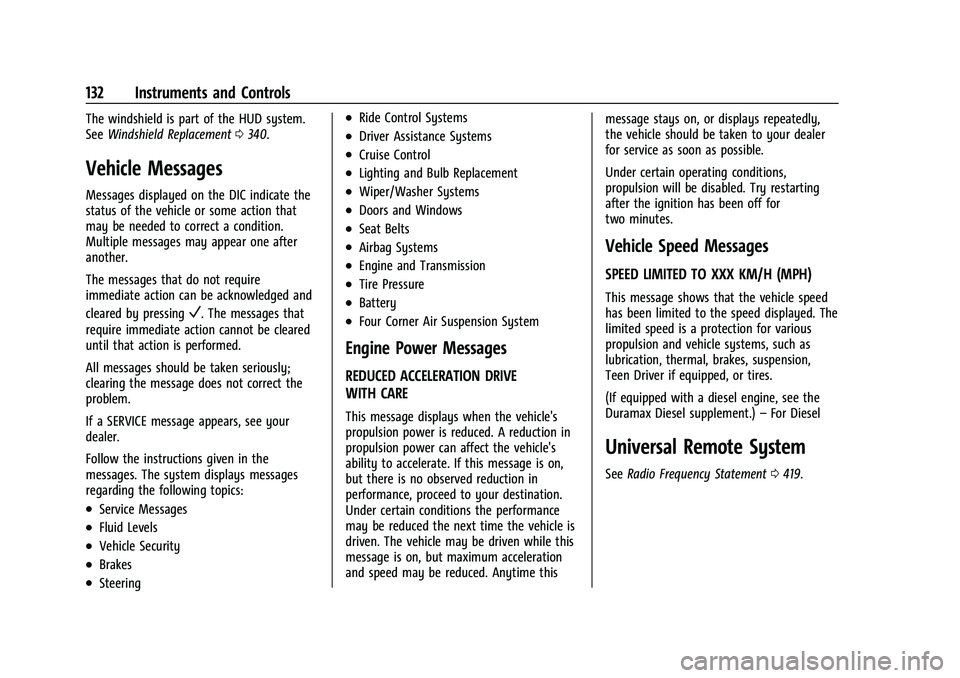
Rear Camera Washer
If equipped, turn the windshield wiper band
fully upward or downward to spray washer
fluid on the rear camera. The wipers will
clear the rear camera and either stop or return to your preset speed. For more
washer cycles, turn and hold the band. See
Rear Camera Mirror
029.
Compass
The vehicle may have a compass display on
the Driver Information Center (DIC). The
compass receives its heading and other
information from the Global Positioning
System (GPS) antenna, Electronic Stability
Control (ESC), and vehicle speed information.
The compass system is designed to operate
for a certain number of miles or degrees of
turn before needing a signal from the GPS
satellites. When the compass display shows
CAL, drive the vehicle for a short distance in
an open area where it can receive a GPS
signal. The compass system will
automatically determine when a GPS signal
is restored and provide a heading again.
Clock
Set the time and date using the
infotainment system. See "Time/Date" under
Settings (Base Radio) 0177 or
Settings (Uplevel Radio) 0178.
Page 133 of 443
Chevrolet Tahoe/Suburban Owner Manual (GMNA-Localizing-U.S./Canada/
Mexico-16416971) - 2023 - CRC - 4/25/22
132 Instruments and Controls
The windshield is part of the HUD system.
SeeWindshield Replacement 0340.
Vehicle Messages
Messages displayed on the DIC indicate the
status of the vehicle or some action that
may be needed to correct a condition.
Multiple messages may appear one after
another.
The messages that do not require
immediate action can be acknowledged and
cleared by pressing
V. The messages that
require immediate action cannot be cleared
until that action is performed.
All messages should be taken seriously;
clearing the message does not correct the
problem.
If a SERVICE message appears, see your
dealer.
Follow the instructions given in the
messages. The system displays messages
regarding the following topics:
.Service Messages
.Fluid Levels
.Vehicle Security
.Brakes
.Steering
.Ride Control Systems
.Driver Assistance Systems
.Cruise Control
.Lighting and Bulb Replacement
.Wiper/Washer Systems
.Doors and Windows
.Seat Belts
.Airbag Systems
.Engine and Transmission
.Tire Pressure
.Battery
.Four Corner Air Suspension System
Engine Power Messages
REDUCED ACCELERATION DRIVE
WITH CARE
This message displays when the vehicle's
propulsion power is reduced. A reduction in
propulsion power can affect the vehicle's
ability to accelerate. If this message is on,
but there is no observed reduction in
performance, proceed to your destination.
Under certain conditions the performance
may be reduced the next time the vehicle is
driven. The vehicle may be driven while this
message is on, but maximum acceleration
and speed may be reduced. Anytime this message stays on, or displays repeatedly,
the vehicle should be taken to your dealer
for service as soon as possible.
Under certain operating conditions,
propulsion will be disabled. Try restarting
after the ignition has been off for
two minutes.
Vehicle Speed Messages
SPEED LIMITED TO XXX KM/H (MPH)
This message shows that the vehicle speed
has been limited to the speed displayed. The
limited speed is a protection for various
propulsion and vehicle systems, such as
lubrication, thermal, brakes, suspension,
Teen Driver if equipped, or tires.
(If equipped with a diesel engine, see the
Duramax Diesel supplement.)
–For Diesel
Universal Remote System
See Radio Frequency Statement 0419.
Page 140 of 443
Chevrolet Tahoe/Suburban Owner Manual (GMNA-Localizing-U.S./Canada/
Mexico-16416971) - 2023 - CRC - 4/25/22
Lighting 139
delay before the automatic headlamp
system changes to the DRL. During that
delay, the instrument cluster may not be as
bright as usual. Make sure the instrument
panel brightness control is in the full bright
position. SeeInstrument Panel Illumination
Control 0140.
When it is bright enough outside, the
headlamps will turn off or may change to
Daytime Running Lamps (DRL).
The automatic headlamp system turns off
when the exterior lamp control is turned to
Oor the ignition is off.
Lights On with Wipers
If the windshield wipers are activated in
daylight with the engine on, and the
exterior lamp control is in AUTO, the
headlamps, parking lamps, and other
exterior lamps come on. The transition time
for the lamps coming on varies based on
wiper speed. When the wipers are not
operating, these lamps turn off. Move the
exterior lamp control to
Oor;to disable
this feature.
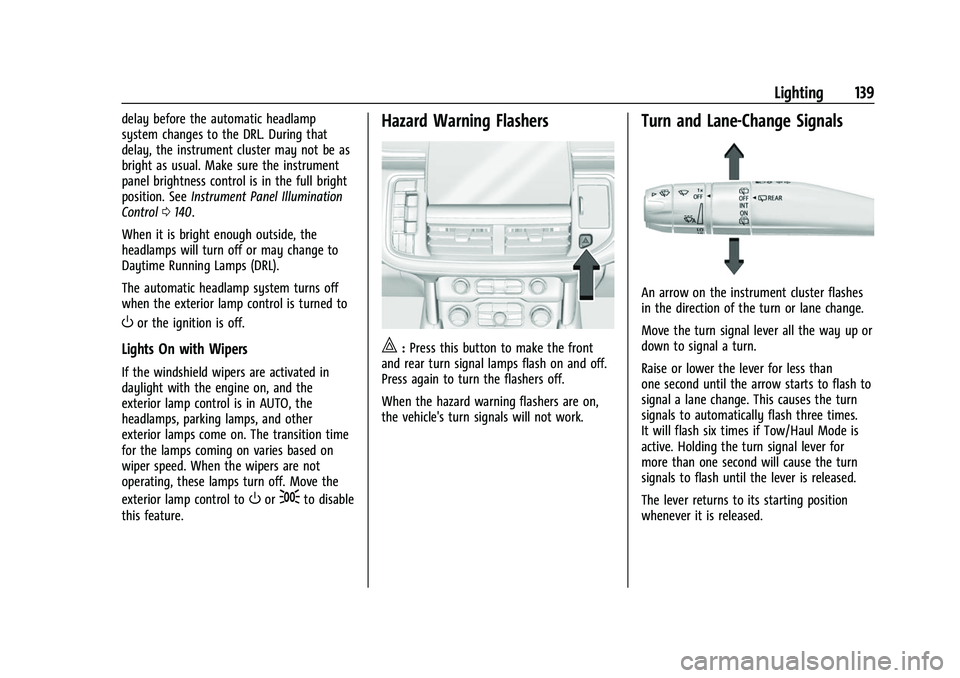
Hazard Warning Flashers
|: Press this button to make the front
and rear turn signal lamps flash on and off.
Press again to turn the flashers off.
When the hazard warning flashers are on,
the vehicle's turn signals will not work.
Turn and Lane-Change Signals
An arrow on the instrument cluster flashes
in the direction of the turn or lane change.
Move the turn signal lever all the way up or
down to signal a turn.
Raise or lower the lever for less than
one second until the arrow starts to flash to
signal a lane change. This causes the turn
signals to automatically flash three times.
It will flash six times if Tow/Haul Mode is
active. Holding the turn signal lever for
more than one second will cause the turn
signals to flash until the lever is released.
The lever returns to its starting position
whenever it is released.
Page 319 of 443
Chevrolet Tahoe/Suburban Owner Manual (GMNA-Localizing-U.S./Canada/
Mexico-16416971) - 2023 - CRC - 4/26/22
318 Vehicle Care
Vehicle Care
General Information
General Information . . . . . . . . . . . . . . . . . . . 319
California Perchlorate MaterialsRequirements . . . . . . . . . . . . . . . . . . . . . . . . 319
Accessories and Modifications . . . . . . . . . 319
Vehicle Checks
Doing Your Own Service Work . . . . . . . . . 319
Hood . . . . . . . . . . . . . . . . . . . . . . . . . . . . . . . . . . 320
Engine Compartment Overview . . . . . . . . 322
Engine Oil . . . . . . . . . . . . . . . . . . . . . . . . . . . . . 325
Engine Oil Life System . . . . . . . . . . . . . . . . 326
Automatic Transmission Fluid . . . . . . . . . . 327
Engine Air Filter Life System . . . . . . . . . . 328
Engine Air Cleaner/Filter . . . . . . . . . . . . . . . 328
Cooling System . . . . . . . . . . . . . . . . . . . . . . . 329
Engine Overheating . . . . . . . . . . . . . . . . . . . . 332
Engine Fan . . . . . . . . . . . . . . . . . . . . . . . . . . . . 334
Washer Fluid . . . . . . . . . . . . . . . . . . . . . . . . . . 334
Brakes . . . . . . . . . . . . . . . . . . . . . . . . . . . . . . . . . 335
Brake Pad Life System . . . . . . . . . . . . . . . . . 335
Brake Fluid . . . . . . . . . . . . . . . . . . . . . . . . . . . . 336
Battery - North America . . . . . . . . . . . . . . . 337
Four-Wheel Drive . . . . . . . . . . . . . . . . . . . . . . 338
Front Axle . . . . . . . . . . . . . . . . . . . . . . . . . . . . . 338
Rear Axle . . . . . . . . . . . . . . . . . . . . . . . . . . . . . . 338
Park Brake and P (Park) Mechanism Check . . . . . . . . . . . . . . . . . . . . . . . . . . . . . . . . 339 Wiper Blade Replacement . . . . . . . . . . . . . 339
Glass Replacement . . . . . . . . . . . . . . . . . . . . 340
Windshield Replacement . . . . . . . . . . . . . . 340
Gas Strut(s) . . . . . . . . . . . . . . . . . . . . . . . . . . . 340
Headlamp Aiming
Front Headlamp Aiming . . . . . . . . . . . . . . . 341
Bulb Replacement
Bulb Replacement . . . . . . . . . . . . . . . . . . . . . 341
LED Lighting . . . . . . . . . . . . . . . . . . . . . . . . . . . 341
Taillamps, Turn Signal, Stoplamps, and
Back-Up Lamps . . . . . . . . . . . . . . . . . . . . . . 342
Electrical System
Electrical System Overload . . . . . . . . . . . . 343
Fuses and Circuit Breakers . . . . . . . . . . . . . 344
Engine Compartment Fuse Block . . . . . . 345
Instrument Panel Fuse Block . . . . . . . . . . 349
Rear Compartment Fuse Block . . . . . . . . . 351
Wheels and Tires
Tires . . . . . . . . . . . . . . . . . . . . . . . . . . . . . . . . . . . 353
All-Season Tires . . . . . . . . . . . . . . . . . . . . . . . . 353
Winter Tires . . . . . . . . . . . . . . . . . . . . . . . . . . . 354
Low-Profile Tires . . . . . . . . . . . . . . . . . . . . . . . 354
All-Terrain Tires . . . . . . . . . . . . . . . . . . . . . . . . 354
Tire Sidewall Labeling . . . . . . . . . . . . . . . . . 354
Tire Designations . . . . . . . . . . . . . . . . . . . . . . 356
Tire Terminology and Definitions . . . . . . 356
Tire Pressure . . . . . . . . . . . . . . . . . . . . . . . . . . 358 Tire Pressure for High-Speed
Operation . . . . . . . . . . . . . . . . . . . . . . . . . . . 359
Tire Pressure Monitor System . . . . . . . . . 360
Tire Pressure Monitor Operation . . . . . . . 361
Tire Inspection . . . . . . . . . . . . . . . . . . . . . . . . 365
Tire Rotation . . . . . . . . . . . . . . . . . . . . . . . . . . 365
When It Is Time for New Tires . . . . . . . . 366
Buying New Tires . . . . . . . . . . . . . . . . . . . . . 367
Different Size Tires and Wheels . . . . . . . 368
Uniform Tire Quality Grading . . . . . . . . . 368
Wheel Alignment and Tire Balance . . . . 369
Wheel Replacement . . . . . . . . . . . . . . . . . . . 370
Tire Chains . . . . . . . . . . . . . . . . . . . . . . . . . . . . 370
If a Tire Goes Flat . . . . . . . . . . . . . . . . . . . . . . 371
Tire Changing . . . . . . . . . . . . . . . . . . . . . . . . . . 372
Full-Size Spare Tire . . . . . . . . . . . . . . . . . . . . 382
Jump Starting
Jump Starting - North America . . . . . . . . 383
Towing the Vehicle
Transporting a Disabled Vehicle . . . . . . . 386
Recreational Vehicle Towing . . . . . . . . . . . 387
Appearance Care
Exterior Care . . . . . . . . . . . . . . . . . . . . . . . . . . 390
Interior Care . . . . . . . . . . . . . . . . . . . . . . . . . . 394
Floor Mats . . . . . . . . . . . . . . . . . . . . . . . . . . . . 397