fuel CHEVROLET TAHOE 2003 2.G User Guide
[x] Cancel search | Manufacturer: CHEVROLET, Model Year: 2003, Model line: TAHOE, Model: CHEVROLET TAHOE 2003 2.GPages: 552, PDF Size: 3.44 MB
Page 216 of 552

Tow/Haul Mode Light
This light is displayed
when the tow/haul mode
has been activated.
For more information, see
Towing a Trailer on
page 4-65.
Fuel Gage
The fuel gage, when the ignition is on, tells you about
how much fuel you have left in your tank.
The gage will ®rst indicate empty before you are out of
fuel, and you should get more fuel as soon as possible.
When the fuel tank is low the FUEL LEVEL LOW
message will appear. See
Driver Information Center
(DIC) on page 3-53.
United StatesCanada
3-52
Page 217 of 552
Here are some situations you may experience with your
fuel gage. None of these indicate a problem with the
fuel gage.
·At the gas station, the fuel pump shuts off before
the gage reads full.
·It takes a little more or less fuel to ®ll up than the
fuel gage indicated. For example, the gage may
have indicated the tank was half full, but it actually
took a little more or less than half the tank's
capacity to ®ll the tank.
·The gage goes back to empty when you turn off the
ignition.
Low Fuel Warning Light
The light next to the fuel gage will come on brie¯y when
you are starting the engine.
This light comes on when the fuel tank is low on fuel.
To turn it off, add fuel to the fuel tank. See
Fuel on
page 5-4.
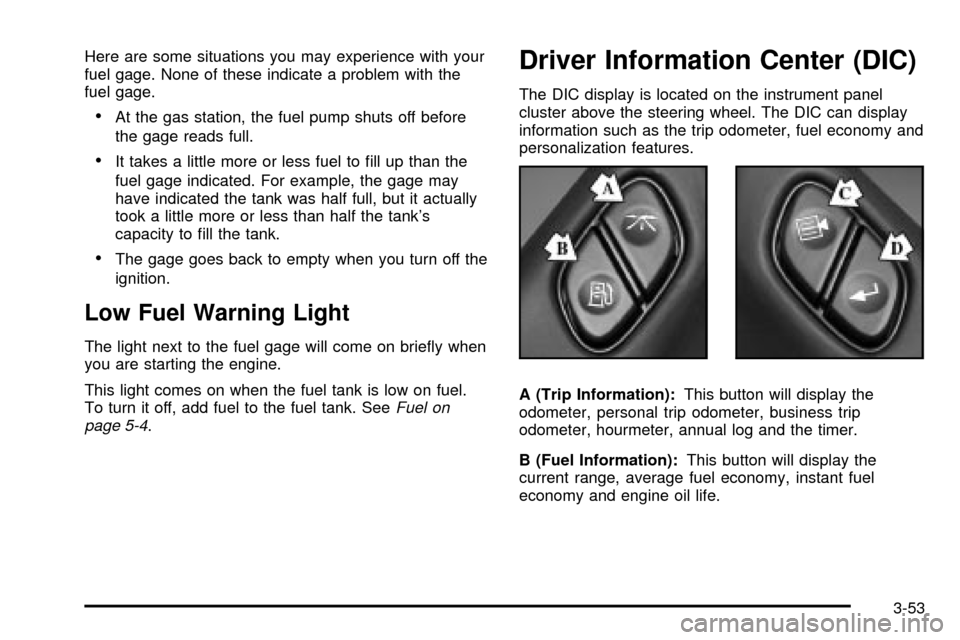
Driver Information Center (DIC)
The DIC display is located on the instrument panel
cluster above the steering wheel. The DIC can display
information such as the trip odometer, fuel economy and
personalization features.
A (Trip Information):This button will display the
odometer, personal trip odometer, business trip
odometer, hourmeter, annual log and the timer.
B (Fuel Information):This button will display the
current range, average fuel economy, instant fuel
economy and engine oil life.
3-53
Page 218 of 552

C (Personalization):This button will change personal
options available on your vehicle.
D (Select):This button resets certain functions and
turns off or acknowledges messages on the DIC.
If your vehicle is not equipped with the DIC steering
wheel buttons you will not have all of the features listed
above, and you will turn off, or acknowledge DIC
messages by using the trip odometer reset stem located
on the instrument panel cluster.
DIC Operation and Displays
The DIC comes on when the ignition is on. After a short
delay the DIC will display the current driver and the
information that was last displayed before the engine
was turned off.
If a problem is detected, a warning message will appear
on the display. Pressing any of the DIC buttons will
acknowledge any current warning or service messages.The DIC has different modes which can be accessed by
pressing the four buttons on the DIC. These buttons
are trip information, fuel information, personalization and
select. The button functions are detailed in the
following.
If your vehicle is not equipped with the DIC steering
wheel buttons not all of the features listed will be
available on your vehicle.
Trip Information Button
Use the trip information button to scroll through the
ODOMETER, PERSONAL TRIP ON/OFF, BUSINESS
TRIP ON/OFF, HOURMETER, ANNUAL LOG and
TIMER. If the personal trip and/or the business trip are
set to ON, you will also be able to scroll through
more messages. See
Personal TripandBusiness Tripnext for more information.
If your vehicle is not equipped with the DIC steering
wheel buttons you can select the trip information
by pressing the trip odometer reset stem on the
instrument panel cluster.
3-54
Page 219 of 552

Personal Trip
If the PERSONAL TRIP is on (turn it on or off by
pressing the select button) you will also be able to scroll
through the following:
·PERSONAL: XX MI Ð This shows the current
distance traveled since the last reset for the
personal trip odometer in either miles or kilometers.
·PERSONAL: XX.X GAL Ð This shows the amount
of fuel used for the personal trip.
·PERSONAL: XX.X MPG Ð This shows the amount
of fuel used for the personal trip.
·PERSONAL: AVG MPH Ð This shows the vehicle's
average speed for the personal trip.
·PERSONAL: % ANNUAL Ð This shows the ratio of
personal trip miles to annual miles as a percent.
You can reset the personal trip odometer by pressing
and holding the trip odometer reset stem.
Business Trip
If the BUSINESS TRIP is on (turn it on or off by
pressing the select button) you will also be able to scroll
through the following:
·BUSINESS: XX MI Ð This shows the current
distance traveled since the last reset for the
business trip odometer in either miles or kilometers.
·BUSINESS: XX.X MPG Ð This shows the amount
of fuel used for the business trip.
·BUSINESS: XX.X GAL Ð This shows the amount
of fuel used for the business trip.
·BUSINESS: AVG MPH Ð This shows the vehicle's
average speed for the business trip.
·BUSINESS: % ANNUAL Ð This shows the ratio of
business trip miles to annual miles as a percent.
To reset the personal or business trip information, do
the following: press and hold select button for two
seconds while in one of the personal or business trip
modes. This will reset all of the information for the
personal or business trip, or if your vehicle does not
have the DIC steering wheel control buttons, press the
reset stem on the instrument panel cluster.
You can also reset the PERSONAL: XX MI, or
BUSINESS: XX MI, while they are displayed by pressing
the reset stem on the cluster. If you press and hold
the reset stem or select button for four seconds,
the display will show the distance traveled since the last
ignition cycle for the personal or business trip.
3-55
Page 221 of 552

Fuel Information Button
Use the fuel information button to scroll through the
range, average fuel economy, instant fuel economy and
the GM Oil Life SystemŸ.
If your vehicle is not equipped with the DIC steering
wheel control buttons you will not be able to display the
fuel information.
Fuel Range
Press the fuel information button until RANGE appears
to display the remaining distance you can drive
without refueling. It's based on fuel economy and the
fuel remaining in the tank. The display will show LOW if
the fuel level is low.
The fuel economy data used to determine fuel range is
an average of recent driving conditions. As your
driving conditions change, this data is gradually updated.
Fuel range cannot be reset.
Average Fuel Economy
Press the fuel information button until AVG appears in
the display. Average fuel economy is how many
miles per gallon your vehicle is getting based on current
and past driving conditions.Press and hold the select button while AVG.ECON is
displayed to reset the average fuel economy. Average
fuel economy will then be calculated starting from
that point. If the average fuel economy is not reset, it
will be continually updated each time you drive.
Instant Fuel Economy
Press the fuel information button until INST appears in
the display. Instant fuel economy is how many miles
per gallon your vehicle is at the particular moment
in time. The instant fuel economy cannot be reset.
GM Oil Life SystemŸ
Press the fuel information button until ENGINE OIL LIFE
appears in the display. The GM Oil Life SystemŸ
shows an estimate of the oil's remaining useful life.
It will show 100% when the system is reset after an oil
change. It will alert you to change your oil on a
schedule consistent with your driving conditions.
Always reset the engine oil life after and oil change.
To reset the Oil Life System press and hold the select
button while ENGINE OIL LIFE is displayed. OIL
LIFE RESET will appear on the display for 10 seconds
to let you know the system is reset.
3-57
Page 227 of 552

Easy Exit Seat
Press the personalization button until EASY EXIT SEAT
appears in the display. To select your personalization
for seat position exit, press the select button while EASY
EXIT SEAT is displayed on the DIC. Pressing the
select button will scroll through the following choices:
SEAT POSITION EXIT OFF (default):The driver's seat
will move to the exit position when the exit button on
the driver's door panel is pressed.
SEAT POSITION EXIT ON:The driver's seat will move
to the exit position when the key is removed from the
ignition.
Choose one of the two options and press the
personalization button while it is displayed on the DIC
to select it and move on to the next feature. For
more information on the seat position exit see
Memory
Seat on page 2-66.
Display Units (ENG/MET)
Press the personalization button until DISPLAY UNITS
appears in the display. To select English or metric,
press the select button while DISPLAY UNITS is
displayed on the DIC. Pressing the select button will
scroll through the following choices:
·UNITS: ENGLISH
·UNITS: METRIC
If you choose English, all information will be displayed
in English units. For example, distance in miles and fuel
economy in miles per gallon.
Choose one of the two options and press the
personalization button while it is displayed on the DIC
to select it and end out of the personalization options.
3-63
Page 228 of 552

Display Language
To select your personalization for display language,
press the select button while DISPLAY LANGUAGE is
displayed on the DIC. Pressing the select button
will scroll through the following languages:
·English
·French
·Spanish
You can also scroll through the different languages by
pressing and holding the trip reset stem for four seconds,
as long as you are in the season odometer mode.
Choose one of the three options and press the
personalization button while it is displayed on the
DIC to select it.
If you accidentally choose a language that you don't
want or understand, press and hold the personalization
button and the trip information button at the same
time. The DIC will begin scrolling through the languages
in their particular language. English will be in English,
French will be in French and so on. When you see
the language that you would like, release both buttons.
The DIC will then display the information in the
language you chose.
Select Button
The select button is used to reset certain functions and
turn off or acknowledge messages on the DIC display.
The select button also toggles through the options
available in each personalization menu. For example, this
button will reset the trip odometers, turn off the FUEL
LEVEL LOW message, and toggle through the languages
you can select the DIC to display information in.
DIC Warnings and Messages
Warning messages are displayed on the DIC to notify
the driver that the status of the vehicle has changed and
that some action may be needed by the driver to
correct the condition. If there is more than one message
that needs to be displayed they will appear one after
another. Some messages may not require immediate
action but you should press the select button to
acknowledge that you received the message and clear it
from the display because they are more urgent. These
messages require action before they can be removed
from the DIC display. The following are the possible
messages that can be displayed and some information
about them.
3-64
Page 231 of 552

FUEL LEVEL LOW
If the fuel level is low, this message will appear on the
DIC and you will hear a chime. Refuel as soon as
possible. Press the select button will acknowledge this
message and clear it from the DIC display.
LEFT REAR DOOR AJAR
If the driver's side rear door is not fully closed, this
message will appear on the display and you will hear a
chime. Stop and turn off the vehicle, check the door
for obstacles, and close the door again. Check to see if
the message still appears on the DIC. Press the
select button to acknowledge the message and clear it
from the DIC display.
LOW COOLANT LEVEL
If your vehicle is equipped with a low coolant level
sensor, this message will appear on the DIC if
the engine coolant level is low. Adding coolant will clear
the message.
OIL LIFE RESET
This message will appear on the DIC display for about 10
seconds after the change engine oil message is reset.
OIL PRESSURE LOW
If low oil pressure levels occur, this message will be
displayed on the DIC and a chime will sound. Stop the
vehicle as soon as safely possible and do not operate
it until the cause of the low oil pressure has been
corrected. Check your oil as soon as possible and have
your vehicle serviced.
PASSENGER DOOR AJAR
If the passenger's door is not fully closed, this message
will appear on the display and you will hear a chime.
Stop and turn off the vehicle, check the door for
obstacles, and close the door again. Check to see if the
message still appears on the DIC. Press the select
button to acknowledge the message and clear it from
the DIC display.
REAR ACCESS OPEN
If the liftgate is open while the ignition is in RUN, this
message will appear on the DIC display and you will hear
a chime. Turn the vehicle off and check the liftgate.
Restart the vehicle and check for the message on the DIC
display. Press the select button to acknowledge the
message and clear it from the DIC display.
3-67
Page 234 of 552

STABILITY SYS ACTIVE
You may see the STABILITY SYS ACTIVE message on
the DIC. It means that an advanced computer-controlled
system has come on to help your vehicle continue to go
in the direction in which you're steering.
Stabilitrak
žactivates when the computer senses that
your vehicle is just starting to spin, as it might if you hit a
patch of ice or other slippery spot on the road. When the
system activates, you may hear a noise or feel a vibration
in the brake pedal. This is normal. When the STABILITY
SYS ACTIVE message is on, you should continue to
steer in the direction you want to go. The system is
designed to help you in bad weather or other difficult
driving situations by making the most of whatever road
conditions will permit.
STABILITY SYS DISABLED
The STABILITY SYS DISABLED message will turn on
when you press the Stabilitrakžbutton, or when the
stability control has been automatically disabled. To limit
wheel spin and realize the full bene®ts of the stability
enhancement system, you should normally leave
Stabilitrak
žon. However, you should turn Stabilitrakžoff
if your vehicle gets stuck in sand, mud, ice or snow and
you want to ªrockº your vehicle to attempt to free it, or if
you are driving in extreme off-road conditions and require
more wheel spin. See
If You Are Stuck: In Sand, Mud, Ice
or Snow on page 4-56. To turn the Stabilitrakžsystem
back on press the Stabilitrakžbutton again. There arefour conditions that can cause this message to appear.
One condition is overheating, which could occur if
Stabilitrak
žactivates continuously for an extended period
of time. The message will also be displayed if the brake
system warning light is on. See
Brake System Warning
Light on page 3-42. The message could be displayed if
the stability system takes longer than usual to complete
its diagnostic checks due to driving conditions. Also, if an
engine or vehicle related problem has been detected, and
the vehicle needs service, the message will appear.
The message will turn off as soon as the conditions that
caused the message to be displayed are no longer
present.
STABILITY SYS READY
Text under development.
TIGHTEN FUEL CAP
If the vehicle's fuel cap is not tightened properly this
message may appear along with the check engine light
on the instrument panel. Reinstall the fuel cap,
making sure to fully install the cap. See
Filling Your
Tank on page 5-9. The diganostic system can determine
if the fuel cap has been left off or improperly installed.
A loose or missing fuel cap will allow fuel to evaporate
into the atmosphere. A few driving trips with the cap
properly installed should turn the light and message off.
3-70
Page 319 of 552

To reinstall the lower air dam do the following:
1. Line up each push-pin
with its intended
retainer and push the
washer portion of
the push-pin towards
the retainer until it locks
into place.
2. Push the ¯at end of the
push-pin towards the
retainer until it
locks into place,
making sure each is
secure.Before You Go Off-Roading
There are some things to do before you go out. For
example, be sure to have all necessary maintenance
and service work done. Check to make sure all
underbody shields (if so equipped) are properly
attached. Be sure you read all the information about
your four-wheel-drive vehicle in this manual. Is
there enough fuel? Is the spare tire fully in¯ated? Are
the ¯uid levels up where they should be? What are the
local laws that apply to off-roading where you'll be
driving? If you don't know, you should check with law
enforcement people in the area. Will you be on
someone's private land? If so, be sure to get the
necessary permission.
4-25