CD player CHEVROLET TAHOE 2010 3.G User Guide
[x] Cancel search | Manufacturer: CHEVROLET, Model Year: 2010, Model line: TAHOE, Model: CHEVROLET TAHOE 2010 3.GPages: 608, PDF Size: 6.53 MB
Page 318 of 608
Root Directory
The root directory is treated as a folder. Files are stored
in the root directory when the disc or storage device
does not contain folders. Files accessed from the root
directory of a CD display as F1 ROOT.
Empty Folder
Folders that do not contain files are skipped, and the
player advances to the next folder that contains files.
Order of Play
Compressed audio files are accessed in the following
order:
.Playlists (Px).
.Files stored in the root directory.
.Files stored in folders in the root directory.
Tracks are played in the following order:
.Play begins from the first track in the first playlist
and continues sequentially through all tracks in
each playlist. When the last track of the last playlist
has played, play continues from the first track of
the first playlist.
.Play begins from the first track in the first folder
and continues sequentially through all tracks in
each folder. When the last track of the last folder
has played, play continues from the first track of
the first folder.
File System and Naming
The song name that displays is the song name that
is contained in the ID3 tag. If the song name is not
present in the ID3 tag, then the radio displays the file
name without the extension (such as .mp3) as the
track name.
Track names longer than 32 characters or four pages
are shortened. The display does not show parts of
words on the last page of text and the extension of the
filename is not displayed.
Preprogrammed Playlists
CDs that have preprogrammed playlists that were
created using WinAmp™, MusicMatch™, or Real
Jukebox™ software can be accessed, however, there
is no playlist editing capability using the radio. These
playlists are treated as special folders containing
compressed audio song files.
Playlists that have an .m3u or .pls file extension and are
stored on a USB device may be supported by the radio
with a USB port.
4-100
Page 319 of 608
Playlists can be changed by using theSc(previous)
and
c T(next) folder buttons, thefknob, or
the
©SEEK¨arrows. MP3 CD-R or CD-RW that
have been recorded without using file folders can be
played. If a CD-R or CD-RW contains more than the
maximum of 50 folders, 15 playlists, and 512 folders
and files, the player allows access and navigates up to
the maximum, but all items over the maximum are not
accessible.
Playing a CD-R or CD-RW MP3
f
(Tune): Turn to select MP3 files on the CD currently
playing.
©SEEK: Press to go to the start of the track, if more
than ten seconds have played. Press and hold or press
multiple times to continue moving backward through
tracks.
¨SEEK: Press to go to the next track. Press and hold
or press multiple times to continue moving forward
through tracks.
sREV (Reverse): Press and hold to reverse
playback quickly. Sound is heard at a reduced
volume and the elapsed time of the file displays.
Release
sREV to resume playing.
\FWD (Fast Forward): Press and hold to advance
playback quickly. Sound is heard at a reduced
volume and the elapsed time of the file displays.
Release
\FWD to resume playing. The elapsed
time of the file displays.
S c(Previous Folder): Press the softkey
below
S cto go to the first track in the previous
folder.
cT (Next Folder): Press the softkey belowcTto
go to the first track in the next folder.
RDM (Random): MP3 files on the CD-R or CD-RW can
be listened to in random, rather than sequential order.
To use random, press the softkey under the RDM tab.
Press the same softkey again to turn off random play.
h(Music Navigator): Press the softkey
below
hto have the files played in order by
artist or album. The player scans the disc to sort the
files by artist and album ID3 tag information. It can
take several minutes to scan the disc depending on the
number of files on the disc. The radio may begin playing
while it is scanning in the background.
When the scan is finished, the disc begins playing files
in order by artist. The current artist playing is shown on
the second line of the display. Once all songs by that
artist are played, the player moves to the next artist in
alphabetical order and begins playing files by that artist.
4-101
Page 320 of 608
To listen to files by another artist, press the softkey
located below either arrow tab. The disc goes to the
next or previous artist in alphabetical order. Continue
pressing either softkey below the arrow tab until the
desired artist displays.
To change from playback by artist to playback by
album:1. Press the softkey located below the Sort By tab.
2. Press one of the softkeys below the album tab from the sort screen.
3. Press the softkey below the back tab to return to the main music navigator screen.
The album name displays on the second line between
the arrows and songs from the current album begin to
play. Once all songs from that album have played, the
player moves to the next album in alphabetical order on
the CD and begins playing MP3 files from that album.
To exit music navigator mode, press the softkey below
the Back tab to return to normal MP3 playback.Connecting a USB Storage Device
or iPod®
The USB Port can be used to control an iPod or a USB
storage device.
To connect a USB storage device, connect the device to
the USB port located on the instrument panel or in the
center console.
To connect an iPod, connect one end of the USB cable
that came with the iPod to the iPod’ s dock connector
and connect the other end to the USB port located in
the center console. If the vehicle is on and the USB
connection works, “OK to disconnect” and a GM logo
may appear on the iPod and iPod appears on the
radio's display. The iPod music appears on the radio’s
display and begins playing.
The iPod charges while it is connected to the vehicle if
the vehicle is in the ACC/ACCESSORY or ON/RUN
position. When the vehicle is turned off, the iPod
automatically powers off and will not charge or draw
power from the vehicle's battery.
If you have an older iPod model that is not supported, it
can still be used by connecting it to the Auxiliary Input
Jack using a standard 3.5 mm (1/8 in) stereo cable. See
“Using the Auxiliary Input Jack” earlier for more
information.
4-102
Page 324 of 608
Using an MP3 (Radios with CD
and DVD)
Format
The radio can play .mp3 or .wma files that were
recorded onto a CD-R or CD-RW disc.
The USB port can play .mp3 and .wma files that are
stored on a USB storage device as well as AAC files
that are stored on an iPod
®.
Compressed Audio or Mixed Mode Discs
The radio plays discs that contain both uncompressed
CD audio and MP3/WMA files depending on which slot
the disc is loaded into.
The DVD Player only reads uncompressed audio and
ignores MP3/WMA files on a mixed mode disc.
The CD Player reads both uncompressed audio and
MP3/WMA files on a mixed mode disc. Uncompressed
audio is played before MP3/WMA files. Press the CAT
(category) button to toggle between uncompressed
audio and MP3/WMA files.
CD‐R or CD‐RW Supported File and Folder
Structure
The DVD Player supports:
.Up to 255 folders.
.Up to 8 folders in depth.
.Up to 15 playlists.
.Up to 40 sessions.
.Playlists with an .m3u or .wpl extension.
.Files with an .mp3, .wma, or .cda file extension.
The CD Player supports:
.Up to 512 files and folders.
.Up to 8 folders in depth.
.Playlists with an .m3u or .wpl extension.
.Files with an .mp3, .wma, or .cda file extension.
4-106
Page 325 of 608
USB Supported File and Folder Structure
The radio supports:
.Up to 700 folders.
.Up to 8 folders in depth.
.Up to 65,535 files.
.Folder and file names up to 64 bytes.
.Files with an .mp3 or .wma file extension.
.AAC files stored on an iPod.
.FAT16
.FAT32
Root Directory
The root directory of the disc is treated as a folder. If the
root directory has compressed audio files, the directory
displays as F1 ROOT on the radio.
If a disc contains both uncompressed CD audio and
MP3/WMA files, a folder under the root directory called
CD accesses all of the CD audio tracks on the disc.
Empty Folder
Folders that do not contain files are skipped, and the
player advances to the next folder that contains files.
No Folder
When the disc contains only compressed files, the files
are located under the root folder. The next and previous
folder function does not function on a disc that was
recorded without folders or playlists. When displaying
the name of the folder the radio displays ROOT.
When the disc contains only playlists and compressed
audio files, but no folders, all files are located under the
root folder. The folder down and the folder up buttons
search playlists first and then goes to the root folder.
When the radio displays the name of the folder the
radio displays ROOT.
Order of Play
Compressed audio files are accessed in the following
order:
.Playlists.
.Files stored in the root directory.
.Files stored in folders in the root directory.
4-107
Page 327 of 608
sREV (Reverse):Press and hold to reverse
playback quickly. Sound is heard at a reduced
volume and the elapsed time of the file displays.
Release
sREV to resume playing.
\FWD (Fast Forward): Press and hold to advance
playback quickly. Sound is heard at a reduced
volume and the elapsed time of the file displays.
Release
\FWD to resume playing. The elapsed
time of the file displays.
S c(Previous Folder): Press the softkey
below
S cto go to the first track in the previous
folder.
cT (Next Folder): Press the softkey belowcTto
go to the first track in the next folder.
RDM (Random): Files on the disc can be listened to in
random, rather than sequential order. To use random,
press the softkey under the RDM tab until Random
Current Disc displays to play songs in random order.
Press the same softkey again to turn off random play.
h(Music Navigator): Press the softkey
below
hto play files in order by artist or album.
The player scans the disc to sort the files by artist and
album ID3 tag information. It can take several minutes
to scan the disc depending on the number of files on
the disc. The radio may begin playing while it is
scanning in the background. When the scan is finished, the disc begins playing files
in order by artist. The current artist playing is shown on
the second line of the display. Once all songs by that
artist are played, the player moves to the next artist in
alphabetical order and begins playing files by that artist.
To listen to files by another artist, press the softkey
located below either arrow tab. The disc goes to the
next or previous artist in alphabetical order. Continue
pressing either softkey below the arrow tab until the
artist displays.
To change from playback by artist to playback by
album:
1. Press the softkey located below the Sort By tab.
2. Press one of the softkeys below the album tab from the sort screen.
3. Press the softkey below the back tab to return to the main music navigator screen.
The album name displays on the second line between
the arrows and songs from the current album begins to
play. Once all songs from that album have played, the
player moves to the next album in alphabetical order on
the CD and begins playing MP3 files from that album.
To exit music navigator mode, press the softkey below
the Back tab to return to normal MP3 playback.
4-109
Page 343 of 608
3. Say the name tag to send.
.If the system clearly recognizes the name tag it
responds with“OK, Sending
the dial tones are sent and the call continues.
.If the system is not sure it recognized the name
tag properly, it responds “Dial
Please say yes or no?” followed by a tone.
If the name tag is correct, say “Yes”. The
system responds with “OK, Sending
continues.
Clearing the System
Unless information is deleted out of the in‐vehicle
Bluetooth system, it will be retained indefinitely. This
includes all saved name tags in the phonebook and
phone pairing information. For information on how to
delete this information, see the above sections on
Deleting a Paired Phone and Deleting Name Tags.
Other Information
The Bluetooth®word mark and logos are owned by the
Bluetooth®SIG, Inc. and any use of such marks by
General Motors is under license. Other trademarks and
trade names are those of their respective owners.
See Radio Frequency Statement
on page 8‑19for FCC
information.
Rear Seat Entertainment (RSE)
System
The vehicle may have a DVD Rear Seat Entertainment
(RSE) system. The RSE system works with the
vehicle's audio system. The DVD player is part of the
front radio. The RSE system includes a radio with a
DVD player, a video display screen, audio/video jacks,
two wireless headphones, a remote control, and if the
vehicle has a third row seat, it may have a second
video display screen and two additional wireless
headphones. See Radio(s)
on page 4‑82for more
information on the vehicle's audio/DVD system.
Before Driving
The RSE is designed for rear seat passengers only. The
driver cannot safely view the video screen while driving
and should not try to do so.
In severe or extreme weather conditions the RSE
system might not work until the temperature is within
the operating range. The operating range for the RSE
system is above −4°F (−20°C) or below 140°F (60°C).
If the temperature of the vehicle is outside of this range,
heat or cool the vehicle until the temperature is within
the operating range of the RSE system.
4-125
Page 344 of 608
Parental Control
The RSE system may have a Parental Control feature,
depending on which radio the vehicle has. To enable
Parental Control, press and hold the radio power button
for more than two seconds to stop all system features
such as: radio, video screen, RSA, DVD and/or CD.
While Parental Control is on, a padlock icon displays.
The radio can be turned back on with a single press of
the power button, but the RSE system will remain under
Parental Control.
To turn Parental Control off, press and hold the radio
power button for more than two seconds. The RSE
returns from where it was previously left and the
padlock icon disappears from the radio display.
Parental Control can also be turned off by inserting or
ejecting any disc, pressing the play icon on the radio
DVD display menu, or changing an ignition position.
Headphones
The RSE includes two 2-channel wireless headphones
that are dedicated to this system. Channel 1 is
dedicated to the DVD player, while Channel 2 is
dedicated to RSA selections. These headphones are
used to listen to media such as CDs, DVDs, MP3s,
DVDAs, radio, any auxiliary source connected to A/V
jacks, or the auxiliary input jack, if the vehicle has this
feature. The wireless headphones have an On/Off
button, channel 1/2 switch, and a volume control.
If the vehicle has a third row video screen display, it
may have two additional headphones.
Push the power button to turn on the headphones.
An indicator light located on the headphones comes
on. If the light comes on but there is intermittent sound
and/or static on the headphones, or if the indicator
light does not come on, the batteries might need to be
replaced. See“Battery Replacement” later in this
section for more information. Switch the headphones to
Off when not in use.
4-126
Page 346 of 608
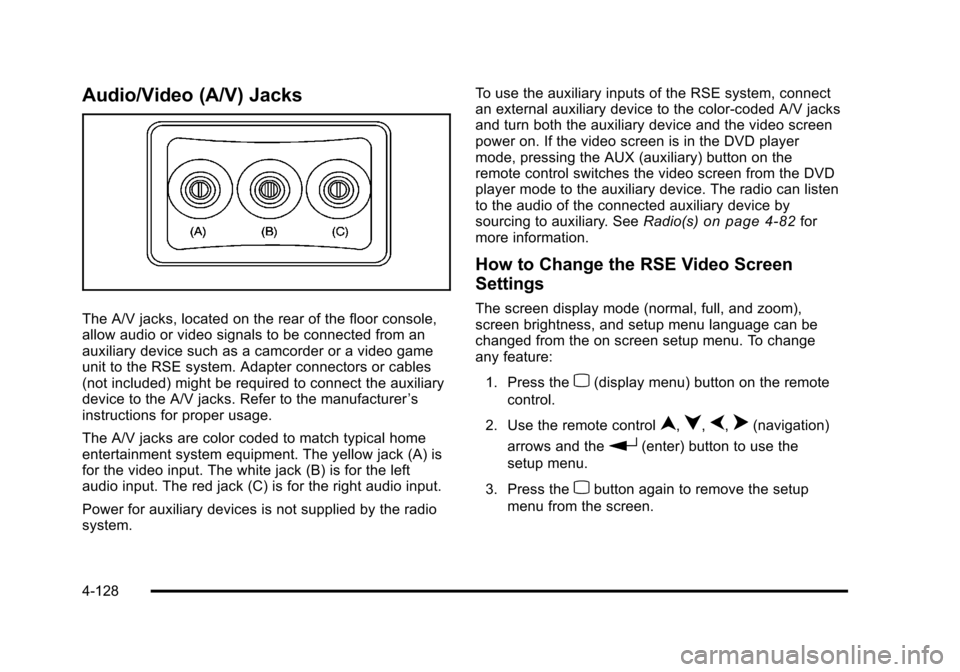
Audio/Video (A/V) Jacks
The A/V jacks, located on the rear of the floor console,
allow audio or video signals to be connected from an
auxiliary device such as a camcorder or a video game
unit to the RSE system. Adapter connectors or cables
(not included) might be required to connect the auxiliary
device to the A/V jacks. Refer to the manufacturer’s
instructions for proper usage.
The A/V jacks are color coded to match typical home
entertainment system equipment. The yellow jack (A) is
for the video input. The white jack (B) is for the left
audio input. The red jack (C) is for the right audio input.
Power for auxiliary devices is not supplied by the radio
system. To use the auxiliary inputs of the RSE system, connect
an external auxiliary device to the color-coded A/V jacks
and turn both the auxiliary device and the video screen
power on. If the video screen is in the DVD player
mode, pressing the AUX (auxiliary) button on the
remote control switches the video screen from the DVD
player mode to the auxiliary device. The radio can listen
to the audio of the connected auxiliary device by
sourcing to auxiliary. See
Radio(s)
on page 4‑82for
more information.
How to Change the RSE Video Screen
Settings
The screen display mode (normal, full, and zoom),
screen brightness, and setup menu language can be
changed from the on screen setup menu. To change
any feature:
1. Press the
z(display menu) button on the remote
control.
2. Use the remote control
n,q,p,o(navigation)
arrows and the
r(enter) button to use the
setup menu.
3. Press the
zbutton again to remove the setup
menu from the screen.
4-128
Page 347 of 608
Audio Output
Audio from the DVD player or auxiliary inputs can be
heard through the following possible sources:
.Wireless Headphones
.Vehicle Speakers
.Vehicle wired headphone jacks on the rear seat
audio system, if the vehicle has this feature.
The RSE system always transmits the audio signal to
the wireless headphones, if there is audio available.
See “Headphones” earlier in this section for more
information.
The DVD player is capable of outputting audio to the
wired headphone jacks on the RSA system, if the
vehicle has this feature. The DVD player can be
selected as an audio source on the RSA system. See
Rear Seat Audio (RSA)
on page 4‑134for more
information.
When a device is connected to the A/V jacks, or the
radio's auxiliary input jack, if the vehicle has this
feature, the rear seat passengers are able to hear audio
from the auxiliary device through the wireless or wired
headphones. The front seat passengers are able to
listen to playback from this device through the vehicle
speakers by selecting AUX as the source on the radio.
Video Screen(s)
The video screen(s) are located in the overhead
console.
To use the video screen(s):
1. Push the release button located on the overhead console.
2. Move the screen to the desired position.
When the video screen is not in use, push it up into its
locked position.
If a DVD is playing and the screen is raised to its locked
position, the screen remains on, this is normal, and the
DVD continues to play through the previous audio
source. Use the remote control power button or eject
the disc to turn off the screen.
The overhead console contains the infrared transmitters
for the wireless headphones and the infrared receivers
for the remote control. They are located at the rear of
the console.
Notice: Avoid directly touching the video screen,
as damage may occur. See “Cleaning the Video
Screen” later in this section for more information.
4-129