remote start CHEVROLET TAHOE 2015 4.G Owner's Manual
[x] Cancel search | Manufacturer: CHEVROLET, Model Year: 2015, Model line: TAHOE, Model: CHEVROLET TAHOE 2015 4.GPages: 495, PDF Size: 6.56 MB
Page 193 of 495
Black plate (50,1)Chevrolet 2015i Tahoe/Suburban Owner Manual (GMNA-Localizing-U.S./
Canada/Mexico-8431502) - 2015 - crc - 1/12/15
5-50 Instruments and Controls
Maximum Startup Volume
This feature sets the maximum
startup volume. If the vehicle is
started and the volume is greater
than this level, the volume is
adjusted to this level. To set the
maximum startup volume, turn the
MENU knob or press + or−to
increase or decrease.
Audio Cue Volume
This feature sets the volume of
audio files played at system startup
and shutdown.
Select On, then press + or −to
increase or decrease the volume.
Vehicle
Select and the following may
display:
.Climate and Air Quality
.Collision/Detection Systems
.Comfort and Convenience
.Lighting
.Power Door Locks
.Remote Lock, Unlock, Start
Climate and Air Quality
Select the Climate and Air Quality
menu and the following may display:
.Auto Fan Max Speed
.Auto Compartment Zone Temp
.Auto Defog
Auto Fan Max Speed
This feature will set the maximum
auto fan speed.
Select Low, Medium, or High.
Auto Compartment Zone Temp
This feature allows for selection of
the compartment zone temperature
setting when the vehicle is
restarted.
Select Single Zone, Dual Zone,
or Last Setting.
Auto Defog
When set to on, the front defog will
automatically come on when the
vehicle is started. Select Off or On.
Collision/Detection Systems
Select the Collision/Detection
Systems menu and the following
may display:
.Alert Type
.Auto Collision Preparation
.Parking Assist
.Side Blind Zone Alert
.Rear Cross Traffic Alert
Alert Type
This feature will set crash alerts to
beeps or seat vibrations. This
setting affects all crash alerts
including Forward Collision, Lane
Departure Warning, and Parking
Assist alerts.
Select Beeps or Safety Alert Seat.
Auto Collision Preparation
This feature will turn on or off the
Forward Collision Alert feature as
well as the Automatic Braking
capability of the Auto Collision
Page 195 of 495
Black plate (52,1)Chevrolet 2015i Tahoe/Suburban Owner Manual (GMNA-Localizing-U.S./
Canada/Mexico-8431502) - 2015 - crc - 1/12/15
5-52 Instruments and Controls
Auto Mirror Folding
When on, the outside rearview
mirrors will automatically fold or
unfold when the Remote Keyless
Entry (RKE) lock or unlock button is
pressed and held.
Select Off or On.
Auto Wipe in Reverse Gear
When on, the rear wiper will
automatically activate when the
vehicle is shifted to R (Reverse).
Select Off or On.
Lighting
Select the Lighting menu and the
following may display:
.Vehicle Locator Lights
.Exit Lighting
Vehicle Locator Lights
This feature will flash the exterior
lights and allows some of the
exterior lamps and most of the
interior lamps to turn on briefly when
Kon the Remote Keyless Entry
(RKE) transmitter is pressed to
locate the vehicle.
Select On or Off.
Exit Lighting
This allows the selection of how
long the exterior lamps stay on
when leaving the vehicle when it is
dark outside.
Select Off, 30 Seconds, 60
Seconds, or 120 Seconds.
Power Door Locks
Select Power Door Locks and the
following displays:
.Unlocked Door Anti-Lockout
.Auto Door Unlock
.Delayed Door Lock
Unlocked Door Anti-Lockout
When on, this feature will keep the
driver door from locking when the
door is open and the key is in the ignition. If Off is selected, the
Delayed Door Lock menu will be
available.
Select On or Off.
Auto Door Unlock
This allows selection of which of the
doors will automatically unlock when
the vehicle is shifted into P (Park).
Select Off, All Doors, or Driver Door.
Delayed Door Lock
When on, this feature will delay the
locking of the doors. To override the
delay, press the power door lock
switch on the door.
Select On or Off.
Remote Lock, Unlock, Start
Select Remote Lock, Unlock, Start
and the following may display:
.Remote Unlock Light Feedback
.Remote Lock Feedback
.Remote Door Unlock
.Remote Start Auto Cooled Seats
Page 196 of 495
Black plate (53,1)Chevrolet 2015i Tahoe/Suburban Owner Manual (GMNA-Localizing-U.S./
Canada/Mexico-8431502) - 2015 - crc - 1/12/15
Instruments and Controls 5-53
.Remote Start Auto Heat Seats
.Passive Door Unlock
.Passive Door Lock
.Remote Left in Vehicle Alert
Remote Unlock Light Feedback
When on, the exterior lamps will
flash when unlocking the vehicle
with the RKE transmitter.
Select Off or Flash Lights.
Remote Lock Feedback
This allows selection of what type of
feedback is given when locking the
vehicle with the RKE transmitter.
Select Off, Lights and Horn, Lights
Only, or Horn Only.
Remote Door Unlock
This allows selection of which doors
will unlock when pressing
Kon the
RKE transmitter.
Select All Doors or Driver
Door Only. Remote Start Auto Cooled Seats
If equipped and turned on, this
feature will turn the cooled seats on
when using remote start on
warm days.
Select Off or On.
Remote Start Auto Heat Seats
If equipped and turned on, this
feature will turn the heated seats on
when using remote start on
cold days.
Select Off or On.
Passive Door Unlock
This allows the selection of what
doors will unlock when using the
button on the driver door to unlock
the vehicle.
Select All Doors or Driver Door.
Passive Door Lock
This allows passive locking to be
turned on or off and selects
feedback. See
Remote Keyless
Entry (RKE) System Operation (Key
Access) on page 2-5 orRemote
Keyless Entry (RKE) System
Operation (Keyless Access) on
page 2-8.
Select Off, On with Horn
Chirp, or On.
Remote Left in Vehicle Alert
This feature sounds an alert when
the RKE transmitter is left in the
vehicle.
Select Off or On.
Bluetooth
Select and the following may
display:
.Pair New Device
.Device Management
.Ringtones
.Voice Mail Numbers
Page 240 of 495
Black plate (31,1)Chevrolet 2015i Tahoe/Suburban Owner Manual (GMNA-Localizing-U.S./
Canada/Mexico-8431502) - 2015 - crc - 1/12/15
Infotainment System 7-31
Settings
Teen Driver
If equipped, Teen Driver allows keys
to be programmed with
customizable vehicle settings.
It limits some vehicle features and
prevents some systems, such as
Park Assist, if equipped, from being
turned off. It also displays a report
card of the driving behavior when a
Teen Driver key is used.
To activate or change the settings,
select Teen Driver from the Settings
menu. SeeVehicle Personalization
on page 5-47. If no keys are
activated, the Teen Driver feature
will not record any Report
Card data.
A Personal Identification Number
(PIN) must be created using the
keypad. The PIN is required to:
.Register Keys.
.Change settings.
.Access or delete Report Card
data or Teen Driver settings.
Register or Unregister a Key
Any of the vehicle keys can be
registered as a Teen Driver key.
Label the key to tell it apart from the
other keys. A maximum of eight
keys can be registered. There is
one Report Card per vehicle.
After creating the PIN, to register or
unregister the key(s):
1. Have the vehicle running.
2. For automatic transmissions, the vehicle must be in P (Park). For
manual transmissions, the
vehicle must be stopped with the
parking brake set.
3. Select Teen Driver from the Settings menu.
4. Enter the PIN.
5. Select Key Registration.
The system will display instructions
for registering or unregistering
a key. For Ignition Keyed System:
.If the key is not registered,
select Register and follow the
instructions. A message displays
to confirm successful
registration.
.If the key is already registered,
the option to unregister displays.
If Unregister is selected, the key
is no longer registered and a
confirmation displays.
For Pushbutton Start System:
Once Key Registration is selected,
the system detects whether there is
a transmitter key in the transmitter
pocket, which is in the center
console storage area or on the side
of the steering wheel column. See
Remote Keyless Entry (RKE)
System Operation (Key Access) on
page 2-5 orRemote Keyless Entry
(RKE) System Operation (Keyless
Access) on page 2-8.
Page 247 of 495
Black plate (4,1)Chevrolet 2015i Tahoe/Suburban Owner Manual (GMNA-Localizing-U.S./
Canada/Mexico-8431502) - 2015 - crc - 1/12/15
8-4 Climate Controls
{Caution
Using a razor blade or sharp
object to clear the inside rear
window can damage the rear
window defogger. Repairs would
not be covered by the vehicle
warranty. Do not clear the inside
rear window with sharp objects.
Heated Mirror: If equipped with
heated outside rearview mirrors, the
mirrors heat to help clear fog or frost
from the surface of the mirror when
the rear window defog button is
pressed. See Heated Mirrors on
page 2-30.
Rear Climate Controls
O(On/Off): Press to turn the rear
climate control system on or off.
AUTO: Press AUTO to control the
rear passenger temperature, air
delivery, and fan speed. AUTO
appears in the display when
automatic operation is active. If any
of the climate control settings except rear temperature are
manually adjusted, this cancels full
automatic operation.
Fan Control:
Press up or down to
increase or decrease the rear
passenger area fan speed.
Air Delivery Mode Control: Press
up or down to change the direction
of the rear passenger airflow.
Repeatedly press the switch until
the desired mode appears on the
display. Multiple presses will cycle
through the delivery selections.
Temperature Control: Press up or
down to increase or decrease the
airflow temperature into the rear
passenger area.
RCTRL (Rear Climate Control
Lockout): Press to lock or unlock
control of the rear climate control
system from the rear seat
passengers. When locked, the rear
climate control can only be adjusted
from the front seat. Remote Start Climate Control
Operation
If equipped with the remote start
feature, the climate control system
will come on when the vehicle is
started remotely, depending on the
outside temperature. The rear
window defogger and heated seats,
if equipped, may also come on. See
Remote Vehicle Start on page 2-15
and
Heated and Cooled Front Seats
on page 3-9.
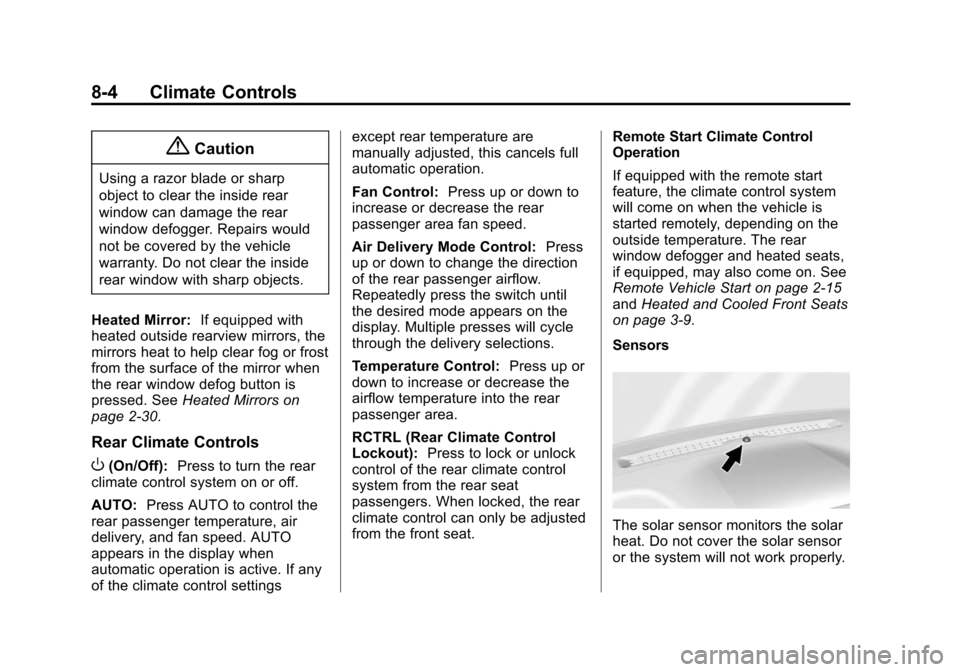
Sensors
The solar sensor monitors the solar
heat. Do not cover the solar sensor
or the system will not work properly.
Page 273 of 495
Black plate (22,1)Chevrolet 2015i Tahoe/Suburban Owner Manual (GMNA-Localizing-U.S./
Canada/Mexico-8431502) - 2015 - crc - 1/12/15
9-22 Driving and Operating
4 (START):This is the position that
starts the engine. When the engine
starts, release the key. The ignition
switch returns to ON/RUN for
driving.
A warning tone will sound when the
driver door is opened and the
ignition is in ACC/ACCESSORY or
LOCK/OFF, and the key is in the
ignition.
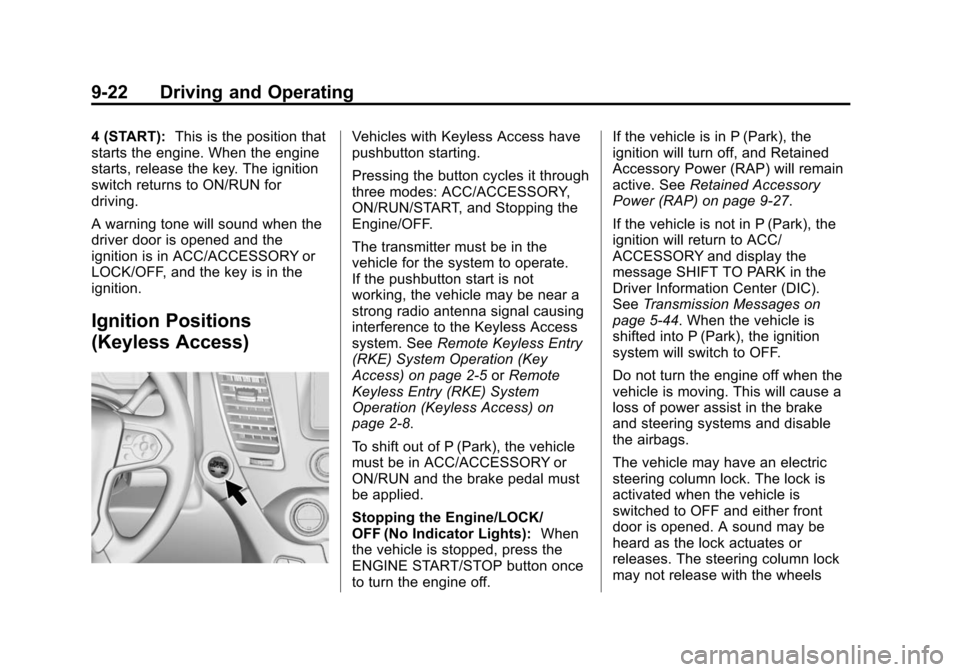
Ignition Positions
(Keyless Access)
Vehicles with Keyless Access have
pushbutton starting.
Pressing the button cycles it through
three modes: ACC/ACCESSORY,
ON/RUN/START, and Stopping the
Engine/OFF.
The transmitter must be in the
vehicle for the system to operate.
If the pushbutton start is not
working, the vehicle may be near a
strong radio antenna signal causing
interference to the Keyless Access
system. See Remote Keyless Entry
(RKE) System Operation (Key
Access) on page 2-5 orRemote
Keyless Entry (RKE) System
Operation (Keyless Access) on
page 2-8.
To shift out of P (Park), the vehicle
must be in ACC/ACCESSORY or
ON/RUN and the brake pedal must
be applied.
Stopping the Engine/LOCK/
OFF (No Indicator Lights): When
the vehicle is stopped, press the
ENGINE START/STOP button once
to turn the engine off. If the vehicle is in P (Park), the
ignition will turn off, and Retained
Accessory Power (RAP) will remain
active. See
Retained Accessory
Power (RAP) on page 9-27.
If the vehicle is not in P (Park), the
ignition will return to ACC/
ACCESSORY and display the
message SHIFT TO PARK in the
Driver Information Center (DIC).
See Transmission Messages on
page 5-44. When the vehicle is
shifted into P (Park), the ignition
system will switch to OFF.
Do not turn the engine off when the
vehicle is moving. This will cause a
loss of power assist in the brake
and steering systems and disable
the airbags.
The vehicle may have an electric
steering column lock. The lock is
activated when the vehicle is
switched to OFF and either front
door is opened. A sound may be
heard as the lock actuates or
releases. The steering column lock
may not release with the wheels
Page 342 of 495
Black plate (3,1)Chevrolet 2015i Tahoe/Suburban Owner Manual (GMNA-Localizing-U.S./
Canada/Mexico-8431502) - 2015 - crc - 1/12/15
Vehicle Care 10-3
of California to cause cancer and
birth defects or other reproductive
harm. Engine exhaust, many parts
and systems, many fluids, and
some component wear by-products
contain and/or emit these
chemicals.
SeeBattery - North America on
page 10-24 andJump Starting -
North America on page 10-79.
California Perchlorate
Materials Requirements
Certain types of automotive
applications, such as airbag
initiators, safety belt pretensioners,
and lithium batteries contained in
Remote Keyless Entry transmitters,
may contain perchlorate materials.
Special handling may be necessary.
For additional information, see
www.dtsc.ca.gov/hazardouswaste/
perchlorate.
Accessories and
Modifications
Adding non-dealer accessories or
making modifications to the vehicle
can affect vehicle performance and
safety, including such things as
airbags, braking, stability, ride and
handling, emissions systems,
aerodynamics, durability, and
electronic systems like antilock
brakes, traction control, and stability
control. These accessories or
modifications could even cause
malfunction or damage not covered
by the vehicle warranty.
Damage to vehicle components
resulting from modifications or the
installation or use of non-GM
certified parts, including control
module or software modifications, is
not covered under the terms of the
vehicle warranty and may affect
remaining warranty coverage for
affected parts.
GM Accessories are designed to
complement and function with other
systems on the vehicle. See your dealer to accessorize the vehicle
using genuine GM Accessories
installed by a dealer technician.
Also, see
Adding Equipment to the
Airbag-Equipped Vehicle on
page 3-42.
Page 346 of 495
Black plate (7,1)Chevrolet 2015i Tahoe/Suburban Owner Manual (GMNA-Localizing-U.S./
Canada/Mexico-8431502) - 2015 - crc - 1/12/15
Vehicle Care 10-7
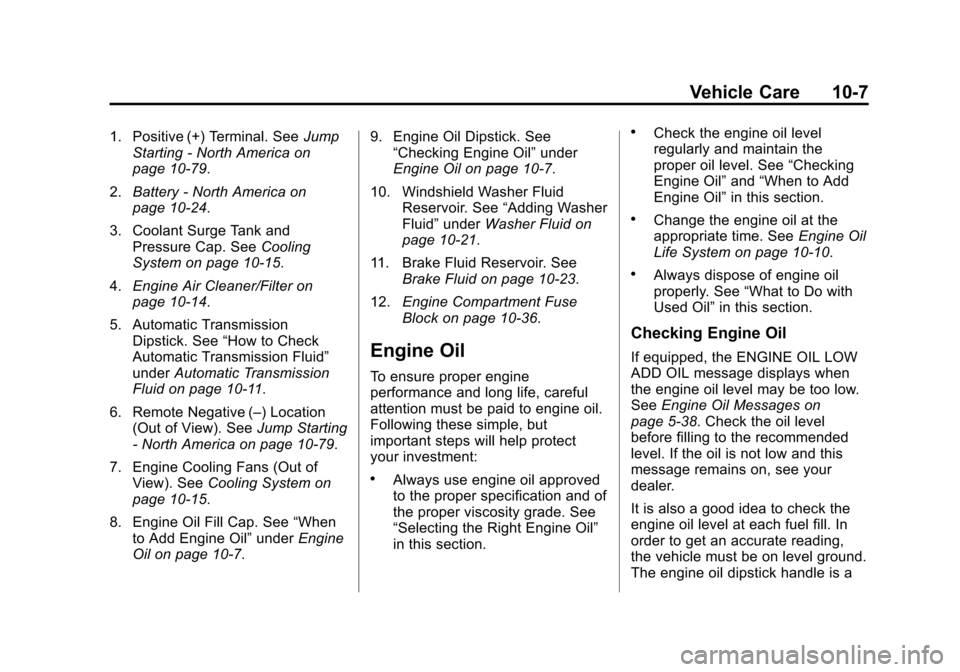
1. Positive (+) Terminal. SeeJump
Starting - North America on
page 10-79.
2. Battery - North America on
page 10-24.
3. Coolant Surge Tank and Pressure Cap. See Cooling
System on page 10-15.
4. Engine Air Cleaner/Filter on
page 10-14.
5. Automatic Transmission Dipstick. See “How to Check
Automatic Transmission Fluid”
under Automatic Transmission
Fluid on page 10-11.
6. Remote Negative (–) Location (Out of View). See Jump Starting
- North America on page 10-79.
7. Engine Cooling Fans (Out of View). See Cooling System on
page 10-15.
8. Engine Oil Fill Cap. See “When
to Add Engine Oil” underEngine
Oil on page 10-7. 9. Engine Oil Dipstick. See
“Checking Engine Oil” under
Engine Oil on page 10-7.
10. Windshield Washer Fluid Reservoir. See “Adding Washer
Fluid” under Washer Fluid on
page 10-21.
11. Brake Fluid Reservoir. See Brake Fluid on page 10-23.
12. Engine Compartment Fuse
Block on page 10-36.
Engine Oil
To ensure proper engine
performance and long life, careful
attention must be paid to engine oil.
Following these simple, but
important steps will help protect
your investment:
.Always use engine oil approved
to the proper specification and of
the proper viscosity grade. See
“Selecting the Right Engine Oil”
in this section.
.Check the engine oil level
regularly and maintain the
proper oil level. See “Checking
Engine Oil” and“When to Add
Engine Oil” in this section.
.Change the engine oil at the
appropriate time. See Engine Oil
Life System on page 10-10.
.Always dispose of engine oil
properly. See “What to Do with
Used Oil” in this section.
Checking Engine Oil
If equipped, the ENGINE OIL LOW
ADD OIL message displays when
the engine oil level may be too low.
SeeEngine Oil Messages on
page 5-38. Check the oil level
before filling to the recommended
level. If the oil is not low and this
message remains on, see your
dealer.
It is also a good idea to check the
engine oil level at each fuel fill. In
order to get an accurate reading,
the vehicle must be on level ground.
The engine oil dipstick handle is a
Page 420 of 495
Black plate (81,1)Chevrolet 2015i Tahoe/Suburban Owner Manual (GMNA-Localizing-U.S./
Canada/Mexico-8431502) - 2015 - crc - 1/12/15
Vehicle Care 10-81
{Caution
If any accessories are left on or
plugged in during the jump
starting procedure, they could be
damaged. The repairs would not
be covered by the vehicle
warranty. Whenever possible, turn
off or unplug all accessories on
either vehicle when jump starting.
4. Turn off the ignition on both vehicles. Unplug unnecessary
accessories plugged into the
accessory power outlets. Turn
off the radio and all the lamps
that are not needed. This will
avoid sparks and help save both
batteries. And it could save the
radio! 5. Open the hood on the other
vehicle and locate the
positive (+) and negative (−)
terminal locations on that
vehicle.
The positive (+) terminal is under
a red plastic cover at the positive
battery post. To uncover the
positive (+) terminal, open the
red plastic cover.
For more information on the
location of the remote
positive (+) and remote negative
(−) terminals, see Engine
Compartment Overview on
page 10-6.
{Warning
An electric fan can start up even
when the engine is not running
and can injure you. Keep hands,
clothing and tools away from any
underhood electric fan.
{Warning
Using a match near a battery can
cause battery gas to explode.
People have been hurt doing this,
and some have been blinded.
Use a flashlight if you need more
light.
Battery fluid contains acid that
can burn you. Do not get it on
you. If you accidentally get it in
your eyes or on your skin, flush
the place with water and get
medical help immediately.
{Warning
Fans or other moving engine
parts can injure you badly. Keep
your hands away from moving
parts once the engine is running.
Page 461 of 495
Black plate (6,1)Chevrolet 2015i Tahoe/Suburban Owner Manual (GMNA-Localizing-U.S./
Canada/Mexico-8431502) - 2015 - crc - 1/12/15
13-6 Customer Information
.Model, year, color, and license
plate number of the vehicle.
.Odometer reading, Vehicle
Identification Number (VIN), and
delivery date of the vehicle.
.Description of the problem.
Coverage
Services are provided up to 5 years/
160 000 km (100,000 mi), whichever
comes first.
In the U.S., anyone driving the
vehicle is covered. In Canada, a
person driving the vehicle without
permission from the owner is not
covered.
Roadside Assistance is not a part of
the New Vehicle Limited Warranty.
General Motors North America and
Chevrolet reserve the right to make
any changes or discontinue the
Roadside Assistance program at
any time without notification.
General Motors North America and
Chevrolet reserve the right to limit
services or payment to an owner ordriver if they decide the claims are
made too often, or the same type of
claim is made many times.
Services Provided
.Emergency Fuel Delivery:
Delivery of enough fuel for the
vehicle to get to the nearest
service station.
.Lock-Out Service:
Service to
unlock the vehicle if you are
locked out. A remote unlock may
be available if you have OnStar.
For security reasons, the driver
must present identification
before this service is given.
.Emergency Tow from a Public
Road or Highway: Tow to the
nearest Chevrolet dealer for
warranty service, or if the vehicle
was in a crash and cannot be
driven. Assistance is not given
when the vehicle is stuck in the
sand, mud, or snow.
.Flat Tire Change: Service to
change a flat tire with the spare
tire. The spare tire, if equipped, must be in good condition and
properly inflated. It is the owner's
responsibility for the repair or
replacement of the tire if it is not
covered by the warranty.
.Battery Jump Start:
Service to
jump start a dead battery.
.Trip Interruption Benefits and
Assistance: If your trip is
interrupted due to a warranty
event, incidental expenses may
be reimbursed within the
Powertrain warranty period.
Items considered are reasonable
and customary hotel, meals,
rental car, or a vehicle being
delivered back to the customer,
up to 805km (500mi).
Services Not Included in
Roadside Assistance
.Impound towing caused by
violation of any laws.
.Legal fines.
.Mounting, dismounting,
or changing of snow tires,
chains, or other traction devices.