air system CHEVROLET TAHOE 2016 4.G Owners Manual
[x] Cancel search | Manufacturer: CHEVROLET, Model Year: 2016, Model line: TAHOE, Model: CHEVROLET TAHOE 2016 4.GPages: 453, PDF Size: 6.23 MB
Page 4 of 453
Chevrolet Tahoe/Suburban Owner Manual (GMNA-Localizing-U.S./Canada/
Mexico-9159366) - 2016 - crc - 5/19/15
Introduction 3
{Warning
Warning indicates a hazard that
could result in injury or death.
Caution
Caution indicates a hazard that
could result in property or vehicle
damage.
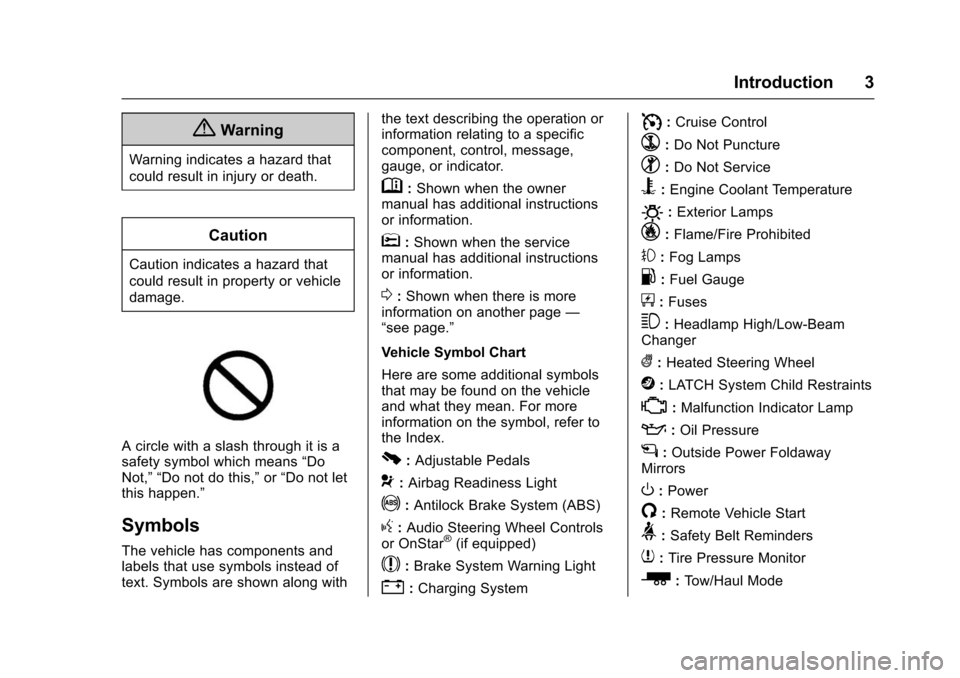
A circle with a slash through it is a
safety symbol which means“Do
Not,” “Do not do this,” or“Do not let
this happen.”
Symbols
The vehicle has components and
labels that use symbols instead of
text. Symbols are shown along with the text describing the operation or
information relating to a specific
component, control, message,
gauge, or indicator.
M:
Shown when the owner
manual has additional instructions
or information.
*: Shown when the service
manual has additional instructions
or information.
0: Shown when there is more
information on another page —
“see page.”
Vehicle Symbol Chart
Here are some additional symbols
that may be found on the vehicle
and what they mean. For more
information on the symbol, refer to
the Index.
0: Adjustable Pedals
9: Airbag Readiness Light
!:Antilock Brake System (ABS)
g: Audio Steering Wheel Controls
or OnStar®(if equipped)
$: Brake System Warning Light
":Charging System
I: Cruise Control
`:Do Not Puncture
^:Do Not Service
B:Engine Coolant Temperature
O:Exterior Lamps
_: Flame/Fire Prohibited
#:Fog Lamps
.:Fuel Gauge
+: Fuses
3:Headlamp High/Low-Beam
Changer
(: Heated Steering Wheel
j:LATCH System Child Restraints
*:Malfunction Indicator Lamp
::Oil Pressure
g:Outside Power Foldaway
Mirrors
O: Power
/:Remote Vehicle Start
>: Safety Belt Reminders
7:Tire Pressure Monitor
_:Tow/Haul Mode
Page 8 of 453

Chevrolet Tahoe/Suburban Owner Manual (GMNA-Localizing-U.S./Canada/
Mexico-9159366) - 2016 - crc - 5/19/15
In Brief 7
1.Air Vents 0225.
2.
gTraction Control/Electronic
Stability Control 0267.
jPower Assist Steps 051 (If
Equipped).
XParking Assist Button (If
Equipped). See Assistance
Systems for Parking or Backing
0 281.
ALane Keep Assist (LKA)
0 289 (If Equipped).
0Pedal Adjust Switch (If
Equipped). See Adjustable
Throttle and Brake Pedal
0 244.
3. Turn Signal Lever. See Turn
and Lane-Change Signals
0 187.
Windshield Wiper/Washer
0 129.
4. Favorite Switches (Out of View). See Steering Wheel
Controls 0128. Volume Switches (Out of View).
See
Steering Wheel Controls
0 128.
5. Instrument Cluster 0137.
6. Hazard Warning Flashers
0187.
7. Shift Lever. See Automatic
Transmission 0255.
Tow/Haul Selector Button. See
Tow/Haul Mode 0259.
Range Selection Mode (If
Equipped). See Manual Mode
0 257.
8. Light Sensor. See Automatic
Headlamp System 0186.
9. Infotainment 0192.
10. Dual Automatic Climate Control
System 0220.
11. Heated and Cooled Front
Seats 070 (If Equipped).
12. 110 Volt Power Outlet (If Equipped). See Power Outlets
0 133.
13. Power Outlets 0133 (If
Equipped). 14. Rear Climate Control Buttons.
SeeDual Automatic Climate
Control System 0220.
15. Steering Wheel Controls 0128.
16. Horn 0129.
17. Steering Wheel Adjustment
0127.
18. Hood Release. See Hood
0 313.
19. Cruise Control 0271.
Adaptive Cruise Control 0273
(If Equipped).
Forward Collision Alert (FCA)
System 0283 (If Equipped).
Heated Steering Wheel 0129
(If Equipped).
20. Trailer Brake Control Panel (If Equipped). See Towing
Equipment 0302.
21. Data Link Connector (DLC) (Out of View). See Malfunction
Indicator Lamp (Check Engine
Light) 0146.
22. Four-Wheel Drive 0260 (If
Equipped).
Page 16 of 453
Chevrolet Tahoe/Suburban Owner Manual (GMNA-Localizing-U.S./Canada/
Mexico-9159366) - 2016 - crc - 5/19/15
In Brief 15
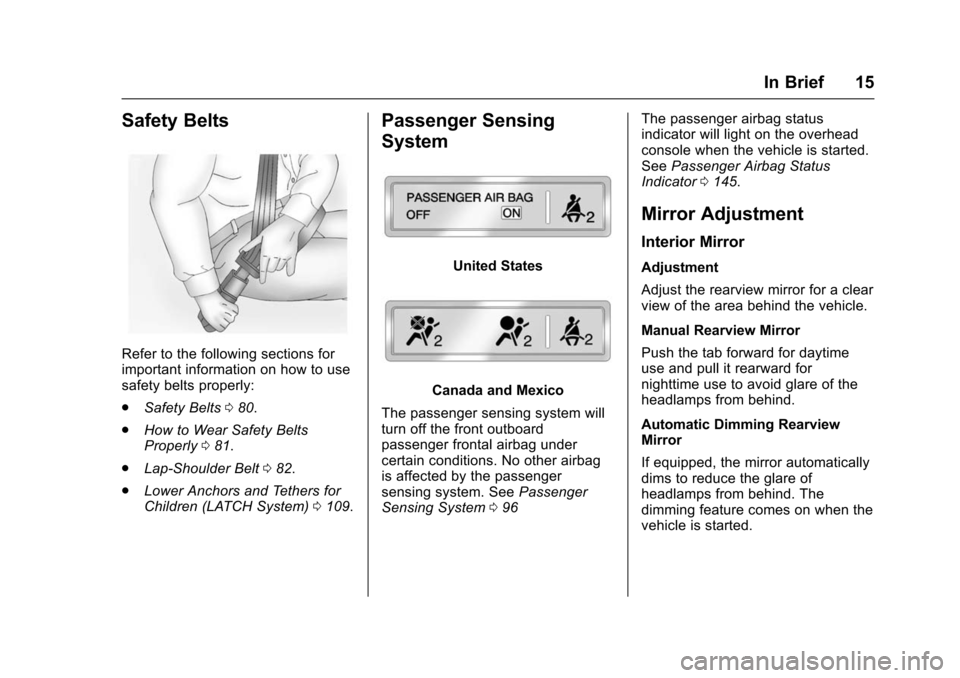
Safety Belts
Refer to the following sections for
important information on how to use
safety belts properly:
.Safety Belts 080.
. How to Wear Safety Belts
Properly 081.
. Lap-Shoulder Belt 082.
. Lower Anchors and Tethers for
Children (LATCH System) 0109.
Passenger Sensing
System
United States
Canada and Mexico
The passenger sensing system will
turn off the front outboard
passenger frontal airbag under
certain conditions. No other airbag
is affected by the passenger
sensing system. See Passenger
Sensing System 096 The passenger airbag status
indicator will light on the overhead
console when the vehicle is started.
See
Passenger Airbag Status
Indicator 0145.
Mirror Adjustment
Interior Mirror
Adjustment
Adjust the rearview mirror for a clear
view of the area behind the vehicle.
Manual Rearview Mirror
Push the tab forward for daytime
use and pull it rearward for
nighttime use to avoid glare of the
headlamps from behind.
Automatic Dimming Rearview
Mirror
If equipped, the mirror automatically
dims to reduce the glare of
headlamps from behind. The
dimming feature comes on when the
vehicle is started.
Page 21 of 453
Chevrolet Tahoe/Suburban Owner Manual (GMNA-Localizing-U.S./Canada/
Mexico-9159366) - 2016 - crc - 5/19/15
20 In Brief
Climate Controls
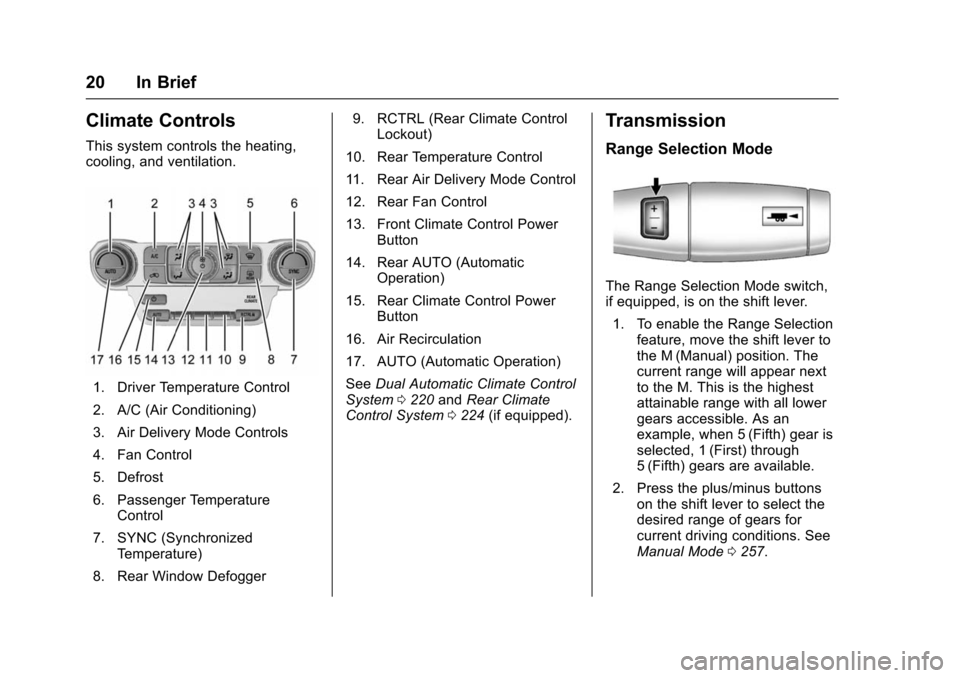
This system controls the heating,
cooling, and ventilation.
1. Driver Temperature Control
2. A/C (Air Conditioning)
3. Air Delivery Mode Controls
4. Fan Control
5. Defrost
6. Passenger TemperatureControl
7. SYNC (Synchronized Temperature)
8. Rear Window Defogger 9. RCTRL (Rear Climate Control
Lockout)
10. Rear Temperature Control
11. Rear Air Delivery Mode Control
12. Rear Fan Control
13. Front Climate Control Power Button
14. Rear AUTO (Automatic Operation)
15. Rear Climate Control Power Button
16. Air Recirculation
17. AUTO (Automatic Operation)
See Dual Automatic Climate Control
System 0220 andRear Climate
Control System 0224 (if equipped).
Transmission
Range Selection Mode
The Range Selection Mode switch,
if equipped, is on the shift lever.
1. To enable the Range Selection feature, move the shift lever to
the M (Manual) position. The
current range will appear next
to the M. This is the highest
attainable range with all lower
gears accessible. As an
example, when 5 (Fifth) gear is
selected, 1 (First) through
5 (Fifth) gears are available.
2. Press the plus/minus buttons on the shift lever to select the
desired range of gears for
current driving conditions. See
Manual Mode 0257.
Page 24 of 453
Chevrolet Tahoe/Suburban Owner Manual (GMNA-Localizing-U.S./Canada/
Mexico-9159366) - 2016 - crc - 5/19/15
In Brief 23
Portable Audio Devices
This vehicle may have a 3.5 mm
(1/8 in) auxiliary input jack and two
USB ports in the center stack or
inside the front seat armrest.
External devices such as iPods
®,
laptop computers, MP3 players, CD
changers, and USB storage devices
may be connected, depending on
the audio system.
See USB Port 0204 andAuxiliary
Jack 0207.
Bluetooth®
The Bluetooth®system allows users
with a Bluetooth-enabled cell phone
to make and receive hands-free
calls using the vehicle audio system
and controls.
The Bluetooth-enabled cell phone
must be paired with the in-vehicle
Bluetooth system before it can be
used in the vehicle. Not all phones
will support all functions. See
Bluetooth (Overview) 0208 or
Bluetooth (Infotainment Controls -
Base Radio) 0209 orBluetooth
(Voice Recognition - Base Radio)
0 213.
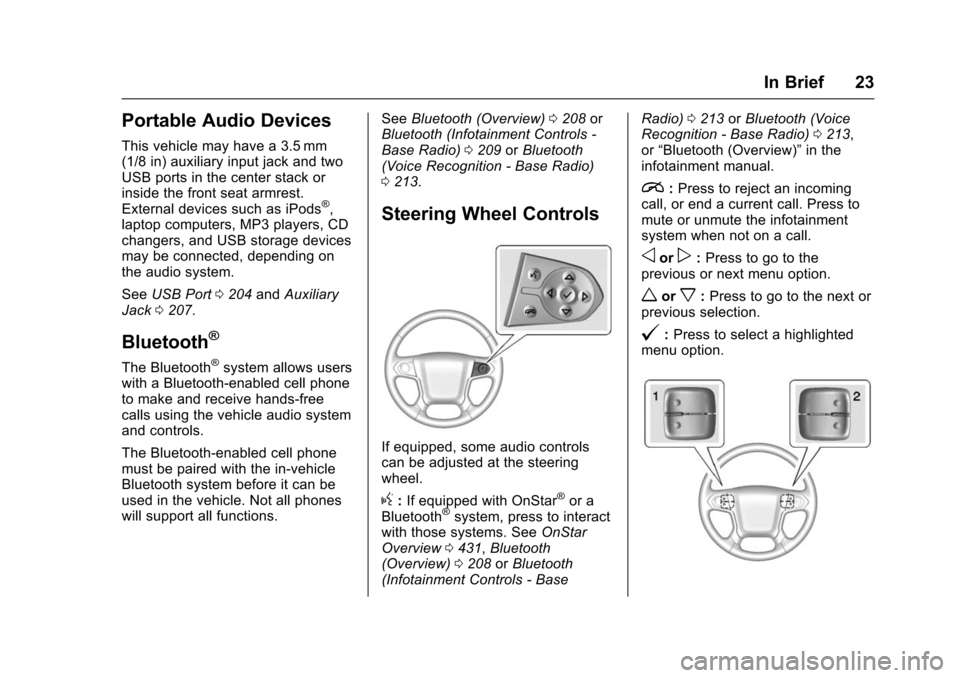
Steering Wheel Controls
If equipped, some audio controls
can be adjusted at the steering
wheel.
g:If equipped with OnStar®or a
Bluetooth®system, press to interact
with those systems. See OnStar
Overview 0431, Bluetooth
(Overview) 0208 orBluetooth
(Infotainment Controls - Base Radio)
0213 orBluetooth (Voice
Recognition - Base Radio) 0213,
or “Bluetooth (Overview)” in the
infotainment manual.
i: Press to reject an incoming
call, or end a current call. Press to
mute or unmute the infotainment
system when not on a call.
oorp: Press to go to the
previous or next menu option.
worx: Press to go to the next or
previous selection.
@: Press to select a highlighted
menu option.
Page 28 of 453
Chevrolet Tahoe/Suburban Owner Manual (GMNA-Localizing-U.S./Canada/
Mexico-9159366) - 2016 - crc - 5/19/15
In Brief 27
Universal Remote System
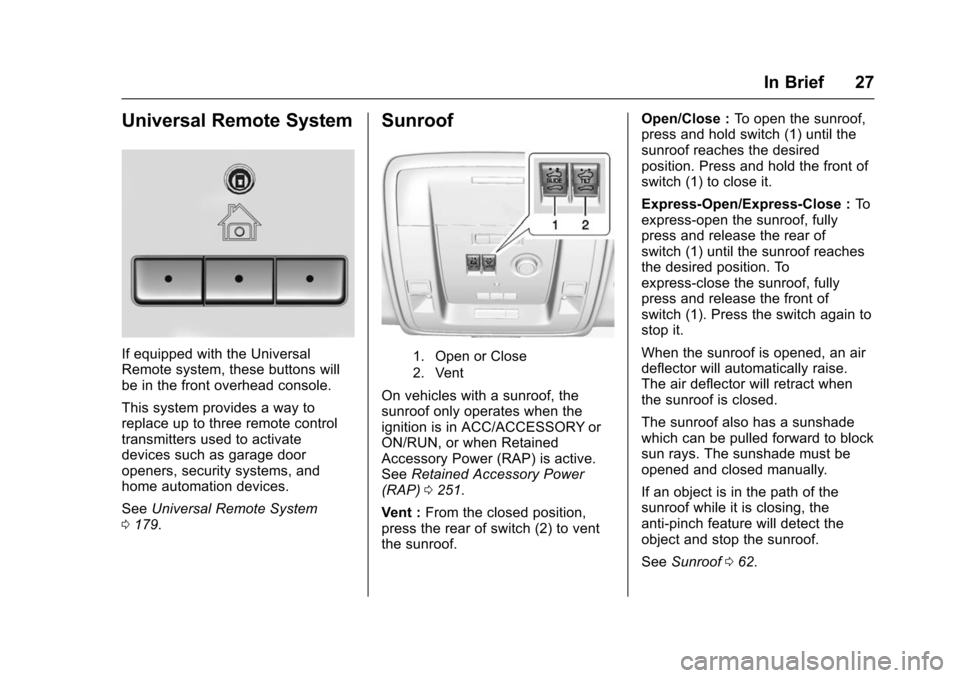
If equipped with the Universal
Remote system, these buttons will
be in the front overhead console.
This system provides a way to
replace up to three remote control
transmitters used to activate
devices such as garage door
openers, security systems, and
home automation devices.
SeeUniversal Remote System
0 179.
Sunroof
1. Open or Close
2. Vent
On vehicles with a sunroof, the
sunroof only operates when the
ignition is in ACC/ACCESSORY or
ON/RUN, or when Retained
Accessory Power (RAP) is active.
See Retained Accessory Power
(RAP) 0251.
Vent : From the closed position,
press the rear of switch (2) to vent
the sunroof. Open/Close :
To open the sunroof,
press and hold switch (1) until the
sunroof reaches the desired
position. Press and hold the front of
switch (1) to close it.
Express-Open/Express-Close : To
express-open the sunroof, fully
press and release the rear of
switch (1) until the sunroof reaches
the desired position. To
express-close the sunroof, fully
press and release the front of
switch (1). Press the switch again to
stop it.
When the sunroof is opened, an air
deflector will automatically raise.
The air deflector will retract when
the sunroof is closed.
The sunroof also has a sunshade
which can be pulled forward to block
sun rays. The sunshade must be
opened and closed manually.
If an object is in the path of the
sunroof while it is closing, the
anti-pinch feature will detect the
object and stop the sunroof.
See Sunroof 062.
Page 33 of 453
Chevrolet Tahoe/Suburban Owner Manual (GMNA-Localizing-U.S./Canada/
Mexico-9159366) - 2016 - crc - 5/19/15
32 Keys, Doors, and Windows
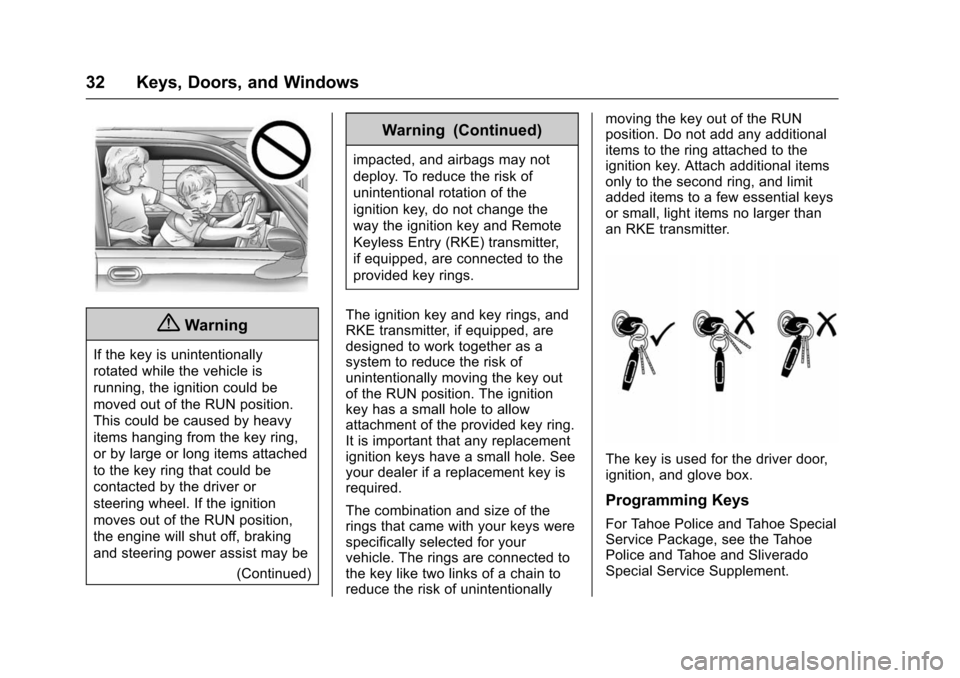
{Warning
If the key is unintentionally
rotated while the vehicle is
running, the ignition could be
moved out of the RUN position.
This could be caused by heavy
items hanging from the key ring,
or by large or long items attached
to the key ring that could be
contacted by the driver or
steering wheel. If the ignition
moves out of the RUN position,
the engine will shut off, braking
and steering power assist may be(Continued)
Warning (Continued)
impacted, and airbags may not
deploy. To reduce the risk of
unintentional rotation of the
ignition key, do not change the
way the ignition key and Remote
Keyless Entry (RKE) transmitter,
if equipped, are connected to the
provided key rings.
The ignition key and key rings, and
RKE transmitter, if equipped, are
designed to work together as a
system to reduce the risk of
unintentionally moving the key out
of the RUN position. The ignition
key has a small hole to allow
attachment of the provided key ring.
It is important that any replacement
ignition keys have a small hole. See
your dealer if a replacement key is
required.
The combination and size of the
rings that came with your keys were
specifically selected for your
vehicle. The rings are connected to
the key like two links of a chain to
reduce the risk of unintentionally moving the key out of the RUN
position. Do not add any additional
items to the ring attached to the
ignition key. Attach additional items
only to the second ring, and limit
added items to a few essential keys
or small, light items no larger than
an RKE transmitter.
The key is used for the driver door,
ignition, and glove box.
Programming Keys
For Tahoe Police and Tahoe Special
Service Package, see the Tahoe
Police and Tahoe and Sliverado
Special Service Supplement.
Page 48 of 453
Chevrolet Tahoe/Suburban Owner Manual (GMNA-Localizing-U.S./Canada/
Mexico-9159366) - 2016 - crc - 5/19/15
Keys, Doors, and Windows 47
Doors
Liftgate
{Warning
Exhaust gases can enter the
vehicle if it is driven with the
liftgate or trunk/hatch open,
or with any objects that pass
through the seal between the
body and the trunk/hatch or
liftgate. Engine exhaust contains
carbon monoxide (CO) which
cannot be seen or smelled. It can
cause unconsciousness and even
death.
If the vehicle must be driven with
the liftgate or trunk/hatch open:. Close all of the windows.
. Fully open the air outlets on
or under the instrument
panel.
. Adjust the climate control
system to a setting that
brings in only outside air
(Continued)
Warning (Continued)
and set the fan speed to the
highest setting. See
“Climate Control Systems”
in the Index.
. If the vehicle is equipped
with a power liftgate, disable
the power liftgate function.
See Engine Exhaust 0254.
Caution
To avoid damage to the liftgate or
liftgate glass, make sure the area
above and behind the liftgate is
clear before opening it.
Manual Liftgate
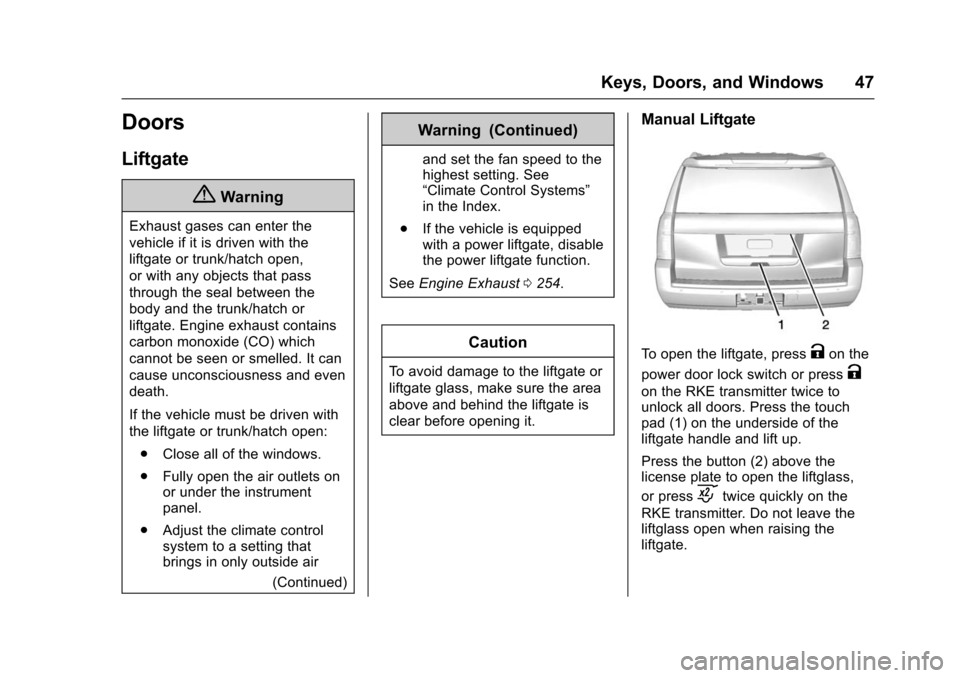
To open the liftgate, pressKon the
power door lock switch or press
K
on the RKE transmitter twice to
unlock all doors. Press the touch
pad (1) on the underside of the
liftgate handle and lift up.
Press the button (2) above the
license plate to open the liftglass,
or press
ctwice quickly on the
RKE transmitter. Do not leave the
liftglass open when raising the
liftgate.
Page 63 of 453
Chevrolet Tahoe/Suburban Owner Manual (GMNA-Localizing-U.S./Canada/
Mexico-9159366) - 2016 - crc - 5/19/15
62 Keys, Doors, and Windows
Roof
Sunroof
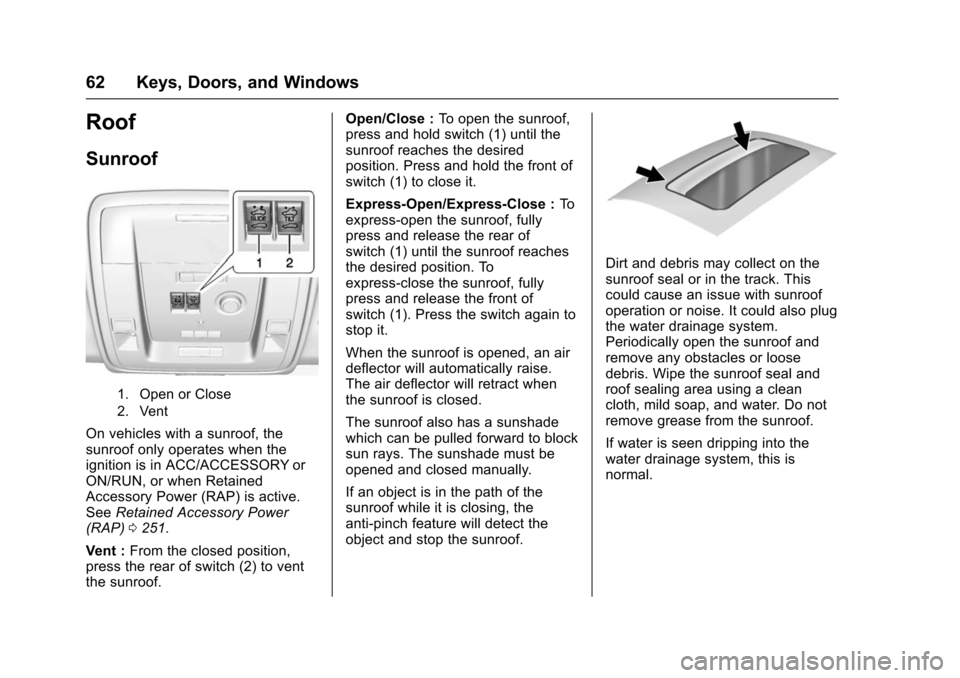
1. Open or Close
2. Vent
On vehicles with a sunroof, the
sunroof only operates when the
ignition is in ACC/ACCESSORY or
ON/RUN, or when Retained
Accessory Power (RAP) is active.
SeeRetained Accessory Power
(RAP) 0251.
Vent : From the closed position,
press the rear of switch (2) to vent
the sunroof. Open/Close :
To open the sunroof,
press and hold switch (1) until the
sunroof reaches the desired
position. Press and hold the front of
switch (1) to close it.
Express-Open/Express-Close : To
express-open the sunroof, fully
press and release the rear of
switch (1) until the sunroof reaches
the desired position. To
express-close the sunroof, fully
press and release the front of
switch (1). Press the switch again to
stop it.
When the sunroof is opened, an air
deflector will automatically raise.
The air deflector will retract when
the sunroof is closed.
The sunroof also has a sunshade
which can be pulled forward to block
sun rays. The sunshade must be
opened and closed manually.
If an object is in the path of the
sunroof while it is closing, the
anti-pinch feature will detect the
object and stop the sunroof.
Dirt and debris may collect on the
sunroof seal or in the track. This
could cause an issue with sunroof
operation or noise. It could also plug
the water drainage system.
Periodically open the sunroof and
remove any obstacles or loose
debris. Wipe the sunroof seal and
roof sealing area using a clean
cloth, mild soap, and water. Do not
remove grease from the sunroof.
If water is seen dripping into the
water drainage system, this is
normal.
Page 64 of 453
Chevrolet Tahoe/Suburban Owner Manual (GMNA-Localizing-U.S./Canada/
Mexico-9159366) - 2016 - crc - 5/19/15
Seats and Restraints 63
Seats and
Restraints
Head Restraints
Head Restraints . . . . . . . . . . . . . . . 64
Front Seats
Seat Adjustment . . . . . . . . . . . . . . . 65
Center Seat . . . . . . . . . . . . . . . . . . . . 66
Power Seat Adjustment . . . . . . . . 66
Lumbar Adjustment . . . . . . . . . . . . 66
Reclining Seatbacks . . . . . . . . . . . 67
Memory Seats . . . . . . . . . . . . . . . . . 68
Heated and Cooled FrontSeats . . . . . . . . . . . . . . . . . . . . . . . . . 70
Rear Seats
Heated Rear Seats . . . . . . . . . . . . 71
Second Row Seats . . . . . . . . . . . . 72
Third Row Seats . . . . . . . . . . . . . . . 76
Safety Belts
Safety Belts . . . . . . . . . . . . . . . . . . . . 80
How to Wear Safety BeltsProperly . . . . . . . . . . . . . . . . . . . . . . 81
Lap-Shoulder Belt . . . . . . . . . . . . . 82
Safety Belt Use During Pregnancy . . . . . . . . . . . . . . . . . . . . 87
Lap Belt . . . . . . . . . . . . . . . . . . . . . . . 87 Safety Belt Extender . . . . . . . . . . . 88
Safety System Check . . . . . . . . . . 88
Safety Belt Care . . . . . . . . . . . . . . . 88
Replacing Safety Belt System
Parts after a Crash . . . . . . . . . . . 89
Airbag System
Airbag System . . . . . . . . . . . . . . . . . 89
Where Are the Airbags? . . . . . . . 91
When Should an Airbag
Inflate? . . . . . . . . . . . . . . . . . . . . . . . 92
What Makes an Airbag Inflate? . . . . . . . . . . . . . . . . . . . . . . . 94
How Does an Airbag Restrain? . . . . . . . . . . . . . . . . . . . . . 94
What Will You See after an Airbag Inflates? . . . . . . . . . . . . . . 94
Passenger Sensing System . . . 96
Servicing the Airbag-Equipped Vehicle . . . . . . . . . . . . . . . . . . . . . . 100
Adding Equipment to the Airbag-Equipped Vehicle . . . . 100
Airbag System Check . . . . . . . . 101
Replacing Airbag System Parts after a Crash . . . . . . . . . . . . . . . . 101
Child Restraints
Older Children . . . . . . . . . . . . . . . . 102
Infants and Young Children . . . 103
Child Restraint Systems . . . . . . 106
Where to Put the Restraint . . . 107 Lower Anchors and Tethers for
Children (LATCH System) . . . 109
Replacing LATCH System Parts After a Crash . . . . . . . . . . 116
Securing Child Restraints
(Center Front Seat) . . . . . . . . . 117
Securing Child Restraints (Rear Seat) . . . . . . . . . . . . . . . . . 117
Securing Child Restraints (Front Passenger Seat) . . . . . 119