warning CHEVROLET TAHOE 2017 4.G Owners Manual
[x] Cancel search | Manufacturer: CHEVROLET, Model Year: 2017, Model line: TAHOE, Model: CHEVROLET TAHOE 2017 4.GPages: 465, PDF Size: 7.47 MB
Page 307 of 465
Chevrolet Tahoe/Suburban Owner Manual (GMNA-Localizing-U.S./Canada/
Mexico-9955986) - 2017 - crc - 7/5/16
306 Driving and Operating
Check periodically to see that all
hitch nuts and bolts are tight.
Trailer Towing
Do not tow a trailer during break-in.
SeeNew Vehicle Break-In 0251.
Before towing a trailer, see
"Hands-Free Operation" under
Liftgate 047.
{Warning
The driver can lose control when
pulling a trailer if the correct
equipment is not used or the
vehicle is not driven properly. For
example, if the trailer is too heavy
or the trailer brakes are
inadequate for the load, the
vehicle may not stop as expected.
The driver and passengers could
be seriously injured. The vehicle
may also be damaged; the
resulting repairs would not be
covered by the vehicle warranty.
Pull a trailer only if all the steps in
this section have been followed.
(Continued)
Warning (Continued)
Ask your dealer for advice and
information about towing a trailer
with the vehicle.
Caution
Pulling a trailer improperly can
damage the vehicle and result in
costly repairs not covered by the
vehicle warranty. To pull a trailer
correctly, follow the advice in this
section and see your dealer for
important information about
towing a trailer with the vehicle.
To identify the trailering capacity of
the vehicle, read the information in
“Weight of the Trailer” following.
Trailering is different than just
driving the vehicle by itself.
Trailering means changes in
handling, acceleration, braking,
durability, and fuel economy. Successful, safe trailering takes
correct equipment, and it has to be
used properly.
The following information has many
time-tested, important trailering tips
and safety rules. Many of these are
important for your safety and that of
your passengers. So please read
this section carefully before pulling a
trailer.Weight of the Trailer
Safe trailering requires monitoring
the weight, speed, altitude, road
grades, outside temperature, and
how frequently the vehicle is used to
pull a trailer. Take into consideration
any special equipment on the
vehicle, and the amount of tongue
weight the vehicle can carry. See
“Weight of the Trailer Tongue”
later
in this section for more information.
Trailer Weight Rating (TWR) is
calculated assuming the tow vehicle
has only the driver and all required
trailering equipment. Weight of
additional optional equipment,
passengers, and cargo in the tow
vehicle must be subtracted from the
trailer weight rating.
Page 315 of 465
Chevrolet Tahoe/Suburban Owner Manual (GMNA-Localizing-U.S./Canada/
Mexico-9955986) - 2017 - crc - 7/5/16
314 Driving and Operating
{Warning
Connecting a trailer that has an
air brake system may result in
reduced or complete loss of trailer
braking. There may be an
increase in stopping distance or
trailer instability which could
result in personal injury or
damage to the vehicle, trailer,
or other property. Use the ITBC
system only with electric or
electric over hydraulic trailer
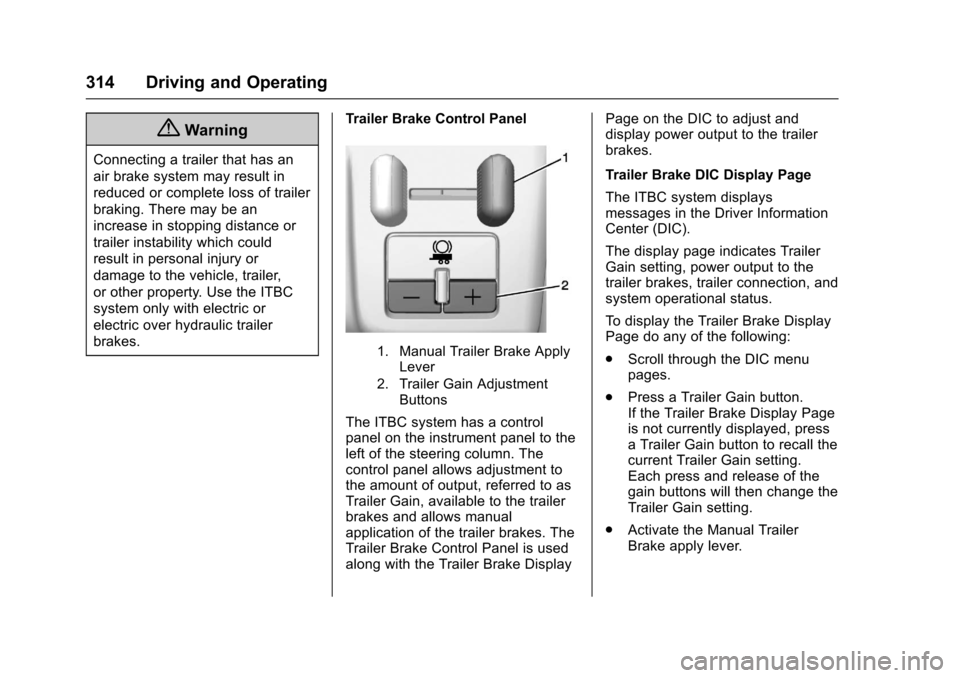
brakes.Trailer Brake Control Panel
1. Manual Trailer Brake Apply
Lever
2. Trailer Gain Adjustment Buttons
The ITBC system has a control
panel on the instrument panel to the
left of the steering column. The
control panel allows adjustment to
the amount of output, referred to as
Trailer Gain, available to the trailer
brakes and allows manual
application of the trailer brakes. The
Trailer Brake Control Panel is used
along with the Trailer Brake Display Page on the DIC to adjust and
display power output to the trailer
brakes.
Trailer Brake DIC Display Page
The ITBC system displays
messages in the Driver Information
Center (DIC).
The display page indicates Trailer
Gain setting, power output to the
trailer brakes, trailer connection, and
system operational status.
To display the Trailer Brake Display
Page do any of the following:
.
Scroll through the DIC menu
pages.
. Press a Trailer Gain button.
If the Trailer Brake Display Page
is not currently displayed, press
a Trailer Gain button to recall the
current Trailer Gain setting.
Each press and release of the
gain buttons will then change the
Trailer Gain setting.
. Activate the Manual Trailer
Brake apply lever.
Page 316 of 465
Chevrolet Tahoe/Suburban Owner Manual (GMNA-Localizing-U.S./Canada/
Mexico-9955986) - 2017 - crc - 7/5/16
Driving and Operating 315
TRAILER GAIN: This setting can be
adjusted from 0.0 to 10.0 with either
a trailer connected or disconnected.
To adjust the Trailer Gain, press one
of the Trailer Gain adjustment
buttons. Press and hold a gain
button to continuously adjust the
Trailer Gain. To turn the output to
the trailer off, adjust the Trailer Gain
setting to 0.0 (zero).
TRAILER OUTPUT: Displays any
time a trailer with electric brakes is
connected. Output to the trailer
brakes is based on the amount of
vehicle braking present and relative
to the Trailer Gain setting. Output is
displayed from 0 to 100% for each
gain setting.
The Trailer Output will indicate“- - -
- - -” on the Trailer Brake Display
Page whenever the following occur:
. No trailer is connected.
. A trailer without electric brakes
is connected (no DIC message
displayed). .
A trailer with electric brakes has
become disconnected (a
CHECK TRAILER WIRING
message will also display on
the DIC).
. There is a fault present in the
wiring to the trailer brakes (a
CHECK TRAILER WIRING
message will also display on
the DIC).
. The ITBC system is not working
due to a fault (a SERVICE
TRAILER BRAKE SYSTEM
message will also display in
the DIC).
Manual Trailer Brake Apply
The Manual Trailer Brake Apply
Lever is used to apply the trailer ’s
electric brakes independent of the
vehicle’s brakes. Sliding the lever to
the left will apply only the trailer
brakes. Use this lever to adjust
Trailer Gain to properly adjust the
power output to the trailer brakes.
The trailer's and the vehicle's brake
lamps will come on when either
vehicle brakes or manual trailer
brakes are applied. Trailer Gain Adjustment Procedure
Trailer Gain should be set for a
specific trailering condition and must
be adjusted any time vehicle
loading, trailer loading, or road
surface conditions change.
{Warning
Trailer brakes that are
over-gained or under-gained may
not stop the vehicle and the trailer
as intended and can result in a
crash. Always follow the
instructions to set the Trailer Gain
for the proper trailer stopping
performance.
To adjust Trailer Gain for each
towing condition: 1. Drive the vehicle with the trailer attached on a level road
surface representative of the
towing condition and free of
traffic at about 32 to 40 km/h
(20 to 25 mph) and fully apply
the Manual Trailer Brake apply
lever.
Page 318 of 465
Chevrolet Tahoe/Suburban Owner Manual (GMNA-Localizing-U.S./Canada/
Mexico-9955986) - 2017 - crc - 7/5/16
Driving and Operating 317
If the CHECK TRAILER
WIRING message only
reappears when connecting the
trailer wiring harness to the
vehicle, the electrical fault is on
the trailer side.
SERVICE TRAILER BRAKE
SYSTEM: This message will display
when there is a problem with the
ITBC system. If this message
continues over multiple ignition
cycles, there is a problem with the
ITBC system. Have the vehicle
serviced.
If either the CHECK TRAILER
WIRING or SERVICE TRAILER
BRAKE SYSTEM message displays
while driving, the ITBC system may
not be fully functional or may not
function at all. When traffic
conditions allow, carefully pull the
vehicle over to the side of the road
and turn the ignition off. Check the
wiring connection to the trailer and
turn the ignition back on. If either of
these messages continues, either
the vehicle or trailer needs service. A GM dealer may be able to
diagnose and repair problems with
the trailer. However, any diagnosis
and repair of the trailer is not
covered under the vehicle warranty.
Contact your trailer dealer for
assistance with trailer repairs and
trailer warranty information.
Trailer Sway
Control (TSC)
Vehicles with StabiliTrak have a
Trailer Sway Control (TSC) feature.
Trailer sway is unintended
side-to-side motion of a trailer while
being towed. If the vehicle is towing
a trailer and the TSC detects that
sway is increasing, the vehicle
brakes are selectively applied at
each wheel, to help reduce
excessive trailer sway. If the vehicle
is equipped with the Integrated
Trailer Brake Control (ITBC) system,
and the trailer has the electric
actuated brake system, StabiliTrak
may also apply the trailer brakes.
If TSC is enabled, the Traction
Control System (TCS)/StabiliTrak
warning light will flash on theinstrument cluster. Vehicle speed
must be reduced. If trailer sway
continues, StabiliTrak can reduce
engine torque to help slow the
vehicle. See
Traction Control/
Electronic Stability Control 0274.
{Warning
Even if the vehicle is equipped
with TSC, trailer sway could result
in loss of control and the vehicle
could crash. If excessive trailer
sway is detected, slow down to a
safe speed. Check the trailer and
vehicle to help correct possible
causes. These could include an
improperly or overloaded trailer,
unrestrained cargo, improper
trailer hitch configuration,
excessive vehicle-trailer speed,
or improperly inflated or incorrect
vehicle or trailer tires. See Towing
Equipment 0310 for trailer ratings
and hitch setup
recommendations.
Page 319 of 465
Chevrolet Tahoe/Suburban Owner Manual (GMNA-Localizing-U.S./Canada/
Mexico-9955986) - 2017 - crc - 7/5/16
318 Driving and Operating
Adding non-dealer accessories can
affect the vehicle performance. See
Accessories and
Modifications0321.Conversions and
Add-Ons
Add-On Electrical
Equipment
{Warning
The Data Link Connector (DLC) is
used for vehicle service and
Emission Inspection/Maintenance
testing. See Malfunction Indicator
Lamp (Check Engine Light)
0 151. A device connected to the
DLC —such as an aftermarket
fleet or driver-behavior tracking
device —may interfere with
vehicle systems. This could affect
vehicle operation and cause a
crash. Such devices may also
access information stored in the
vehicle’s systems.
Caution
Some electrical equipment can
damage the vehicle or cause
components to not work and
would not be covered by the
vehicle warranty. Always check
with your dealer before adding
electrical equipment.
Add-on equipment can drain the
vehicle's 12-volt battery, even if the
vehicle is not operating.
The vehicle has an airbag system.
Before attempting to add anything
electrical to the vehicle, see
Servicing the Airbag-Equipped
Vehicle 0102 andAdding
Equipment to the Airbag-Equipped
Vehicle 0102.
Page 320 of 465
Chevrolet Tahoe/Suburban Owner Manual (GMNA-Localizing-U.S./Canada/
Mexico-9955986) - 2017 - crc - 7/5/16
Vehicle Care 319
Vehicle Care
General Information
General Information . . . . . . . . . . 320
California Proposition65 Warning . . . . . . . . . . . . . . . . . 320
California Perchlorate Materials Requirements . . . . . 321
Accessories and Modifications . . . . . . . . . . . . . . . . 321
Vehicle Checks
Doing Your OwnService Work . . . . . . . . . . . . . . . 322
Hood . . . . . . . . . . . . . . . . . . . . . . . . . 322
Engine Compartment Overview . . . . . . . . . . . . . . . . . . . . 323
Engine Oil . . . . . . . . . . . . . . . . . . . . 325
Engine Oil Life System . . . . . . . 327
Automatic Transmission Fluid . . . . . . . . . . . . . . . . . . . . . . . . 328
Engine Air Cleaner/Filter . . . . . . 331
Cooling System . . . . . . . . . . . . . . 332
Engine Coolant . . . . . . . . . . . . . . . 333
Engine Overheating . . . . . . . . . . 336
Engine Fan . . . . . . . . . . . . . . . . . . . 337
Power Steering Fluid . . . . . . . . . 338
Washer Fluid . . . . . . . . . . . . . . . . . 338
Brakes . . . . . . . . . . . . . . . . . . . . . . . 338
Brake Fluid . . . . . . . . . . . . . . . . . . . 339 Battery - North America . . . . . . 340
Four-Wheel Drive . . . . . . . . . . . . . 341
Front Axle . . . . . . . . . . . . . . . . . . . . 341
Rear Axle . . . . . . . . . . . . . . . . . . . . 342
Noise Control System . . . . . . . . 343
Starter Switch Check . . . . . . . . . 344
Automatic Transmission Shift
Lock Control Function
Check . . . . . . . . . . . . . . . . . . . . . . . 344
Ignition Transmission Lock Check . . . . . . . . . . . . . . . . . . . . . . . 344
Park Brake and P (Park) Mechanism Check . . . . . . . . . . 345
Wiper Blade Replacement . . . . 345
Glass Replacement . . . . . . . . . . 346
Windshield Replacement . . . . . 346
Headlamp Aiming
Headlamp Aiming . . . . . . . . . . . . 347
Bulb Replacement
Bulb Replacement . . . . . . . . . . . . 347
Halogen Bulbs . . . . . . . . . . . . . . . . 347
High Intensity Discharge (HID) Lighting . . . . . . . . . . . . . . . . . . . . . 347
LED Lighting . . . . . . . . . . . . . . . . . 347
Headlamps . . . . . . . . . . . . . . . . . . . 348
Fog Lamps . . . . . . . . . . . . . . . . . . . 348
Front Turn Signal Lamps . . . . . 348 Taillamps, Turn Signal,
Stoplamps, and Back-Up
Lamps . . . . . . . . . . . . . . . . . . . . . . 349
License Plate Lamp . . . . . . . . . . 350
Replacement Bulbs . . . . . . . . . . . 351
Electrical System
Electrical System Overload . . . 351
Fuses . . . . . . . . . . . . . . . . . . . . . . . . 351
Engine Compartment Fuse Block . . . . . . . . . . . . . . . . . . . . . . . . 352
Instrument Panel Fuse Block (Left) . . . . . . . . . . . . . . . . . 356
Instrument Panel Fuse Block (Right) . . . . . . . . . . . . . . . . . . . . . . 359
Rear Compartment Fuse Block . . . . . . . . . . . . . . . . . . . . . . . . 361
Wheels and Tires
Tires . . . . . . . . . . . . . . . . . . . . . . . . . . 362
All-Season Tires . . . . . . . . . . . . . . 363
Winter Tires . . . . . . . . . . . . . . . . . . 363
Low-Profile Tires . . . . . . . . . . . . . 364
All-Terrain Tires . . . . . . . . . . . . . . . 364
Tire Sidewall Labeling . . . . . . . . 364
Tire Designations . . . . . . . . . . . . . 365
Tire Terminology and
Definitions . . . . . . . . . . . . . . . . . . 366
Tire Pressure . . . . . . . . . . . . . . . . . 369
Tire Pressure for High-Speed
Operation . . . . . . . . . . . . . . . . . . . 370
Page 321 of 465
Chevrolet Tahoe/Suburban Owner Manual (GMNA-Localizing-U.S./Canada/
Mexico-9955986) - 2017 - crc - 7/5/16
320 Vehicle Care
Tire Pressure MonitorSystem . . . . . . . . . . . . . . . . . . . . . . 371
Tire Pressure Monitor Operation . . . . . . . . . . . . . . . . . . . 372
Tire Inspection . . . . . . . . . . . . . . . . 375
Tire Rotation . . . . . . . . . . . . . . . . . 375
When It Is Time for New
Tires . . . . . . . . . . . . . . . . . . . . . . . . 376
Buying New Tires . . . . . . . . . . . . . 377
Different Size Tires and Wheels . . . . . . . . . . . . . . . . . . . . . . 378
Uniform Tire Quality Grading . . . . . . . . . . . . . . . . . . . . . 379
Wheel Alignment and Tire Balance . . . . . . . . . . . . . . . . . . . . . 380
Wheel Replacement . . . . . . . . . . 380
Tire Chains . . . . . . . . . . . . . . . . . . . 381
If a Tire Goes Flat . . . . . . . . . . . . 382
Tire Changing . . . . . . . . . . . . . . . . 383
Full-Size Spare Tire . . . . . . . . . . 392
Jump Starting
Jump Starting - North America . . . . . . . . . . . . . . . . . . . . . 393
Towing the Vehicle
Towing the Vehicle . . . . . . . . . . . 396
Recreational VehicleTowing . . . . . . . . . . . . . . . . . . . . . . 396
Appearance Care
Exterior Care . . . . . . . . . . . . . . . . . 402 Interior Care . . . . . . . . . . . . . . . . . . 406
Floor Mats . . . . . . . . . . . . . . . . . . . . 409
General Information
For service and parts needs, visit
your dealer. You will receive
genuine GM parts and GM-trained
and supported service people.
Genuine GM parts have one of
these marks:
California Proposition
65 Warning
WARNING:
Most motor vehicles,
including this one, as well as many
of its service parts and fluids,
contain and/or emit chemicals
known to the State of California to
Page 323 of 465
Chevrolet Tahoe/Suburban Owner Manual (GMNA-Localizing-U.S./Canada/
Mexico-9955986) - 2017 - crc - 7/5/16
322 Vehicle Care
Vehicle Checks
Doing Your Own
Service Work
{Warning
It can be dangerous to work on
your vehicle if you do not have
the proper knowledge, service
manual, tools, or parts. Always
follow owner’s manual procedures
and consult the service manual
for your vehicle before doing any
service work.
If doing some of your own service
work, use the proper service
manual. It tells you much more
about how to service the vehicle
than this manual can. To order the
proper service manual, see Service
Publications Ordering
Information 0438.
This vehicle has an airbag system.
Before attempting to do your own
service work, see Servicing the
Airbag-Equipped Vehicle 0102. Keep a record with all parts receipts
and list the mileage and the date of
any service work performed. See
Maintenance Records
0424.
Caution
Even small amounts of
contamination can cause damage
to vehicle systems. Do not allow
contaminants to contact the fluids,
reservoir caps, or dipsticks.
Hood
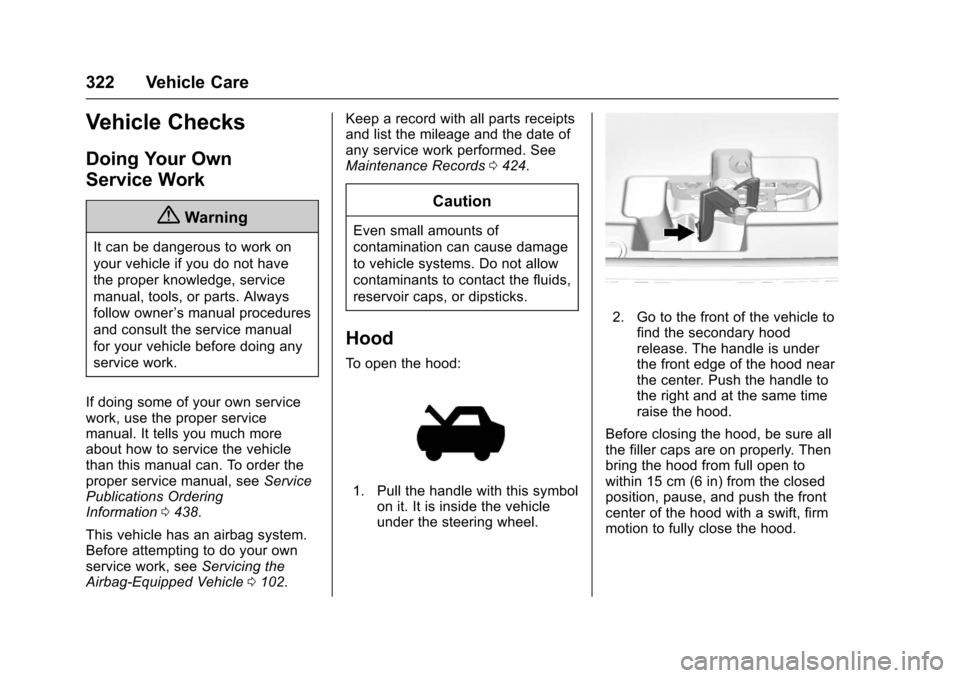
To open the hood:
1. Pull the handle with this symbol
on it. It is inside the vehicle
under the steering wheel.
2. Go to the front of the vehicle tofind the secondary hood
release. The handle is under
the front edge of the hood near
the center. Push the handle to
the right and at the same time
raise the hood.
Before closing the hood, be sure all
the filler caps are on properly. Then
bring the hood from full open to
within 15 cm (6 in) from the closed
position, pause, and push the front
center of the hood with a swift, firm
motion to fully close the hood.
Page 327 of 465
Chevrolet Tahoe/Suburban Owner Manual (GMNA-Localizing-U.S./Canada/
Mexico-9955986) - 2017 - crc - 7/5/16
326 Vehicle Care
{Warning
The engine oil dipstick handle
may be hot; it could burn you.
Use a towel or glove to touch the
dipstick handle.
If a low oil Driver Information Center
(DIC) message displays, check the
oil level.
Follow these guidelines:
. To get an accurate reading, park
the vehicle on level ground.
Check the engine oil level after
the engine has been off for at
least two hours. Checking the
engine oil level on steep grades
or too soon after engine shutoff
can result in incorrect readings.
Accuracy improves when
checking a cold engine prior to
starting. Remove the dipstick
and check the level.
. If unable to wait two hours, the
engine must be off for at least
15 minutes if the engine is
warm, or at least 30 minutes if
the engine is not warm. Pull out the dipstick, wipe it with a clean
paper towel or cloth, then push it
back in all the way. Remove it
again, keeping the tip down, and
check the level.
When to Add Engine Oil
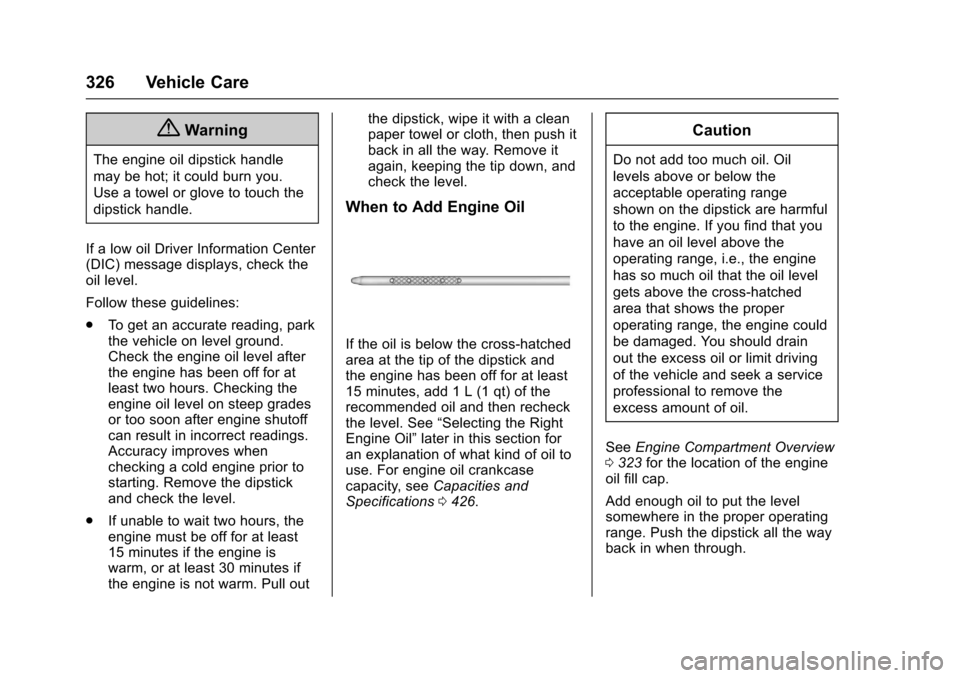
If the oil is below the cross-hatched
area at the tip of the dipstick and
the engine has been off for at least
15 minutes, add 1 L (1 qt) of the
recommended oil and then recheck
the level. See
“Selecting the Right
Engine Oil” later in this section for
an explanation of what kind of oil to
use. For engine oil crankcase
capacity, see Capacities and
Specifications 0426.
Caution
Do not add too much oil. Oil
levels above or below the
acceptable operating range
shown on the dipstick are harmful
to the engine. If you find that you
have an oil level above the
operating range, i.e., the engine
has so much oil that the oil level
gets above the cross-hatched
area that shows the proper
operating range, the engine could
be damaged. You should drain
out the excess oil or limit driving
of the vehicle and seek a service
professional to remove the
excess amount of oil.
See Engine Compartment Overview
0 323 for the location of the engine
oil fill cap.
Add enough oil to put the level
somewhere in the proper operating
range. Push the dipstick all the way
back in when through.
Page 328 of 465
Chevrolet Tahoe/Suburban Owner Manual (GMNA-Localizing-U.S./Canada/
Mexico-9955986) - 2017 - crc - 7/5/16
Vehicle Care 327
Selecting the Right Engine Oil
Selecting the right engine oil
depends on both the proper oil
specification and viscosity grade.
SeeRecommended Fluids and
Lubricants 0421.
Specification
Ask for and use engine oils that
meet the dexos1™ specification.
Engine oils that have been
approved by GM as meeting the
dexos1 specification are marked
with the dexos1 approved logo. See
www.gmdexos.com.
Caution
Failure to use the recommended
engine oil or equivalent can result
in engine damage not covered by
the vehicle warranty. Viscosity Grade
Use SAE 0W-20 viscosity grade
engine oil.
When selecting an oil of the
appropriate viscosity grade, it is
recommended to select an oil of the
correct specification. See
“Specification”
earlier in this section.
Engine Oil Additives/Engine
Oil Flushes
Do not add anything to the oil. The
recommended oils meeting the
dexos1 specification are all that is
needed for good performance and
engine protection.
Engine oil system flushes are not
recommended and could cause
engine damage not covered by the
vehicle warranty.
What to Do with Used Oil
Used engine oil contains certain
elements that can be unhealthy for
your skin and could even cause
cancer. Do not let used oil stay on
your skin for very long. Clean your
skin and nails with soap and water,
or a good hand cleaner. Wash or properly dispose of clothing or rags
containing used engine oil. See the
manufacturer's warnings about the
use and disposal of oil products.
Used oil can be a threat to the
environment. If you change your
own oil, be sure to drain all the oil
from the filter before disposal. Never
dispose of oil by putting it in the
trash or pouring it on the ground,
into sewers, or into streams or
bodies of water. Recycle it by taking
it to a place that collects used oil.
Engine Oil Life System
When to Change Engine Oil
This vehicle has a computer system
that indicates when to change the
engine oil and filter. This is based
on a combination of factors which
include engine revolutions, engine
temperature, and miles driven.
Based on driving conditions, the
mileage at which an oil change is
indicated can vary considerably. For
the oil life system to work properly,
the system must be reset every time
the oil is changed.