ECO mode CHEVROLET TAHOE 2017 4.G Owner's Guide
[x] Cancel search | Manufacturer: CHEVROLET, Model Year: 2017, Model line: TAHOE, Model: CHEVROLET TAHOE 2017 4.GPages: 465, PDF Size: 7.47 MB
Page 279 of 465
Chevrolet Tahoe/Suburban Owner Manual (GMNA-Localizing-U.S./Canada/
Mexico-9955986) - 2017 - crc - 7/5/16
278 Driving and Operating
thereafter. The system may exhaust
(lower vehicle height) for up to
10 minutes after the ignition key has
been turned off. You may hear the
air compressor operating when the
height is being adjusted.
If a weight-distributing hitch is being
used, it is recommended to allow
the shocks to inflate, thereby
leveling the vehicle prior to adjusting
the hitch.Cruise Control
{Warning
Cruise control can be dangerous
where you cannot drive safely at
a steady speed. Do not use
cruise control on winding roads or
in heavy traffic.
Cruise control can be dangerous
on slippery roads. On such roads,
fast changes in tire traction can
cause excessive wheel slip, and
you could lose control. Do not use
cruise control on slippery roads.
With cruise control, a speed of
about 40 km/h (25 mph) or more can
be maintained without keeping your
foot on the accelerator. Cruise
control does not work at speeds
below about 40 km/h (25 mph).
If the brakes are applied, the cruise
control disengages.
For an explanation of how cruise
control interacts with the Range
Selection Mode, Tow/Haul Mode, and Grade Braking systems. See
“Grade Braking”
underTow/Haul
Mode 0266.
If the vehicle has StabiliTrak and the
system begins to limit wheel spin,
cruise control will automatically
disengage. See Traction Control/
Electronic Stability Control 0274.
If a collision alert occurs when
cruise control is activated, cruise
control is disengaged. See Forward
Collision Alert (FCA) System 0291.
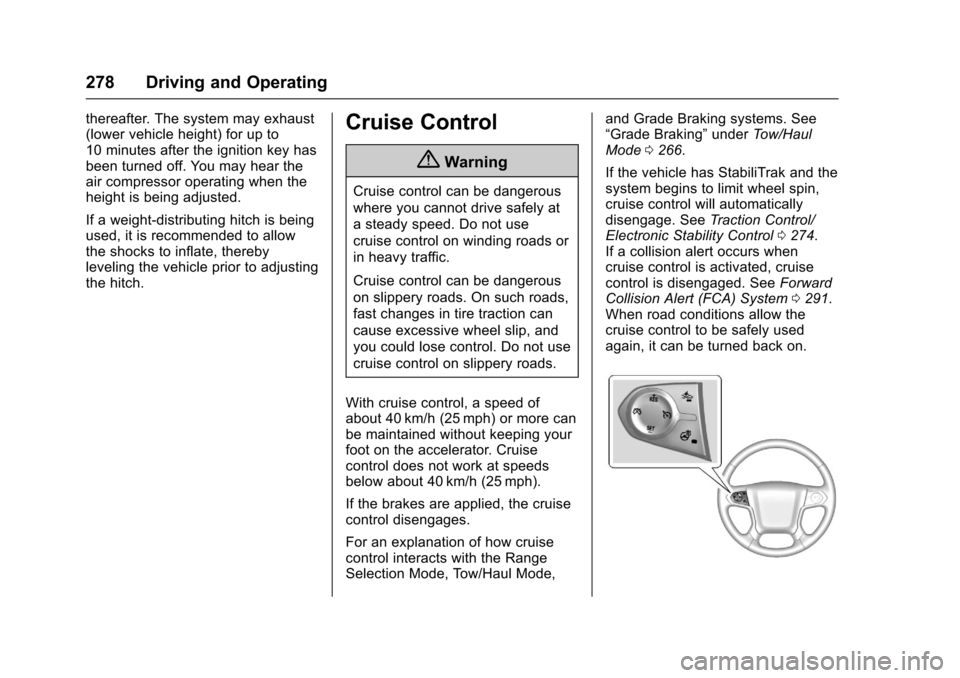
When road conditions allow the
cruise control to be safely used
again, it can be turned back on.
Page 281 of 465
Chevrolet Tahoe/Suburban Owner Manual (GMNA-Localizing-U.S./Canada/
Mexico-9955986) - 2017 - crc - 7/5/16
280 Driving and Operating
.To slow down in small
increments, briefly press SET–.
For each press, the vehicle goes
about 1.6 km/h (1 mph) slower.
The speedometer reading can be
displayed in either English or metric
units. See Instrument Cluster 0141.
The increment value used depends
on the units displayed.
Passing Another Vehicle While
Using Cruise Control
Use the accelerator pedal to
increase the vehicle speed. When
you take your foot off the pedal, the
vehicle will slow down to the
previous set cruise speed. While
pressing the accelerator pedal or
shortly following the release to
override cruise control, briefly
pressing SET– will result in cruise
control set to the current vehicle
speed.
Using Cruise Control on Hills
How well the cruise control works
on hills depends on the vehicle
speed, the load, and the steepness
of the hills. When going up steep
hills, pressing the accelerator pedal may be necessary to maintain
vehicle speed. When going
downhill, Cruise Grade Braking
helps maintain the driver selected
speed.
Cruise Grade Braking is enabled
when the vehicle is started and
cruise control is active. It is not
enabled in Range Selection Mode.
It assists in maintaining driver
selected speed when driving on
downhill grades by using the engine
and transmission to slow the
vehicle.
To disable and enable Cruise Grade
Braking for the current ignition key
cycle, press and hold the Tow/Haul
button for five seconds. A DIC
message displays. See
Transmission Messages
0175.
For other forms of descent control,
see Hill Descent Control (HDC)
0 276,Automatic Transmission
0 262, and Tow/Haul Mode 0266.
Ending Cruise Control
There are four ways to end cruise
control:
. Step lightly on the brake pedal. .
Press*.
. Shift the transmission to
N (Neutral).
. To turn off cruise control,
press
5.
Erasing Speed Memory
The cruise control set speed is
erased from memory when
5is
pressed, or if the ignition is
turned off.
Adaptive Cruise Control
If equipped with Adaptive Cruise
Control (ACC), it allows for selecting
the cruise control set speed and
following gap. Read this entire
section before using this system.
ACC uses a camera and radar
sensors to detect other vehicles.
See Radio Frequency Statement
0 439. The following gap is the
following time (or distance) between
your vehicle and a vehicle detected
directly ahead in your path, moving
in the same direction. If no vehicle
is detected in your path, ACC works
like regular cruise control.
Page 314 of 465
Chevrolet Tahoe/Suburban Owner Manual (GMNA-Localizing-U.S./Canada/
Mexico-9955986) - 2017 - crc - 7/5/16
Driving and Operating 313
Tow/Haul is a feature that assists
when pulling a heavy trailer or a
large or heavy load. SeeTow/Haul
Mode 0266.
Tow/Haul is designed to be most
effective when the vehicle and
trailer combined weight is at least
75 percent of the vehicle's Gross
Combined Weight Rating (GCWR).
See “Weight of the Trailer” under
Trailer Towing 0306. Tow/Haul is
most useful under the following
driving conditions:
. When pulling a heavy trailer or a
large or heavy load through
rolling terrain.
. When pulling a heavy trailer or a
large or heavy load in
stop-and-go traffic.
. When pulling a heavy trailer or a
large or heavy load in busy
parking lots where improved low
speed control of the vehicle is
desired.
Operating the vehicle in Tow/Haul
when lightly loaded or with no trailer
at all will not cause damage.
However, there is no benefit to the selection of Tow/Haul when the
vehicle is unloaded. Such a
selection when unloaded may result
in unpleasant engine and
transmission driving characteristics
and reduced fuel economy. Tow/
Haul is recommended only when
pulling a heavy trailer or a large or
heavy load.
Integrated Trailer Brake
Control System
The vehicle may have an Integrated
Trailer Brake Control (ITBC) system
for use with electric trailer brakes or
most electric-over-hydraulic trailer
brakes.
This symbol is on the Trailer Brake
Control Panel on vehicles with an
ITBC system. The power output to
the trailer brakes is based on the
amount of brake pressure being
applied by the vehicle’s brakesystem, and on the type of trailer
brakes detected. This available
power output to the trailer brakes
can be adjusted to a wide range of
trailering situations.
The ITBC system is integrated with
the vehicle’
s brake, antilock brake,
and StabiliTrak systems. In trailering
conditions that cause the vehicle’s
antilock brake or StabiliTrak
systems to activate, power sent to
the trailer's brakes will be
automatically adjusted to minimize
trailer wheel lock-up. This does not
imply that the trailer has StabiliTrak.
If the vehicle’s brake, antilock brake,
or StabiliTrak systems are not
functioning properly, the ITBC
system may not be fully functional
or may not function at all. Make sure
all of these systems are fully
operational to ensure full
functionality of the ITBC system.
The ITBC system is powered
through the vehicle's electrical
system. Turning the ignition off will
also turn off the ITBC system. The
ITBC system is fully functional only
when the ignition is in ON/RUN.
Page 369 of 465
Chevrolet Tahoe/Suburban Owner Manual (GMNA-Localizing-U.S./Canada/
Mexico-9955986) - 2017 - crc - 7/5/16
368 Vehicle Care
Normal Occupant Weight:The
number of occupants a vehicle
is designed to seat multiplied by
68 kg (150 lb). See Vehicle Load
Limits 0247.
Occupant Distribution
:
Designated seating positions.
Outward Facing Sidewall
:The
side of an asymmetrical tire that
has a particular side that faces
outward when mounted on a
vehicle. The side of the tire that
contains a whitewall, bears
white lettering, or bears
manufacturer, brand, and/or
model name molding that is
higher or deeper than the same
moldings on the other sidewall
of the tire.
Passenger (P-Metric) Tire
:A
tire used on passenger cars and
some light duty trucks and
multipurpose vehicles.
Recommended Inflation
Pressure
:Vehicle
manufacturer's recommended tire inflation pressure as shown
on the tire placard. See
Tire
Pressure 0369 andVehicle
Load Limits 0247.
Radial Ply Tire
:A pneumatic
tire in which the ply cords that
extend to the beads are laid at
90 degrees to the centerline of
the tread.
Rim
:A metal support for a tire
and upon which the tire beads
are seated.
Sidewall
:The portion of a tire
between the tread and the bead.
Speed Rating
:An
alphanumeric code assigned to
a tire indicating the maximum
speed at which a tire can
operate.
Traction
:The friction between
the tire and the road surface.
The amount of grip provided.
Tread
:The portion of a tire that
comes into contact with
the road. Treadwear Indicators
:Narrow
bands, sometimes called wear
bars, that show across the tread
of a tire when only 1.6 mm
(1/16 in) of tread remains. See
When It Is Time for New
Tires 0376.
UTQGS (Uniform Tire Quality
Grading Standards)
:A tire
information system that provides
consumers with ratings for a
tire's traction, temperature, and
treadwear. Ratings are
determined by tire
manufacturers using
government testing procedures.
The ratings are molded into the
sidewall of the tire. See Uniform
Tire Quality Grading 0379.
Vehicle Capacity Weight
:The
number of designated seating
positions multiplied by
68 kg (150 lb) plus the rated
cargo load. See Vehicle Load
Limits 0247.
Page 375 of 465
Chevrolet Tahoe/Suburban Owner Manual (GMNA-Localizing-U.S./Canada/
Mexico-9955986) - 2017 - crc - 7/5/16
374 Vehicle Care
passenger side front tire, passenger
side rear tire, and driver side rear.
See your dealer for service or to
purchase a relearn tool. A TPMS
relearn tool can also be purchased.
See Tire Pressure Monitor Sensor
Activation Tool at
www.gmtoolsandequipment.com or
call 1-800-GM TOOLS
(1-800-468-6657).
There are two minutes to match the
first tire/wheel position, and
five minutes overall to match all four
tire/wheel positions. If it takes
longer, the matching process stops
and must be restarted.
The TPMS sensor matching
process is:1. Set the parking brake.
2. Turn the ignition to ON/RUN with the engine off or place the
vehicle power mode in ON/
RUN/START.
3. Uplevel DIC Only: Make sure the Tire Pressure info page
option is turned on. The info
pages on the DIC can be
turned on and off through the Settings menu. See
Driver
Information Center (DIC) (Base
Level) 0158 orDriver
Information Center (DIC)
(Uplevel) 0160.
4. If the vehicle has an uplevel DIC, use the DIC controls on
the right side of the steering
wheel to scroll to the Tire
Pressure screen under the DIC
info page.
If the vehicle has a base level
DIC, use the trip odometer
reset stem to scroll to the Tire
Pressure screen.
5. If the vehicle has an uplevel DIC, press and hold
Vin the
center of the DIC controls.
If the vehicle has a base level
DIC, press and hold the trip
odometer reset stem for about
five seconds. A message
asking if the process should
begin should appear. Select
yes and press the trip
odometer reset stem to confirm
the selection. The horn sounds twice to
signal the receiver is in relearn
mode and the TIRE
LEARNING ACTIVE message
displays on the DIC screen.
6. Start with the driver side front tire.
7. Place the relearn tool against the tire sidewall, near the valve
stem. Then press the button to
activate the TPMS sensor.
A horn chirp confirms that the
sensor identification code has
been matched to this tire and
wheel position.
8. Proceed to the passenger side front tire, and repeat the
procedure in Step 7.
9. Proceed to the passenger side rear tire, and repeat the
procedure in Step 7.
10. Proceed to the driver side rear tire, and repeat the procedure
in Step 7. The horn sounds two
times to indicate the sensor
identification code has been
matched to the driver side rear
tire, and the TPMS sensor
Page 434 of 465
Chevrolet Tahoe/Suburban Owner Manual (GMNA-Localizing-U.S./Canada/
Mexico-9955986) - 2017 - crc - 7/5/16
Customer Information 433
.Find the
Chevrolet-recommended
maintenance services.
GM Mobility
Reimbursement Program
This program is available to
qualified applicants for cost
reimbursement of eligible
aftermarket adaptive equipment
required for the vehicle, such as
hand controls or a wheelchair/
scooter lift for the vehicle.
For more information on the limited
offer, visit www.gmmobility.com or
call the GM Mobility Assistance
Center at 1-800-323-9935. Text
Telephone (TTY) users, call
1-800-833-9935. General Motors of Canada also has
a Mobility Program. Visit www.gm.ca
or call 1-800-GM-DRIVE (463-7483)
for details. TTY users call
1-800-263-3830.
Roadside Assistance
Program
For U.S.-purchased vehicles, call
1-800-243-8872. (Text Telephone
(TTY): 1-888-889-2438.)
For Canadian-purchased vehicles,
call 1-800-268-6800.
Service is available 24 hours a day,
365 days a year.
Calling for Assistance
When calling Roadside Assistance,
have the following information
ready:
.
Your name, home address, and
home telephone number.
. Telephone number of your
location.
. Location of the vehicle.
. Model, year, color, and license
plate number of the vehicle. .
Odometer reading, Vehicle
Identification Number (VIN), and
delivery date of the vehicle.
. Description of the problem.
Coverage
Services are provided for the
duration of the vehicle’s powertrain
warranty.
In the U.S., anyone driving the
vehicle is covered. In Canada, a
person driving the vehicle without
permission from the owner is not
covered.
Roadside Assistance is not a part of
the New Vehicle Limited Warranty.
General Motors North America and
Chevrolet reserve the right to make
any changes or discontinue the
Roadside Assistance program at
any time without notification.
General Motors North America and
Chevrolet reserve the right to limit
services or payment to an owner or
driver if they decide the claims are
made too often, or the same type of
claim is made many times.
Page 439 of 465
Chevrolet Tahoe/Suburban Owner Manual (GMNA-Localizing-U.S./Canada/
Mexico-9955986) - 2017 - crc - 7/5/16
438 Customer Information
.Vehicle make, model, and
model year.
. Vehicle Identification
Number (VIN).
. Insurance company and policy
number.
. General description of the
damage to the other vehicle.
Choose a reputable repair facility
that uses quality replacement parts.
See “Collision Parts” earlier in this
section.
If the airbag has inflated, see What
Will You See after an Airbag
Inflates? 097.
Managing the Vehicle Damage
Repair Process
In the event that the vehicle requires
damage repairs, GM recommends
that you take an active role in its
repair. If you have a pre-determined
repair facility of choice, take the
vehicle there, or have it towed there.
Specify to the facility that any
required replacement collision parts
be original equipment parts, either
new Genuine GM parts or recycled original GM parts. Remember,
recycled parts will not be covered by
the GM vehicle warranty.
Insurance pays the bill for the repair,
but you must live with the repair.
Depending on your policy limits,
your insurance company may
initially value the repair using
aftermarket parts. Discuss this with
the repair professional, and insist on
Genuine GM parts. Remember,
if the vehicle is leased, you may be
obligated to have the vehicle
repaired with Genuine GM parts,
even if your insurance coverage
does not pay the full cost.
If another party's insurance
company is paying for the repairs,
you are not obligated to accept a
repair valuation based on that
insurance company's collision policy
repair limits, as you have no
contractual limits with that company.
In such cases, you can have control
of the repair and parts choices as
long as the cost stays within
reasonable limits.
Service Publications
Ordering Information
Service Manuals
Service Manuals have the diagnosis
and repair information on the
engines, transmission, axle,
suspension, brakes, electrical,
steering, body, etc.
Owner Information
Owner publications are written
specifically for owners and intended
to provide basic operational
information about the vehicle. The
Owner Manual includes the
Maintenance Schedule for all
models.
In-Portfolio: Includes a Portfolio,
Owner Manual, and Warranty
Manual.
RETAIL SELL PRICE: $35.00
–
$40.00 (U.S.) plus handling and
shipping fees.
Without Pouch: Owner Manual only.
RETAIL SELL PRICE:
$25.00 (U.S.) plus handling and
shipping fees.
Page 440 of 465
Chevrolet Tahoe/Suburban Owner Manual (GMNA-Localizing-U.S./Canada/
Mexico-9955986) - 2017 - crc - 7/5/16
Customer Information 439
Current and Past Models
Service and Owner publications are
available for many current and past
model year GM vehicles.
ORDER TOLL FREE:
1-800-551-4123 Monday–Friday
8:00 AM –6:00 PM Eastern Time
For Credit Card Orders Only
(VISA-MasterCard-Discover), see
Helm, Inc. at: www.helminc.com.
Or write to:
Helm, Incorporated
Attention: Customer Service
47911 Halyard Drive
Plymouth, MI 48170
Prices are subject to change without
notice and without incurring
obligation. Allow ample time for
delivery.
All listed prices are quoted in U.S.
funds. Make checks payable in U.S.
funds.
Radio Frequency
Statement
This vehicle has systems that
operate on a radio frequency that
complies with Part 15/Part 18 of the
Federal Communications
Commission (FCC) rules and with
Industry Canada Standards
RSS-GEN/210/216/220/251/310,
ICES‐001.
Operation is subject to the following
two conditions:
1. The device may not cause harmful interference.
2. The device must accept any interference received, including
interference that may cause
undesired operation of the
device.
Changes or modifications to any of
these systems by other than an
authorized service facility could void
authorization to use this equipment.
Reporting Safety
Defects
Reporting Safety Defects
to the United States
Government
If you believe that your vehicle
has a defect which could cause
a crash or could cause injury or
death, you should immediately
inform the National Highway
Traffic Safety Administration
(NHTSA) in addition to notifying
General Motors.
If NHTSA receives similar
complaints, it may open an
investigation, and if it finds that
a safety defect exists in a group
of vehicles, it may order a recall
and remedy campaign.
However, NHTSA cannot
become involved in individual
problems between you, your
dealer, or General Motors.
Page 460 of 465

Chevrolet Tahoe/Suburban Owner Manual (GMNA-Localizing-U.S./Canada/
Mexico-9955986) - 2017 - crc - 7/5/16
Index 459
Level ControlAutomatic . . . . . . . . . . . . . . . . . . . . . 277
Liftgate . . . . . . . . . . . . . . . . . . . . . . . . . . 47
Light Hill Decent Control . . . . . . . . . . . 154
Lighting Entry . . . . . . . . . . . . . . . . . . . . . . . . . 196
Exit . . . . . . . . . . . . . . . . . . . . . . . . . . . 196
Illumination Control . . . . . . . . . . . 194
LED . . . . . . . . . . . . . . . . . . . . . . . . . . 347
Lights . . . . . . . . . . . . . . . . . . . . . . . . . . . 154
Airbag Readiness . . . . . . . . . . . . . 149
Antilock Brake System(ABS) Warning . . . . . . . . . . . . . . 154
Brake System Warning . . . . . . . 153
Charging System . . . . . . . . . . . . . 151
Cruise Control . . . . . . . . . . . . . . . . 157
Flash-to-Pass . . . . . . . . . . . . . . . . . 191
Front Fog Lamp . . . . . . . . . . . . . . 157
High-Beam On . . . . . . . . . . . . . . . . 157
High/Low Beam Changer . . . . . 191
Low Fuel Warning . . . . . . . . . . . . 156
Safety Belt Reminders . . . . . . . . 149
Security . . . . . . . . . . . . . . . . . . . . . . 157
StabiliTrak
®OFF . . . . . . . . . . . . . 155
Tire Pressure . . . . . . . . . . . . . . . . . 156
Tow/Haul Mode . . . . . . . . . . . . . . . 154 Lights (cont'd)
Traction Control System
(TCS)/StabiliTrak
®. . . . . . . . . . 156
Traction Off . . . . . . . . . . . . . . . . . . . 155
Locking Rear Axle . . . . . . . . . . . . . . 277
Locks Automatic Door . . . . . . . . . . . . . . . . . 46
Delayed Locking . . . . . . . . . . . . . . . . 46
Door . . . . . . . . . . . . . . . . . . . . . . . . . . . . 45
Lockout Protection . . . . . . . . . . . . . . 46
Power Door . . . . . . . . . . . . . . . . . . . . . 45
Safety . . . . . . . . . . . . . . . . . . . . . . . . . . 47
Loss of Control . . . . . . . . . . . . . . . . . 238
Low Fuel Warning Light . . . . . . . . . 156
Low-Profile Tires . . . . . . . . . . . . . . . . 364
Lower Anchors and Tethers for Children (LATCH
System) . . . . . . . . . . . . . . . . . . . . . . . 111
Lumbar Adjustment . . . . . . . . . . . . . . 68 Front Seats . . . . . . . . . . . . . . . . . . . . . 68
M
Magnetic Ride Control . . . . . . . . . . 277
MaintenanceRecords . . . . . . . . . . . . . . . . . . . . . . 424
Maintenance and Care Additional . . . . . . . . . . . . . . . . . . . . . 418
Maintenance Schedule . . . . . . . . . 412 Maintenance Schedule (cont'd)
Recommended Fluids and
Lubricants . . . . . . . . . . . . . . . . . . . 421
Transfer Case . . . . . . . . . . . . . . . . 267
Malfunction Indicator Lamp . . . . . 151
Manual Mode . . . . . . . . . . . . . . . . . . . 265
Memory Features . . . . . . . . . . . . . . . . 13
Memory Seats . . . . . . . . . . . . . . . . . . . 70
Messages Airbag System . . . . . . . . . . . . . . . . 174
Battery Voltage andCharging . . . . . . . . . . . . . . . . . . . . 166
Brake System . . . . . . . . . . . . . . . . 167
Compass . . . . . . . . . . . . . . . . . . . . . 167
Door Ajar . . . . . . . . . . . . . . . . . . . . . 168
Engine Cooling System . . . . . . . 168
Engine Oil . . . . . . . . . . . . . . . . . . . . 169
Engine Power . . . . . . . . . . . . . . . . 169
Fuel System . . . . . . . . . . . . . . . . . . 170
Key and Lock . . . . . . . . . . . . . . . . . 170
Lamp . . . . . . . . . . . . . . . . . . . . . . . . . 170
Object Detection System . . . . . 171
Ride Control System . . . . . . . . . . 172
Security . . . . . . . . . . . . . . . . . . . . . . 174
Starting the Vehicle . . . . . . . . . . . 174
Steering System . . . . . . . . . . . . . . 174
Tire . . . . . . . . . . . . . . . . . . . . . . . . . . . 174
Transmission . . . . . . . . . . . . . . . . . 175