infotainment CHEVROLET TAHOE 2019 Owner's Manual
[x] Cancel search | Manufacturer: CHEVROLET, Model Year: 2019, Model line: TAHOE, Model: CHEVROLET TAHOE 2019Pages: 460, PDF Size: 6.77 MB
Page 2 of 460
Chevrolet Tahoe/Suburban Owner Manual (GMNA-Localizing-U.S./Canada/
Mexico-12460269) - 2019 - CRC - 9/11/18
ContentsIntroduction . . . . . . . . . . . . . . . . . . . . . . 2
In Brief . . . . . . . . . . . . . . . . . . . . . . . . . . . 5
Keys, Doors, and Windows . . . . . 29
Seats and Restraints . . . . . . . . . . . 64
Storage . . . . . . . . . . . . . . . . . . . . . . . 128
Instruments and Controls . . . . . . 133
Lighting . . . . . . . . . . . . . . . . . . . . . . . 183
Infotainment System . . . . . . . . . . 193
Climate Controls . . . . . . . . . . . . . . 194
Driving and Operating . . . . . . . . . 202
Vehicle Care . . . . . . . . . . . . . . . . . . 299
Service and Maintenance . . . . . 401
Technical Data . . . . . . . . . . . . . . . . 417
Customer Information . . . . . . . . . 421
Reporting Safety Defects . . . . . . 432
OnStar . . . . . . . . . . . . . . . . . . . . . . . . 435
Connected Services . . . . . . . . . . . 443
Index . . . . . . . . . . . . . . . . . . . . 447
Page 6 of 460
Chevrolet Tahoe/Suburban Owner Manual (GMNA-Localizing-U.S./Canada/
Mexico-12460269) - 2019 - CRC - 9/11/18
In Brief 5
In Brief
Instrument Panel
Instrument Panel Overview . . . . . . 6
Initial Drive Information
Initial Drive Information . . . . . . . . . . 8
Remote Keyless Entry (RKE)System . . . . . . . . . . . . . . . . . . . . . . . . 8
Remote Vehicle Start . . . . . . . . . . . 9
Door Locks . . . . . . . . . . . . . . . . . . . . . 9
Liftgate . . . . . . . . . . . . . . . . . . . . . . . . 10
Windows . . . . . . . . . . . . . . . . . . . . . . . 11
Seat Adjustment . . . . . . . . . . . . . . . 11
Memory Features . . . . . . . . . . . . . . 12
Second Row Seats . . . . . . . . . . . . 12
Third Row Seats . . . . . . . . . . . . . . . 13
Heated and Ventilated Seats . . . 13
Head Restraint Adjustment . . . . 13
Seat Belts . . . . . . . . . . . . . . . . . . . . . 13
Passenger Sensing System . . . 14
Mirror Adjustment . . . . . . . . . . . . . . 14
Steering Wheel Adjustment . . . . 15
Throttle and Brake Pedal Adjustment . . . . . . . . . . . . . . . . . . . 16
Interior Lighting . . . . . . . . . . . . . . . . 16
Exterior Lighting . . . . . . . . . . . . . . . 17
Windshield Wiper/Washer . . . . . . 18
Climate Controls . . . . . . . . . . . . . . . 19 Transmission . . . . . . . . . . . . . . . . . . 19
Four-Wheel Drive . . . . . . . . . . . . . . 20
Vehicle Features
Infotainment System . . . . . . . . . . . 21
Steering Wheel Controls . . . . . . . 21
Cruise Control . . . . . . . . . . . . . . . . . 21
Driver Information
Center (DIC) . . . . . . . . . . . . . . . . . 21
Forward Collision Alert (FCA) System . . . . . . . . . . . . . . . . . . . . . . . 22
Forward Automatic Braking (FAB) . . . . . . . . . . . . . . . . 22
Lane Keep Assist (LKA) (1500 Series) . . . . . . . . . . . . . . . . . . . . . . . 22
Lane Change Alert (LCA) . . . . . . 23
Rear Vision Camera (RVC) . . . . 23
Rear Cross Traffic Alert (RCTA) System . . . . . . . . . . . . . . . . . . . . . . . 23
Park Assist . . . . . . . . . . . . . . . . . . . . 23
Power Outlets . . . . . . . . . . . . . . . . . 23
Universal Remote System . . . . . 24
Sunroof . . . . . . . . . . . . . . . . . . . . . . . . 24
Performance and Maintenance
Traction Control/Electronic Stability Control . . . . . . . . . . . . . . 25
Tire Pressure Monitor . . . . . . . . . . 26
Fuel (5.3L V8 Engine) . . . . . . . . . . 26
Fuel (6.2L V8 Engine) . . . . . . . . . . 26
E85 or FlexFuel . . . . . . . . . . . . . . . . 27 Engine Oil Life System . . . . . . . . 27
Driving for Better Fuel
Economy . . . . . . . . . . . . . . . . . . . . . 27
Roadside Assistance Program . . . . . . . . . . . . . . . . . . . . . . 28
Page 8 of 460

Chevrolet Tahoe/Suburban Owner Manual (GMNA-Localizing-U.S./Canada/
Mexico-12460269) - 2019 - CRC - 9/11/18
In Brief 7
1.Air Vents 0199.
2. Head-Up Display (HUD) 0167
(If Equipped).
3.
gTraction Control/Electronic
Stability Control 0246.
jPower Assist Steps 052 (If
Equipped).
XPark Assist Button (If
Equipped). See Assistance
Systems for Parking or Backing
0 261.
ALane Keep Assist (LKA)
(1500 Series) 0271 (If
Equipped).
0Pedal Adjust Switch (If
Equipped). See Adjustable
Throttle and Brake Pedal
0 220.
4. Turn Signal Lever. See Turn
and Lane-Change Signals
0 187.
Windshield Wiper/Washer
0 135. 5. Favorite Switches (Out of
View). See Steering Wheel
Controls 0135.
Volume Switches (Out of View).
See Steering Wheel Controls
0 135.
6. Instrument Cluster 0145.
7. Hazard Warning Flashers
0187.
8. Shift Lever. See Automatic
Transmission 0231.
Tow/Haul Selector Button. See
Tow/Haul Mode 0238.
Range Selection Mode (If
Equipped). See Manual Mode
0 234 orManual Mode 0236.
9. Light Sensor. See Automatic
Headlamp System 0186.
10. Infotainment 0193.
11. Dual Automatic Climate Control
System 0194.
12. Heated and Ventilated Front
Seats 073 (If Equipped). 13. 110/120-Volt Power Outlet (If
Equipped). See Power Outlets
0 139.
14. Power Outlets 0139 (If
Equipped).
15. Rear Climate Control Buttons. SeeDual Automatic Climate
Control System 0194.
16. Steering Wheel Controls 0135.
17. Horn 0135.
18. Steering Wheel Adjustment
0134.
19. Hood Release. See Hood
0 303.
20. Cruise Control 0250.
Adaptive Cruise Control 0252
(If Equipped).
Forward Collision Alert (FCA)
System 0265 (If Equipped).
Heated Steering Wheel 0135
(If Equipped).
21. Trailer Brake Control Panel (If Equipped). See Towing
Equipment 0289.
Page 22 of 460
Chevrolet Tahoe/Suburban Owner Manual (GMNA-Localizing-U.S./Canada/
Mexico-12460269) - 2019 - CRC - 9/11/18
In Brief 21
Vehicle Features
Infotainment System
See the infotainment manual for
information on the radio, audio
players, phone, navigation system,
Rear Seat Entertainment (RSE),
and voice or speech recognition,
if equipped. It also includes
information on settings.
Steering Wheel Controls
The infotainment system can be
operated by using the steering
wheel controls. See“Steering Wheel
Controls” in the infotainment
manual.
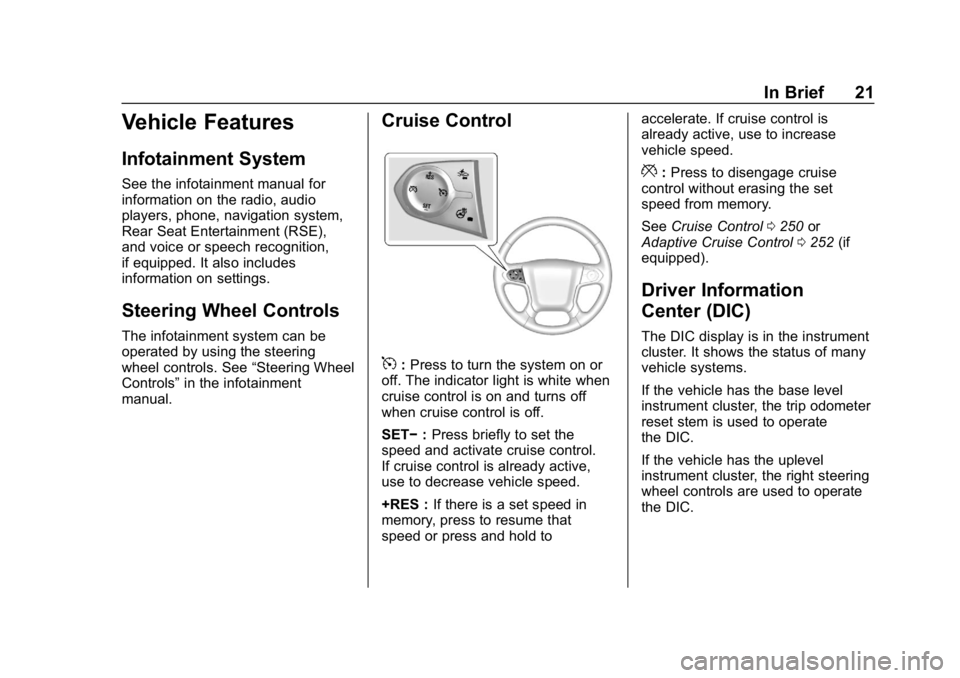
Cruise Control
5: Press to turn the system on or
off. The indicator light is white when
cruise control is on and turns off
when cruise control is off.
SET− :Press briefly to set the
speed and activate cruise control.
If cruise control is already active,
use to decrease vehicle speed.
+RES : If there is a set speed in
memory, press to resume that
speed or press and hold to accelerate. If cruise control is
already active, use to increase
vehicle speed.
*:
Press to disengage cruise
control without erasing the set
speed from memory.
See Cruise Control 0250 or
Adaptive Cruise Control 0252 (if
equipped).
Driver Information
Center (DIC)
The DIC display is in the instrument
cluster. It shows the status of many
vehicle systems.
If the vehicle has the base level
instrument cluster, the trip odometer
reset stem is used to operate
the DIC.
If the vehicle has the uplevel
instrument cluster, the right steering
wheel controls are used to operate
the DIC.
Page 24 of 460
Chevrolet Tahoe/Suburban Owner Manual (GMNA-Localizing-U.S./Canada/
Mexico-12460269) - 2019 - CRC - 9/11/18
In Brief 23
Lane Change Alert (LCA)
If equipped, the LCA system is a
lane-changing aid that assists
drivers with avoiding lane change
crashes that occur with moving
vehicles in the side blind zone (or
spot) areas or with vehicles rapidly
approaching these areas from
behind. The LCA warning display
will light up in the corresponding
outside mirror and will flash if the
turn signal is on. The Side Blind
Zone Alert (SBZA) system is
included as part of the LCA system.
SeeSide Blind Zone Alert (SBZA)
0 269 andLane Change Alert (LCA)
0 269.
Rear Vision
Camera (RVC)
If equipped, RVC shows a view of
the area behind the vehicle on the
infotainment display when the
vehicle is shifted into R (Reverse) to
aid with parking and low-speed
backing maneuvers. See
Assistance Systems for Parking
or Backing 0261.
Rear Cross Traffic Alert
(RCTA) System
If equipped, the RCTA system
shows a triangle with an arrow on
the infotainment display to warn of
traffic behind your vehicle that may
cross your vehicle's path while in
R (Reverse). In addition, beeps will
sound, or the driver seat will pulse.
See Assistance Systems for Parking
or Backing 0261.
Park Assist
If equipped, Rear Park Assist (RPA)
uses sensors on the rear bumper to
assist with parking and avoiding
objects while in R (Reverse).
It operates at speeds less than
8 km/h (5 mph). RPA may show a
warning triangle on the infotainment
display and a graphic on the
instrument cluster to provide the
object distance. In addition, multiple
beeps or seat pulses may occur if
very close to an object. The vehicle may also have the Front
Park Assist system.
See
Assistance Systems for Parking
or Backing 0261.
Power Outlets
Power Outlets 12-Volt Direct
Current
Accessory power outlets can be
used to plug in electrical equipment,
such as a cell phone, MP3
player, etc.
The vehicle may have up to five
accessory power outlets:
Vehicles with a Center Console
.
One in front of the cupholders on
the center console
. One inside the center storage
console
. One on the rear of the center
storage console
. One in the third row seat on the
driver side
. One in the rear cargo area on
the passenger side
Page 129 of 460
Chevrolet Tahoe/Suburban Owner Manual (GMNA-Localizing-U.S./Canada/
Mexico-12460269) - 2019 - CRC - 9/11/18
128 Storage
Storage
Storage Compartments
Storage Compartments . . . . . . . 128
Instrument Panel Storage . . . . 128
Glove Box . . . . . . . . . . . . . . . . . . . . 128
Cupholders . . . . . . . . . . . . . . . . . . . 128
Sunglasses Storage . . . . . . . . . . 129
Armrest Storage . . . . . . . . . . . . . . 129
Rear Storage . . . . . . . . . . . . . . . . . 129
Center Console Storage . . . . . . 130
Floor Console Storage . . . . . . . . 131
Additional Storage Features
Cargo Tie-Downs . . . . . . . . . . . . . 131
Convenience Net . . . . . . . . . . . . . 131
Roof Rack System
Roof Rack System . . . . . . . . . . . 131
Storage
Compartments
{Warning
Do not store heavy or sharp
objects in storage compartments.
In a crash, these objects may
cause the cover to open and
could result in injury.
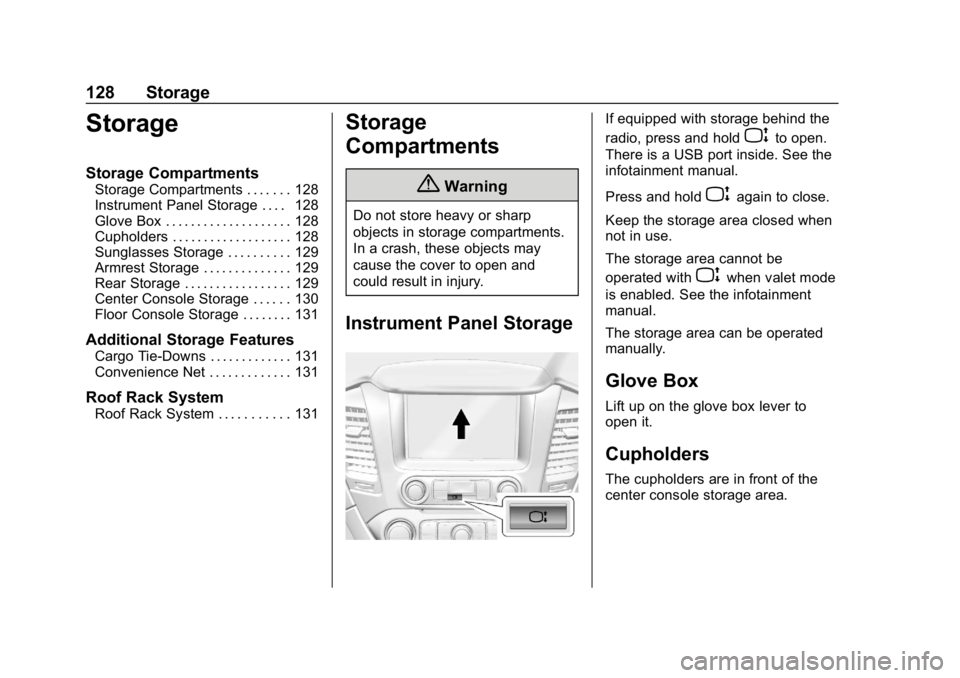
Instrument Panel Storage
If equipped with storage behind the
radio, press and hold
Pto open.
There is a USB port inside. See the
infotainment manual.
Press and hold
Pagain to close.
Keep the storage area closed when
not in use.
The storage area cannot be
operated with
Pwhen valet mode
is enabled. See the infotainment
manual.
The storage area can be operated
manually.
Glove Box
Lift up on the glove box lever to
open it.
Cupholders
The cupholders are in front of the
center console storage area.
Page 136 of 460
Chevrolet Tahoe/Suburban Owner Manual (GMNA-Localizing-U.S./Canada/
Mexico-12460269) - 2019 - CRC - 9/11/18
Instruments and Controls 135
Steering Wheel Controls
The infotainment system can be
operated by using the steering
wheel controls. See“Steering Wheel
Controls” in the infotainment
manual.
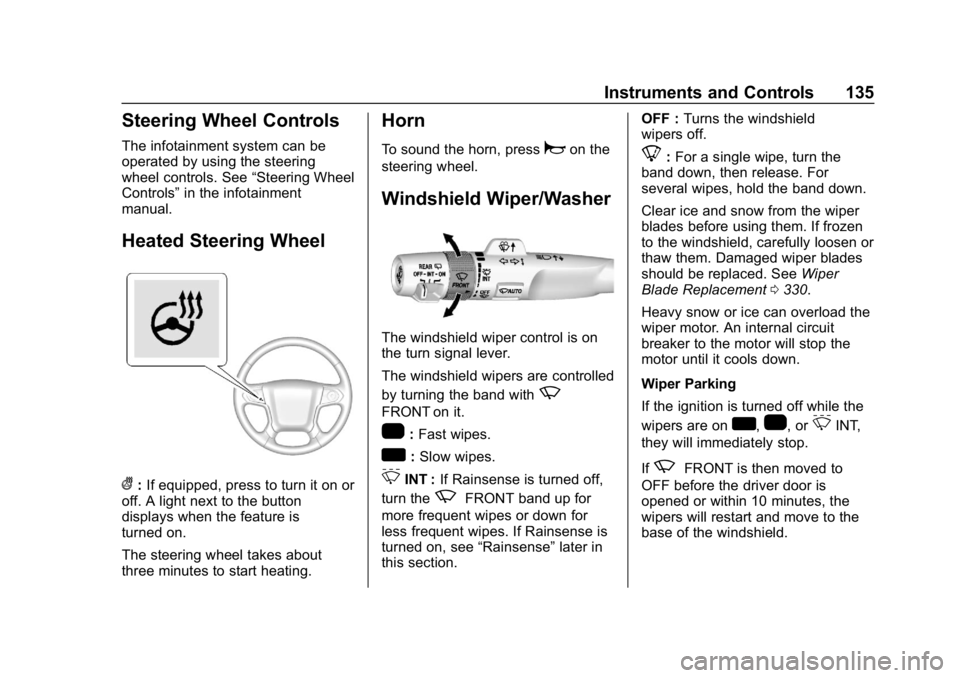
Heated Steering Wheel
(: If equipped, press to turn it on or
off. A light next to the button
displays when the feature is
turned on.
The steering wheel takes about
three minutes to start heating.
Horn
To sound the horn, pressaon the
steering wheel.
Windshield Wiper/Washer
The windshield wiper control is on
the turn signal lever.
The windshield wipers are controlled
by turning the band with
z
FRONT on it.
1: Fast wipes.
w:Slow wipes.
3INT : If Rainsense is turned off,
turn the
zFRONT band up for
more frequent wipes or down for
less frequent wipes. If Rainsense is
turned on, see “Rainsense”later in
this section. OFF :
Turns the windshield
wipers off.
8: For a single wipe, turn the
band down, then release. For
several wipes, hold the band down.
Clear ice and snow from the wiper
blades before using them. If frozen
to the windshield, carefully loosen or
thaw them. Damaged wiper blades
should be replaced. See Wiper
Blade Replacement 0330.
Heavy snow or ice can overload the
wiper motor. An internal circuit
breaker to the motor will stop the
motor until it cools down.
Wiper Parking
If the ignition is turned off while the
wipers are on
w,1, or3INT,
they will immediately stop.
If
zFRONT is then moved to
OFF before the driver door is
opened or within 10 minutes, the
wipers will restart and move to the
base of the windshield.
Page 139 of 460
Chevrolet Tahoe/Suburban Owner Manual (GMNA-Localizing-U.S./Canada/
Mexico-12460269) - 2019 - CRC - 9/11/18
138 Instruments and Controls
in R (Reverse), and the front
windshield wiper is performing
interval wipes, then the rear wiper
automatically performs interval
wipes.
This feature can be turned on or off.
SeeVehicle Personalization 0172.
The windshield washer reservoir is
used for the windshield and the rear
window. Check the fluid level in the
reservoir if either washer is not
working. See Washer Fluid 0323.
Compass
The vehicle may have a compass
display on the Driver Information
Center (DIC). The compass receives
its heading and other information
from the Global Positioning
System (GPS) antenna, StabiliTrak/
Electronic Stability Control (ESC),
and vehicle speed information.
The compass system is designed to
operate for a certain number of
miles or degrees of turn before
needing a signal from the GPS
satellites. When the compass
display shows CAL, drive the vehicle for a short distance in an
open area where it can receive a
GPS signal. The compass system
will automatically determine when a
GPS signal is restored and provide
a heading again.
Clock
Setting the Time and Date with
Center Stack Controls
To set the time or date:
1. Select SETTINGS from the Home Page, then select Time
and Date.
2. Select the desired function.
3. Turn the MENU knob to increase or decrease the value.
4. Press the MENU knob to go to the next value. After the last
value is selected, the system
will update and return to the
Settings menu. Press
oBACK
to go to the last menu and
save the changes.
Auto Set requires an active OnStar
or connected service plan. If auto timing is set, the time
displayed on the clock may not
update immediately when driving
into a new time zone.
To set the clock display:
1. Select SETTINGS from the Home Page, then select Time
and Date.
2. Select Clock Display.
3. Turn the MENU knob to Off or On.
4. Press the MENU knob to select.
Press
oBACK to go to the last
menu and save the changes.
Setting the Time and Date with
Infotainment Display Controls
To set the time:
1. Touch SETTINGS on the Home Page, then touch Time
and Date.
Page 143 of 460
Chevrolet Tahoe/Suburban Owner Manual (GMNA-Localizing-U.S./Canada/
Mexico-12460269) - 2019 - CRC - 9/11/18
142 Instruments and Controls
The vehicle must be on, in ACC/
ACCESSORY, or Retained
Accessory Power (RAP) must be
active. The wireless charging
feature may not correctly indicate
charging when the vehicle is in RAP.
SeeRetained Accessory Power
(RAP) 0227.
The operating temperature is −20 °C
(−4 °F) to 60 °C (140 °F) for the
charging system and 0 °C (32 °F) to
35 °C (95 °F) for the smartphone.
{Warning
Remove all objects from the
charging pad before charging
your compatible smartphone.
Objects, such as coins, keys,
rings, paper clips, or cards,
between the smartphone and
charging pad will become very
hot. On the rare occasion that the
charging system does not detect
an object, and the object gets
wedged between the smartphone
and charger, remove the
(Continued)
Warning (Continued)
smartphone and allow the object
to cool before removing it from
the charging pad, to prevent
burns.
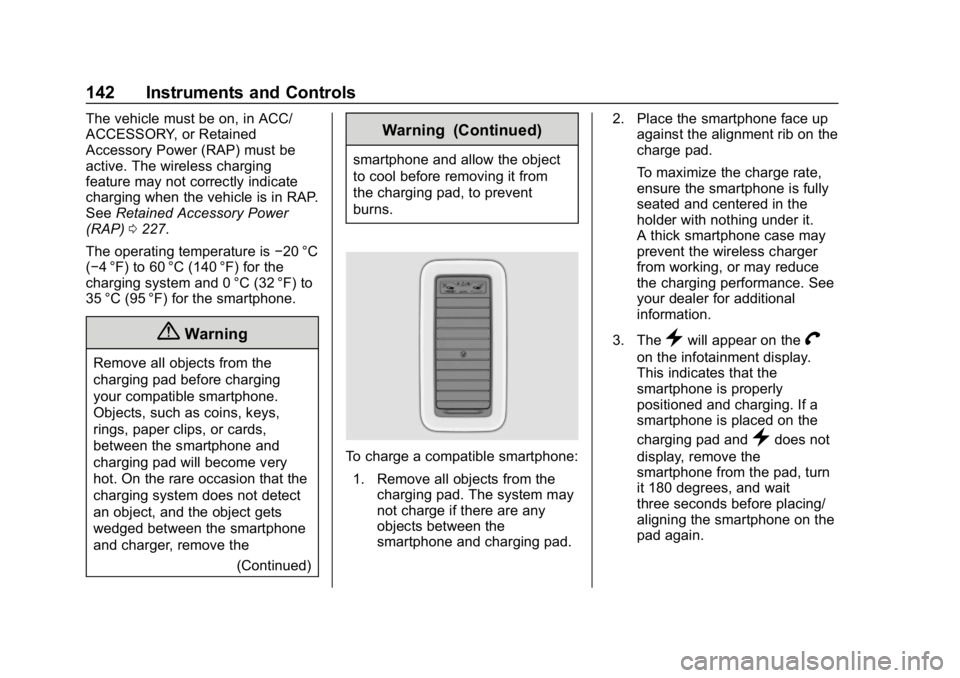
To charge a compatible smartphone:
1. Remove all objects from the charging pad. The system may
not charge if there are any
objects between the
smartphone and charging pad. 2. Place the smartphone face up
against the alignment rib on the
charge pad.
To maximize the charge rate,
ensure the smartphone is fully
seated and centered in the
holder with nothing under it.
A thick smartphone case may
prevent the wireless charger
from working, or may reduce
the charging performance. See
your dealer for additional
information.
3. The
}will appear on theV
on the infotainment display.
This indicates that the
smartphone is properly
positioned and charging. If a
smartphone is placed on the
charging pad and
}does not
display, remove the
smartphone from the pad, turn
it 180 degrees, and wait
three seconds before placing/
aligning the smartphone on the
pad again.
Page 173 of 460
Chevrolet Tahoe/Suburban Owner Manual (GMNA-Localizing-U.S./Canada/
Mexico-12460269) - 2019 - CRC - 9/11/18
172 Instruments and Controls
Vehicle
Personalization
Use the audio system controls to
access the personalization menus
for customizing vehicle features.
The following are all possible
personalization features. Depending
on the vehicle, some may not be
available.
Radio Audio System Controls1. Touch the desired feature to display a list of available
options.
2. Touch to select the desired feature setting.
3. Press
oBACK on the center
stack or touch
0on the
infotainment display to return to
the previous menu or exit.
Turn the vehicle on to access the
Settings menu, then select
SETTINGS from the Home Page on
the infotainment display. Personalization Menus
The following list of menu items may
be available:
.
Time and Date
. Language
. Rear Seat Reminder
. Video Voice-Over
. Teen Driver
. Valet Mode
. Radio
. Vehicle
. Bluetooth
. Apple CarPlay
. Android Auto
. Voice
. Display
. Rear Camera
. Return to Factory Settings
. Software Information
. Wi-Fi
Detailed information for each menu
follows.
Time and Date
Manually set the time and date. See
Clock 0138.
Language
Select Language, then select from
the available language(s).
The selected language will display
on the system, and voice
recognition will reflect the selected
language.
Rear Seat Reminder
This allows for a chime and a
message when the rear door has
been opened before or during
operation of the vehicle.
Select Off or On.
Video Voice-Over
When activated, the RSI will read
aloud menu titles, menu listings,
pop-ups, alerts, and file titles from
audio and video media.
Select Off or On.